dsh-git-sidepanel
anise0x7c/dsh-git-sidepanel
A VS Code(Code OSS) style Git source-control sidebar for DSH: review working-tree changes with unified diffs, stage, unstage, discard or ignore files, commit, amend, commit and push, check out branches, follow the commit graph, and fetch, pull, push or sync remotes. Its HTTP routes have no DSH access check, so a web page open in your browser could call them.
Install
dsh plugin --profile web add github:anise0x7c/dsh-git-sidepanelREADME
dsh-git-sidepanel



English · 中文
A Git sidebar in the style of VS Code-family editors, with the workflow you already know 😉.
Features
- Polished UI: a Code OSS Git graph, the Host's file icons, near-native styling, native toasts, and floating panels with frosted-glass backdrops plus enter/leave animations.
- Restrained on purpose: Git runs on the Host's RPC route: no shell, no saved credentials. Lean by design — it does the necessary parts well.
Screenshots
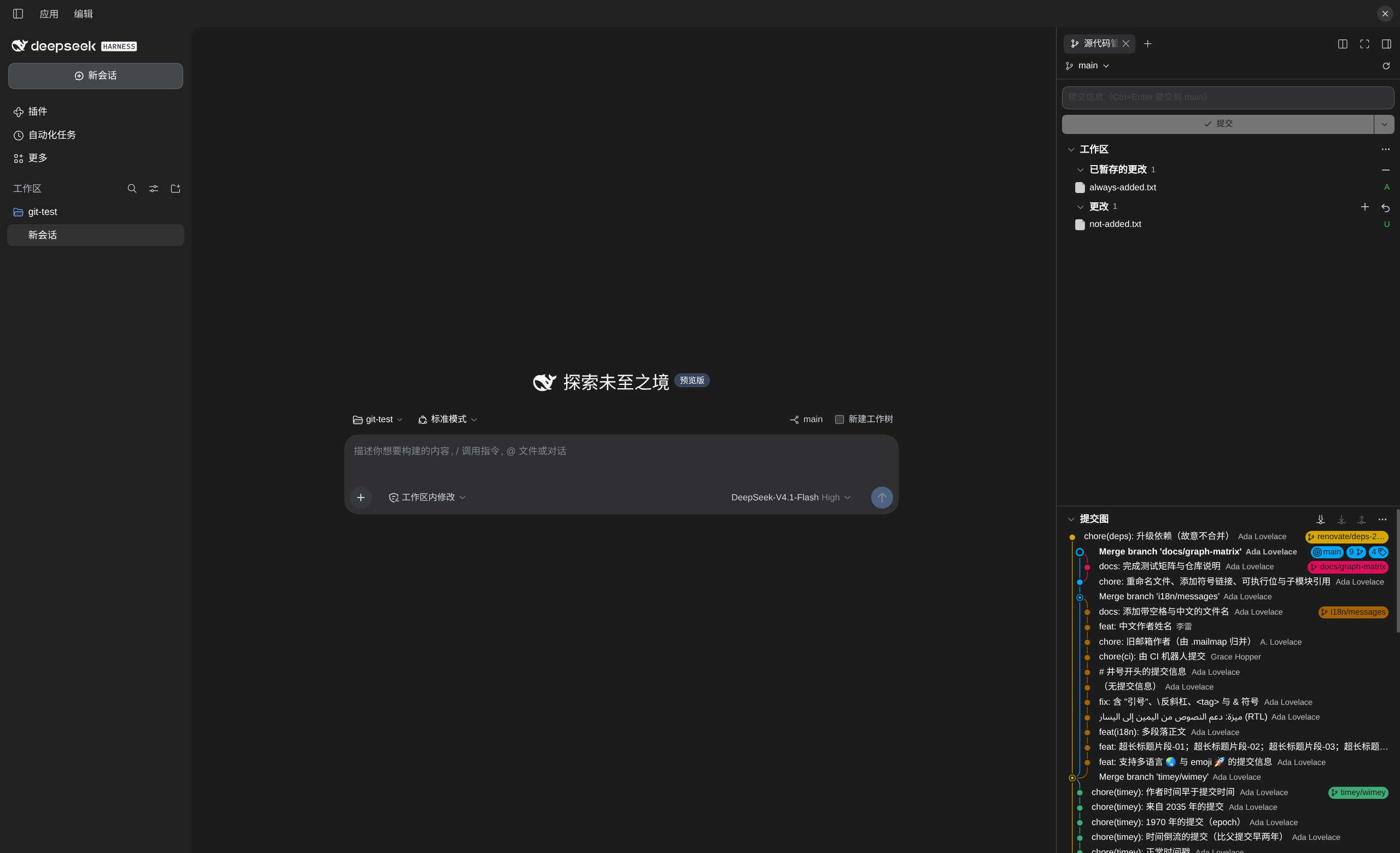
The Source control tab in the right sidebar: workspace changes, the commit box, and a commit graph with branch and tag badges.
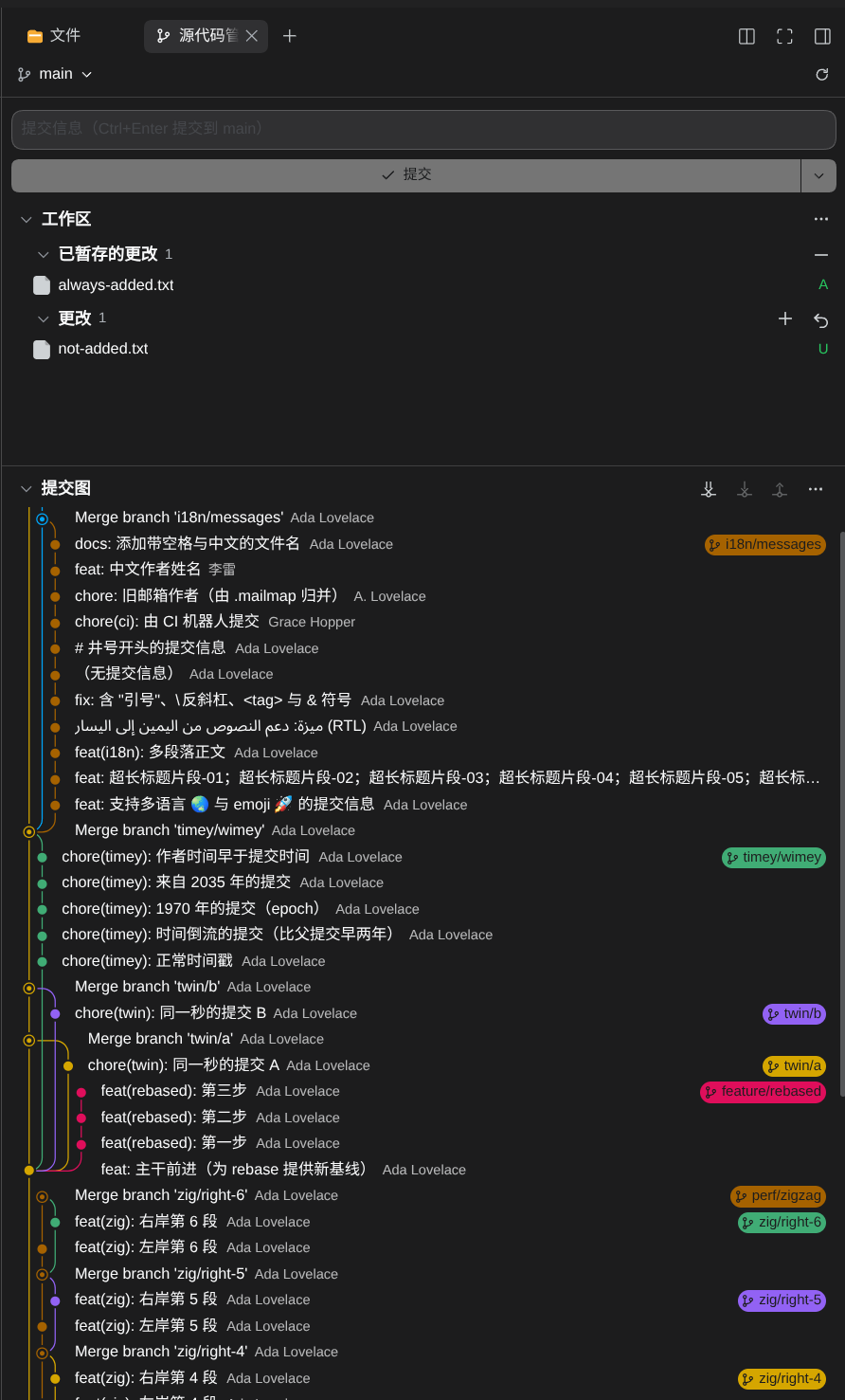
The panel on its own — branch header, commit box, staged and changes groups, and a Code-style commit graph.
Install and open
From a source checkout
Clone this repository, then install that directory through Plugins → Add
plugin in DSH, or install_bundle with the directory. The plugin needs DSH
>=0.2.2-rc.1 <0.3.0-0; installing a prepared checkout uses the committed
artifacts, so no build step is required. Open it from the right Sidebar's guide,
or with Ctrl+Shift+G (Cmd+Shift+G on macOS) in the desktop app and the
Windows/macOS Web interface; Linux Web browsers have no default shortcut, so
assign one in DSH's keyboard settings.
After changing sources, rebuild the artifacts. Host changes take effect only after a Host restart; browser update behavior depends on the running DSH Web development/reload setup. If the open page does not update, refresh it and verify the served artifact rather than starting another server.
DSH Market
Pending review.
What's in the panel
- Branch header — current branch, detached HEAD or no-commit state, upstream tracking and ahead/behind counts. Click it to switch to another local or remote-tracking branch.
- Commit box — a growing multi-line message field,
Ctrl+Enterto commit, and a menu for Commit, Commit (Amend), Commit and Push and Commit and Sync. - Workspace — merge, staged and unstaged groups as flat path-sorted lists or folder trees, each with its own counts, bulk actions and context menus, in a pane that splits against the graph at an adjustable ratio.
- Commit graph — recent commits across local branches, tags and remote-tracking branches, 60 at a time with Load earlier commits; commits expand in place to list the files they changed.
- Commit details and diffs — a glass details card with the message, author and a folder tree of changed files, plus unified diff tabs in the regular dock area.
- Remotes and branches — fetch, pull, push and an overflow menu for pull (rebase), sync, publish, and adding or removing remotes.
- Context menus — on change rows, commit rows, group headers and diff
headers, for viewing, staging, discarding, adding to
.gitignoreand copying paths.
The English detail guide and Chinese detail guide describe every state, shortcut and failure mode, may helpful to AI Agents(Respect for anyone who is capable of reading such a wall of texts without feeling headache 🫡).
Under the hood
- Host source:
src/host-entry.ts+src/host/**, a guarded local Git RPC route. - Browser source:
src/client-entry.ts+src/client/**, the React panel and right-Sidebar registrations. React is supplied by DSH, never bundled. - Shared wire types:
src/shared/git.ts, erased from runtime output. - Tests: checked TypeScript on Node's built-in test runner, with real Git and loopback fixtures, pure unit tests, loader tests and a tiny React renderer.
- Zero runtime dependencies. The two host modules the client bundle requires,
reactand@deepseek-ai/dsh-client-ui-primitives, are declared as optional peers because DSH supplies them. TypeScript, tsx, esbuild and Biome are development-only.
Development
For development, use Node ≥ 22.13 and the pnpm version pinned in
packageManager (12.21.0). The generated plugin's runtime requirement remains
Node ≥ 22; the newer development minimum comes from pnpm itself. If the machine
has no pnpm yet, install the pinned version once with npm i -g pnpm@12.21.0;
the packageManager pin keeps every later command on 12.21.0.
pnpm install --frozen-lockfile  # install exactly the committed dependency graph
pnpm build                     # generate both Host and browser artifacts
pnpm test                      # build, then run every regression test
pnpm check                     # read-only quality gate: types, Biome, tests, freshness
pnpm lint:fix                  # apply safe Biome lint/import/format fixes
pnpm format                    # formatting only
pnpm dev                       # watch both halves; Host changes still need restart
pnpm verify:contract           # extra integration gate against a real DSH installation
On Linux under DSH's workspace-write sandbox the install is rejected with
ERR_PNPM_STORE_DIR_OPEN_OPERATION_LOCK: pnpm 12 keeps its store lock in
$XDG_RUNTIME_DIR, outside the workspace. Run it as
mkdir -p .temp/cache/runtime
XDG_RUNTIME_DIR="$PWD/.temp/cache/runtime" pnpm install --frozen-lockfile
instead; pnpm then keeps its store under node_modules/. This workaround is
Linux-only — a normal terminal, or macOS/Windows, needs the plain command. All
project scratch output (caches, logs, screenshots, probe HTML) lives under the
ignored .temp/ folder.
pnpm check deliberately does not build first: stale committed artifacts
must fail rather than silently repair themselves. CI runs the same gate on Node
22 and 24 after a frozen installation. pnpm verify:contract is separate because
CI does not ship DSH; override its installation with --dsh-root <directory> or
DSH_ROOT. The same gate checks unused declarations and the runtime import graph:
Host/browser isolation, shared type-only contracts, pure-module boundaries,
cycles and unreachable executable production modules. Architecture tests include
intentional violations so these rules cannot silently become no-ops.
index.js, index.js.map, client.js and client.js.map are generated and
committed. Never hand-edit them. Installing a prepared directory needs no build,
TypeScript loader or development dependencies. Development dependencies do not
run install scripts; platform binary packages provide esbuild and Biome directly.
See Architecture for module boundaries, loader contracts and the build and quality gates, Usage / 中文说明 for features and limitations, and Changelog for released changes.
License
MIT — see LICENSE. Third-party components and their licenses are listed in THIRD-PARTY-NOTICES.md.
Related plugins
dsh-web (dsh-git-graph)
zhu1090093659/dsh-web
plannotator
backnotprop/plannotator
dsh-web-ui (dsh-git-graph)
zhu1090093659/dsh-web-ui
codex-guard (dsh)
akimiya-z/codex-guard