Skills-Space (dsh-skills-space)
arch3rpro/skills-space/packages/dsh-skills-space
Browse, install, and manage global and project skills in DeepSeek Harness.
Install
dsh plugin --profile web add github:arch3rpro/skills-spaceThis plugin lives in the packages/dsh-skills-space subdirectory of the repository.
README

Skills Space
Discover, install, and manage skills across your AI agents.
English · 简体中文
Features · Agent integrations · Quick start · Development
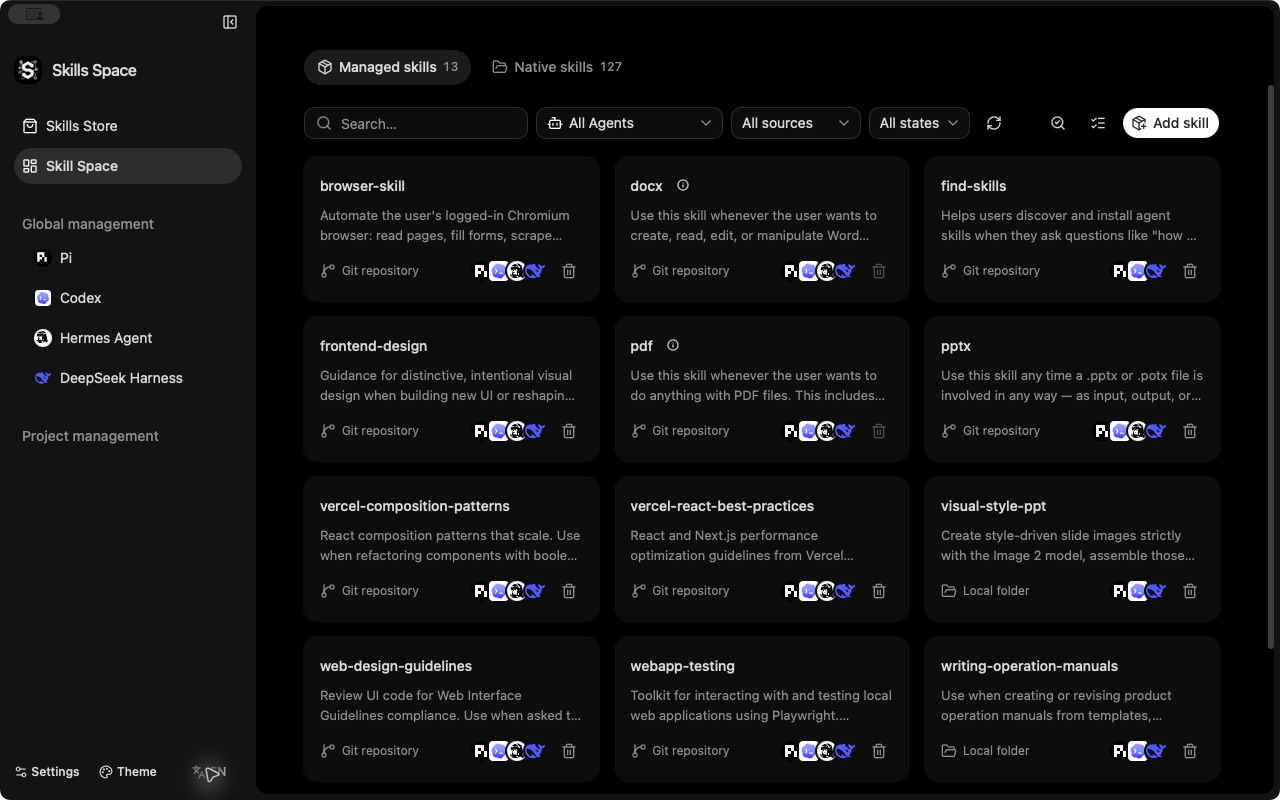
Skills Space is a desktop application for managing skills across Codex, Claude Code, Pi, Hermes, DeepSeek Harness, and other AI agents. It combines skill discovery, installation, and maintenance across global and project scopes.
Features
| Feature | What you can do |
|---|---|
| Unified management | Manage CLI-managed and native skills across agents, with global/project scopes, sources, and installation status. |
| Skill store | Browse leaderboards, search skills, and read full documents, installation instructions, and repository details without cloning. |
| Installation and sharing | Install from Git repositories, local directories, or supported download URLs; share skills with selected agents and projects. |
| Native skill controls | Preserve existing directories and control enable/disable, automatic selection, manual invocation, and preloading where supported. |
| Updates and maintenance | Check updates and local differences, review shared removal impact, run batch actions, and install from project dependencies or supported lockfile entries. |
| Configuration and extensions | Manage skill directories, agent settings, DSH presets, Codex plugins, and Pi extension packages. |
Installation, updates, and removal use the original Vercel skills CLI, keeping the installation flow aligned with upstream.
Agent integrations
Enhanced integration
Agent-specific management in addition to general installation and maintenance:
| Agent | Additional capabilities |
|---|---|
| Codex | Native skill enable/disable, local plugins and marketplaces, skill catalog budget, plugin defaults, and account tool settings. |
| Pi | Skill directories, enable/disable and invocation controls, code mode settings, and extension packages. |
| Hermes | Skill directories, project discovery and trust, enable/disable, and preload settings. |
| DeepSeek Harness (DSH) | Configuration-file and preset discovery, skill directories, and independent enable/disable and invocation policies. |
DSH enable/disable and invocation controls use a companion plugin installed through Skills Space, without modifying skill files. See the DSH guide for setup and usage.
General support
Installation and maintenance follow the agent definitions in the pinned skills CLI 1.7.4, including Claude Code, Cursor, Gemini CLI, GitHub Copilot, OpenCode, Windsurf, Cline, and Roo Code.
View all 75 generally supported agents
| Agent | Agent | Agent | Agent |
|---|---|---|---|
| AdaL | AiderDesk | Amp | Antigravity |
| Antigravity CLI | AstrBot | Augment | Autohand Code CLI |
| Claude Code | Cline | Code Studio | CodeArts Agent |
| CodeBuddy | Codemaker | Command Code | Continue |
| Cortex Code | Crush | Cursor | Deep Agents |
| Devin for Terminal | Dexto | Droid | Eve |
| Firebender | ForgeCode | fx | Gemini CLI |
| GitHub Copilot | Goose | Grok Build | IBM Bob |
| iFlow CLI | inference.sh | Jazz | Junie |
| Kilo Code | Kimchi | Kimi Code CLI | Kiro CLI |
| Kode | Lingma | Loaf | MCPJam |
| MiniMax Code | Mistral Vibe | Moxby | Mux |
| Neovate | Ona | OpenClaw | OpenCode |
| OpenHands | Pochi | Posit Assistant | PromptScript |
| Qoder | Qoder CN | Qwen Code | Reasonix |
| Replit | Roo Code | Rovo Dev | Sarvam Code |
| Tabnine CLI | Terramind | Tinycloud | Trae |
| Trae CN | Warp | Windsurf | ZCode |
| Zed | Zencoder | Zenflow |
Quick start
Source setup
Install Node.js 22.20.0 or later, pnpm 11.5.0 (the repository-pinned version), Rust, and the Tauri 2 prerequisites for your platform. Git is needed to clone the repository and work with Git sources.
git clone https://github.com/arch3rPro/Skills-Space.git
cd Skills-Space
pnpm install --frozen-lockfile
CI=false pnpm tauri dev
The commands above use a POSIX shell. tauri dev prepares the bundled CLI and starts both the frontend and desktop app.
Usage
- Choose Global or add and select a project.
- Open Skill store to browse or search, or choose Install skills to enter a source.
- Inspect the source, select skills and target agents, and review the installation settings.
- Confirm, then inspect the results in your skill collection or the agent's page.
The app detects Node automatically and prepares a compatible version when needed. You can also select one manually in Settings → Global.
Development
The app uses React 19, TypeScript, Vite, Tauri 2, and Rust. Presentation lives in src/; filesystem, process, and native capabilities live in src-tauri/.
Checks and build commands
Run frontend checks and prepare the CLI resources before native tests:
pnpm stage:upstream
pnpm test:frontend-contracts
pnpm build
pnpm test:native
Build a debug macOS application bundle:
CI=false pnpm tauri build --debug --bundles app
Resource staging and native tests must run sequentially. See the development guide for platform setup, isolated test fixtures, verification scope, and packaging details.
Documentation
- Capability map — supported commands, sources, and integration boundaries.
- Roadmap — completed work, remaining development, and verification gaps.
- Architecture decision — why lifecycle operations use the unmodified upstream CLI.
- Documentation index — specifications, agent guides, design, research, and historical records.