dsh-chrome-browser
aurora-lucas/dsh-chrome-browser
DeepSeek Harness plugin: a model-facing `chrome` tool that drives the installed Google Chrome over CDP — screenshots returned as images, DOM/text/eval, console & network diagnostics, real input events. Runs in the Host, so no per-call approval and no bash sandbox limits.
Install
dsh plugin --profile web add github:aurora-lucas/dsh-chrome-browserREADME
chrome-browser
A DeepSeek Harness plugin that gives the model a
chrome tool: it drives the Google Chrome installed on the machine over the Chrome DevTools
Protocol, so front-end work can navigate, screenshot, inspect, and interact with real rendered pages.
The tool runs inside the Harness Host process, which has two consequences worth knowing:
- No per-call approval. A
chromecall is an ordinary tool call; it never asks for shell or sandbox permission. - It is not affected by the shell sandbox. On Linux, Chrome cannot start under a Landlock-confined
shell (it aborts with
chrome_crashpad_handler: --database is required), so a plaingoogle-chrome --headless …bash command fails on a hardened Host. The Host process is not confined, and the plugin runs there.
Works on Linux, macOS, and Windows: the browser is located per platform, the sandbox flag follows the
platform, and Windows process-tree teardown uses taskkill.
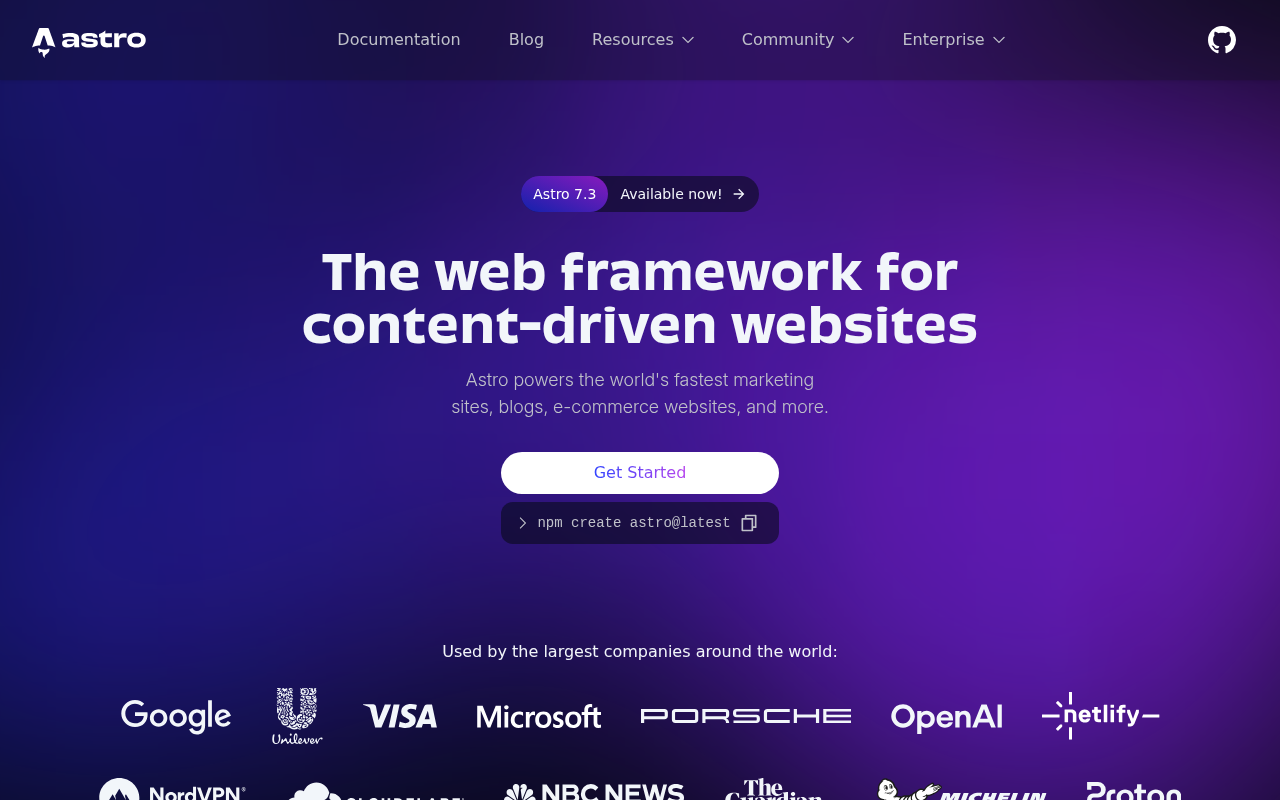
Screenshots are returned as real images in the tool result (when the model route accepts image input) and written to a file, so the model sees the rendered UI while a human can open the exact PNG afterwards.
A real render, captured by the tool itself — astro.build at 1280×800:
Tool reference
One tool, chrome, with an action parameter. Page ids (p1, p2, …) come from open; every
later action takes an optional page and otherwise uses the most recent one.
| Action | Key parameters | Result |
|---|---|---|
open | url, width, height, deviceScaleFactor, mobile | Starts Chrome if needed, opens a page. |
goto | url, page | Navigates an open page and waits for load. |
screenshot | path, fullPage, selector, width, height, scale | PNG image + saved path; viewport by default. |
viewport | width, height, deviceScaleFactor, mobile | Resizes the emulated viewport (responsive checks). |
dom | selector, maxChars | outerHTML of the document or of one element. |
text | selector, maxChars | innerText of the body or of one element. |
eval | expression, maxChars | Evaluates JavaScript in the page, returns the JSON value. |
click | selector or x/y, button, clickCount | Real mouse events at the element centre. |
type | selector, text, clear, submit, delayMs | Focuses, clears, inserts real input events. |
press | key | Enter, Tab, Escape, arrows, Home, End, PageUp, PageDown, Backspace, Delete, Space. |
wait_for | selector or text, timeoutMs | Polls until the selector matches or the text appears. |
console | clear, limit | Collected console.* calls, uncaught exceptions, browser log entries. |
network | clear, limit | Failed requests and HTTP 4xx/5xx responses seen while attached. |
pdf | path | Prints the page to a PDF file. |
tabs | – | Lists open pages. |
close | page | Closes one page. |
stop | – | Terminates Chrome and removes its temporary profile. |
Requirements
- Google Chrome or Chromium (any recent version; developed against Chrome 155), on Linux, macOS, or Windows. Chromium-based Microsoft Edge is accepted as a last resort on Windows.
- Node.js 22+ (uses the global
WebSocket). - No npm dependencies: the plugin imports only its sibling module and Node.js built-ins.
- For CJK pages install a CJK font (
apt-get install fonts-noto-cjkon Debian/Ubuntu, or the Noto CJK fonts on Windows/macOS); without one, screenshots render those glyphs as empty boxes.
Install into a Harness profile
The Host imports plugins only from its own module roots (the profile and the dsh installation), so the bundle must be installed as a real copy inside the profile, not as a link to a checkout:
npm pack # -> local-dsh-chrome-browser-<version>.tgz
Then install that tarball through the Harness plugin manager (plugin_manager, action: install_bundle, target = absolute tarball path). The Host reports restart-required when it
replaces an already installed package; restart dsh web to load the new module generation. A
version bump changes the dependency spec, which is what makes an update detectable.
Configuration
The bundle patch sets these; apply merges them over its own defaults and validates them.
| Key | Default | Meaning |
|---|---|---|
chromePath | '' (auto-detect) | Browser executable. |
headless | true | Run without a window. |
noSandbox | true on POSIX, false on Windows | Pass --no-sandbox; required when the Host runs as root, unnecessary on Windows. |
userDataDir | '' (fresh temp dir per start) | Chrome profile directory; set it to a plain ASCII path if the system temp path upsets Chrome. |
defaultWidth / defaultHeight | 1280 / 900 | Default viewport. |
maxOutputChars | 100000 | Default cap for dom/text/eval output. |
navigationTimeoutMs | 30000 | Navigation and wait_for budget. |
artifactDir | '' (system temp) | Where screenshots and PDFs go when no path is given. |
How Chrome is located
The tool schema has no path parameter: the model never needs to know where the browser lives.
resolveChromePath resolves in this order and fails with an actionable message naming the config key
when nothing matches:
- the row's
chromePathconfig; - the
DSH_CHROME_PATHenvironment variable; - the probe list for the running platform:
- Linux —
/usr/bin/google-chrome,google-chrome-stable,google-chrome-beta,/usr/bin/chromium,chromium-browser,/opt/google/chrome/chrome,/snap/bin/chromium,/var/lib/flatpak/exports/bin/com.google.Chrome; - macOS —
/Applications/Google Chrome.app/Contents/MacOS/Google Chrome, the Chromium bundle, and the per-user~/Applicationscopy; - Windows —
%ProgramFiles%and%ProgramFiles(x86)%\Google\Chrome\Application\chrome.exe,%LOCALAPPDATA%\Google\Chrome\Application\chrome.exe, then%ProgramFiles(x86)%\Microsoft\Edge\Application\msedge.exe.
- Linux —
For an unusual installation, set DSH_CHROME_PATH for the Host or edit the row's chromePath — no
code change is needed.
Platform notes
| Platform | Behaviour |
|---|---|
| Linux | Chrome runs with --no-sandbox by default because the Host usually runs as root. A Landlock-confined shell cannot start Chrome at all (chrome_crashpad_handler: --database is required); the Host process is not confined, which is where this plugin runs. |
| macOS | Same code path as Linux apart from the probe list; --no-sandbox is likewise the default. |
| Windows | --no-sandbox is off by default, the process is spawned with windowsHide (no console window), and stop/disposal terminates the whole tree with taskkill /pid <pid> /T /F — Windows has no POSIX process groups, so a plain child.kill() would leave renderers and the crashpad handler behind. |
If Chrome exits before exposing a DevTools endpoint on Windows, the usual causes are a policy block on
--remote-debugging-port, antivirus interception, or a profile path the browser cannot use; set
userDataDir to a plain ASCII directory to rule out the last one.
Tests
Two dependency-free suites drive real Chrome (no test framework required):
node test/engine.test.mjs   # CDP engine: browser resolution per platform, navigation, capture, input, console, network, teardown
node test/tool.test.mjs     # the real tool definition: schema validation, every action, error paths
Run them from the repository root; tool.test.mjs writes throwaway screenshots under .tmp/. Browser
resolution is injectable, so the Linux/macOS/Windows probe lists are covered even when the suite runs
on one of them.
Operational notes
- Chrome starts lazily on the first action and runs with a fresh temporary profile;
stop(or plugin disposal) terminates it and removes that profile. WithuserDataDirset, that directory is left in place instead. - One Chrome process is shared by all pages, and all sessions share it.
- Captures beyond 12000 CSS px of page height are capped, and a clip capture that exceeds the deployment's image limits is retried once at half scale.
- If no attachment service or image-capable route is available,
screenshotstill saves the PNG and reports the path instead of attaching the image.
License
MIT — see LICENSE.
Related plugins
dsh-infinite-gen-4
minglink/dsh-infinite-gen-4
cc-safety-net
kenryu42/cc-safety-net
api-relay-audit
toby-bridges/api-relay-audit
dsh-redteam-model
seaof0/dsh-redteam-model