dsh-loci
awenforever/dsh-loci
Layered long-term memory for DeepSeek Harness: the prompt sees only a stable index, full text is one lookup away. Bi-temporal facts, strict scope isolation, verified-only injection.
Install
dsh plugin --profile web add github:awenforever/dsh-lociREADME
dsh-loci · Loci
A long-term memory for DeepSeek Harness where the prompt only ever sees the palace's index — every room is one lookup away.
中文 · Design · Research · Operations · Security · Acceptance
system prompt:  ~1.3k tokens, stable, one line per fact
user asks     →  loci_search "发布顺序"   → total=3, one call
needs detail  →  loci_get m_01J…           → full text + history + evidence
Why it exists
Every memory plugin tested in this workspace failed one of two ways: it cost a fixed toll on every request (mnemon: +4.8 KB of system prompt, 16 tools), or it grew without bound (ledger-memory: 7 KB → 27 KB per turn). The ones that stayed cheap truncated recall silently (mnemon returned 4 of 20 requested rows; auto-memory's index holds about 27 Chinese entries).
Loci is built around one rule: the prompt holds an index, not a memory.
- Empty store → 0 bytes injected. No header, no advice, nothing.
- 100 entries → still one stable section, capped at a byte budget with an honest "… +N more" footer.
- A read-only turn → the section is byte-identical, so the prefix cache survives.
- A broad question →
loci_searchreturnstotaland a cursor, so "list them all" is answerable.
What it remembers
| Layer | Kind | Injected? | Example |
|---|---|---|---|
| rules | rule | yes, first | "删除前必须做路径断言" |
| semantic | semantic | yes, index line | "生产机是 prod-01" |
| procedural | procedural | yes, index line | "发布顺序 staging → canary → 全量" |
| episodic | episodic | yes, index line | "2026-11-13 会话摘要" |
| working | working | no | scratch facts for this session only |
Only verified entries are injected. Anything written without a verbatim quote
from the conversation is stored as a candidate and waits in the panel for
one click.
Install
Inside the Harness profile that should have memory:
Settings → Plugins → install from a directory or the market listing, or
dsh plugin --profile <name> add dsh-loci
The bundle adds one Host row (dsh-loci) and one Client half. Restart the
Harness, then open Settings → Loci or the Memory panel in the sidebar.
Requirements: DSH >=0.2.2-rc.1 <0.3.0-0, Node >=24.9.0 (the Harness ships it).
No service and no native module.
The package also ships a small CLI (snapshot, export, import, doctor,
stats, review, purge, migrate, rollback). It is not on your PATH after a
plugin install — call it through the profile:
node "$HOME/.dsh/profiles/<profile>/node_modules/dsh-loci/scripts/cli.mjs" doctor --json
Inside a chat there are zero-token slash commands too: /loci, /loci review,
/loci doctor, /loci export.
The five tools
| Tool | Use |
|---|---|
loci_write | Save, revise, or merge facts. evidenceQuote must be verbatim; without it the entry is a candidate. op:'merge' folds duplicate ids into one — the sources are superseded, never deleted. |
loci_search | Hybrid search. Returns total, hasMore, cursor; detail is snippet/overview/full. Omit query to list the newest entries. |
loci_get | Full text plus revision history and the evidence quote. |
loci_forget | Soft-delete (history kept) or restore. |
loci_stats | Counts, budget use, channel health, database location. |
Tool names are prefixed loci_ on purpose: ctx.tools.register throws on a
duplicate name, so two memory plugins both claiming memory_search would break
one of them.
Where you see it
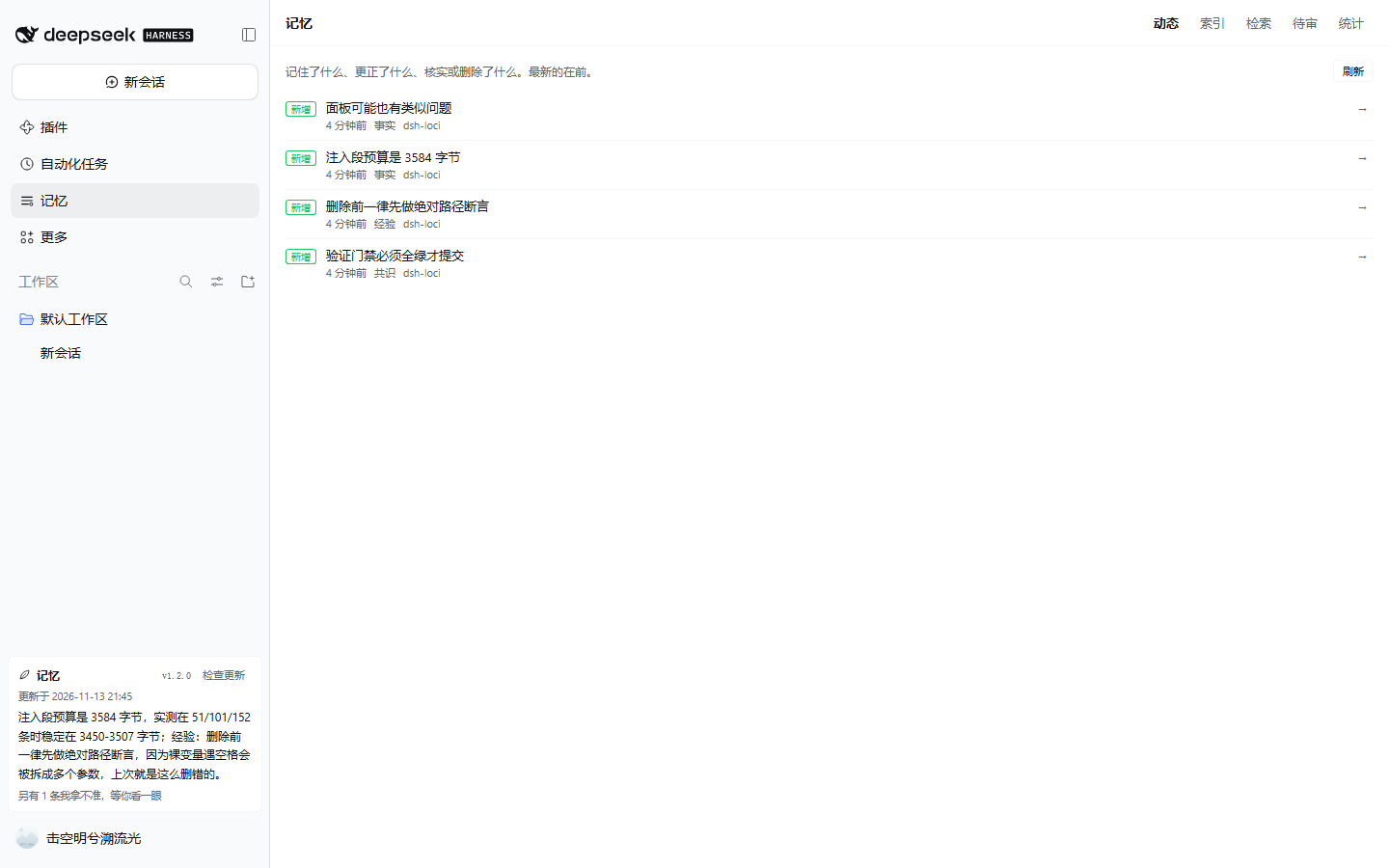
- Sidebar note — a small card beside Settings, like the quota and advisor
cards: a shadowed card in the sidebar footer with a status dot, a
updated <time>stamp and numeric rows (verified / pending / disputed, index bytes against the budget, injected / opened / dead weight) over one short paragraph of what the agent currently understands in this project (a consensus, a lesson, a fact), plus one quiet line if something is waiting for your review. It answers "did it take that in?" — no counters. The version sits in small text with an explicit "check for updates", the only path that touches the network. - Memory panel — the full view, opening on a Feed of every add, revision, verification, pin, deletion and import, newest first.
- Settings → Loci — the budget, capture mode, default scope, secret policy and embedding channel.
Configuration
Everything lives in the plugin's Loader row; Loci never reads a project file. The settings page writes the fields marked live without a restart.
| Key | Default | Meaning |
|---|---|---|
sectionMaxBytes | 3584 | hard byte budget for the injected section (max 16384) |
rulesMaxBytes | 1024 | ceiling for the rules block inside that budget |
defaultScope | workspace | scope a write lands in when it does not say |
captureMode | rules | deterministic capture of explicit durable statements |
extractMode | off | session asks the model once, when a session ends, for up to extractSessionMaxCandidates proposals — one sitting to review, not one per turn. turn/on keep the older per-turn behaviour. Always candidates, always budgeted |
recallAssist | off | one bounded first-turn recall block per session |
maintenanceMode | sweep | TTL, index repair, and embedding backfill every 6h |
secretPolicy | redact | redact high-confidence secrets, or refuse the write |
vectorMode | off | optional HTTP embedding channel; lexical always works |
allowHardDelete | false | enable purge in the CLI/panel |
What it will not do
- Capture and the session summary are deterministic — no model call, so their cost is
visible and zero. The only model call is
extractMode, which is off by default and only runs when you set it. - No cloud, no telemetry. Three optional network paths, all off by default: the update
check (
updateCheck), the HTTP embedding channel (vectorMode: 'http'), and session extraction (which sends the recent conversation to your configured model through the Harness). - Session reads use an explicit scope-key set, never a wildcard. The panel and export enumerate every scope — an admin view, not a session read.
- No physical deletion by default;
purgeneeds a config switch, a confirmation, and leaves an audit line.
Data
$DSH_HOME/memory/loci/ only:
memory.db            SQLite (WAL) — the transactional truth
audit.jsonl          append-only: inject / recall / write / verify / delete
backups/             pre-migration and manual snapshots (VACUUM INTO)
markdown/            human-readable projection
exports/             export bundles and import drops
Uninstalling the plugin leaves the directory untouched, by design. Delete it yourself when you mean it.
License
MIT. See NOTICE for the research lineage of each mechanism.