dsh-sidebar-mode-indicator
bailishta/dsh-sidebar-mode-indicator
Shows the mode (agent preset) each Session runs under as a colored pill in the left sidebar, with a settings page for per-mode dot colors.
Install
dsh plugin --profile web add github:bailishta/dsh-sidebar-mode-indicatorREADME
dsh-session-mode-indicator
Left-sidebar indicator for the mode (agent preset) each Session runs under.
简体中文 | English

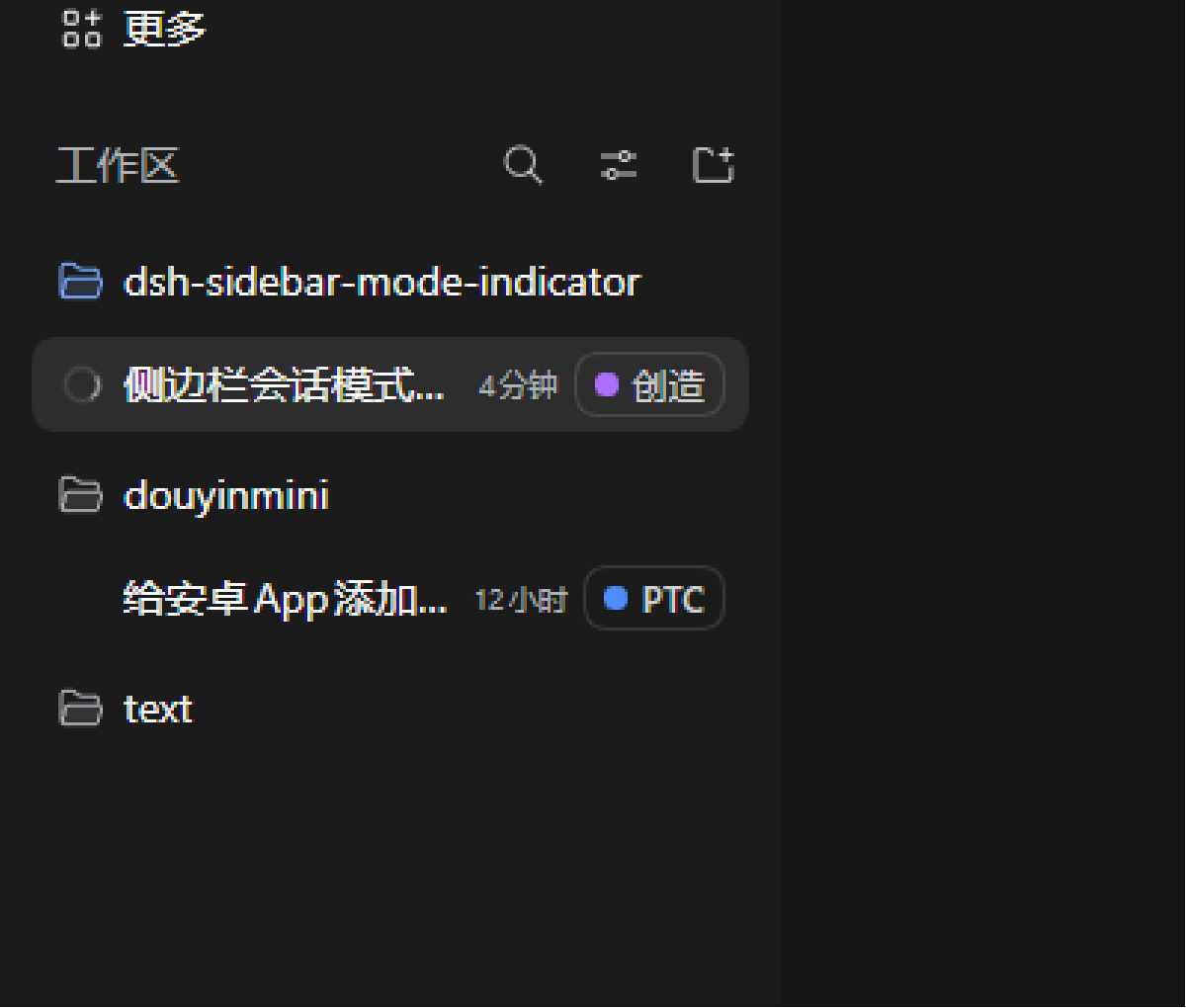
Each Session keeps the mode it started with, and that mode cannot change once the Session opens. The plugin adds one piece of row metadata to the sidebar: a small pill with a colored dot and the mode's name. The dot color identifies the mode.
Installation
Requires DeepSeek Harness 0.2.2-rc.1 or newer. The plugin installs into one
profile, so every session opened from that profile loads it.
dsh plugin --profile web add dsh-session-mode-indicator              # install
dsh plugin --profile web update dsh-session-mode-indicator@latest    # update
dsh plugin --profile web remove dsh-session-mode-indicator           # uninstall
The CLI needs Node.js 24.9+ and pnpm on PATH; the desktop app ships its own
dsh command (add its resources\runtime\cli\bin folder to PATH). web above
is only a profile name — use the one you launch, then start the UI with dsh web.
In the desktop app you can also install it from the Add plugin wizard by
searching for dsh-session-mode-indicator, or ask the agent to call
plugin_manager with action: install_bundle.
There is no build step: the package is plain ESM JavaScript.
Verify: each Session row gets a mode pill, and Settings → Mode dots lists the built-in modes.
Modes are discovered, not hard-coded
- The four shipped presets — standard, PTC, create (cordis), minimal — carry localized names and default colors.
- Every other preset is a custom mode. A custom mode is listed and colored only while it is still a declaration in the current profile or is used by a live Session that is neither archived nor blank; retired presets and archived-only or blank test modes stop being listed, and their pinned color is dropped so it no longer reserves a hue.
- When a custom mode is first seen it gets a color automatically: a deterministic FNV-1a hash of its id seeds a vivid palette, probing past colors already in use so two modes rarely share one. The result is pinned in browser storage, so a mode keeps its color across restarts.
- Custom modes show their published preset name when they have one; otherwise they render as the generic "Custom" label (the color still identifies them).
Nothing has to be edited in this package when a new mode appears.
Settings
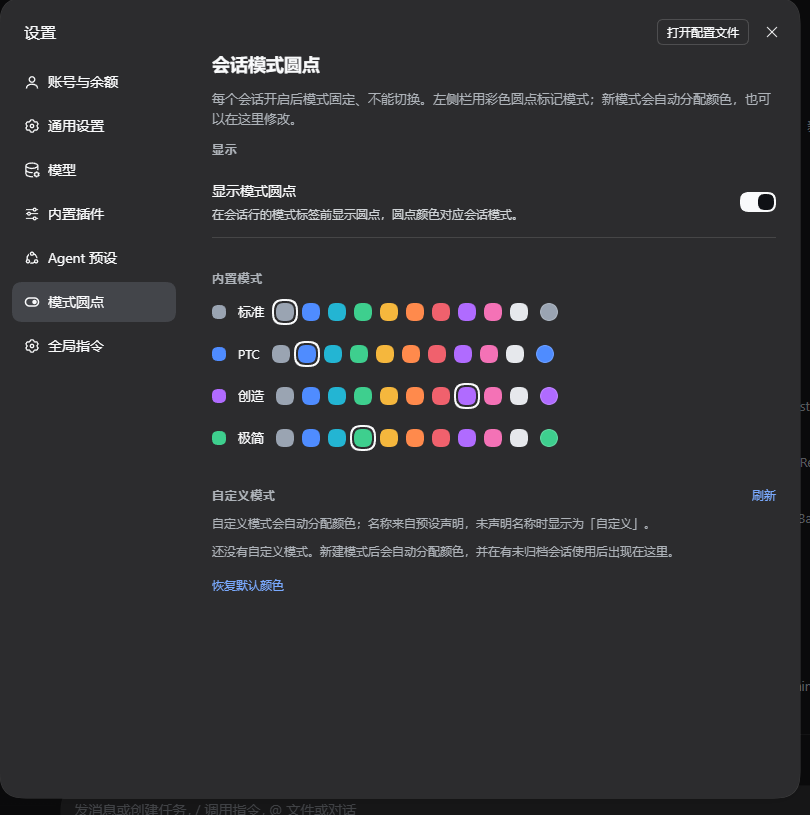
Settings → Mode dots (right after Agent presets) contains:
- Show mode dots — toggles the dot in the sidebar pill.
- Built-in modes / Custom modes — one row per known mode with a color preview, ten preset swatches, and a native color picker; custom rows also show the full preset id.
- Refresh — re-reads the preset roster, picking up presets installed since the page was opened.
- Reset colors — drops user colors and re-derives the automatic ones.
The preference lives in this Web client's localStorage
(dsh.session-mode-indicator.settings.v1, shape version 2; the pre-v2
colors shape is migrated on read).
Interface for future modes
The plugin provides the Client service sessionModeIndicator. A plugin that
knows a mode's display name or wants to reserve its color registers it ahead
of time:
export const inject = ['sessionModeIndicator']

export function apply(ctx) {
  ctx.effect(() =>
    ctx.sessionModeIndicator.registerMode({
      id: 'my-mode',            // required, matches the preset id
      name: 'My mode',          // optional display name
      color: '#4f8cff',         // optional reserved #rrggbb color
    }),
  )
}
registerMode returns a disposer; retire the contribution by calling it or by
registering inside ctx.effect. The service also exposes getModes() (the
current { id, name, color, builtin, contributed } list) and subscribe(fn)
for consumers that follow changes. Contributions live only while their plugin
is loaded; auto-assigned colors keep working without any contributor.
Files
client.js— the whole UI: sidebar pill, settings section, color model, public service.index.js/cordis.patch.yml— the Host row and its bundle patch.locale/*.json— Plugin Manager title/description.docs/mode-badge-preview.png— sidebar preview.docs/settings-preview.png— settings page preview.
Related plugins
dsh-web (dsh-task-board)
zhu1090093659/dsh-web
dsh-web (dsh-web-all)
zhu1090093659/dsh-web
dsh-TUI
ccch1mneyyy/dsh-tui
dsh-web-ui (dsh-task-board)
zhu1090093659/dsh-web-ui