dsh-google-drive
boldandigital/dsh-google-drive
Connect Google Drive accounts in the Settings, browse their files in a Drive tab of the right sidebar, and drag a file straight into the conversation. You create your own Google OAuth client (or service-account key) in Google Cloud Console; the plugin can read and write the Drive of the accounts you connect, and downloads a file only when you ask.
Install
dsh plugin --profile web add github:boldandigital/dsh-google-driveREADME
dsh-google-drive

Connect Google Drive to the DeepSeek Harness.
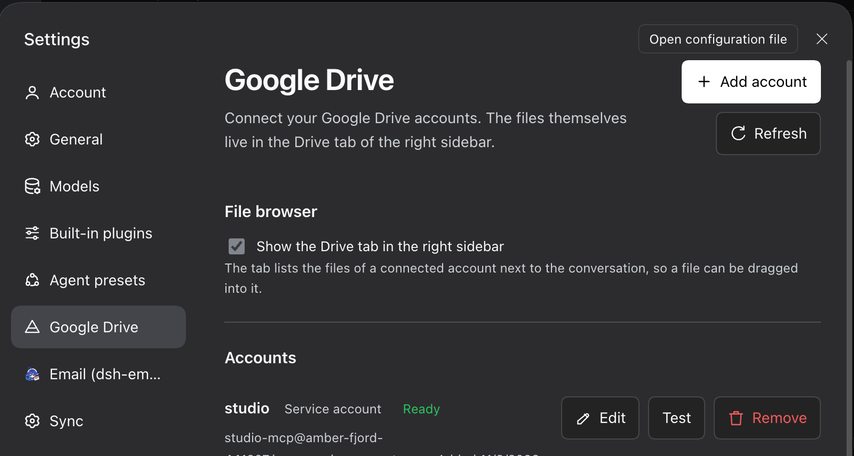
The plugin has no entry in the left sidebar. Connected accounts live in Settings → Google Drive, and the files live in the Drive tab of the right sidebar, next to Workspace files, Browser and Terminal. A file can be dragged into the conversation, so the agent works with the same Drive the user does.
Screenshots
The account names, the addresses and the file names in these screenshots are invented. The real ones belong to whoever installed the plugin, so they stay out of the repository.
What it does
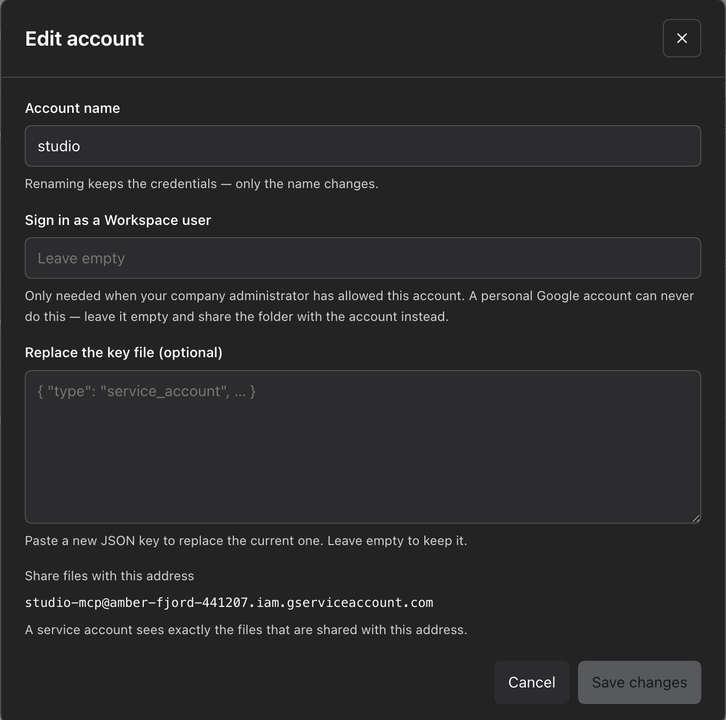
| Settings section | Settings → Google Drive lists the connected accounts, each with an Edit button (rename it, change the Workspace user it acts as, replace a rotated key, renew a Google sign-in), a Test button that checks the connection and a Remove button behind a confirmation, plus an Add account button, a refresh button and the storage/bridge information. An account the installed google-workspace-mcp server owns is listed too, marked MCP: its credentials are the server's, so it offers Make editable instead of an Edit button — one click and this plugin has its own copy of it, which the server keeps working with. |
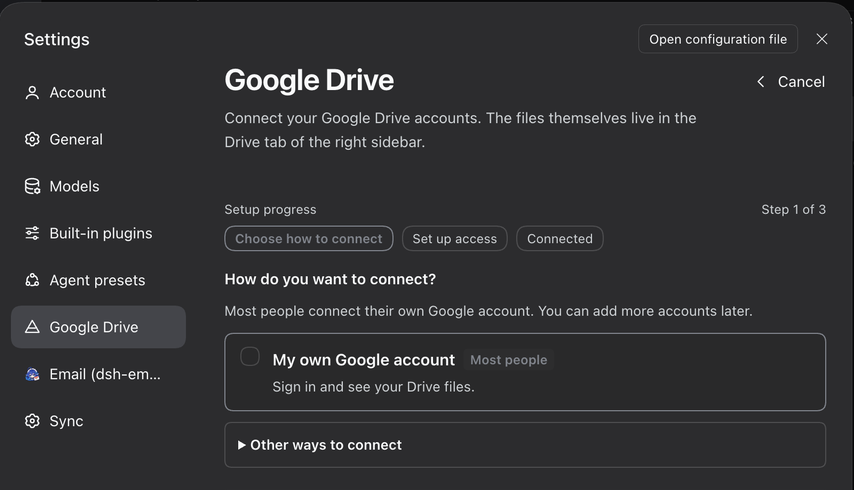
| Guided onboarding | Add account opens a wizard: one primary choice — sign in with Google — with a service account and a Workspace delegation behind a disclosure. It opens the browser for you, explains what Google will say before you meet it, and names the way out of every dead end. |
| Optional browser | A toggle in the settings section turns the Drive tab in the right sidebar on or off. The choice is remembered, and the tab is gone the next time the app starts. |
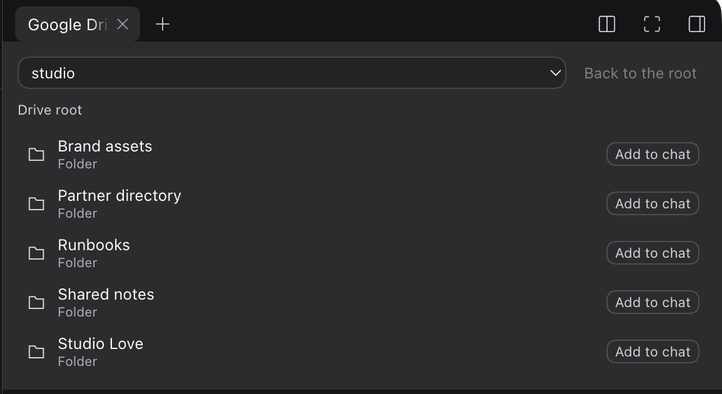
| Right-sidebar tab | The Drive tab shows an account picker, a folder breadcrumb with a back button, and the folder's files. Each row carries a badge naming the kind: Google Sheet, Google Doc, Google Slides, Google Drawing, Google Form, Google Script, Folder, Shortcut, or the file's own extension (PDF, XLSX, …) for an ordinary file. |
| Hand a file to the agent | Drag a row into the conversation, or press Add to chat on it. The file arrives as a reference the agent can act on. |
@ reference menu | Typing @ in the composer opens the harness reference menu, which also lists Google Drive files. |
| Agent tools | The same account list and file operations are exposed to the agent as google_drive_* tools. |
| MCP bridge | Accounts are mirrored into ~/.google-mcp/accounts.json, so an installed google-workspace-mcp server picks a new account up on its next call — no restart. |
Install
From the Plugin Manager's Discover tab, or directly from npm:
dsh plugin --profile web add dsh-google-drive
The package is also on npm as dsh-google-drive,
so npm install dsh-google-drive works too. To run it straight from a checkout instead:
dsh plugin --profile desktop add "link:/path/to/dsh-google-drive"
From the Discover tab
The plugin is listed in a plugin market index of its own. To see it there, add the index source under Plugins → Discover → Manage index sources:
https://boldandigital.github.io/dsh-plugin-index/index.json
The index is rebuilt from the npm registry every morning, so it never points at a version the registry does not have.
Every channel this plugin appears in, and the two steps that still need a person, are written down in MARKETPLACES.md.
Compatibility and trust
| DSH version | >=0.2.0 (engines.dsh in package.json). Node >=22. |
| Platforms | macOS, Linux and Windows. The OAuth flow signs in through a loopback URL on http://localhost, so the browser and the harness run on the same machine. |
| Licence | MIT. |
| External service | The Google Drive API, and Google Cloud Console only when you choose to create a service-account key there yourself. |
| Permissions | The plugin reads and writes the Drive of the accounts you connect, and downloads a file only when you ask for it. It never reads a file outside the connected account. |
| Data | Account names, file ids and file names are sent to the model when you hand a file to the agent, marked as untrusted data. Nothing else leaves the machine. |
| Credentials | Stays in the DSH credential store and the plugin's own 0600 key files. Secrets never reach the bundle patch, the profile file, a log or a prompt. |
| Accounts | Adding, replacing and removing an account is user-only; the agent cannot do it. |
Configure
The bundle ships with sensible defaults. To change them, override the
google-drive row in your profile's cordis.patch.yml:
- id: google-drive
  name: 'dsh-google-drive'
  config:
    scopes:
      - 'https://www.googleapis.com/auth/drive'
    defaultAccount: ''
    mcpBridge: true
    storeDir: ''
| Key | Default | Meaning |
|---|---|---|
scopes | ['https://www.googleapis.com/auth/drive'] | OAuth scopes requested at sign-in. |
defaultAccount | '' | Account selected when the Drive tab opens. Empty means the first one. |
mcpBridge | true | Mirror the registry into ~/.google-mcp for google-workspace-mcp. |
storeDir | '' | Registry and credential directory. Empty means ~/.google-mcp. |
oauthClientId | '' | A sign-in key the plugin ships for everyone. Empty by default: each user creates their own client in the Cloud console, so no sign-in runs through the plugin's owner. |
oauthClientSecret | '' | The secret of that key. Only used when oauthClientId is set. |
Where the credentials live
Secrets never touch the bundle patch, the profile file, or a log.
| What | Where |
|---|---|
| Account metadata, OAuth client, refresh token, service key | The DSH credential store (~/.dsh/.credentials.yaml), under google-drive/… records. |
| Credential files the Drive library reads | <storeDir>/tokens/<name>.json and <storeDir>/keys/<name>.json, mode 0600. |
The registry google-workspace-mcp reads | <storeDir>/accounts.json. |
Each service account gets its own copy of the key file. Removing one account never deletes a key another account still points at.
Which sign-in should I use?
Most people should sign in with their own Google account. It is the only route that shows the files you can already see in drive.google.com, and it needs no administrator.
| You want… | Use | What it costs |
|---|---|---|
| Your own Drive files, and files shared with you | Sign in with Google | One visit to the Google Cloud console to create a sign-in key. |
| One folder, for automation or for a script | A service account | A Google Cloud project, and you must share the folder with the account's address. |
| A company Workspace, as one of its users | Domain-wide delegation | A Workspace super administrator has to allow the app; Google can take up to a day to apply it. |
Google classifies …/auth/drive as a restricted scope, so an app that
requests it has to pass Google's verification before it can be published to
everybody. Until it does, Google shows an "app is not verified" warning during
the sign-in; the answer is Advanced → Go to …. A service account sidesteps
the consent screen entirely: it needs no OAuth approval, and access is granted
by sharing a file or folder with the service account's email address — but it
sees only what you share with it.
For a service account:
- In Google Cloud Console, create a service account and download its key.
- Share the Drive folder you need with the account's
client_email. - Choose the key file in the wizard. With the gcloud command line tool installed and signed in, the wizard can create the key for you instead.
Domain-wide delegation (the optional "act as" field) lets the service account act as a Workspace user with that user's full Drive access. A Workspace super-admin must first authorise the service account's client id under Admin console → Security → Domain-wide delegation, and Google can take up to 24 hours to apply the change.
Sign in with Google is for the files a specific person can see but has not
shared with anyone. The plugin signs in through a loopback consent URL on
http://localhost, so it needs a Desktop app OAuth client — Google
rejects a localhost callback for a web client. The wizard walks through
creating one in Google Cloud Console and reads the downloaded JSON file in the
browser, so the client id and secret do not have to be typed. The sign-in must
complete on the same machine.
Handing a file to the agent
Drag a row from the Drive tab into the conversation, or press Add to chat on it. The composer keeps the file as a reference chip.
When the message is sent, the plugin names the account, the file id and the
file in the prompt, so the agent knows which Drive file is meant and which
tool reads it: google_drive_download_file for a file,
google_drive_list_files for a folder, and google_drive_search_files for
other files in the same account. The file names are marked as untrusted user
data.
Agent tools
| Tool | Arguments |
|---|---|
google_drive_list_accounts | — |
google_drive_list_files | account, folderId?, pageSize? |
google_drive_search_files | account, query, pageSize? |
google_drive_download_file | account, fileId, path, exportFormat? |
google_drive_upload_file | account, localPath, name?, folderId?, mimeType? |
Adding, replacing and removing an account stays user-only. Those actions grant authority, so the agent cannot perform them.
Development
node --check lib/index.js
node --check lib/client.js
node --check lib/client.onboarding.js
node --check lib/client.sidebar.js
The bundle has no build step and no runtime dependencies beyond Node's standard library.
Notes
- A service account sees the items shared with it at the top of its Drive, and
Drive reports those items with no parent at all. The usual
'root' in parentsfilter therefore matches nothing and the account looks empty — the upstreamgoogle-workspace-mcpserver has this blind spot too, and itslistFolderContentsreports an empty folder for an account whose files are plainly visible. This plugin lists the root of a service account with the negated query and keeps the genuinely top-level items. nextPageTokenis not surfaced in the Drive tab, so the file list shows the first page only.- The account picked in the Drive tab is client-side state and resets to the first account when the app is reloaded.
- An account that belongs to the
google-workspace-mcpserver is listed in the settings section. Its credentials belong to that server, so removing it here only unlinks it: the plugin stops offering the account and the server keeps its own copy. Remove it in the MCP server's own settings to delete the credentials. - Turning the Drive tab off removes the plugin's view of it. A tab that was already open then shows the harness's empty-tab placeholder until it is closed; a new session never opens it at all.
Licence
MIT — see LICENSE.
Related plugins
dsh-web (dsh-ssh)
zhu1090093659/dsh-web
dsh-web (dsh-remote-web-ui)
zhu1090093659/dsh-web
dsh-web-ui (dsh-ssh)
zhu1090093659/dsh-web-ui
dsh-purge
kingcharleslzy-ai/dsh-purge