dsh-ui-automation
bot-for-imitoy/dsh-ui-automation
Linux-only numbered-image UI control: screenshots a display with yellow numbered badges, then clicks, double-clicks, scrolls, drags and types by index. Every action waits, captures the next numbered image, and returns it; indices only exist inside their own image. GTK4's broken AT-SPI screen coordinates are repaired from the X11 toplevel origin plus WINDOW rectangles.
Install
dsh plugin --profile web add github:bot-for-imitoy/dsh-ui-automationREADME
dsh-ui-automation — numbered-image UI control for DeepSeek Harness
Linux only. The plugin drives an X11 display through XTEST and reads the screen through AT-SPI2. macOS and Windows are not supported.
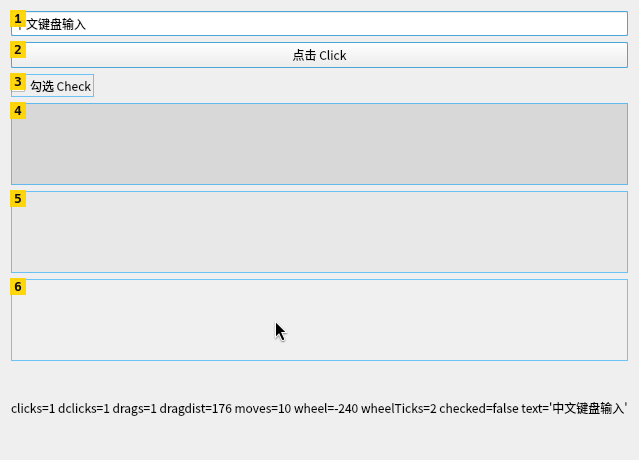
The agent never addresses a control by name, role or coordinate. It takes a numbered
screenshot: every actionable element gets a yellow badge (1..N), a thin outline, and an entry
in a sidecar JSON. The agent then says “click 4”. Every action clicks the centre of rectangle 4
with XTEST, waits afterSeconds, captures a new numbered image, and returns it. Indices from
the previous image are dead the moment the next image exists.
Why numbered images
- One contract. “Number = pixel.” No semantic tree API to reconcile with a coordinate fallback, no toolkit-specific action names — a click is always an XTEST click at the centre of the numbered rectangle.
- Inspectable. The model (or a human reviewing the session) can
read_imagethe exact frame that produced the indices. A stale numbering is visible, not hidden. - Works where accessibility is thin. The numbering filter picks actionable roles/actions; if the tree is poor the model still sees the screenshot and can fall back to reading it.
- Bounded by construction. The screenshot is cropped to the windows, indices are capped, and old images are pruned; a session cannot accumulate an unbounded index space.
What it is / is not
- It is a screen-level driver: point it at a display (an Xvfb used by your tests, or a real desktop) and drive it by number.
- It is not a launcher or a sandbox. There is no
ui_launch: the test/app owner starts the application and gives the plugin adisplay. The plugin only screenshots and clicks. - It is not a remote-desktop protocol. It uses the local X server and AT-SPI.
- It is not OCR: rectangles and labels come from the accessibility tree. Text the tree does not expose still appears in the screenshot, but is not numbered.
Tools
| Tool | Parameters | Returns |
|---|---|---|
ui_screenshot | — | imagePath, imageId, display, screen, crop, targets[] |
ui_click | index, button?, afterSeconds? | action details + next numbered image |
ui_double_click | index, intervalMs?, afterSeconds? | action details + next numbered image |
ui_scroll | index, direction (up/down/left/right), amount?, afterSeconds? | action details + next numbered image |
ui_drag | fromIndex, toIndex, steps?, afterSeconds? | action details + next numbered image |
ui_type | text? or keys?, index?, afterSeconds? | typed/readback details + next numbered image |
index is 1-based and only valid for the most recent numbered image. Out-of-range indices return
a structured E_INDEX; an action before any screenshot returns E_NO_IMAGE.
afterSeconds defaults to the plugin setting (1.0 s) and is clamped to 0–30 s. The wait happens
before the new screenshot, so apps that repaint late are still captured.
ui_type with index targets that element: the AT-SPI path writes its text directly
(EditableText.SetTextContents, reliable for CJK); when the node has no EditableText the tool
clicks the recorded centre to focus it, types with XTEST, and reads the text back to verify.
keys (ctrl+a, Return, …) clicks the index to focus (when given) and always uses XTEST.
How the numbering pipeline works
- Capture the display size with
xdpyinfo. - Walk every AT-SPI application on the session bus.
- Keep interactive roles/actions (plus named drag surfaces), drop layout wrappers, exact duplicates, and regions that contain other candidates.
- Sort by reading order: cluster elements into vertical bands by their centre, then left-to-right.
- Crop the image to the union of the contributing windows (plus
padding), so no black desktop surrounds the screenshot. ffmpeg -f x11grabgrabs the crop and draws thin outlines + yellow badges withdrawtext(/usr/share/fonts/TTF/Hack-Bold.ttf). No PIL, no Qt overlay.- Write
<imageId>.pngand<imageId>.json(index → role/name/rect/centre/app pid/AT-SPI path, plus screen/crop metadata).
GTK4 and the X11-origin fallback
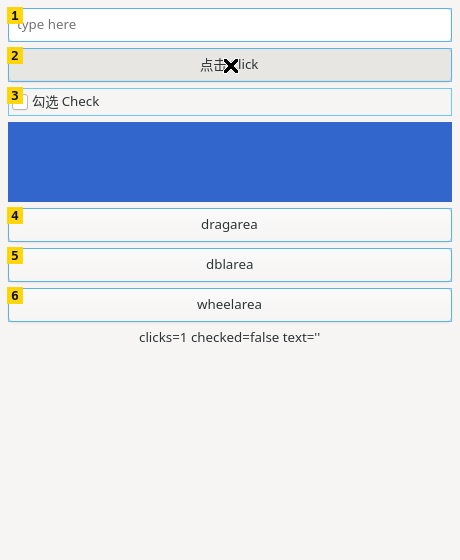
GTK 4.24's AT-SPI bridge hardcodes every SCREEN origin to (0, 0) while WINDOW rectangles stay
correct (full investigation). The plugin detects that shape per
application — one SCREEN origin, several WINDOW origins — and rebuilds each rectangle as
X11 toplevel content origin + GetExtents(WINDOW)
using xdotool search --pid + xwininfo/xprop (including _GTK_FRAME_EXTENTS when the toolkit
advertises it). A GTK4 surface is one X11 toplevel, so dialogs and popovers are matched and shifted
independently. GTK3/Qt report real SCREEN origins, so they never enter this path.
Failure is never silent: if no X11 window can be matched, that application's targets are dropped
with a structured warning (E_NO_X11_UTILS, E_NO_X11_WINDOW, E_NO_X11_ORIGIN) and
geometryTrusted: false. A GTK4 target is therefore never numbered at (0,0) and never clicked
into the top-left corner. gtk4OriginFallback=false turns the repair off and drops the app the same
way. After the per-app pass a global guard still refuses a capture whose remaining targets all
share one origin.
Screenshots
| Qt 6 fixture | GTK 3 fixture |
|---|---|
|  |
| GTK 4 (X11-origin fallback) | GTK 4 with the fallback disabled |
|---|---|
 |  |
| WorkBuddy (Electron, real app) |
|---|
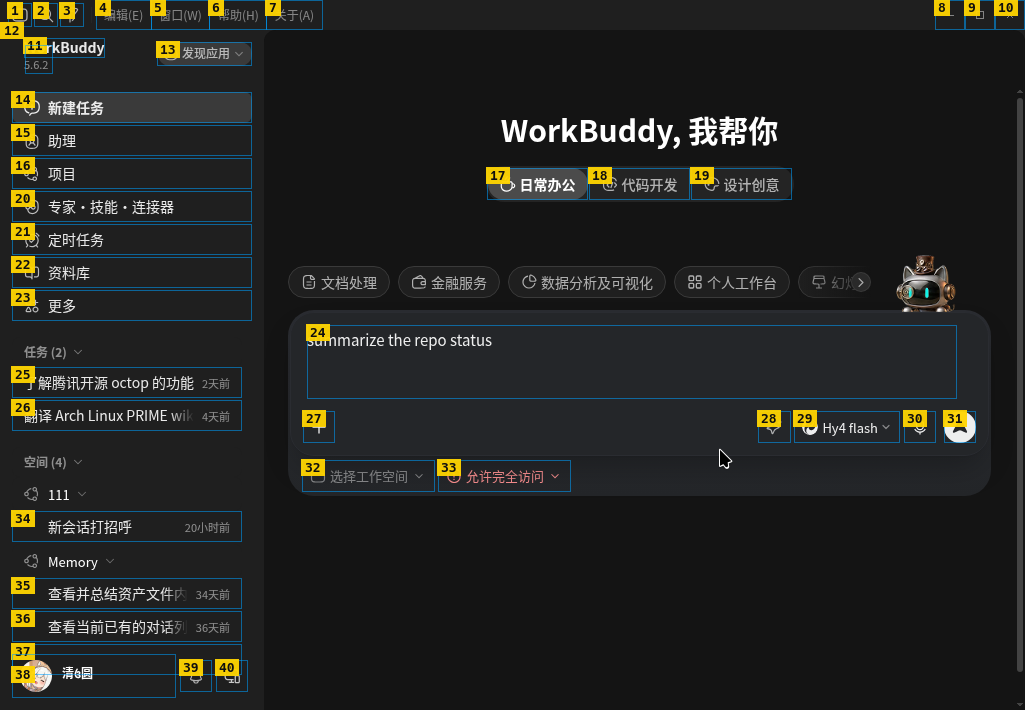 |
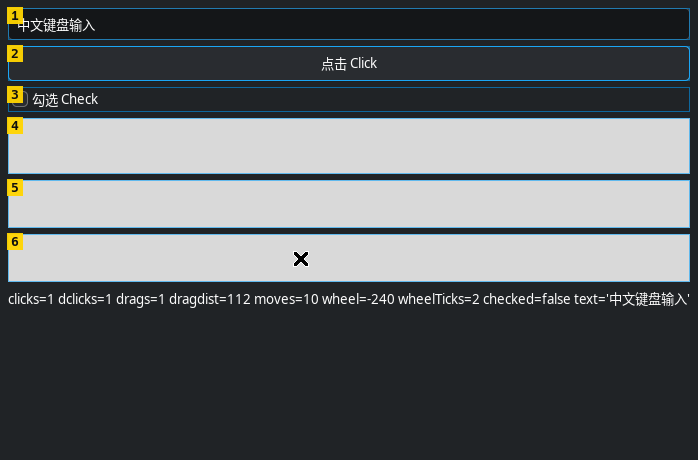
Each fixture shows its own counter line (clicks=… dclicks=… drags=… wheel=… text='…'); the
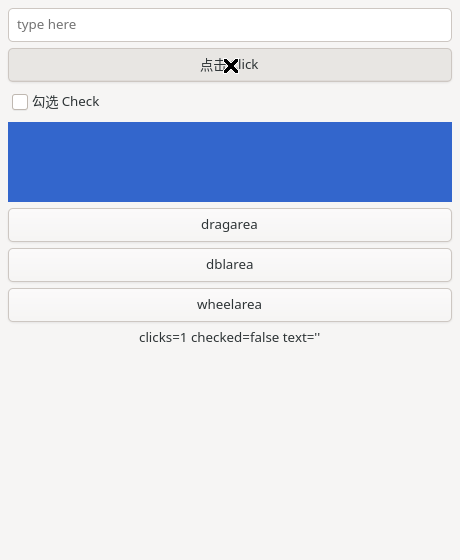
values match the state read back over AT-SPI after each numbered action. The GTK 4 capture uses
the X11-origin fallback; the second image is what the guard produces when the fallback is disabled
(E_NO_GEOMETRY, app dropped, no badges).
Install
Requirements
| Dependency | Why |
|---|---|
an X11 DISPLAY | the plugin operates on a display you provide; it does not start one |
at-spi2-core | accessibility registry the numbering helper reads |
python3 + python-gobject (gi.repository.Atspi) | AT-SPI enumeration |
xdotool | XTEST clicks, drags, wheel and keyboard |
ffmpeg | x11grab capture + drawtext badges |
x11-utils (xwininfo, xprop) | GTK4 X11-origin fallback: match the toplevel window and read _GTK_FRAME_EXTENTS |
On Arch: pacman -S at-spi2-core xdotool ffmpeg python-gobject.
On Debian/Ubuntu: apt install at-spi2-core xdotool ffmpeg python3-gi.
Tests additionally need xvfb (pacman -S xvfb / apt install xvfb).
From GitHub
dsh plugin --profile web add github:bot-for-imitoy/dsh-ui-automation
From a local checkout
dsh plugin --profile web add /path/to/dsh-ui-automation
Then set display in the plugin settings (or leave it empty to use the Host's DISPLAY).
Configuration
| Field | Default | Meaning |
|---|---|---|
display | empty → $DISPLAY → :0 | target X display |
dbusAddress | empty → Host env | optional session-bus address when AT-SPI lives on a private bus (tests/CI) |
atspiBusAddress | empty → Host env | optional private accessibility bus (AT_SPI_BUS_ADDRESS), used by the tests/CI |
screenshotDir | empty → screenshots/ | where PNG + sidecar JSON are written |
fontFile | /usr/share/fonts/TTF/Hack-Bold.ttf | badge font |
maxDepth | 24 | AT-SPI walk depth (Electron needs ≥24) |
maxTargets | 60 | badge cap per image (1–200) |
padding | 0 | crop margin in pixels added around the window; 0 keeps the image flush with the window |
crop | true | crop to the participating windows (no black desktop) |
afterSeconds | 1.0 | wait before the automatic re-screenshot (0–30) |
keepImages | 15 | generated image pairs kept on disk (curated screenshots are untouched) |
gtk4OriginFallback | true | repair GTK4 SCREEN extents from the X11 toplevel origin + WINDOW rectangles (needs x11-utils); when false, GTK4 apps are dropped with a warning |
attachImage | true | also expose the PNG as an attachment/image block when the Host supports it (each capture adds a durable attachment; turn off if storage matters more than inline vision) |
enabledSessionIds | empty | extra session ids allowed to use the tools |
allowedWorkspacePaths | empty → plugin dir | workspaces allowed to use the tools |
allowAllSessions | false | open the tools to every session |
Visibility and safety
The plugin can drive whatever display you configure — including a real desktop. Tools are therefore exposed only to allow-listed sessions/workspaces by default (the plugin's own workspace), and every session that gets them receives a short workflow prompt. Keep the allow-list narrow unless you really want every conversation to be able to click arbitrary windows.
Treat it as a powerful local input device, not a sandbox: it does not isolate processes, and a misnumbered click is a real click.
Cross-plugin suppression (2.2.0)
A wrapper that owns a natural-language entry point can take the tool surface over, so ordinary Sessions never see the six raw tools and must go through the wrapper:
- Service. The plugin publishes
ctx.uiAutomationVisibility(lib/visibility.js), a reference-counted switch:suppress(key, applies?)→ idempotentrelease(),release(key),suppressed()→ boolean,suppresses(sessionId, agent)→ the predicate verdict, andactiveKeys()→ active suppressor ids. - Effect. While a suppressor's
applies(sessionId, agent)matches,ui_screenshot/ui_click/ui_double_click/ui_scroll/ui_drag/ui_type(and the numbered-image prompt section) are hidden from that Session. Sessions whose headeroriginissubagentare never suppressed, so a wrapper's child still drives the desktop. - Scoped, not global. A suppressor normally passes its own gate as
applies, so only the Sessions that may use the wrapper's tool lose the raw tools; a Session outside the wrapper's allow-list keeps them instead of ending up with no UI control at all. - Lifecycle. The controller is owned by this plugin's fiber: unloading
dsh-ui-automationremoves it. A suppressor callssuppress(key, applies)inside an effect and keeps the returned release function; unloading or disabling the suppressor releases it and the raw tools come back. - Standalone behavior is unchanged. With no suppressor (only this plugin installed), every
gate in the table above behaves exactly as in 2.1.0.
allowAllSessionsis never consulted by the suppression — a wrapper does not widen this plugin's own allow-list.
dsh-ui-nl is the reference suppressor: it enables
hideUnderlyingTools by default and releases on unload.
Rolling back
- Keep both plugins installed, show both surfaces: set
hideUnderlyingTools: falseon theui-nlrow (or removedsh-ui-nl). The six tools reappear for every allow-listed Session. - Back to the pre-2.2.0 behavior: uninstall
dsh-ui-nl; this plugin's code path is unchanged, so the tools are visible by the same three gates as before.
Image return
Every result carries imagePath and a text index list. When a ctx.attachments service exists and
attachImage is true, the PNG is also saved with saveImage() and returned as an image content
block; if the model route is text-only the Host replaces it with a placeholder handle. In that
case (the default DeepSeek route) the model should call read_image on imagePath when it needs
to look at the frame.
Limitations
- GTK 4.24 on X11 reports
(0,0,w,h)for every widget; the X11-origin fallback repairs it viaGetExtents(WINDOW)+ the toplevel origin. The fixture is pixel-exact; real libadwaita apps show a 5–11 px residual and popovers ~8 px (measured in the GTK4 report), which still lands inside the recorded control. The repair needsx11-utils; without it the app is dropped with a warning instead of being mis-numbered. - Electron must run with
--force-renderer-accessibility(as the WorkBuddy capture does) or its tree contains almost nothing. - Indices are only valid for the image they came from; a state change made outside the plugin
requires a new
ui_screenshot. - Radio buttons and other tiny controls get a badge but small hit targets are still small; the click always uses the recorded centre.
- No OCR: elements missing from AT-SPI appear in the screenshot but are not numbered.
- No Wayland-native support; XWayland behaves like X11 only for what it exposes.
- Linux only.
Publishing (maintainers)
publish.sh publishes the repository and opens the awesome-list PR. The PR stage uses the GitHub
REST API by default and never clones the list (the repo is ~600 MB and the proxy drops mid-clone):
./publish.sh --check                 # read-only: token, network, repo and fork state
./publish.sh --pr-only --dry-run     # entry + blob/tree/commit shas; no ref, no PR
./publish.sh --pr-only               # create/update the fork branch and open/reuse the PR
./publish.sh --pr-only --clone       # legacy path: clone the fork and git push
It needs GITHUB_TOKEN_FILE (default ~/.dsh/github-token) and the usual http_proxy/
https_proxy variables. API requests retry network errors, 5xx and 429 up to
PUBLISH_RETRY_MAX times with exponential backoff; other 4xx stop immediately and print the
response body. Re-runs update the branch ref and reuse the open PR instead of opening a duplicate.
Offline coverage for the whole path (mock API): python3 test/publish-api.test.py.
Testing
make -C test fixtures          # build the Qt6 / GTK3 / GTK4 panels
node test/integration.mjs      # 80 checks, starts its own Xvfb + private D-Bus + fixtures
node test/reliability.mjs      # 30 attempts per operation (100% on Qt3/GTK3/GTK4)
node test/visibility.mjs       # 20 checks for the cross-plugin suppression switch
node test/capture-screenshots.mjs
The tests own Xvfb, the private session bus and the fixture; the plugin only receives the display (and bus address). Every assertion reads the fixture's own counter label over AT-SPI. See VERIFY.md for the measured numbers.
Project layout
index.js                 plugin entry, settings, session gating, prompt
lib/automation.js        latest-image state, capture orchestration, actions
lib/tools.js             the six tool definitions + human rendering
lib/x11.js               xdotool/XTEST wrapper
lib/shipped.js           resolve dsh-tools/schemastery from the DSH install
scripts/numbering.py     AT-SPI enumeration, numbering, crop, badges, sidecar JSON
test/                    fixtures + integration/reliability/capture scripts
screenshots/             curated numbered images referenced by the docs
License
MIT. Only Linux is supported.
Related plugins
archify (deepseek-harness)
tt-a1i/archify
WeKnora (dsh-weknora)
tencent/weknora
next-ai-draw-io (dsh-plugin)
dayuanjiang/next-ai-draw-io
AiToEarn (dsh-plugin-aitoearn)
yikart/aitoearn