dsh-charter
centella-cream/dsh-charter
A durable, user-owned session charter for DeepSeek Harness, designed to survive context compaction.
Install
dsh plugin --profile web add github:centella-cream/dsh-charterREADME
dsh-charter





English | 中文
Compaction rewrites history. Your commitments don't.
dsh-charter is a durable, user-owned task contract for
DeepSeek Harness. Goals, hard constraints, and
deliverables stay visible across context compaction — and remain editable at any time.
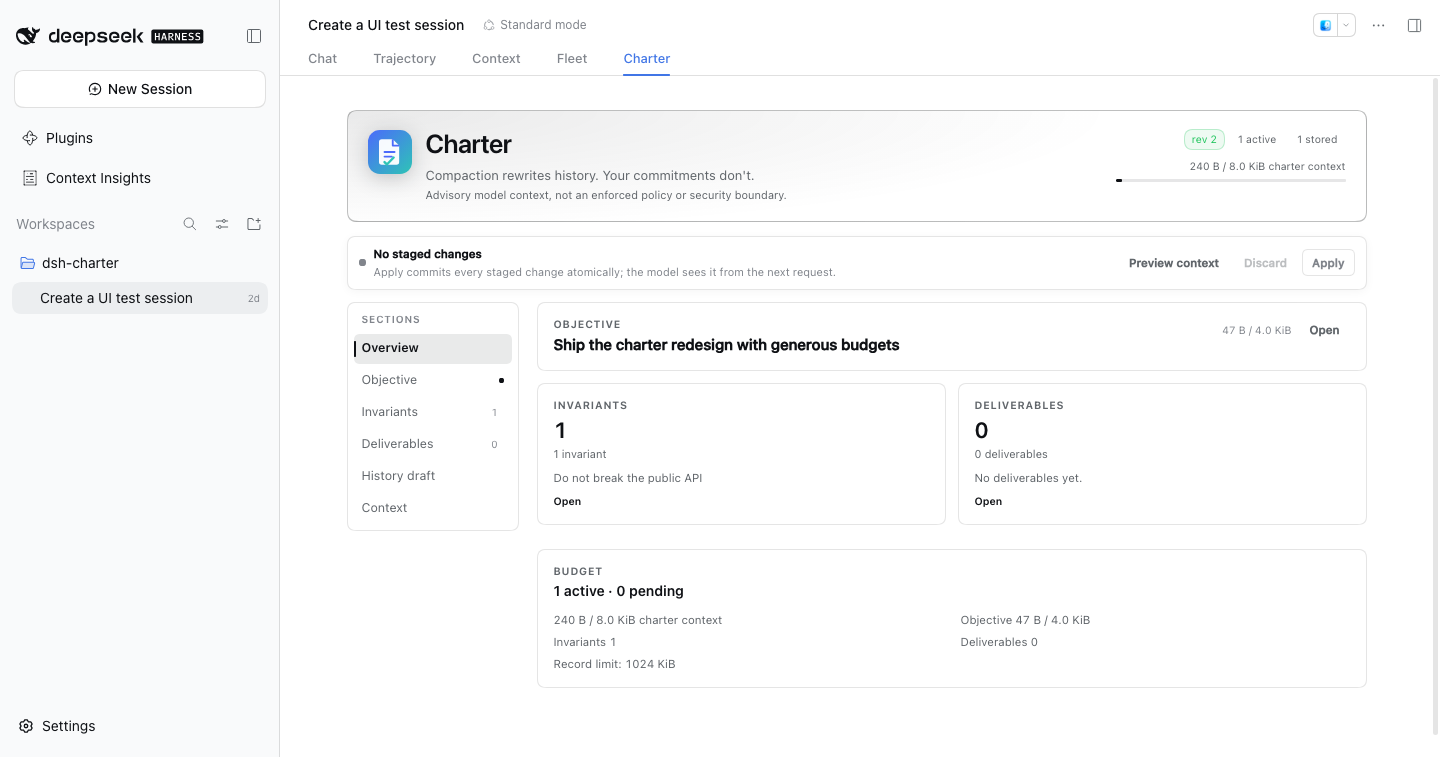
Dark theme and narrow-layout evidence: dark, narrow.
A real English Web profile with
dsh-contextinstalled. The tab order is Chat, Trajectory, Context, Fleet, then Charter; every pane string follows the active DSH language.
Contents
- Why
- Highlights
- How it works
- Install
- Quick start
- The Charter tab
- Configuration
- Compatibility
- Security and privacy
- Development
- Documentation
- Acknowledgements
- Contributing
- License
Why
Compaction replaces older history with a summary. A summary can keep the general task while quietly dropping standing constraints such as “do not touch migrations/”, “run tests before delivery”, or “keep the API backward compatible”. Promoting those constraints to the system prompt would instead cross the user-content permission boundary.
dsh-charter solves a narrow problem well:
- Independent authority. One
dsh-storage-domainrecord per Session is the only authoritative source. Compaction summaries and UI caches are never writers or recovery sources. - User role by construction. Editable user text enters
systemPrompt.context(), never a system-role message. The model can read the charter throughcharter_read; it cannot write it. - Deterministic rebuild. The same record revision and renderer version produce byte-identical context.
{{...}}runs are escaped so older DSH prompt interpolators cannot rewrite user text. - Explicit budgets. The tab shows a live context meter and per-field byte counters. Overflow is rejected or surfaced for selection — never silently truncated.
- Atomic Apply. One edit commits completely or not at all, with revision conflicts and idempotent retries.
- Safe onboarding. An existing compacted Session gets a review-only history draft from its latest compaction summary; nothing becomes effective until you review and apply it.
- Drafts survive navigation. Staged edits, an open inline editor, and a reviewed history draft belong to the Session, not to the mounted tab, so checking the conversation and coming back does not lose work.
- Fail closed and degrade per Session. One stored record that loads but fails the strict inner schema or consistency checks disables only that Session (its raw bytes are preserved for diagnosis); a charter that exceeds a later-tightened budget is shown as over-budget instead of corrupt, is not injected, and can be shrunk back into range. An unreadable outer JSON record is a documented residual risk: the JSON storage backend treats it as absent and the plugin cannot distinguish it from a missing record (verification §4.5).
- Recoverable applies. A retry reuses the mutation id of an unknown-outcome request, and a revision conflict offers an explicit apply-to-latest action instead of discarding the draft.
- Visible build identity. The Charter header shows the installed plugin version beside the revision and
item counts, so a screenshot or support report identifies the build. A regression test fails if the
client-side constant drifts from
package.json.
A charter is a declaration, not an enforcement policy. Use Host permissions, sandbox policy, hooks, or execution guards for restrictions that must be machine-enforced.
Highlights
- Separate original and current objective; ordinary edits never rewrite the original.
invariantanddeliverableitems with orthogonal review, lifecycle, verification, and progress state.- A localised conversation-view tab registered once at a stable high order (1000), so it follows Chat, Trajectory, and common plugin tabs without re-registering itself.
- A compact, navigable pane: Overview / Objective / Invariants / Deliverables / History / Context.
- Sticky Preview / Discard / Apply toolbar and an exact preview of the model-visible user-role context.
- History draft extraction from
compaction/summary; deterministic, no model call, no automatic write. - English/Chinese UI, light/dark themes, keyboard focus states, and container-query responsiveness.
- Self-explaining navigation (
rc.6): every section has a hover/focus?help badge with a one-sentence purpose. - Context preview in Formatted JSON or Exact text mode (
rc.6); formatted JSON is for reading, exact bytes remain visible. - Read-only
charter_readtool with a compact standing projection; one-time fork copy; explicit degraded states across restart, compaction, unload, corrupted records, and over-budget configurations.
How it works
flowchart LR
  U[User edits the Charter tab] --> A[charter.edit]
  A --> B[Atomic single-record update]
  B --> D[(dsh_charter_v1 storage domain)]
  D --> R[Deterministic renderer]
  R --> C[user-role runtime context]
  D --> T[charter_read]
  P[Compaction] -. never writes .-> D
  P --> S[compaction/summary]
  S --> H[Review-only history draft]
  H --> U
  W[charter.watch] --> U
  D --> W
The Host service initializes a record on session/created and before the first prompt on agent/created.
The browser registers a conversation.view entry; the pane and charter.watch use the same revisioned view.
charter.bootstrap reads the latest usable compaction summary and returns a draft only — it does not write storage.
Install
Current release state
- Latest published RC:
0.1.0-rc.6(npmlatestandnext), now formally accepted. Its canonical GitHub tag name is unavailable after the earlier immutable-release deletion; the GitHub Release will use the recovery tagv0.1.0-rc.6-republished. 0.1.0-rc.6: exact artifact digest21ddbea0ae3fd88994d4e4731429ef4d8cb75db2b97e83cd7530a0386e425825; published to npm.0.1.0-rc.5: still published on npm as the previous accepted RC; its canonical GitHub tag/release was accidentally deleted and is pending restoration.0.1.0-rc.5adds review, recovery, accessibility, and release-evidence hardening; it is not a new 0.2 capability line.
Install the latest published version for normal use: dsh-charter@0.1.0-rc.6.
Our channel policy is to publish RCs under next and to point latest at the newest RC until a stable release
exists (npm keeps a latest tag and we choose where it points; this is our policy, not an npm requirement).
The full recovery/record-health contract is in the user guide and the
verification record. In short, records use a structured health state; export/restore is
owner-only on DSH 0.2.1+, healthy records are not overwritten, and a rejected write fences only that Session
until a Host restart.
Pin an exact version for npm/CLI installation. pnpm 11+ applies a default
minimumReleaseAgeof 1440 minutes (24 hours) before resolving a newly published release. During that window, unversioned resolution (dsh-charter,@next, or@latest) can select an older release that does not declare compatibility with the current DSH runtime, and DSH will reject it. An exact published version does not use that unversioned resolution path. Do not bypass the compatibility gate with an exact-version exemption for an older, undeclared release.
Requirements
- DSH: only the versions listed in the compatibility matrix are supported
(
0.1.7-rc.2,0.2.0-rc.1/rc.2,0.2.1-rc.1/rc.2/rc.3/rc.4/rc.5). Newer stable/RC versions are not claimed until the matrix is extended;0.2.1+is required for per-Peer Remote resource authorization. DSH0.2.1-rc.5is supported by the published rc.6 artifact. The rc.5 artifact does not declare it; do not install rc.4 or rc.5 on DSH rc.5. - Node.js
^22.19.0 || >=24.0.0. - A Web or Desktop profile.
Install from npm (recommended)
Web profile — install an exact version
# Pin the latest published RC; required when it is inside pnpm's release-age window.
dsh plugin --profile web add dsh-charter@0.1.0-rc.6
rc.4 defaults all history candidates but renders only the first 40. Do not apply a draft with more than 40 candidates. rc.6 is the accepted latest RC; rc.5 remains the previous accepted release.
Pin an exact version for reproducible profiles. @next and @latest follow dist-tags but are still subject to
pnpm's release-age policy, so they are not a reliable way to install a freshly published RC. If the registry is
unreachable, or you need the exact release artifact, use the offline tarball fallback below.
dsh-charter@0.1.0-rc.6 is the latest installable release from npm.
Restart dsh web (or let profile HMR recompose), then refresh the page. The profile's package.json gains the
dependency and bundle entry.
Desktop — install through Plugins
Open Desktop → Plugins and use Install/Update for dsh-charter. The current Desktop Plugins UI does
not accept an exact npm version spec; it resolves the package through its plugin catalog. Consequently, when a
new release is still inside pnpm's release-age window, the catalog can initially resolve an older release that
the DSH compatibility gate rejects. In that case, wait until the target release is outside the release-age
window and retry Install/Update. Do not disable the policy or grant an exact-version exemption to force
an older, undeclared release.
For an immediate or exact install, use the offline tarball fallback below if your Desktop build supports
importing a local plugin. Otherwise, the Plugins UI is the only supported Desktop installation path. Desktop
owns the plugin lifecycle and hot-applies the new bundle. Web and Desktop consume the same dsh.client
web bundle through the host client-module carrier; there is no separate Desktop client entry. The Desktop app
runtime must itself be one of the declared DSH versions.
Offline / local tarball fallback
Use this path as a backup for air-gapped machines, exact-artifact verification, or Desktop builds that support
importing a local plugin. Published releases ship the same tarball and SHA256SUMS used by npm publish.
# Published rc.6 artifact (recovery GitHub release):
npm pack dsh-charter@0.1.0-rc.6
shasum -a 256 dsh-charter-0.1.0-rc.6.tgz
dsh plugin --profile web add ./dsh-charter-0.1.0-rc.6.tgz
The published rc.6 tarball is the supported offline artifact; use its registry digest.
dsh plugin --profile desktop is intentionally refused by the Electron app that owns that profile; use the
Desktop Plugins page or that profile's package manager. Source-level development is described in
CONTRIBUTING.md; do not use git clone as the normal installation method.
Update
- Web (npm): install the exact published target version, e.g.
dsh plugin --profile web add dsh-charter@0.1.0-rc.6, then restart/refresh. Pinned profiles keep their explicit version entry. Do not use a bare@next/@latestimmediately after a release; pnpm's release-age policy can resolve an older version. Pin the exact published rc.6 version outside that window. - Local tarball: rebuild/download the new tarball and repeat the local install command; this bypasses registry release-age resolution.
- Desktop: use Plugins → Install/Update. The UI has no exact npm version selector, so it follows the catalog and the release-age policy. If it resolves an older release that the compatibility gate rejects, wait until the target release matures and retry, or use the offline tarball fallback if your build supports local plugin import. Desktop hot-applies the new bundle.
Quick start
Bring an existing compacted Session
- Open an old Session that has already been compacted and is live in this Web process.
- Open the Charter tab. If its charter is empty, the plugin reads the latest
compaction/summaryand shows a History draft tab. - Review or edit the candidates, uncheck anything stale, and click Apply draft. Only then does the content become effective and enter the next model request.
History extraction is deterministic and heuristic: it selects high-signal sections and splits long candidates instead of truncating them. The review step is intentionally mandatory.
Start a new charter
- Open Charter in a started Session.
- Set the objective.
- Add invariants and deliverables in their sections.
- Use Preview context to inspect the exact user-role text and byte count.
- Click Apply. A revision conflict preserves your draft and shows the server revision.
The Charter tab
The tab is opened from the conversation header; it is registered once at a stable high order (1000), so it follows Chat, Trajectory, and common plugin tabs without re-registering itself. The pane has a left section navigation on wide screens and a horizontal tab strip on narrow screens:
| Section | Purpose |
|---|---|
| Overview | Objective summary, invariant/deliverable cards, budget, history-draft callout |
| Objective | Edit or redirect the objective; the original is immutable |
| Invariants | Add, edit, replace, archive, purge, and verify hard constraints |
| Deliverables | Same actions plus delivery progress |
| History | Always available: apply a draft extracted from the latest usable compaction summary, or inspect the current bootstrap phase and re-check |
| Context | Exact user-role runtime context, bytes, and limits |
While the Charter view is active it owns the whole reading surface: the chat composer is hidden, and its draft returns untouched when you switch back to Chat. Approval/question/plan-review seats stay visible.
When a history draft has more candidates than the context budget can hold, the extra candidates are imported as pending proposals in the same atomic Apply. They remain visible and reviewable; nothing is rejected because of an arbitrary per-kind active-count cap.
Budgets are visible everywhere. Long draft items become multiple candidates; over-limit fields are highlighted. The charter-context budget is the gate: when a history draft does not fit, the remaining candidates become pending proposals instead of blocking the whole import. Apply is disabled only for real field, storage, or atomic limits.
Configuration
Defaults live in cordis.patch.yml. Override them in the profile patch:
- id: charter
  config:
    maxPromptBytes: 8192
    maxObjectiveBytes: 4096
    maxItemBytes: 1024
    contextOrder: 130
| Field | Default | Meaning |
|---|---|---|
maxPromptBytes | 8192 | UTF-8 budget for the charter contribution only (excludes history, system, tools, and other contexts) |
maxObjectiveBytes | 4096 | UTF-8 budget for the objective |
maxItemBytes | 1024 | per-item text budget |
maxItems | 512 | all-items storage limit |
maxPendingItems | 512 | pending-proposal limit |
maxOps | 1024 | operations per Apply |
maxRecordBytes | 1048576 | one Session record |
historyLimit | 64 | recent history receipts |
maxHistoryBytes | 131072 | recent history bytes |
mutationLimit | 128 | recent mutation receipts |
maintenanceLimit | 16 | recent initialize/restore receipts (min 1) |
maxRecoveryBytes | 4194304 | complete recovery-archive budget (≥ record budget + 64 KiB, 16 MiB ceiling) |
contextOrder | 130 | runtime-context order; after sandbox/approval/subagent by default |
The only model-visible capacity is maxPromptBytes; active invariants and deliverables are not capped
separately. maxItems and maxPendingItems bound storage. When a history draft does not fit the context
budget, the candidates that fit are imported as active and the rest become pending proposals — not rejected,
truncated, or silently dropped.
Compatibility
| DSH version | Status |
|---|---|
0.1.7-rc.2 | Supported (minimum) |
0.2.0-rc.1 / 0.2.0-rc.2 | Supported |
0.2.1-rc.1 / 0.2.1-rc.2 / 0.2.1-rc.3 / 0.2.1-rc.4 / 0.2.1-rc.5 | Supported (primary baseline: 0.2.1-rc.5) |
0.1.5-rc.1 and earlier | Not supported |
0.2.2-rc.x, 0.3.x | Not declared until verified |
Supported" means typecheck, build, tests, and Remote/client smoke for that version. Fresh Web profile install,
startup, page, and client-bundle checks passed on 0.1.7-rc.2, 0.2.0-rc.2, 0.2.1-rc.2, 0.2.1-rc.4, and 0.2.1-rc.5;
other versions are API/build verified. Real-model compaction end-to-end is a documented manual check (npm run verify:compaction, section 8 of the current verification record); a PASS is recorded in the immutable v0.1.0-rc.4 verification §8.4.
The full matrix and degradation notes are in the compatibility document.
0.1.7/0.2.0 have no per-Peer Remote resource authorization; use them only in a trusted single-operator
environment.
Security and privacy
- User-authored text never enters a system-role message.
- The model has no charter write capability;
charter_readis read-only. Itsstandingview returns the complete current working set (bounded by record quotas) in a compact form that omits debug-only ids/review/lifecycle, so metadata cannot inflate the tool result; there is no fixed byte cap onstanding, so a maximum-size charter can produce a large tool result. Thealldebug page is capped at 64 items / 32 KiB (final envelope) and reports omitted items; pagingstandingis a documented follow-up. - Actor policy:
ownermay perform all edits including purge;usermay perform ordinary edits but not purge;hostis rejected on the Remote edit path. Records are bound tocreatedAt,cwd, andparentSession; reusing a Session id across lifecycles is rejected. - Ordinary logs contain stable ids, kinds, revisions, and error codes — not user body text.
- A charter is not a permission system. See SECURITY.md for the threat model and reporting path.
Development
npm run typecheck        # strict TS
npm test                 # build + Vitest
npm run build            # Host ESM + single-file browser bundle + smoke
npm run check            # typecheck + build + tests
npm run smoke:package    # packed tarball installability
npm run verify:compaction # manual real-model compaction check (not part of check)
The test suite covers the pure core, real Host composition, storage-domain behavior, Remote framing, history extraction, client state, and factory-bundle registration. The current tree has 379 tests; the eight-version matrix passes on all declared DSH versions. See the verification record for the current evidence.
Acknowledgements
The design research for this project benefited from two independent community projects:
- dsh-context-enhancement — per-record storage, Session lifecycle fencing, durable publish ordering, and revision conflict handling.
- dsh-ontology — a pure domain kernel, stable error codes, and overlay validation before writes.
Their ideas informed the design review; no source code is copied, and these projects do not endorse
dsh-charter. See the research notes for the detailed comparison.
Documentation
- Design specification
- User and operator guide
- Compatibility matrix
- Verification record
- Release notes
- Version roadmap
- Release checklist
- Historical design/research notes remain under
docs/design/anddocs/research/but are not current operating instructions.
Every long-form document has an English and Chinese version, linked at the top of each page.
Contributing
Issues and pull requests are welcome. Please read CONTRIBUTING.md and the Code of Conduct before changing the Host contract, prompt boundary, or client bundle. For security reports, follow SECURITY.md.
Status
Pre-1.0. The DSH plugin ABI is still moving; compatibility is tested against the eight versions above, and the design keeps the compatibility layer deliberately small.
Current release state (2026-10-30):
- Published:
0.1.0-rc.6— npmlatest/next; exact artifact SHA-25621ddbea0ae3fd88994d4e4731429ef4d8cb75db2b97e83cd7530a0386e425825. - Recovery tag:
v0.1.0-rc.6-republishedfor the GitHub Release; the canonical rc.6 tag name is unavailable under the immutable-release rule. 0.1.0-rc.5: previous accepted npm release; canonical GitHub tag/release pending restoration.- The real-model compaction acceptance PASS remains recorded on the immutable v0.1.0-rc.4 verification §8.4.
CI (.github/workflows/ci.yml) packs and smoke-tests the installable artifact on Node 22.19.0 and 24;
release candidate, browser evidence, and promotion workflows are separate gates. Do not infer a publication
from a green candidate.
License
MIT © 2026 dsh-charter contributors.
Related plugins
dsh-web-ui (dsh-chat-recovery)
zhu1090093659/dsh-web-ui
billion-context
ranxianglei/billion-context
dsh-synapse
liangmianya/dsh-synapse
dsh-archive-manager
michengai/dsh-archive-manager