dsh-bilingual-description
che0911/dsh-bilingual-description
Blocks tool calls whose description argument is not written in both Chinese and English: adds a system-prompt section stating the 中文:“…” 英文:“…” format and a tool guard that rejects English-only calls before they run. By default it checks every tool that declares a description parameter; set DSH_BILINGUAL_DESCRIPTION_SCOPE=shell to limit it to shell tools.
Install
dsh plugin --profile web add github:che0911/dsh-bilingual-descriptionREADME
dsh-bilingual-description
English · 简体中文
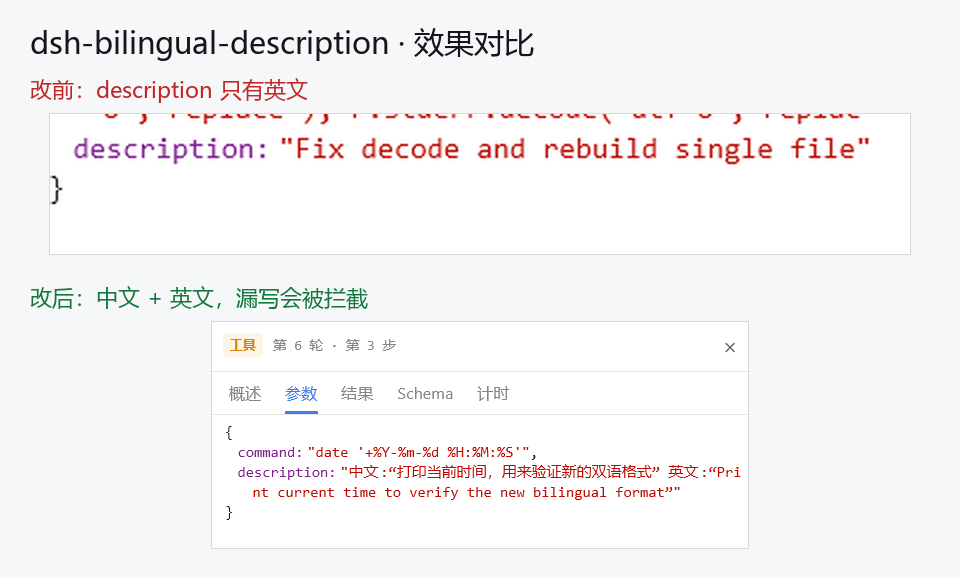
Every tool call that takes a description argument writes it bilingual — Chinese first, English second — and a call that forgets the Chinese half is rejected before it runs, with the exact rewrite handed back to the model.
Why
Tool-call description is the sentence you read in the trajectory 参数 panel to remember what a call did. English-only descriptions are fast to skim but hard to scan for non-English readers, and they silently become the project's audit trail.
There is no translation layer to bolt on: the value is produced by the model, stored verbatim in the session record, and never rewritten afterwards. So the only two places that can influence it are the prompt (say the rule) and the guard (refuse the call). This plugin does both.
What it does
- Prompt section — a short rule is appended to the system prompt of every agent, next to the built-in shell guidance, so the model knows the format before it writes.
- Tool guard — before a call executes,
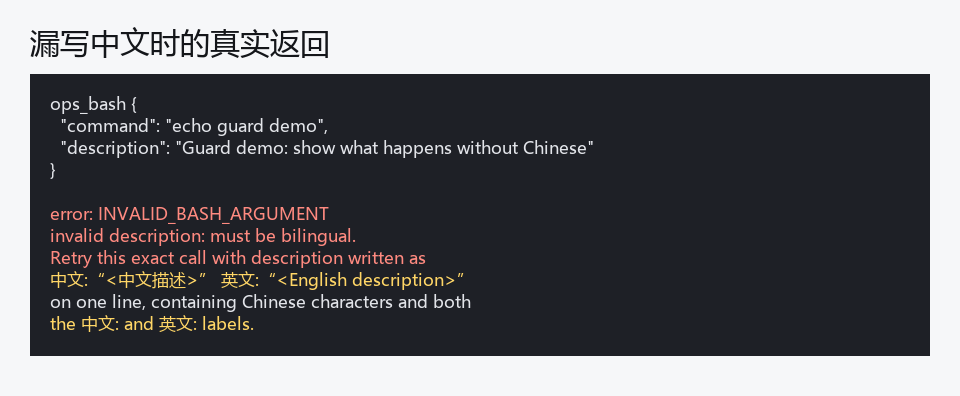
descriptionis checked. On failure the call is denied and the model receives the exact retry text, so the next attempt is correct.
Required format (one line, full-width quotes so nothing needs JSON escaping):
中文:“<中文描述>” 英文:“<English description>”
Scope
- Only tools that actually declare a top-level
descriptionparameter are checked; the plugin reads the tool definition at call time, so it follows whatever the installed tools expose. - If the definition cannot be read, it falls back to a known shell-tool list instead of guessing broadly.
read,writeand similar tools without adescriptionparameter are untouched.- Every failure inside the plugin results in allow — it can never block a call for its own reasons.
Configuration
All optional, via environment variables:
| Variable | Default | Meaning |
|---|---|---|
DSH_BILINGUAL_DESCRIPTION_DISABLE | unset | Set to 1 to turn the plugin off entirely. |
DSH_BILINGUAL_DESCRIPTION_SCOPE | all | shell restricts checks to command-style tools only. |
DSH_BILINGUAL_DESCRIPTION_EXTRA_TOOLS | unset | Comma-separated extra tool names to enforce when the schema is unavailable. |
The wording lives at the top of index.js (CN_LABEL / EN_LABEL / RULE / message builders) if you want a different language pair or separator.
Install
From the DSH plugin market: install dsh-bilingual-description.
Manually, into a profile:
cd ~/.dsh/profiles/<profile>
npm install /path/to/dsh-plugin-bilingual-description
then add "dsh-bilingual-description" to dsh.profile.bundles in that profile's package.json and restart DSH.
Verify with a tool call that has an English-only description — it should be rejected with invalid description: must be bilingual.
Development
node scripts/smoke.mjs   # 16 assertions, no DSH runtime needed
node --check index.js
Compatibility
- DeepSeek Harness
>= 0.2.0-rc.1(tested on0.2.2-rc.1). - No dependency on any other plugin; it only uses
ctx.systemPrompt.section()andctx.tools.guard().
License
MIT
Related plugins
archify (deepseek-harness)
tt-a1i/archify
WeKnora (dsh-weknora)
tencent/weknora
next-ai-draw-io (dsh-plugin)
dayuanjiang/next-ai-draw-io
weknora
tencent/weknora