dsh-session-management
chengeat/dsh-session-management
Managing chat conversations in DeepSeek Harness
Install
dsh plugin --profile web add github:chengeat/dsh-session-managementREADME
dsh-session-management
English | 简体中文
A session-management plugin for the DeepSeek Harness (dsh).
List, archive, pin, stop, rename, and permanently delete your dsh sessions — from a Settings page, the sidebar right-click menu, the /sessions command, or the session_manage tool the AI can call for you.
dsh only ships Archive for sessions. This plugin adds the missing part: a real delete (removes the session log from disk), plus a bird's-eye view of every session with its size, status, and log path.


Features
| Action | What it does |
|---|---|
| list | Every session with title, id, cwd, live/cold, running, pinned, archived, event count, on-disk size, and log path. Text search, optional "show archived". |
| archive / unarchive | Reversible — hides a session from the sidebar without touching its history. |
| pin / unpin | Keep sessions at the top of the sidebar. |
| stop | Interrupt a running session's current turn (same as the user's stop button). |
| rename | Update a live session title (written to the session log, durable). |
| delete | Permanently remove the session log directory from disk. Irreversible — every entry point requires an explicit confirmation. A running session is stopped first. Deleting the current session is allowed; its in-memory copy disappears on the next app restart. |
All four entry points share one operation core in the Host, so the page, the menu, the command, and the AI tool always behave identically. The UI follows the Harness language setting (English / 中文 switch live, no reload).
Screenshots
Settings page
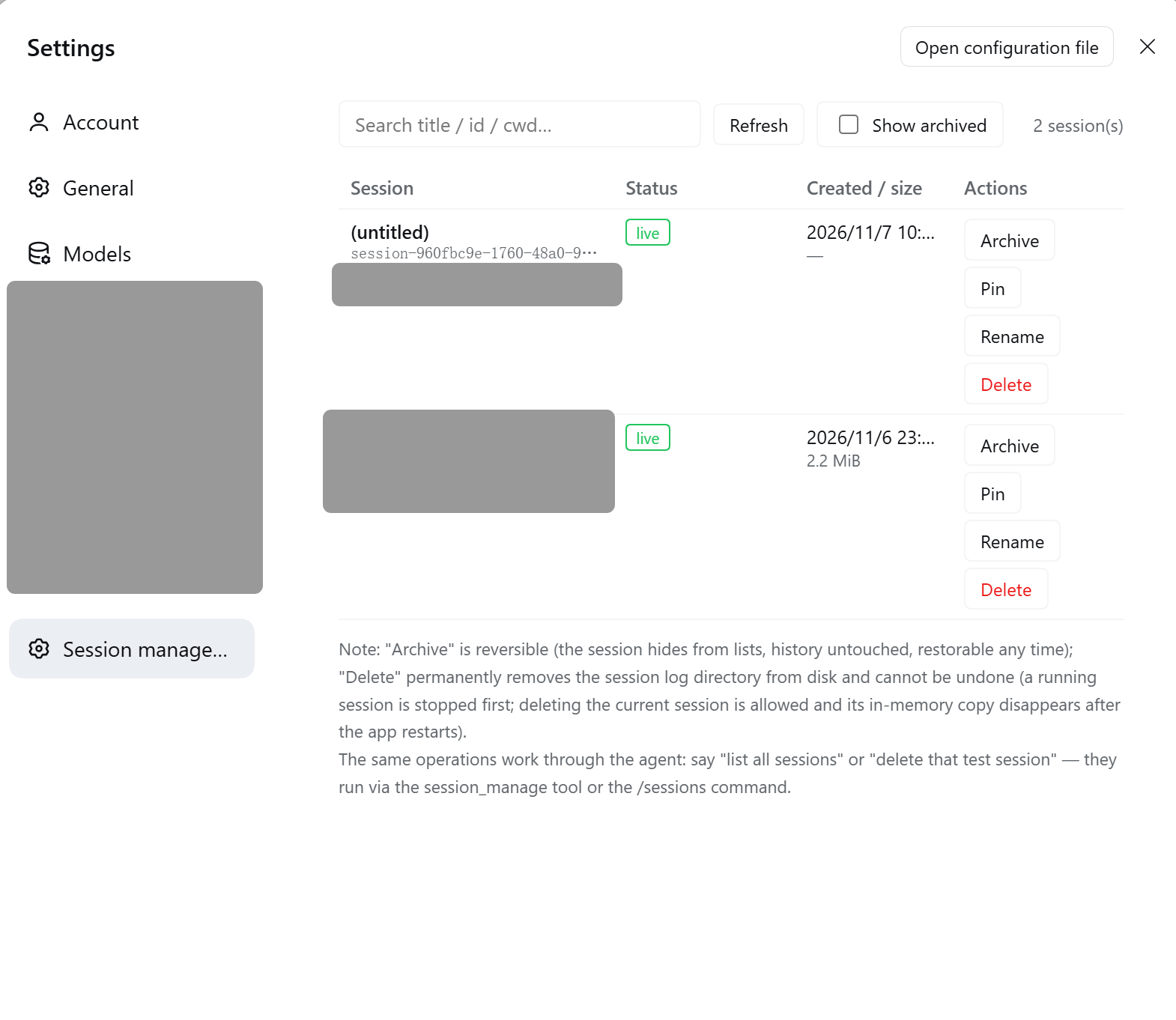
Settings → Session management — searchable table with per-row actions:
Sidebar right-click menu
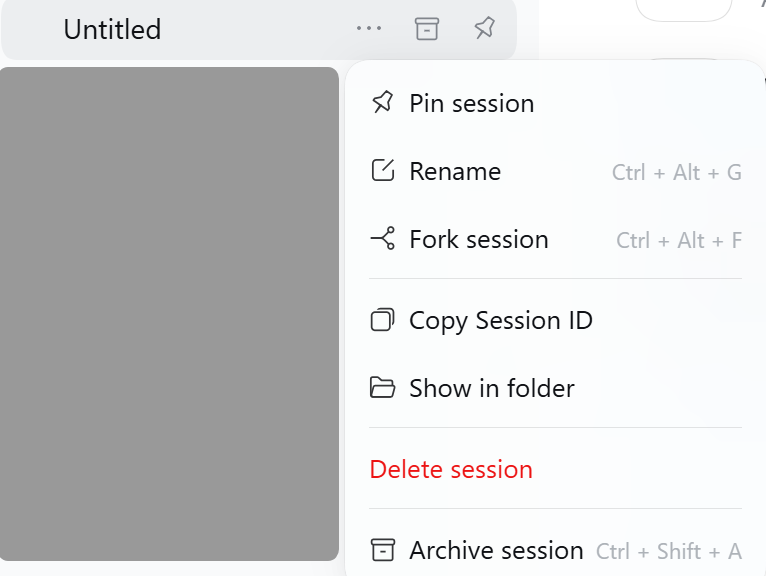
The built-in session menu gains a red Delete session item above Archive:
Requirements
- A
dshprofile with the Web GUI (the standarddsh webcomposition or Desktop). - The shipped JSONL session-persistence backend (the default) — needed to see cold sessions, disk sizes, and to delete stored logs. Without it, everything except
deletestill works on live sessions. - Built against
@deepseek-ai/dsh 0.2.2. The plugin registers only through stable Host services (tools, commands, slots, context menus, web routes) and imports no internal packages at runtime.
Install
One command, into any profile (pnpm must be on PATH — corepack enable pnpm):
dsh plugin --profile <profile-name> add github:Chengeat/dsh-session-management
For example, to install into the profile named web:
dsh plugin --profile web add github:Chengeat/dsh-session-management
The npm package name is dsh-session-management-t (the un-suffixed dsh-session-management is already taken on npm by another plugin). Once it is published, install by name instead:
dsh plugin --profile web add dsh-session-management-t
The first install of a git-hosted plugin asks pnpm to allow its install-time build step: when pnpm prints an allowBuilds key, add that exact key to the profile's pnpm-workspace.yaml and re-run the command.
Or install from a checkout:
git clone https://github.com/Chengeat/dsh-session-management.git
- From an interactive
dshsession (recommended) — tell the AI:install the plugin bundle at /abs/path/to/dsh-session-management
- From the Web GUI — open Settings → Plugins and install this directory like any bundle.
Restart dsh and refresh the browser page. A bundle with both a Host and a Client half needs a restart on first install so the module graph picks the halves up.
After the restart you get all four surfaces at once:
- Settings → "Session management" — the management page
- Sidebar right-click — a red Delete session item above the built-in Archive
/sessions— the slash commandsession_manage— the agent tool
Note — if you previously installed a copy of this plugin under another name (e.g.
@local/dsh-session-management), remove that bundle first. Two active copies both registeringsession_managecollide at activation.
Usage
Settings page
Settings → Session management: a searchable table of every session. Each row carries Archive / Unarchive / Pin / Unpin / Stop / Rename / Delete buttons; Delete needs an in-row "Confirm delete". The page language follows your browser (English / 中文).
Sidebar menu
Right-click any session row in the sidebar — the menu gains a red Delete session row above the built-in Archive:
… Delete session ← added by this plugin Archive session
Ctrl + Shift + A
Selecting it raises a confirmation toast — press Confirm delete to remove the log permanently.
Slash command
/sessions list [filter]
/sessions archived
/sessions archive <id>
/sessions unarchive <id>
/sessions pin <id>
/sessions unpin <id>
/sessions stop <id>
/sessions rename <id> <new title>
/sessions delete <id> confirm
delete refuses to run without the trailing confirm. An empty id for archive / pin / stop acts on the current session.
Agent tool
Just talk to your agent:
"list all my sessions" "delete the test session
29d374e3" — the AI runssession_managewithconfirm="confirm"
Tool: session_manage(action, sessionId?, title?, confirm?, query?, includeArchived?, stop?).
How it works
The plugin composes with existing dsh services instead of reaching around them:
| Concern | Service used |
|---|---|
| Session enumeration + titles | sessionQuery.listSessions() (live-preferred), readTitleSnapshots() |
| Archive / pin state | workspaceRegistry.archiveSession/unarchiveSession/pinSession/unpinSession, archivedSessionIds, pinnedSessionIds |
| Stop | ctx.agents.get(id) → agent.cancel({ kind: 'user' }) |
| Rename | sessionTitle.rename(session, title) — a durable title event |
| Delete | sessionPersistence.list() → each stored session's location.path (e.g. ~/.dsh/sessions/--<cwd>--/<id>/session.v4.jsonl.zstd); the plugin removes that whole session-owned directory after checking the artifact name shape. The persistence seam has no delete API, so this is an intentionally guarded direct removal. |
| Page transport | a JSON API served at /dsh-session-management/api on the Harness webserver, guarded by a same-origin (Origin/Host) check |
| Sidebar menu | contextMenus.register({ target: 'session' }) with a two-step confirm via the host toast |
Session ids are opaque — some are plain UUIDs without the session- prefix. The plugin always uses the exact id the list reported and never rewrites it.
Repository layout
dsh-session-management/
  package.json          # dsh bundle manifest (patch + client declaration)
  cordis.patch.yml      # inserts the session-management plugin row
  index.js              # Host half: admin core, session_manage tool, /sessions command, JSON API
  client.js             # Client half: Settings page + sidebar menu action (React, plain JS)
  icon.svg              # bundle icon
  locale/en.json        # meta.title / meta.description (English)
  locale/zh.json        # meta.title / meta.description (中文)
  screenshots.json      # storefront screenshot manifest (see awesome-dsh-plugin)
  screenshot/           # the images above (EN-*.png English UI, CH-*.png 中文 UI)
  README.md             # this file
  README-zh.md          # 中文文档
  LICENSE               # MIT
Safety notes
- Delete is irreversible. It removes the durable log; there is no undo and no trash. Every path requires explicit confirmation (
confirm="confirm"/ in-row confirm / toast confirm). - The plugin can delete the session you are currently in — by design, with confirmation.
- The JSON API refuses cross-origin and cross-site requests.
License
MIT — see LICENSE.
Related plugins
dsh-web-ui (dsh-chat-recovery)
zhu1090093659/dsh-web-ui
billion-context
ranxianglei/billion-context
dsh-synapse
liangmianya/dsh-synapse
dsh-archive-manager
michengai/dsh-archive-manager