dsh-account-balance-pill
cheny5100/dsh-account-balance-pill
Shows the signed-in account's top-up and bonus balance above the DSH sidebar account entry, refreshed every minute with a manual refresh button.
Install
dsh plugin --profile web add github:cheny5100/dsh-account-balance-pillREADME
dsh-account-balance-pill
A DeepSeek Harness (DSH) plugin that shows the signed-in account's top-up balance and bonus balance in one line above the sidebar account entry. It refreshes every minute and has a refresh button.
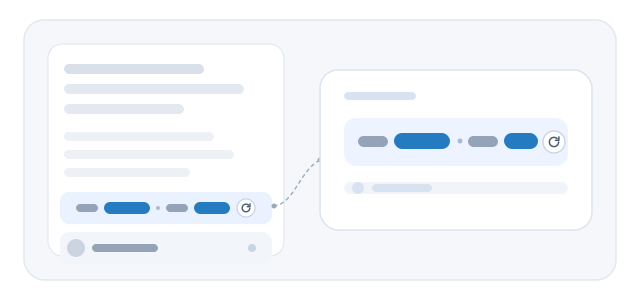
Illustration of the row: top-up and bonus amounts with a refresh button, directly above the avatar row.
Features
- Always shows both amounts: top-up balance and bonus balance, formatted like the Platform balance card (two decimals, digit grouping,
<¥0.01for positive sub-cent amounts). - Refreshes automatically every 60 seconds and pauses while the page is hidden; when the page or window returns after more than 10 seconds, it reads again.
- A refresh button on the right starts a read immediately and restarts the one-minute timer.
- When a read fails, the last successful amounts stay visible with a warning mark and an amber refresh button; the tooltip and a screen-reader status message explain the failure.
- Hidden when no account credential is stored (for example an API-key-only setup) and in the collapsed icon rail.
- Uses the theme's
--dsw-alias-*tokens, so it follows light and dark themes.
Install
The Desktop app uses the desktop profile; dsh web uses web. Replace desktop with your profile name if needed.
From GitHub:
dsh plugin --profile desktop add github:cheny5100/dsh-account-balance-pill
From npm (after the package is published):
dsh plugin --profile desktop add dsh-account-balance-pill
From a local directory:
dsh plugin --profile desktop add D:\path\to\dsh-account-balance-pill
Confirm the row in Plugins, then refresh the page. The browser module is served by the Host after the bundle row is enabled.
Usage
- Sign in to your DeepSeek account. The row appears in the sidebar foot, directly above the account entry, left-aligned with the account row.
- The row reads
Top-up ¥12.34 · Bonus ¥5.00with a refresh button. Hover it for the full amounts, the last update time and any failure reason. - Click the refresh button to read immediately. The button spins while a read is in flight.
- Collapsing the sidebar to the icon rail hides the row.
Behavior
| Situation | What the row does |
|---|---|
| Signed out / API-key-only | Hidden |
| Loading | Shows — for both amounts |
| Success | Shows both amounts; refresh every 60 s |
| Failure after a success | Keeps the last amounts, shows a warning mark, turns the refresh button amber and reports the failure to assistive technology |
| Failure before any success | Shows the localized "balance unavailable" text and the refresh button |
| Page hidden | Pauses requests; reads on return when the last read is older than 10 s |
| Repeated failures | Backs off 60 s → 120 s → 240 s → 300 s, reset by a success or a manual refresh |
There are no configuration options.
Compatibility
- DSH
>=0.2.2-rc.3 <0.3.0, Desktop and Web clients (platform: web). - No runtime dependencies and no build step; the browser bundle is plain JavaScript.
How it works
- The Host row is an empty
apply(); its only job is to enable the package so DSH's client module system scans and serves./client. - The browser module registers into the
sidebar.footer.actionlist slot and calls the existing account Remote,ctx.remote.account.getBalance(metadata), with the client version, active language and UTC offset. - The Host asks the configured
platformOriginfor the signed-in account's wallet summary. The account token stays on the Host; the browser only receives currency codes and decimal amount strings. - Amounts keep the server's decimal precision until display; the formatting follows the Platform card rules.
Limitations
- Only DeepSeek account sign-in produces a balance. A profile that uses only an API key has no account entry and no balance row.
- The row is not rendered in the collapsed icon rail (56 px), where labels do not fit.
- DSH currently has no extension point inside the account row itself, so the row sits directly above it.
- When the shipped dynamic-Cordis footer action is visible (it appears only while dynamic Cordis plugins exist), both actions share the single sidebar-foot row and the balance row can be squeezed. This is a limitation of the shipping footer layout; profiles without dynamic Cordis plugins are unaffected.
Development
Edit client.js; there is no build step. Reinstall the bundle or reload the plugin, then refresh the page.
License
Related plugins
DeepSeek-Balance-Whale-Widget
meteornox/deepseek-balance-whale-widget
dsh-context
bowenliang123/dsh-context
dsh-cost-meter
han-1413141/dsh-cost-meter
dsh-damage-pulse
wssfk12138/dsh-damage-pulse