dsh-gui-agent
chinxavier/dsh-gui-agent
Computer-use for DSH on Windows: a session-scoped toggle in the composer that registers nine tools for screenshots, mouse clicks and drags, keyboard typing and shortcuts, window switching, UI Automation element lookup, window-to-account mapping, a batch prompt queue and download collection. Desktop automation input is native Win32 SendInput and defaults to human-like pacing - bezier cursor paths with overshoot correction, real VK keystrokes, log-normal typing with occasional typo corrections and a pause before each click - with realistic, fast and custom (0.2-8x) speed presets. Windows only. Off by default and switched on per session by the user; screenshots are sent to the model, and clicks on send/pay/delete-like controls are refused unless confirmed.
Install
dsh plugin --profile web add github:chinxavier/dsh-gui-agentREADME
dsh-gui-agent
鼠标键盘代理操作 · 真人模拟(Mouse & keyboard agent control with human-like pacing)
给 DeepSeek Harness 的输入框加一个会话级开关「代理操作」。开启后,代理获得真实的 Windows 级鼠标、键盘、窗口与截屏能力,可以像人一样操作浏览器、聊天框和任何桌面程序: 点击按钮、在输入框里打字、切换窗口、等页面加载,然后用截屏确认结果。
A session-scoped switch in the DSH composer. Turn it on and the agent gets real Windows mouse, keyboard, window and screenshot control — click buttons, type into inputs, switch windows, wait for a page, then verify with a screenshot.


能力 / What it does
| 工具 / Tool | 作用 / Purpose |
|---|---|
computer_screenshot | 截取桌面或单个显示器,PNG 直接作为图片内容块返回给模型 |
computer_mouse | 移动、点击、双击、右键、滚轮、拖拽;命中危险控件时先拒绝 |
computer_keyboard | 文本输入(ASCII 走 VK 击键,中文回落到 Unicode)、组合键 |
computer_window | 枚举窗口、激活、最小化/最大化/还原/关闭 |
computer_wait | 等待动画或页面加载 |
computer_uia | 用 UI Automation 在窗口里按名称/类型查找控件,或读取某坐标处的控件 |
computer_account | 窗口标题子串 ↔ 账号标签的映射,切换并校验前台窗口 |
computer_queue | 批量 prompt 队列:add / next / complete / fail / list / clear |
computer_downloads | 列下载目录、等待新下载、把新文件收集到 ~/Pictures/dsh-gui-agent/<账号> |
九个工具全部只在开关开启时注册;关闭时它们不存在于模型侧工具栏,也没有提示段。
真人模拟 / Human-like input pacing
这是本插件与常见 computer-use 插件的差异所在:输入不是「瞬移+瞬时按键」,而是默认走拟真路径。
- 原生输入:所有点击与按键都走 Win32
SendInput(SetCursorPos定位 +INPUT事件), 与真实鼠标键盘同一条系统路径,页面拿到的是isTrusted事件。不使用 CDP、WebDriver、 浏览器扩展注入或 DOM 合成事件。 - 轨迹:光标沿两段非对称三次贝塞尔移动(弧线偏移随机、末端 2–8px 过冲再 2–4 步回拉), 单步 ±1px 抖动,耗时按距离在 120–540ms 之间随机。
- 按键:ASCII 走
VkKeyScanW的真实 VK 事件(含 Shift 组合,页面读到正常的key值,而不是Unidentified);非 ASCII 才回落到KEYEVENTF_UNICODE。 字符间隔是对数正态分布,空格 ×0.7、标点 ×1.18,约每 11 个字符一次长停顿; 字母与数字有 3% 概率先打错一个键再用退格重打。 - 点击:按下前有 150–500ms 犹豫,按下 45–95ms,连击间隔 70–140ms。
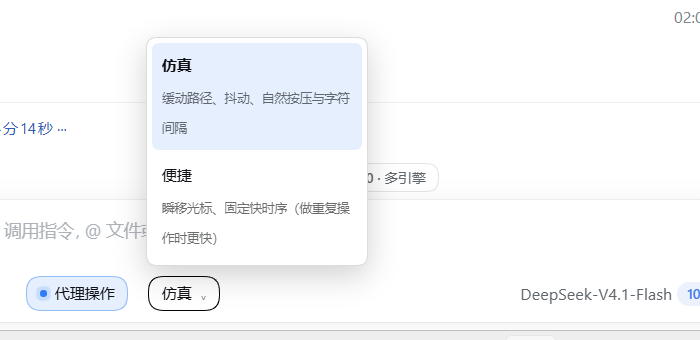
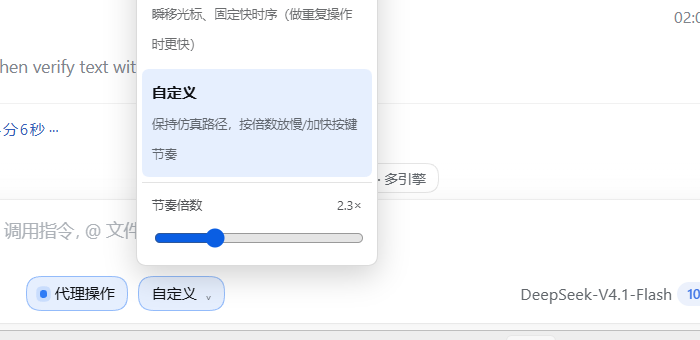
- 节奏档:开关开启后,输入框左侧出现「仿真 / 便捷 / 自定义」下拉。
仿真(默认)走上述轨迹与时序;便捷瞬移光标、固定快时序(重复劳动更快);自定义保留仿真路径,用 0.2–8× 滑杆整体放慢或加快。 单次工具调用还可以用instant: true、pace: "fast"、slowdown: 2.5覆盖。
安全模型 / Safety model
- 默认关闭,按会话生效。开启状态写入
%LOCALAPPDATA%\dsh-gui-agent\state.json, 宿主重启后按 12 小时 TTL 恢复,超时自动失效。 - 只有用户能开启。开关是输入框左侧的按钮,工具无法自行打开该状态。
- 关闭即消失。关闭时
computer_*不会注册到模型;开关状态由插件自有路由维护, 路由用connection.requestRejection做与 DSH API 相同的 Host/Origin 与浏览器认证。 - 危险控件拦截。点击前用 UI Automation 反查落点上的控件名,命中
发送 / 提交 / 购买 / 支付 / 下单 / 删除 / 发布 / 分享 / 注销 / 退出登录(含英文同义词) 时直接拒绝,必须由用户明确同意后代理才能带confirm: true重试。 - 截图会外发。截图把屏幕可见内容发给模型,开启前请确认屏幕内容可以外发。
安装 / Install
在 DSH 里通过插件管理器安装:
plugin_manager action=install_bundle target=<本仓库目录或包名>
或在 dsh plugin CLI 里:
dsh plugin --profile <profile> add github:ChinXavier/dsh-gui-agent
安装后刷新 Web 页面,输入框工具行左侧出现「代理操作」开关。开关关闭时只有这一个按钮; 开启后才在它右边出现节奏下拉(同一格内,不额外占位)。
结构 / Layout
index.js              Host 入口:会话状态、路由、惰性注册工具与提示段、状态恢复
lib/store.js          持久化(会话开关、节奏、账号映射、队列、下载基线),原子写
lib/win-bridge.js     PowerShell 常驻进程的 JSON-lines 桥
lib/keys.js           按键名 -> Windows VK 码
lib/tools.js          9 个 computer_* 工具定义
client.js             conversation.input.left 的开关 + 节奏下拉
helper/computer.ps1   SendInput / GDI 截屏 / 窗口枚举 / UI Automation(DPI 感知)
test/                 Host 契约与工具行为回归(node --test 直接跑)
实现要点 / Notes
- 状态:
lib/store.js持有{ sessions, paces, slowdowns, accounts, downloads, queue }, 写盘去抖 250ms、临时文件 + rename 原子替换;启动时加载并清理过期会话。 - 惰性注册:仅当至少一个会话开启时才向
tools注册 9 个工具并注入提示段; 全部关闭时反向注销。插件在ctx.inject(['webServer'])内注册路由,避免宿主重启时 服务尚未就绪导致路由缺失。 - 执行层:一个常驻
powershell.exe -File helper/computer.ps1,JSON-lines 请求/响应。SendInput使用LayoutKind.Explicit, Size = 40的INPUT结构并检查返回值;SetProcessDpiAwarenessContext(PER_MONITOR_AWARE_V2)保证坐标系与屏幕像素一致。 - UIA:
ControlViewWalker深度优先遍历(节点数/深度/时间上限),返回名称、控件类型、 矩形与中心点;AutomationElement.FromPoint用于点击前的控件识别。 - 截图:GDI 截屏写入临时 PNG →
attachments.saveImage→ 以{ type: 'image', attachment: { attachmentId, mediaType, bytes, width, height } }内容块返回。文本块附带屏幕/图像尺寸、缩放、光标位置与前台窗口标题。
已知限制 / Limits
- 仅 Windows(PowerShell 5.1,无第三方依赖、无 Python、无驱动、无 MCP 进程)。
- UAC 提权窗口(更高完整性级别)收不到注入输入。
- DRM / 受保护画面可能截到黑屏。
- 每进程只允许挂一个
computerUse提供者;本插件直接驱动输入,不占用该服务名额。 - UIA 对 Electron/Chromium 窗口的 Web 内容依赖首次 attach 后可达;部分自绘控件没有可访问性名称。
- 下载收集按文件名做基线比对,同名覆盖由浏览器决定,插件只按冲突改名保存。
关键词 / Keywords
鼠标键盘代理操作 · 真人模拟 · 电脑操作 · 桌面自动化 · 浏览器操作 · 截屏视觉 · UI Automation · 多账号批量 · Windows computer use · desktop automation · mouse and keyboard agent · human-like input · screenshot vision · session-scoped toggle
许可 / License
MIT
Related plugins
archify (deepseek-harness)
tt-a1i/archify
WeKnora (dsh-weknora)
tencent/weknora
next-ai-draw-io (dsh-plugin)
dayuanjiang/next-ai-draw-io
weknora
tencent/weknora