dsh-plugin-job-panel
cholf5/dsh-plugin-job-panel
A right-sidebar job panel for the dsh web GUI: click a row in the background-jobs popover to inspect the command, follow its terminal output (iterm2-style bounded scrollback), and stop it.
Install
dsh plugin --profile web add github:cholf5/dsh-plugin-job-panelREADME
English | 简体中文
dsh-plugin-job-panel
A right-sidebar job panel for the DeepSeek Harness web GUI
Click a row in the session header's background-jobs popover → inspect the command, follow its live terminal output, stop the job.




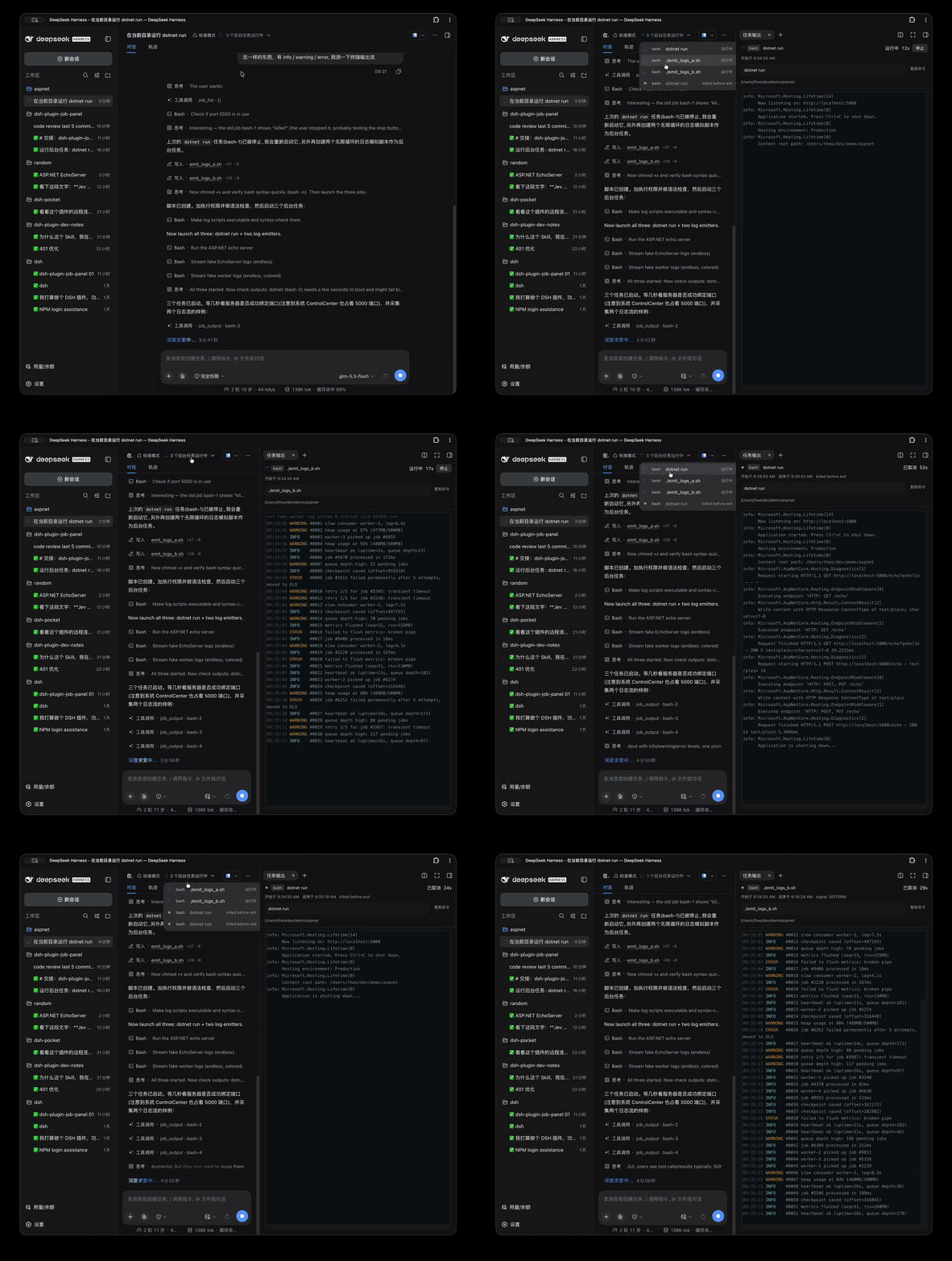
Click a popover row → the panel tab opens with the live output; full history loads from the spill file; the stop control arms, then confirms.
Dual-face plugin: a Node half (observation tap + three exact /api routes) and a browser half (panel body + popover row enhancement) in one package.
Verified against @deepseek-ai/dsh@0.1.7-alpha.2. MIT licensed.
Highlights
| 🖱 Clickable popover rows | The official background-jobs popover renders read-only rows — every row becomes a click target that opens (or re-navigates) the panel tab |
| 🖥 A real terminal engine | Output renders in an embedded xterm.js terminal: SGR colors (16/256/truecolor), OSC, bold/dim/italic/underline, carriage-return progress redraws |
| 🎨 Semantic log colors | Plain text is colored at presentation time by level vocabulary — error red, warn amber, debug dim — never touching the captured stream the model reads |
| 📜 Full spill-backed history | Streams past the 64 KB window are kept in a host spill file; one button stitches spill head + retained tail with byte-gap detection |
| ⏹ Deliberate stop | First click arms for 3 s, second confirms; the host kills via the owner session recorded at start time |
Install
Prerequisites:
- dsh reachable —
dsh --version. If dsh is not a global command (most installs run npx-only), prefix everydshcommand below withnpx @deepseek-ai/dsh - pnpm on PATH (the dsh plugin manager shells out to it):
npm install -g pnpm
# from the npm registry — the package ships its built lib/, no build step needed
npx @deepseek-ai/dsh plugin --profile web add dsh-plugin-job-panel -w
# or straight from GitHub
npx @deepseek-ai/dsh plugin --profile web add git+https://github.com/cholf5/dsh-plugin-job-panel.git -w
Restart dsh web once (bundle additions don't hot-reload), then refresh the browser page.
Verify the host routes are live — with a session cookie, because the fence rejects every /api request without one, so a 401 says nothing about registration:
curl -s -c /tmp/dsh-cookies.txt "http://127.0.0.1:3080/?token=<token-from-launch-url>" -o /dev/null   # mint a cookie (303)
curl -s -b /tmp/dsh-cookies.txt "http://127.0.0.1:3080/api/job-panel/output"                          # 400 jobId-validation body = registered; 404 "not found" = not
Then click any row in the session header's background-jobs popover — it opens the panel tab.
No pnpm, and don't want it? Manual fallback
git clone https://github.com/cholf5/dsh-plugin-job-panel.git ~/.dsh/profiles/web/node_modules/dsh-plugin-job-panel
Then make ~/.dsh/profiles/web/cordis.patch.yml contain (this is the file's final top-level shape — do not blindly append after a [] line):
- insert:
    - id: job-panel
      name: dsh-plugin-job-panel
The running dsh hot-loads this patch row; refresh the browser afterwards.
Update / remove
npx @deepseek-ai/dsh plugin --profile web update dsh-plugin-job-panel -w # or remove dsh-plugin-job-panel -w
Restart dsh web afterwards.
What it does
- Clickable popover rows. The official background-jobs popover (
dsh-client-ui-jobs) offers no row-level extension seat, so the rows are enhanced the documented no-seat way: a MutationObserver stamps each row withdata-job-panel-id(the job id, read off the row's React fiber —props.job.idon theJobItemwrapper since dsh 0.1.7; the keyed-<li>shape of 0.1.5 stays supported as a fallback), one click listener opens (or re-navigates) the panel tab — except presses on the row's native kill control, which stay native — and CSS adds the pointer/hover/chevron affordances. Nothing is ever injected into React-managed children. - The panel. A page tab type (
kind: job-output, guide entry included) registered through the official two-stagesidebarRightTabspath; the body renders kind chip, live status dot, ticking duration, start/finish/detail facts, the command block (producer label — for bash jobs the command itself) with copy button and the captured spawn cwd, the streaming output view, and the stop control. Page tabs dedupe within their pane, so clicking another job re-navigates the same tab; split panes / float / fullscreen come from the docking kit for free. - Output. While the tab is visible the panel polls every 500 ms with its own byte offsets and forwards the raw deltas into the embedded xterm.js terminal — a real terminal engine, so SGR colors (16/256/truecolor), OSC, C1 two-byte escapes, bold/dim/italic/underline and carriage-return progress redraws all render natively, with the style state carried across lines exactly like a terminal. The bounded history is the terminal's own scrollback (2000 lines, iterm2-style); auto-follow sticks to the bottom until the user scrolls up (floating jump-back button); lossy reads restart from the retained tail behind a gap marker. When a stream overflowed its in-memory window (64 KB/stream by default) the host keeps a spill file, and a "load full history" button resets the view and stitches spill head + retained tail with byte-count gap detection.
- Stop. First click arms the button for 3 s, the second confirms. The host calls
ctx.jobs.kill(id, { id: ownerSession })— the registry duck-types the caller by session id, and the owner session is the one recorded at start time, so the browser never declares authority.
How the output works (the interesting part)
        browser half                                   host half
┌───────────────────────────┐                  ┌─────────────────────────────────┐
│  popover rows (clickable) │   GET /api/…     │  JobTap wraps (behavior-safe):  │
│  panel tab                │  ──────────────▶ │    ctx.jobs.start               │
│   └ embedded xterm.js     │   fenced /api    │    ctx.subprocess.spawn         │
│     + semantic colors     │   channel        │  3 exact routes:                │
│  stop control (arm→ok)    │  ◀────────────── │    output / full / stop         │
└───────────────────────────┘                  └─────────────────────────────────┘
The job registry contract exposes stream output through one consuming cursor per job (ctx.jobs.read()), owned by the model's job_output tool; the official README lists "independent observers need a cursor or snapshot API" as a known limitation. Reading through the registry would steal the model's deltas and suppress its completion notices.
So this plugin observes one layer below:
ctx.jobs.startis wrapped (behavior-preserving) to record kind / label / owner session and hold an entry open while the producer's synchronousrun()executes;ctx.subprocess.spawnis wrapped to attribute the first spawned collect-mode handle of an in-flight start to that entry — the handle'scollected.stdout/collected.stderrareSubprocessOutputReaders documented as cursor-free ("independent readers cannot consume one another's output"), reading from arbitrary whole-stream byte offsets, still readable after exit.
The three exact routes on the shared authenticated /api channel serve that data: GET /api/job-panel/output (incremental reads + snapshot), GET /api/job-panel/full (spill head + retained tail), POST /api/job-panel/stop (kill). Requests pass the connection package's trust fence and cookie authentication before dispatch.
Terminal colors
Captured streams are plain text by design: the harness runs every command with NO_COLOR=1, TERM=dumb, and no TTY so the model sees clean text — and the panel never touches that stream. Colors are rebuilt at presentation time only, in two layers:
- Semantic levels (always on). Plain log lines — the overwhelming default — render by their level vocabulary:
error/failed/fatal/exception/panicred,warn/deprecatedamber,debug/trace/verbosedimmed, the console-logger convention (.NET, serilog, log4j, …). The classifier only decides; the terminal applies the decision as a presentation-time SGR wrap on lines that carry no escapes of their own. - The real thing (when present). If a command's output carries actual escape sequences, the embedded terminal renders them as a terminal would — 16/256-color, truecolor, attributes, cursor-addressed progress redraws — no mapping layer in between.
To see true terminal colors for a specific job, force them in the command itself — the common detectors honor FORCE_COLOR over NO_COLOR:
FORCE_COLOR=1 dotnet run            # .NET / chalk / most Node tools
CLICOLOR_FORCE=1 ./mytool           # GNU-style tools
tool --color=always …               # tools with explicit flags
[!NOTE] The model's own
job_outputreads the same captured stream — forcing color on a job whose output the model will read puts escape sequences in front of the model too. That tradeoff belongs to the command author; the panel deliberately does not strip or rewrite the stream to change it.
The terminal's theme follows the product: the surface background, foreground, and error/warn palette entries resolve from dsh tokens at mount and re-resolve on theme switches; the rest of the 16-color palette uses mid-brightness values that read on both light and dark surfaces.
Known limitations
- Non-bash jobs (one-shot background subagents, …) are in-process producers with no subprocess handle to observe: their panel shows metadata and stop, with a "no output stream" note.
- Jobs started before the plugin loads (including after a host-half reload) are not tapped: no output; stop falls back to the browser-supplied session id of the session that shows the row.
- Human kills suppress the model's completion notice —
kill()marks terminal delivery reported, an accepted official seam gap in 0.1.5-rc.2; the model discovers the stop on its nextjob_output/job_list/job_waitcall and does not hang. dsh webrestarts empty the job registry (in-memory by design); panels for gone jobs say so.- A running job's output beyond the spill cap (64 MB/stream) cannot be fully recovered; the spill head is additionally capped in the full-history view (2 MB/stream by default).
Version-sensitive seams (re-check on dsh upgrades)
| Seam | Fact assumed | Where |
|---|---|---|
jobs-local.start() | calls spec.run() synchronously | lib/tap.js correlation |
SubprocessHandle.collected | offset-based readers, readFrom(byteOffset) | lib/routes.js |
ctx.jobs.kill/get | caller duck-typed by caller.id vs owner id | lib/routes.js |
| Popover DOM | <ul aria-label="后台任务"/"Background jobs">; row identity = props.job.id on the JobItem fiber (0.1.7; legacy: keyed <li> fiber key), kill button = the row button without aria-expanded | src/client/enhance-dropdown.js |
| Sidebar seat | sidebar.right.pane.tab keyed seat, useTabInfo hook prop | src/client/index.jsx |
/api fence | unauthenticated probes answer 401 (route-independent in this version — the old "404 = absent" heuristic does not hold) | — |
Troubleshooting
| Symptom | Cause & fix |
|---|---|
dsh: command not found | npx-only install — prefix npx @deepseek-ai/dsh |
pnpm was not found (exit 127) | npm install -g pnpm, or use the manual fallback above |
ERR_PNPM_ADDING_TO_ROOT | the -w flag was dropped |
| Installed but rows are not clickable / no panel | restart dsh web (bundle layers don't hot-reload), then refresh the page |
Development
To hack on the plugin itself, install from a local checkout (a symlink — source edits apply directly):
dsh plugin --profile web add link:/abs/path/to/dsh-plugin-job-panel -w
After the one restart (bundle installs don't hot-reload):
| Change | Takes effect |
|---|---|
lib/client.js (run npm run build) | hot-swapped by dsh-client-hmr, no restart |
lib/*.js host half | restart dsh web |
cordis.patch.yml | hot-reloaded |
npm install          # esbuild + @xterm (all devDependencies)
npm test             # node --test: output-buffer / log-line / stream-piper / host routes / bundle factory
npm run build        # src/client/* -> lib/client.js
node --check lib/index.js
npm run build regenerates lib/client.js from src/client/ (esbuild bundles in @xterm/xterm and its stylesheet — every build-time dependency is a devDependency, so registry installs pull in this package only). lib/ is committed so a link:-installed profile picks changes up without an install step.
Host half is plain ESM JavaScript with no build step; the client half is built by build.js, which wraps the esbuild CJS output into the window.__ModuleLoader__.load({ id, factory }) shape the browser module system expects. Platform seed modules (react, react/jsx-runtime, @deepseek-ai/dsh-client-ui-primitives) stay external, resolved through the loader's module table; the embedded terminal (@xterm/xterm, @xterm/addon-fit — both MIT, by the xterm.js authors) and its stylesheet are bundled in.
License
Related plugins
dsh-web (dsh-task-board)
zhu1090093659/dsh-web
dsh-web (dsh-web-all)
zhu1090093659/dsh-web
dsh-web-ui (dsh-task-board)
zhu1090093659/dsh-web-ui
dsh-web-ui (dsh-web-ui-all)
zhu1090093659/dsh-web-ui