dsh-proxy
copylee711/dsh-proxy
DeepSeek Harness 代理插件:在设置中配置全局 HTTP(S) 代理,或为单个 LLM 提供商单独配置代理 / 直连
Install
dsh plugin --profile web add github:copylee711/dsh-proxyREADME
@copylee/dsh-proxy
English | 中文
A network proxy plugin for DeepSeek Harness (dsh):
- Global proxy: enter
http://127.0.0.1:7890under Settings → Network proxy, and model requests, web search, web fetch, HTTP MCP, and commands the agent runs all go through it. - Per-provider proxy: give one model provider its own proxy or force it direct. For example, Anthropic through
http://127.0.0.1:7890and DeepSeek direct. - Applies on save: no dsh restart needed.
Precedence: provider setting > global proxy > HTTP(S)_PROXY from launch.
Install
dsh plugin --profile web add @copylee/dsh-proxy
Restart dsh web, and a Network proxy page appears in Settings.
Keep the
@copylee/scope. The unscopeddsh-proxyanddsh-network-proxypackages on npm belong to other people and are unrelated.
You can also install straight from GitHub. Built output is committed, so no build script or allowBuilds entry is needed:
dsh plugin --profile web add github:copylee711/dsh-proxy
Use
Open Settings → Network proxy:
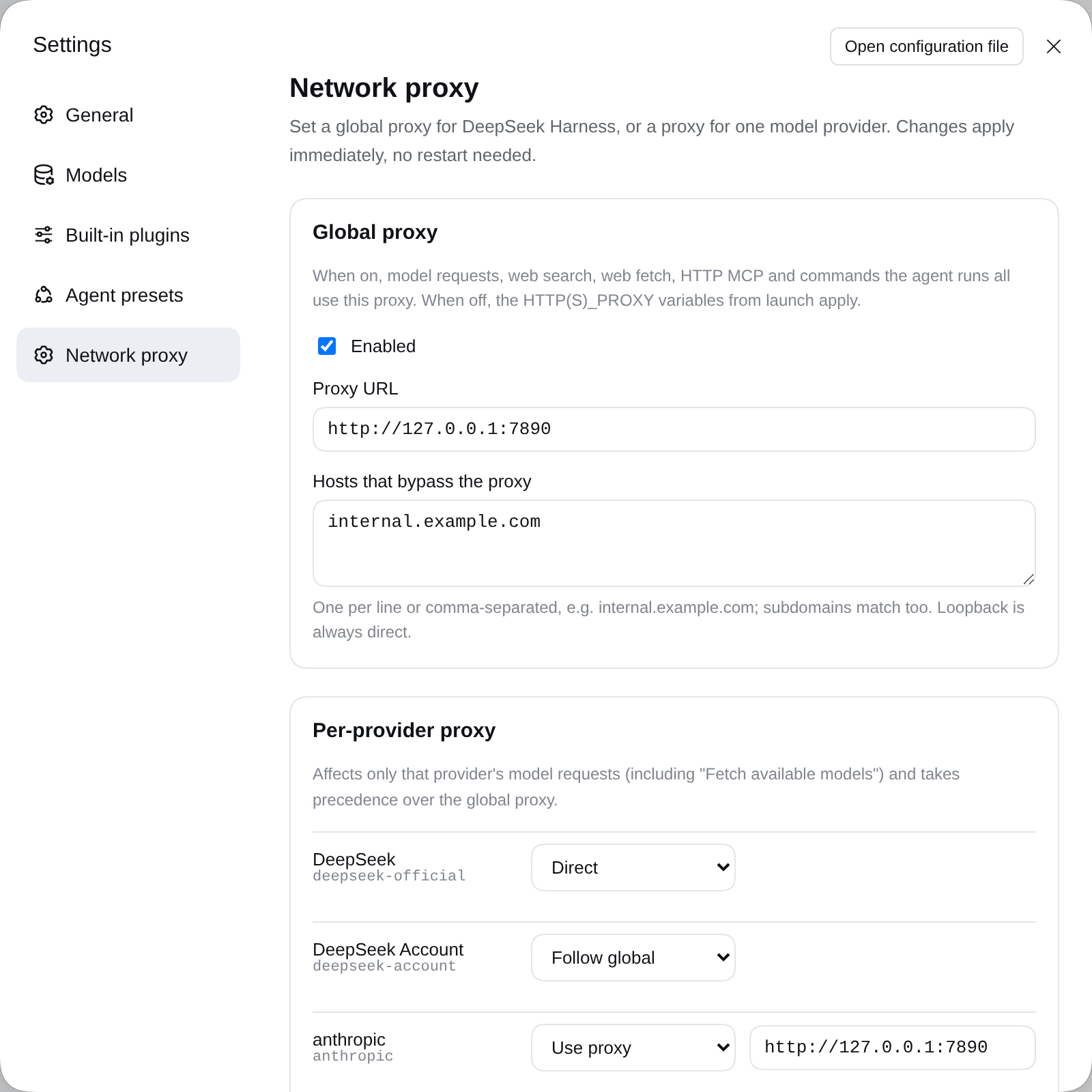
| Area | What it does |
|---|---|
| Global proxy | Tick Enabled and enter the proxy URL. Hosts that bypass the proxy takes one host per line and matches subdomains too. localhost / 127.0.0.1 are always direct. |
| Per-provider proxy | Lists configured model providers. Each can be Follow global, Use proxy, or Direct. Add a provider not in the list by typing its id below it (e.g. deepseek-official, anthropic, openai, or a custom Provider ID from the Models page). |
Save applies to the next request, including Fetch available models on the Models page.
Configuration file
The same settings live in $DSH_HOME/profiles/<profile>/cordis.patch.yml (the Web UI profile is web):
- id: dsh-proxy
  config:
    global:
      enabled: true
      url: http://127.0.0.1:7890
      noProxy: [internal.example.com]
    providers:
      anthropic:
        mode: proxy
        url: http://127.0.0.1:7890
      deepseek-official:
        mode: direct
| Field | Meaning |
|---|---|
global.enabled | Turn the global proxy on. Default false, which keeps the launch environment's proxy. |
global.url | Global proxy URL. |
global.noProxy | Hosts reached directly while the global proxy is on. |
providers.<id>.enabled | Use this provider's own setting. Default true; false follows the global route. |
providers.<id>.mode | proxy (use url) or direct (bypass every proxy, the global one included). |
providers.<id>.url | This provider's proxy URL. |
Proxy URLs may be http:// or https://. A bare 127.0.0.1:7890 becomes http://127.0.0.1:7890. Credentials go in the URL: http://user:password@host:port.
How it works
- Global proxy installs through dsh's own
@deepseek-ai/dsh-http-proxy, the package the launcher uses forHTTP(S)_PROXY. Loopback bypass,NO_PROXYmatching,web_fetchrouting, and the proxy environment of spawned tools therefore behave exactly as upstream. Turning it off restores the launch policy. - Per-provider proxy hooks the
llm/streammiddleware. A provider's model call runs in one async context. The plugin puts that provider's undiciProxyAgent(or a directAgent) in an AsyncLocalStorage, andfetchuses it inside that context. Other requests are untouched, and concurrent calls to different providers don't interfere. - Both sections are Cordis volatile fields. Saving in Settings fires
loader/volatile-update, and the plugin switches routes in place without reloading.
Limits
- HTTP(S) proxies only; SOCKS5 is not supported. The "mixed port" of Clash, v2rayN, and similar apps (e.g. 7890) also speaks HTTP, so use that port.
- Per-provider routes cover that provider's model requests only (including model discovery). Web search, web fetch, and other traffic use the global route.
- Credentials are stored in plain text. A username and password in the URL are saved in the profile's
cordis.patch.yml. The global proxy URL also reaches commands the agent runs through their environment. - Telemetry stays direct. It uses Node's
httpmodule, as it does in upstream dsh.
Develop
npm install
npm run typecheck
npm test        # global / per-provider / direct routing against local fake proxies
npm run build   # regenerates lib/ and client/ (commit them)
Try it in a local dsh: dsh plugin --profile web add /path/to/dsh-proxy.
Publish to npm (maintainers)
npm login                 # sign in as copylee; check with npm whoami
npm ci && npm test        # tests pass; lib/ and client/ are already built
npm pack --dry-run        # should list only lib/ client/ cordis.patch.yml README LICENSE package.json
npm publish               # publishConfig is public; with 2FA on, npm asks for an OTP
For later releases, push a version tag and the publish workflow publishes it through npm Trusted Publishing (no token needed):
npm version patch         # or minor / major: bumps the version, commits and tags vX.Y.Z
npm run build             # rebuild; commit lib/ and client/ if they changed
git push --follow-tags    # the vX.Y.Z tag triggers the publish workflow
The workflow checks that the tag matches package.json, runs typecheck, tests and the build check, then publishes. Prerelease versions (1.2.0-rc.1) go to the next dist-tag. It can also be run by hand from the Actions tab; a version already on npm is skipped.
License
MIT
System proxy and menus (0.4.0)
The global selector offers Off (use launch settings), System proxy (auto-detect), and Manual proxy. Each provider can also select its own system proxy, overriding the global route. Menus follow dsh-free-search's floating cards, hover highlights, and selection checkmarks, with Arrow, Home/End, Enter, Esc, and Tab keyboard support.
Detection tries valid HTTP(S) values from HTTPS_PROXY / https_proxy, HTTP_PROXY / http_proxy, and ALL_PROXY / all_proxy in that order, then Windows current-user Internet Settings or macOS scutil. Linux uses environment variables. A launch environment snapshot prevents the plugin's own installed proxy from feeding back into detection. OS settings are checked every 30 seconds; the settings page also offers Detect again. SOCKS, PAC, and WPAD are not supported. When detection finds no usable proxy, the global layer restores launch settings and provider overrides fall back to the global route with a warning. Status and logs mask proxy credentials.
global:
  enabled: true
  mode: system
  noProxy: []
providers:
  openai:
    enabled: true
    mode: system
Existing configurations without mode continue using their manual proxy. The global proxy remains disabled by default.
Related plugins
dsh-web (dsh-ssh)
zhu1090093659/dsh-web
dsh-web (dsh-remote-web-ui)
zhu1090093659/dsh-web
dsh-web-ui (dsh-ssh)
zhu1090093659/dsh-web-ui
dsh-web-ui (dsh-remote-web-ui)
zhu1090093659/dsh-web-ui