dsh-lan-access
cy-w-2000/dsh-lan-access
LAN access gateway for the Web UI: serve DSH on localhost or 0.0.0.0 with password protection or an explicit no-password mode plus expiry presets, and open a separate chat-only port that other agents can drive over HTTP with selectable workspace, token or token-free auth, and its own expiry. LAN sharing is opt-in: it rebinds the Web UI port to 0.0.0.0, gives other devices the full DSH interface behind a password (the default), and an explicit no-password mode needs you to confirm a security warning.
Install
dsh plugin --profile web add github:cy-w-2000/dsh-lan-accessREADME
dsh-lan-access · 局域网访问 / LAN access
A DSH bundle that opens two extra network surfaces for DeepSeek Harness — every switch applies immediately from Settings → LAN access, no save button. 为 DeepSeek Harness 多开两个网络入口,全部在「设置 → 局域网访问」里即时开关、即时生效,无需保存。
中文
功能
- 网络端口(本机) — 在
127.0.0.1:<端口>再监听一份 DSH Web 界面,本机浏览器直接访问,不需要密码。 - 局域网分享 — 把该端口改绑到
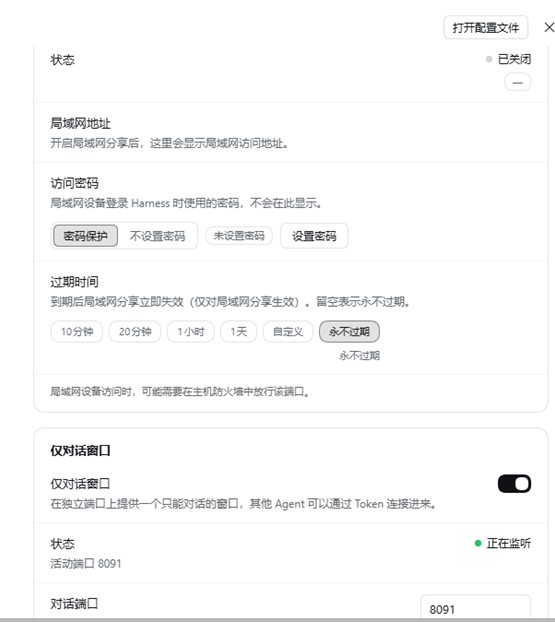
0.0.0.0,局域网内其他设备可用完整 DSH 界面:可选密码保护(scrypt 加盐哈希、可修改/清空),也可显式选择不设置密码(需确认安全警告);两种模式都支持过期时间快捷选项(10 分钟 / 20 分钟 / 1 小时 / 1 天 / 自定义 / 永不过期)。局域网设备看到的设置页始终是只读的。 - 仅对话窗口(独立端口) — 一个轻量的独立对话页面,同时提供 供其他 Agent 调用的 HTTP 接口:复制「连接指示」粘给别的 Agent,即可在所选工作区新建对话、发消息、取回复。支持 Token 鉴权或显式免 Token、独立过期时间,以及工作区选择(只影响新对话,不接管已有会话)。
所有配置保存在 $DSH_HOME/lan-access/state.json(Windows:C:\Users\<你>\.dsh\lan-access\state.json,仅当前用户可读写),不会把数据发送到本机以外。
安装
dsh plugin add https://github.com/CY-W-2000/dsh-lan-access
安装后在 DSH 中重新挂载/重启该插件(视版本而定),打开 设置 → 局域网访问 即可。
网络端口与局域网分享
- 打开「网络端口」后监听
127.0.0.1:<端口>,无密码。 - 打开「局域网分享」后同一端口改绑
0.0.0.0,设置页会列出可分享的局域网地址。 - 密码保护(默认):设置密码后,局域网访问需登录,登录成功下发签名的 HttpOnly 会话 Cookie;修改密码会让所有既有局域网会话失效。
- 不设置密码:必须确认阻塞式安全警告后生效;任何能访问该端口的设备都可直接进入 DSH。切回密码保护或设置密码会自动退出无密码模式。
- 过期时间:快捷选项或自定义时间;过期后局域网请求返回「已过期」页面,本机
127.0.0.1端口不受影响。
仅对话窗口(给其他 Agent 用)
- 独立端口(默认
8091),页面chat.html自带样式脚本、无外部依赖。 - Token(默认):
Authorization: Bearer <token>,可在设置页轮换,轮换后旧链接立即失效。 - 免 Token:必须确认安全警告;连接指示会自动省略鉴权头并提醒仅限可信网络。
- 过期时间:到期后页面与
/api/*返回 403(/api/health仍可探活并报告expired: true)。 - 工作区:可选默认工作区或当前 DSH 中的任意工作区;之后的新对话创建在该工作区,每个对话记录自己的归属,删除的工作区自动回退默认工作区。
HTTP 接口
| 接口 | 作用 |
|---|---|
GET /api/health | 健康检查 + expired 标记(无需鉴权) |
GET /api/info | 服务信息、鉴权模式、生效工作区、工作区列表、过期时间 |
POST /api/conversations | 在生效工作区新建对话 |
POST /api/conversations/:id/messages | 发送一条消息并等待本轮回复 |
GET /api/conversations/:id | 读取对话记录 |
GET /api/conversations | 列出通过该接口创建的对话 |
POST /api/conversations/:id/cancel | 取消当前生成 |
回复结构为 { reply: { text, reason }, reason, pendingInput, running, conversation }。若主机端需要工具审批,接口返回 reason: "input-required",在主机处理后再用 GET 读取。
安全说明
- 网关是明文 HTTP:只在可信网络使用,跨不可信网络请叠加 TLS 反向代理或 VPN。
- 不设置密码与免 Token 是显式降低安全性的选项:前者让任何能访问端口的设备进入完整 DSH(文件、命令、工具、审批、额度),后者让任何人可新建对话并消耗模型额度;启用前必须确认警告,仅限完全可信网络。
- 状态文件包含密码哈希(scrypt+salt)、签名密钥、对话 Token 与会话索引,权限
0600。 - 不会执行来自网络的代码;对话接口的输入有校验与长度限制。
限制
- 仅 IPv4;插件内部不终止 TLS。
- 仅对话端口只能新建对话,不会列出或接管主机已有会话。
- 局域网过期只影响局域网监听;对话过期只影响对话端口。
开发与许可
index.js— Host 入口:持久化配置、设置 API、HTTP/WebSocket 反向代理、监听器生命周期。chat-host.js— 仅对话监听:鉴权/过期、chat.html托管、对话 API(通过 DSHsessionController)。client.js— 设置页(Cordis 客户端模块);chat.html— 独立对话页面。- MIT,见 LICENSE。
English
What it does
- Network port (localhost) — serve the Web GUI on
127.0.0.1:<port>for local tabs/scripts; no password. - LAN share — bind that port to
0.0.0.0so other devices can use the full DSH UI. Choose password protection (scrypt-hashed, rotatable) or explicitly no password behind a blocking warning; both support expiry presets (10 min / 20 min / 1 h / 1 day / custom / never). LAN visitors always get a read-only settings page. - Chat-only window (separate port) — a standalone lightweight chat page plus an agent-facing HTTP API: copy the connection instruction into another agent so it can create conversations in a selected workspace, send messages, and read replies. Supports token or explicitly confirmed token-free access, its own expiry, and workspace selection (new conversations only; existing sessions are never taken over).
State lives in $DSH_HOME/lan-access/state.json (Windows: C:\Users\<you>\.dsh\lan-access\state.json, user-only permissions); nothing leaves the machine.
Install
dsh plugin add https://github.com/CY-W-2000/dsh-lan-access
Remount/restart the plugin if your DSH build asks, then open Settings → LAN access.
Network port & LAN share
- Network port listens on
127.0.0.1:<port>without a password. - LAN share rebinds the same port to
0.0.0.0; Settings lists the LAN URLs to share. - Password protection (default): LAN visitors sign in and receive a signed HttpOnly cookie; changing the password invalidates existing sessions.
- No password: only after confirming a blocking security warning; anyone reaching the port gets the full DSH UI. Setting a password or switching back exits passwordless mode.
- Expiry: quick presets or a custom date; expired LAN requests get an "expired" page, while the localhost port is unaffected.
Chat-only window (for other agents)
- Own port (default
8091), self-containedchat.htmlwith no external dependencies. - Token (default):
Authorization: Bearer <token>, rotatable; old links stop working after rotation. - No token: only after confirming a blocking warning; the connection instruction omits the auth header.
- Expiry: after it passes, the page and
/api/*return 403 (/api/healthstill reportsexpired: true). - Workspace: pick the default workspace or any workspace in this DSH install; new conversations are created there and each conversation records its workspace; a deleted workspace falls back to the default one.
HTTP API
| Endpoint | Purpose |
|---|---|
GET /api/health | liveness + expired flag (no auth) |
GET /api/info | service info, auth mode, effective workspace, workspace list, expiry |
POST /api/conversations | create a conversation in the effective workspace |
POST /api/conversations/:id/messages | send one message and wait for the turn's reply |
GET /api/conversations/:id | read the transcript |
GET /api/conversations | list conversations created through this API |
POST /api/conversations/:id/cancel | cancel the running turn |
Replies are { reply: { text, reason }, reason, pendingInput, running, conversation }. If the host needs tool approval the call returns reason: "input-required"; handle it on the host and read the result with GET.
Security notes
- The gateway is plain HTTP: trusted networks only, or put TLS/VPN in front.
- No password and no token are deliberate reductions of security: the former exposes the whole DSH UI (files, commands, tools, approvals, quota), the latter lets anyone create conversations and consume model quota. Confirm the warning and use trusted networks only.
- The state file contains the password hash (scrypt + salt), signing secret, chat token and conversation index; written with
0600. - The plugin does not execute inbound network input; conversation payloads are validated and bounded.
Limitations
- IPv4 only; no TLS termination inside the plugin.
- The chat-only port only creates new conversations; it never lists or takes over existing sessions.
- LAN expiry affects only the LAN listener; chat expiry affects only the chat port.
Development & license
index.js— host entry: persisted config, Settings API, HTTP/WebSocket reverse proxy, listener lifecycle.chat-host.js— chat-only listener: auth/expiry,chat.htmlhosting, conversation API through DSH'ssessionController.client.js— the Settings page (Cordis client module);chat.html— the standalone chat window.- MIT — see LICENSE.
Related plugins
dsh-web (dsh-ssh)
zhu1090093659/dsh-web
dsh-web (dsh-remote-web-ui)
zhu1090093659/dsh-web
dsh-purge
kingcharleslzy-ai/dsh-purge
dsh-web-ui (dsh-ssh)
zhu1090093659/dsh-web-ui