dsh-session-kit
czr-chu/dsh-session-kit
Session manager for DSH: export in full, compact or compressed form, back up workspaces as per-workspace ZIPs, restore deleted sessions from a reversible trash, move sessions between workspaces, and check attachment references.
Install
dsh plugin --profile web add github:czr-chu/dsh-session-kitREADME
dsh-session-kit

Session manager, backup, and migration toolkit for DeepSeek Harness.
Version 0.13.0 · public beta · 中文说明
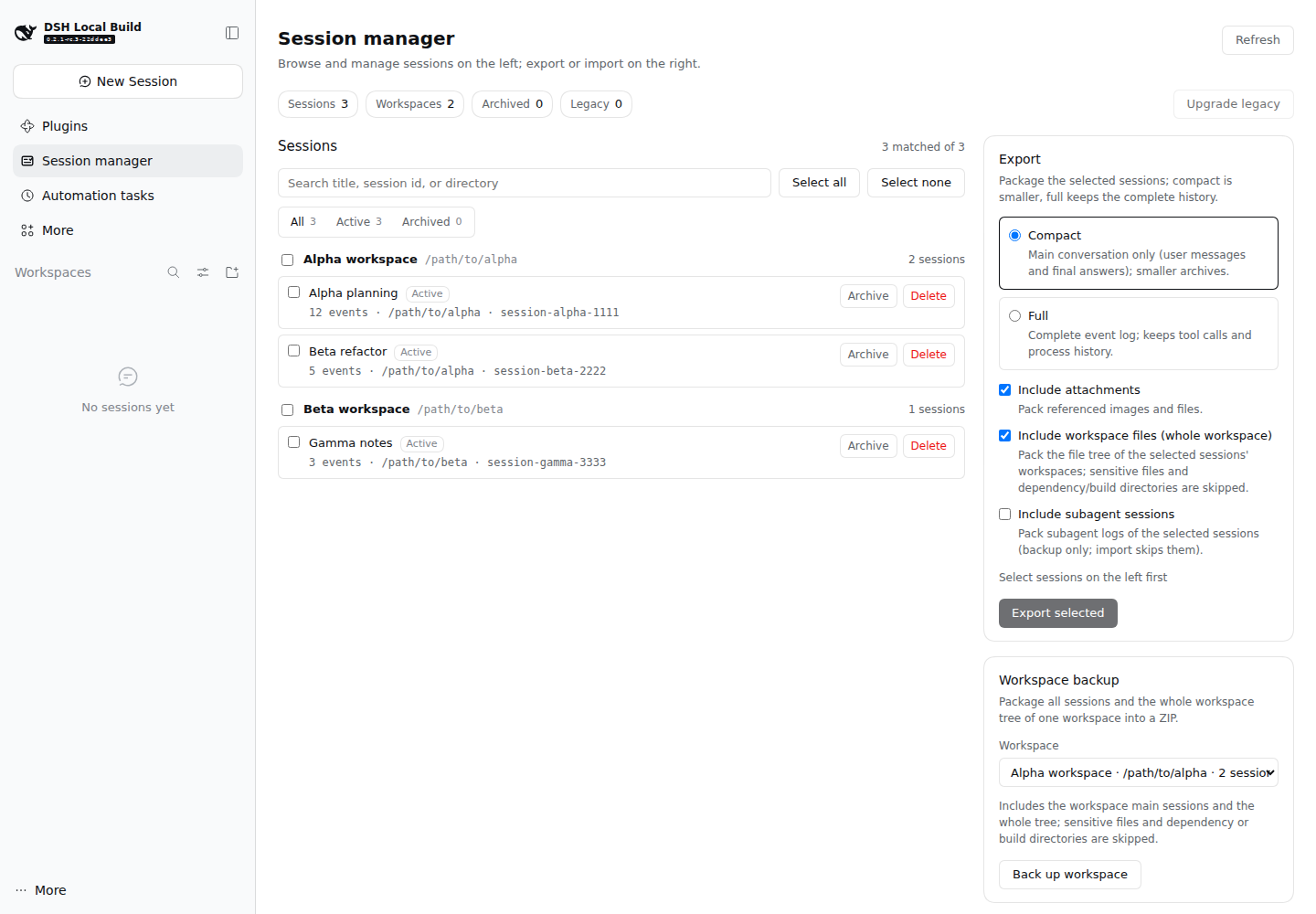
dsh-session-kit adds a Session manager panel and a session_kit agent
tool to DeepSeek Harness (DSH). It backs up a whole workspace (every session
plus the project files, collected once), exports selected conversations as
portable archives, imports them as new sessions on another machine or workspace,
manages archive state, upgrades old session logs through DSH's official
migration, and turns public DeepSeek share links into new local conversations.
It is built for people who migrate DSH between machines, keep local backups, or want a smaller conversation-only copy of a long session — without touching DSH's storage layout or rewriting session files by hand.
The plugin is a plain ESM bundle. It declares no
@deepseek-ai/*runtime dependency and reads every DSH capability through the composed service registry.
Why dsh-session-kit
- Back up a project, not guesses. A workspace is DSH's project unit: one ZIP carries every session in that workspace and its file tree exactly once.
- Move conversations between machines. One ZIP carries sessions, their attachments and, optionally, the workspace trees they ran in. Import creates new sessions and never overwrites existing ones.
- Keep a usable backup, not a byte dump. Compact export keeps the visible conversation — your prompts, image/file blocks and each turn's final answer — and drops tool calls, reasoning and streaming deltas. The result is still a valid DSH session you can continue.
- Manage sessions where they live. Archive/unarchive, delete to a trash directory with strict path validation, restore or permanently purge a trash operation, or (explicitly) erase permanently.
- Put a whole project away. Archive a workspace's sessions and remove only its registration; the directory, logs and files stay put, and restoring recreates the project with the same sessions, title and pinning.
- Move a session to another workspace. The copy is written under a new id, verified by reading it back, then the source is moved to the trash — the move stays reversible.
- Upgrade old logs the official way. Legacy sessions are upgraded through DSH's own migration chain; the old generation is retained and refusals are reported instead of forced.
- Bring in a public DeepSeek share. Paste a share link, pick a workspace, and the public conversation becomes a new local session.
Features
Browse, search, inspect
- Sidebar Session manager panel grouped by workspace; search by title, id, cwd or workspace; filter all / active / archived; sort by recently updated, created, title or directory; select one, many, or all. Long groups render 25 rows at a time with a show more button, and the selection bar reports selected ids that the current filter hides.
- The tools column is split into Export, Workspaces, Import, Trash and Checks tabs so it stays short. The selection bar archives sessions; the Workspaces tab archives a whole workspace. Active sessions (running or open) disable archive/delete/move and explain why.
- Archived sessions stay visible with an archived badge and a dimmed row.
- Subagent transcripts are hidden by default (they can be requested explicitly).
- Click a row for its storage size (all retained generations, lock files excluded), format status and archived state. The list itself never opens cold session logs.
Workspace backup (recommended for projects)
- Choose one or more workspaces; each selected workspace is backed up as its own ZIP containing all its main sessions + the whole workspace tree. Files are collected once per workspace, not per session.
- The archive records
manifest.backupwith the workspace id, title and source path; only that root is packed. Sensitive/build/dependency paths and symlinks are excluded with the normal workspace rules. - Restore through Import → Archive → Target workspace, which creates new sessions with the target cwd, attaches them to that workspace, and restores the files without overwriting existing files.
- This is the intended model when one workspace is one project. Session-level file derivation remains experimental for mixed workspaces.
Archive a whole workspace
- Archive whole workspace archives every session attached to it through the official session archive API, writes a restore record, and then removes the workspace registration only. The directory, session logs and workspace files stay exactly where they are.
- Use it when a project is paused but may come back. Deleting a workspace instead leaves its sessions in the unnamed workspace and loses the project grouping; the archive record keeps the title, path, order and each session's prior archived/pinned state.
- Restore recreates or reuses the workspace at the recorded path, reattaches the sessions, unarchives only the sessions this archive archived (sessions that were already archived stay archived), restores pinning, and removes the record only when every session was attached. A partial restore keeps the record for a retry.
- An active session aborts the archive and rolls it back. Archiving the workspace you are currently using makes DSH leave it; open Session management from another workspace (or after creating one) to restore the record.
- This is not a backup: nothing is copied, moved or deleted. Use workspace backup when you need an off-machine ZIP.
Export selected sessions
- Compact mode: conversation spine only. User messages, visible image/file blocks and the final assistant text of every turn, plus session-level config, request context and one title. Tool calls/results, reasoning, stream chunks, jobs, subagent and workspace events are dropped; sequence numbers are renumbered and the title's citations are remapped so DSH can replay and continue the log.
- Compressed mode: every event and tool call keeps its type, order and
seq; streamed deltas are emptied and oversized strings are truncated with a visible marker (default 8 KiB per string, 16 KiB per event). Use it when full is too large and compact loses too much. - Full mode: the complete event log and the attachments it references.
- One ZIP can contain many selected sessions; each session is its own folder
with a per-session
meta.json. - Optional workspace trees: include the whole workspace of the selected conversations. Dependency/build directories, credential-shaped files and symlinks are excluded; oversized files and cap violations are skipped with warnings.
- Top-level
manifest.jsonwith sha256 checksums, plus an archiveREADME.mdthat explains the layout.
Import
- Accepts an archive produced by this plugin, a DSH built-in session-log export,
or a bare
.jsonllog. - Always creates new sessions: it never modifies, overwrites or deletes an existing conversation.
- An archive exported by this plugin carries
archived/pinnedflags inmanifest.jsonand each sessionmeta.json; import re-applies them to the new id best-effort (a registry failure is a warning, not a rollback). - Before writing, a duplicate preflight compares each source id with local
sessions. Duplicates still import as new-id copies with a warning; enable
Skip duplicates (or
?skipDuplicates=1) to filter them out instead. If every session is filtered the import reportsno-session. POST /session-kit/import?progress=ndjsonstreams onesessionline per committed session plus a finaldone/errorline; the panel uses the normal JSON response.- New session id and header; parent/seed lineage is dropped. Delivery markers and inherited end-seed markers are rewritten for the new owner; attachments are restored into the content-addressed store.
- Optional workspace file restore into the chosen directory. Path traversal, absolute paths and symlinks are rejected before writing; existing files are skipped with a warning.
- Each imported session is read back through the session query after the write as a post-write verification; a failure is reported per session.
Manage: archive and delete
- Archive / unarchive a session or a batch. Archive state is durable in the workspace registry, so every DSH surface agrees; archived rows stay visible in this panel.
- Delete is a move, not an erase. The session directory and its
origin: 'subagent'descendants move to$DSH_HOME/session-kit-trash/<timestamp>/. User-visible fork/seeded children are preserved. Live sessions and running agents are refused before anything moves; every backend session directory is validated (canonical name, canonical project directory, not a symlink) and a failed move rolls back. - Each delete writes an
operation.jsonmanifest before the first move (per-session original directories, the derived sessions root, and the archived/pinned snapshots). Workspace membership, pins and archive state are cleaned afterwards; cleanup failures are logged rather than reported as a failed delete.
Trash: restore and purge
Deletes stay recoverable until you purge them.
- Trash card /
trash_list. Lists every operation under$DSH_HOME/session-kit-trash/with its session count, byte size, and restorable flag. Directories written by older releases (no manifest) are shown but marked manifest missing — they can only be purged or restored by hand. - Restore /
trash_restore. Moves each recorded session directory back to its original project directory, re-attaches it to that workspace, and replays the archived/pinned snapshot. A target that already exists is skipped, never overwritten; a path outside the recorded sessions root is refused. A partial restore keeps the operation (with the remaining sessions) for a later call. - Purge /
trash_purge. Permanently removes whole operation directories. Requiresconfirm: true; accepts explicit operation ids orall, optionally limited byolderThanDays. It never touches the attachment store and never removes a directory outside the trash root.
Move a session to another workspace
- Move card action /
move. Select sessions and choose Move to workspace (next to archive and delete). Pick the destination in the dialog. - DSH binds a session to a workspace through the header's
cwd, and that value cannot be re-labelled in place. The plugin therefore copies each session into the target workspace under a new id, verifies the copy by reading it back through the session query, attaches it there, and only then moves the source directory into the trash. A failed copy leaves the source untouched; a failed trash move keeps the copy and reports it. - Live/running sessions, subagent transcripts and older-format logs are skipped before any write. Subagent transcripts are not copied (they travel with the source into the trash); attachment bytes are shared, not duplicated; archived and pinned state is replayed best-effort.
- The old id stops working after a move; restoring the trash operation brings the
source and its old id back. The batch is per-session tolerant (max 100) and
requires
confirm: true.
Attachment reference check
- The Attachment check card and
attachment_reportscan up to 300 sessions read-only, resolve every image/file reference in the logs against the attachment provider's host path, and report references that are missing or unverifiable (no host path is exposed by the backend). GET /session-kit/attachment-report?limit=&includeSubagents=1accepts a positivelimit(max 300). The response includes scanned/total sessions, truncation, reference counts and per-session missing entries.- It never deletes, rewrites or repacks anything. This is deliberately not an orphan listing: the attachment store is append-only and exposes no enumeration/delete API in the supported surface.
Experimental: related files on delete
This feature is marked experimental in the UI and requires a second confirmation.
- Clicking a session loads a best-effort list of workspace files derived from its events: presented deliverables, tool result metadata, tool arguments and working-directory hints. Evidence is labelled strong or weak; files are grouped by session and individually selectable.
- Trash delete moves only the selected files into the operation's
<trash>/files/<encoded-root>/<relative-path>tree with afiles-manifest.json, then moves the session directories. A file failure rolls the moved files back before any session directory moves. - Permanent delete is a separate opt-in mode with its own red confirmation. It validates every session directory and selected file first, then unlinks the files and removes the session directories. There is no trash copy and no rollback; failures report what was already erased.
The derivation is inherently approximate: shell redirections, PTC/script outputs and files only mentioned in text cannot be discovered, and a file shared with another session is affected too. Review the preview before confirming.
Legacy format migration
- The list marks sessions stored in an older session format
(
formatStatus,legacy), including their stored generation. - Single or batch upgrade runs through DSH's official persistence migration:
SessionPersistence.open(id, 'write')triggers the prepare/publish path, the handle is closed immediately, and a secondstatverifies the published generation. The plugin never decompresses, re-encodes or rewrites a session artifact itself. - The released old generation stays on disk. If the official migration refuses a log (for example an unresolved tool call or an unsupported historical subagent descriptor), the source remains unchanged and the failure is reported with the official reason.
DeepSeek share-link import
- Paste
https://chat.deepseek.com/share/<id>or a bare share id, choose a target workspace, optionally set a title, and import. - Only public content from
chat.deepseek.comis fetched; arbitrary URLs are refused. Requests have a timeout and a response-size cap, and non-zero API codes / non-JSON responses fail loudly. - The public conversation is normalized (requests, responses, thinking, search and opened-source fragments, citations) and converted into the same v4 session skeleton used by the standalone share importer, then imported as a new session in the chosen workspace. No arbitrary workspace file is fetched.
Agent tool
The session_kit tool exposes the same operations to the model:
| Action | Purpose | Notes |
|---|---|---|
list | Summarize workspaces and sessions | archived rows are marked |
export | Write one ZIP under the plugin's export directory | mode: compact / compressed / full, sessionIds or all |
export_workspace | Write one ZIP per selected workspace | workspaceIds (max 20) or a single workspaceId; each ZIP carries all main sessions + that workspace tree |
workspace_archive_list | List whole-workspace archive records | read-only; title/path, session and partial counts |
workspace_archive | Archive all sessions of one workspace, then remove its registration | requires confirm: true and workspaceId; directory/logs/files are kept |
workspace_restore | Recreate the workspace and reattach its sessions | archiveId; partial records can be retried |
import | Import an archive file as new sessions | optional workspace file restore |
archive / unarchive | Toggle the durable archive state | batch ids supported |
delete | Move sessions to the trash | requires confirm: true; optional removeFiles with explicit selectedFiles; permanent: true erases irreversibly |
migrate | Upgrade legacy logs through DSH's official migration | sessionIds or all (needs confirm: true) |
move | Copy sessions into another workspace, then trash the sources | requires confirm: true and workspaceId; new ids; skips live/subagent/legacy |
trash_list | List trash operations with size and restorable flag | read-only |
trash_restore | Move an operation's sessions back into their workspace | operationId; optional sessionIds subset |
trash_purge | Permanently erase trash operations | requires confirm: true; operationIds or all, optional olderThanDays |
files | Preview derived related files for a delete | experimental, best effort |
detail | Report storage size, format status and archived state | up to 100 explicit ids; read-only, no writes |
import_share | Import a DeepSeek share link | input, optional workspaceId / cwd / title |
attachment_report | Report missing/unverifiable attachment references | read-only; up to 300 sessions; optional limit |
Example prompts you can give the agent:
- "Export the current session in compact mode."
- "Import the archive at ~/Downloads/session-kit-backup.zip into this workspace."
- "Upgrade all legacy-format sessions."
- "Import this DeepSeek share link into the project workspace: https://chat.deepseek.com/share/…"
Install
Requirements: DSH 0.2.1-rc.3 or newer, session format v4, Node 22+
for the plugin (the shipped DSH CLI requires Node 24.9+). The browser panel needs
a Web or Desktop deployment; a headless deployment still gets the
session_kit tool.
# from GitHub (recommended: pin a release tag)
dsh plugin --profile web add github:czr-chu/dsh-session-kit#v0.13.0

# or directly from a GitHub Release tarball
# dsh plugin --profile web add 'https://github.com/czr-chu/dsh-session-kit/releases/download/v0.13.0/dsh-session-kit-0.13.0.tgz'

# from a local checkout (iterating on the plugin)
dsh plugin --profile web add ~/src/dsh-session-kit

# verify the row was added
dsh plugin --profile web list --depth 0
Restart dsh web after installing, then refresh the page. The sidebar
gets a Session manager row under Plugins.
In the Desktop/Web Plugins → Add plugin dialog, enter either the GitHub
repository URL (https://github.com/czr-chu/dsh-session-kit#v0.13.0), the
Release .tgz URL, or an absolute local directory. The repository is public; no
GitHub token is needed for a Git install. See docs/install.md
for the repository requirements and offline install.
The npm name dsh-session-kit already belongs to an unrelated
package on npm, so install this project from GitHub or from a Release tarball;
do not run dsh plugin add dsh-session-kit unless this project is
later published under a different name.
An incompatible DSH version is refused at install time through
engines.dsh.
Quick start
- Open the panel. After restarting
dsh weband refreshing, click Session manager in the sidebar. Rows are grouped by workspace; use the search box and the all/active/archived filter. - Back up one or more workspaces. In Workspace backup tick the workspaces (or Select all workspaces) and click Back up workspace. Each workspace becomes its own ZIP with all its main sessions and its tree once; the panel reports every file and any per-workspace failure.
- Export selected sessions (optional). Select conversations, choose
compact, compressed or full in the Export card, and click Export selected.
The browser downloads one ZIP; the agent tool writes it under
$DSH_HOME/session-kit/exports/instead. - Import an archive. In the Import card choose Archive, pick a ZIP (or
bare
.jsonl), choose the Target workspace, enable workspace-file restore when restoring a backup, and click Import archive. Imported conversations appear as new sessions; nothing existing is overwritten. - Manage. Use the row actions to archive/unarchive or delete. Delete moves the session to the trash; the delete dialog also offers the experimental related-file selection and a separate permanent-erase confirmation. The Trash card at the bottom of the tools column lists delete operations and can restore or permanently purge them. Move to workspace copies the selected sessions into another workspace and moves the sources to the trash.
- Upgrade legacy rows. A row with the legacy badge can be upgraded singly or in a batch through DSH's official migration; the old generation is kept.
- Import a DeepSeek share. In the Import card choose the DeepSeek share tab, paste a share link or id, choose a workspace, and import.
- Or ask the agent. The
session_kittool exposes the same operations (see the action table below).
Archive layout
One ZIP contains a manifest, a restore README, per-session folders and optional workspace trees:
session-kit-<count>-sessions-<timestamp>.zip
├── manifest.json                         # kind/version, sessions, sha256, workspaces
├── README.md                             # restore instructions
├── sessions/<sessionId>/
│   ├── session.v4.jsonl                  # full mode
│   ├── session.compact.v4.jsonl          # compact mode
│   ├── session.compressed.v4.jsonl       # compressed mode
│   └── meta.json
├── attachments/
│   ├── media/<attachmentId>.<ext>
│   └── files/<prefix>/<digest>/<name>
└── workspaces/<encoded-workspace>/...    # optional whole workspace tree
A whole-workspace archive record lives outside the ZIP layout:
$DSH_HOME/session-kit-workspace-archive/<archiveId>/
└── record.json                           # workspace title/path/order, per-session archived/pinned, partial state
The trash produced by delete is separate from archives:
$DSH_HOME/session-kit-trash/<timestamp>/
├── operation.json                        # manifest: sessions, original dirs, archived/pinned
├── <encoded-session-id>/...              # moved session directory + subagent descendants
├── files/<encoded-workspace>/<relative>  # selected related files (experimental flow, optional)
└── files-manifest.json                   # original absolute paths, evidence, session ids (optional)
Configuration
Plugin row config (cordis.patch.yml or the plugin settings row):
| Field | Default (bundle) | Meaning |
|---|---|---|
maxImportBytes | 512 MiB | Maximum archive upload size |
maxExportBytes | 1 GiB | Maximum produced archive size |
includeAttachments | true | Export referenced attachments by default |
includeWorkspaceFiles | true (bundle) | Include whole workspace trees by default |
includeSubagents | false | Export subagent transcripts by default |
restoreWorkspaceFiles | true (bundle) | Restore archived workspace files on import by default |
workspaceExclude | [] | Extra directory names / patterns to exclude |
workspaceMaxBytes | unset | Optional byte cap for the workspace part |
trashDir | $DSH_HOME/session-kit-trash | Where deleted sessions move |
defaultMode | compact | Export mode used when the caller omits one: full, compact or compressed |
The bundle exports a standard-schema Config; unknown keys and wrong types
fail the plugin at startup rather than being silently defaulted. Batch limits:
up to 500 management ids per request, 100 ids for migration, workspace move,
file preview and session detail, 20 workspaces per backup batch, and 5000
selected files per delete.
Security and privacy
- Exports contain user content: conversation text, referenced attachments and (optionally) workspace files. Review an archive before sharing it.
- Workspace collection excludes
.git,node_modules,.venv,venv,dist,build,.next,target,pycache,.cache,.pnpm-store,.yarn,.idea,.vscodedirectories;.env,.env.,.pem,.key,.p12,.keystore,id_rsa,id_ed25519*,.npmrc,.netrc,.git-credentials,credentials*,secrets*,.DS_Storefiles and.ssh,.aws,.gnupg,.config/gclouddirectories. Symlinks are not followed. DSH credentials, upload indexes, caches and telemetry identities are never read. - Imports treat archives as untrusted: manifests and checksums are validated, workspace restore rejects traversal/absolute paths/symlinks, format-version mismatches and over-limit archives are refused, and existing sessions are never overwritten.
- Delete is a trash move with strict backend-location validation and rollback; permanent delete is opt-in, validated before erasing, and irreversible.
- Share import accepts only
chat.deepseek.com/share/<id>links or bare share ids, never arbitrary URLs, with timeout and response-size caps. - Deleting with related files is experimental and best effort. The derivation can miss files and can affect files shared with other sessions. Treat the preview as a hint, not a complete inventory.
- These protections reduce risk but cannot guarantee that every sensitive file in a workspace is undiscoverable. Keep backups and review exports.
More detail: docs/security.md and the privacy audit.
Compatibility
- DSH
0.2.1-rc.3or newer; session format v4. - Node.js 22+ for the plugin; the shipped DSH CLI requires Node 24.9+.
- Web and Desktop deployments get the panel; headless deployments get the agent tool.
- Import requires the archive's session format to match the running DSH; export in a matching version or migrate first.
- DSH public APIs are pre-stable; this plugin reads capabilities through
ctx.get(...), so it does not pin@deepseek-ai/*packages. A DSH upgrade may still require a plugin update.
Known limitations
- Compact export is lossy by design. It keeps the visible conversation, not tool history, reasoning or runtime records; use full export for a byte-level backup.
- Subagent transcripts are never imported; imported sessions have no parent/seed lineage. Fork/seeded children hidden from a parent delete are kept as independent sessions.
- Workspace export currently packs the whole workspace tree (with the exclusions above). A per-session touched-files export is not implemented; the checked-file selection exists only for deletion.
- Backing up several workspaces produces one ZIP per workspace and may trigger a browser "allow multiple downloads" prompt; the batch is not atomic.
- Large workspaces are bounded by
maxExportBytes/workspaceMaxBytes; oversized files and cap violations are skipped with warnings. - Related-file derivation is approximate and marked experimental.
- A workspace move creates a new session id: links/bookmarks to the old id stop working until you restore the trashed source. Subagent transcripts are not copied and the move is not atomic across a batch.
- Archiving a workspace does not copy or delete any file; it archives the member sessions and removes the registration. Restoring normally creates a new workspace id at the same path, and archiving the workspace currently in use makes DSH leave it until another workspace is opened.
- Permanent delete has no rollback and no trash copy.
- The official format migration can refuse a legacy log; the plugin reports the refusal and leaves the source unchanged.
- Share import needs network access to
chat.deepseek.com; private or deleted shares fail, and only public content is available. - Trash is not cleaned automatically. Use the Trash card /
trash_purge(or delete old operation folders yourself) when the space is needed; a purge requires explicit confirmation and never removes attachments.
Development and testing
The host half is plain ESM; the browser half is bundled from src/client/ with the same closure-factory protocol the client module system loads. From a checkout of this repository:
# install the pinned build tooling and rebuild the committed client artifact
cd dsh-session-kit && npm ci
npm run build:client

# plugin-local tests (network-free; real-backend cases skip when unavailable)
npm run format:check
npm run lint
npm test

# full suite from the DSH repository root, including real persistence/replay checks
node --import tsx/esm --test dsh-session-kit/test/*.test.mjs
Expected result: 331 tests, with 9 guarded real-backend cases skipped under
plain node --test (they run when the DSH checkout is available
through tsx). The suite covers session listing/reading, compact
building, workspace file collection and sensitive exclusions, archive
build/import (including zip-slip and sha256 checks, archived/pinned restore,
duplicate preflight, NDJSON progress), archive/trash/permanent
delete semantics, trash restore/purge, workspace move, multi-workspace backup,
attachment reference reporting, official format migration, and share-link
normalization/build/import against a real local JSONL backend where available.
Project docs: architecture · install and upgrade · security · plugin conformance · workspace backup · self-assessment · privacy audit · feature matrix · roadmap · change documentation · decision records · market listing.
Contributing and reporting security issues
- Issues and pull requests are welcome on GitHub. Please keep fixtures synthetic: no real session logs, workspace paths, credentials or screenshots.
- For a security issue, do not open a public issue with sensitive details. Report it privately through GitHub Security Advisories on the repository (or contact the maintainers listed there) and include a minimal reproduction.
- Before sending a change, run the test command above and keep compatibility notes (DSH version, session format) current.
License
MIT. See LICENSE. Portions of lib/zip.js,
lib/format.js and lib/attachments.js are derived from
dsh-session-port (MIT); see
NOTICE.
Related plugins
billion-context
ranxianglei/billion-context
dsh-web-ui (dsh-chat-recovery)
zhu1090093659/dsh-web-ui
dsh-synapse
liangmianya/dsh-synapse
dsh-archive-manager
michengai/dsh-archive-manager