deepseek-harness-tui
demo-0416/deepseek-harness-tui
Interactive terminal UI for deepseek-harness, installed as a dsh profile bundle
Install
dsh plugin --profile web add github:demo-0416/deepseek-harness-tuiREADME
deepseek-harness-tui


English | 简体中文
Interactive terminal UI for deepseek-harness, installed as a dsh profile bundle. It renders into the terminal's main screen — no alternate screen, so the conversation stays in the scrollback after you leave — and runs in the same process as the agent it drives.

Highlights
- A transcript built for agents — streaming answers, tool cards with live
output, and a one-row collapse for runs of read-only calls (
Thought for 8s, searched for 3 patterns, read 2 files); Ctrl+O reopens the cards. - Steer while it runs — the editor stays live under a running turn: Enter steers, Esc cancels, and queued prompts are handed back on cancel.
- Modes on one key — Shift+Tab cycles normal → auto-accept → plan; the
badges above the prompt and
/permission//planalways agree, because the key writes through the same services. - Sessions are durable —
/resumepicks up any past session,/rewindforks back to an earlier prompt with the original left intact,/searchgreps everything the session holds. - Models and providers, in place —
/modelpicks a route and reasoning effort (per session or as the saved default);/loginstores a key checked against the endpoint before it lands in the credential store. - A terminal that adapts — light/dark/no-color themes previewed live,
English/Chinese chrome (
/lang), rebindable keys,@file references honoring.gitignoreviafd. - Scriptable —
--printruns one task with no UI and answers on stdout, under the same flags, model, and preset as the interactive run.
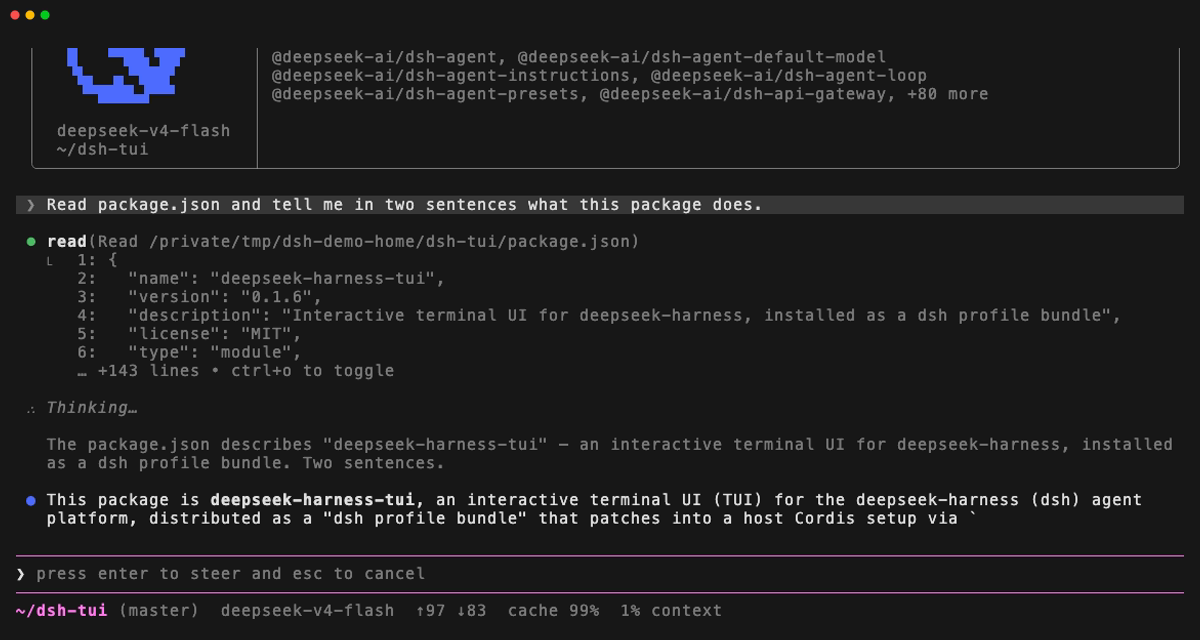
A turn as it streams: the tool card the agent's read call renders, the
thinking that follows it, the answer arriving token by token — and the editor
still live underneath, waiting for a steer (Enter) or a cancel (Esc):
Quick start
The dsh CLI must be installed first — this package is a dsh plugin, not a standalone program:
npm install -g @deepseek-ai/dsh
dsh plugin --profile tui add deepseek-harness-tui
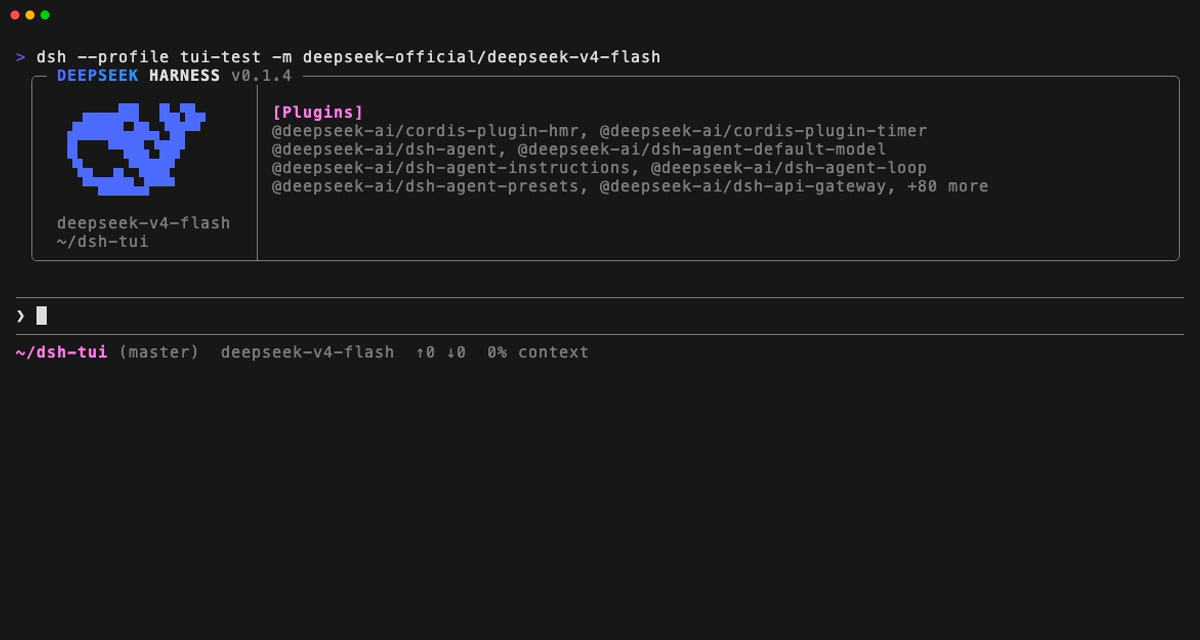
dsh --profile tui
The plugin command installs the package into a new tui profile (dsh-base +
deepseek-harness-tui) and activates it on next launch.
Usage
dsh --profile tui                                      # start the interactive TUI
dsh --profile tui "fix the failing test"               # start and send an initial prompt
dsh --profile tui --continue                           # resume the most recent session
dsh --profile tui --resume <sessionId>                 # resume a specific session
dsh --profile tui --preset code                        # start on the "code" agent preset
dsh --profile tui -m deepseek-official/deepseek-v4-flash  # override the model
dsh --profile tui --print "run the tests"              # one task, one answer on stdout
| Flag | Action |
|---|---|
-m, --model <provider/model> | model selection for this run |
--preset <id> | agent preset a fresh session is composed from; a resumed session keeps the preset its own log records |
-r, --resume <sessionId> | resume a session by id |
-c, --continue | continue the most recent session in this workspace |
-p, --print <task> | run one task with no UI: the answer goes to stdout, the exit code is 0 only for a completed turn, and tool approvals are pinned to never because there is nobody to ask |
-h, --help | show this help |
[prompt...] | initial prompt, sent once the UI is up |
Both stdin and stdout must be TTYs; the bundle refuses to start on a pipe.
--print is the exception — it renders nothing, so it runs on a pipe, which is
the only place it is useful. Every other flag means the same thing with it:
--print runs against a --resumed or --continued session as readily as
against a fresh one, under the model and preset the rest of the command line
selects.
Keys
Every key below is what the terminal actually binds, at its default. ? at an
empty prompt, /hotkeys, and /help print the same list, generated from the
keybinding registry, so a deployment that moves a key sees the new one named on
all three.
| Key | Action |
|---|---|
| Enter | send |
| Shift+Enter / Alt+Enter / Ctrl+J | newline; a \ before Enter does the same, for terminals that cannot send Shift+Enter |
| Up / Down | prompt history from the first row of the prompt, cursor movement below it |
| Tab | accept a completion |
@ | reference a file |
/ | run a command; /skill:<name> loads a skill |
? | shortcut help, on an empty prompt; never typed into the draft |
| Ctrl+R | search the prompt history backwards |
| Ctrl+G | search this session's messages; Ctrl+F stays the editor's forward-char |
| Shift+Tab | cycle mode: normal → auto-accept → plan → normal. normal and auto-accept are the workspace-write and auto-accept permission presets (same sandbox, approval asked or not); plan is plan mode, which the cycle enters on workspace-write. danger-full-access is not a rung — it is reached with /permission, and a session already on it keeps it while the key moves plan mode alone |
| Ctrl+N | expand or collapse the plan; Ctrl+Y stays the editor's kill-ring paste |
| Ctrl+O | cycle tool cards: preview, full, hidden |
| Ctrl+T | show or hide thinking blocks — off, thinking streams and goes with the step that wrote it; on, every step keeps it, history included. The model reasons either way; showReasoning: false turns the key off with it |
| Ctrl+X | copy the last answer |
| Ctrl+L | redraw |
| Esc | cancel the turn (and hand back what was queued behind it); again on a draft clears it; again on an empty prompt opens Rewind |
| Ctrl+C | cancel while running, clear the draft while typing, twice to exit while idle; a third press leaves a turn that will not cancel |
| Ctrl+D | exit on an empty prompt |
| Shift+Ctrl+D | session debug panel — identity, lifecycle, screen, resolved keys |
While a surface holds the keyboard
| Surface | Keys |
|---|---|
Panel (/help, /hotkeys, /palette, /status, /mcp, /doctor) | Up/Down scroll · PgUp/PgDn page · g/G or Home/End top or bottom · Esc or Ctrl+C close |
| Question | Up/Down move · 1-9 answer straight away · Space toggle (multi-select) · "Type something." row for a custom answer · PgUp/PgDn page long detail · Enter submit · Esc or Ctrl+C cancel |
| Permission prompt | Up/Down move · 1-4 answer straight away · Enter confirm · Esc or Ctrl+C deny |
| History search (Ctrl+R) | type to match · Ctrl+R steps to an older match · Tab or Esc accepts into the editor · Enter sends it · Ctrl+C or an emptied query restores the draft |
Session search (/search, Ctrl+G) | type to filter · Up/Down move · PgUp/PgDn page · Enter opens the message · Esc leaves the message, then clears the query, then closes |
Model picker (/model) | type to filter · Up/Down move · Left/Right or Shift+Tab adjust reasoning effort · Enter save as default · Ctrl+S use for this session only · Esc clears the filter, then closes |
Resume picker (/resume) | type to search · Up/Down move · PgUp/PgDn page · Tab switches between this workspace and all · Enter resume · Esc clears the search, then closes |
Rewind (/rewind) | Up/Down move · PgUp/PgDn page · Home/End first or last · Enter go back to that prompt · Esc close |
Plugins (/plugins) | type to filter · Up/Down move · PgUp/PgDn page · Enter expand one entry · Esc close |
Skills (/skills) | type to filter · Up/Down move · PgUp/PgDn page · Enter read one skill (Up/Down scroll · g/G or Home/End top or bottom) · Esc leaves the skill, then clears the filter, then closes |
Settings (/config) | Up/Down move · Enter flips a switch, steps a choice, or opens a submenu · Left/Right step a choice · Esc close |
Theme picker (/theme) | Up/Down preview each theme on the screen behind it · Enter keep it · Esc restore the one you opened on |
Provider sign-in (/login, /provider add) | Up/Down move · Space tick a model · Enter continue · Ctrl+U clear the field · Esc cancel the whole flow |
Ctrl+C is the one key that is never rebindable: it is how a terminal is always
left. Every other binding is configurable — see keybindings below.
Commands
| Command | Action |
|---|---|
/help | keyboard shortcuts and commands |
/hotkeys | the keyboard shortcuts alone |
/model [[provider/]model] | switch the model and save it as your default; without an argument it opens the picker, which can also pick for this session only |
/preset [<preset> | copy <preset> <new-id>] | show, switch, or copy this session's agent preset |
/config | this terminal's own settings — the Ctrl+T thinking pin, the tool-card phase a session opens on, theme — changed in place and saved for the next session |
/theme [auto|light|dark|no-color] | the palette this terminal paints with; without an argument it opens the picker |
/login [provider] | give a provider an API key: pick a configured route or one the adapter offers, paste the key, and it is checked against the endpoint before being stored. The key goes to the credential store; settings record only the variable name |
/provider [add] | list configured providers and the ones /login can configure; add walks through name, endpoint, protocol, key, and the models the endpoint reports |
/copy | copy the last answer to the system clipboard |
/new | start a blank session in this workspace; the current one keeps its history and stays resumable |
/clear | clear the transcript view; the session log is unchanged |
/lang [en|zh] | show or switch the interface language; the choice is remembered for the next session |
/palette | every color and attribute role this terminal renders |
/export [path] | write this session's log to a file and report the path; an existing file is replaced only after you confirm |
/plugins | search and inspect the Loader's plugin entries |
/search [query] | search this session's messages; an argument fills the panel's query box |
/rewind | go back to an earlier prompt in this session |
/resume [session] | list this workspace's resumable sessions; an argument fills the picker's search box |
/skills | search this session's skills and read one in full |
/status | session diagnostics, system prompt, registered tools |
/mcp | the MCP servers this agent's tools come from, with each server's tool list; says how to mount one when the profile has none |
/doctor | check the Node version, the terminal, the model route, and the services this terminal degrades without |
/exit, /quit | exit after the active turn reaches idle |
/skill:<name> [instructions] | load a skill into the conversation |
/reload | EXPERIMENTAL (dev): re-read the Loader's config files and apply the diff, idle only. Registered only when experimentalCommands is on |
Those are this bundle's own commands. Whatever else the profile mounts registers
its own on top of them, and /help lists what the running session actually has.
/details is retired. It packed two unrelated switches into one argument syntax
— [collapsed|expanded|hidden] [reasoning [on|off]] — that had to be memorized
to be used, and it remembered neither past the process. The two things it did
belong in different places: the tool-card phase is what Ctrl+O cycles on the
spot, and the thinking display is a standing preference. Both are rows in
/config now, beside the theme row that opens /theme. Its
detailsDialogWidth was renamed settingsDialogWidth, and its argument
completions are /theme's four values.
What /config and /theme change applies at once and is written to the tui
section of the harness's own settings document ($DSH_HOME/settings.yaml),
through the same optional settings service /model saves a default model
with. Every /config row reads its value live, so Ctrl+O pressed while the
panel is open moves the tool-card row under it. A host that never mounts that
service keeps every switch working for the session and simply forgets it at
exit.
/lang switches this terminal's own chrome — the command list, the panels
(/help, /status, /config, /search, /skills, /mcp, /doctor,
/plugins), the prompt and status rows, the dialogs and their buttons, and the
notices those surfaces write — between English (the default) and Chinese; the
conversation itself is never translated. A few command answers are still
English-only whatever the language is: /model, /preset and /resume print
their own report text, and the turn-outcome notices the transcript folds
("Turn cancelled.", "The model reached its output-token limit.") come from the
session log rather than from the message table.
The choice is written to the Host's locale settings section when a settings
provider owns one, which is the same preference the web client reads, and to
$DSH_HOME/tui-locale.json (~/.dsh/tui-locale.json) otherwise.
@ file references
@ lists the workspace through fd when the host has it (fd, or fdfind on
Debian and Ubuntu), so completion honors .gitignore, .ignore, and
.fdignore. Without it a built-in walker takes over and skips build output by
name — .git, node_modules, dist, build, out, coverage, .cache,
.next, .nuxt, .turbo, .venv, __pycache__, target — and withholds
*.log and *.tsbuildinfo from a query that named no extension. Set
fileSearchCommand to pin the binary's path, or to "" to always use the
walker, and fileSearchExcludedDirectories to change what the walker skips.
Commands complete their arguments too: /model offers every advertised
provider/model, /preset the roster's presets and the copy verb, /theme
its four values, and /resume this workspace's recent sessions.
Surfaces
- Chat — the main view: streaming messages, tool cards, the plan, the status
row, and the prompt with its context line. A run of consecutive read-only
calls — reads, greps, globs,
ls/cat-shaped shell commands, MCP queries — reports as one row (Thought for 8s, searched for 3 patterns, read 2 files) instead of one card each; Ctrl+O opens the run back into its cards. A call that writes never joins one —cat a > bwritesb, whatever its verb says — while a call that fails stays in the run and turns its bullet red, because a failure the reader cannot see is worse than a row that admits one. Each fragment of that row is a whole phrase per language rather than a verb and a noun joined at render time, so Chinese picks its own word order, measure words, and comma. - Thinking on that row — the run reports the thinking next to it as its
first clause (
Thinking for 12s, read 2 files…), counting up against the clock while the model is still thinking. It is the only thinking duration a default transcript states: the thinking block itself keeps its own rule and goes with the step that wrote it (Ctrl+T pins it, Ctrl+O expanded brings it back). Every clause carries its own tense — the files are read while the thought is still running — and the row a duration appeared on is the row that keeps it, so a thought that ends in an answer rather than in another tool call settles in place instead of vanishing off the screen. Until the run's first call names a file, a pattern or a command, the⎿line under the row shows the newest line of the thinking;showReasoning: falsekeeps that line off the row like everywhere else, and the duration — which quotes nothing — stays. - Rewind —
/rewind, or a double Esc at an empty prompt: go back to an earlier prompt. With a host that can fork the session the conversation moves with it and the original stays resumable; otherwise the prompt comes back to the editor alone. Files are never restored — dsh keeps no file checkpoints. - Resume —
/resume [session]: pick and resume a past session, in this workspace or (Tab) in all of them. A row is its title over how long ago it was touched and how big its log is (2 hours ago · 354.1KB); the session you are in is not listed, because resuming into it is not a destination. The id is matched by the search box but printed on no row. With nothing typed and nothing to list the panel says there is no other session to resume, rather than reporting a search that missed — the empty list is the answer, not a failed query. Leaving the terminal prints the command that brings the session you just left back, so the way in is on screen at the moment you walk out. - Session search —
/search [query], or Ctrl+G: every message this session holds, filtered as you type, with the hit shown in place and the whole message one Enter away. It is a panel rather than a jump because the transcript above the prompt belongs to the terminal's scrollback, which no program can scroll for you. - Plugins —
/plugins: search and inspect the Loader's entries. - Skills —
/skills: search what this session composes and read one skill's body;/skill:<name>is how you then load it into the conversation. - Settings —
/config: the preferences this terminal decides for itself — the thinking pin, the tool-card phase a session opens on, the theme — plus the language and model rows, which are read-only and name the command that changes them. - Theme —
/theme, or the/configrow:auto(follow the terminal's report),light,dark,no-color, previewed on the screen behind the picker as you move and restored if you leave by Esc. - Provider sign-in —
/login [provider]: give a route an API key. The list holds what settings already configure and what the adapter's own directory offers, which is what lets a machine with an empty settings file reach DeepSeek's official endpoint at all. The key is never echoed — the field draws dots — and it is checked against the endpoint before it is stored where there is an endpoint to check: a 401 or a 403 stores nothing; a key an endpoint could not answer for is stored only after an explicit yes; and a catalog route, whose endpoint lives inside the adapter where this terminal cannot see it, is stored straight away because there was never anything here to ask. A key the endpoint actually answered for is the only one the receipt calls checked; every other stored key is reported as unchecked rather than as working. The secret goes to the credential store's own file; settings record the variable name and nothing else./providerlists the same two groups, and/provider addwalks a route the adapter has never heard of through name, endpoint, protocol, credential variable, key, and the models the endpoint reports. - Status —
/status: session diagnostics, system prompt, registered tools. - MCP —
/mcp: which MCP server each of this session's tools came from, read back out of themcp__<server>__<tool>names the tools are registered under, because the harness keeps no registry to ask. It is read-only by construction — the terminal holds no handle to connect, restart, or authenticate a server — and a profile with no MCP row is told how to mount one instead of shown an empty list. - Doctor —
/doctor: what the session is running on, where/statusdescribes the session itself — the Node version, the terminal, the model route, and the services this terminal degrades quietly without. Each check is one line: a verdict, what was observed, and the one thing to do about it. - Help —
/help: keys and slash commands.
Configuration
Values on the bundle row (tui-runner), all optional.
| Key | Default | Meaning |
|---|---|---|
welcome | — | extra dim line under the startup banner; with no key at all the wordmark sweeps in instead |
sessionId | main | shared agent/session identity this terminal drives |
initialSkill | — | skill auto-invoked as the session's first turn, as if /skill:<name> were typed; set by a launcher, not by a person |
initialDraft | — | text the editor opens with, unsent; set by a rewind handoff |
experimentalCommands | false | register the developer commands (/reload today) |
showReasoning | true | may this transcript render reasoning text at all; false hides the blocks in every phase, keeps the model's words off a collapsed row's ⎿ hint (the duration stays), and turns both Ctrl+T and the /config Thinking display row off |
markdownRenderer | claude | claude (this bundle's renderer) or pi (pi-tui's Markdown); a claude render that throws falls back to pi for the rest of the process |
maxToolOutputLines | 6 | body lines kept in a collapsed tool card's head/tail preview |
maxDiffEditLength | 1000 | added and removed lines explored while deriving an exact line diff |
maxQuestionOptions | 8 | options visible at once in a question panel |
maxModelOptions | 8 | models visible at once in the model selector |
maxResumeOptions | 8 | sessions visible at once in the resume selector |
resumeScanConcurrency | 4 | concurrent cold projection reads in one resume scan |
questionDialogWidth | 200 | question panel width in columns, clamped to the terminal |
questionDialogMaxHeight | 20 | question panel maximum height in rows |
modelDialogWidth | 76 | model selector width in columns |
modelDialogMaxHeight | 20 | model selector maximum height in rows |
settingsDialogWidth | 72 | /theme selector width in columns |
fileSearchMaxResults | 20 | fuzzy file candidates displayed for one @ query |
fileSearchMaxEntries | 10000 | paths retained in one @ workspace index |
fileSearchExcludedDirectories | see above | directory basenames the walker skips |
fileSearchCommand | — | fd path or name; unset discovers it on PATH, "" disables it |
showHardwareCursor | false | show the terminal's hardware cursor at the editor's IME marker |
title | DeepSeek Harness | terminal window title while the UI is mounted |
theme.color | true | apply the built-in ANSI palette |
theme.truecolor | detected | 24-bit brand gradient on the banner; unset reads COLORTERM |
theme.leftPrompt | ${cwd}${git/worktree}${model}${token_meter/cache_hit_rate}${context} | left-aligned template above the editor |
theme.rightPrompt | ${queued} | right-aligned template above the editor |
theme.inputPrompt | ❯ | the editor's first-line prefix |
theme.inputPlaceholder | press enter to steer and esc to cancel | placeholder in an empty editor while the agent runs |
keybindings | — | key overrides, keyed by action id |
Prompt templates interpolate ${name} against the values this bundle registers
— cwd, git/worktree, model, context, token_meter/cache_hit_rate,
goal, queued, symbol, indicator — and a separator next to a value that
is currently unavailable is dropped with it.
Bindings other than Ctrl+C are configurable: set keybindings on the bundle row
({ "app.history.search": "alt+r" }), keyed by action id and valued with one
pi-tui key id or several. This bundle's ids are app.mode.cycle,
app.tools.cycle, app.history.search, app.transcript.search,
app.todos.toggle, app.thinking.toggle, app.message.copy,
app.screen.redraw, app.cancel, and app.exit; pi-tui's own editor bindings
can be moved the same way. Shift+Ctrl+D reports what each of those ids resolved
to, any key two actions both claim, and any key an app.* action takes off
pi-tui's editor — which is the first thing to suspect when a key "does nothing".
Two keys are deliberately not what a reader might expect, because an app.*
binding is answered before the editor sees the key: search is Ctrl+G rather than
Ctrl+F (pi-tui's tui.editor.cursorRight), and the plan toggle is Ctrl+N rather
than Ctrl+Y (pi-tui's tui.editor.yank). Rebinding either onto the editor's key
takes the editor's habit away for good.
Shift+Tab is safe to take for the mode cycle for the same reason: pi-tui binds
tab and nothing else in that family, and its editor recognises no Shift+Tab of
its own. The /model picker's Shift+Tab (step the reasoning effort) is a
different scope and keeps working — while any overlay owns the screen the app's
listener returns before its first branch, so the dialog sees the key first.
The cycle itself writes nothing of its own: normal and auto-accept are
selected through ctx.permissionPresets (the auto-accept entry is added to
the table by this bundle's cordis.patch.yml) and plan mode through
ctx.planMode, so /permission, /plan, a resumed log, and the key all report
the same state. A mode that is on says so above the prompt — ⏸ plan mode on,
⏵⏵ auto-accept on — with the key that cycles it named beside the badge. Both
badges can be up at once, reached with /permission auto-accept and /plan
rather than with the key; the hint then rides the last one alone, because one
key repeated on two stacked rows reads as two keys to press. A deployment that
composes no preset table, or no plan mode, keeps the rungs it has: the key
cycles what is mounted, and says so once there is nothing left to cycle.
Development
pnpm install
pnpm typecheck
pnpm test
pnpm build
dsh plugin --profile tui add link:./path/to/dsh-tui  # live-link for development
dsh --profile tui
Set experimentalCommands: true on the tui-runner row to get /reload while
editing config files.
The plugin is two Cordis plugins in one bundle:
dsh-tui/startup— parses the TUI's own command line and provides thetuiStartupservice.dsh-tui— the runner: owns the pi-tui render loop, the in-process agent session, the approval answerer, and the user-question provider.
Data flows one way. Events from the dsh bus (session/event, agent/status)
are folded by a per-session read model into an immutable node list; a keyed
reconciler turns that list into pi-tui components, reusing every node whose
version it has already applied, so a burst of stream chunks repaints one
assistant step rather than the transcript. The TUI runs in-process and calls
ctx.agents / ctx.approval / ctx.commands directly — no SDK, no ACP
transport, and no React.
License
MIT
Related plugins
dsh-web (dsh-task-board)
zhu1090093659/dsh-web
dsh-web (dsh-web-all)
zhu1090093659/dsh-web
dsh-web-ui (dsh-task-board)
zhu1090093659/dsh-web-ui
dsh-web-ui (dsh-web-ui-all)
zhu1090093659/dsh-web-ui