bladebro
dondai44423/bladebro
Stealthy and efficient agentic browser driver for AI agents. Few tools, full control, real stealth, max token efficiency.
Install
dsh plugin --profile web add github:dondai44423/bladebroREADME
Give your AI agent a browser. Few tools. Full control. Real stealth. Zero runtime deps.
Re-render-immune refs · batch actions · auto-extract · self-improving · 6-layer stealth · drive your own browser
One MCP server · one CLI · one persistent page model · no Node.js · one binary · Linux · macOS · Windows






npm install -g bladebro && bladebro mcp
Demo · Install · The 5 tools · Usage · Your browser · Stealth Bench V1 · Stealth · Adapters · Comparison · Gotchas & limits
Bladebro is an agentic browser driver — it gives an AI agent full control of a real browser through 5 tools, not thirty. Built in Rust on a self-built CDP transport: one static binary, no Node.js, no Playwright, no runtime. It holds a persistent Live Page Model across tool calls, so every action returns what changed — never the whole page again.
⭐ New — drive your browser.
bladebro rb onswitches every surface to your own Chromium-family browser — your profile, your logins, your display — with the page-injection layer off entirely: a real environment has no manufactured tells to catch. Everything driver-side stays on. Real-browser mode →
🎬 Demo
Bladebro doing real work on two bot-protected sites — Reddit and X.com — in under two minutes. Real navigation, real actions, real content back: comment trees, threads and timelines as clean structured output.
https://github.com/user-attachments/assets/f67d80cc-a0ae-447a-8848-e35fce67f378
🏆 Stealth Bench V1
Run against browser-use's Stealth Bench V1: 80 real production sites protected by 11 anti-bot vendors. Bladebro cleared 68 (85%) — above every provider on the published leaderboard (browser-use-cloud: 81%).
- Out of the box — one IP, no proxy, no captcha solver, no fingerprint rotation, no cloud. Stock Chromium with Bladebro's stealth layer on by default.
- Honest run — real navigation of the real 80 sites; an open-model agent acted as the browsing agent because there was no paid cloud access, and the deviations are disclosed in full. The defensive layer being measured is Bladebro's own.
- Where it stands — perfect on Cloudflare (22/22) and reCaptcha (6/6); cleared the two sites browser-use-cloud did not (Shape, Temu); one named gap: Akamai (3/6).
Full report and methodology → · Per-site results (CSV)
✨ What makes it different
| What | Why it matters |
|---|---|
| Re-render immunity | Refs survive React/Vue/Angular DOM replacement via structural fingerprints — no other agent browser does this. |
| Delta-first results | Every action returns what changed: 60–570 tokens per action, not full-page snapshot dumps. |
| 5 tools, not 30 | ~1,900 tokens of tool definitions total; comparable tools ship 8,000–13,700. |
| Batch + branching | act batch runs multi-step workflows in ONE call; run adds if/while logic. |
| Auto-extract + adapters | Template-free list extraction, site-aware: Reddit comment trees, X.com threads, GitHub repos, product pages. |
| Infinite-scroll collect | act collect scrolls, dedupes and returns a whole feed as one artifact, in one call. |
| 6-layer stealth | Protocol, environment, behavior, coherence, residue, seasoning — on by default, verified against real detectors. |
| Real-browser lane | bladebro rb on drives your real Chrome-family browser — your profile, your display — with zero page patches and every driver feature on. |
| Self-improving | Learns consent selectors, block choices and settle timing per domain; one behavioral fingerprint forever. |
| Self-healing | Dead refs re-resolve, dead tabs reopen, crashed Chrome relaunches — transparently. |
🚀 Install
npm (recommended)
npm install -g bladebro
bladebro mcp
Requires Chrome/Chromium; prebuilt Linux binaries require glibc 2.28 or newer. No Rust or compilation. npm resolves the prebuilt binary for your platform — zero postinstall scripts. Update later with npm update -g bladebro.
| Platform | Package | Size | Status |
|---|---|---|---|
| Linux x86_64 | bladebro-linux-x64 | 7.4 MB | Live-verified |
| Linux ARM64 | bladebro-linux-arm64 | 6.5 MB | Not live-verified |
| Windows x86_64 | bladebro-windows-x64 | 6.9 MB | Live-verified |
| macOS Intel | bladebro-darwin-x64 | 6.9 MB | CI-verified |
| macOS Apple Silicon | bladebro-darwin-arm64 | 6.4 MB | CI-verified |
Every release builds and passes CI on Ubuntu, macOS and Windows. Linux ARM64 and macOS binaries are cross-compiled from Linux with cargo-zigbuild.
Pi coding agent
pi install npm:bladebro
Registers 5 native tools (browser.act, browser.see, browser.state, browser.run, browser.vision) from the binary's own tools/list — tool definitions auto-adapt to any change, with zero extension maintenance.
DeepSeek Harness (DSH)
Add Bladebro as a native plugin in the Web UI's Plugins page, or run:
dsh plugin --profile web add bladebro
pnpm 11 defaults to a one-day release-age delay,
so an unversioned install immediately after a release can select an older package.
To install this release, use dsh plugin --profile web add bladebro@4.3.0
(or enter bladebro@4.3.0 in Plugins). If your package manager explicitly enforces
a stricter release-age policy, wait for its configured delay. Keep that policy intact.
Restart the profile and start a new chat. Desktop users can install bladebro
from the same Plugins page. For terminal setup, enable Desktop's Manage dsh
Command, fully quit the app, then use its bundled command:
dsh plugin --profile desktop add bladebro
Use Desktop's command for its profile; the npm DSH CLI cannot manage that app-owned profile. Open Desktop again after installation.
DSH discovers the five tools as mcp__bladebro__act, see, state, run and
vision (each with the same prefix). Schemas and descriptions come from the
binary; DSH handles permissions, image attachments, reconnection and cleanup
through its native MCP bridge. DSH may also expose its own generic MCP resource
helpers and choose PTC presentation. No API key, separate MCP configuration, global
Bladebro install or extra plugin package is needed. Chrome/Chromium must be
installed on the machine running the DSH host. A remotely hosted Web UI controls
that host's browser, rather than the device viewing the UI.
Disable/re-enable the Bladebro bundle in Plugins, or remove it with
dsh plugin --profile web remove bladebro (use desktop with Desktop's command).
Restart the profile and begin a new chat after package changes. Other tools and
settings remain intact. Do not also configure a second MCP server named
bladebro; DSH refuses the duplicate namespace.
Updates use DSH's package manager: dsh plugin --profile web update bladebro,
or Update in Plugins. The plugin and native binary travel in the same
package, so ordinary Bladebro releases update both. Existing global/Pi installs
are separate. No background downloader or installation scripts run.
Advanced configuration belongs in the profile's cordis.patch.yml:
- id: bladebro
  config:
    # Optional absolute source-build/portable executable; package binary is default.
    binaryPath: /absolute/path/to/bladebro
    env:
      CHROME_PATH: /absolute/path/to/chrome
      BLADE_HOME: /absolute/path/to/private/browser-data
    toolCallTimeoutMs: 180000
Windows YAML paths can use forward slashes, such as C:/Tools/bladebro.exe.
The optional cwd and reconnect settings use DSH's native MCP configuration.
The default per-call budget is 180 seconds; raise it for longer run sequences.
Cancellation stops waiting, but an already-dispatched browser mutation may
finish: observe its destination before trying it again.
The npm CLI keeps its Node.js >=14 requirement; the DSH plugin uses the host's
Node.js requirement. Prebuilt binaries cover Linux x64/ARM64 (glibc >=2.28),
macOS Intel/Apple Silicon and Windows x64. Other targets need a source build and
binaryPath. See the official DSH plugin commands
and Desktop command runtime.
Hermes Agent
npm install -g bladebro
bladebro hermes on
Requires a current Hermes CLI with config get --json --raw, config unset
and mcp test; update Hermes if those commands are unavailable.
Start a new Hermes chat (restart a running gateway or desktop client).
This connects the standard MCP server and removes Hermes' built-in browser
toolset, including browser_exec, from the agent's tools. Web search and
extraction keep their existing settings. Chrome/Chromium must be installed;
bladebro doctor checks browser prerequisites.
bladebro hermes status          # inspect the setup
bladebro hermes off             # restore the previous browser settings
bladebro hermes on --profile work  # target a named Hermes profile
Use the same profile for off; HERMES_HOME is also respected. If Hermes isn't
on PATH, add --hermes /path/to/hermes (its CLI executable on Windows).
Setup uses Hermes' public config and mcp test commands, saves private
recovery state beside config.yaml, and reads settings back after writing.
Interrupted switches can resume with on or restore with off. A changed
MCP entry is refused during recovery rather than overwritten. Existing server environment settings are retained; explicit BLADE_HOME and
CHROME_PATH from setup are forwarded because Hermes filters inherited variables.
Other settings and pre-existing browser suppression survive restore. Avoid concurrent manual
configuration edits while switching.
There is no separate plugin or copied tool schema: normal Bladebro updates
update the Hermes browser too. Hermes may expose MCP tools through its built-in
Tool Search; all five remain discoverable there. browser.backend: off selects
Hermes' alternative native browser stack; it does not disable browser tools.
See Hermes browser documentation
and MCP documentation.
From source
Requires Chromium or Chrome (auto-detected) and Rust 1.86+. Linux servers need Xvfb for headful.
git clone https://github.com/dondai44423/bladebro.git
cd bladebro
cargo build --release
./target/release/bladebro mcp
Source builds self-update too: bladebro -u swaps in the official released binary for your platform (it doesn't rebuild — for that: git pull && cargo build --release).
🎯 The 5 tools
act — do, then observe
Every call returns an outcome verdict + page delta. Clicks choose a role-aware activation lane and dispatch once; a quiet DOM never triggers another click. After a disconnect, mutating actions report an unknown outcome so the agent can inspect the destination before repeating them; clicking by text skips the read step (act click text="Sign in"), and ambiguous text returns matches with refs + nth values. Verdicts report observable evidence only: a state-only change is labeled state-only, no nodes added/removed (never a phantom (+0 −0)), an occluded click names what actually receives it, and a coordinate click that hits nothing names the topmost element at that point.
| Action | Example | What it does |
|---|---|---|
click | act click e5 / act click text="Sign in" / act click selector="#menu li" | Mouse, JS, Enter escalation; selector= reaches controls inside open shadow roots — a bad selector errors as invalid, an out-of-range nth errors with the real match count |
type | act type label="Search" text="hello" | Cadenced typing into textboxes |
fill | act fill fields=[...] submit="Go" | Multi-field forms in ONE call, auto-detects field type |
batch | act batch steps=[...] | Multi-step workflows in ONE call |
navigate | act navigate url="https://example.com" | Idempotent; returns the page model |
collect | act collect max=50 timeout=30 | Auto-extract + scroll + dedupe an infinite feed |
wait | act wait condition=url text="dashboard" | 6 conditions: element, title, settle, url, text, js |
eval | act eval js="document.title" | Console-style JS; el in scope when a ref is given |
scroll | act scroll dy=800 | Smooth, eased wheel events |
hover | act hover text="Products" | Reveals dropdowns in the delta |
press | act press key=Enter / key=Control+a | Real key event; full chords (Control+a, Meta+Enter, Shift+Tab) |
select | act select e4 option="Nepal" | Dropdown by option text or value |
read | act read e5 | Element text content |
upload | act upload e7 text="/tmp/file.txt" | File input |
clear | act clear e3 | Empty an input or rich editor |
download | act download url=... timeout=10 | Fetch + Blob download, returns the path |
pdf | act pdf | Export the page as a PDF artifact |
back / forward / reload | act back | History + reload |
- Self-healing refs — a dead ref re-resolves by identity:
act click e5after navigation finds the new "Sign in" and reports[ref e5 healed]. - Batch — one call fills, submits, clicks; it continues through navigation and stops on the first error with step number + page state.
selector=everywhere — click, hover, type, select, clear, read, upload, eval,fillfields, andbatch/runsteps all accept a CSS selector (light DOM + open shadow roots);nth=picks among matches.url=on any action — navigate first, then act:act fill url="https://..." fields=[...]reaches a page and fills it in one call.slim=true— verdict only, no delta.
see — observe
| Call | What you get |
|---|---|
see | Full model — interactive elements with refs (nav/footer auto-folded) |
see mode=content | Page text as clean markdown — for reading |
see mode=outline | Heading hierarchy only (~50–200 bytes) |
see find="price" | Search by text (light DOM + open shadow roots) → refs + scores; a miss names hidden matches with reasons |
see filter="button,link" | Zoom by role/name/landmark |
see extract="auto" | Template-free list extraction, site-aware (below) |
see extract="json" template={...} | Custom CSS-template extraction |
see extract="links" / "forms" | All links / all form fields |
see scope=e5 | One element's subtree text; with mode=content: that subtree as markdown (budget honored) |
see logs="console" / "network" | JS errors / requests, failures first |
- Truncation is deterministic: output ends with
…(N more: X link, Y button)— roles sorted by count desc, then alphabetically; the full set stays available viasee filter=. - Big data goes to files. Payloads over 12KB are written to
artifacts/and returned as a path + preview; read any artifact back in pages withsee artifact="<path>"(+offset/limit) — no filesystem access needed. - Site-aware: on Reddit post pages and X.com status pages,
extract=autoreturns the full comment tree / thread in ONE call; Hacker News rows carry points, author, age and comment count.
state — cookies, storage, tabs, sessions
| op | What it does |
|---|---|
tabs / open-tab / switch-tab / close-tab | Tab management (auto-focus on open) |
cookies / set-cookie / del-cookie | Cookies |
save name=login / load name=login | Save cookies + storage; navigate to the saved origin before loading, then reload |
ls / ss / set-ls / set-ss / rm-ls / rm-ss | localStorage / sessionStorage |
block classes="images,fonts,trackers" | Block inert assets — never first-party scripts |
compress on/off/status | Context pruning toggle |
run — batch + branch + JS
{"steps":[
  {"action":"type","label":"Email","text":"user@mail.com"},
  {"action":"type","label":"Password","text":"secret"},
  {"action":"click","text":"Sign in"},
  {"action":"wait","condition":"element","text":"Dashboard","timeout":10}
]}
Use instead of act batch when you need branching (if/else), loops (while), or state ops that change tabs. see steps read inline — nav + loop + read across pages in ONE call. Steps take optional: true (a tolerated failure reports failed (optional) and the run continues), and wait accepts an else: [...] fallback branch when its condition times out.
vision — screenshot (last resort)
Screenshot as PNG; marks=true overlays numbered ref badges. MCP returns it as an image; the CLI writes a file and reports image_path. The structural model is almost always better: cheaper, more reliable, and it hands you refs to act on.
🔌 Usage
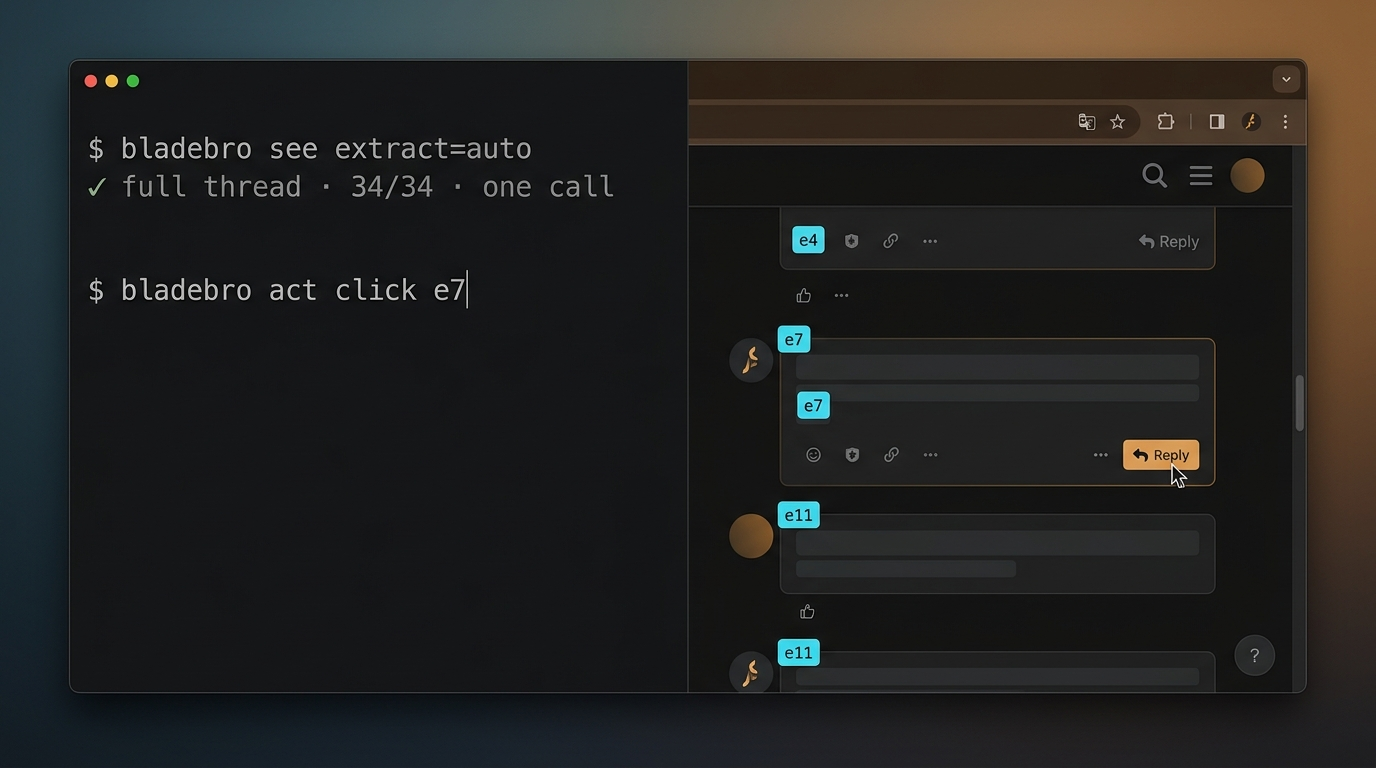
Same 5 tools, same handlers, same stealth — two surfaces. Use MCP for agents; use the CLI for scripts, shells and CI. One codebase, so every fix lands on both.
| MCP server | CLI | |
|---|---|---|
| Best for | AI agents (Claude, Cursor, pi, Cline) | Shell scripts, CI/CD, quick one-offs |
| Works over | stdio JSON-RPC | bladebro <command>, daemon-backed |
| Discovery | tools/list | bladebro help --json |
| Session | one Chrome per agent session | persistent daemon, or --no-daemon per command |
MCP server
Add to your client's config:
{
  "mcpServers": {
    "bladebro": {
      "command": "bladebro",
      "args": ["mcp"]
    }
  }
}
Speaks MCP 2024-11-05 through 2026-07-28 — the legacy initialize handshake and the stateless per-request dialect (server/discover). Works with every MCP client, old and new.
CLI
bladebro help --json is the single self-teaching manual: the same tool schemas as MCP, plus per-command usage, universal flags, payload conventions and exit codes — in ONE call.
bladebro help --json | jq '.tools[].name'   # ["act","see","state","run","vision"]
bladebro help act --json | jq .detail.actions
Daemon mode — the first command auto-starts a daemon; Chrome stays alive across calls:
bladebro nav https://news.ycombinator.com
bladebro see content
bladebro act click e5
bladebro stop                              # clean shutdown
bladebro see content https://example.com --no-daemon # one-shot: launch Chrome per command
Universal flags
| Flag | What it does |
|---|---|
--json | One JSON object on stdout: {ok, is_error, text} (+ image_path for vision) |
--no-daemon | Launch Chrome per command instead of using the daemon |
--host / --port | Drive an already-running Chrome on this debug port |
--marks | Vision: overlay numbered ref badges |
Exit codes are the contract: 0 success · 1 command failed (the text carries page state for recovery) · 2 usage error (the message says how to fix it).
Big payloads come from a file or stdin — no shell-quoting games: bladebro run @steps.json, cat steps.json | bladebro run -, bladebro act eval @script.js.
More CLI examples
# Forms — one call
bladebro act fill '[{"label":"Email","text":"a@b.com"},{"label":"Password","text":"secret"}]' --submit e20

# Batch steps from a file
bladebro run @steps.json
bladebro act batch @steps.json

# Read + extract
bladebro see model --json | jq .text
bladebro see extract auto --json

# State
bladebro state cookies
bladebro state open-tab https://example.com

# Drive your own browser
bladebro rb on && bladebro nav https://news.ycombinator.com

# Screenshot with ref badges
bladebro vision --marks --json | jq -r .image_path
🧠 How it works
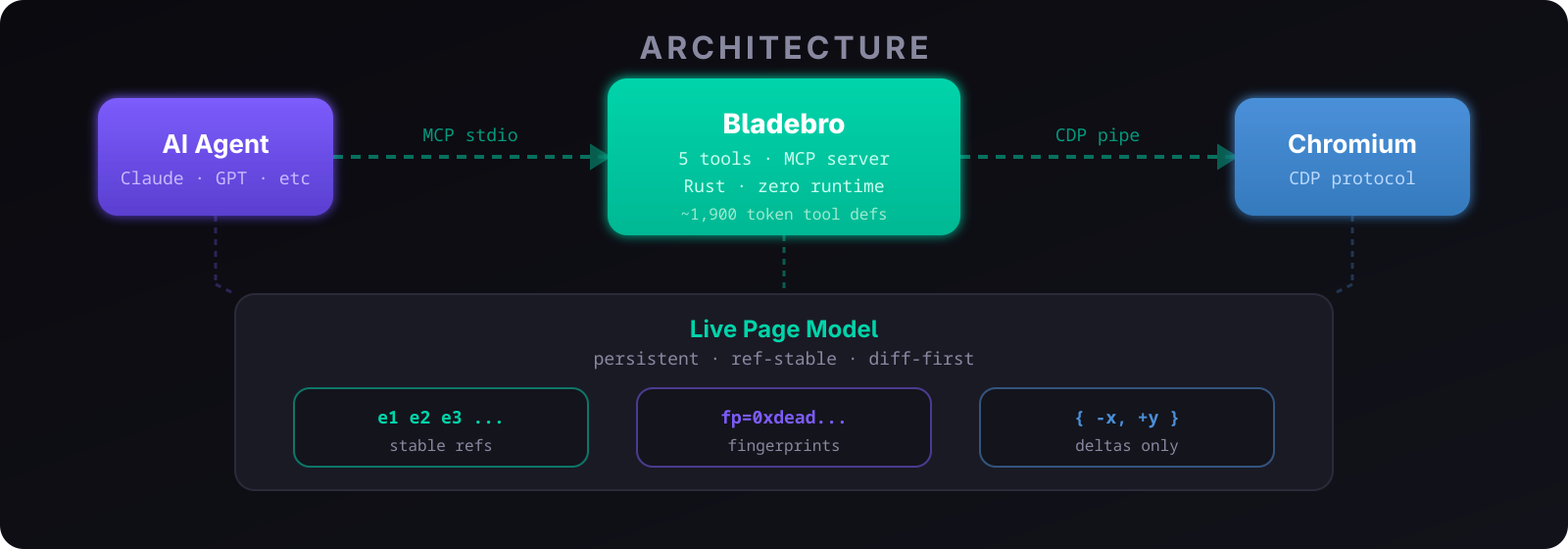
The core is the Live Page Model — a persistent, compressed, ref-stable model of the page held across every tool call. Three pillars:
- Semantic refs (
e1,e2, …) — anchors assigned by signature (framePath|role|name|rank), not position. They survive scrolls, insertions and re-renders. - Structural fingerprints — an FNV-1a hash of the ancestor chain, tag, children and identity attributes: the mechanism behind re-render immunity.
- Deltas only — every action returns what changed, so the agent never re-reads what it already knows.
Everything is built from scratch where it counts — the CDP transport, perception, stealth injection, biometrics, session management. Chromium is the only borrowed part.
🧬 Re-render immunity
The #1 reliability gap in every other agent browser, solved.
When React, Vue or Angular re-renders a component, the DOM nodes are destroyed and recreated — and every other agent browser loses its refs. Bladebro re-binds them: when text changes but structure survives, the ref follows the fingerprint instead of dying.
Before re-render:  e2 button "Buy Now"     sig=button|Buy Now|1     fp=0xdeadbeef
After re-render:   e2 button "Buy Now v1"  sig=button|Buy Now v1|1  fp=0xdeadbeef  ← same fp
                   ↺ e2 (re-render survived)
The agent sees ↺ e2 (re-render survived) in the delta. The click works. No recapture. Playwright, Puppeteer, CDP wrappers, accessibility-tree snapshots — all lose refs here.
🪙 Token efficiency
5× more token-efficient than every competitor.
- Delta results — 60–570 tokens per action; snapshot-based tools spend ~1,400–2,000+.
- Tool defs — ~1,900 tokens vs 8,000–13,700. The agent plans; it doesn't juggle APIs.
- Context pruning —
actresponses compress after turn 3 on the same page: full (8K) → reduced (3K) → verdict-only (500 chars). ~54% fewer tokens over a session, zero capability loss.
bladebro state compress off # on / off / status — or BLADE_NO_COMPRESS=1
The counter resets on navigation, any see, or any error. see, state, run and vision are never compressed.
🥷 Stealth
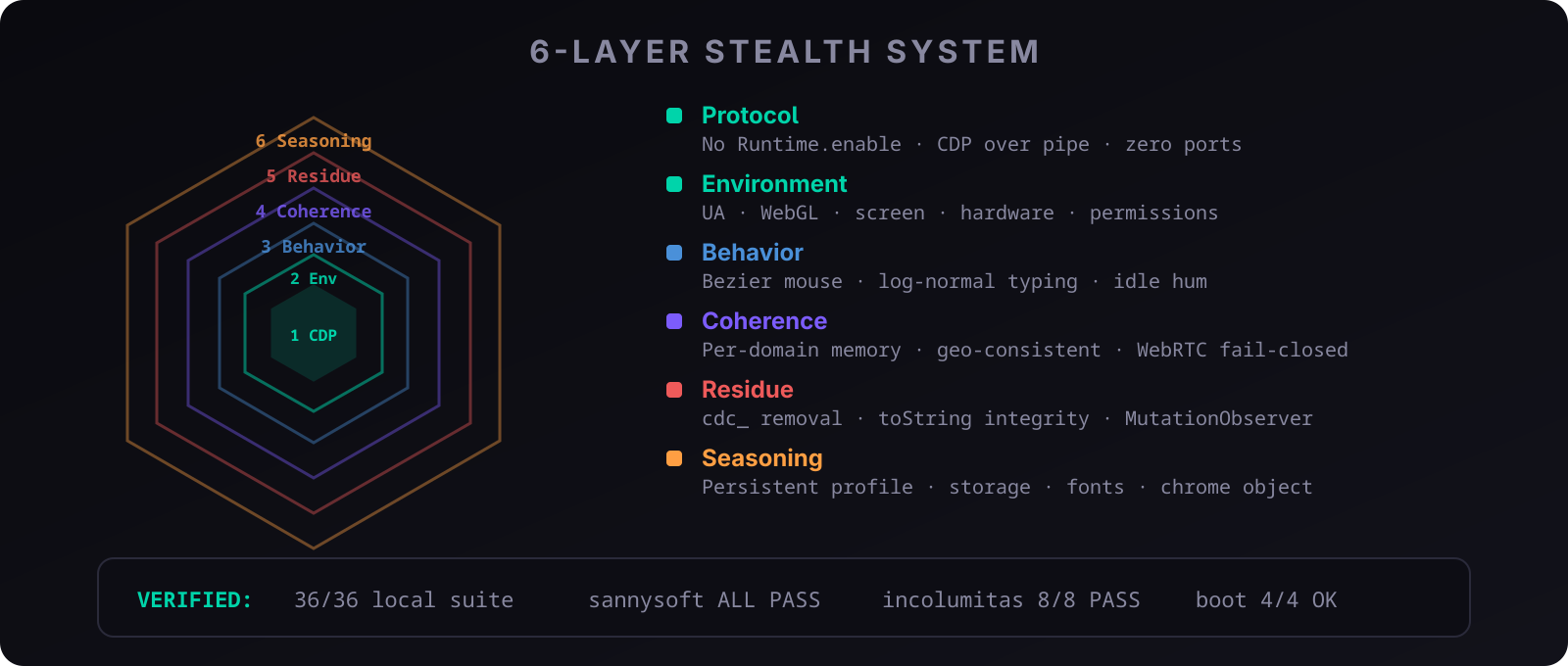
Six layers, all on by default, no config needed:
| Layer | What it does |
|---|---|
| Protocol | No Runtime.enable (defuses the DataDome console trap); CDP over WebSocket by default (native webdriver=false) with a zero-port pipe opt-in; isolated world for DOM reads. |
| Environment | UA + Client Hints override (no HeadlessChrome), WebGL renderer/limits/extension coherent with the machine's real GPU, mediaDevices, permissions — every override installed as a Proxy over the native original, so it keeps native receiver/argument errors, own keys {length,name}, no prototype, and stringifies as native in every realm. |
| Display | A window manager on the virtual display (xfwm4) plus a declared work area, so outerWidth > innerWidth and availHeight < height are real — window chrome and a taskbar, not patched getters. Falls back to a self-correcting mask on WM-less hosts. |
| Behavior | Bezier mouse paths with overshoot + correction, movementX/Y deltas, micro-tremors, non-zero key-press duration, log-normal typing, idle hum, smooth scroll. |
| Coherence | Per-domain timezone/locale memory, geo-consistent identity, WebRTC fail-closed, stable canvas/audio (noise off by default). |
| Residue | cdc_ removal, MutationObserver for late artifacts, and — deliberately — no Function.prototype.toString patch: masks are native-shaped by construction, so there is nothing to leak across realms. |
| Seasoning | Persistent profile (cookies, history, HSTS) + a login snapshot that survives clean shutdown, SIGKILL and power loss. |
Verified against real detection sites:
| Test | Result |
|---|---|
61-check local suite + boot self-check + drift stamp (bladebro audit) | 61/61 pass, stamps stable |
Differential oracle vs stock Chrome on the same display (tools/diff_oracle) | 67 probes: identical or documented mask surface in every profile state, 0 divergent |
Real-browser lane vs stock Chrome (oracle.py --lane real) | 67 probes: all identical, 0 expected, 0 divergent — the lane carries no page patches |
| CreepJS | headless: 0%, stealth: 0% (stock Chrome on the same lane: 0%/0%) |
| bot.sannysoft.com | All pass |
| incolumitas.com | All OK (webdriver=false, no UA leak) |
| deviceandbrowserinfo.com | “You are human!” — isBot: false |
| PerimeterX/HUMAN (Zillow, Fiverr) | Full page load, no block |
Run bladebro audit to verify your own setup; run python3 tools/diff_oracle/oracle.py before any release.
🌐 Real-browser mode
The strongest fingerprint is a real one. No manufactured coherence to maintain — this lane simply is your browser, on your machine, with your history.
The stealth layers above manufacture coherence inside an isolated browser. The real-browser lane deletes the problem instead: it drives your own Chromium-family browser — your profile data, your display — and switches the page-injection layer off entirely. Truth has no tells to catch, so on this lane the amount of page patching is zero. Everything driver-side still runs: perception, Live Page Model, refs, adapters, token efficiency, resource blocking, biometrics + idle hum.
bladebro rb on        # switch every surface (CLI, daemon, MCP) to your browser
bladebro rb status    # what is configured / live (--json for agents)
bladebro rb pause     # manual control: input, navigation, history, downloads, collecting and tab ops refuse until `rb resume`
bladebro rb off       # back to the isolated agent browser
| Mechanism | How it works | When it fits |
|---|---|---|
clone (default) | Imports your profile once into a blade-owned copy (browser may stay open; the source is never written to); runs your real binary on the copy, which ages through use | Everyday use; works on branded Google Chrome |
profile | Launches your binary on your live profile | Purists — close the browser first; Google Chrome 136+ refuses CDP on the default profile dir |
attach | Drives a browser that already exposes a debug endpoint (--remote-debugging-port=0, or Chrome 144+ chrome://inspect#remote-debugging) | Zero disruption; never owned, never shut down. Caveat (measured, Chrome 151): an ephemeral --remote-debugging-port=0 arm — and the approval flow — makes Chrome itself report navigator.webdriver=true; a fixed port reports false |
Supported browsers: Chromium, Google Chrome, Brave, Helium, Edge, Vivaldi,
and Opera. bladebro rb use lists detected installs; bladebro rb use helium
selects Helium on Linux, macOS, or Windows. On Linux, Helium wrappers on PATH
and HELIUM_CONFIG_HOME are recognized. For an AppImage or portable install,
launch Helium once to create its profile, select it, then set
bladebro rb use --binary /absolute/path/to/helium.AppImage (or executable).
rb mode auto (default) attaches when a live endpoint exists, else clones.
Browser override: rb use <id> · custom binary (nix/flatpak wrapper):
rb use --binary <path|auto> · profile pick: rb profile <key> (validated;
an absolute profile path also works) · re-import: rb refresh · wipe the
imported copy: rb forget · rb visible on|off (real window vs
--headless=new) · rb idle-hum on|off · rb idle-shutdown on|off (may the
idle timeout close the real browser — default off). Switching restarts the
daemon, and a live MCP/daemon browser is detected as stale at its next use
and relaunched automatically; an attach session detaches instead — your
browser is left running, untouched. No host restart anywhere.
⚠️ The agent browses as you: anything it does is attributable to your identity.
rb onprints exactly what it will use and how to revert.
🧩 Site adapters
Built-in, automatic, zero config — and zero cost to the tool definitions. Adapters are runtime heuristics: they add no tools and no parameters, and their extra fields appear only on pages that have them.
- Reddit —
see extract=autoon a post returns the FULL comment tree in ONE call: every reply (collapsed included), thread-ordered with depth, author/date,fuzzed_score(Reddit's displayed values, labeled as such), full text, anopflag on the submitter's comments, and honestcount/total/completefields. On feeds: typed posts (title,fuzzed_score, comments, author, subreddit, date, domain).see mode=contentgives clean title/meta/body markdown. - X.com (Twitter) —
see extract=autoon a status page returns the FULL conversation in ONE call: the focal post plus every reply and nested reply, thread-ordered with depth, author/date/counts, media and anopflag — read from the page's own API traffic (query ids captured live, self-healing across deploys). Profile/search/home return timelines the same way; search falls back to bounded in-page collection when X gates its API. The composer works through the normal tools:act clickReply →act type→act clickPost. - GitHub — repo pages: description, stars, forks, language, topics; issue/PR lists: number, title, status, labels, author per row.
- Product pages — price (with strikethrough original), rating, availability, key features — on any shop, not a fixed list of stores.
Adapters self-improve through the domain knowledge base (below): consent selectors, block history, settle timing and resource-blocking choices are learned per domain and reused on later visits. No plugin API — site-specific behavior belongs in the heuristics, not in config.
🌱 Self-improvement
Learns from every session, persists in knowledge/ under your data root, survives restarts.
Domain knowledge base — per-site consent selectors and behavior, learned from success only:
- Confidence +0.05 per success, −0.15 per failure (failures cost 3×). Auto-applied at ≥0.7, so known sites skip the full detection JS entirely.
- Evicted below 0.3 after 30 days; bounded at 2,000 domains. Unknown sites fall back to full detection — zero regression.
Behavioral fingerprint — biometric parameters generated once per installation and reused forever, so detectors see the same "person" every session: click precision, mouse curvature, typing cadence, inter-action gaps, overshoot and idle-hum frequency, all clamped to human ranges, written atomically.
📊 Comparison
| Bladebro | agent-browser | Playwright MCP | Chrome DevTools MCP | |
|---|---|---|---|---|
| Tool defs | ~1,900 tokens | 0 (CLI) | ~13,700 tokens | ~8,000 tokens |
| Per-click result | 60–570 tokens (delta) | ~1,400 (snapshot) | 2,000+ | 2,000+ |
| Stealth | 6 layers + biometrics | None | None | None |
| Drive your own browser | Yes (rb on) | No | No | No |
| Re-render immunity | Yes | No | No | No |
| Self-improvement | Yes | No | No | No |
| Auto-extraction | Template-free, site-aware | No | No | No |
| Batch actions | Yes (act batch / run) | No | No | No |
| Infinite-scroll collect | Yes | No | No | No |
| Runtime | None (static binary) | Node.js daemon | Node.js | Node.js |
| Page model | Persistent, ref-stable, diff-first | A11y snapshot | None | None |
| Binary size | 7.4 MB | ~50 MB (node + deps) | ~50 MB | ~50 MB |
| Platforms | Linux, macOS, Windows | Linux, macOS, Windows | Linux, macOS, Windows | Linux, macOS, Windows |
Head-to-head: Bladebro vs agent-browser
agent-browser v0.33.2 at its best (headed, system Chromium, persistent profile, custom UA) vs Bladebro defaults, same machine:
| Task | agent-browser | Bladebro |
|---|---|---|
| Wikipedia (navigate + read) | 153K chars, 3 calls | 82K chars, 2 calls (−47%) |
| Hacker News (elements) | 14K chars, 2 calls | 5.5K chars, 1 call (−61%) |
| Reddit (search) | 5.7K chars, 2 calls, no URLs | 4.5K chars, 2 calls, URLs + content |
| Zillow (PerimeterX) | Blocked (Press & Hold) | Full access (992 listings) |
| HN structured extraction | No feature | 30 items as JSON, 1 call |
Stealth benchmark: Bladebro vs Camoufox
A pure stealth comparison — Camoufox is a patched Firefox for scraping, not an agent tool. Both headed, same machine, same network, no proxy, 8 detection sites.
| Detection site | Camoufox | Bladebro |
|---|---|---|
| Sannysoft | 1 fail (Chrome obj — expected for Firefox) | All pass |
| CreepJS | Fingerprint computed | headless: 6%, stealth: 20% |
| BotD / FingerprintJS | Pass | Pass |
| Pixelscan | Pass (masking detected) | Pass (masking detected) |
| Zillow / Reddit / Fiverr | Pass | Pass |
CreepJS values in this block are from that earlier round — the current suite reads headless 0% / stealth 0% (stealth table above).
Near equal on stealth; both flagged for masking on Pixelscan (expected for any anti-detect tool). The difference is delivery: Bladebro ships this out of the box in one binary — Camoufox needs Python, a venv and a Playwright script to drive it.
🚧 Gotchas & limits
Honest boundaries: what surprises people, and what Bladebro deliberately does not do.
| Situation | What happens — and why |
|---|---|
| CAPTCHA / Turnstile challenges | Not solved as a general capability, deliberately — you get a blocked: verdict with a remediation ladder; hand off to a solver if needed. One narrow exception: a site adapter may pass a challenge that is trivial for a human (reddit's one-time "prove your humanity" checkbox gets one humanized click); image grids stay unsolved and are reported honestly. |
| Datacenter / VPS IPs | Flagged regardless of fingerprint. Use BLADE_PROXY with a residential proxy — with a proxy set, WebRTC ICE candidates are filtered (no srflx / raw-IP host candidates reach the page) so the real IP cannot leak around it. |
| Cross-origin iframe content | Invisible (SecurityError). Deliberate: access would need Runtime.enable, which defuses the protocol stealth layer. |
| Browser extensions | Not supported — CDP cannot load them, and they would break the stealth profile. |
| Session video recording | Not supported. Use vision screenshots. |
| Firefox / Gecko | Not supported — the driver speaks CDP, which is Chromium-only. |
| macOS binaries | Cross-compiled from Linux via cargo-zigbuild; CI builds and tests macOS natively on every release, but the released binary is not live-driven on macOS hardware yet. File an issue if something breaks. |
| Linux ARM64 | Cross-compiled; not live-verified on ARM hardware yet. Community reports welcome. |
BLADE_NOISE=1 | Canvas/audio noise can hurt — FingerprintJS ML reads it as tampering. Off by default; enable only if you know why. |
🔧 Configuration
Everything optional; configuration is environment variables.
Data & profile
| Var | Default | What it does |
|---|---|---|
BLADE_HOME | auto | Data root override (highest priority): knowledge, logins, artifacts, fingerprint |
XDG_STATE_HOME | XDG spec | Data root becomes $XDG_STATE_HOME/blade when set |
BLADE_PROFILE_DIR | <data root>/profile | Persistent browser profile location — point it at a directory only you can write (it holds the live cookie jar) |
BLADE_FRESH | unset | 1 = ephemeral profile (no persistence) |
CHROME_PATH | auto-detected | Chrome/Chromium binary |
Identity & stealth
| Var | Default | What it does |
|---|---|---|
BLADE_LOCALE | en-US | BCP-47 locale (en-GB, ne-NP, …) |
BLADE_TZ | IP geo | Timezone (Europe/London, Asia/Kathmandu, …) |
BLADE_GPU | auto | intel / amd / nvidia / mali / adreno / auto (lspci detection) |
BLADE_WEBGL | auto | spoof / real / auto |
BLADE_MEDIA | auto | patch / real / auto |
BLADE_NOISE | unset | 1 = canvas/audio fingerprint noise (see gotchas) |
BLADE_PROXY | none | Proxy URL — also enables WebRTC ICE filtering + the non-proxied-UDP launch policy, so the real IP stays out of ICE candidates |
BLADE_CONSENT | reject | Consent banners: accept / reject / off |
Behavior & ops
| Var | Default | What it does |
|---|---|---|
BLADE_PACE | on | off = disable the pacing governor (human inter-action gaps) |
BLADE_NO_COMPRESS | unset | 1 = disable context pruning |
BLADE_NO_WARMING | unset | 1 = skip first-run profile warming |
BLADE_NO_UPDATE_CHECK | unset | 1 = skip update checks |
BLADE_CMD_TIMEOUT | 300 | How long the CLI waits for a daemon response, seconds |
BLADE_IDLE_TIMEOUT | 600 | Daemon idle time before Chrome shuts down, seconds |
BLADE_TRANSPORT | ws | MCP transport: WebSocket by default (native webdriver=false); pipe opts into the zero-port pipe (its automation flag is masked) |
BLADE_CHROME_FLAGS | none | Extra Chrome launch flags |
BLADE_LANE | auto | real forces the real-browser lane for this process (same as rb on) |
BLADE_RB_DEBUG | — | 1 surfaces the browser's own stderr on real-lane launches |
BLADE_PLAIN | — | 1 renders CLI output plain — no ANSI even on a terminal (same: NO_COLOR; override: CLICOLOR_FORCE=1) |
Data root resolution (Unix): BLADE_HOME → $XDG_STATE_HOME/blade → $HOME/.local/state/blade → $HOME/.blade (legacy). Existing installs keep their tree — nothing is ever split across two directories. Windows: %USERPROFILE%\.blade (plus BLADE_HOME). bladebro doctor prints the resolved data root.
🔄 Maintenance
| Command | What it does |
|---|---|
bladebro -doc / bladebro doctor | System check — Chrome, display, profile hygiene, logins, data root, network, version |
bladebro audit | Stealth audit — 61-check suite + boot self-check + cross-restart drift stamp, against your setup |
bladebro -v | Version + update status (check only) |
bladebro -u | Self-update: check, download, SHA-256-verify, swap — non-npm installs |
bladebro --rollback | Restore the previous version (from the pre-update backup) |
npm update -g bladebro | Update an npm install |
One updater per install — use the one that matches how you installed. npm-managed (npm install -g bladebro) → npm update -g bladebro, which keeps the shim, the platform package and npm's bookkeeping in sync. Everything else — a downloaded binary, a manual copy, a cargo build — → bladebro -u: it downloads the official released binary for your platform, SHA-256-verifies it against the published checksum, confirms it starts, backs up the old one and swaps it in; bladebro --rollback undoes it. (-u never rebuilds from source — for that: git pull && cargo build --release.)
bladebro -u knows which install it's on: under npm it refuses to touch npm's files and points you to npm (--force overrides — at the cost of npm's metadata going stale); on a build that's ahead of the latest release it won't downgrade without --force. BLADE_NO_UPDATE_CHECK=1 skips update checks entirely.
💖 Sponsors
Bladebro is free and open source. Sponsoring keeps development independent.
| Tier | Price | What you get |
|---|---|---|
| 🥉 Bronze | $15/mo | Name + link |
| 🥈 Silver | $40/mo | Small logo + link |
| 🥇 Gold | $60/mo | Large logo/banner + link, pinned at top |
How to sponsor. GitHub Sponsors is enabled and featured on this repo — but my region isn't supported for payouts yet, so the reliable route is email: bhandaribishesh879@gmail.com. Write me, I'll share my PayPal, and we go through the steps. One-time sponsorships are welcome at any amount — Ko-fi covers quick one-offs too.
Prepay to lock your rate. You can pay for any number of months in one go at today's price, and that rate is fixed for the whole term — e.g. 6 months of Gold at today's $60/mo = $360, and a later increase (even to $150) doesn't touch it. Price changes only ever apply to sponsorships started after them.
🤝 Contributing
PRs welcome — see CONTRIBUTING.md. Before submitting: cargo clippy --release -- -D warnings and cargo test --release.
Using a coding agent? Point it at AGENTS.md — repo mechanics, house rules and verification instruments in one file.
📄 License
Apache-2.0 — see LICENSE.
Related plugins
reactive-resume
amruthpillai/reactive-resume
cloudbase-ai-toolkit
tencentcloudbase/cloudbase-ai-toolkit
sandbase-harness
sandbaseai/sandbase-harness
deja-vu
vshulcz/deja-vu