dsh-oauth
dshjjj/dsh-oauth
OAuth/OIDC sign-in for DSH Web -- GitHub, Google, GitLab, Gitee, Microsoft Entra, Discord, Slack, Keycloak/OIDC and Feishu/Lark, all configured in Settings -> OAuth with per-account allowlists that apply on the next request.
Install
dsh plugin --profile web add github:dshjjj/dsh-oauthREADME
dsh-oauth
Sign in to DeepSeek Harness with the accounts you already have.


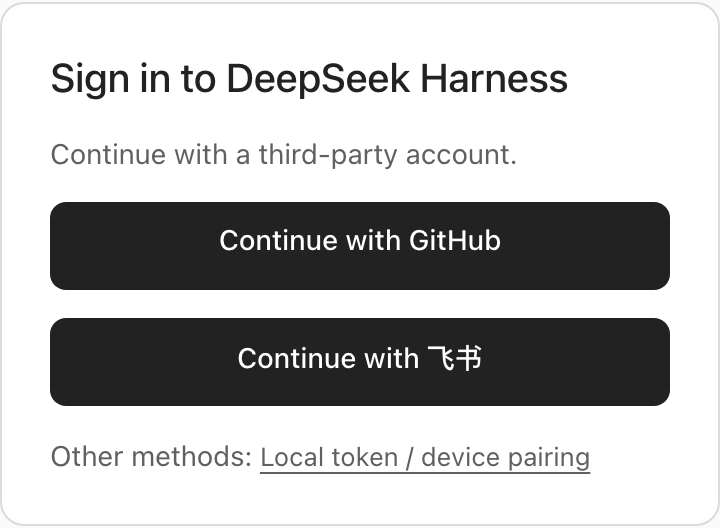
OAuth / OIDC sign-in for DeepSeek Harness Web, built as a DSH bundle. Nine providers are built in — GitHub, Google, GitLab, Gitee, Microsoft Entra, Discord, Slack, Keycloak/any OIDC issuer and Feishu/Lark — and you configure them from Settings → OAuth: pick a provider, paste its client ID and secret, list who is allowed. The next request uses it. No restart, no environment variables, no YAML.
Why this exists
DSH 0.2.3 opens authentication to plugins: anything that can verify a credential can register with
connection.authentication and hand back an owner session. This bundle uses that hook so the login wall is
part of the app instead of the reverse proxy in front of it:
- One place to log in. No oauth2-proxy container, no
import protected <upstream>in Caddy, no cookie secret to share between two processes. TLS termination stays wherever it is. - Per-account allowlists. Each provider lists the usernames, emails or subject IDs it accepts (any returned identifier matches, case-insensitively). Remove an account and its sessions die on the next request.
- Nine providers, one engine. A provider declares its endpoints, token encoding and profile mapping; the engine owns the whole authorization-code flow, so adding a tenth is ~20 lines.
- Zero runtime dependencies. The host half imports only Node builtins; the client half uses the React the harness already ships.
Install
dsh plugin --profile web add @dshj/dsh-oauth
The bundle inserts one row (oauth-github) and its settings page appears on its own. Restart the host once if the
profile loader asks for it; from then on every change is live.
Add a provider
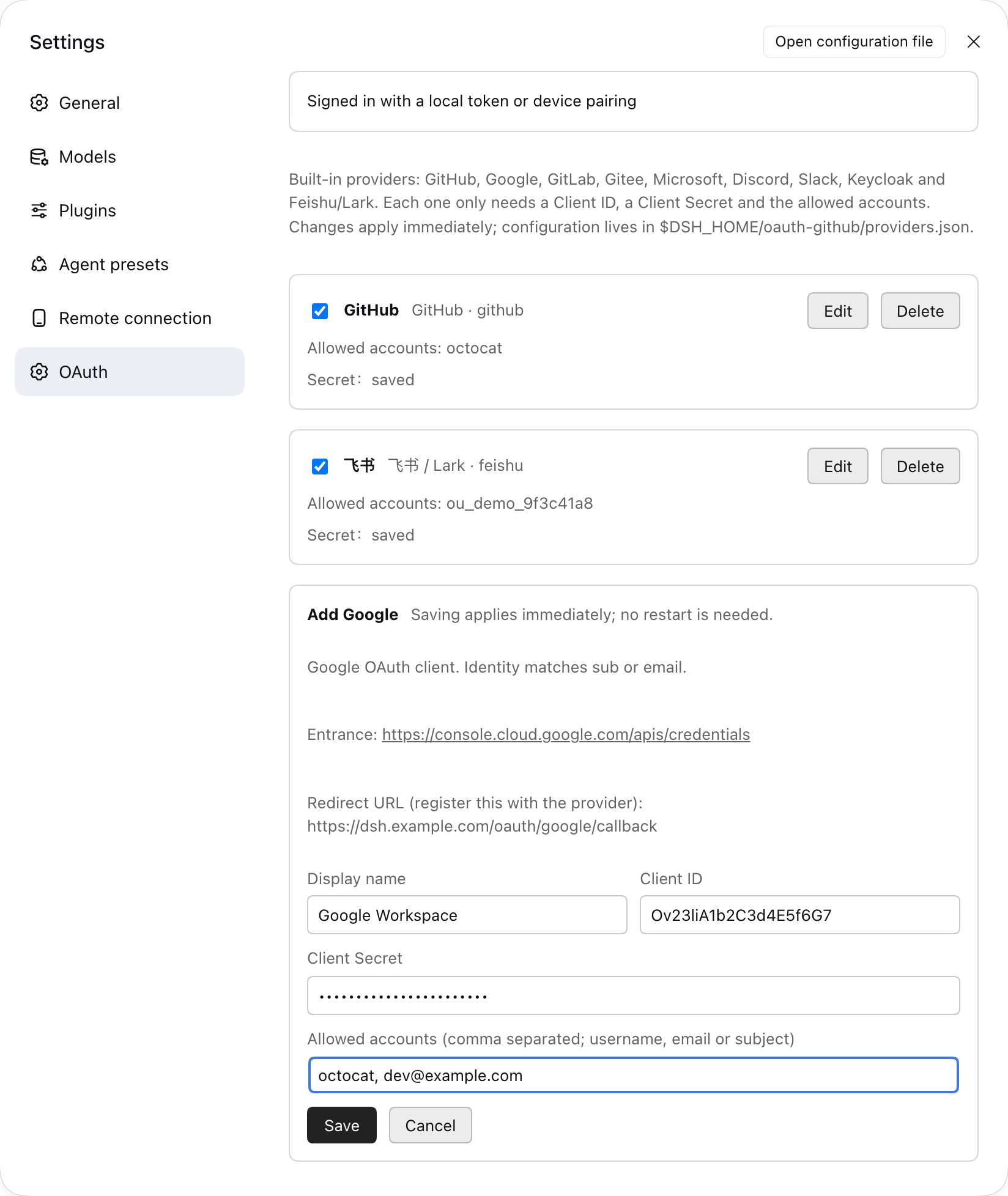
- Create an OAuth client at the provider. The form shows the exact callback to register —
<public url>/oauth/<provider id>/callback. - In DSH: Settings → OAuth → Add an OAuth provider, choose the provider and fill Client ID, Client Secret and Allowed accounts (plus that provider's own fields).
- Save. The login page lists it immediately, and the account you allowlisted can sign in.
Allowed accounts accept anything the provider returns as identity — GitHub login, email, Google sub,
Feishu open_id, and so on. Leave it empty and nobody gets in; that is the intended fail-closed default.
What it looks like
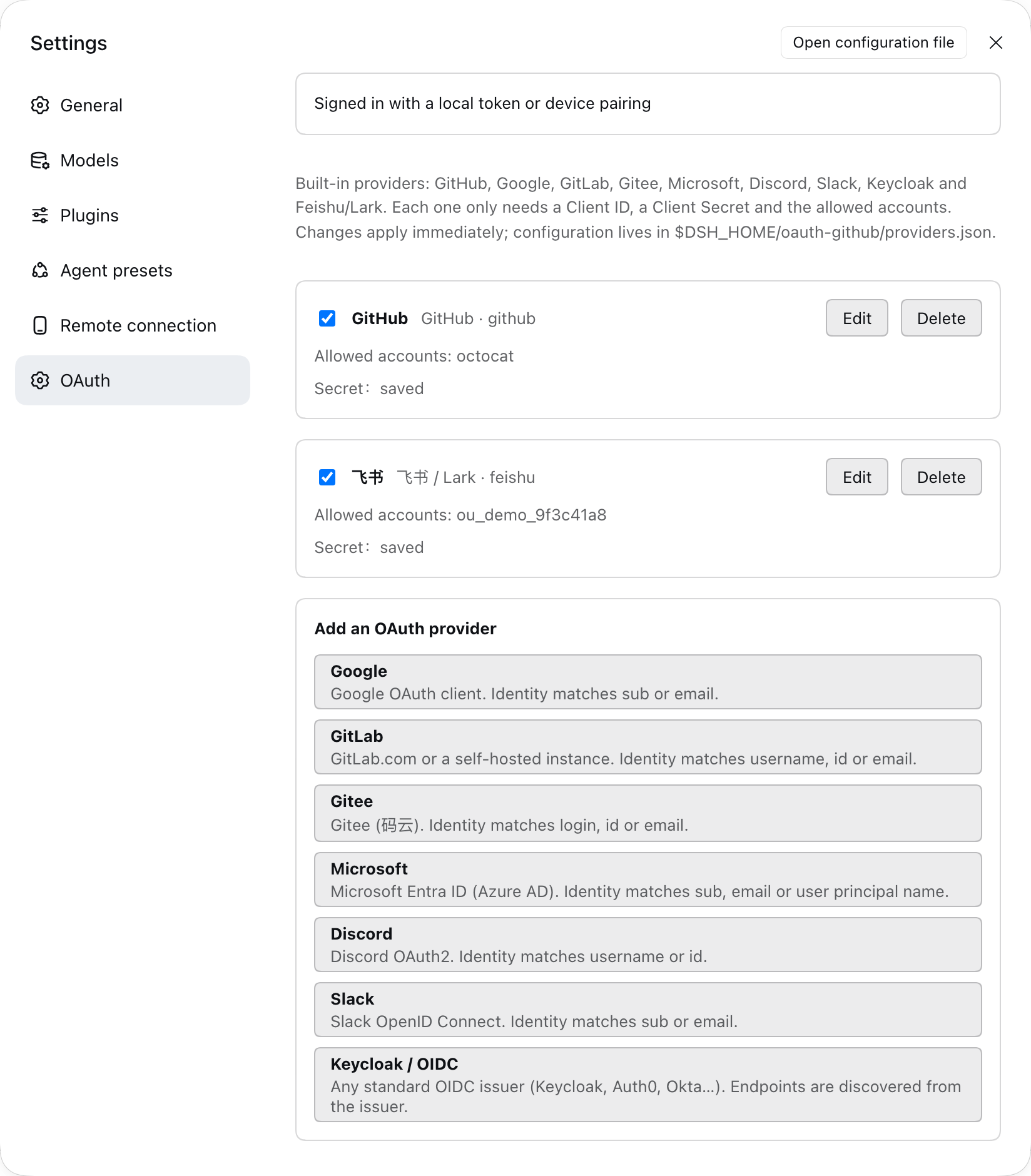
The same panel in Chinese: docs/settings.zh.png.
Providers
| Provider | Extra fields | Identity candidates |
|---|---|---|
| GitHub | – | login, numeric id, email |
| – | sub, email | |
| GitLab | base URL | username, id, email |
| Gitee | – | login, id, email |
| Microsoft | tenant | sub, email, preferred_username |
| Discord | – | username, id, email |
| Slack | – | sub, email |
| Feishu / Lark | edition, scope | open_id, union_id, user_id, email, enterprise_email |
| Keycloak / OIDC | issuer (discovery) | sub, email, preferred_username |
The native local token / device pairing login keeps working next to all of this: the OAuth page only takes over when a provider is enabled and admits the request.
How it works
GET /oauth/<provider>/startmints a 256-bitstate, bound to the provider, valid for ten minutes and usable once.- The provider redirects back to
/oauth/<provider>/callback; the token exchange happens server-side, the profile is fetched and mapped to{ id, name, identifiers[] }. - The allowlist is checked, then the browser gets
dsh_oauth_session—HttpOnly,SameSite=Lax,Securewhen the advertised URL is HTTPS, signed with HMAC-SHA256. - Every later request re-checks the live provider list and allowlist, so disabling a provider or editing its allowlist applies to sessions that already exist.
There is no server-side session table; the cookie carries provider id, subject, identifiers and an absolute expiry. Third-party access tokens are used for the userinfo call and then dropped.
Hot configuration
| You change | Effect |
|---|---|
| Add a provider | Login page lists it on the next request |
| Edit an allowlist | Accounts removed from it are rejected on their next request |
| Delete or disable a provider | Its sessions stop working immediately |
Rotate $DSH_HOME/oauth-github/secret | Every OAuth session is invalidated |
Feishu / Lark
Feishu gets two extras beyond the generic flow:
- Create the app by scanning a QR code — the RFC 8628 device flow used by the official Feishu CLI/SDK creates the app for you.
- A configuration preflight that checks the credentials (
tenant_access_token), whether the authorize page accepts the redirect URL (Feishu error20029), and whetherapplication:application:patchlets the plugin register that URL through the Open Platform API. When the API cannot do it — missing permission, or an app not created in the developer console — the checklist prints the exact manual steps instead of guessing.
Redirect URLs take effect without review; other app configuration may need a version publish.
Adding your own provider
Append one entry to CATALOG in src/catalog.ts:
example: {
  label: 'Example',
  description: 'Example OAuth service.',
  docsUrl: 'https://example.com/apps',
  scope: 'openid profile',
  fields: [{ key: 'region', label: 'Region', type: 'text', default: 'us' }],
  token: { body: 'form' },
  endpoints: (config) => ({
    authorizeUrl: `https://${config.region}.example.com/oauth/authorize`,
    tokenUrl: `https://${config.region}.example.com/oauth/token`,
    userInfoUrl: `https://${config.region}.example.com/oauth/userinfo`,
  }),
  profile: (user) => ({
    id: String(user.sub),
    name: String(user.name ?? user.sub),
    identifiers: [user.sub, user.email].filter(Boolean).map(String),
  }),
},
Nothing else changes: the settings page renders fields, the login page lists the provider, and the engine
handles state, the token exchange, userinfo, the allowlist and the cookie.
Security
stateis 256-bit, single-use, provider-bound, and expires after ten minutes.- Cookies are HMAC-SHA256 signed;
Securefollows the advertised URL scheme, so TLS-terminating proxies work. - Secrets never reach the browser: the provider list reports only
hasSecret, and a write that omitsclientSecretkeeps the stored one. - The settings API requires an authenticated owner, and cross-site writes are rejected by the harness fence.
- The allowlist is the only authorization check — treat each IdP account you add as an owner credential.
See SECURITY.md for the threat model and how to report a vulnerability.
Storage
| What | Where | Notes |
|---|---|---|
| Provider configuration | $DSH_HOME/oauth-github/providers.json | 0600, atomic write, secrets included |
| Cookie signing key | $DSH_HOME/oauth-github/secret | 0600, generated once |
| Session | browser cookie dsh_oauth_session | HttpOnly, SameSite=Lax, HMAC-SHA256, absolute expiry |
Optional profile-row config (cordis.patch.yml):
- id: oauth-github
  name: '@dshj/dsh-oauth'
  config:
    cookieMaxAgeDays: 30   # absolute session lifetime
    cookieSecret: "…"      # 32+ bytes; otherwise generated under $DSH_HOME
Development
npm install
npm run typecheck   # tsc --noEmit
npm run build       # esbuild -> lib/index.js (ESM) + lib/client.js (harness bundle)
src/
  index.ts        host plugin: engine, routes, Feishu extras
  catalog.ts      provider catalog, normalization, OIDC discovery
  copy.ts         host-rendered login/error copy + provider localization
  store.ts        providers.json and cookie secret
  types.ts        structural types for the DSH surfaces used
  util.ts         crypto/cookie/http helpers
  client/
    index.tsx     settings section (React, schema driven)
    locales.ts    en / zh dictionaries
    styles.ts     inline styles
    context.ts    client-side DSH surface types
lib/ is committed build output so the plugin can be linked without a build step. icon.svg and
locale/*.json are the plugin-market presentation (title, description, icon).
Releasing
- Bump
versioninpackage.jsonand updateCHANGELOG.md. - Commit, then tag:
git tag vX.Y.Z && git push origin vX.Y.Z. - The
Publishworkflow builds, verifies the committed bundle and stages the version with provenance (npm stage publish).
Staged publishing is deliberate: the trusted publisher only has the stage permission, so a maintainer approves each release on npmjs.com with 2FA before it becomes installable.
License
MIT © jokcy
中文说明
DeepSeek Harness Web 的第三方 OAuth / OIDC 登录插件,host + client 双端 bundle。
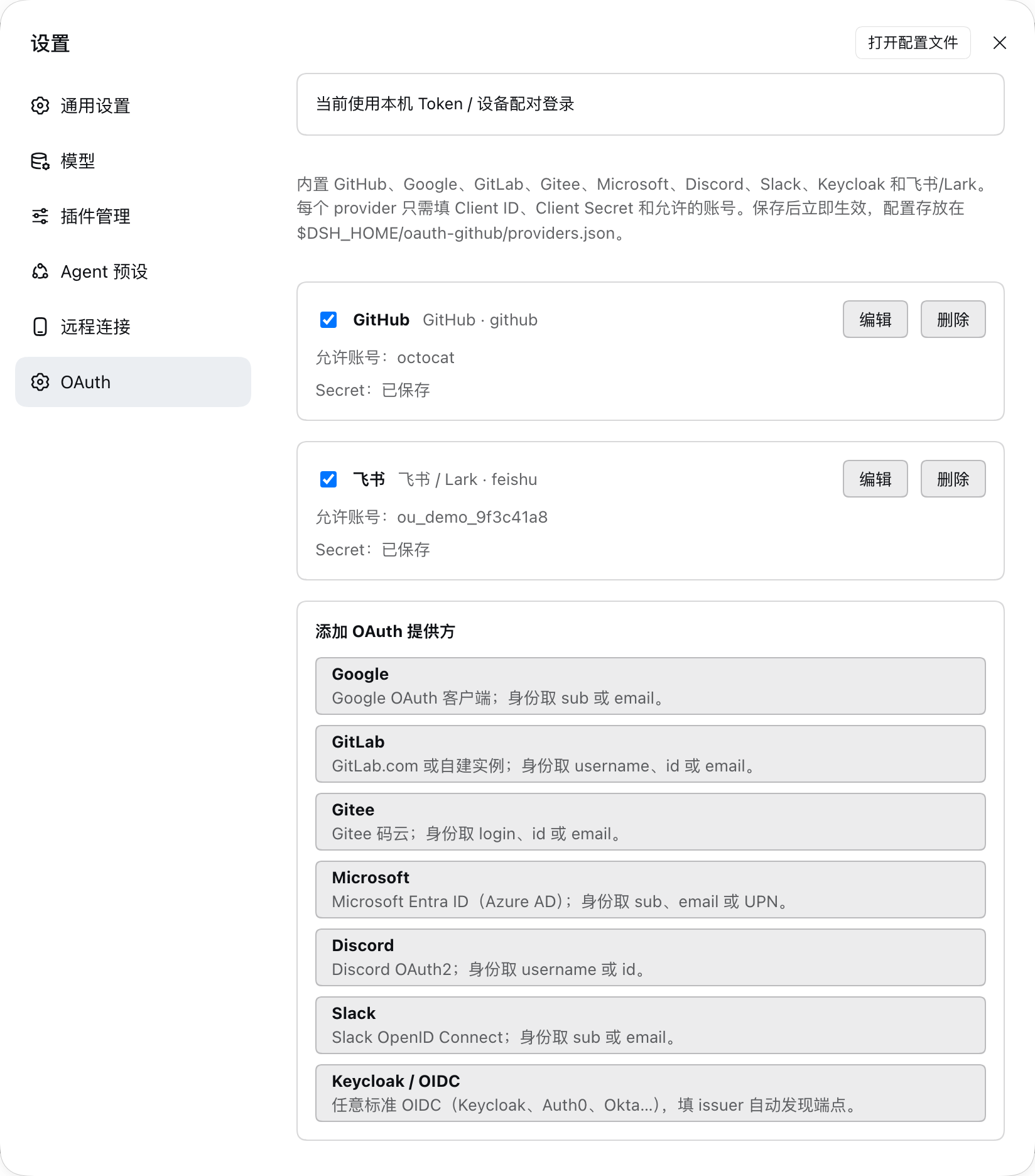
为什么用它:DSH 0.2.3 把认证开放给插件,这个 bundle 让登录墙变成应用的一部分,而不是反向代理里的一层——
不用再起 oauth2-proxy 容器,不用在 Caddy 里 import protected,也不用两个进程共享 cookie secret。
- 内置 9 个 provider:GitHub、Google、GitLab、Gitee、Microsoft Entra、Discord、Slack、Keycloak / 任意 OIDC、飞书 / Lark;新增一个约 20 行。
- 设置页「OAuth」:按 provider 的 schema 渲染表单,填 Client ID / Secret / 允许账号即可;保存后下一个请求生效,无需重启。
- 白名单即权限:用户名、邮箱、sub / open_id 任一命中即可登录;把账号删掉,它已有的会话立刻失效。留空则拒绝所有人(fail-closed)。
- 飞书:扫码一键创建应用(RFC 8628 device flow),自带配置自检(凭据、重定向 URL、能否通过 API 自动登记),失败会给出精确的手动步骤。
- 零运行时依赖:host 只用 Node 内置模块,client 复用 harness 自带的 React;会话是 HMAC 签名的无状态 cookie,服务端没有 session 表。
- i18n:设置页与登录 / 错误页面均支持中英文。
安装:
dsh plugin --profile web add @dshj/dsh-oauth
然后在「设置 → OAuth」里添加 provider,回调地址填 <公网地址>/oauth/<provider id>/callback。
存储:$DSH_HOME/oauth-github/providers.json(0600)、secret(0600)。
开发:npm install && npm run typecheck && npm run build,产物在 lib/。
Related plugins
dsh-purge
kingcharleslzy-ai/dsh-purge
dsh-web (dsh-ssh)
zhu1090093659/dsh-web
dsh-web (dsh-remote-web-ui)
zhu1090093659/dsh-web
dsh-web-ui (dsh-ssh)
zhu1090093659/dsh-web-ui