dsh-jira-work-overview
eaglesoap/dsh-jira-work-overview
Show your Jira work items and their workflow status inside DeepSeek Harness (DSH) · 在 DSH 里查看我的 Jira 工作项与完成状态
Install
dsh plugin --profile web add github:eaglesoap/dsh-jira-work-overviewREADME
dsh-jira-work-overview
Show your Jira work items — with their real workflow status — inside DeepSeek Harness (DSH): as agent tools, as a /jira slash command, and as a panel in the left sidebar with a live unread badge.


中文说明见 README.zh.md · Changelog: CHANGELOG.md · License: MIT
What you get
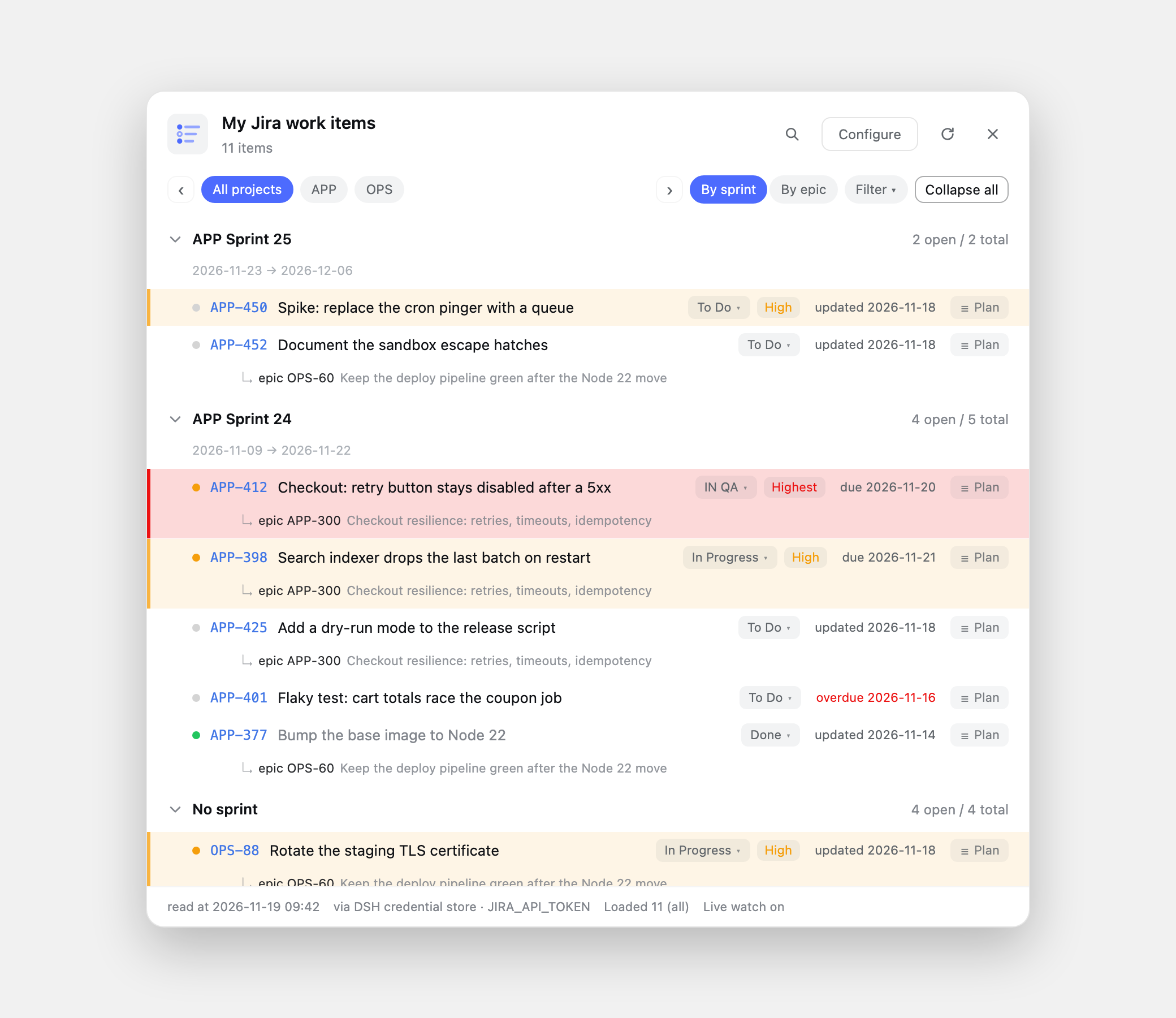
- Rows are highlighted by Jira's own priority order — the top two levels get a row background and a left bar (reddest = highest), read from
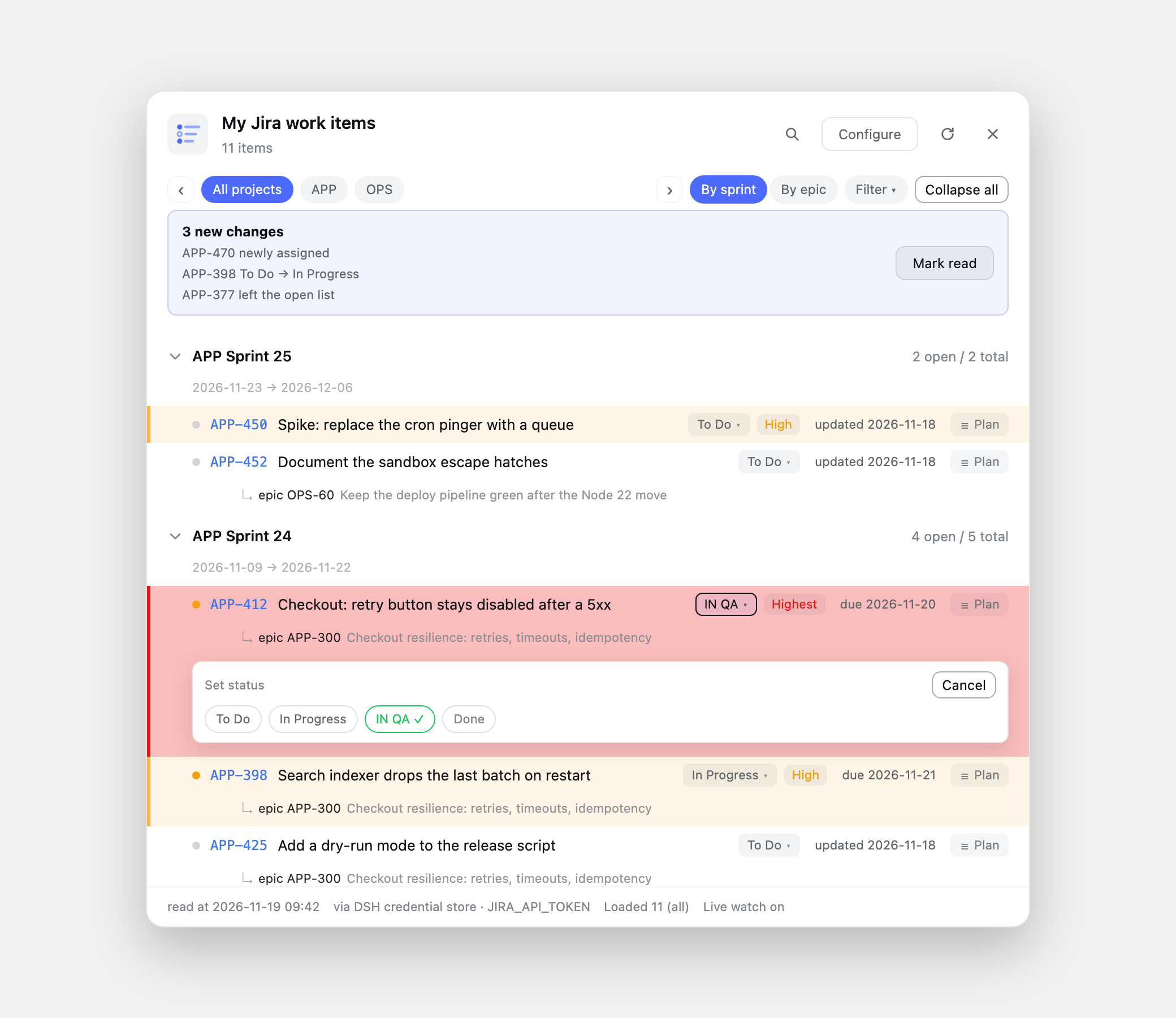
GET /rest/api/3/priorityrather than a hard-coded "Highest", so a site that reorders priorities or uses custom names (P0,Blocker) still gets it right. Everything below stays uncoloured. If the site does not expose that list, the panel falls back to matching the namesHighest/High. - Left-sidebar panel — one row per issue, grouped by sprint (collapsible, newest sprint first), with project tabs, a single-select status filter, an accurate total in the header, priority highlighting (see above), and a status dropdown to move an issue through its workflow in place — only that row and the counts are updated, the list is not re-fetched.
- Epic / parent relations, without a canvas — every row carries its place in Jira's own hierarchy: a
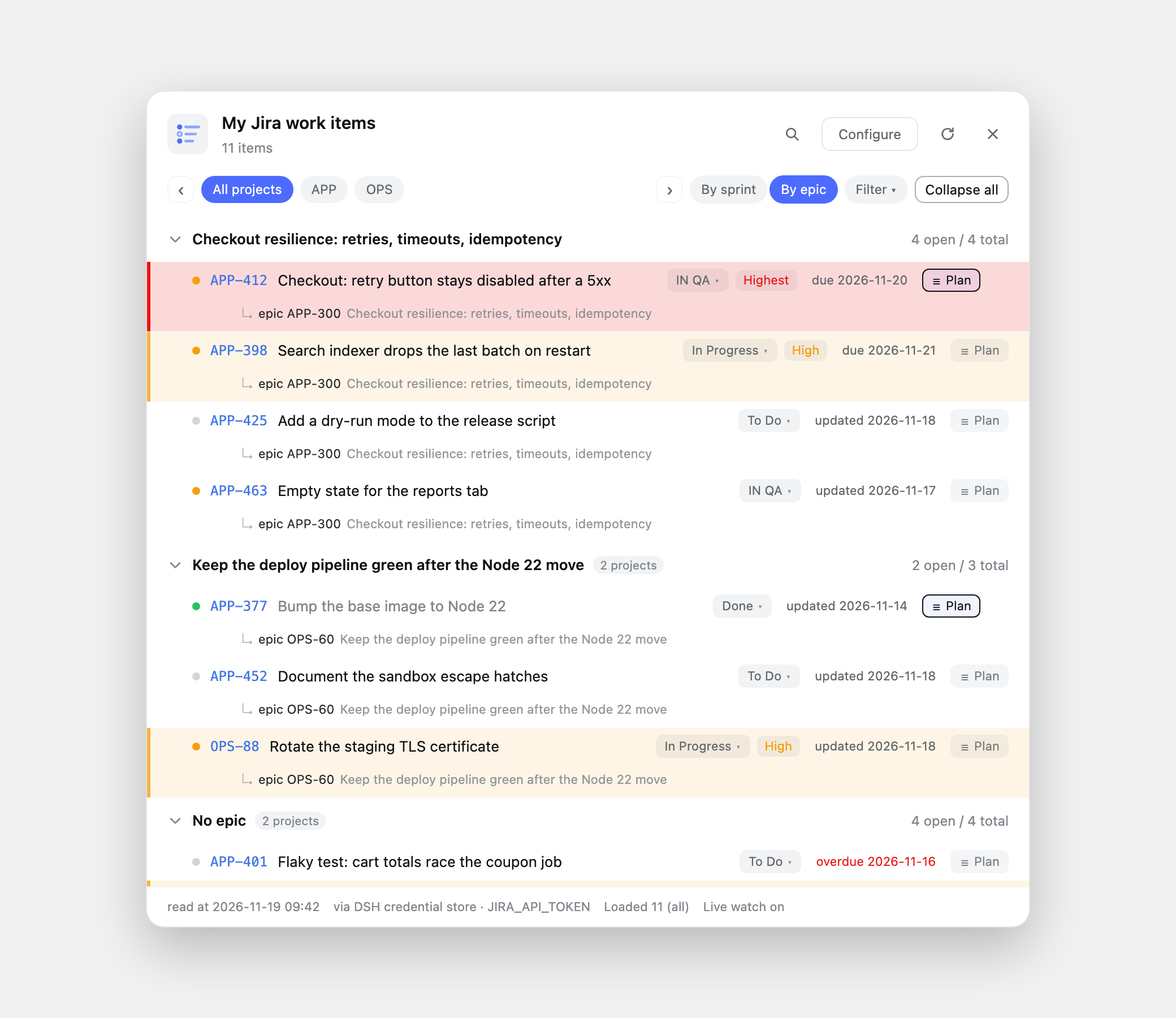
↳ epic APP-123 · <title>line (or↳ parent APP-123for sub-tasks without an epic), clickable to jump to that issue. A 按迭代 / 按 epic switch in the header re-groups the same list by Epic Link instead of sprint, and a group that spans several projects is labelled with its project count — so "which epic is this across projects" is one glance, with no free-form graph to maintain. Both views share the same virtualization, collapse state and totals; a site without an epic field silently falls back to the "no epic" group, and rows without any relation take no extra height. - Search, Jira-style — the magnifier in the panel header opens a search row. Enter searches all of Jira (summary / description / comments, via Jira's own
text ~operator), not just your issues; an issue key or a pasted/browse/APP-123link jumps straight to that issue. Results reuse the same sprint grouping, project tabs, status filter and accurate total, so a hit shows which sprint it belongs to;×clears back to your work. - Live watch — the host polls "assigned to me and not done" in the background; new assignments / status changes show a system notification, an unread badge on the sidebar entry, and a "what changed" banner with mark as read. The panel refreshes itself when a change arrives.
- Three agent tools —
jira_my_work,jira_issue,jira_transition(preview by default, writes only withapply: true). - One slash command —
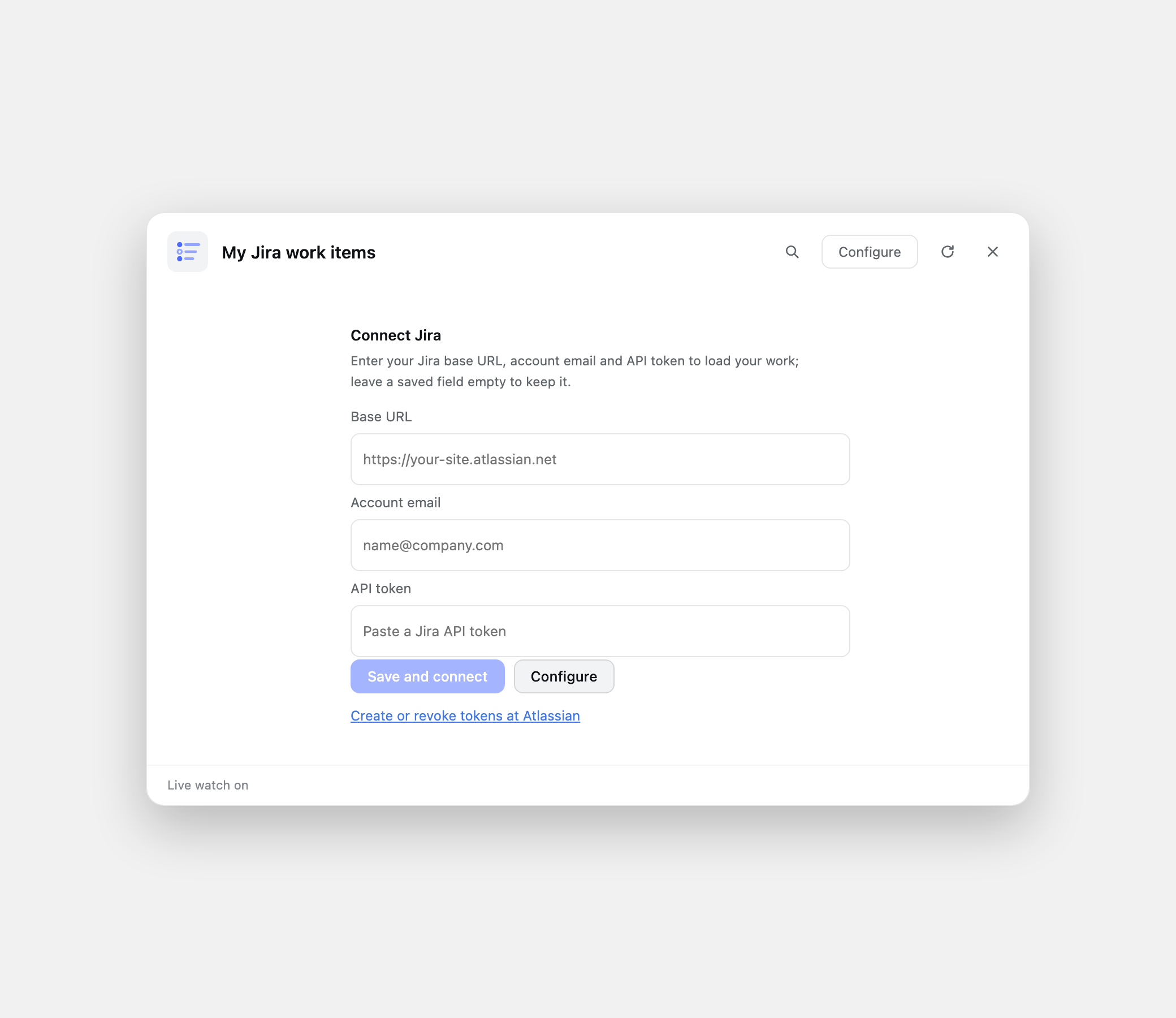
/jira [--json] [--limit=<n>|0] [--lang=<tag>] [--search=<text>] [open|sprint|all | <issue key> | <JQL>]; it renders in the command surface, so it costs no model tokens. - First run is the form — with no Jira site, email or token the panel body is a Connect Jira form (site URL, email, API token) in the exact spot the failure message used to take; fill what is missing and press Save and connect. Already-saved fields can be left empty, and Configure is still one click away for fetch size, watch, notifications and language.
- Configure dialog — Jira site / email / API token (token goes to the DSH credential store), fetch size, watch switch + interval, notification switch, UI language, and one-click open
cordis.patch.yml(default app / system "open with" chooser / detected editors / custom app). - Bilingual UI — follows the DSH language setting (
设置 → 通用 → 语言), live; Jira-returned text (summaries, status names, labels) is always shown verbatim.
Requirements
| DSH | Desktop app or dsh web, with the plugin manager (plugin_manager) available |
| Jira | Cloud or Server, plus an API token for your own account and your login email |
| Build step | none — the package ships index.js (host half) and client.js (web half) as-is |
Install
DSH installs plugins from an installation spec — anything pnpm add accepts (registry package name, git URL, tarball, absolute path). Pick one:
# 1) from the npm registry (published since 0.14.0; pin a version with @0.16.6)
plugin_manager install_bundle(target="dsh-jira-work-overview")

# 2) straight from GitHub (no npm publishing needed)
plugin_manager install_bundle(target="github:EagleSoap/dsh-jira-work-overview")

# 3) from a local checkout
plugin_manager install_bundle(target="/absolute/path/to/dsh-jira-work-overview")
Or do it in the UI: left icon rail → Plugins → install, and paste the same spec.
Installing adds dsh-jira-work-overview to your profile's bundle list and inserts the plugin row declared in cordis.patch.yml. The host then serves the web half as a plugin bundle — refresh the page (Cmd/Ctrl+R) and the sidebar entry appears.

First-run configuration
The bundled cordis.patch.yml deliberately contains no site-specific values, so nothing of the author's Jira account is shipped.
Nothing configured yet? The panel body is the login form. Site URL, account email and API token show up in the exact spot where a failure hint used to be — fill what is missing and press Save and connect. Fields that are already saved may stay empty (the plugin submits only what you changed), and the list loads as soon as Jira accepts the pair.
Everything else lives in the configure dialog — click 配置 / Configure in the panel header and fill in:
| Field | Example | Required |
|---|---|---|
Jira site URL (baseUrl) | https://your-site.atlassian.net | ✅ — the tools tell you when it is missing |
Login email (email) | you@example.com | ✅ (Basic auth = email + token) |
| API token | create one at id.atlassian.com → API tokens | ✅ |
| Project key / board id | APP / 42 | optional, used for labels and the sprint field |
Fetch size (maxResults) | 0 = unlimited | optional |
| Watch switch / interval, notifications, UI language | — | optional (change = save) |
The token is written to the DSH credential store (key JIRA_API_TOKEN unless you change credentialKey); it never enters the repo, the logs, or the UI (the panel only shows a masked form such as ATAT…0000). Before storing, the plugin verifies the email + token pair against /rest/api/3/myself and refuses to save a rejected token.
Prefer files? Add an override row to your profile's cordis.patch.yml (this is also where the panel writes the ✏️ fields):
- id: jira-work-overview
  config:
    baseUrl: https://your-site.atlassian.net
    email: you@example.com
    projectKey: YOURKEY
    boardId: 42
Usage
Panel
-
Project tabs (with
‹ ›scrolling) filter by issue-key prefix; status filter is single-select, defaults to "all statuses". -
Search: the header magnifier expands in place into a field that slides out to the left; type a keyword or an issue key and press Enter. The query runs against all of Jira (not only your issues); matches are grouped by sprint like your own list, with the same project tabs / status filter / total. Losing focus (or Esc) collapses the field back to the button and keeps an unsubmitted draft; a submitted query clears the field and keeps the results, and
×clears the search to return to your work.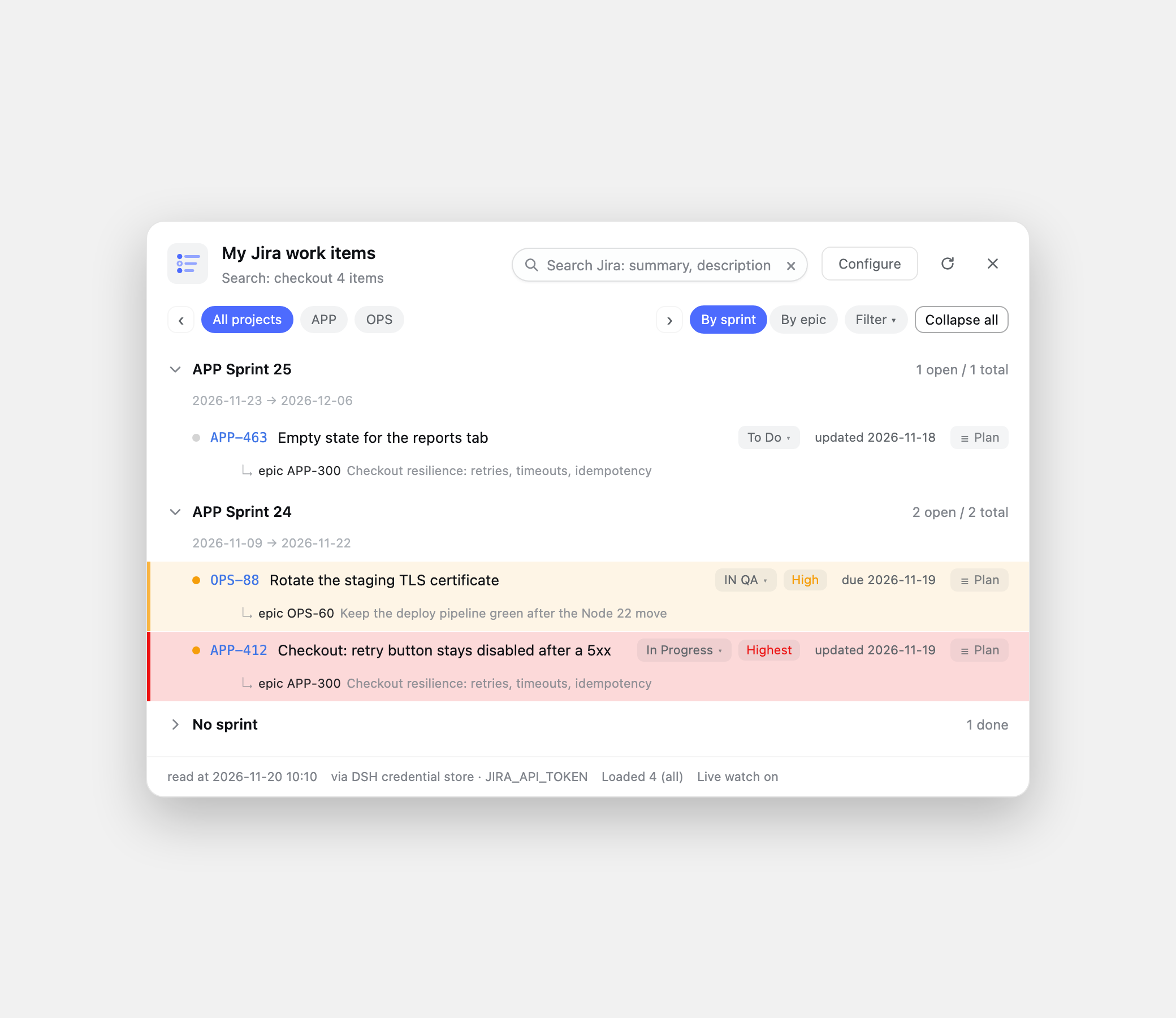
-
The header shows the accurate total for the current project + status, straight from Jira's
approximate-count. -
Click a status chip on any row to move the issue; the list reloads. Esc closes the top-most layer (status menu → configure dialog → panel).
-
The list is virtualized: thousands of rows scroll smoothly because only the visible ones are in the DOM.
-
Plan at the end of a row (the
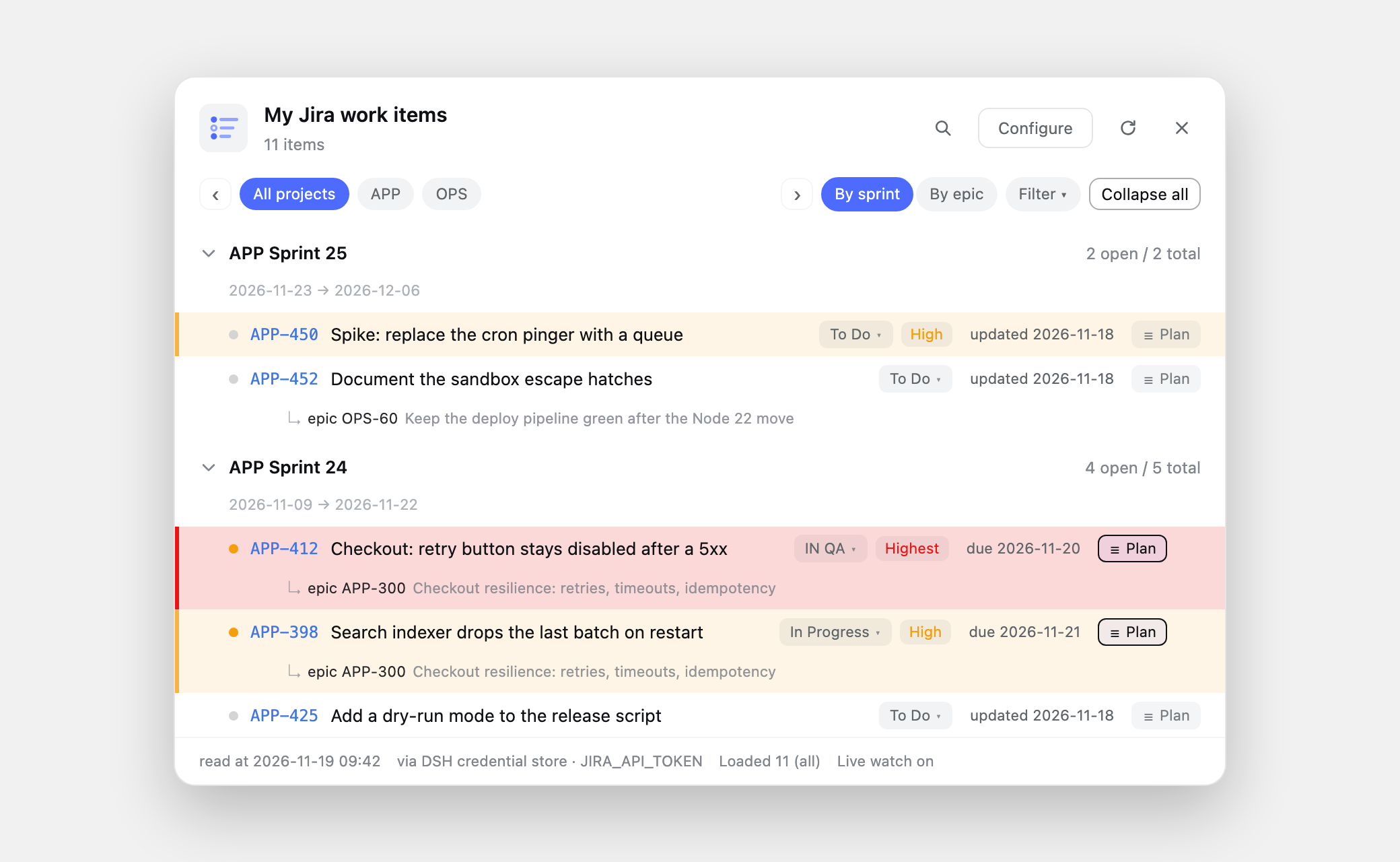
☰ 计划chip) opens a planning conversation for that issue in the workspace the project is linked to (or in DSH's default Workspace when it is not linked): the new session switches to plan mode, receives the issue key, title, status and link, and is told to report only the list of changes it intends to make — no explanations, no analysis. You approve or amend the plan in that conversation, and nothing is executed before you do. If the issue is too thin to plan (no description, no parent and no links), the session stops instead of guessing and tells you the Jira issue is unclear. One issue maps to one planning session: once bound the chip is highlighted, clicking it reopens the existing conversation (the binding lives in the volatileplanSessionsconfig asISSUE<TAB>sessionId, and a lost binding is recovered from theJIRA_PLAN_SESSION:<KEY>marker in the session's first message). Only when neither the project mapping nor DSH's default Workspace can be resolved does the button report what is missing; if the profile shipsdeepseek-ai/dsh-plan-mode, itssectionis the planning policy, and without it the first message carries a built-in one ("plan only, list the changes, execute once the user agrees"). A planned row also carries a×: it archives that conversation through DSH's own workspace archive (remote.workspace.archiveSession, same path as the sidebar's *Archive`) and clears the binding, so the row is unplanned again and the next click starts a fresh session. Archiving keeps the log — a mis-click is recoverable from the archive.
Planning: click ☰ Plan
The ☰ Plan chip at the end of a row creates a planning-mode conversation for that issue: the new session
switches to plan mode, receives the issue key / title / status / link, and is told to report only the list of
changes it intends to make — no explanations, no background, no analysis. You approve or amend the plan in
that conversation, and nothing is executed before you do. If the card is too thin to plan (no summary, no
description, no parent and no links), the session stops and says the Jira issue is unclear instead of guessing.
Where the conversation lands is decided in one place, in this order:
- the workspace the project is linked to (sidebar → Link Jira project…), when there is one;
- otherwise DSH's default Workspace — the same one the sidebar initializes on first use — so an unlinked project is no longer a dead end.
Either way the session appears in the sidebar immediately and the main view switches to it. A planned row
always reopens its existing conversation rather than creating a second one, so to file it under a project
workspace: link the project first, archive the old conversation with ×, then click Plan again. Linking a
workspace to a project is a one-time four-step job:
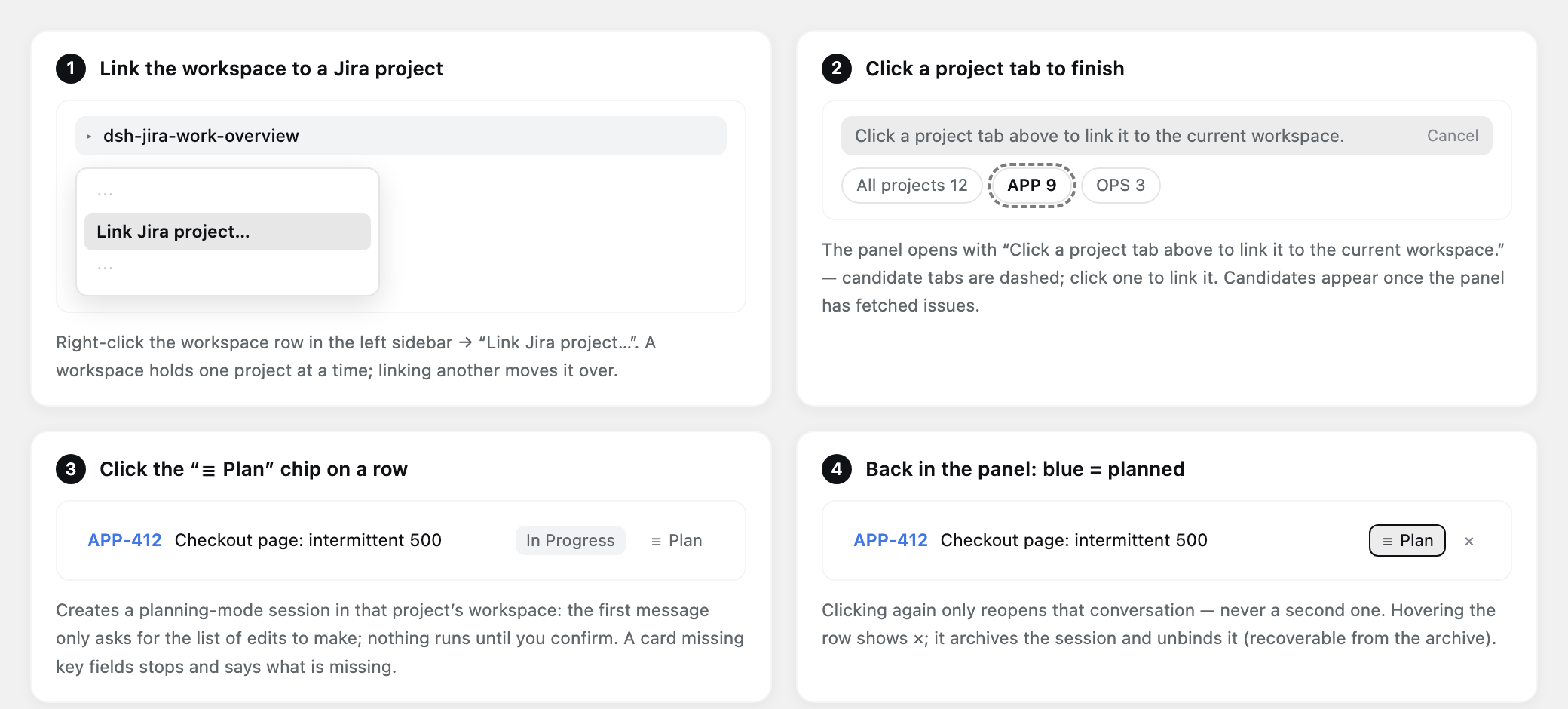
- Link the workspace to a project: right-click the workspace row in the left sidebar → Link Jira project…. A workspace holds one project at a time; linking another one moves it over, and the menu item becomes Unlink Jira project once something is linked.
- Click a project tab: the panel opens by itself and the header reads "Click a project tab above to link it to the current workspace." Candidate tabs carry a dashed outline — click one to link it; the header then reads "This workspace is linked to APP". Candidates appear only after the panel has fetched issues once, so hit Refresh if there are none.
- Click the
☰ Planchip at the end of a row: creates a planning-mode session in that project's workspace — or in DSH's default Workspace when the project is not linked. The first message only asks for a bullet list of the edits to make, and you agree to it in the conversation.deepseek-ai/dsh-plan-modeis optional — a built-in policy is used when it is absent. - Back in the panel: the chip turns blue (
on) = planned. Hovering the row reveals a×that archives the session and clears the binding (recoverable from the archive).
The real panel, for comparison (the two planned rows near the top are outlined):
"Plan" does nothing or shows an error
| What you see | Why | What to do |
|---|---|---|
Project APP is not linked to a workspace and no default Workspace could be resolved: link it from the sidebar first. | Neither the project mapping nor DSH's default Workspace could be resolved (workspace service unavailable / older DSH build) | Redo steps 1–2 above, or install a DSH build that provides the workspace service |
No candidate tabs / No projects to link yet: open the panel once so the project list loads. | The panel has never fetched issues successfully | Hit Refresh; if it still fails, set the site / email / token first |
| The planning conversation sits under default-workspace, not the project workspace | The project was not linked to a workspace when you clicked Plan, so it fell back to DSH's default Workspace | Link the project, archive the row with ×, then click Plan again |
| The workspace context menu has no Link Jira project… | The client half of the plugin did not register (the host row can still read active) | Reinstall the bundle and reload the page |
| The chip stays grey and does nothing | The previous session creation has not returned yet | Wait for it; a failure shows Could not create the planning session: … |
| It always reopens the same conversation | One issue maps to one planning session (by design) | Click × to archive it, then click Plan again |
| The first message says the Jira issue is unclear | The card is missing key fields: no summary / description / parent or links | Fill those in on Jira and click Plan again |
Epic view
The By sprint / By epic switch in the header re-groups the same list. Each group is an Epic Link (or "No epic"), a group that spans several projects is labelled with its project count, and every row keeps its ↳ epic APP-123 line — one level of Jira's own hierarchy, no free-form graph to maintain.
Slash command
/jira                       # my open items, text
/jira --json                # same, as JSON (used by the panel)
/jira --limit=200           # cap this call (0 = unlimited)
/jira --status="IN QA"      # server-side status filter
/jira --search="login error" # full-text search across all of Jira (or an issue key)
/jira APP-4051              # one issue in full
/jira project = APP AND duedate is not EMPTY
Agent tools
| Tool | Purpose |
|---|---|
jira_my_work | my issues + status, grouped; scope = open / sprint / all, or your own jql; status filter; limit |
jira_issue | one issue in full: fields, description (ADF → plain text), optional recent comments |
jira_transition | list the workflow transitions of an issue, or apply one (apply: true) — preview by default |
Live watch and notifications
The host polls assignee = currentUser() AND statusCategory != Done every watchIntervalMs (default 60 s, minimum 15 s). New assignments and status changes notify; items that simply leave the open list are recorded but stay silent. The first poll only establishes a baseline.
A status you changed — from the panel dropdown or jira_transition — is not news: the write records the expected from → to and the next poll silently advances its baseline instead of raising a notification, an unread badge or a banner entry. The match is on that exact pair, so a colleague changing the same issue to something else still notifies. Notifications use osascript on macOS, a PowerShell Toast on Windows, and notify-send elsewhere — silently degrading if the platform refuses.
Configuration reference
| Key | Default | Meaning |
|---|---|---|
baseUrl | '' | Jira site root, e.g. https://your-site.atlassian.net (required) |
email ✏️ | '' | login email used for Basic auth |
apiToken | '' | fallback only — prefer the DSH credential store |
credentialKey | JIRA_API_TOKEN | credential-store key that holds the token |
projectKey | '' | optional project label |
boardId | — | agile board id, used to read the active sprint |
maxResults ✏️ | 0 | fetch cap: 0 = unlimited, otherwise 10–5000 (safety net: 5000 items / 50 pages / one timeoutMs budget) |
timeoutMs | 30000 | HTTP timeout, and the total budget for one paged fetch |
watchEnabled ✏️ | true | background watch on/off |
watchIntervalMs ✏️ | 60000 | watch interval (≥ 15000) |
notify ✏️ | true | desktop notifications on changes |
language ✏️ | auto | UI/tool language: auto / zh / en |
preferredEditor ✏️ | '' | last editor used for "open cordis.patch.yml" |
✏️ = runtime-editable: the panel writes it through the host settings service into the active profile's cordis.patch.yml, and it applies immediately (no restart).
Platform support
| macOS | Windows | Linux | |
|---|---|---|---|
| Notifications | osascript | PowerShell Toast (-EncodedCommand); the AUMID is tried in order DSH_NOTIFY_AUMID → DeepSeek Harness → PowerShell's own AUMID | notify-send |
Open cordis.patch.yml | open / open -R / osascript app chooser | cmd /c start / rundll32 … OpenAs_RunDLL / explorer /select, | xdg-open |
| Editor picker | scans /Applications, ~/Applications, /System/Applications for .app bundles | where + %LOCALAPPDATA% / %ProgramFiles%; PATH split on ; | searches PATH plus the usual install locations (/usr/local/bin, /snap/bin, flatpak exports, ~/.local/bin, ~/.nix-profile/bin, JetBrains Toolbox), requires an executable bit, launches the resolved absolute path |
| Host paths | POSIX | avoid spaces in the install path — DSH records it as a link: dependency | POSIX |
The web half only uses standard React/DOM APIs (color-mix, createPortal are supported on all three).
The cordis.patch.yml path may be POSIX (/…), a Windows drive path (C:\… / C:/…) or a UNC share
(\\server\share\…, the case when a corporate profile is redirected to a network location).
Known edge: on Windows the cmd /c start fallback re-interprets cmd metacharacters (&, %) if the path
contains them — profile paths placed by DSH do not. explorer.exe /select, returns 1 even on success, so only a
failure to spawn is reported as an error.
What is real and what is not, on Linux: every platform difference — notifications, opening cordis.patch.yml,
the editor picker and its PATH lookup, fonts and scrollbars — is implemented by process.platform dispatch and
covered by the offline suites, but it has never been run on a Linux machine (development happens on macOS). If
something misbehaves there, open an issue with the panel's error text. The one Linux-specific gap by design:
the "choose application" picker has no desktop-portal equivalent, so only xdg-open / the editor picker / a
freely typed command are offered.
Internationalization
The plugin's own copy follows the DSH language setting; English and Chinese ship with the plugin and every other language falls back to English. Resolution order: DSH_JIRA_LANG → per-call override (--lang= / ?lang=) → language config → the host locale.preference → the panel-reported language → system env → ICU → en. Jira data is never translated.
Troubleshooting
| Symptom | Meaning |
|---|---|
Cannot reach https://… (…): ECONNRESET / HTTP 000 | your machine cannot reach Jira right now (VPN/proxy/network), not a plugin bug |
| "No matching work items" with no error row | the query returned nothing — widen the status filter or the project tab |
| footer says "live watch unavailable" | the Electron shell did not expose a fetch transport; the panel/badge degrade, tools still work |
| configure dialog says "Reading the token state failed: HTTP 404" | the plugin's /api routes were not registered (the host loaded the plugin before its connection service existed) — reload the plugin; a fixed build registers them once the service is up |
| footer says "live watch disconnected" | transient transport error; it retries with backoff |
| token rejected when saving | the email + token pair is wrong, or the token has no Jira access |
| panel body is a Connect Jira form | nothing is configured yet: fill site URL / email / API token and press Save and connect (a saved field can stay empty); the form sits where the failure hint used to be, and the token still goes straight to the DSH credential store |
| panel says "Jira rejected this email / token pair" | 401/403 from Jira: regenerate the token; the raw response is under the hint |
| panel says "Could not read the stored token" | the credential store returned an error rather than a value: save the token again from Configure |
Behind a corporate proxy on Windows, DSH needs the proxy env vars it was started with (NODE_USE_ENV_PROXY=1) — the plugin itself never talks to the network outside fetch.
Versions and upgrades
The current version is 0.16.6 (2026-11-26). The changelog records 40 versions (from 0.1.0); GitHub carries 15 tags / releases (0.13.0 → 0.16.6), and 0.13.4 was the first public release — the earlier 0.1.0–0.12.0 exist only in CHANGELOG.md and the project notes, with no commit or tag behind them, so "an older version" means 0.13.0 or later. Every release is described in CHANGELOG.md.
Why people still install older versions
- The package was not on npm before 0.14.0. Until then the only ways in were a GitHub URL or a local path —
plugin_manager install_bundle(target="dsh-jira-work-overview")simply could not resolve. And an existing install never upgrades itself: whichever spec you installed stays pinned. - 0.13.0 / 0.13.1 never loaded their browser half (see below): the sidebar entry, the panel and the token configuration were all missing, while
plugin_managerstill showedfiberPhase: "active"— easy to read as "the plugin is broken". Upgrade to 0.13.2+. - 0.15.0 and earlier report "Reading the token state failed: HTTP 404" in the configure dialog, and the badge, the status dropdown and the watch form fail with it (one root cause). Fixed in 0.15.1; upgrading from 0.15.1 on keeps your email / token.
Version history
| Version | Date | Kind | In one line |
|---|---|---|---|
| 0.1.0 | 2026-11-18 | first | jira_my_work / jira_issue tools, the Config card, token from the credential store |
| 0.2.0 | 2026-11-18 | feature | /jira slash command (no model message, no tokens), scope / issue key / raw JQL |
| 0.3.0 | 2026-11-18 | feature | the client panel in the left sidebar, fed by ctx.remote.commands.execute('/jira --json') |
| 0.4.0 | 2026-11-18 | feature | sprint grouping (collapsible), sprint field resolved via schema.custom |
| 0.5.0 | 2026-11-18 | feature | live watch: background polling, system notifications, unread badge, "what changed" banner |
| 0.6.0 | 2026-11-18 | feature | status transitions from the panel + the jira_transition tool |
| 0.7.0 | 2026-11-18 | feature | High / Highest row highlighting |
| 0.7.1–0.7.3 | 2026-11-18 | fix / trim | drop the unreliable "active sprint" line; abort the previous request on switch |
| 0.8.0 | 2026-11-18 | feature | API token editable in the plugin's own config page (masked, /myself check, rejected pairs never stored) |
| 0.8.1–0.8.6 | 2026-11-18 | feature | several config entry points, token modal, watch switch → applies as you change it, project tabs |
| 0.8.7–0.8.10 | 2026-11-18 | feature | editable login email, Windows / Linux support, UI language, configurable fetch size |
| 0.9.0 | 2026-11-18 | feature | internationalization (zh / en dictionaries following the DSH language) |
| 0.10.0 | 2026-11-18 | feature | accurate totals (projectTotals), editor picker; JQL conditions inserted before ORDER BY |
| 0.11.0 | 2026-11-18 | feature | single-select status filter (server-side --status), accurate total from approximate-count |
| 0.12.0 | 2026-11-18 | feature | virtualized list (@tanstack/react-virtual), maxResults: 0 = unlimited |
| 0.13.0 | 2026-11-18 | release prep | package renamed dsh-jira-work-overview, MIT, neutral defaults only in cordis.patch.yml |
| 0.13.1 | 2026-11-18 | cleanup | removed three stale test suites |
| 0.13.2 | 2026-11-18 | fix | the browser half never loaded (bundle id ≠ package name) |
| 0.13.3 | 2026-11-18 | fix | group headers overlapped after "collapse all"; scrolling flashed the macOS screen |
| 0.13.4 | 2026-11-18 | first public | desensitized: no personal values left in the repo, the docs or the git history |
| 0.14.0 | 2026-11-19 | feature | highlight follows Jira's own priority order; first npm release |
| 0.15.0 | 2026-11-19 | feature | transitions update in place, your own changes no longer notify you, typed failure hints |
| 0.15.1 | 2026-11-19 | fix | the four /api routes were never registered in a real host (404) |
| 0.16.0 | 2026-11-20 | feature | site-wide search, group by epic, the 计划 (plan) button on every row |
| 0.16.1 | 2026-11-22 | fix | Windows notifications and Show in file manager, the Linux editor picker, UNC patch paths; three-OS CI and the release preflight; a planning walkthrough in both READMEs |
| 0.16.2 | 2026-11-23 | fix | the workspace context menu's Link Jira project… could vanish for a whole page (client startup race); covered by a new offline suite |
| 0.16.3 | 2026-11-23 | fix | the Jira site URL is now an editable field in the config page (placeholder = current URL, saved to the profile Cordis patch); the failure hint's Configure button matches Save and verify |
| 0.16.4 | 2026-11-23 | fix | on a fresh profile, filling email + token + site URL and clicking only Save & verify left the URL unsaved, so the panel always said there was no site URL; the panel now also reloads automatically after a successful save |
| 0.16.5 | 2026-11-24 | feature | nothing configured shows a form, not an error: the panel body is the Connect Jira form (site URL / email / API token) in the old failure slot, saved fields can stay empty, and the list reloads once Jira accepts the pair |
| 0.16.6 | 2026-11-26 | feature | ☰ Plan works on an unlinked project too: the planning conversation lands in the project's workspace when there is one and in DSH's default Workspace otherwise (resolved through workspaces.initializeDefault() client-side and workspaceController.initializeDefault() host-side); only when neither resolves does it fail, with copy that says so |
0.1.0–0.12.0 all happened on 2026-11-18; tags and GitHub Releases start at 0.13.0. To install an older version:
plugin_manager install_bundle(target="github:EagleSoap/dsh-jira-work-overview#v0.13.2"), or pin the npm version withtarget="dsh-jira-work-overview@0.14.0"(the earliest version on npm is 0.14.0).
Upgrading
There is no "check for updates" button — upgrading means reinstalling the same spec:
plugin_manager install_bundle(target="dsh-jira-work-overview") # resolves the newest release when already installed
then refresh the DSH page (Cmd/Ctrl+R). Upgrading never touches your profile patch or the token in the credential store; since 0.13.0 cordis.patch.yml ships neutral defaults only, and your personal values (site / email / project key / board id) always live in your own profile.
Fixed issues
Every user-visible defect, newest first (implementation detail is in the matching CHANGELOG.md entry).
| Version | Symptom | Cause / fix |
|---|---|---|
| 0.16.2 | The workspace right-click menu lost Link Jira project… (so there was no way to bind a project), while the panel itself kept working | Browser-side plugins are created concurrently, and this one only waits for slots / remote; contextMenus waits for locale / shortcuts too, so a single ctx.get('contextMenus') in apply() could see it missing and skip the registration for the whole page. It now registers through ctx.inject(['contextMenus'], …) once the service appears; an older host without ctx.inject falls back to the direct path |
| 0.16.1 | On Windows, new assignments and status changes produced no notification at all | A Windows toast must be posted under a registered AUMID; an unregistered one makes CreateToastNotifier() throw Element not found (0x80070490), which was swallowed. It now tries DSH_NOTIFY_AUMID → DeepSeek Harness → com.deepseek.harness → the built-in PowerShell AUMID in order; the script statements are joined with newlines ({; try … } is a PowerShell syntax error, so nothing ran) |
| 0.16.1 | On Windows, Show in file manager opened Explorer but still reported a failure | explorer.exe /select, exits with code 1 even on success. That branch now tolerates a non-zero exit; only a process that never starts counts as a failure |
| 0.16.1 | With the profile on a network share, the config file was treated as an unknown path | Absolute-path detection only accepted /… and C:\…. It now also accepts UNC paths (\\server\share\…) |
| 0.16.1 | On Linux the editor picker "did nothing" and launches from a desktop launcher failed | Only the command name was stored, and a desktop session has a minimal PATH. Detection now covers PATH plus /usr/local/bin, /usr/bin, /snap/bin, flatpak exports, ~/.local/bin and friends (executables only), and launch always uses the absolute path |
| 0.16.1 | A fresh clone crashed the test suite: ENOENT … .dsh_jira_env; without site credentials the transition suite exited 1 | A missing env file is created empty (mkdirSync first when the directory is missing), and missing credentials now print SKIP: … and exit 0 — suites skip, they do not fail |
| 0.16.0 | × fails with 归档计划对话失败:no workspaces service / 这个 profile 没有提供工作区归档通道 | wrong facade: ctx.get('workspaces') is empty (the registry is workspaceRegistry) and the remote namespace is workspace, not workspaces. Now tries remote.workspace.archiveSession → the workspace registry itself → connection.call('workspace/archiveSession') |
| 0.16.0 | after deleting a plan session, 计划 reopens the archived one | the panel now fetches the binding with force: true (mapping only, no log scan) and the fresh-create path passes skipToken: true |
| 0.16.0 | 计划 throws cannot get property "remote.session" without inject | now uses the base's sessions.create({ workspaceId }) + sessions.using(id, …) — the same path as the chat box |
| 0.16.0 | 计划 errors out when no plan-mode plugin is installed | policy resolved from settings → the panel's host config view → the profile row in the boot data, with a built-in fallback in the first message |
| 0.16.0 | the epic view only ever shows the "no epic" group | a site can expose both gh-epic-label (always empty) and gh-epic-link (carries the key); an array-order find picked the empty one. Now resolved by schema priority (link first) |
| 0.15.1 | "Reading the token state failed: HTTP 404", and the badge, status dropdown and watch form with it | the plugin read ctx.get('connection') synchronously in apply() while client-connection's apply is async, so the same load batch got undefined — the four exact /api Fetch routes were never registered. Now ctx.inject(['connection'], …); the offline stub mirrors real host timing |
| 0.15.0 | a transition re-fetched hundreds of rows; your own change notified you again | the row + counts are updated in place; an expectation (key → from / to / category, 24h TTL) written around the POST absorbs the matching poll diff |
| 0.15.0 | the panel pasted raw errors with no way forward | --json failures return ok:false + error.code (no_credential / credential_unreadable / no_email / no_base_url / auth / network / http / not_json / unknown); the panel shows a title plus Configure / Retry |
| 0.13.4 | the author's real project key and token fragments appeared in docs, screenshots and tests | replaced with the made-up APP / ATAT…0000; projectKey defaults to ''; tests derive their own path; the git history was rewritten (old SHAs are void) |
| 0.13.3 | after "collapse all", a group header's title and date overlapped | @tanstack/react-virtual's default getItemKey is index => index, so heights are cached by index; now keyed by identity (g:<group id> / i:<issue key>) and estimateSize estimates per kind (header 64 / row 32) |
| 0.13.3 | scrolling the list flashed the whole macOS screen | a full-window backdrop-filter: blur(2px) flashes on scroll repaint in Electron; the masks now dim without blurring |
| 0.13.2 | after installing, the sidebar entry, the panel and every token config page were missing, yet plugin_manager said active | client.js still registered the old @local/… bundle id, so the host's client boot graph could not match it; test/dsh-jira-bundle-id.mjs pins the three names together |
| 0.13.1 | three test suites had been red for a while | they predated the 0.7 panel redesign and are covered by dsh-jira-visual.mjs / dsh-jira-credential.mjs; deleted |
| 0.13.0 | a missing site only said "no base URL" | err.noBaseUrl now says where to set it |
| 0.12.0 | not all items were fetched / the page got slow | virtualization + maxResults: 0 pages to the end; safety net 5000 items / 50 pages / one timeoutMs budget, partial results honestly carry hasMore: true |
| 0.11.0 | "N items" disagreed with what was on screen | the header now uses Jira's approximate-count; --status is applied server-side so the list and the count cannot disagree |
| 0.10.0 | adding a status condition produced invalid JQL and a silently empty projectTotals | conditions must be inserted before ORDER BY (appending after it is HTTP 400); now through withJqlClause |
| 0.9.0 | the UI language ignored the DSH language setting | resolved DSH_JIRA_LANG → per-call → config → host locale.preference → the panel's reported language → system env → ICU → en |
| 0.8.8 | editing the email had no effect | it read the startup snapshot; now read through liveSetting() per operation |
| 0.8.7 | a wrong email meant editing cordis.patch.yml | editable in the dialog, verified against /rest/api/3/myself as a pair with the token |
| 0.8.6 | the test predicate matched jmw-rowmeta as a row | tightened to an exact class match |
| 0.8.4–0.8.5 | the dialog was not centred / white on white in the dark theme / overlays survived closing the panel | restored the classes a CSS rewrite had dropped; button colours are hardcoded (--dsw-alias-brand-primary is near-white in the dark theme); closeAll() moved into the shared snapshot |
| 0.8.0–0.8.3 | the token was file-only; settings needed a restart | the token moved into the plugin config page; watch settings use .volatile() + settings.mutate and apply on loader/volatile-update |
| 0.7.3 | a fast project / status switch let a stale response win | the previous request is aborted and a sequence number discards stale responses |
| 0.7.1 | the tool output's "active sprint" did not match reality | the board's sprint state is not reliable; the line is gone |
| 0.1.0–0.6.0 | early gaps | see the matching CHANGELOG.md entries |
Where to start
- No sidebar entry, or
plugin_managersaysactivewhile the UI is empty → upgrade to 0.13.2 or later and refresh. - The configure dialog reports HTTP 404 / the badge never updates → upgrade to 0.15.1 or later.
- Nothing is configured yet → the panel body is a Connect Jira form (site URL, email, API token); fill what is missing and press Save and connect. A rejected token / unreadable credential keeps the failure hint: use Configure there (or at the right of the panel title); you never have to edit the profile file.
- A raw error from
/jirain text mode is on purpose — the command surface should show the real reason; the panel uses the typed--jsonhints instead.
Security and privacy
- The API token lives in the DSH credential store; the plugin only ever returns a masked form + its source, never the value. There is no place in the code where a full token is logged or rendered.
- The plugin reads only issues assigned to you (the JQL always starts from
assignee = currentUser()) and writes only the workflow transition you click, plus your own settings. - Your Jira site / email are personal configuration: they belong in your profile (
cordis.patch.yml/ the panel), not in this repository.
Development
dsh-jira-work-overview/
├── index.js          host half: tools, /jira command, fetch routes, watch loop, Jira client
├── client.js         web half: sidebar entry, panel, configure dialog (plain React via __ModuleLoader__)
├── cordis.patch.yml  the plugin row this bundle inserts (neutral defaults only)
├── locale/{zh,en}.json  plugin-list title/description (file name = language id, en.json required)
├── icon.svg          plugin-list icon (36×36, transparent, theme-friendly strokes)
├── docs/images/      README screenshots, rendered by `test/dsh-jira-shot.mjs`
└── test/             offline + real-Jira suites
Tests run under DSH's own Electron-as-Node binary (ELECTRON_RUN_AS_NODE=1):
BIN="/Applications/DeepSeek Harness.app/Contents/MacOS/DeepSeek Harness"
ELECTRON_RUN_AS_NODE=1 "$BIN" test/dsh-jira-visual.mjs      # offline: rendering, virtualization, filters
ELECTRON_RUN_AS_NODE=1 "$BIN" test/dsh-jira-credential.mjs  # offline: config panel, routes, paging
ELECTRON_RUN_AS_NODE=1 "$BIN" test/dsh-jira-i18n.mjs        # offline: language matrix + dict parity
ELECTRON_RUN_AS_NODE=1 "$BIN" test/dsh-jira-transition.mjs  # real Jira (read-only + failure paths)
ELECTRON_RUN_AS_NODE=1 "$BIN" test/dsh-jira-status.mjs      # real Jira (skips itself when unreachable)
ELECTRON_RUN_AS_NODE=1 "$BIN" test/dsh-jira-shot.mjs        # regenerate docs/images (headless Chrome, fake data)
The screenshots are generated offline too: test/dsh-jira-shot.mjs renders the real client.js components with the real plugin CSS and a fixed set of made-up APP/OPS issues, serializes them to static HTML and lets headless Chrome shoot them — so the images never contain a real site, account or issue. Run it with --lang en,zh, --theme dark, --only panel|panel-plan|panel-watch|panel-search|panel-epic|sidebar-entry or --out <dir>; it prints SKIP: and exits 0 when no Chrome is installed.
The host half imports @deepseek-ai/schemastery, which only resolves inside the app, so the suites copy index.js next to a copy of that dependency in a temp dir (DSH_JIRA_TMP overrides the location). Real-Jira suites read a token from DSH_JIRA_ENV_FILE (default $TMP/.dsh_jira_env, chmod 600) and skip when Jira is unreachable instead of reporting a false regression.
License
MIT © 2026 Zhaohong Fei
Related plugins
dsh-purge
kingcharleslzy-ai/dsh-purge
dsh-web (dsh-ssh)
zhu1090093659/dsh-web
dsh-web (dsh-remote-web-ui)
zhu1090093659/dsh-web
dsh-web-ui (dsh-ssh)
zhu1090093659/dsh-web-ui