dsh-ponytail
edwardhey/dsh-ponytail
Adds the Ponytail lazy-senior workflow to DeepSeek Harness with four modes, a composer selector, six focused skills, bilingual descriptions, per-skill toggles, and cache-friendly switching.
Install
dsh plugin --profile web add github:edwardhey/dsh-ponytailREADME
dsh-ponytail


The best code is the code you never wrote.
A DeepSeek Harness (DSH) port of DietrichGebert/ponytail, forked from Wenaixi/dsh-ponytail and maintained independently by edwardhey (ADR-0010). Injects the 7-rung ladder directly into system prompts, provides 6 specialized skills, and registers zero tools.
What it is
A counter-weight to LLM boilerplate and over-engineering: deletion over addition, boring over clever, and fewest files possible. Challenge requirements before writing code (YAGNI), prioritize existing functions and standard libraries, and solve in one line when possible.
Features a Zero Cache Miss Architecture (ADR-0012) for non-off mode switches: the session baseline is locked permanently, and dynamic intensity changes take effect via turn-end reminders, leaving historical prompt / KV cache 100% untouched across long conversations. The off boundary is the documented exception and costs one cache rebuild. Ships as a pure dsh.bundle, writes zero garbage to your home root, uninstalls cleanly, and rebuilds itself through HMR.
Install
Needs the DSH runtime (npm i -g @deepseek-ai/dsh). Node and pnpm floors are in the badges above. Examples use the web profile; substitute your own profile name.
Install directly from GitHub; no npm account or npm publication is required. Build artifacts are committed, so no install-time build approval is needed.
# Install v1.0.0 (automatic HMR reload)
dsh plugin --profile web add "github:edwardhey/dsh-ponytail#v1.0.0"

# Remove
dsh plugin --profile web remove @edwardhey/dsh-ponytail

# Inspect composed patch tree
dsh --profile web --dump-config | grep -A2 ponytail
Usage
/ponytail            Switch to full mode (all 7 rungs active)
/ponytail lite       Do the bare minimum
/ponytail ultra      Challenge the requirement itself first
/ponytail off        Disable injection
/ponytail default lite   Persist default across sessions
stop ponytail        Equivalent to off (exact match)
Intensity levels reset on each new session according to env > Profile patch > fallback full. Therefore, /ponytail <level> is session-scoped. To persist across restarts and new sessions, use /ponytail default <level>.
Zero Cache Miss Architecture
When switching intensity levels within an ongoing session or updating global default configurations, the top-level SystemPrompt baseline remains strictly byte-identical and static.
Mode transitions take effect dynamically by appending an incremental system notification (<system-reminder>) at the end of the current turn's user message (aligned with the official dsh-tool-skill catalog update pattern, ADR-0012). This 100% protects historical KV Cache / Prompt Cache across all multi-turn conversation history, eliminating costly prefill recalculations and latency spikes.
Skills
| Skill | Description |
|---|---|
/ponytail | Core mode: 7-rung ladder, lazy senior dev mindset |
/ponytail-review | Over-engineering code review: hunt for code that can be deleted |
/ponytail-audit | Whole-repo complexity audit, ranked by deletion yield |
/ponytail-debt | Harvest ponytail: comments into an actionable debt ledger |
/ponytail-gain | Minimal metrics dashboard showing code reduction benchmarks |
/ponytail-help | Quick reference card for modes, commands, and skills |
Skill Bodies and Description Languages
Skill bodies are retrieved directly from upstream DietrichGebert/ponytail v4.10.3 in verbatim English. Two host-incompatible details are tailored for DSH: ponytail-gain data sources point to assets/*.svg (as upstream benchmarks/ is excluded), and ponytail-help configuration and update sections reference profile patches and dsh plugin.
Model catalog views and configuration forms share the exact same description string, governed by skillDescriptionLang (three-state: explicit Chinese zh / explicit English en / unconfigured auto). When unconfigured, it follows the host's locale.preference (English triggers English alignment; others default to Chinese). Explicit selection locks the language. Canonical descriptions reside in skills/descriptions.zh.json and skills/descriptions.en.json, served live via ctx.remote.ponytail.snapshot().
Configuration Panel
The card detail view provides an embedded settings panel: independent toggle switches for all 6 skills, a description-language switch, a one-click reset button, and a 3-tier priority diagnostic chain displaying environment variables, profile patches, and built-in fallbacks with their active hit states.
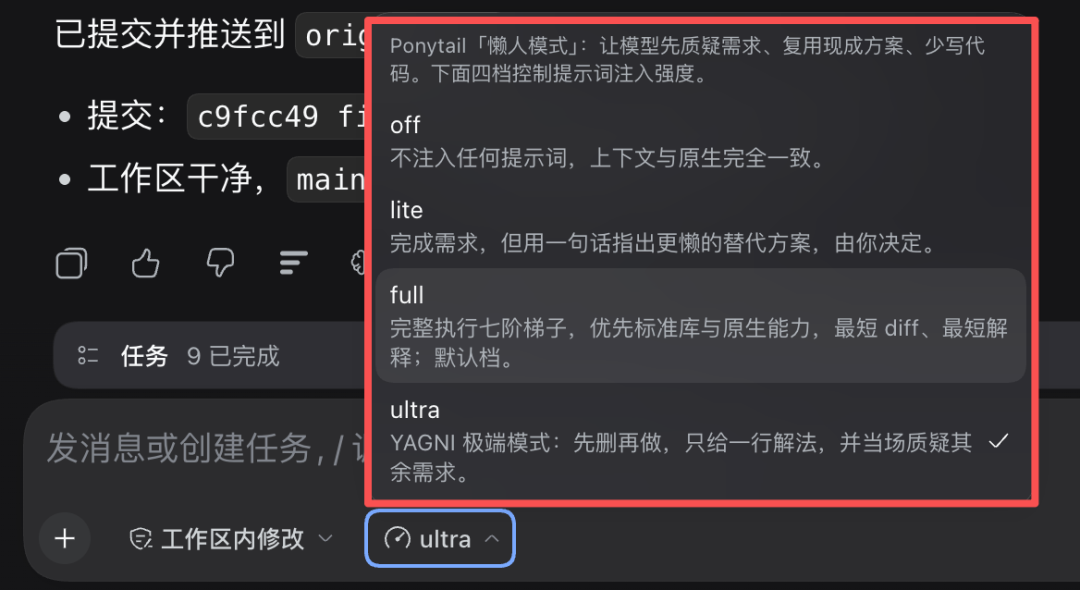
The intensity level selector now lives in the composer tool row immediately right of the permission picker, as a dropdown built from the same official Menu component. Every level carries a one-line description inside the menu, and the trigger's title explains the current level. Selecting Off injects no ladder prompt into the context at all. The trade-off: the off↔on boundary costs one KV Cache miss (ADR-0012 no longer holds for off); switching between non-off levels still keeps the prefix byte-identical.
The control shows the patch's defaultMode; when the patch has none it shows the level actually in effect, with no separate "unset" row.
Configuration reads and writes use two official DSH channels:
| Channel | Scope | Target |
|---|---|---|
ctx.configForms.get('ponytail') | Default level & disabled skills with revision conflict checking | profiles/<name>/cordis.patch.yml |
ctx.remote.ponytail.snapshot() | Active runtime level & 3-tier diagnostic chain (read-only) | In-memory RPC |
Profiles lacking a full UI service bundle (headless, CLI) fall back gracefully to profiles/<name>/ponytail/config.json, fully aligned with the latest DSH pure profile architecture.
Upstream Mapping
The six hooks from upstream hooks/ are consolidated into a single DSH Cordis plugin:
| Upstream | DSH Implementation |
|---|---|
ponytail-config.js | src/ponytail-config.ts |
ponytail-instructions.js | src/ponytail-instructions.ts (single entrypoint renderPromptSection) |
ponytail-state.js | src/ponytail-state.ts (flag file I/O, session baseline manager, reload) |
ponytail-activate.js | src/ponytail.ts (agent/created hook) |
ponytail-mode-tracker.js | src/ponytail-commands.ts (createCommandDispatcher) |
ponytail-subagent.js | src/ponytail.ts (agent/created, PONYTAIL_SUBAGENT_MATCHER) |
Prompts are injected via systemPrompt.section('ponytail') at order: 50, positioned neatly between persona (0) and tools (100). When switched to off, prompt rendering overhead is zero. Flags and configurations are scoped per profile directory, ensuring full multi-instance isolation.
Development
pnpm typecheck              # tsc --noEmit
pnpm build                  # tsc into lib/, scripts/build-client.mjs generates lib/client.js
node scripts/verify.mjs     # Static contract gates: artifacts, skills, zero tools, slots, locales
node scripts/docs-verify.mjs # Documentation and version consistency gates
node scripts/behavior.test.mjs  # Behavioral test suite

dsh --profile web --patch ./cordis.patch.yml --dump-config  # Verify patch parsing
pnpm dsh web --patch ./cordis.patch.yml   # Hot reload dev runner
License
MIT. Full text in LICENSE.
Credits
- Original upstream DietrichGebert/ponytail
- Fork source Wenaixi/dsh-ponytail
- DeepSeek Harness for the plugin architecture and runtime
- dsh-plugin-dev for DSH plugin development patterns and architectural guidelines