dsh-turn-timeline
ejinhouse/dsh-turn-timeline
Left-sidebar timeline of the current session's turns, showing each turn's deliverables, ledger updates and file changes read from the session event log and the change ledger.
Install
dsh plugin --profile web add github:ejinhouse/dsh-turn-timelineREADME
dsh-turn-timeline
A left-sidebar panel that turns every session into a task timeline: one row per task stretch, the turns behind it, the files each turn produced, and one click straight into a preview.
DSH sessions are linear. A single conversation usually contains several jobs — research, build, fix, test — and once it is long enough the only thing you remember is the last result. Everything before it is buried in scrollback. This panel indexes that scrollback: it reads the session logs, folds turns into task stretches, and gives every produced file a click target.
Screenshots
| Turns | Ledger | In-panel preview |
|---|---|---|
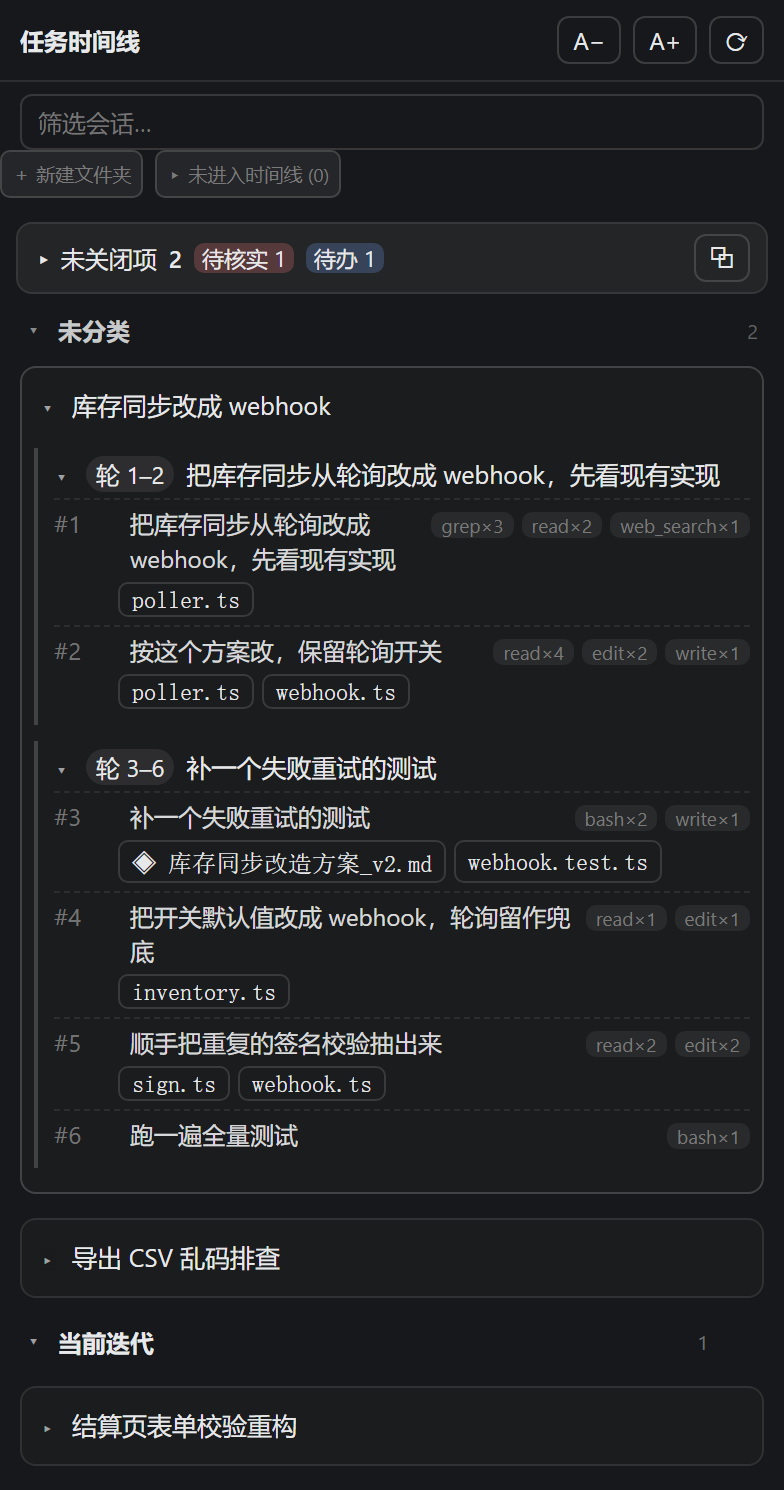 | 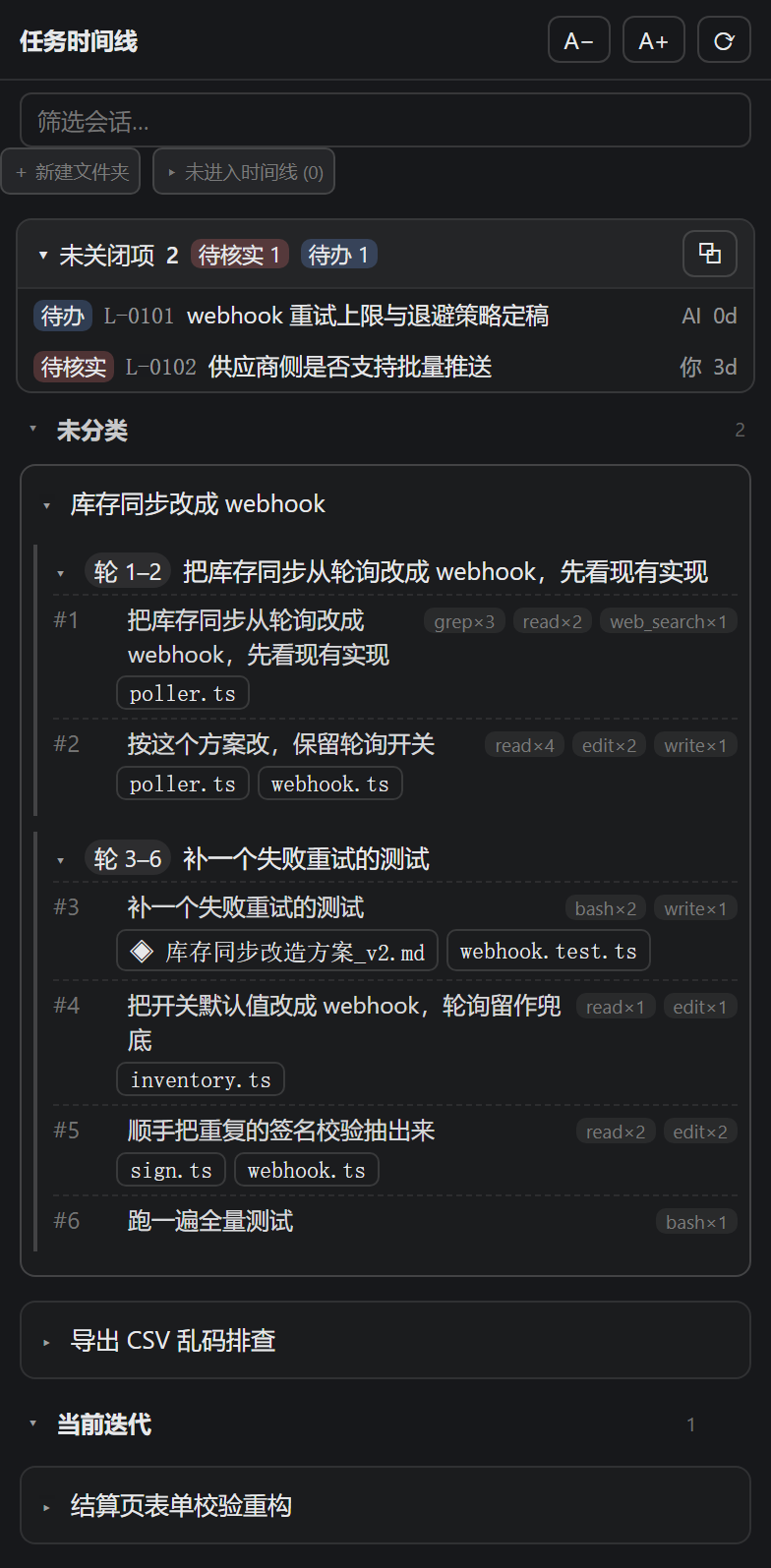 | 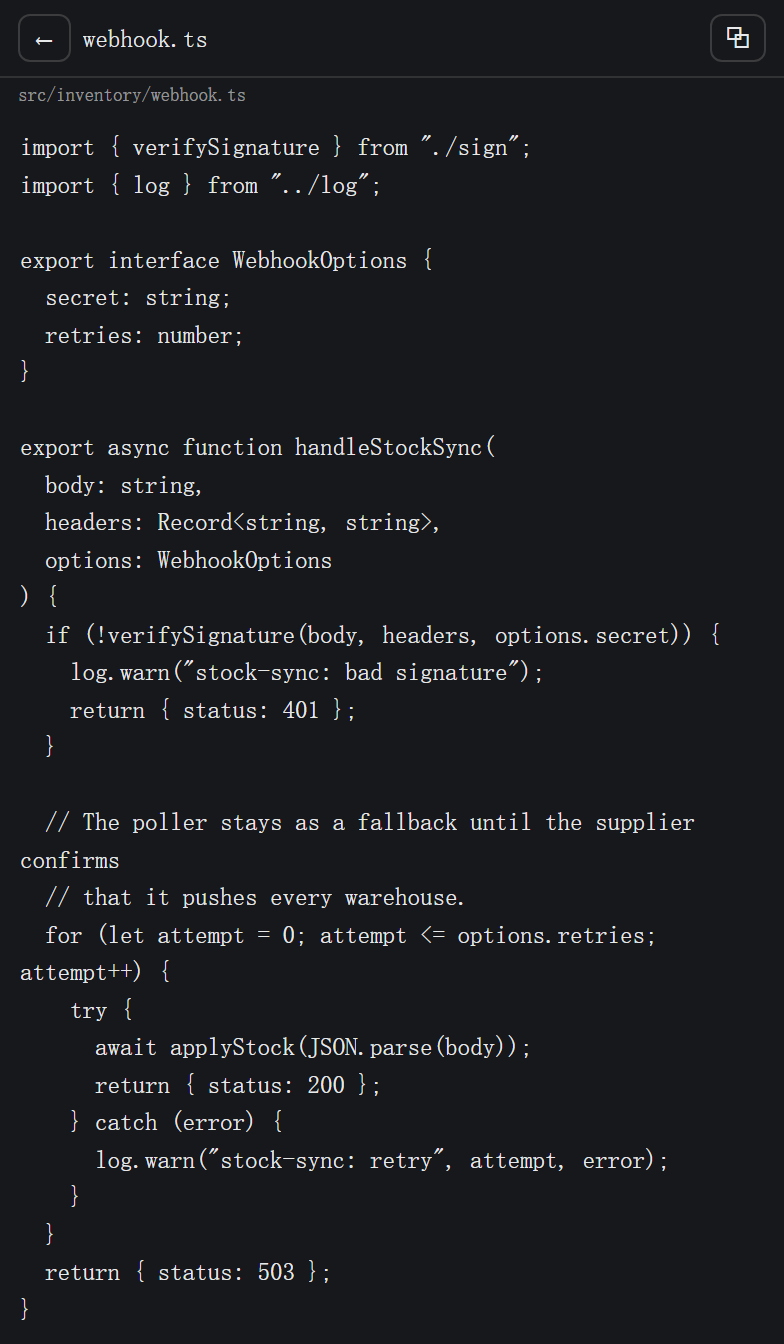 |
Rendered from an invented demo workspace — no real session data, paths or ledger text. The 1.0.0 bs sb service marker in the header is hidden in these shots.
What it shows
⏱ Task timeline           1.0.0 bs sb  A− A+  [workspace ▾]  ⟳
[ filter sessions… ]
[ + New folder ]  [ ▸ Not in timeline (2) ]
▾ 📁 Plugin research              3
    ▸ session-97fd3980…           3 segments · 11 turns
▾ 📁 Sidebar plugins              1
    ▸ session-c210cf12…           1 segment · 4 turns
▾ Unfiled                         5
    …
- Sessions of the current workspace, labelled with the same summary title the workspace session list shows (the last
session/titlein the log; the first user message only when the Harness never wrote a title). Titles are resolved host-side, cached, and refreshed when a newer title lands, so re-entering the panel never falls back to serial ids. - Task stretches: consecutive turns are grouped into one stretch, a new stretch starts when a turn touches files that the previous stretch did not.
- Turns inside a stretch: turn number, status, the first line of what you asked, and tool usage (
pwsh×21,web_fetch×16, …). - Produced files per turn (chips). Left click jumps to that turn in the conversation and opens the file in the right sidebar; right click previews it inside the panel.
- Subagent sessions are folded behind a toggle — they are read-only while their parent is offline.
Managing the list
Since 0.2.0 the panel is editable; the arrangement is yours, not a mirror of the log.
| Action | How |
|---|---|
| New folder | + New folder, type a name, Enter |
| File a session | drag the session row onto a folder name (drop on Unfiled to clear it) |
| Rename a session | ✎ on the row |
| Rename a folder | double-click its name |
| Remove a session | × on the row — the session and its log stay untouched |
| Bring one back | ▸ Not in timeline (n) → + |
| Delete a folder | ✕ — its sessions return to Unfiled, nothing is deleted |
| Collapse | click any folder header |
New sessions appear automatically; only sessions you removed are held back.
The arrangement lives in $DSH_HOME/storages/turn-timeline-v1.json (default ~/.dsh/storages/). It stores folder names plus each session's {folderId, name, removed} — no session content is copied. Writes are temp file + rename, so a crash never leaves a half-written layout.
Preview
- Left click on a file chip = jump to the turn (anchor
[data-chat-anchor-key], matched by the turn's user text), highlight it, then open the file in the right sidebar. - If the right sidebar refuses (a global panel owns the main area, or the session is not on screen), the panel falls back to its own read-only preview: markdown rendered, code syntax-coloured with line numbers, images inline.
- Right click on a chip = preview inside the panel directly;
⧉tries to push it to the right sidebar and reveal the conversation. A− / A+zoom the panel; Ctrl + mouse wheel over the right sidebar zooms that pane (0.6–2.4, remembered).
Data sources
| What | Where |
|---|---|
Turn boundaries, user text, tool usage, present deliverables | ctx.sessionQuery.readSession(id) — the raw log, not the compacted surface |
| Files changed per turn, including shell-created ones | turn-rewind's change ledger (~/.dsh/change-ledger/v1/…): diff of checkpoint N against N+1 |
Files written by file tools (write, edit, …) | tool/call arguments |
| Session titles | the last session/title (the workspace's summary name), else the first user message; cached host-side, refreshed on new titles |
The ledger is optional: without turn-rewind the panel degrades to "files written by file tools", which means a pwsh-created file will not appear.
Unclosed items ledger (1.1.0)
The timeline answers "what happened"; the ledger answers "what is still owed". The first can be rebuilt from the session log, the second cannot — so the ledger's source of truth stays in the workspace markdown, and this plugin only reads it.
A bar at the top of the panel is fed by two files:
| Source | Path | Holds |
|---|---|---|
| Global pool | <workspace>/50-knowledge/OPEN-ITEMS.md | cross-session, project-level items |
| Session notes | <workspace>/10-sessions/<dir>/NOTES.md | items that only concern one session |
Only fenced ```ledger blocks are parsed; prose outside them is ignored. A repeated id counts once, and the global pool wins.
- [ ] L-0007 | 待核实 | 良品率98.2%无来源 | owner=你补 | 2026-11-12 | 会话=20261112_1504 轮=12
- [x] L-0006 | 待办 | 建会话目录模板 | owner=AI | 2026-11-12 | 关闭=2026-11-12 已交付
- Click a row to open its source file in the panel;
⧉opens this workspace'sOPEN-ITEMS.md. - Open items older than 14 days are marked stale; unparseable lines are counted, not guessed.
- Read-only by design: the plugin never writes the ledger.
Honest limits
- The last turn is always incomplete — a checkpoint is taken before a turn, so the newest turn has no successor to diff against.
- The ledger is per workspace — subagent sessions never write one; sessions from another workspace are not indexed even when the panel shows all workspaces.
- Not a file manager — the preview route only serves paths the session itself produced (
not-in-sessionotherwise), caps text at 1 MB / 400k characters, images at 8 MB. - No timeline without a log — a session whose log was deleted simply shows no turns.
- Titles need content — an empty session (no user message, no title) shows its short id.
- Zero tokens by default — naming is local. Nothing is sent to a model.
- Ledger badges are workspace-level only — a DSH sessionId has no reliable mapping to a
10-sessions/<dir>folder, so counts appear on the workspace selector and the summary bar, never on a session row.
Install
From the plugin market (recommended): open the market panel (dshmarket), search timeline, install.
Command line:
dsh plugin --profile desktop add "https://github.com/Ejinhouse/dsh-turn-timeline/releases/latest/download/dsh-turn-timeline.tgz"
Fully quit and reopen the desktop app afterwards — the host half registers new routes, so a page refresh is not enough. The panel appears in the left sidebar with a clock icon; its position in the panel list can be pinned.
Requires DSH 0.2.x. Zero dependencies, no network calls, no model calls.
Structure
lib/index.js— host half, zero dependencies: session index, turn folding, ledger diffing, file preview, arrangement storage.lib/client.js— browser half, hand-writtenwindow.__ModuleLoader__bundle (no build step):mainpanel +sidebar.panellistrow, markdown/code/image preview, drag-and-drop arrangement.cordis.patch.yml— bundle insertion.
Routes (prefix /turn-timeline):
GET  /index                 workspaces + one row per session
GET  /session/<id>          turns + task segments
GET  /file?session=&path=   one produced file (preview)
GET  /layout                folders + per-session arrangement
POST /layout                folder.create|folder.rename|folder.delete
                            item.assign|item.rename|item.remove|item.restore
Uninstall
dsh plugin --profile desktop remove dsh-turn-timeline
License
MIT — see LICENSE.
Related plugins
billion-context
ranxianglei/billion-context
dsh-web-ui (dsh-chat-recovery)
zhu1090093659/dsh-web-ui
dsh-synapse
liangmianya/dsh-synapse
dsh-archive-manager
michengai/dsh-archive-manager