ModelManager
epocheran/modelmanager
Manage model providers, API keys, per-provider proxies, and reasoning levels from one Settings page.
Install
dsh plugin --profile web add github:epocheran/modelmanagerREADME
Model manager
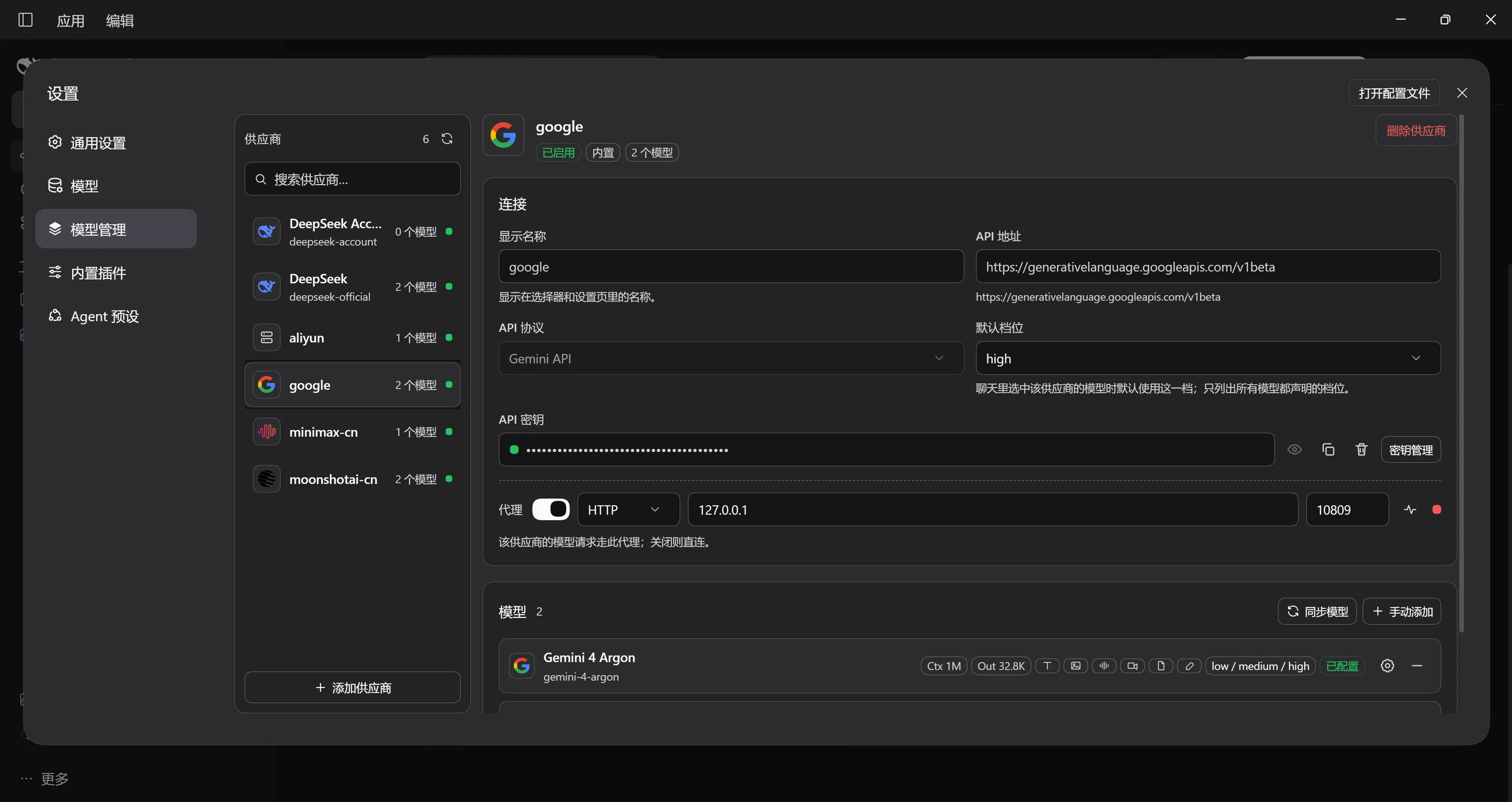
A provider and model management page at Settings → Model manager for DeepSeek
Harness. It keeps provider routes, connection fields, model lists, capability
data, reasoning levels, API keys, and per-provider proxies in one place instead
of spreading them across the Models cards and cordis.patch.yml.
Features
Providers
- Lists every configured provider route with its logo, display name, route id, model count, and a live status dot (green: usable, orange: missing a key).
- Each provider card shows 已启用 / 内置 / N 个模型 tags, its protocol, and a 删除供应商 action. The account route is read-only.
- Edits display name, API endpoint, API protocol, and default reasoning effort; every edit saves automatically after a short debounce and the footer reports saving/saved/retry states. There is no Apply button.
- Built-in providers keep their protocol locked to the one their adapter speaks; custom routes choose from the installed protocols.
- Add provider offers the installed catalog (searchable, one row per provider) or a custom API tab where you enter the route id, display name, base URL, and protocol, then fetch the endpoint's model list live or type a model id by hand. No API key is required at add time — keys are set on the provider card afterwards.
- A pi-ai catalog route that duplicates a native adapter (for example
deepseeknext todeepseek-official) is hidden while it is unconfigured.
Models
- Every model row shows its real capabilities as icons: input modalities (text / image / audio / video / PDF), tool calls, and reasoning — read from models.dev and cached locally for a day. Context window, output cap, declared reasoning levels, and an 已配置 tag follow.
- Sync models opens a drawer that interrogates the endpoint with the
endpoint, protocol, and key currently in the editor (the key never returns to
the browser once stored). Name-prefix tags (
all,qwen,qwen3.8, …) filter the discovered list; each model has a one-click add. Configured models the endpoint no longer lists are kept. A two-step Remove all models action clears the list for a fresh sync. - 手动添加 opens the same editor with a blank model.
- The model editor (
gearon the row) writes id, display name, context window, maximum output, input types, and reasoning levels:- input types are text and image — the two modalities DSH messages actually carry; audio/video/document found in the catalog are shown read-only with an explanation
- reasoning levels can be inherited from the catalog/endpoint, custom (add a row per level and map it to the API value the endpoint expects), or off
- Probe levels sends one real request per candidate level directly to the provider endpoint (bypassing the local effort map), reports which levels are accepted with their reasoning-token count, and applies the accepted set in one click. A wrong inferred protocol retries the next wire protocol instead of reporting the wrong endpoint's 404.
- Models can be removed from the row; the last model of an active route is refused because DSH needs at least one.
API keys
- Key manager (button next to the key field) keeps several keys per provider in the browser, lets you enable exactly one, reveal/copy/edit/delete them, and test one against the endpoint. Enabling a key writes it into the DSH credential store, which is what the model layer reads.
- Opening the drawer imports the currently stored credential so the saved key appears there too. The key field itself is write-only from the page: only a redacted descriptor is ever sent to the browser.
Per-provider proxy
- Each provider card has a proxy block at the bottom: a switch, protocol (HTTP / SOCKS5), host, port, a test action, and a status dot that is red until the endpoint answers through the proxy.
- Rules are per provider, stored in
$DSH_HOME/storages/model-manager/proxy.json; the first run inherits rules from the retired Model proxy plugin. - The Host installs an undici dispatcher and scopes every
llm/streamto its provider throughAsyncLocalStorage, so only that provider's requests take the tunnel. Requests with no provider of their own (model discovery) match by destination host; everything else keeps the dispatcher it already had.
The page itself
- While active, the Settings panel widens to the window and gives the provider column and the detail column independent scrolling.
- Drawers are measured against the Settings content area, so they stay inside the surface instead of covering the whole window.
- Provider marks are real logos where available and a neutral glyph otherwise; duplicate name/id lines are suppressed.
- All surfaces follow the DSH theme tokens, so light and dark themes both work.
Install and use
This repository root is the plugin package: package.json declares both
dsh.bundle.patch (cordis.patch.yml) and the browser half (client.js), so it
can be installed straight from here.
Requirements: a DSH installation with the plugin manager (the desktop app
provides both the manager and pnpm) and a version that satisfies this package's
engines.dsh / @deepseek-ai/dsh-* ranges.
- From a directory — clone or copy this repository, then open Settings →
Plugins → Add plugin and enter the absolute package directory (for example
D:\DSHplugin\ModelManager), or pick it with the directory control. The profile records alink:dependency, so keep the directory where it is. - From a Git URL — the install field also accepts a repository URL such as
https://github.com/EpocheRan/ModelManager. Public repositories install directly; a private repository needs Git credentials on that machine (the manager probes the host withgit ls-remotebefore installing). - As a package —
npm packproduces a tarball; publish it to a registry and installname@version, or install from the local tarball path.
After installing, confirm the bundle is enabled on the Plugins page and open Settings → Model manager. On first use:
- Add or open a provider card, set the endpoint and protocol, and add an API key (or keep the account route, which is read-only).
- Use Sync models to import what the endpoint serves; filter by the name tags, then confirm.
- Set a Default effort on the provider card if the route should start on a specific reasoning level.
- Open Key manager to keep several keys and test connectivity.
- Open a model's gear and use Probe levels to learn which reasoning levels the endpoint really accepts.
- If the provider needs a proxy, enable the proxy block and test it.
安装与使用
仓库根目录就是插件包(package.json 同时声明 dsh.bundle.patch 和客户端
client.js),可以直接安装。
前置条件:DSH 桌面版(自带插件管理器与 pnpm),且版本满足本包的
engines.dsh / @deepseek-ai/dsh-* 范围。
- 本地目录安装(推荐):克隆或复制本仓库 → 设置 → 插件 → 添加插件 →
填绝对目录(如
D:\DSHplugin\ModelManager)或选择目录。profile 会记录为link:依赖,目录不要随意移动。 - Git 地址安装:安装框支持仓库地址,如
https://github.com/EpocheRan/ModelManager。公开仓库可直接装;私有仓库 需要目标机器已配置 Git 凭据(安装前会先用git ls-remote探测可达性)。 - 打包安装:
npm pack生成 tarball,可发布到 registry 后按name@version安装,也可直接用本地 tarball 路径。
安装后在插件页确认 bundle 已启用,打开设置 → 模型管理。首次使用:
- 添加/打开供应商卡片,填写地址、协议、API 密钥(账号路由只读)。
- 同步模型:按名称标签筛选后导入端点实际提供的模型。
- 需要时在供应商卡片设置默认档位。
- 打开密钥管理:保存多把密钥、切换启用、检测连通性。
- 打开模型的齿轮,用探测档位确认端点真正接受哪些推理档位。
- 供应商需要代理时,打开底部的代理模块并测试。
实现方式
- Host 半(
index.js):通过connection.fetch注册认证路由/api/model-manager,处理state、discover、save、add、delete、probe-reasoning、key-*、capabilities、proxy-*。所有修改都经 DSH 的settings/credentials服务写入 profile 设置文档,插件不直接解析cordis.patch.yml。 - 模型能力来自 https://models.dev,首次读取后缓存 24 小时到
$DSH_HOME/storages/model-manager/models-dev.json;离线时回退到适配器自带的 输入类型。 - Client 半(
client.js):一个设置分区 + 左右两栏页面,抽屉、弹窗、密钥 管理、代理块都在客户端渲染,全部使用 DSH 的插槽与主题 token。
Persistence and limits
- Provider and model edits are written through the Host
settingsandcredentialsservices; the profile's settings document stores the resulting user-layer values. - API keys live in the DSH credential store. The key-manager list itself is
browser-local (
localStorage), so it does not travel to another machine; the enabled key is what the model layer reads. - Proxy rules live in
$DSH_HOME/storages/model-manager/proxy.json. - Sync verifies the endpoint's model listing, not inference: a provider can list a model that rejects requests; the model editor is the place to correct its protocol, endpoint, or capabilities.
- Reasoning levels are model capabilities, not a provider-wide setting; a model with no metadata has no effort menu until one is declared.
- DSH needs at least one model on an active route: closing the editor with an empty list restores the previous list and explains the constraint.
- The page cannot edit the account route's models and does not offer Bedrock/Vertex/Azure/Codex-specific authentication, which no single key and endpoint can describe.
- Deleting a provider removes its user-layer profile; an installed catalog provider remains available to add again.
- The proxy covers this Host process only: spawned child processes, sandboxed
run_coderuntimes, workflow workers, terminals, and other applications keep their own transport.
Files
index.js— the authenticated/api/model-managerroute: state, discovery, save, add, delete, capability lookup, reasoning probe, key actions, per-provider proxy state and test.client.js— the Settings page.cordis.patch.yml— the plugin row.locale/{en,zh}.json,icon.svg— display metadata.assets/screenshot-model-manager.webp— the screenshot above.
Provider marks are embedded from Simple Icons (CC0) and LobeHub icons (MIT), plus the official Google G; all trademarks belong to their owners and are used only to identify the provider.
Related plugins
dsh-our-free-model
ebony-vinyl/dsh-our-free-model
dsh-routing-suite
yjh051108/dsh-routing-suite
dsh-connect-workbuddy
dingminhua/dsh-connect-workbuddy
dsh-workbuddy-connect
corrinehu/dsh-workbuddy-connect