agent-control-tower (dsh-tower)
evolution301/agent-control-tower/packages/dsh-tower
Control tower tools: dispatch a task to a role agent, read its report, verify and accept or send it back. Requires the separate agent-control-tower Python CLI (tower; it is not on PyPI — install it with pip install -e from the same repo) on the DSH process's PATH plus a tower init-ed workspace; without it every tool call fails with ENOENT.
Install
dsh plugin --profile web add github:evolution301/agent-control-towerThis plugin lives in the packages/dsh-tower subdirectory of the repository.
README
agent-control-tower
One agent to talk to. Many agents doing the work. Evidence before "done".
A local control tower for role-based AI agent teams — dispatch, report, verify, accept or rework. DSH-first, adapter-portable, no SaaS, no database, no daemon.





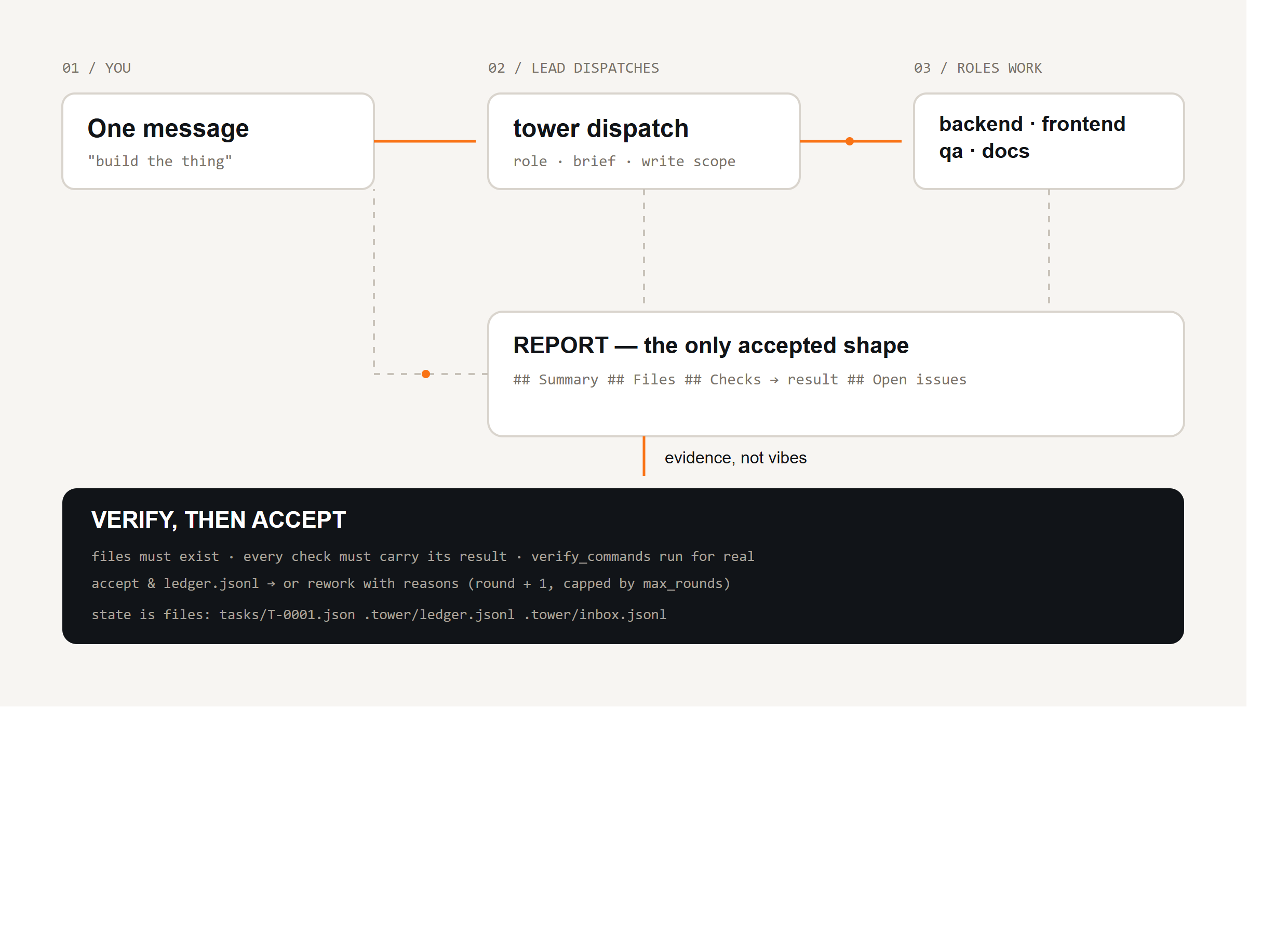
The problem
You can already get one agent to write code, one to write copy, one to review. What breaks is the handoff between them — in five predictable ways:
| What actually happens | What it costs you |
|---|---|
| Self-grading — the agent that did the work also reports "done, tests pass". It never ran them. | You ship a bug and find it in production. |
| Context rot — a long session compacts its history, and the deliverable was "in the conversation". | Re-doing work, contradicting earlier decisions, circular rounds. |
| Silent collisions — two agents edit the same file in the same round; both report success. | Lost work, regressions nobody can explain. |
| No audit trail — which role changed what, on which instruction? | You cannot review, reproduce, or hand the project over. |
| Ping-pong — "fix it" → "fixed" → "still broken". Nothing tracks rounds or forces escalation. | Hours burned; you become the message bus. |
agent-control-tower is the missing middle layer.
The loop
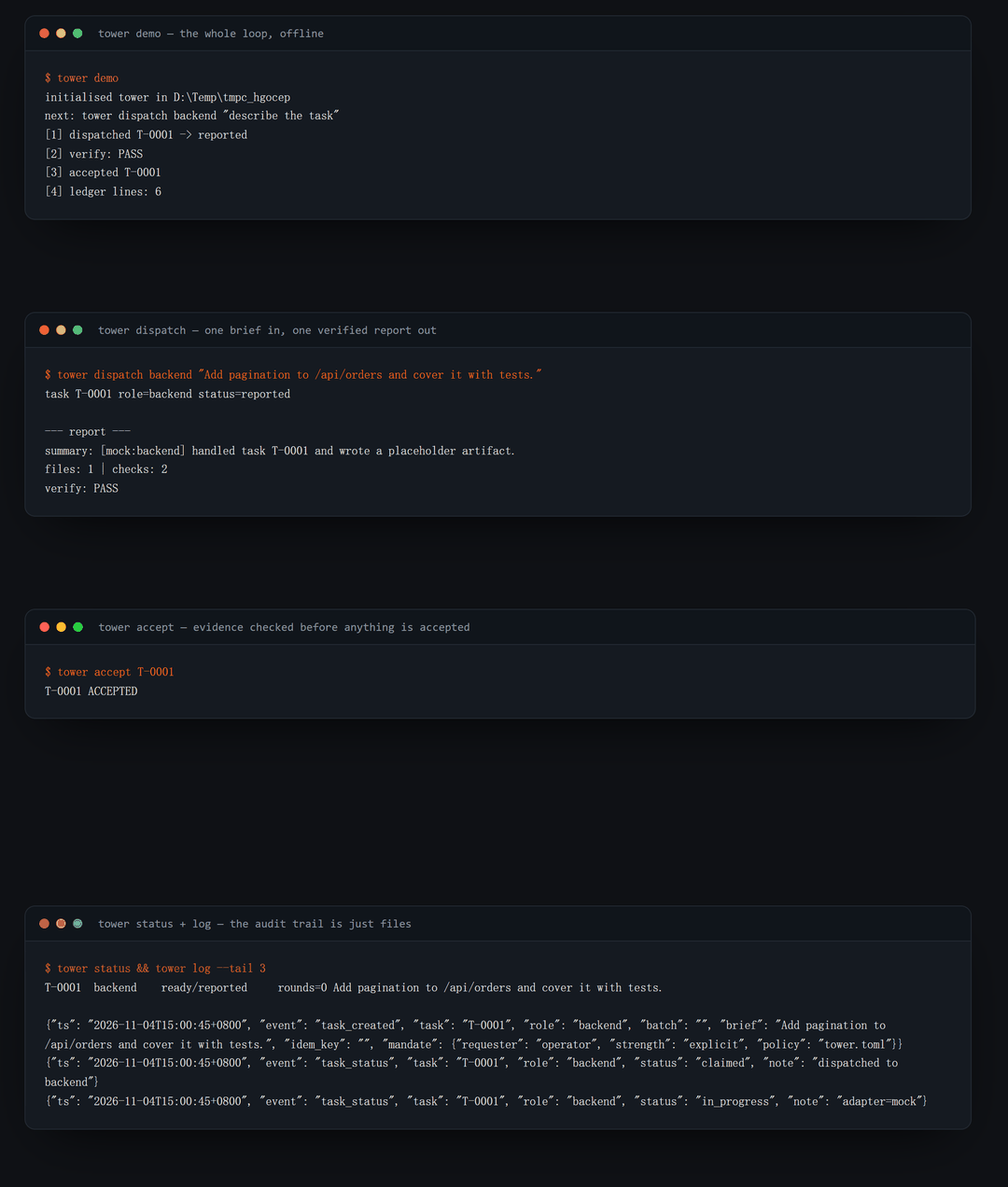
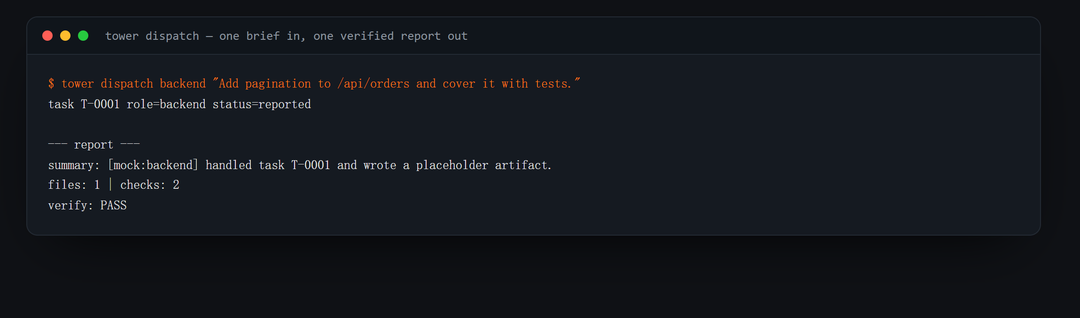
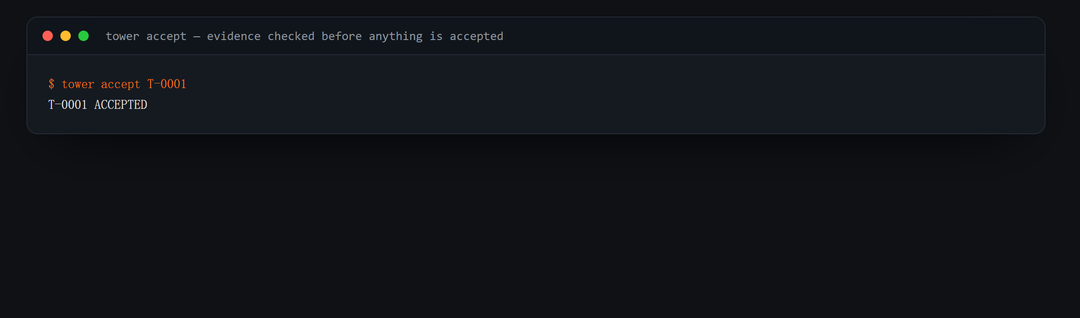
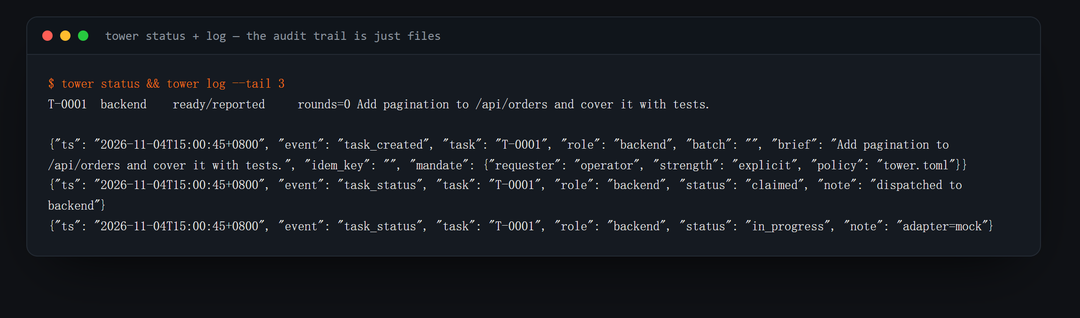
Real output: tower demo → tower dispatch → tower accept → tower status / tower log
| Dispatch | Verify & accept |
|---|---|
 |  |
| Audit trail — just files |
|---|
 |
tower dispatch frontend "Rework the home layout. Deliver before/after screenshots at 1440 and 390."
tower inbox                      # what came back
tower accept T-0001              # files exist? checks carry results? verify_commands pass?
tower rework T-0001 --note "Checks list no results; re-run the suite"
Who it is for
Good fit
- You already run 2–8 agent sessions (DSH, Claude Code, Codex, Cursor, Aider, plain API) and you are the one copy-pasting between them.
- Indie devs / small teams building something multi-part: an app (backend + frontend + QA), a content site (research → copy → design → SEO), a data pipeline.
- Agencies / freelancers who must show a client what was done and how it was verified — the ledger and reports are that answer.
- Anyone burned by an agent saying "done" when it was not.
- CI / automation that wants reproducible agent work:
tower demoruns the loop offline in under a second.
Not a good fit
- One-shot tasks ("rename this variable") — a single prompt is faster.
- You want agents to talk to each other freely — this design is deliberately hub-and-spoke.
- You want a hosted dashboard / multi-tenant service — this is a local CLI with adapters.
What you get
| Without the tower | With the tower |
|---|---|
| You paste briefs between windows | tower dispatch <role> "<brief>" — contract and write scope included |
| "Done ✅", no evidence | Reports must list Files (must exist) and Checks (must carry a result); verify_commands run for real |
| Deliverables live in chat | Deliverables in roles/<role>/, reports in <task>-REPORT.md |
| Nobody knows who changed what | Append-only .tower/ledger.jsonl, timestamped |
| Rounds loop forever | round counter + max_rounds → the tower stops and tells you to escalate |
| Two agents overwrite each other | write_scopes per role, one directory per role |
| Work lost after compaction | State on disk; tower rework T-0012 resumes with the note attached |
| Can't hand the project over | git log of reports and tasks is the handover doc |
| You re-read every report to see if a human is needed | tower attention lists only ready / blocked / failed |
| A retry or a double-click creates duplicate work | tower dispatch --key <id> returns the existing task |
Install
git clone https://github.com/evolution301/agent-control-tower.git
cd agent-control-tower
python -m venv .venv && source .venv/bin/activate   # Windows: .venv\Scripts\activate
pip install -e .
Python 3.10+. One runtime dependency (PyYAML).
60-second demo (no model, no network, no API key)
tower demo
[1] dispatched T-0001 -> reported
[2] verify: PASS
[3] accepted T-0001
[4] ledger lines: 5
The mock adapter writes a placeholder artifact and a real report, so the entire
dispatch → report → verify → accept loop is deterministic and CI-friendly.
Use it with DSH (primary)
The pattern was extracted from a real DeepSeek Harness deployment: one lead session steering several long-lived role sessions through a multi-week build, verifying every delivery.
# tower.toml
roles:
  frontend:
    description: Layout, components, styling, browser verification.
    adapter: dsh
    write_scopes: ["web/"]

adapters:
  dsh:
    base_url: "http://127.0.0.1:65163"
    sessions:
      frontend: "session-acc99990-..."
→ Full walkthrough: docs/dsh-quickstart.md — create role sessions, wire config, run the loop, plus the five failure modes the reference project hit and how the code prevents them.
Drive it from inside DSH: packages/dsh-tower
A companion bundle registers five tools on the harness tool registry, so the session never leaves the conversation:
dsh plugin --profile <name> add ./packages/dsh-tower
tower_dispatch · tower_inbox · tower_accept · tower_rework · tower_status
→ packages/dsh-tower
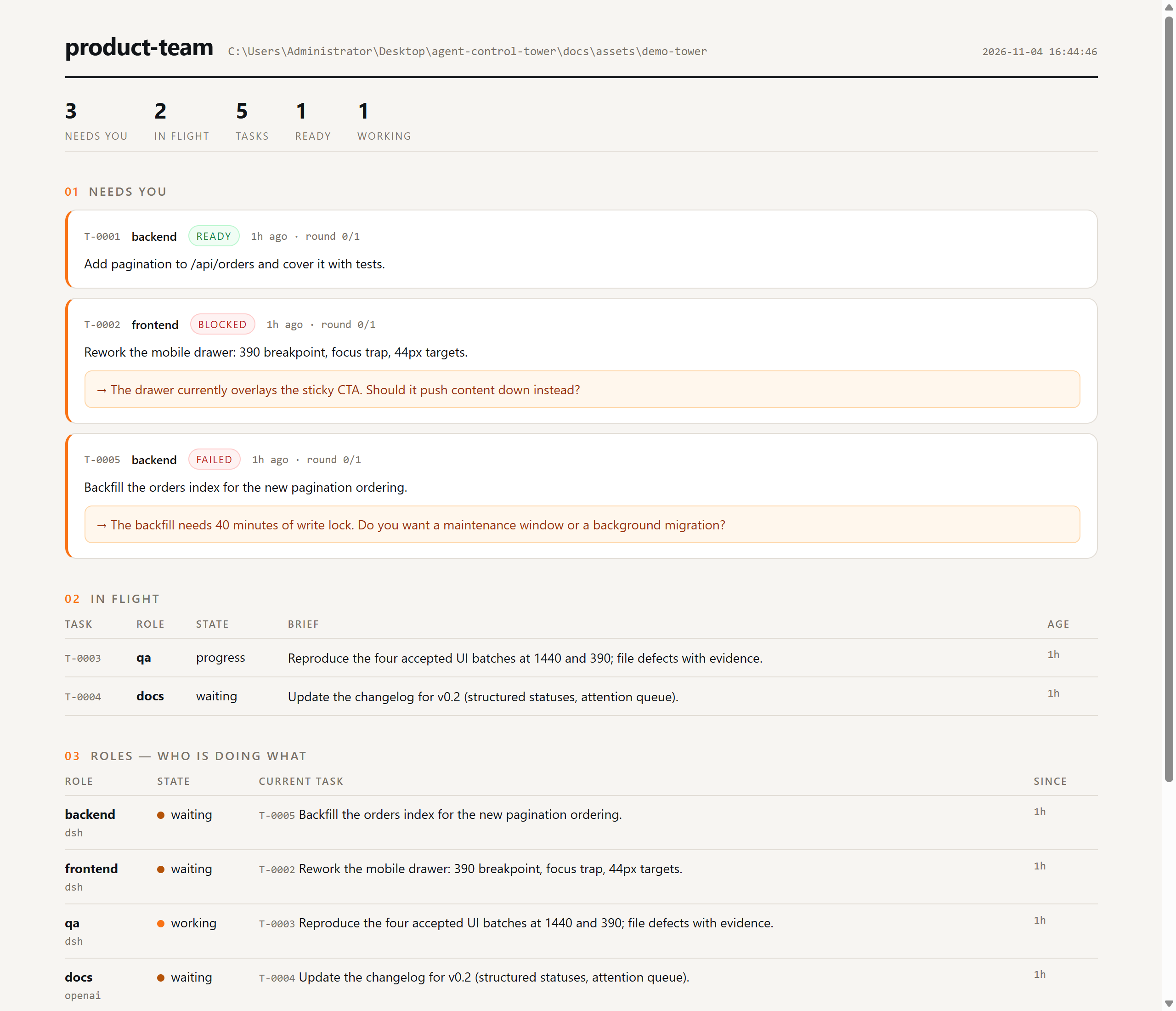
Panel: one glance, everything in flight
Two renderings of the same snapshot — the terminal (tower board) and a local read-only web panel
(tower panel). Person-states first, healthy work takes no space.
tower board            # print once
tower board --watch    # refresh in place (tmux/ssh friendly)
tower panel            # http://127.0.0.1:8787/  (read-only, auto-refresh 2s)
The panel shows needs you (ready / blocked / failed, each with its one question), then what is in flight, then what every role is doing right now, then the tail of the ledger. It reads the same files the CLI does — no database, no daemon, no writes.
Adapters
An adapter is the only component that knows how to make an agent act. Same contract for all four:
| Adapter | Drives | Use when |
|---|---|---|
dsh | a live DeepSeek Harness session (session/prompt, queued) | primary: long-lived roles with browser + shell tools |
cli | any agent binary that takes a prompt (claude -p, codex exec, Aider, your script) | you already run agent CLIs |
openai | any OpenAI-compatible /chat/completions with a small run_shell loop | hosted models, vLLM, Ollama |
mock | nothing (writes a placeholder artifact) | tests, demos, CI |
Adding one is ~40 lines → docs/adapters.md.
The report contract (and why the verifier exists)
## Status         → progress | waiting | ready | blocked | failed | dropped
## Summary        → 2–5 sentences
## Files          → - <path> — <what changed>          (must exist on disk)
## Checks         → - <command run> → <result seen>    (a bare command fails)
## Open issues    → anything unfinished, or "none"
## Attention      → only when status is blocked/failed: one concrete question
The status vocabulary is a closed set, borrowed from DeepSeek's
dsh-superagent research prototype: the
lead routes on a state, not on prose, and tower attention shows only the tasks that are actually
waiting for a person. See docs/superagent-ideas.md for what we borrowed
and what we deliberately left out.
tower accept mechanically rejects: a missing/empty section · a check line without a result · a
listed file that does not exist · any failing entry in verify_commands.
verify_commands:
  - "pytest -q"
  - "npm run build"
That is the difference between "the agent said it works" and "the tower checked".
Commands
| Command | Purpose |
|---|---|
tower init <dir> | scaffold config + role folders |
tower dispatch <role> "<brief>" [--key …] | create and run one task (idempotent with --key) |
tower batch role1 role2 --brief "…" | fan one brief out to several roles |
tower inbox [--all] [--read] | reports filed by roles (the full log) |
tower attention | only the tasks waiting on a person |
tower board [--watch] / tower panel | the same picture, in a terminal or a local web page |
tower accept <task> | verify, then accept (auto-rejects to rework) |
tower rework <task> --note "…" | send back with reasons and re-dispatch |
tower status [--json] | task board |
tower show <task> / tower log | inspect one task / tail the ledger |
tower demo | offline end-to-end demo |
tower doctor | validate config, adapter options, keys, sessions |
What's on disk
my-project/
├── tower.toml              # roles, adapters, verify commands
├── roles/
│   ├── backend/            # this role's only write area
│   │   ├── AGENT.md
│   │   └── T-0001-REPORT.md
│   ├── frontend/
│   └── qa/
└── .tower/
    ├── tasks/T-0001.json   # materialised task view
    ├── ledger.jsonl        # append-only event log (source of truth)
    └── inbox.jsonl         # reports + unread flag
How it compares
| single agent | agent framework (graph/DSL) | agent-control-tower | |
|---|---|---|---|
| Who routes the work | the one agent, in its head | the graph you wrote | the lead, explicitly, per task |
| Deliverable | chat text | node outputs | files + a four-section report |
| "Done" means | the agent said so | the node finished | the tower verified it |
| Audit trail | scrollback | framework logs | ledger.jsonl you can git diff |
| Setup | prompt | graph + runtime + infra | pip install + one YAML |
| Runs offline / in CI | no | sometimes | yes (tower demo) |
FAQ
Do I need DSH to use it? No. DSH is the primary adapter because that is where the pattern came
from; cli, openai and mock follow the same contract.
Does it run the agents itself? No. It renders the prompt, calls your adapter, and checks what came back. The agent runtime stays yours.
Can agents talk to each other? No. Hub-and-spoke on purpose: the lead routes, so the task tree stays inspectable and two roles cannot silently converge on the same file.
What if a role keeps failing? round increments on every rework; when round > max_rounds the
tower stops and tells you to escalate instead of looping.
Is the ledger safe to commit? Yes — append-only JSONL; committing it puts the audit trail in
git log. Add .tower/ to .gitignore if you only want deliverables.
Where does it write? Only inside the tower workspace: roles/<role>/ for deliverables and
.tower/ for state.
Docs
| Doc | What's inside |
|---|---|
| DSH quickstart | the primary setup, end to end, plus five failure modes it prevents |
| Architecture | components, state machine, why files instead of a queue |
| Adapters | mock / cli / dsh / openai, and how to add your own |
| Borrowed from dsh-superagent | the five ideas we adopted, and what we left out |
| Contributing | ground rules, PR checklist, adapter guide |
License
MIT — see LICENSE.
Acknowledgements
- The pattern was extracted from a real long-running build on DeepSeek Harness, then generalised so it works without it.
- The
dsh-towerbundle follows the harness bundle conventions from the DeepSeek Harness docs:dsh.bundle+cordis.patch.yml+ctx.tools.register. - Terminal frames in this README are real command output, rendered by
docs/assets/build_assets.py— no mock-ups.
Star History
Related plugins
webnovel-writer
lingfengqaq/webnovel-writer
loopx (dsh-loopx-plugin)
loopx-project/loopx
ouroboros (dsh-plugin)
q00/ouroboros
loopx (dsh-loopx-plugin)
huangruiteng/loopx