saving-your-ass
fallenwings27/saving-your-ass
Reins for full-access AI agents: hard red-line stops, reversible vault soft-delete (3 tools), plain-language impact cards, and a bilingual Web settings panel with zero runtime dependencies.
Install
dsh plugin --profile web add github:fallenwings27/saving-your-assREADME
Saving Your Ass
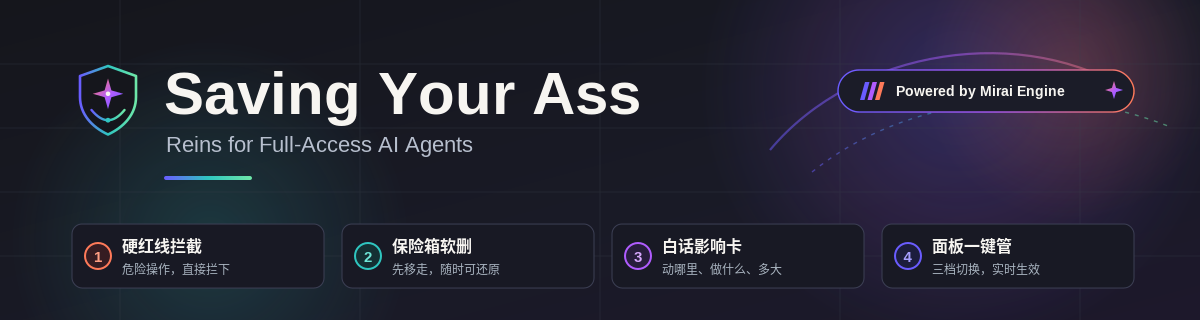
A safety net for full-access AI agents: a wrong command still cannot reach your drives, personal files, or credentials — with no OS sandbox lockouts and no script-review screens nobody can read.
Status: 0.1.0 — see CHANGELOG. Powered by Mirai Engine. Requires Node.js
>=20and runs inside DSH; the exact version pair verified together is stated once, under Quick start and configuration.
30-second start
- Open the DSH sidebar Plugins → Add plugin → Install a third-party plugin and enter the npm package name
saving-your-ass. You can also supply a Git URL, a.tgzarchive, or an absolute local package directory path. Enable the plugin, then refresh or restart DSH as prompted so the bundledcordis.patch.ymltakes effect. - The Plugins list shows Saving Your Ass with its official vector icon and localized name and summary; in a Chinese environment the detail view loads
README.zh-CN.mdautomatically. Open Settings → Guardian (设置 → 安全守卫 in a Chinese host) for the panel. - To install from the CLI instead, use
dsh plugin --profile web add saving-your-ass, or point it at a local package directory withdsh plugin --profile web add /path/to/saving-your-ass.--profileis required; in the TUI profile use--profile tui, for exampledsh plugin --profile tui add saving-your-ass. balancedmode is active by default. Baseline protection (drive roots, personal directories, credential files) needs no manual setup.
What this is
Saving Your Ass is an open-source plugin built specifically for DeepSeek Harness (DSH). It is not a generic third-party host protocol and does not target other agent runtimes. The historical ./hooks exports and the dsh-guardian-hook binary remain as an experimental, independent pure-module baseline only; they are not the main product or a delivery gate.
The agent still runs with Full Access; the checks sit around the call, so a wrong path variable or a careless cleanup cannot erase photos, documents, or projects.
Why Saving Your Ass
Users of AI coding or desktop assistants commonly run into these limits:
- OS sandboxes (
read-only/workspace-write) are restrictive: the agent cannot install dependencies, use legitimate tools outside the workspace, or coordinate sessions, so automation breaks. Repeated approval popups lead many users to switch todanger-full-accessanyway. - Full Access is fast but leaves no room for error: an undefined variable, a cleanup through a junction or symlink, or a stray
git clean -fdxcan permanently remove personal data. - Script review is not meaningful for non-programmers: an 80-line shell or Python snippet tells someone who does not code little about what it will do.
Full-access failure modes this project defends against include: recursive deletion of a user home directory through an accidental automatic variable, cross-drive deletion following junctions/symlinks, destructive Git resets and cleans, reading or exfiltrating SSH keys / browser sessions / cloud credentials, killing host or system processes, and tampering with the host's own state.
The Four Checks
1. Hard red-line stops with self-correction
The hard red-line rules deny the following: formatting or erasing disks, including the PowerShell Storage module's Format-Volume, Clear-Disk, Remove-Partition, and related irreversible cmdlets; deleting drive roots, personal directories (Desktop, Documents, Pictures, Downloads, cloud sync), or the host's own state; touching credential files; paths containing unresolved variables or wildcards; escapes through symlinks or junctions; destructive Git rewrites; and process or power abuse. The refusal is written back to the agent as a concrete, safe alternative, so it can reroute and keep working.
Interpreter inline code is scanned on what the code actually does: the body of python -c / node -e / pwsh -Command is parsed recursively and scored on the risks found there; a single-quoted literal stays a literal and is not treated as dynamic. When one command line writes a script and then runs it (heredoc or redirection), the written body is what gets scanned.
Windows PowerShell in-memory provider items get a precise exemption for a static single item under Env:, Variable:, Alias:, and Function: (for example clearing one environment variable is not misread as an ntfs-ads deletion). Registry (HKLM:, HKCU:, Registry::), certificate and filesystem providers, wildcard or dynamic item names, and genuine NTFS alternate data streams stay hard-denied.
2. Guardian Vault — reversible deletion
Physical deletion bypasses the recycle bin, so the plugin exposes three tools and nothing else:
guardian_safe_delete({ paths, reason })— move files or directories into a time-stamped vault entry instead of deleting them. Same-volume moves use an atomic rename; cross-volume moves use a three-phase copy → verify (count / bytes / digest) → delete-source → atomic place, and keep the source if any step fails.guardian_restore({ entry_id, target_path? })— restore an entry to its original path or an explicit target. Restore re-runs the full deny-zone, link, and filesystem checks; if the destination already exists it refuses to overwrite and suggests a conflict-free path.guardian_vault_list({ limit? })— list recoverable entries and capacity usage.
Retention is 7 days with a 5 GiB cap, cleaned oldest-first (FIFO). Traversal skips embedded links rather than following them, and skips entries currently being restored. All three defaults live in a single source (vaultRetentionDays, vaultMaxSizeGb, vaultEnabled in cordis.patch.yml and the config store); the Web panel can toggle the vault switch and adjust retention and the size cap, and changes take effect live without a restart. Turning the vault off only blocks moving new items in — guardian_vault_list and guardian_restore keep working so older entries remain recoverable.
3. Plain-language impact cards
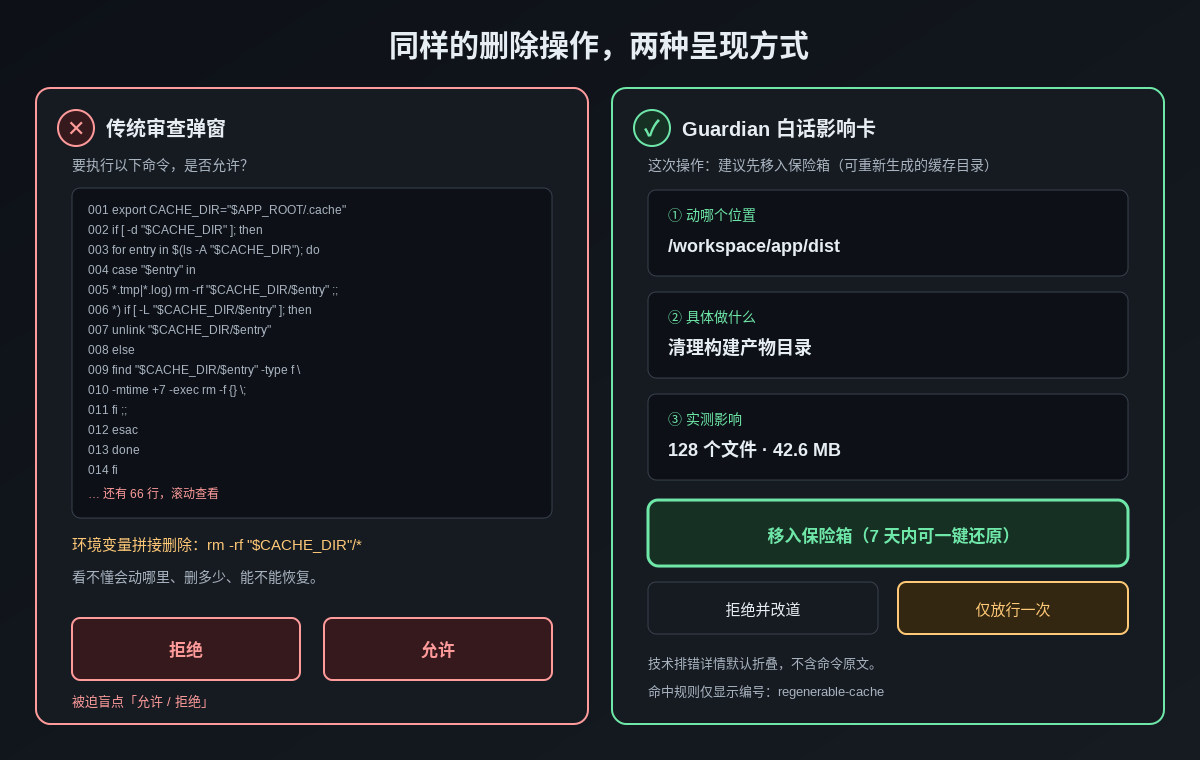
Outside the hard red lines, when an action still crosses beyond the current workspace, the user sees a plain-language card rather than raw source code. It answers three questions, all derived from deterministic scanning and on-disk measurement:
- Where — a human-readable path and zone label (for example
/workspace/app/dist, a regenerable cache directory). - What — a plain verb such as "clean build artifacts".
- Measured impact — for example "128 files, 42.6 MB". If the target cannot be fully measured, the card says so instead of inventing a number.
The preferred choice is the reversible vault move; decline-and-reroute and allow-once are secondary. With no interactive channel, a closed card, or a timeout, the card resolves to an explicit deny rather than a silent allow. The shipped default configuration does not enable the interactive channel, so these cases currently resolve to an explicit deny carrying the card text; interactive selection is off by default.
4. Default protection and the DSH Web settings panel
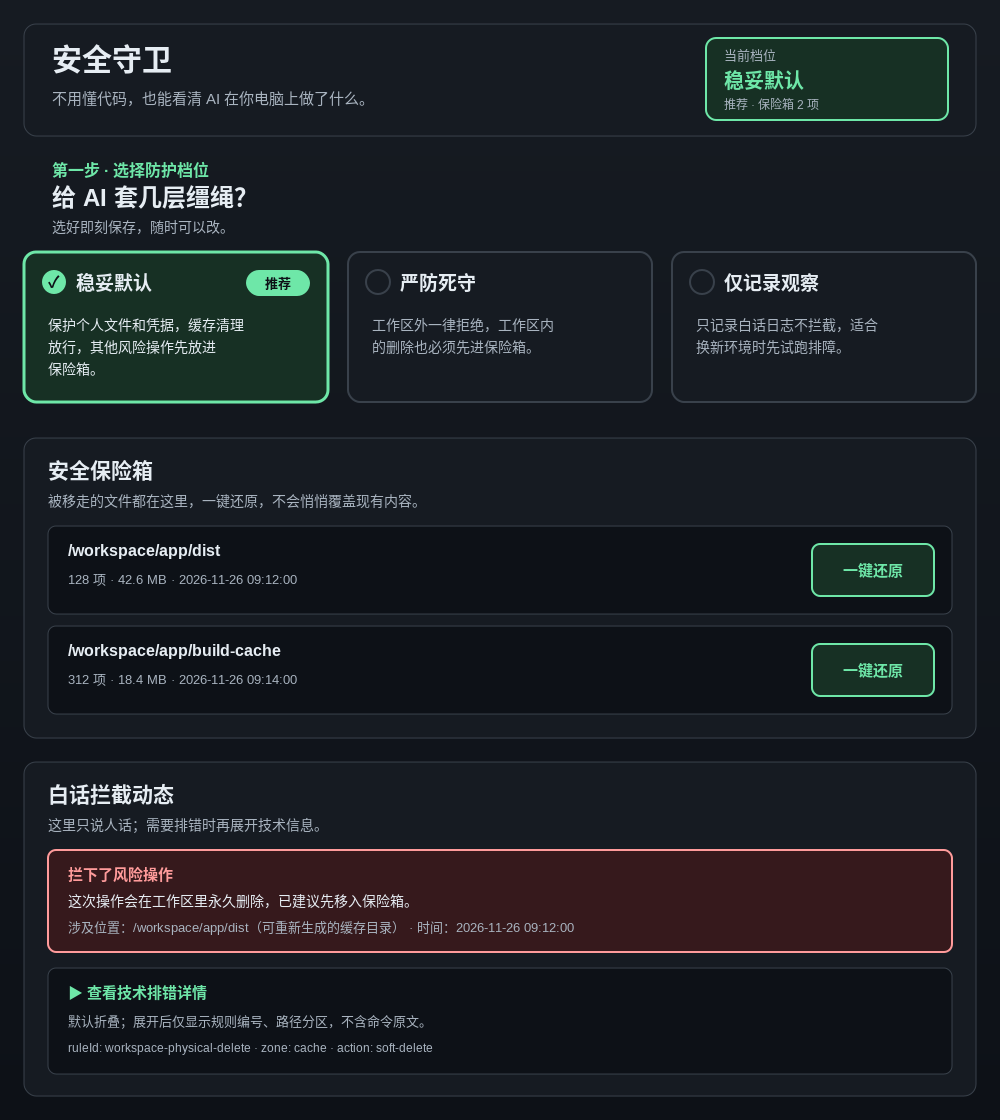
Baseline protection is part of the default policy out of the box: enabling the plugin covers drive roots, personal directories, and core credential files for the patterns above, with no manual setup required for this baseline. The DSH Settings → Guardian panel turns all of this into plain language:
- three modes switched live (the next tool call is judged under the new mode; no restart);
- a vault list with one-click restore (a 409 conflict offers a suggested path instead of overwriting);
- a plain-language interception feed with collapsible technical details;
- editable allow-listed directories and absolute deny zones.
The Web settings panel is fully bilingual in Chinese and English: it follows the DSH host language via ctx.locale and switches live with no reload. The plugin also ships an official SVG icon (assets/icon.svg) shown in the plugin manager, plus localized metadata (locale/en.json, locale/zh.json); the detail view routes to the matching README by host language.
Read-only access to ordinary files outside the workspace is allowed and audited (outside-workspace); write/edit requests crossing out of the workspace still need confirmation, and are denied outright under strict. Reads of credential files, system directories, and the host's own state remain hard-denied.
Panel write requests are protected by host session cookies, cross-site origin checks, and a dedicated UI header; unauthenticated requests get 401, cross-site or unmarked requests get 403.
Quick start and configuration
Requirements, stated once. engines in package.json declares Node.js >=20 and DSH >=0.2.0-rc.1. The combination actually verified is DSH 0.2.2-rc.1, whose own runtime needs Node.js >=24.9; the full suite has passed on Windows and Linux x86_64 under Node.js 20 and 22, and macOS is still untested. There are no runtime dependencies beyond the modules that ship with Node, and peer dependencies are optional, supplied by the DSH host.
balanced mode is the default, and baseline protection works with no configuration at all. Here is the config the package ships, unchanged:
- insert:
    - id: dsh-guardian
      name: "saving-your-ass"
      config:
        mode: balanced
        enableConfigStore: true
        vaultEnabled: true
        vaultRetentionDays: 7
        vaultMaxSizeGb: 5
        allowRoots: []
        protectedRoots: []
mode accepts balanced, strict, or observe; unknown values fall back safely to balanced. enableConfigStore must stay on so the HTTP settings API is mounted. allowRoots and protectedRoots can also be edited from the Web panel. By default the process guard protects all DSH profiles and ports; a controlled test sandbox can narrow that scope only by explicitly declaring the optional sandboxPorts / sandboxProfiles in the plugin config.
| Mode | Behavior |
|---|---|
balanced (recommended) | Hard-protect the whole drive and personal areas, allow workspace cache cleanup, route business-directory deletions into the vault, and show a plain-language card outside the workspace. |
strict | Hard-deny everything outside the workspace; every deletion inside the workspace must go through the vault. |
observe | Only write plain-language audit events; nothing is blocked. Useful for a trial run in a new environment. |
Where things live, and how to turn it off
- Vault:
<DSH_HOME>/guardian-vault(DSH_HOMEdefaults to~/.dsh). Vault entries are ordinary directories, so back this location up before reinstalling or wiping the host — it is the only copy of a soft-deleted file. - Audit events:
<DSH_HOME>/guardian-audit. - Stop blocking without uninstalling: switch to
observein the panel. Nothing is blocked; events are still written. - Turn the plugin off: disable it in the DSH Plugins list. Disabling the plugin, or turning the vault switch off, never deletes existing vault entries.
No machine-specific path is required or embedded in the project.
Exports and architecture
package.json exposes these subpaths:
| Subpath | Target | Purpose |
|---|---|---|
. | src/index.mjs | Plugin entry (apply, createGuardian, name, modes, core, vault, humanizer, hooks namespace) |
./core | src/core/evaluate.mjs | Deterministic verdict engine and shared constants |
./hostsafe-compat | src/core/hostsafe-compat.mjs | Three-state HostSafe compatibility bridge + script closure SHA-256 binding |
./vault | src/vault/index.mjs | Guardian Vault (safe delete, restore, list, retention) |
./humanizer | src/humanizer/index.mjs | Plain-language cards and audit-event translation |
./client | src/plugin/client.js | DSH Web settings panel component |
./locale/*.json | locale/*.json | Localized plugin metadata (en, zh) for display name, summary, and README detail routing |
./icon | assets/icon.svg | Official SVG icon shown in the DSH plugin manager |
./cordis.patch.yml | cordis.patch.yml | Bundled default plugin configuration (balanced mode, vault defaults) |
./hooks | src/hooks/adapter.mjs | Experimental: standalone pure-module baseline, kept as an export; not the DSH main line |
The runtime implementation lives under src/core/, src/vault/, src/humanizer/, and src/plugin/; authority for each rule stays in one module, and subpath exports only re-export it.
Known boundaries: this is not OS kernel isolation or antivirus software, it does not replace off-machine backups, and it deliberately excludes unattended multi-agent dual-review machinery.
Verification & Tests
The full regression suite (38 test files, 1,096 cases) is maintained in the upstream development repository and is not shipped inside the release distribution (neither the npm tarball nor this release repository includes test/), so running npm test inside an installed package directory will report a missing test/run-all.mjs. Release builds are verified against Windows (Node.js 24 + DSH 0.2.2-rc.1) and Linux x86_64 (Node.js 20 and 22) prior to publishing.
Docs navigation
- CHANGELOG.md — release history and notable changes.
- SECURITY.md — how to report a vulnerability privately.
- README.zh-CN.md — Simplified Chinese README.
- assets/manifest.json — metadata for the bundled visual assets: banner, panel preview, plain-language impact card, SVG plugin icon (
assets/icon.svg), and PNG storefront tile (assets/icon-180.png).
License
Powered by Mirai Engine.
Related plugins
dsh-purge
hunyisage/dsh-purge
dsh-infinite-gen-4
minglink/dsh-infinite-gen-4
dsh-purge
mmparko/dsh-purge
cc-safety-net
kenryu42/cc-safety-net