dsh-reakit
ferrisching/dsh-reakit
Registers the REA reverse-engineering toolset in DSH and manages its Node and REA runtime, with a global tool switch, a live composer status indicator and in-place runtime upgrades. On first start it downloads a pinned Node and REA runtime (from nodejs.org and npm) into a managed location and registers REA's full tool catalogue as mcp__rea__*; optional analyzers are set up only on request.
Install
dsh plugin --profile web add github:ferrisching/dsh-reakitREADME
dsh-reakit

A managed Node and REA runtime, one switch for the full 229-tool catalogue, a live composer status dot,
on-demand optional analyzer setup, and in-place runtime upgrades with rollback







dsh-reakit puts REA — Reverse Engineer Anything inside DeepSeek Harness and owns everything around it: it provisions a pinned Node and REA runtime, exposes the complete tool catalogue as mcp__rea__*, and gives you one switch, a live status dot and a supported upgrade path. It ships no analysis code — the capability is upstream REA plus the engines you configure.
📑 Table of Contents
- ✨ Features
- 🚀 Installation
- ⌨ Usage
- ⚙ Settings
- 🧩 How it works
- 🛠 Development
- 🔐 Security
- 🩺 Troubleshooting
- ⚠ Known limitations
- 📄 License
✨ Features
- Bring your own REA — if REA is already installed globally, one click detects it and switches the plugin to that copy instead of provisioning a managed runtime; switching back is just as easy
- Zero path configuration — the first start provisions pinned Node 24.22.1 and REA 6.8.0 from official sources with a fully locked dependency graph. No global
npm i -g rea-agents, and your system Node, shellPATHand usernpmrcare never touched - Complete catalogue, never trimmed — all 229 REA tools register as
mcp__rea__*, including capabilities that still need an external analyzer; unconfigured tools are never hidden - One switch, two places — the composer button and the settings switch drive the same host-accepted state; the UI never keeps an optimistic local copy, and updates propagate across windows
- Live status dot — off, ready, running a tool call (pulsing), just finished (one-shot ring), starting, failed, unknown. Sub-second calls still leave a visible ring
- Call-aware safety — disabling REA while a tool call is in flight is refused by the UI and by the host, so a running analysis is never cut in half
- On-demand setup instead of a wall of toggles — one collapsed section, one copyable AI setup prompt that targets this installed instance, and nothing installs itself
- Honest dependency hints — a missing analyzer is reported only when a real REA call fails with a reviewed structured code; a later successful call clears it
- Supported upgrades — an explicit update check reads official metadata, prepares a candidate in isolation, verifies the whole lock, publishes atomically, and leaves the previous generation intact for rollback
- Bilingual UI — English and Chinese dictionaries through the official locale service; backend diagnostics are English
- Calm on the wire — polling is visibility- and focus-aware (0.5 s focused, 2 s unfocused, 6 s hidden) because page plugins get no push channel; no custom network surface is added
🚀 Installation
The plugin is published on npm. Options are ordered by convenience.
Install inside DSH (recommended)
Open the plugins page → Add plugin → enter dsh-reakit → install, then enable REA in the plugin list.
Or with the DSH CLI:
dsh plugin --profile desktop add dsh-reakit@0.1.0
Replace --profile with your own profile (usually desktop), then restart DSH. The first start needs network access while the pinned runtime is provisioned; the download is several hundred MB and reused afterwards.
Install from a tarball
npm pack dsh-reakit@0.1.0          # or download dsh-reakit-0.1.0.tgz
dsh plugin --profile desktop add ./dsh-reakit-0.1.0.tgz
Install from source
git clone https://github.com/ferrisching/dsh-reakit.git
cd dsh-reakit
npm ci --ignore-scripts --no-audit --no-fund
npm run check
npm pack --ignore-scripts
dsh plugin --profile desktop add ./dsh-reakit-0.1.0.tgz
Requirements
- Verified on DSH
0.2.2-rc.1; the plugin targets the Cordis 4 bundle API and the official Typert remote surface - macOS / Linux for the managed runtime path (darwin/linux/win32 are mapped in code; only macOS arm64 is validated on real hardware here)
- Node is not a prerequisite: the managed runtime supplies its own
⌨ Usage
The composer shows a compact REA on / REA off button in the native tools area, next to whatever else already lives there. It does not depend on other plugins, does not borrow their styles or DOM, and never inserts itself into the context/usage row.
| Action | Effect |
|---|---|
| Click the composer button | Toggles the same global switch as Settings, keeping your draft intact |
| Hover the status dot | Shows the full state; while a call runs it lists the running tools |
| Settings → REA → Input switch | Hides the composer button without touching REA itself |
| Try to disable during a call | Refused, with an explanation of what is still running |
| Status dot | Meaning |
|---|---|
| Grey | REA is off |
| Green | Ready and idle |
| Pulsing green | Running a REA tool call; the label becomes REA busy |
| Green ring | A call finished within the last 8 seconds |
| Amber | Starting or switching |
| Red | Connection failed |
| Hollow grey | Status temporarily unavailable |
Turning REA on adds the full tool definitions to later model requests; turning it off removes them and ends temporary analysis sessions, so export unsaved evidence first. Neither direction rewrites existing conversations.
⚙ Settings
Settings → REA (also reachable from the plugin detail page):
| Section | What it does |
|---|---|
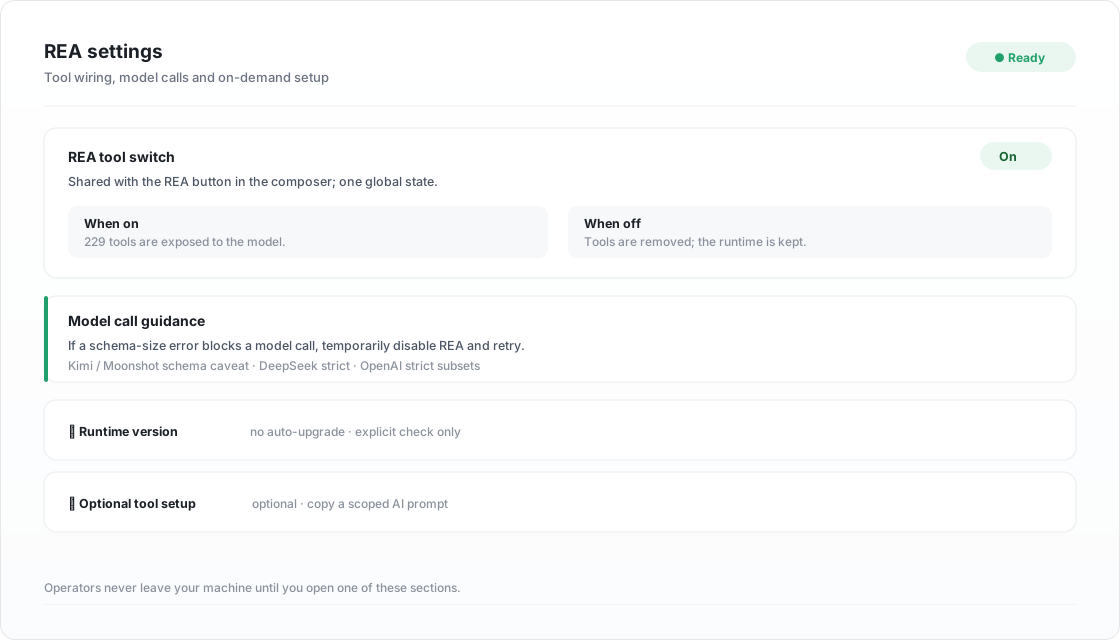
| REA tool switch | Master switch, shared with the composer button, with the call-lock explanation inline |
| Model call guidance | Conditional advice: if a model call fails because the parameter schema exceeds the allowed size, temporarily disable REA and retry. Lists the Kimi / Moonshot schema-size caveat and the JSON Schema subset rules of DeepSeek strict mode and OpenAI strict tool mode |
| Input switch | Show or hide the composer button; stored through official Config Forms, synced to other windows, never restarts REA |
| Runtime version | Collapsed. Check for updates reads official npm and Node.js metadata; preparing a candidate requires two confirmations; only one version is kept and there is no rollback button, so going back means re-downloading the previous release |
| Optional tool setup | Collapsed. One copyable AI prompt scoped to this installed instance; nothing is installed by the plugin |
Advanced fields live in the profile configuration. npmRegistry accepts an https mirror (no credentials, query or fragment) for the REA package install; integrity still comes from the lockfile SRI, so a mirror never weakens verification. Empty keeps registry.npmjs.org. nodeMirror does the same for the Node distribution: an https base such as https://mirror.example.com/nodejs, whose SHASUMS256.txt must agree with the pinned digest before anything is extracted; empty keeps nodejs.org/dist.
The panel uses scoped compact typography (13px body, 16px title, 12px code) and never leaks styles to the host page or the composer button.
Setup failures say what to fix
A failed preparation is classified before it reaches the status line: a network problem (DNS, timeout, refused connection, TLS, HTTP 4xx/5xx, proxy), a full disk (ENOSPC), or a permission problem (EACCES/EPERM/EROFS). Each gets one actionable sentence naming the managed root; anything else keeps its original wording so a real bug is never hidden behind a generic message. npm output is inspected too, because its exit code alone is usually just 1.
Split runtime layout
A fresh install publishes two independent trees under the managed root:
runtime/node/<platform>-<arch>-<node>-<sha12>/   Node distribution + ready.json
runtime/engine/rea<version>-<lock12>/           REA install + ready.json
Dropping the Node part therefore only costs a re-download, never the REA install. Each part carries its own ready marker; both are verified offline on every start (versions, archive digest, dependency lock, entry digest), and a half-published runtime is rolled back instead of being used. Existing installations from the older combined layout are migrated with a copy-verify-then-switch step, and the legacy generations are only removed after the new layout has started successfully.
Where Node lives
On a machine with no usable Node the plugin does not download anything by itself. It asks first: install into the plugin environment (a private, integrity-checked runtime that never touches your system Node) or install on your machine (the plugin names the installers it actually found — Homebrew, nvm, apt, dnf, winget or Chocolatey — with the exact command and a copy button, then re-detects). Anything it cannot verify, including a machine with no installer at all, is reported instead of assumed.
Shared runtime safety
The runtime directory is shared by every DSH profile by default. Before deleting it the plugin asks the host which other profiles still run REA in managed mode; if any does, deletion is refused with the profile names, so one window can never strand another. Abandoned staging trees from a crashed install are cleaned up automatically before the next attempt, and the detector also covers the Windows global locations (%APPDATA%\npm, %LOCALAPPDATA%\pnpm, %ProgramFiles%\nodejs).
Bring your own REA
If REA is already installed on this machine, the plugin can drive that copy instead of the managed runtime. Open Settings → REA → Existing REA installation and press Detect an installed REA: the plugin scans the deterministic global roots it can name without running npm or REA, validates the package name, the scripts/rea.mjs entry and the REA engines.node contract, and offers only installations that pass. Each candidate is checked against the plugin's managed Node first and the host process Node second, so a REA that needs a newer Node still works, and the panel states which Node will run it. Choose a Node then lists every Node the plugin can find — the managed Node first, then your own installations — with its version and whether it satisfies the REA engines.node range. Picking an incompatible one shows the required range, its version, and a one-click upgrade to the plugin-managed Node; if even the managed Node is too old, the panel points you at Runtime version → Check for updates. Use this Node writes the manual nodePath / reaEntry pair, and Switch back to the managed runtime clears it again. After adopting your own environment the plugin asks whether to delete the downloaded Node to reclaim the space or keep it. Only the Node part is removed — the installed REA engine stays, so switching back costs a Node download, not a full reinstall. The decision is remembered until the next adoption.
Adoption is a configuration change, not a silent swap: the host compares the current pair before writing, refuses a path that is not the package entry, and reports an incompatible Node as a reason instead of marking the install ready. Nothing is downloaded and nothing is uninstalled either way.
🧩 How it works
Host side (lib/)
lib/index.jsdeclares the config schema, resolves the managed runtime and registers thereaComponents/*Typert endpointslib/bootstrap.jsprovisions the pinned runtime: staging directory, archive digest check,npm ci --ignore-scripts --include=optional, ready marker, atomic publishlib/runtime-versions.jsimplements the update check and candidate preparation;lib/runtime-manager.jsimplements switching, quiescence checks and rollbacklib/optional-tools.jswraps the officialtools/executeevent to count only locked REA tool calls, and observestools/resultfor reviewed dependency codes
Client side (client/client.js)
- Registers three slots:
conversation.input.left(button),settings.section(panel) andplugins.detail.section(detail panel) - Renders with the host's own React module; no bundler and no runtime dependencies
- Reads status over unary RPC; the cadence adapts to focus and visibility because page plugins receive no push channel
🛠 Development
npm ci --ignore-scripts --no-audit --no-fund
npm run check        # 182 cases: host, client render, runtime, components
npm run pack:check
npm pack --ignore-scripts
.
├── lib/                     Host side (plain ESM, no build step)
│   ├── index.js             Plugin entry, config schema, Typert service registration
│   ├── bootstrap.js         Managed runtime provisioning and offline re-verification
│   ├── runtime-versions.js  Update check, candidate staging, lock verification
│   ├── runtime-manager.js   Switch, rollback, session quiescence
│   ├── components*.js       Optional analyzer catalogue and install plans
│   └── optional-tools.js    Activity tracking and dependency hints
├── client/client.js         Composer button, status dot, settings panel, i18n
├── assets/engine/           Pinned engine manifest and dependency lock
├── docs/ACCEPTANCE.md       Recorded verification evidence
└── test/                    182 tests, no network and no real installs
Real-engine checks are explicit and never part of npm test:
node scripts/zero-config-acceptance.mjs /absolute/new-evidence-directory
node scripts/acceptance.mjs /absolute/manual-config.json /absolute/owned-app.asar /absolute/new-evidence-directory
🔐 Security
This is not a sandbox. The REA child process runs with your user privileges, and the full tool set includes launching programs, writing files, device access and network observation — every operation still needs your authorisation. Content returned by tools is untrusted data, not instructions. Tool results enter the agent and are then subject to your model provider's data policy.
- Downloads are verified against pinned SHA-256 digests and npm SRI; lifecycle scripts stay disabled
- Switching versions requires two explicit confirmations and refuses to run while analysis work is active
- Analysis targets, devices, browsers and commercial licences are never started or handled automatically
- The plugin is MIT; REA and its tools keep their own licences (REA MIT, third-party notices)
🩺 Troubleshooting
| Symptom | Likely cause | What to do |
|---|---|---|
| Dot stays grey, no tools | REA is switched off | Enable it from the composer button or Settings → REA |
| Dot red, "connection failed" | Runtime missing or tampered | Open Settings → REA, read the error, then retry setup |
| First start seems stuck | Runtime download in progress (hundreds of MB) | Wait; the panel shows the phase and any error |
| Model call fails with a schema-size error | Tool definitions too large for the provider | Temporarily disable REA, retry, re-enable when needed |
| A capability says a provider is missing | Optional analyzer not configured | Open Optional tool setup and follow the copied prompt |
A standalone doctor success only proves the installation preflight — not the MCP connection, the analyzers or a target application.
⚠ Known limitations
- The status dot is polled, not pushed: page plugins get no event channel and cannot extend the host allowlist. A call shorter than one interval can still be missed, which the 8-second ring covers
- Only macOS arm64 has been validated end to end; darwin/linux/win32 are mapped in code but not proven on real hardware
- Windows path handling for the managed runtime is untested
- The runtime directory name stays
~/.dsh/dsh-reakitunderDSH_HOME; moving it manually breaks the ready marker and re-provisions - Some REA capabilities need licences or platform tooling that this plugin deliberately does not automate
📄 License
MIT, see LICENSE. REA is MIT and maintained separately; report REA bugs upstream and plugin bugs to this repository's issues.
Related plugins
archify (deepseek-harness)
tt-a1i/archify
WeKnora (dsh-weknora)
tencent/weknora
next-ai-draw-io (dsh-plugin)
dayuanjiang/next-ai-draw-io
weknora
tencent/weknora