dsh-balance-plugin
francis-xavier-code/dsh-balance-plugin
deepSeek 余额监控与用量统计(DSH 动态 Cordis 插件):余额监控 · 官方充值入口 · 用量统计 · 三方插件管理
Install
dsh plugin --profile web add github:francis-xavier-code/dsh-balance-pluginREADME
💰 DeepSeek Balance Monitor & Usage Stats
A DeepSeek Harness (DSH) plugin — balance monitoring · official top-up link · Miyu-style usage statistics · third-party plugin manager



✨ Features · 🖼 Screenshots · 📥 Install · ⚙️ Configuration · 🎮 Usage · 🗑 Uninstall · 🏗 Architecture · ❓ FAQ
✨ Features
| Module | Capability |
|---|---|
| Balance monitoring | Monitors DeepSeek API balance (CNY / USD dual balance pool) with parallel multi-account queries; auto-reads the DSH credential DEEPSEEK_API_KEY — no manual entry needed |
| Low-balance alerts | Independent CNY / USD thresholds (default ¥10 / $2, configurable); the balance bar turns red when below threshold |
| One-click top-up | Jumps straight to the official DeepSeek top-up page platform.deepseek.com/top_up, plus a usage-details page link |
| Usage statistics | 1:1 recreation of the Miyu WebUI usage page: stat tiles / GitHub-contribution-style usage calendar / three-segment stacked trend bar chart / model consumption donut chart with detail table / recent 50 call records |
| Performance metrics | Turns · steps · LLM duration · tool-call duration · avg first-token latency · tok/s · cache hit rate |
| Third-party plugin manager | Lists unofficial (non-@deepseek-ai) web plugins: package name / local path / Bundle rev / dependencies, with a one-click "Open Directory" to locate source code |
| Model tool | Registers the query_api_quota tool — just ask "How much DeepSeek balance is left?" and get a balance summary |
Charts use Miyu's chart / heat palettes (blue / gold / rose / purple + blue-purple heat scale) and auto-adapt to dark / light themes.
🖼 Screenshots
| Screenshot | Description |
|---|---|
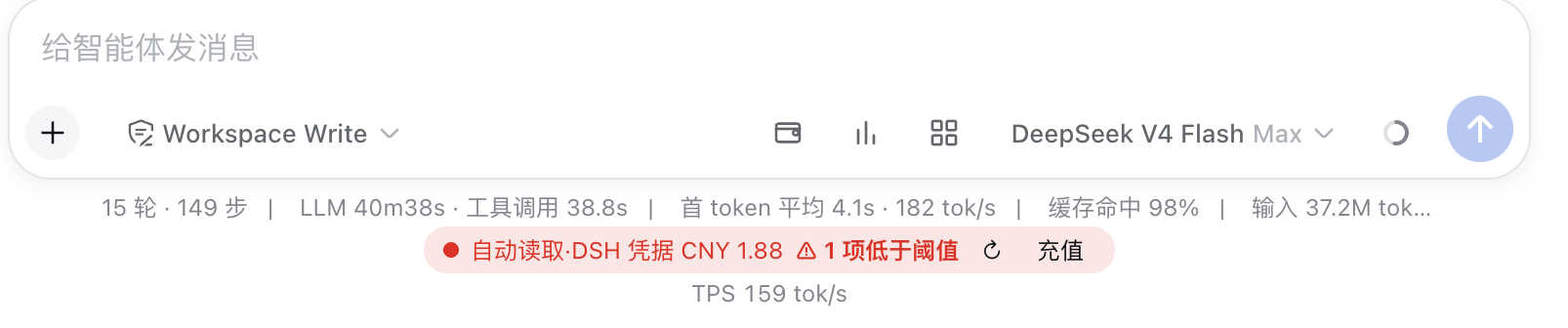 | Three icon entries on the right of the input toolbar (💰 Wallet / 📊 Usage / 🧩 Plugins) plus a persistent balance bar below |
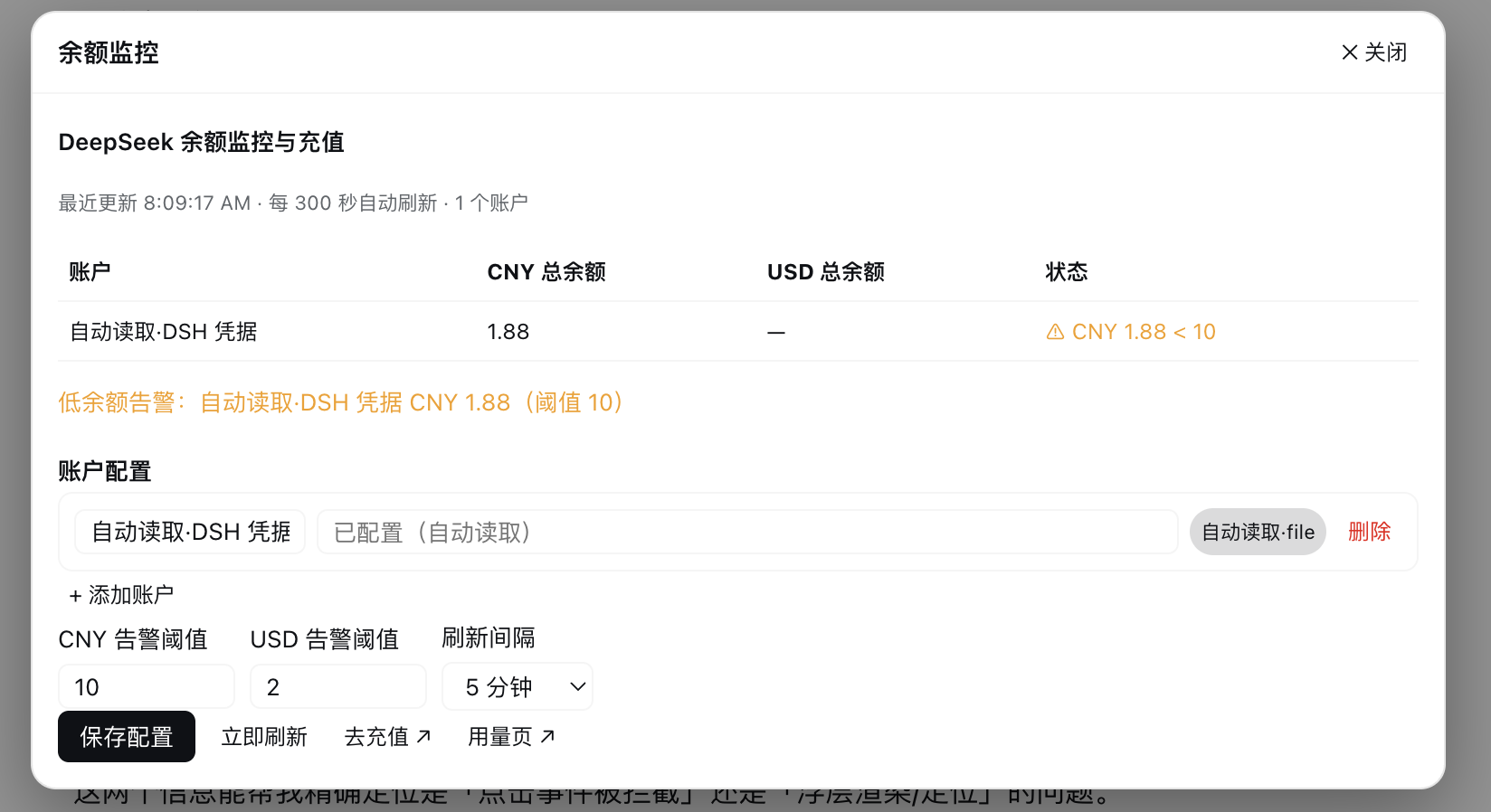 | Balance monitoring panel: balance table, low-balance alerts, account config, thresholds & refresh interval, top-up entry |
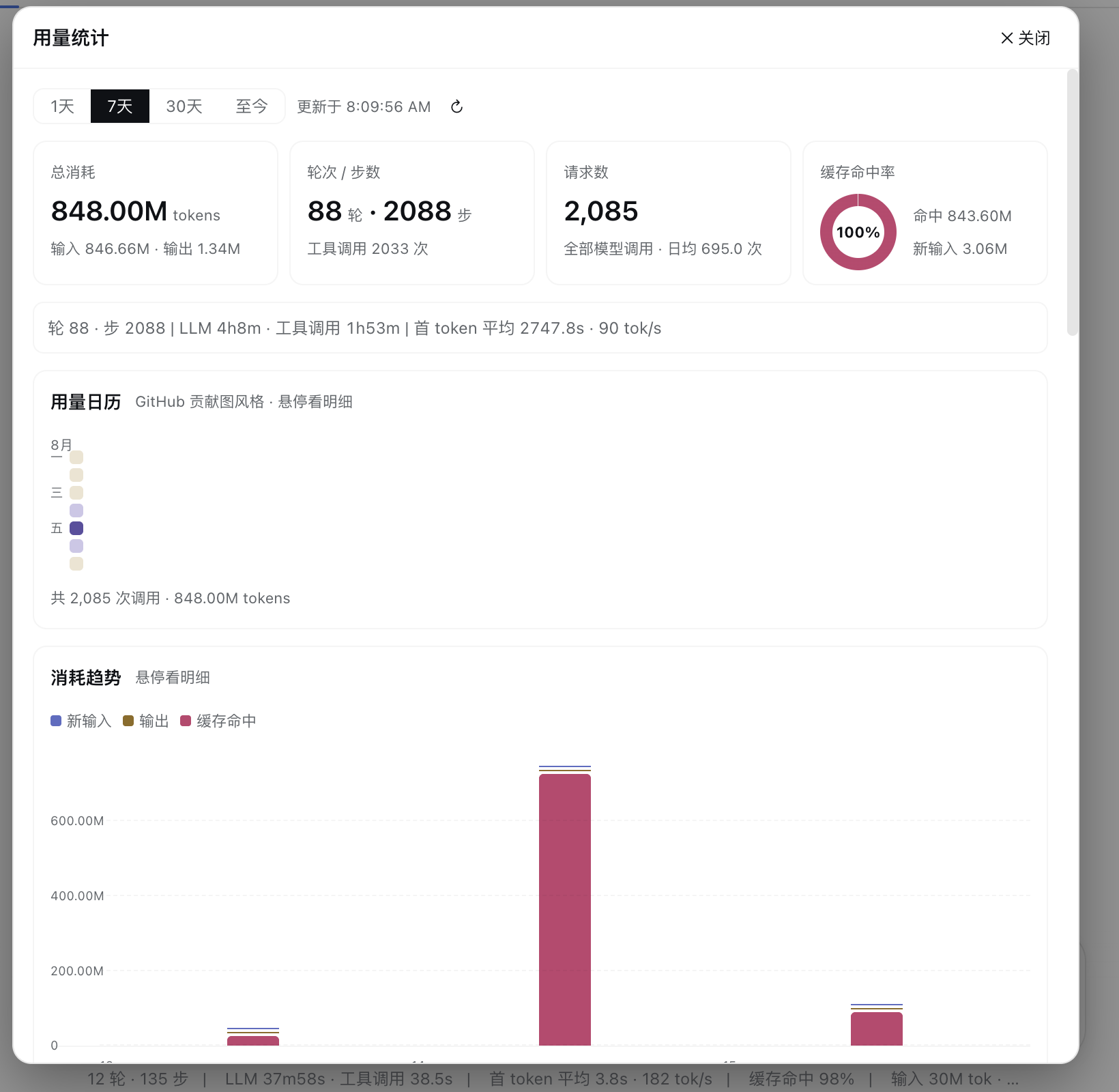 | Usage page top: range switcher, stat tiles, live performance metric bar, GitHub-style usage calendar |
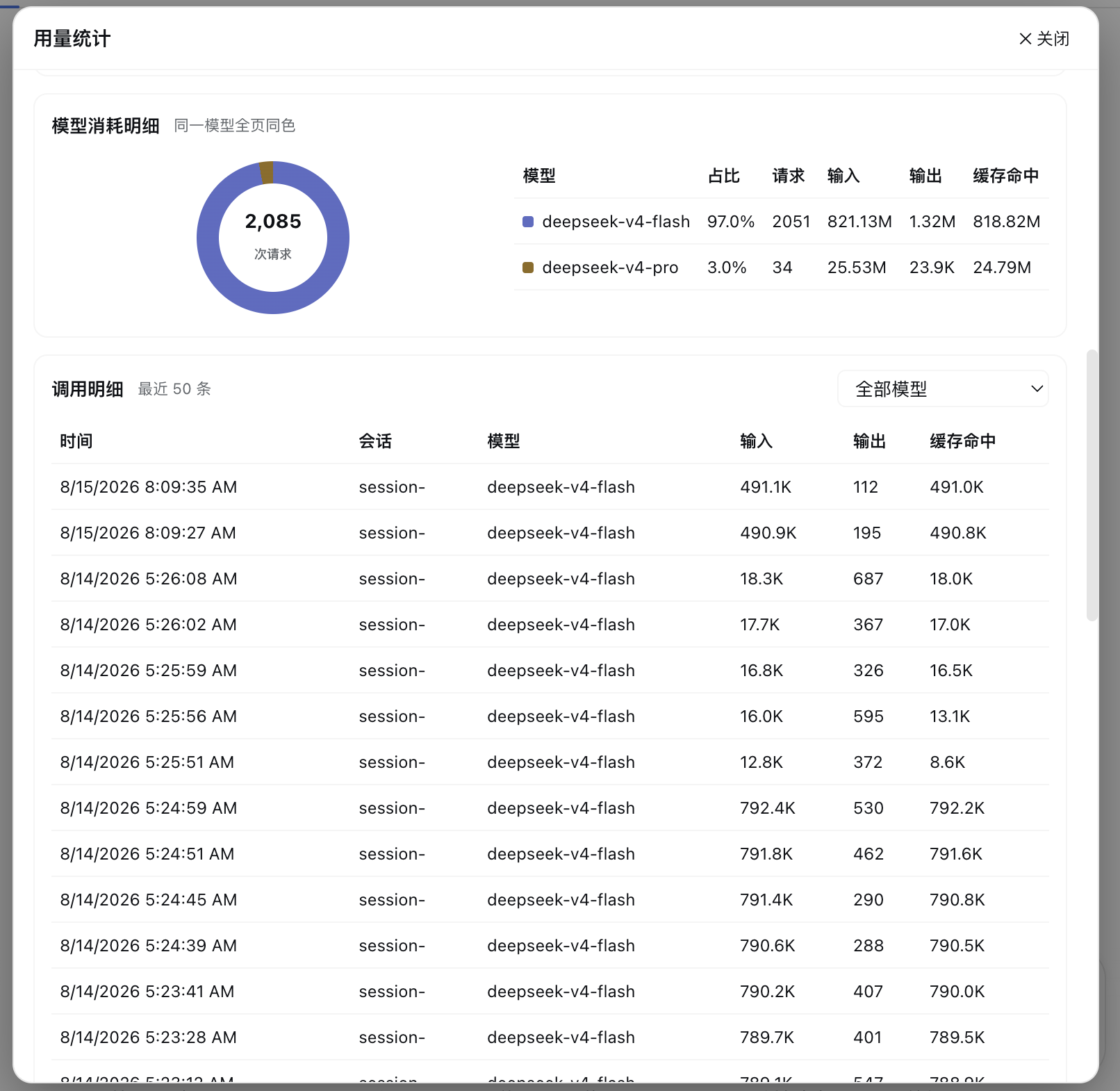 | Usage page bottom: trend bar chart, model consumption details, call record details |
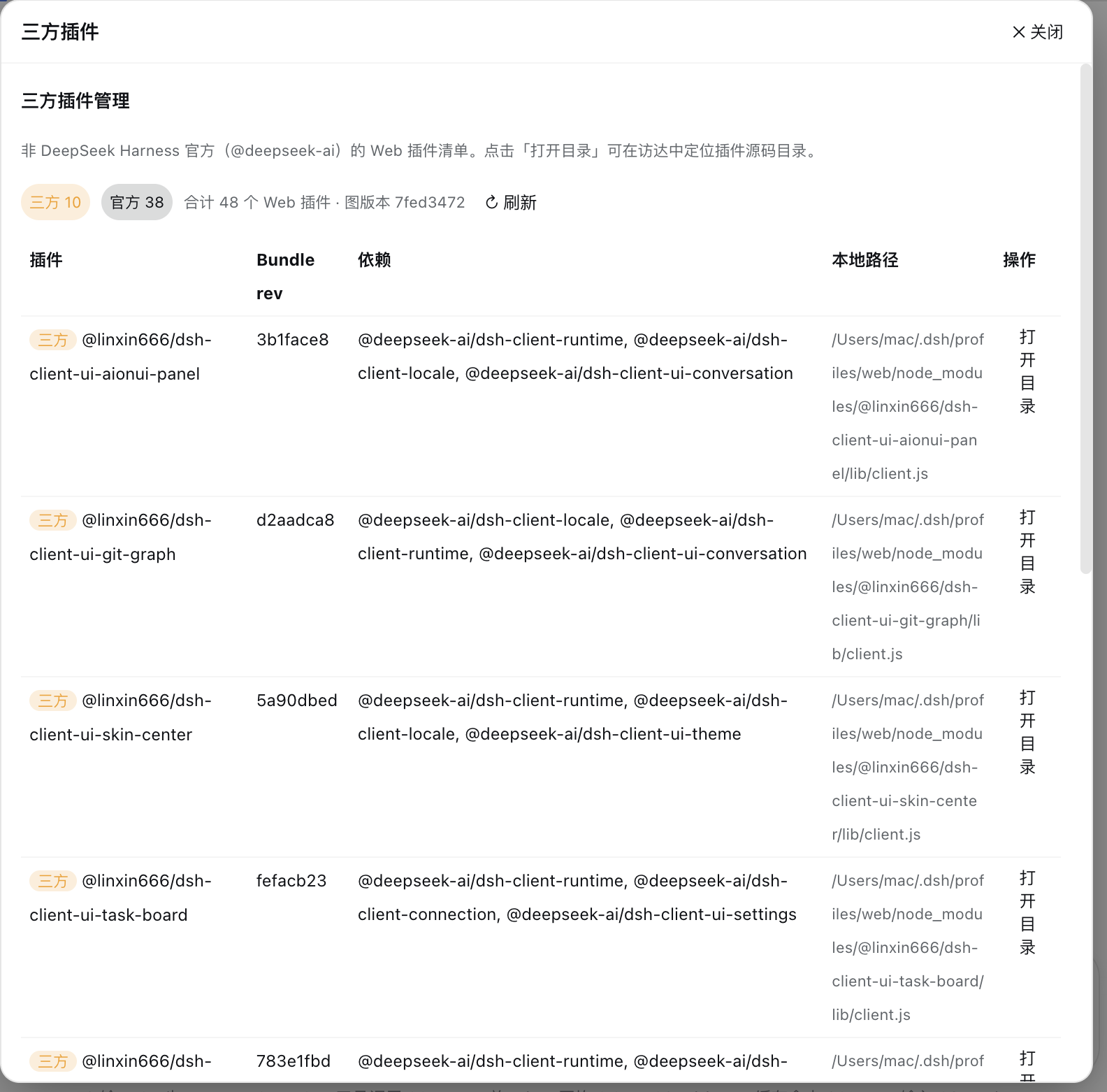 | Third-party plugin manager: stat badges, plugin list, "Open Directory" action |
📥 Install
Prerequisites
- DeepSeek Harness installed and running
- (Optional) DeepSeek API Key — get one at platform.deepseek.com; if
DEEPSEEK_API_KEYis already configured on this machine, the plugin auto-reads it at startup — no manual input required
One-click install (recommended)
# Installs automatically (install deps → write compose patch → prompt restart)
curl -fsSL https://raw.githubusercontent.com/Francis-Xavier-code/dsh-balance-plugin/main/install.sh | bash
Restart DeepSeek Harness after installation — three icon buttons appear on the right of the input box. Use DSH_PROFILE=<name> to target another profile.
Manual install (equivalent)
# 1. Install the dependency (use the github: source, not the bare package name — a third party owns a same-named package on npm)
dsh plugin --profile web add github:Francis-Xavier-code/dsh-balance-plugin

# 2. Append the plugin line to ~/.dsh/cordis.patch.yml (skip if already present)
- insert:
    - id: dsh-balance-plugin
      name: 'dsh-balance-plugin'

# 3. Restart DeepSeek Harness
⚙️ Configuration
Click the wallet icon (💰) on the right of the input toolbar to open the "Balance Monitor" panel:
| Setting | Description |
|---|---|
| Account list | Click "+ Add Account" to add; each account can have a name and API Key |
| API Key input | Enter the plaintext Key, or reference an environment variable like $env:DEEPSEEK_API_KEY; leaving an existing Key empty keeps it unchanged |
| Auto-read account | At startup, if the DSH credential DEEPSEEK_API_KEY is detected, an "Auto-read · DSH credential" account is created automatically |
| CNY / USD alert thresholds | Triggers a low-balance alert when the balance of the corresponding currency drops below the threshold (default ¥10 / $2) |
| Refresh interval | 30 seconds ~ 30 minutes (default 5 minutes); "Save Config" triggers an immediate refresh |
🔒 Key security: API Keys are kept only in the plugin process memory on your machine and are never uploaded to any third party; the UI only shows masked values.
🎮 Usage
| Entry | Location | Description |
|---|---|---|
| 💰 Wallet icon | Right of the input toolbar | Opens the balance monitor panel (config / balance / top-up) |
| 📊 Bar-chart icon | Right of the input toolbar | Opens the usage statistics panel |
| 🧩 Four-grid icon | Right of the input toolbar | Opens the third-party plugin manager panel |
| Persistent balance bar | Below the input box | Real-time balance summary, ↻ refresh, top-up link; turns fully red on low balance |
query_api_quota tool | Model calls | Just ask "How much DeepSeek balance is left?" |
All panels are centered overlays: click the backdrop or "✕ Close" to exit.
🗑 Uninstall
# One-click uninstall (removes dependency + cleans the compose patch)
curl -fsSL https://raw.githubusercontent.com/Francis-Xavier-code/dsh-balance-plugin/main/uninstall.sh | bash
Manual equivalent:
dsh plugin --profile web rm dsh-balance-plugin
# and remove the corresponding two lines from ~/.dsh/cordis.patch.yml
Restart DeepSeek Harness after uninstalling.
🏗 Architecture
Host (Node.js process)
├─ Balance query: shell runs curl → api.deepseek.com/user/balance (Bearer auth)
├─ Usage aggregation: real-time session/event listening + 90-day history scan (deduped by seq)
├─ Third-party plugins: clientModules.graph() + clientPath() + open -R to locate
├─ RPC routes: /bmon/api/get-state · refresh · recharge · set-config ·
│              get-usage · list-plugins · open-plugin-dir
└─ Model tool: query_api_quota

Client (browser)
├─ Entry: 3 SVG icon buttons on the right of the input toolbar
├─ Overlays: self-rendered fixed panels inside the component (no overlay slot dependency)
└─ Charts: Miyu chart/heat palettes, dark/light adaptive
❓ FAQ
Q: Will the plugin still be there after a restart?
A: Yes — static plugins are installed persistently and survive restarts. Manually configured account keys reset (the auto-read DEEPSEEK_API_KEY account needs no reconfiguration and restores automatically after restart).
Q: I can't see the entry button at the bottom of the sidebar? A: The DSH sidebar bottom slot is exclusively occupied by the official Cordis panel plugin. This plugin's entry is fixed on the right of the input toolbar and does not depend on that slot.
Q: Will my Key leak? A: No. Keys are kept only in the plugin process memory on your machine and the UI only shows masked values; neither the source code nor the README contains any secrets.
Q: Balance query fails?
A: Check the error hint in the panel: no Key configured (API Key not configured), missing environment variable (Environment variable xxx not set), invalid Key (401 error message), and handle accordingly.
Q: No historical usage data? A: The plugin scans session events from the last 90 days at startup; "avg first token" only counts streaming data captured in real time after the plugin is running.
Q: Why not use dsh plugin add dsh-balance-plugin?
A: A third party owns a same-named package on npm (dsh-balance-plugin@0.1.0), so the bare name would install the wrong one. Use the one-click script or the github: source (see Install).
💬 QQ Community
📄 License
Related plugins
DeepSeek-Balance-Whale-Widget
meteornox/deepseek-balance-whale-widget
dsh-context
bowenliang123/dsh-context
dsh-cost-meter
han-1413141/dsh-cost-meter
dsh-damage-pulse
wssfk12138/dsh-damage-pulse