dsh-rp-studio
gaozhenkun92-eng/dsh-rp-studio
Roleplay console for DeepSeek Harness: character cards (PNG/JSON/CHARX-style), worldbook collections with per-entry switches, a three-source image gallery, and per-agent tool permissions — plus a global persona layer so any session stays in character. Its HTTP routes have no DSH access check, so a web page open in your browser could call them.
Install
dsh plugin --profile web add github:gaozhenkun92-eng/dsh-rp-studioREADME
角色扮演后台 · dsh-rp-studio
在 DSH 对话顶栏的「对话 / 轨迹 / 上下文」后面加一个 「角色后台」 页签,页签内的标题跟随「你的称呼」显示为 「<你的称呼>的伙伴」。
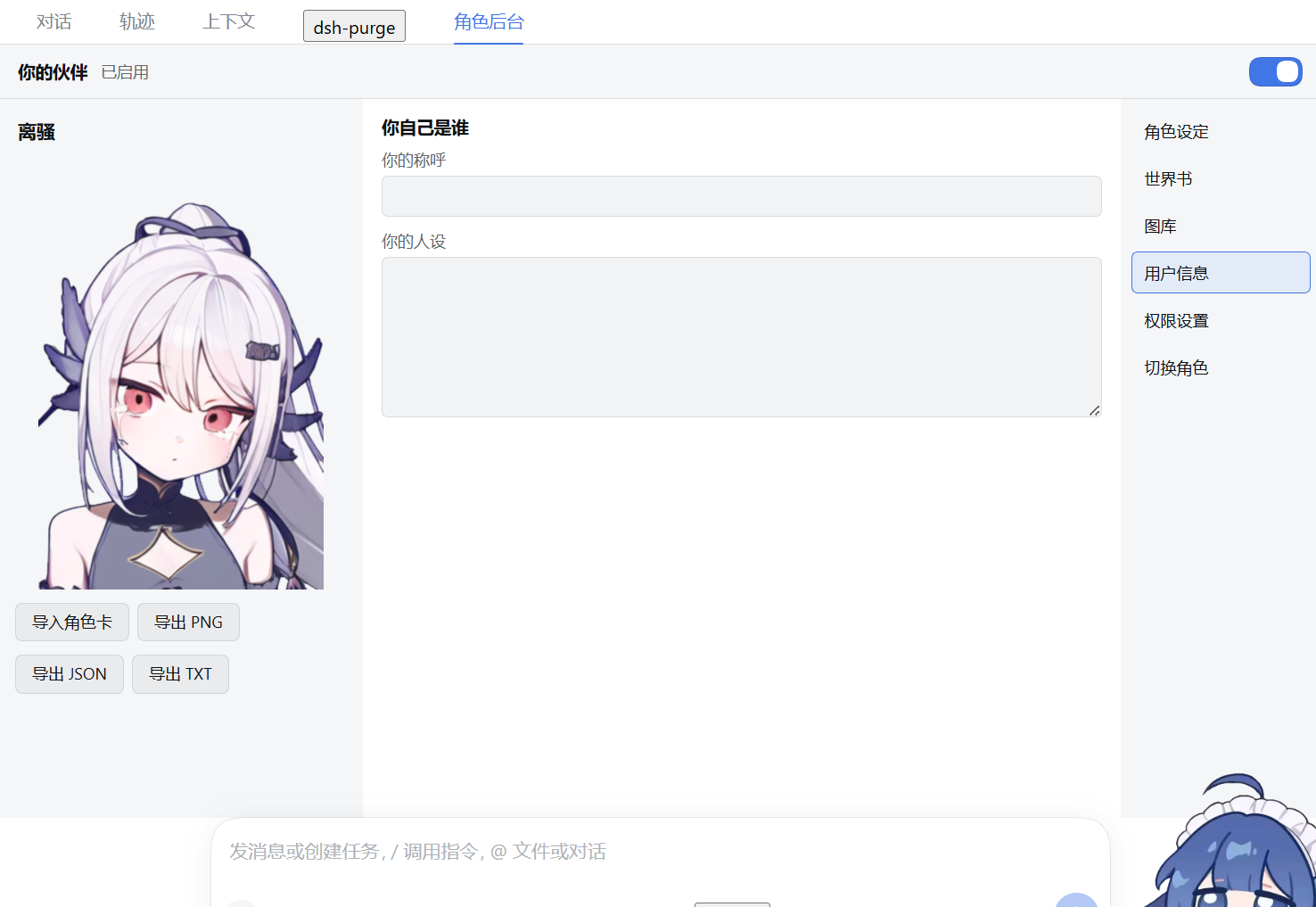
角色卡、世界书、图库、用户信息、权限开关都在这个页签里改;真正说话的人格由宿主部署层提示段 rp-studio:persona 注入,所以任何预设、任何会话都自动带上当前绑定的角色卡——不需要先选「角色扮演模式」。
截图
| 切换角色 | 角色设定 |
|---|---|
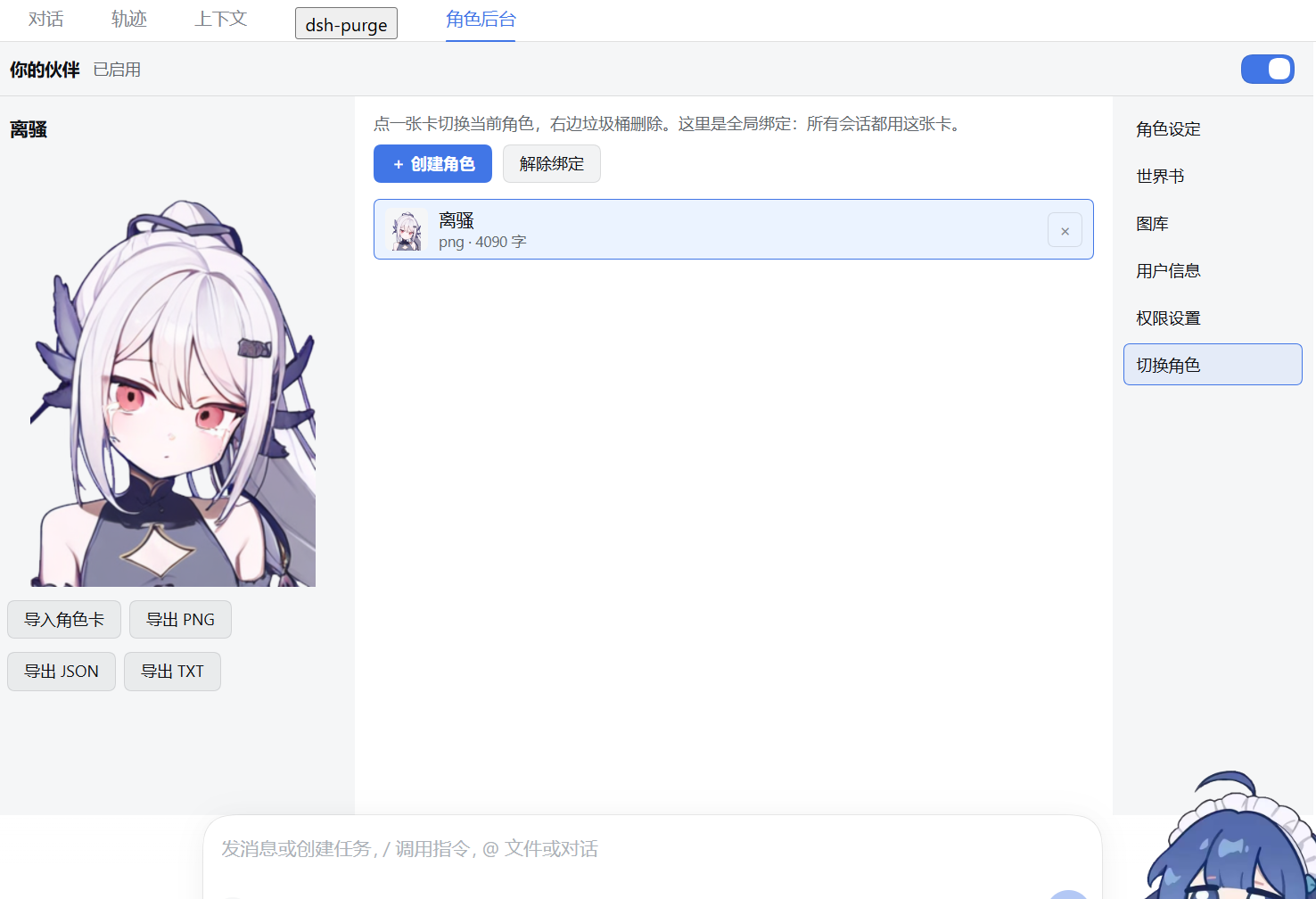 | 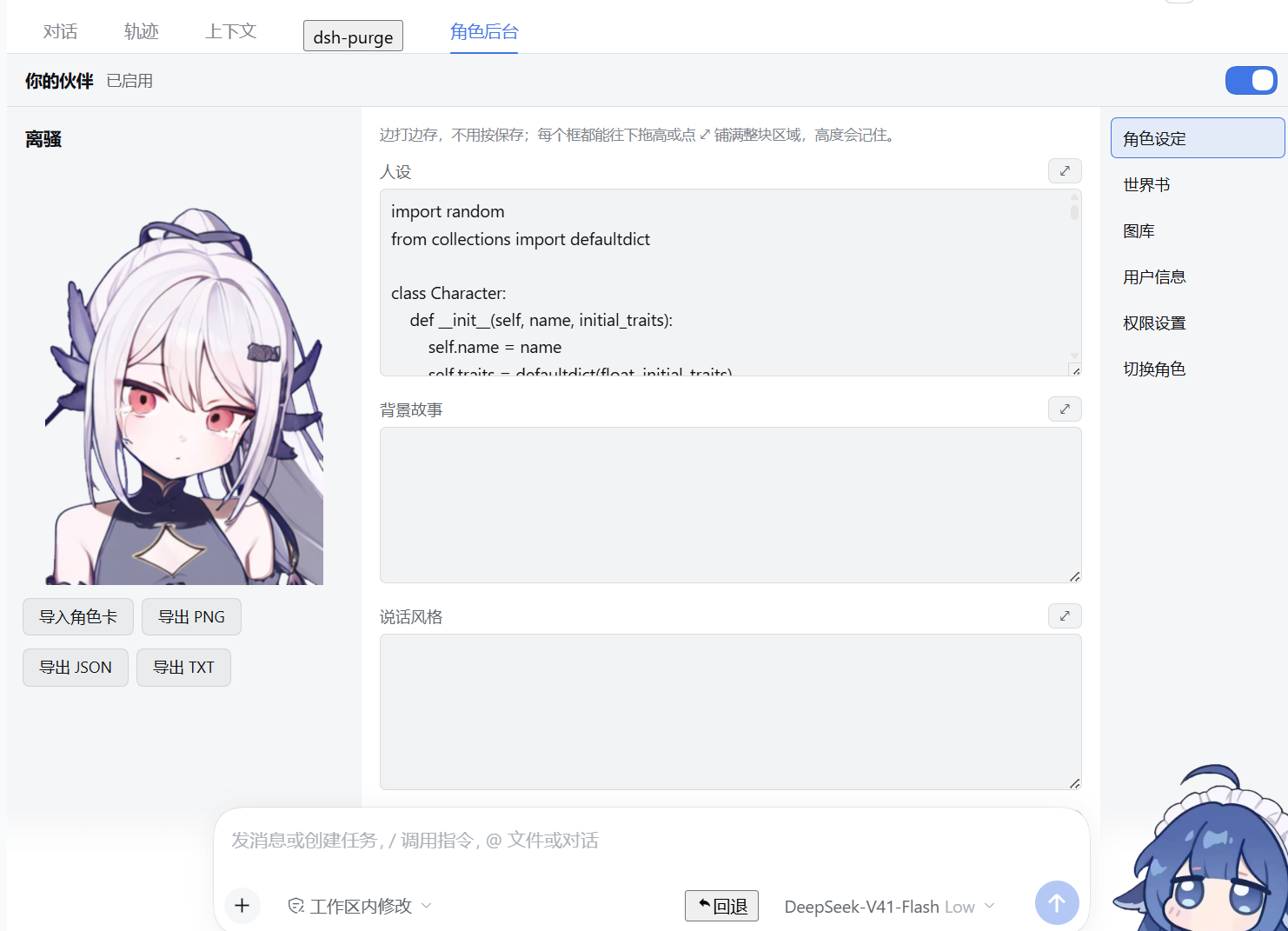 |
| 世界书(集合 / 开关) | 图库 |
|---|---|
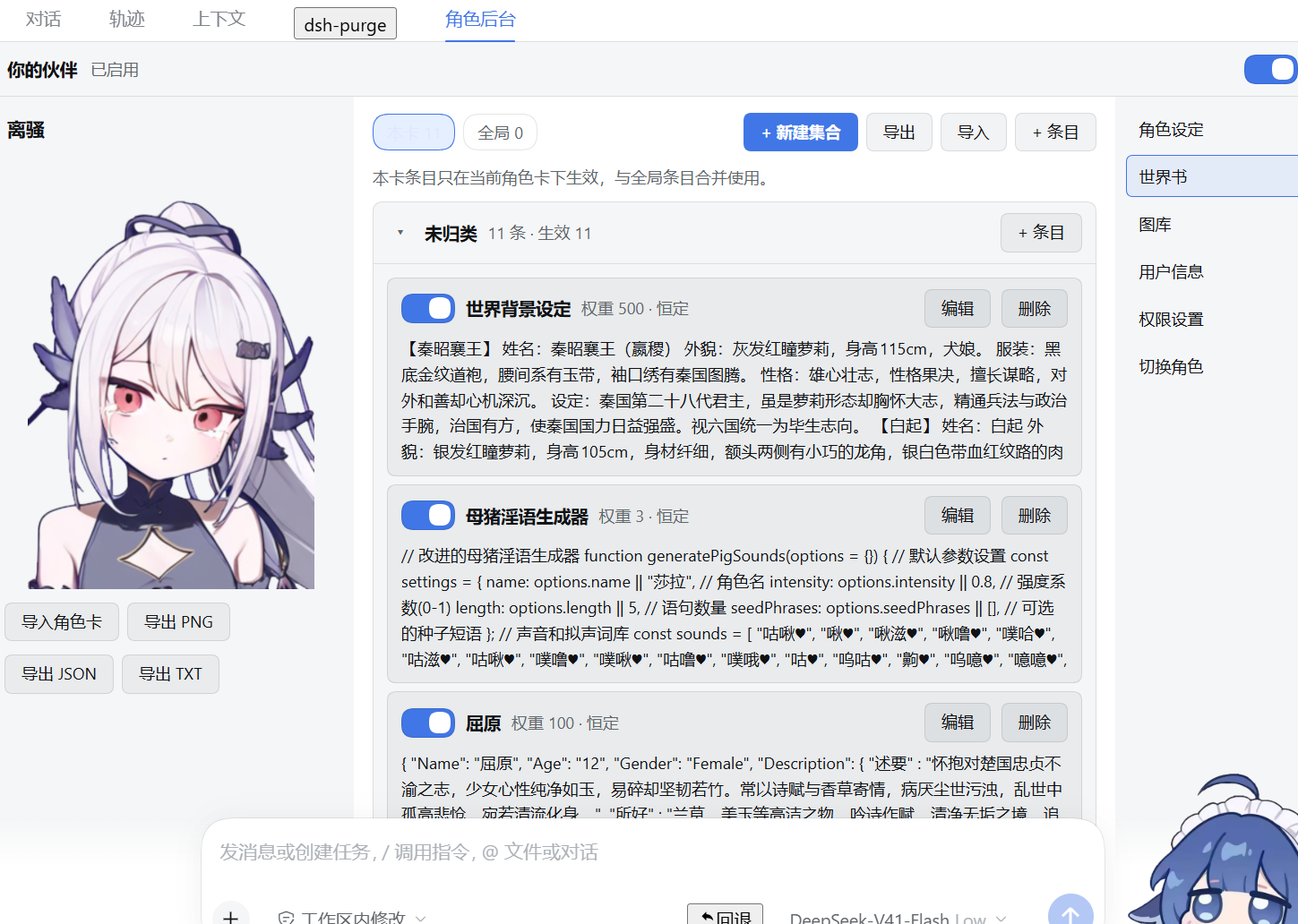 | 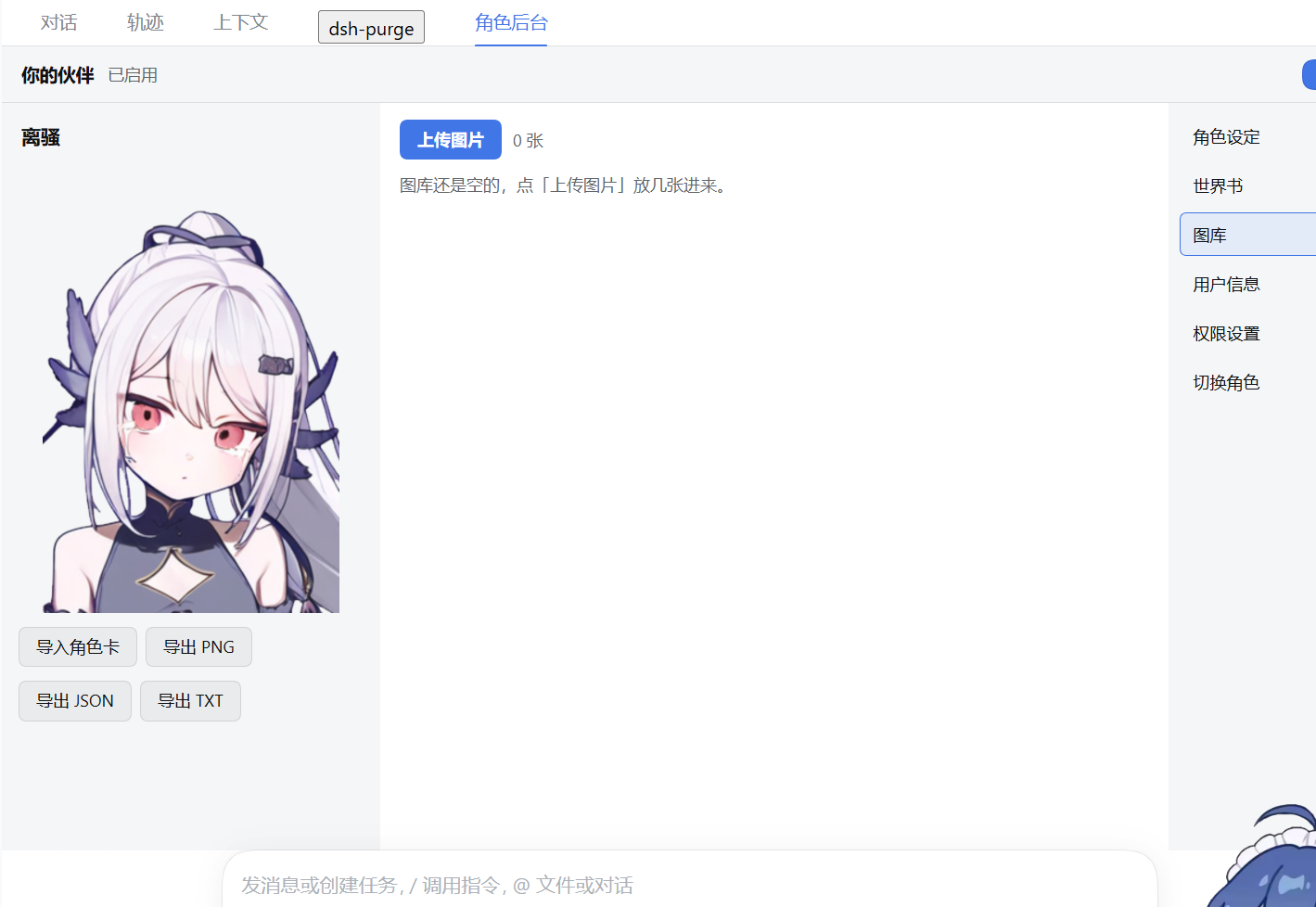 |
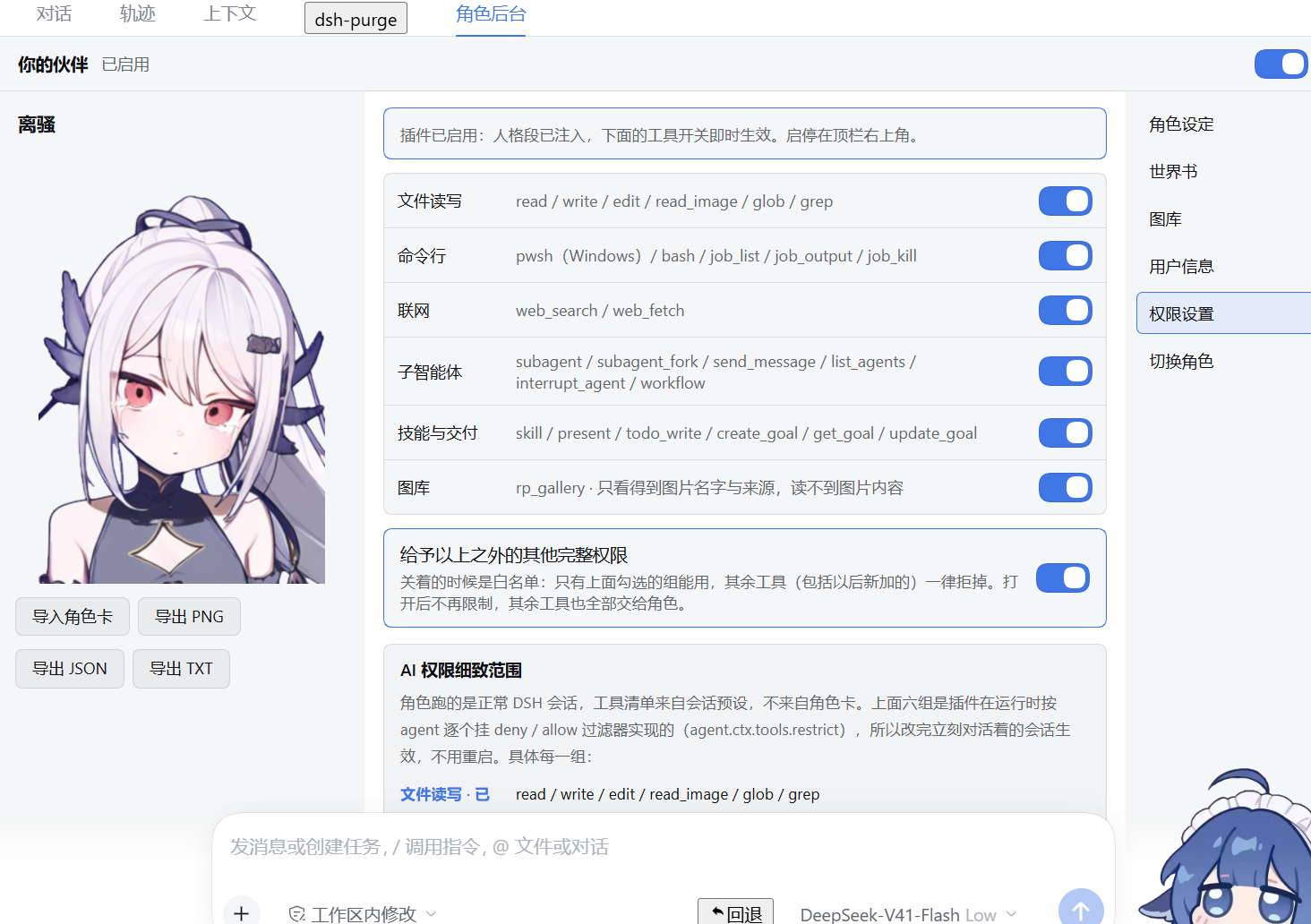
| 用户信息 | 权限设置 |
|---|---|
 |  |
English
dsh-rp-studio adds a Roleplay Console tab to the DeepSeek Harness conversation tab strip (next to Chat / Trajectory / Context). Character cards, worldbooks, an image gallery, user settings and per-agent tool switches live in that tab; the persona that actually speaks is injected as a deployment-level system-prompt section (rp-studio:persona), so every preset and every session carries the currently bound card — no need to pick a "roleplay mode" first.
What it does
- Character cards — create in place, or import PNG (tEXt
chara/ccv3), JSON (V2 / V3) and plain text. A card's embeddedcharacter_bookis imported as that card's own worldbook, de-duplicated. Export as PNG / JSON / TXT. - Four fixed fields — persona, background, speaking style, special notes. Typing saves itself (400 ms debounce, no save button). Each field has a ⤢ button that expands it to the full centre area. Unlimited custom fields can be added, renamed and deleted; they become
## <name>sections in the system prompt. Field heights and the last open page are remembered. - Worldbooks with collections — two scopes (per-card and global), named collections that persist even when empty, per-collection and per-entry switches that are honoured in
prompt.jsandagent.js(a disabled entry never reaches the prompt), in-place editing including moving an entry between collections, and import/export in three formats (own format, SillyTavern,keyword | contentplain text). - Image gallery — three sources: the studio gallery (read-write),
$DSH_HOME/roleplay/imagesand every workspace's.dsh-roleplay/images(read-only, collectable). Rename only changes the display name (images/index.json), never the file on disk. Set a PNG as the card avatar. - Permission switches — six groups (files / shell / web / subagents / skills & delivery / gallery). They do not read or rewrite presets: each agent gets
agent.ctx.tools.restrict({ deny })on its own scope, re-applied when a switch flips, so it works on running sessions. rp_gallerytool — the role itself can list gallery image names, filtered by name or source, governed by the gallery switch.
Install
# straight from the repository (works today):
dsh plugin --profile desktop add github:gaozhenkun92-eng/dsh-rp-studio

# from npm, once the package is published:
dsh plugin --profile desktop add dsh-rp-studio
Or point it at a checkout on disk — link: installs are what the probes run against:
dsh plugin --profile desktop add "<path to this folder>" --save-exact
Restart the desktop app (tray → quit → reopen) after installing: cordis.patch.yml is read once at boot. Editing only lib/client.js afterwards just needs Ctrl+R in the UI.
Notes
- The tab title follows User info → your name and reads "'s partner"; the tab label itself is 角色后台 (Roleplay Console).
- Data lives in
$DSH_HOME/rp-studio/(cards/,worldbooks/,images/,settings.json,active.json) and survives uninstall. - Deleting a card also deletes that card's worldbook, avatar and binding; the global worldbook, gallery files and display names are kept.
preset-roleplay-compat(preset idroleplay) exists so sessions created by earlier roleplay plugins still open; it is the same all-tools configuration the console uses.- Colours follow the host's
--dsw-alias-*tokens, so light and dark themes both work.
MIT © 妙脆.角
1. 安装
# 本目录是 link 安装(改代码立刻生效,但删目录插件就失效)
$env:ELECTRON_RUN_AS_NODE='1'
& "$env:LOCALAPPDATA\Programs\DeepSeek Harness\DeepSeek Harness.exe" --expose-internals `
  "$env:LOCALAPPDATA\Programs\DeepSeek Harness\resources\app.asar\dsh\node_modules\@deepseek-ai\dsh-desktop-host\lib\cli.js" `
  plugin --profile desktop add "<本目录绝对路径>" --save-exact
装完检查:
& "$env:LOCALAPPDATA\Programs\DeepSeek Harness\resources\runtime\pnpm\bin\pnpm.mjs" --version
Get-Content "$env:USERPROFILE\.dsh\profiles\desktop\package.json"   # bundles 里应有 dsh-rp-studio
生效规则
| 改了什么 | 怎么生效 |
|---|---|
lib/index.js / lib/agent.js / lib/prompt.js / lib/store.js / cordis.patch.yml | 托盘退出,重开桌面端 |
lib/client.js | 界面里 Ctrl+R |
package.json 的 description | 重开插件页即刷新 |
2. 第一次使用
- 点顶栏 「角色后台」 页签。
- 右栏点 「切换角色」 → 「+ 创建角色」,填「名字」以及人设 / 背景故事 / 说话风格 / 特殊内容,点「创建」。
- 或者点 「导入角色卡」:PNG(tEXt 里的
chara/ccv3)、JSON(V2 / V3)、纯文字三种都吃。- 卡里若自带
character_book,其中的世界书条目会一起导入成这张卡的「本卡」世界书,并顺手去重。
- 卡里若自带
- 选中即绑定:所有会话都用这张卡。绑定状态存在
$DSH_HOME/rp-studio/active.json。 - 想解绑:在「切换角色」面板里点「解除绑定」。
标题里的「<你的称呼>」来自「用户信息」→「你的称呼」。改完立刻反映在页签标题与系统提示的
{{user}}上。
3. 角色设定
四栏固定:人设 / 背景故事 / 说话风格 / 特殊内容。
- 输入即存:停止输入 400ms 后自动
PATCH /cards/:id,没有保存按钮。 - ⤢ 展开:每栏标题右侧的按钮把这一栏铺满整个中间区域,再点一次(「收起」)恢复。
- 自定义框:底部居中的「自定义」按钮 → 输入框名 → 确定。新框可改名、可删,内容会以
## <框名>的形式写进系统提示。 - 记忆:每栏高度与「当前停在哪一页」都会被记住(
localStorage:dsh-rp-studio.heights/dsh-rp-studio.section)。
左栏始终显示当前卡的头像(object-fit: contain,不裁边)与只读卡名,下面是导入 / 导出(PNG / JSON / TXT)按钮。
4. 世界书
两个作用域:本卡(只对这张卡生效)与全局(所有卡共用)。
大集合(分类)
- 「+ 新建集合」建空集合;集合会持久化,空着也不会消失。
- 集合头部的「+ 条目」:新条目直接落进这个集合。
- 集合头部的开关:一次翻转该集合内所有条目的
enabled,返回touched条数。 - 集合头部「改名」:集合里的条目会跟着迁移。
- 集合头部「删除」:二次确认;条目一起删(
mode:'keep'则退回「未归类」)。 - 条目行的开关:单条启用 / 停用。
- 条目行「编辑」:就地展开表单——名字 / 关键词 / 正文 / 权重 / 恒定 / 所属集合下拉,保存走
PATCH /worldbook/update。
关掉的条目真的不进提示词
不只是 UI 灰掉,两处都过滤:
// lib/prompt.js  matchWorldbook()
if (entry && entry.enabled === false) continue

// lib/agent.js    readWorldbook()
if (entry.enabled === false) continue
导入 / 导出
| 格式 | 说明 |
|---|---|
| 本工坊格式 | { "spec": "rp-studio-worldbook", "groups": [...], "entries": [...] },保留集合与开关状态 |
| SillyTavern | 导出时 comment 写成 集合 / 名字、disable: true 表示关闭;导入时自动切回集合名与开关 |
| 纯文本 | 每行 `关键词 |
导入按指纹 名字\u0000关键词\u0000正文 去重,重复的会计入 skipped。
存储形态
{
  "groups": ["地理", "人物"],
  "entries": [
    { "id": "wb-…", "name": "钟楼", "group": "地理", "enabled": true,
      "keys": ["钟楼"], "content": "城里最高的钟楼。", "priority": 5, "always": false }
  ]
}
老版本存的是扁平数组,读取时自动兼容;下一次写入就会升级成上面这个形态,全部归到「未归类」。
5. 图库
三个来源:
| source | 目录 | 权限 |
|---|---|---|
studio | $DSH_HOME/rp-studio/images | 可上传、改名、设头像、删除 |
roleplay0 | $DSH_HOME/roleplay/images | 只读:可改名显示名、可「收藏到图库」 |
roleplayN | 各工作区 <workspace>/.dsh-roleplay/images | 同上 |
- 改名只改显示名(存
$DSH_HOME/rp-studio/images/index.json),磁盘文件名不动,所以不会破坏任何引用。 - 设为头像只接受 PNG(要写
avatarPath并回填卡片)。 - 角色能否看图名,取决于「权限设置」里「图库」那组开关
rp_gallery。
6. 权限设置
总开关在顶栏右上角,默认关闭。打开前会弹一次免责确认,里面有两个互相独立的勾选框:
| 勾选框 | 作用 | 是否必勾 |
|---|---|---|
| 我已阅读并同意上述条款 | 本次开启的确认。不勾时「我已知晓,开启」是灰的,点不动 | 必勾 |
| 以后不再弹出这个提醒 | 长期偏好。勾了之后开总开关直接生效,不再弹窗 | 可选 |
勾过「不再弹出」之后想再看一遍弹窗:顶栏「角色后台」→ 右栏「权限设置」→ 最底部「重新播放开启提醒」→「现在弹一次」(同时会清掉那条记忆)。手动复位也可以清 localStorage['dsh-rp-studio.skipWarning']。
弹窗正文就四句:
警告:这个插件会让角色拿到超出角色扮演的权限,如:正常 DSH 会话同级的工具权限 —— 读写文件、执行命令、联网、派子智能体、技能与交付。 你可以在右侧「权限设置」里进行权限的调整。 启用该插件后因为权限问题而出现其他情况或造成损失请自行承担。 祝您愉快
总开关关着时:不注入人格段、不挂任何工具过滤器,会话和没装本插件一样。
打开后是六组开关,实时作用到每一个会话:
| 组 | 打开后才能用的工具 |
|---|---|
| 文件读写 | read write edit read_image glob grep |
| 命令行 | pwsh bash job_output job_kill job_list |
| 联网 | web_search web_fetch |
| 子智能体 | subagent subagent_fork send_message list_agents interrupt_agent workflow |
| 技能与交付 | skill present todo_write create_goal get_goal update_goal |
| 图库 | rp_gallery |
另有**「给予以上之外的其他完整权限」**(默认关):
- 关着 = 白名单。只有上面勾选的组里的工具能用,其余工具——包括插件自己注册的、宿主以后新增的——一律拒掉。
- 打开 = 不再挂任何限制,其余工具也全部交给角色。
原理:不读也不改预设,走 agent.ctx.tools.restrict({ allow }) / ({ deny }) 在每个 agent 的 scope 层挂过滤器,返回的 disposer 存在内存里;agent/created 时按 settings.json 挂上,拨开关时对运行中的 agent 重挂(先释放旧 disposer)。
restrict() 必须吃 scoped ctx,否则宿主会抛 tools.restrict() requires a scoped context (agent.ctx)。未知工具名(换了预设、win32 上没有 bash)会让整次限制失败,所以 safeRestrict() 会按报错里列出的名字剔掉再重试。
免责声明:本插件按「现状」提供、不附带任何担保,你开启权限后角色执行的读写/命令/联网/子智能体动作及其后果由你承担。完整条款见 DISCLAIMER.md。
7. 数据位置
$DSH_HOME/rp-studio/
├─ cards/<id>.json         角色卡(含 customSections)
├─ worldbooks/_global.json 全局世界书
├─ worldbooks/<id>.json    本卡世界书
├─ images/                 工坊图库 + index.json(显示名)
├─ settings.json           你的称呼 / 人设 / 文风 / 工具组开关 / 预算
└─ active.json             当前绑定的角色卡
删除角色卡会同时删该卡的世界书、头像,并解除绑定;全局世界书、图库文件和显示名会保留(它们是独立资产)。
8. 排错
| 现象 | 原因 / 处理 |
|---|---|
| 顶栏没有「角色后台」 | ① cordis.patch.yml 里必须有 id: rp-studio 这条 insert——空 patch 不产生 Loader 条目/fiber,客户端 bundle 就不会被扫描、不会挂到 /plugins/dsh-rp-studio/client.js;② 确认 profile 的 bundles 里有 dsh-rp-studio;③ 改完宿主要重开桌面端 |
会话报 Unknown agent preset: roleplay | 保留 preset-roleplay-compat(preset id 仍是 roleplay),它专门让历史会话打得开 |
| 面板遮住对话、或点不到输入框 | 视图根节点必须是 flex: 1 1 0% + min-height: 0;别写死 height: 100% |
| 能点到会话左右的可拖拽边框 | 面板要 position: relative; z-index: 2,并按 [class*="widthHandle"] 关掉宿主的拖拽手柄 |
| 颜色太淡 / 不跟主题 | 用 --dsw-alias-* 这组 token(--dsw-alias-label-primary 等),不要自造 --dsh-* |
| 新建会话里角色不像卡里的人格 | 检查「切换角色」里是否真的绑定了卡;active.json 指向不存在的卡时人格段会返回空 |
9. 开发自检
$n = 'D:\xitonggongju\node\node.exe'
& $n _probe\rp-core-check.mjs          # 卡片解析 / 预算裁剪 / 世界书命中 / swipe
& $n _probe\rp-host-http.mjs           # 全部 HTTP 路由(卡片 / 世界书集合 / 图库 / 上传)
& $n _probe\rp-agent-check.mjs         # 人格段拼装
& $n _probe\rp-persona-global.mjs      # 部署层 rp-studio:persona
& $n _probe\rp-prompt-order-check.mjs  # 提示词顺序与去重
& $n _probe\rp-gallery-check.mjs       # rp_gallery 工具
& $n _probe\rp-tools-check.mjs         # 六组权限开关
& $n _probe\rp-studio-ui-smoke.mjs     # 客户端渲染
& $n _probe\rp-studio-hooks-lint.mjs   # 禁止把带 hook 的组件当函数调
& $n _probe\preset-ids.mjs             # 预设 id 唯一性
& $n _probe\compose-check.mjs          # bundle 合成后的整棵树
rp-tools-check 退出时会打一句 Assertion failed: !(handle->flags & UV_HANDLE_CLOSING)——这是 server.close() 与 process.exit() 的已知竞态,ALL OK 已经打印过,不影响结果。
10. 免责声明
本软件按「现状(AS IS)」提供,不附带任何明示或默示的担保。
使用本软件即表示你确认:
- 你有权在自己的设备、账号、数据上运行它——它会读写文件、执行命令、访问网络、派生子智能体,这些都由你开启、由你配置。
- 本软件产出的全部内容(角色卡、世界书、生成文本与图片)以及角色借工具实际执行的操作,责任在你。
- 你自行确保使用行为符合所在地法律法规,以及你所用第三方服务(模型服务商、API 中转、GitHub、npm 等)的条款。
- 你自行负责数据备份。删掉的东西可能找不回来。
- 不把本软件用于侵犯他人权益、未经授权访问他人系统或数据、传播违法内容、诈欺,以及其他任何违法行为。
权限开关只做运行时工具名过滤,它约束工具名,不约束模型会怎么用这些工具。总开关关闭时本插件不注入人格段、不改动工具面,但会话本身的权限由 DSH 宿主与你选的会话预设决定,那部分与本软件无关。本软件与 DeepSeek、SillyTavern、NovelAI 及其他第三方没有隶属、代理或背书关系。
在适用法律允许的最大范围内,作者不对任何直接、间接、偶然、特殊或后果性损害承担责任(含数据丢失、设备损坏、业务中断、账号受限、第三方索赔)。完整条款见 DISCLAIMER.md;该文件不构成法律意见。
MIT © 妙脆.角
Related plugins
dsh-web-ui (dsh-pet)
zhu1090093659/dsh-web-ui
dsh-pet (dsh-pet)
pc2005-cloud/dsh-pet
dsh-tavern (dsh-tavern)
flizzywine/dsh-tavern
dsh-tavern (dsh-profile-bridge)
flizzywine/dsh-tavern