dsh-session-panel
gznofeng/dsh-session-panel
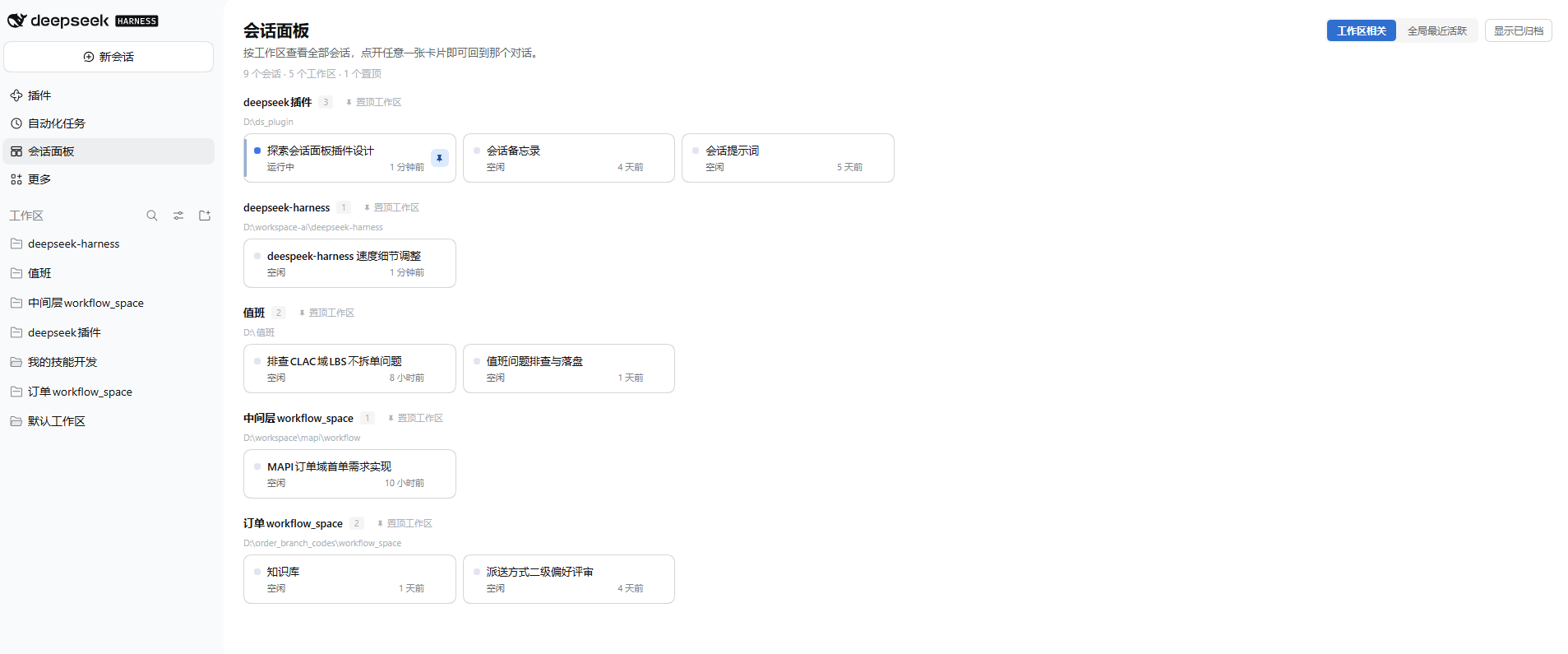
A session panel page reached from one sidebar row: every session as a card, grouped by owning workspace with per-section counts and directory, or flat as a recent list with a workspace tag per card. Four-tier ordering (pinned-and-busy > pinned > busy > idle, recency inside a tier), session pins reused from the Harness so nothing is stored twice, workspace pins kept in plugin-data keyed by folder path so a rename keeps them, archived sessions hidden by default behind a toggle, and "N more" folding for long workspaces. Reads only state the client already holds — no model call, no extra tokens; workspace pins go through three loopback-only routes with atomic writes that refuse to overwrite a damaged file.
Install
dsh plugin --profile web add github:gznofeng/dsh-session-panelREADME
dsh-session-panel
A session panel for DeepSeek Harness (dsh): one sidebar row, one screen of cards, one click back into the conversation.
English | 中文
What it does
The sidebar gains a Session panel row, directly below the shipped Automation tasks row. It has two view modes, switched from the top right.
By workspace (default)
Sessions grouped under the workspace that owns them, each section carrying its count and directory:
- Status at a glance. A dot and a label per card: running, waiting for approval, plan awaiting review, waiting for an answer, just finished, or idle. A pending interaction outranks running, which outranks the finished-but-unopened reminder.
- Pinning reorders, it does not extract. A pinned Session leads inside its section, and a pinned workspace lifts the whole section. Sessions never leave the section they belong to — pulling them out would render one workspace twice and break the grouping.
- Ordered for triage. A workspace holding pinned work leads, then the best tier it contains, then recency.
Recent everywhere
One flat list across all workspaces:
- Pinned Sessions rise into a Pinned block above a rule; everything below it is the rest.
- Each card carries its workspace as a small tag, because in a flat list the Sessions of one workspace scatter.
- No grouping headers.
Ordering, in both modes
One shared rule:
| Tier | What |
|---|---|
| 0 | pinned and busy |
| 1 | pinned |
| 2 | busy |
| 3 | idle |
Within a tier, most recently active first. Pinned-and-busy is the only top tier, so a pinned Session that is running leads a pinned Session that is idle even when the idle one was touched later.
Pinning
Two pin sources, deliberately kept apart:
- Session pins use the Harness's own
pinSession/pinnedSessionIds. They are the same fact as a pin in the sidebar, so this panel stores no second copy. - Workspace pins have no Harness equivalent, because
WorkspaceViewcarries no pin field. They are stored in~/.dsh/plugin-data/dsh-session-panel.jsonand follow the folder path, not the title: a rename keeps the pin, and a folder that is removed and re-added gets its pin back.
Both are driven from the panel — the pin glyph on a card, and the pin button beside a workspace heading. A card whose workspace is pinned as a whole shows the pinned state but cannot be unpinned on its own.
- Archived sessions stay out of the way. Hidden by default; a toggle brings them back, greyed and marked. An archived card is never pinned and cannot be opened until restored.
- Nothing extra is spent. Everything comes from state the client already holds. No model call, no extra token.
Long workspaces fold their overflow behind an "N more" control instead of pushing the page down.
Install
dsh plugin add dsh-session-panel
Or from a checkout:
dsh plugin --profile web add /path/to/dsh-session-panel
Reload the page afterwards. The row appears below Automation tasks, and the panel opens in the main column.
What it does not do
- No creating, renaming, archiving or deleting sessions.
- No sending prompts, steering, or stopping a turn.
- No per-session token, cost or context-usage figures.
- No full-text search across sessions.
- No floating orb or right-sidebar surface.
Those are natural next steps, not oversights.
How it works
| Slot | Purpose |
|---|---|
sidebar.panellist | The sidebar row. order: 11 puts it directly below Automation tasks at order: 10. |
main (keyed session-panel) | The page. The sidebar row selects the same key. |
Session, workspace and status data come from the framework's standard root-scope props — useSessions, useWorkspaces and useSessionStatus — so the page subscribes to the slices it needs and the Harness renderer handles incremental publication.
Workspace pins need the filesystem, which the browser cannot touch, so the host half exposes three loopback-only routes:
| Route | Purpose |
|---|---|
GET /dsh-session-panel/state | The current pin set |
POST /dsh-session-panel/pin | { path, pinned } |
POST /dsh-session-panel/reload | Re-read the file after a repair |
Every route refuses any peer that is not on 127.0.0.0/8 or ::1, and does so before checking the method, so a remote caller learns nothing about the contract. A missing or unparsable address fails closed.
The pin file is written atomically (temp file plus rename) and one write at a time. A missing file is a clean first run. A damaged file is reported and refuses every write — overwriting it with the in-memory empty state would destroy the only copy of the user's pins; the panel shows a notice with a retry that re-reads after the user repairs it.
Styling uses only --dsw-* theme tokens, with one local pair for the pin accent (the palette has no soft blue chip). The stylesheet is a component-local element, removed on unmount.
Requirements
- DSH
0.2.2-rc.3or a compatible0.2.x. Developed and verified against0.2.2-rc.3. - The web client (
dsh.client.platform: web).
Development
npm test
Four suites:
test/panel.test.js— the derivation: the four-tier ordering, both modes, the two pin sources, grouping, and the registration contract.test/render.test.js— renders the shipping components with real React for both modes, pinned and unpinned states, the rule, the workspace tag, archived rows, and a damaged pin file. It resolves React from a scratch install; pointDSH_RENDER_TEST_NODE_MODULESat one if the default is missing.test/host.test.js— the file and the routes against a real temporary directory: atomic writes, first-run absence, a damaged file refusing writes, reload recovery, serialized concurrent writes, and the loopback guard.test/discovery.test.js— the install contract: a resolvable name,dsh.bundle,dsh.clientwithplatform: web, a./clientexport that exists, an envelope id equal to the package name, no unexpected externals, and parseable locales.
License
MIT. Copyright (c) 2026 gznofeng.
Related plugins
billion-context
ranxianglei/billion-context
dsh-web-ui (dsh-chat-recovery)
zhu1090093659/dsh-web-ui
dsh-synapse
liangmianya/dsh-synapse
dsh-archive-manager
michengai/dsh-archive-manager