dsh-agent-team-planner
haistar/dsh-agent-team-planner
A DeepSeek Harness plugin for managing agent software R&D teams, which delivers functions including standardized software R&D process management, document management, software development and operation & maintenance. It enables you to easily own an agent software R&D team and complete software development efficiently.
Install
dsh plugin --profile web add github:haistar/dsh-agent-team-plannerREADME
DSH Agent Team Planner
中文 | English



A project-planning workbench for DeepSeek Harness Agent Teams.
DSH Agent Teams gives you the team and the task board. DSH Agent Team Planner adds the layer above it: requirements, versions, stage gates, meetings, documents, confirmations and scheduling — so a group of agents behaves like a small delivery team instead of a chat room.
One workspace = one project team. One version = one delivery pipeline. One click = the next legal move.
Why this exists
Agent Teams is excellent at coordination primitives: spawn a teammate, assign a task, wait, complete. It intentionally does not decide what should be built, when a phase is allowed to start, or which document is the source of truth.
This plugin supplies those decisions as a visible, auditable workflow:
| Without the planner | With the planner |
|---|---|
| Tasks appear from a conversation | Requirements enter a version, then a gate opens |
| "Is architecture done?" lives in chat | Architecture doc is an artifact; confirmation advances the stage |
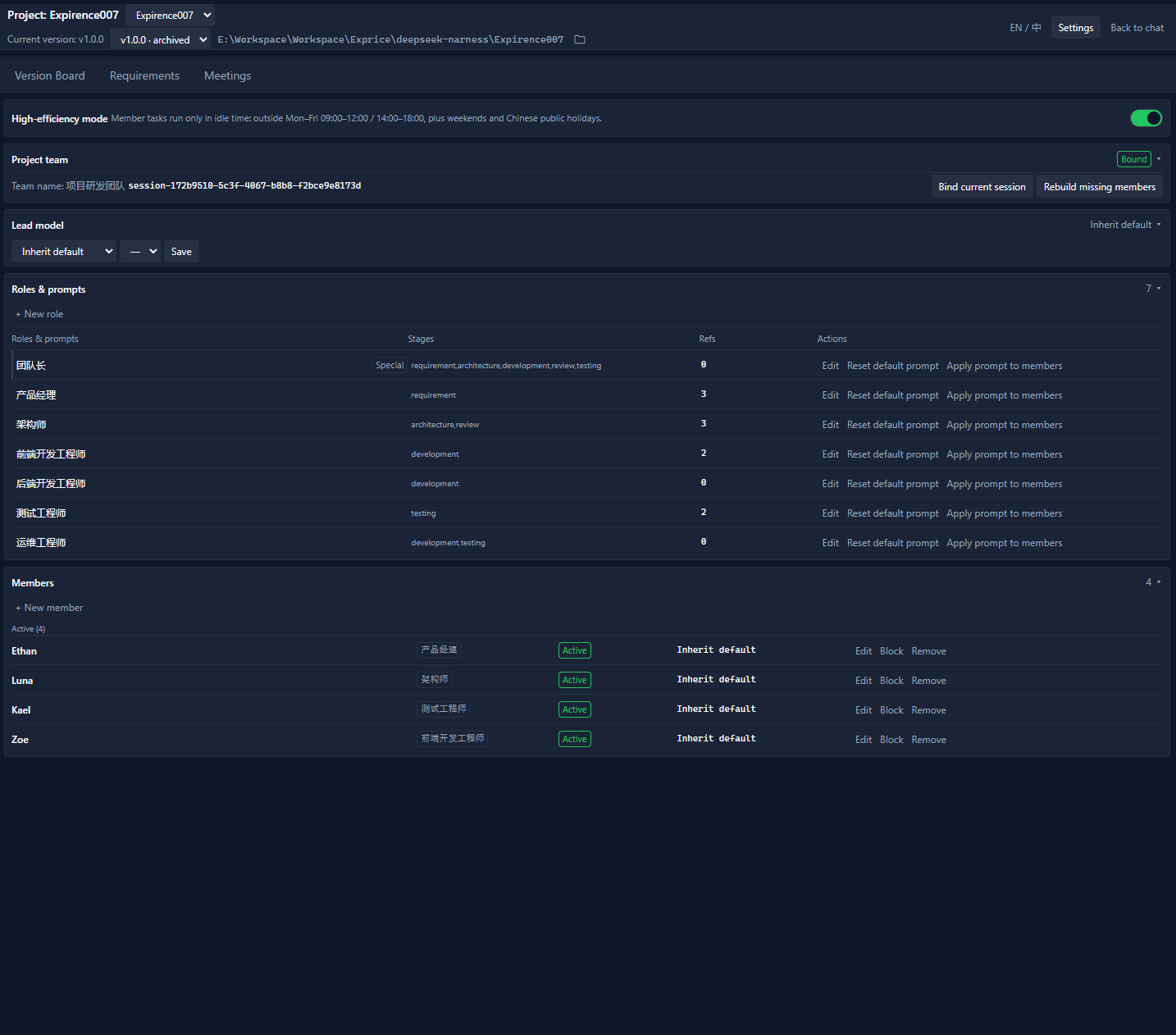
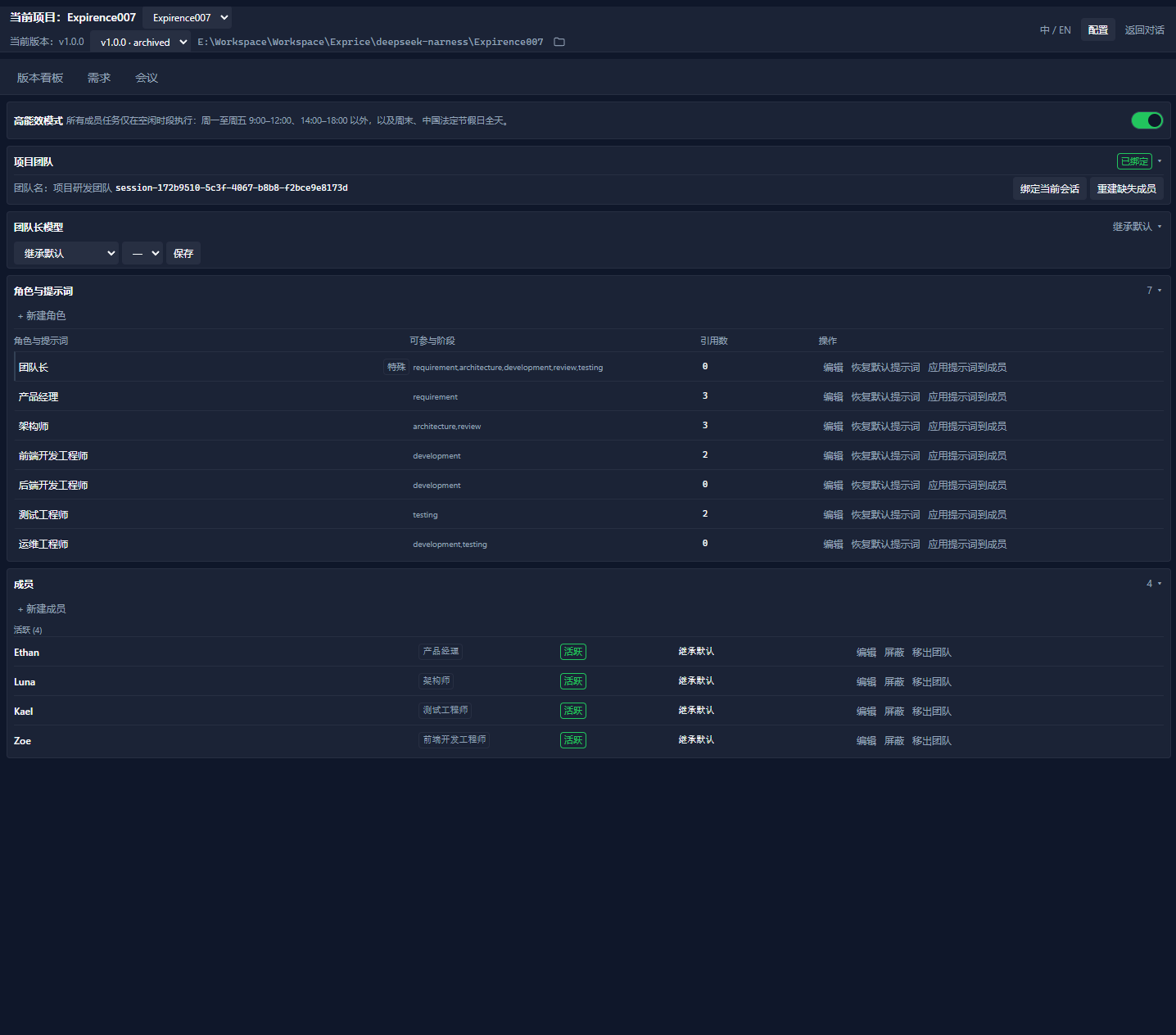
| Members are ad-hoc names | Reusable roles, per-member model routes, display names |
| Meeting notes are pasted somewhere | Meeting output becomes version-linked documents |
| Off-peak work needs manual timing | High-efficiency mode schedules member work in idle windows |
It is a community plugin. It uses public Host services and the official Agent Teams API; it does not fork, patch or bypass DSH.
Feature tour
1. A single workbench, not another chat tab
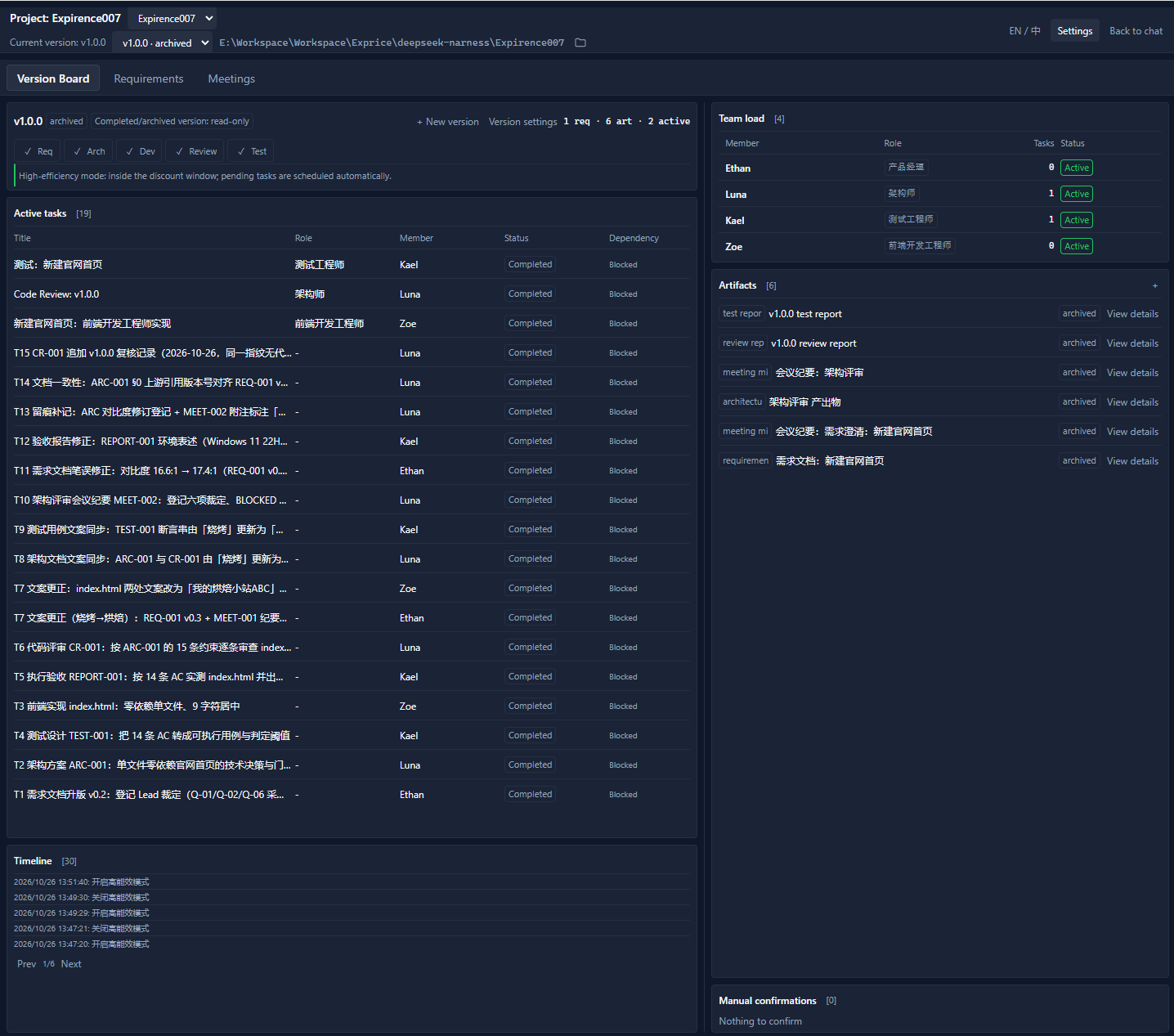
The left-rail entry dsh-agent-team-planner opens a full main-area workbench with three tabs:
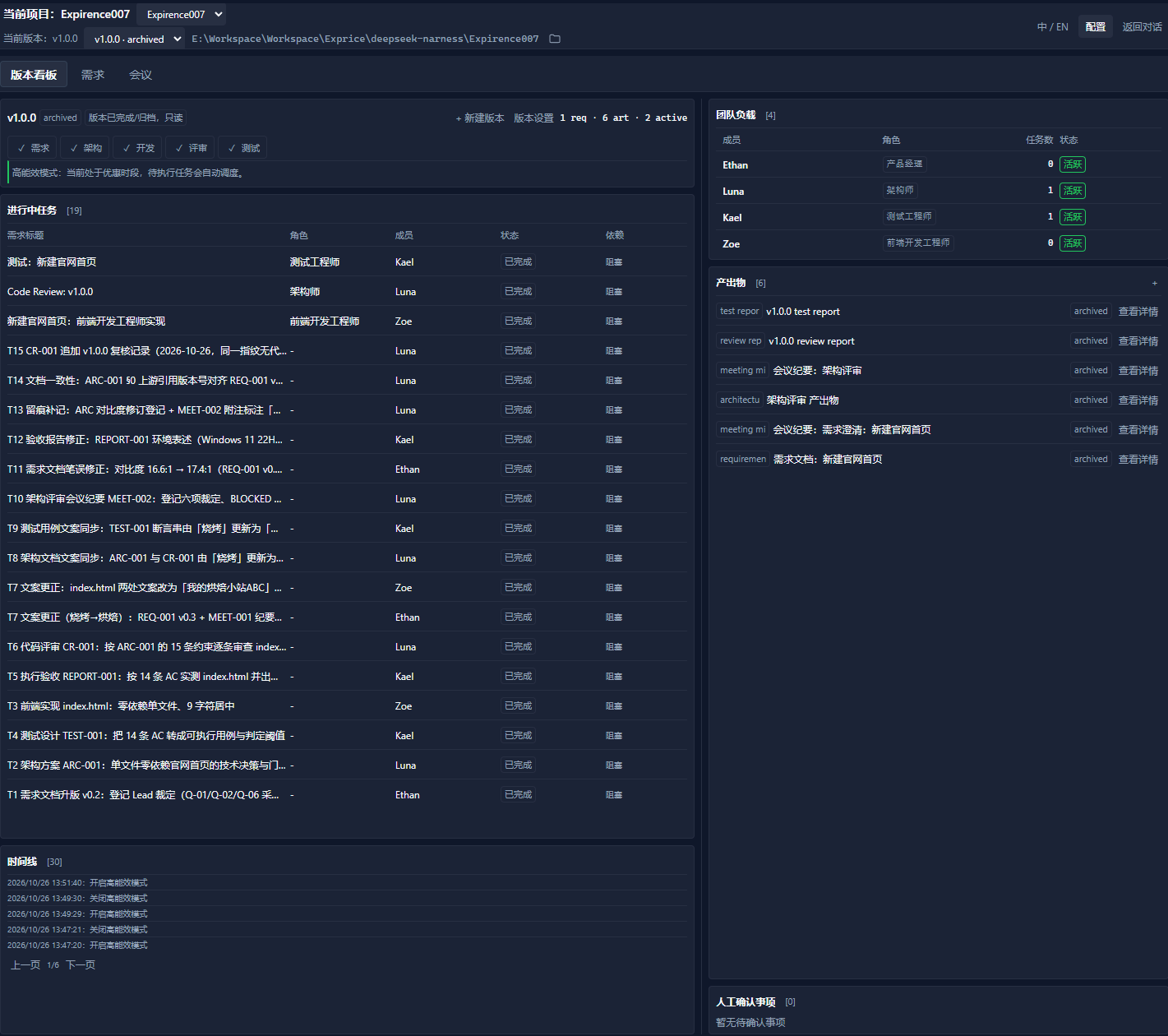
- Version Board — version header, five-stage pipeline, active tasks, timeline, team load, artifacts and manual confirmations.
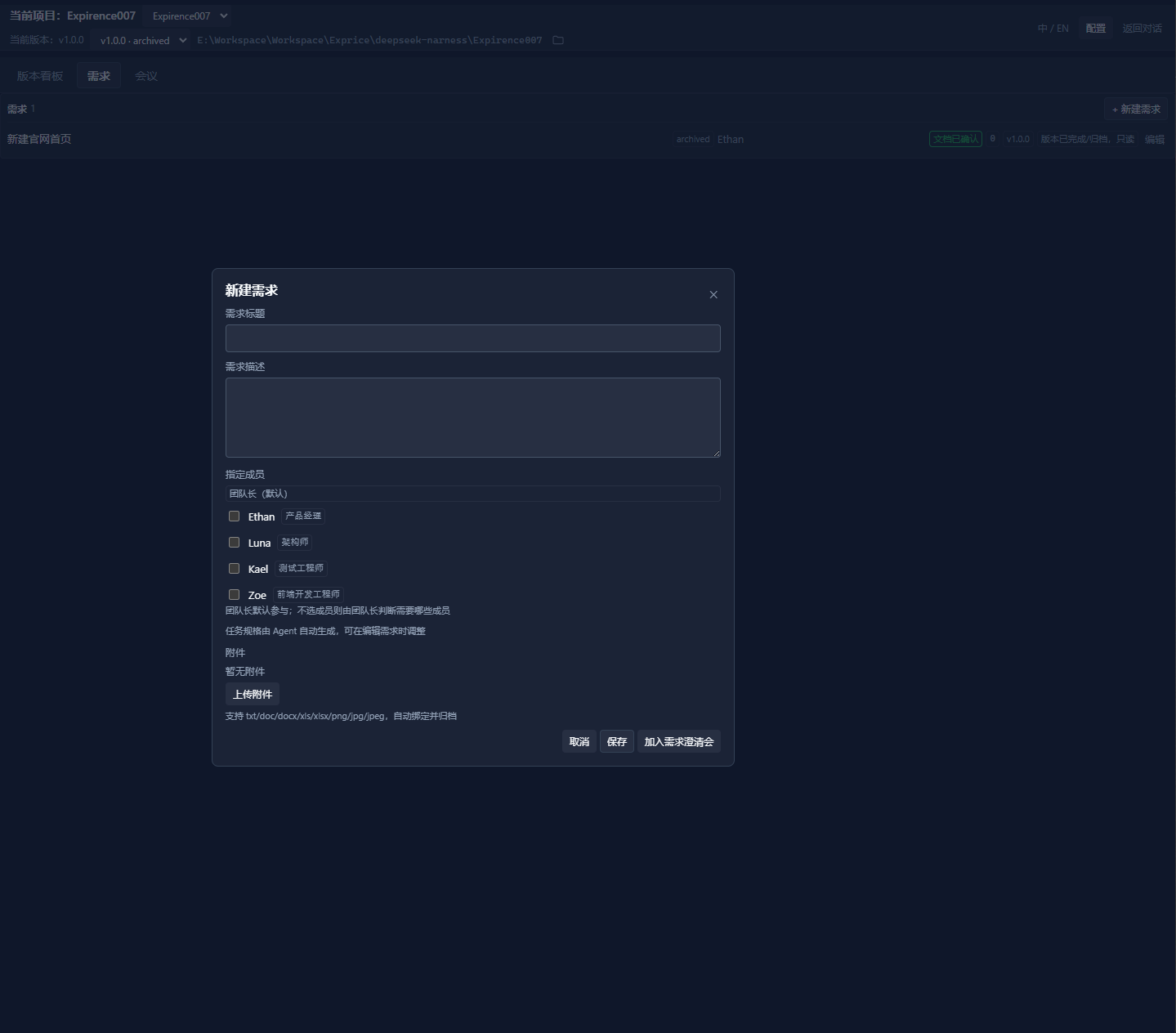
- Requirements — a dedicated requirement workspace: create, edit, attach files, assign members, bind to versions.
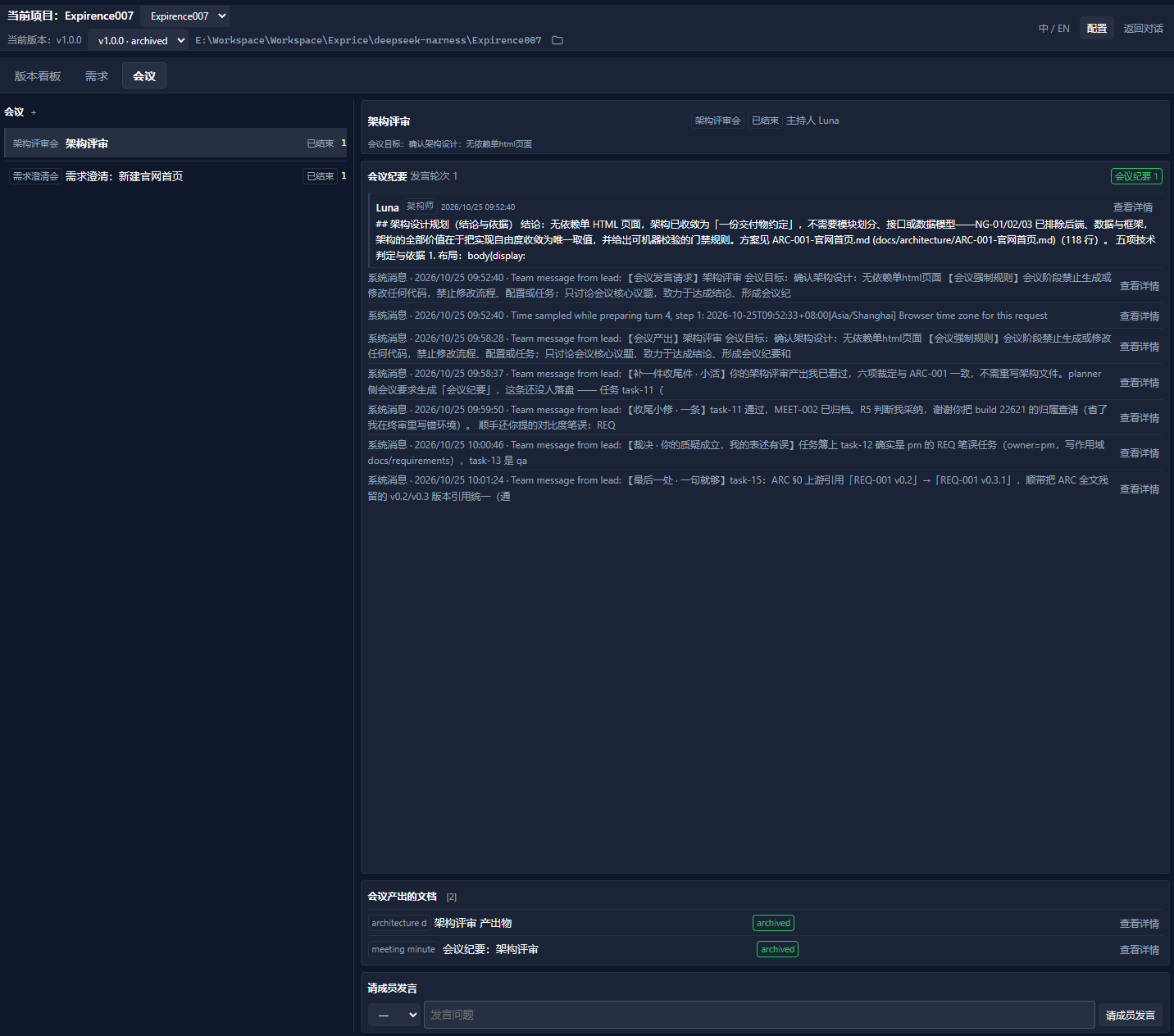
- Meetings — version-scoped requirement clarification, architecture review, test review and custom meetings.
The top bar keeps project context together: current project, workspace switcher, current version, version switcher, workspace folder opener, language toggle, Settings and Back to conversation.
The layout is dense by design: 60/40 main/side columns, internal scrolling, adaptive page sizes, no page-level scroll.
2. Requirements with real attachments
- Create requirements with title, description and multi-select members.
- The team lead always participates; selected members become the first-choice assignees.
- Upload multiple attachments:
txt / doc / docx / xls / xlsx / png / jpg / jpeg, up to 10 MB each. - Files are stored under the workspace state directory and appear inside the requirement dialog with open and remove actions.
- Requirement documents are artifacts, not hidden prompts.
3. Versions, gates and task dispatch
A version moves through:
Requirement -> Architecture -> Development -> Review -> Testing -> Done
- Requirement stage: requirement docs must be confirmed before entering architecture.
- Architecture stage: an architecture document must be confirmed before development.
- Development: task specs are generated/edited, then dispatched as official Agent Teams tasks.
- Review/testing: completion creates review/test tasks; confirmed reports advance the version.
- Completed/archived versions are read-only: requirements, artifacts, captures and meetings cannot be edited.
Task specs can be produced by a local deterministic splitter (selected developers first, then architecture document / requirement text) or edited manually as JSON. The splitter never blocks on an agent turn, so it works even while the lead is busy.
4. Members: configured first, activated on first use
- Six default profiles are available for new projects: Luna (Product), Kael (Architect), Zoe (Frontend), Owen (Backend), Mia (Test), Jasper (Ops).
member.createis configuration-only. It does not spawn an official teammate, start a conversation, or run a task.- The official teammate is created lazily on first dispatch or first meeting participation; an existing official teammate with the same name is adopted instead of duplicated.
- Per-member model route: provider / model / reasoning effort.
- Blocked members stop receiving dispatch; removed members stay in the official roster but leave the project roster.
- Roles display by display name everywhere in the UI.
5. Meetings that produce version documents
- Requirement clarification: participants discuss; generated output immediately becomes a version-linked requirement-doc draft, visible on the board; saving the requirement reuses that document.
- Architecture review: entering architecture automatically creates and starts an architecture review with Product and Architect; the architect produces an architecture-design document from a dedicated template. Confirming it archives the document.
- Meeting page: participant checkboxes, host selection, speaking progress, generated-document links, transcript pagination and rendered Markdown.
- Meeting guardrails are injected into prompts: no code generation/edits, no workflow/config/task changes; discuss the topic and produce conclusions/minutes.
- Non-participants are told to wait; task dispatch is paused for non-participants while a meeting is active.
6. Human confirmations, not hidden assumptions
The Manual confirmations section sits under artifacts:
- Development-complete confirmation with a per-task/per-artifact breakdown.
- Confirm and enter review in one action.
- Reject with a required reason; the reason is persisted, shown on the pending item and sent to the developer.
- Draft review/test reports can be opened as rendered Markdown and approved.
Approving a review/test report no longer depends on a task binding being marked complete: the confirmed document itself advances the stage.
7. High-efficiency mode (DeepSeek idle windows)
Settings has a real switch for High-efficiency mode (default off). When enabled:
- New member task dispatch and artifact capture are gated to DeepSeek idle time.
- Peak windows (Beijing time, Mon–Fri excluding Chinese statutory holidays):
09:00–12:00and14:00–18:00. - Weekends, Chinese public holidays (2026 schedule built in) and all other hours are idle.
- Running tasks continue; pending tasks wait.
- When an idle window opens, state polling resumes the pump automatically.
- The board shows whether the scheduler is currently waiting or active.
8. Documents are documents
- Every artifact has View details and opens in a Markdown-rendered modal.
- Draft artifacts still keep Edit; editing remains raw text by design.
- Meeting transcripts and system messages are summarized; details are rendered, not dumped as Markdown source.
- Artifacts are version-linked; requirement docs, architecture docs and minutes stay visible on the board.
9. Persistence and recovery
- Planner state is workspace-scoped, not tied to whichever session the UI happened to select. Returning to chat and reopening the workbench keeps the same state.
- State writes are serialized, atomic (unique temp + fsync + rename retry) and revision-checked.
- Data-bearing backups are rotated (last 10); empty snapshots never displace real ones.
- Corrupt/missing reads are distinguished from transient Windows locks; recovery can restore from a data-bearing backup.
- Official tasks that are cold after an app restart fall back to persisted bindings for the task list and timeline.
10. Bilingual, accessible, dark-first
- Chinese/English UI with a top-bar toggle.
- Dark developer-tool palette, 4/8 px spacing rhythm, semantic status colors.
- Focus-visible rings, role/switch/aria-checked semantics, Esc-closable modals, reduced-motion CSS.
- Pagination and adaptive row counts for tasks, artifacts, members and timeline.
Requirements
- DeepSeek Harness 0.2.1-rc.2 or a compatible 0.2.x release, with the official Agent Teams profile enabled.
- Node.js 20+.
- Windows, macOS or Linux. The manual installer is PowerShell; the plugin itself is Node.js.
Install (GitHub, no npm package)
This project is distributed from GitHub only; there is no npm package.
git clone https://github.com/haistar/dsh-agent-team-planner.git
cd dsh-agent-team-planner

# links the plugin into the `web` profile and registers its bundle
powershell -NoProfile -ExecutionPolicy Bypass -File .\scripts\install-manual.ps1

# restart DSH Web
The installer backs up the profile manifest, adds a link: dependency, registers the bundle and copies the published files. To uninstall:
powershell -NoProfile -ExecutionPolicy Bypass -File .\scripts\uninstall-manual.ps1
Quick start
- Open a workspace and bind a Team Session in Settings → Team.
- Create a version.
- Add requirements; assign members and attach files.
- Run a requirement-clarification meeting; generate and confirm the requirement doc.
- Enter architecture design — the architecture review meeting opens automatically.
- Generate and confirm the architecture doc.
- Start development; task specs are dispatched to selected developers.
- When development completes, use Manual confirmations → Confirm and enter review.
- Confirm review and test reports; the version completes and artifacts archive.
Repository layout
lib/
  index.js          Host half: state, roles/members, requirements, versions, gates, meetings, routes, scheduling
  client.js         Client half: sidebar entry, workbench, dialogs, i18n, markdown viewer
  roles.js          Seven built-in role prompts
cordis.patch.yml    DSH bundle registration
scripts/            Manual install/uninstall for a DSH web profile
test/               Host smoke test, client simulation, renderer/i18n checks
docs/               Design system and workbench mockup
Development
npm run check   # syntax check
npm test        # Host smoke + client simulation + renderer/i18n
The tests use in-memory fake Hosts; no real team, network or DSH instance is required. CI runs the same suite on GitHub Actions.
Configuration reference
| Area | Behavior |
|---|---|
| Team | Bind one Team Session per workspace; rebind or rebuild missing members |
| Roles | 7 built-in + custom roles; editable prompts; members without overrides follow role prompt |
| Members | Display name, role, model route, block, logical removal, create-on-first-use |
| Requirements | Multi-file attachments; assignees; task-spec editor; version binding |
| Meetings | Requirement clarification, architecture review, test review, custom; participant checkboxes |
| High-efficiency | Switch + idle-window gating; 2026 Chinese holiday calendar built in |
| State | .dsh_teams/planner/state.json in the workspace; backups alongside |
Troubleshooting
- Plugin entry missing — restart DSH Web after install; confirm the profile bundle list contains
dsh-agent-team-planner. - "session/agent-busy" — the plugin now prefers root sessions and resolves a subagent session's parent; refresh after upgrading from an older build.
- Tasks disappear after restart — the task list falls back to persisted bindings; timeline falls back to binding history. If the whole workbench is empty, verify the workspace path and that the state file exists under
.dsh_teams/planner/. - High-efficiency waiting — outside
Mon–Fri 09:00–12:00 / 14:00–18:00(Beijing) tasks are suspended by design; weekends and Chinese public holidays are idle all day. - Meeting still says "in progress" — finish the meeting or check that
closedAtis set; the dock and prompt sections only consider active, non-closed meetings.
Security and privacy
- No telemetry, analytics or external service calls from the planner.
- All planning data and attachments stay in the workspace under
.dsh_teams/planner/. - No credentials are stored by the plugin; model routes reference provider/model identifiers only.
- Agent execution remains owned by DSH and the official Agent Teams runtime.
Known limitations
- Built and tested against DSH
0.2.1-rc.2; newer DSH releases may change Host/client seams. - GitHub-only distribution; no npm package.
- Chinese holiday calendar currently covers 2026; future years need an annual update.
- Token usage is not exposed by the official task view; task details state this explicitly instead of inventing numbers.
- Custom in-conversation confirmation requests are not yet extracted automatically; the manual-confirmation section derives from development completion and draft reports.
Contributing
Issues and pull requests are welcome. Please run npm run check and npm test before opening a PR, keep changes scoped, and describe the DSH version used for manual verification. See CONTRIBUTING.md.
License
MIT. See LICENSE.
Disclaimer
This is an independent community project by haistar (Hohhabur). It is not affiliated with, endorsed by, or supported by DeepSeek. "DeepSeek" and "DeepSeek Harness" are used only to describe compatibility.
Related plugins
webnovel-writer
lingfengqaq/webnovel-writer
loopx (dsh-loopx-plugin)
loopx-project/loopx
ouroboros (dsh-plugin)
q00/ouroboros
loopx (dsh-loopx-plugin)
huangruiteng/loopx