Eva_dsh_Asuka_Rei
hakudi-a/eva_dsh_asuka_rei
Evangelion theme for the DSH Web UI with two palettes in one package: graphite and red for dark mode, porcelain and blue for light mode, and line-art figures at the chat edge.
Install
dsh plugin --profile web add github:hakudi-a/eva_dsh_asuka_reiREADME
Eva DSH: Asuka & Rei
Two Evangelion palettes for the DeepSeek Harness Web UI, one plugin.
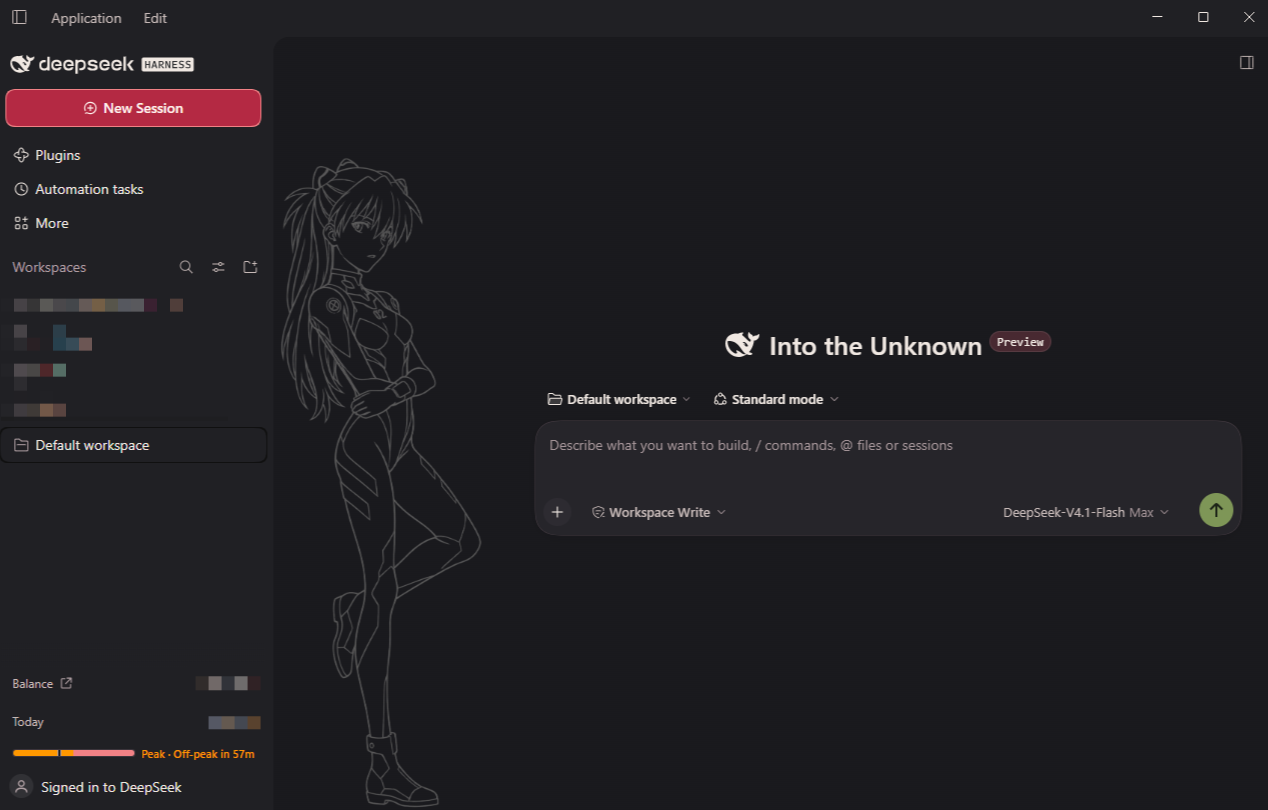
- Dark appearance: Asuka Shikinami, EVA-02. Graphite
#19191Dbackground, warm ivory text, a red#B42943new-session button, a green#A8CB6Bsend button, orange for warnings and work in progress. Asuka's line-art portrait sits at the chat edge. - Light appearance: Rei Ayanami, EVA-00. Porcelain
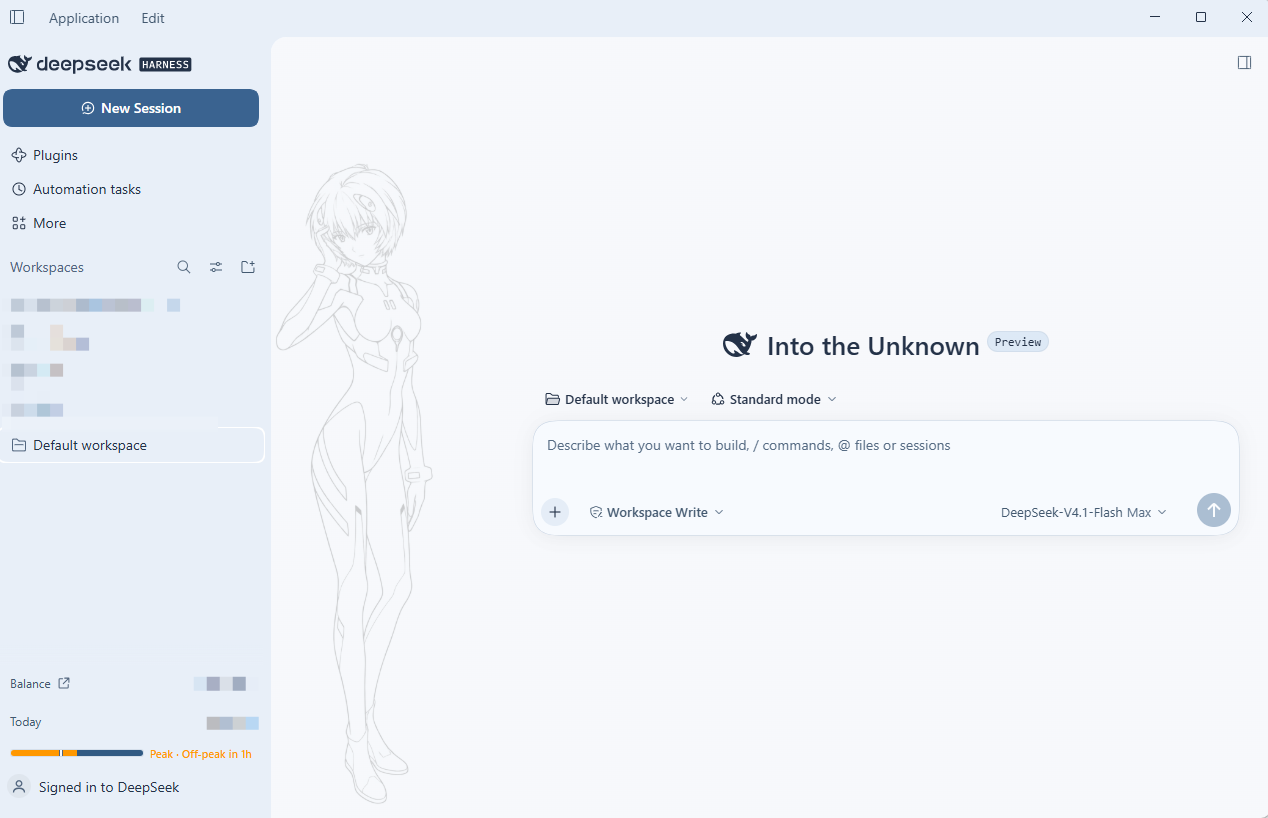
#F7F9FCbackground, cold blue buttons and panels, muted burgundy for errors. Rei's line-art portrait takes the same place.
The palette is switched by the normal DSH appearance setting in Settings → General → Appearance. Dark enables Asuka, Light enables Rei, System follows the operating system. In a new session the character stands full-length at the left edge of the chat. Once the conversation starts, a quieter portrait appears in the bottom-right corner.
This is an unofficial fan work, not affiliated with khara or DeepSeek. Details are in NOTICE.
Screenshots
Dark appearance, Asuka, EVA-02:
Light appearance, Rei, EVA-00:
Install
Requires DSH 0.2.2-rc.1 or newer. The package declares engines.dsh = ">=0.2.2-rc.1 <0.3.0-0".
# DSH Desktop uses the `desktop` profile
dsh plugin --profile desktop add github:hakudi-a/Eva_dsh_Asuka_Rei

# a plain `dsh web` install uses the `web` profile
dsh plugin --profile web add github:hakudi-a/Eva_dsh_Asuka_Rei
Restart the application. In DSH Desktop, quit from the tray, because closing the window keeps the host running. Then pick an appearance mode in Settings → General → Appearance.
The package ships prebuilt JavaScript, so it needs no build step and no install scripts.
Uninstall
dsh plugin --profile desktop remove dsh-theme-asuka
Compatibility
| Tested on | DSH Desktop 0.2.2-rc.3 on macOS and Windows |
| Declared | >=0.2.2-rc.1 <0.3.0-0 |
| Windows | checked visually on DSH Desktop; the screenshots above were taken on Windows, with no separate layout audit |
| Web | expected to work the same way in dsh web, not separately verified |
The theme overrides CSS custom properties (--dsw-alias-*, --dsw-specific-*) through the client theme API. A future DSH release that renames those tokens will drop the affected colours until the theme is updated.
How it works
index.jsis a Host-side no-op bundle entry. It exists so the package has adsh.bundlemanifest.cordis.patch.ymlinserts the single plugin rowdsh-theme-asuka.client.jsregisters the palette withctx.theme.overrideTokens('dsh-theme-asuka', tokens)and switches between the Asuka and Rei token sets when the resolved appearance changes.- Illustrations are served by the Host from
/plugins/dsh-theme-asuka/assets/<hash>.png. The hashed names inexportsare the cache-busting aliases thatclient.jsrefers to.
Limitations
- Colours and two illustrations only. The layout, spacing and typography of DSH stay untouched.
- The figures are decorative overlays. They do not react to the conversation or to the window size beyond the CSS rules in
client.js. - Token names are tied to the DSH release named above.
Assets and attribution
The four PNG illustrations were generated for this project with an image-generation model. Character names and designs belong to their rights holders, and this repository does not license them. Redistribution must keep NOTICE. The generation briefs are recorded in docs/ART-PROMPTS.md.
License
Code and documentation: MIT. Artwork and third-party names: see NOTICE.
Related plugins
dsh-wallpaper-engine
elysia395/dsh-wallpaper-engine
dsh-deep-whale (maid-atelier)
small-tailqwq/dsh-deep-whale
dsh-claude-style
nwflower/dsh-claude-style
dsh-deep-whale
small-tailqwq/dsh-deep-whale