dsh-agent-usage
hds1989824/dsh-agent-usage
Left-sidebar panel that reads this machine's local agent-client session logs (Claude desktop, Qwen Work, WorkBuddy, MiniMax Code, DeepSeek Harness) and shows per-client session counts and token consumption for today, the current week, or the current month, with a token-share donut.
Install
dsh plugin --profile web add github:hds1989824/dsh-agent-usageREADME
Agent usage
A DeepSeek Harness bundle that adds a left-sidebar panel showing session count and token consumption for the agent clients installed on this machine, over the current day, week, or month.
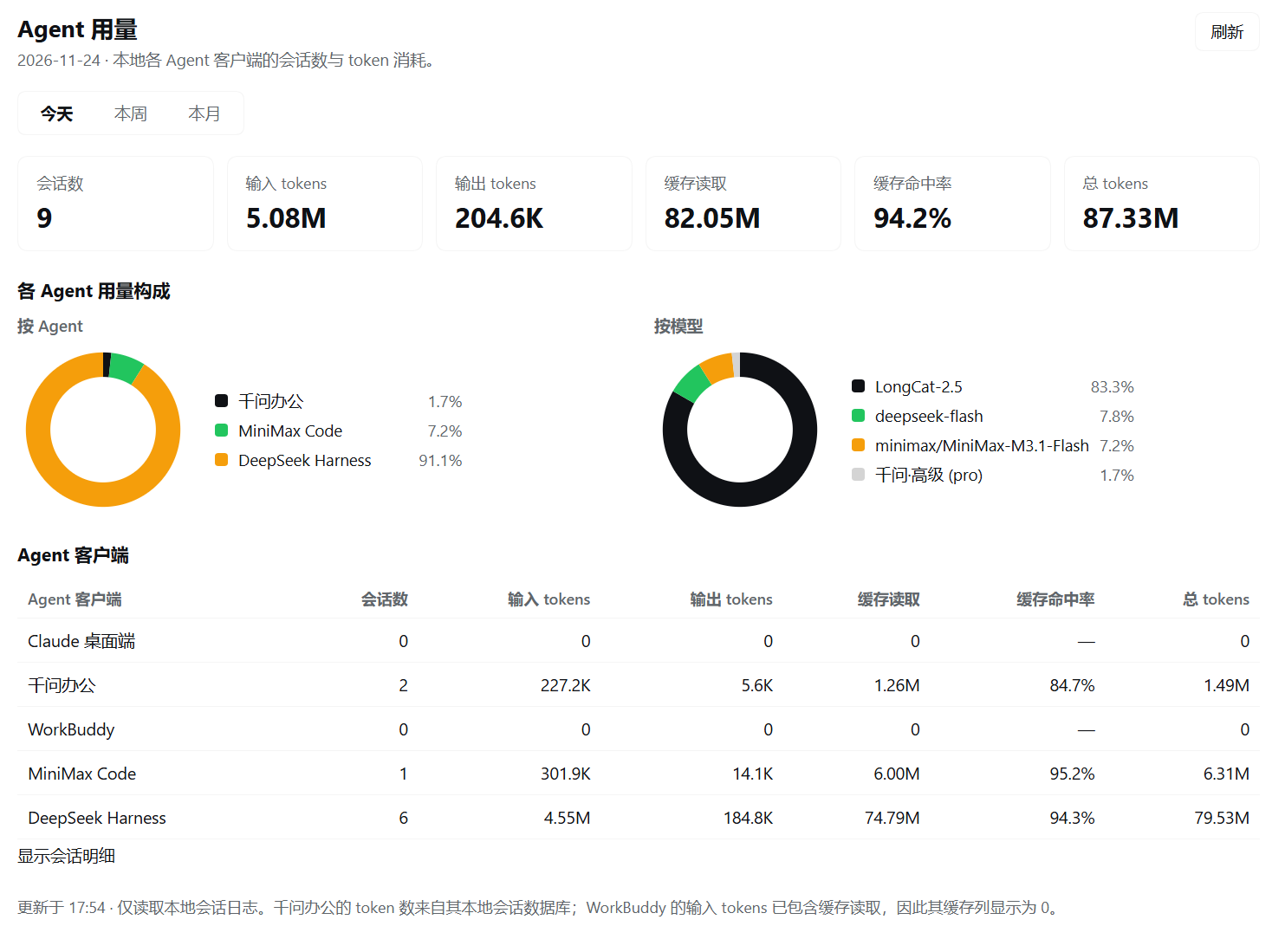
What it shows
- A time-range switch: Today, This week (Monday-based), This month.
- A responsive row of summary cards: sessions, input tokens, output tokens, cache reads, cache hit rate, and total tokens for the selected window.
- Two donut charts side by side: token share by agent and by model, each with a percentage legend.
- A per-client table: Claude desktop, Qwen Work, WorkBuddy, MiniMax Code, and DeepSeek Harness.
- A per-session detail table (toggleable) with the last-activity time and token breakdown of each session active in the window.
Where to find it
Open the DeepSeek Harness Web GUI, then click the Agent usage icon in the left sidebar's panel list (beside Plugins and Schedules). The panel appears in the central column.
Data sources and limits
- Claude desktop:
%LOCALAPPDATA%\Claude-3p/%APPDATA%\Claude-3p(and theClaudeequivalents) under theirprojectsdirectories - Qwen Work:
~/.qwenworkcn/.harness/**/qwenwork.db(current releases), with the older~/.qwenworkcn/projects/**/*.jsonllayout as a fallback - WorkBuddy:
~/.workbuddy/projects/**/*.jsonl - MiniMax Code:
~/.minimax/v2/sqlite/runtime-state.sqlite, with the older~/.minimax/v2/sessions/**/messages.jsonltranscripts as a fallback - DeepSeek Harness:
~/.dsh/sessions/**/session*.jsonl.zstd(a concatenation of per-write zstd frames; the scanner splits frames, then readsdata.usagefromassistant/messageevents)
Once files whose modification time falls inside the selected window are read, only
events whose own timestamp falls inside that window are counted. Claude logs
one response several times (one line per content block) with the same
message.id; usage is counted once per response. Qwen Work and MiniMax Code
token counts come from their local session databases. WorkBuddy input tokens
already include its cache reads, so its cache columns are zero and its total is
input + output.
The per-model breakdown uses each platform's own model label: Claude's
message.model, WorkBuddy's providerData.model, Qwen Work's modelID
(falling back to the session's configured id), MiniMax's model column, and for
DeepSeek Harness the model of the most recent request/header/request/context
before an assistant message. Qwen Work's tier keys get friendly labels from its
own catalog (flash → 千问·标准 (flash), pro → 千问·高级 (pro)). A missing
label is grouped as (unknown); <synthetic> is ignored.
Cache creation is reported as zero by every source, so the panel shows a cache
hit rate instead: cached reads divided by total context tokens
(cache_read / (input + cache_read)). WorkBuddy counts differently — its
input_tokens already includes the cache reads — so its context is just its
reported input. Hover the card for the exact numerator/denominator.
The Host exposes the data at GET /plugins/agent-usage/today (optional
?range=today|week|month, ?date=YYYY-MM-DD, and &force=1). The route is
registered on the Host web server behind the Connection authentication fence and
is only available from this Harness's own Web GUI. Nothing is sent off the
machine, and no session file is ever modified.
Configuration
None. The bundle has no settings row.
Related plugins
DeepSeek-Balance-Whale-Widget
meteornox/deepseek-balance-whale-widget
dsh-context
bowenliang123/dsh-context
dsh-cost-meter
han-1413141/dsh-cost-meter
dsh-damage-pulse
wssfk12138/dsh-damage-pulse