dsh-plugin-deepseek-peak-hours
hifengzy/dsh-plugin-deepseek-peak-hours
A composer badge that shows whether DeepSeek API usage bills at the peak or off-peak rate right now, and on click the price table for that window: input cache hit, input cache miss and output, in CNY per million tokens, for FLASH and PRO. It sits in the statistics row under the composer right of the context meter, and in the New Session options row. The schedule follows the official pricing page — Beijing time, Monday to Friday except Chinese statutory holidays, 09:00-12:00 and 14:00-18:00 peak, weekends and holidays off-peak all day — with statutory holiday data for 2026 and 2027. One timer fires at the next boundary instead of polling. Client-only, no network requests, no dependencies.
Install
dsh plugin --profile web add github:hifengzy/dsh-plugin-deepseek-peak-hoursREADME
DeepSeek peak hours · DSH plugin




English · 简体中文
A lightweight DeepSeek Harness (DSH) plugin that shows whether DeepSeek API usage is billing at the peak or off-peak rate right now, next to the composer's context meter. Clicking the badge opens the FLASH / PRO price table for that window.
Peak 09:00 - 12:00 ← click for the price table
What it does
| Where | Appears when | Exact position |
|---|---|---|
conversation.composer.dock | A session with a conversation (composer docked at the bottom) | In the statistics row under the composer card, immediately right of the built-in Context used x% reading |
conversation.hero.options | The New Session home (a blank session) | Right-hand side of the options row above the composer card, beside the workspace and preset controls |
- Reading:
Peak 09:00 - 12:00during a peak window,Off-peak 18:00 - 24:00otherwise. Overnight and whole-day windows read their real range:00:00 - 09:00,18:00 - 24:00,00:00 - 24:00. - Click: a table for the running window — rows
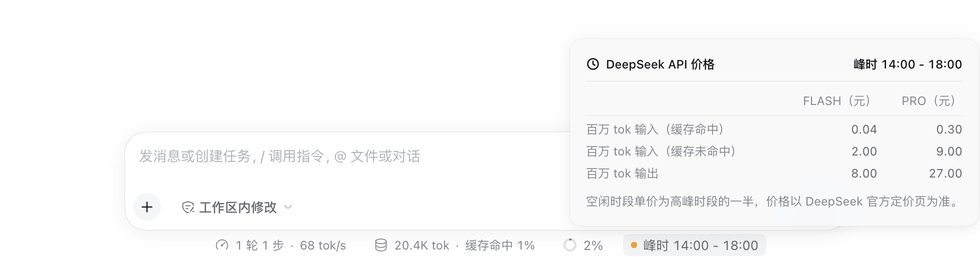
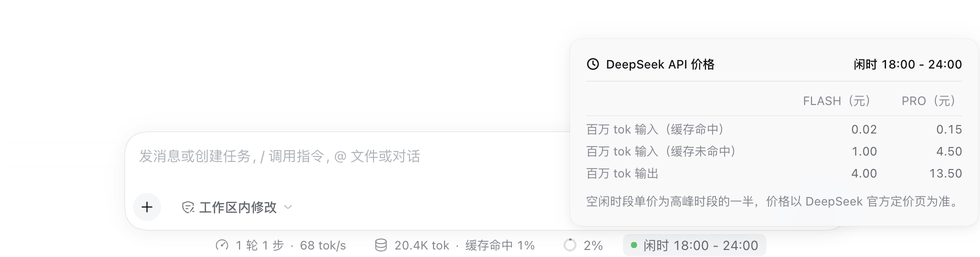
Input, 1M tokens (cache hit)/Input, 1M tokens (cache miss)/Output, 1M tokens, columnsFLASH (CNY)andPRO (CNY), plus the note that off-peak rates are half the peak rates. - State dot: amber for peak, green for off-peak, from DSH's
--dsw-alias-state-warn-primaryand--dsw-alias-state-success-primarytokens.
Screenshots
The interface is shown in Chinese; the same layouts appear in every locale.
New Session — the badge rides the options row right of the workspace and preset chips, matching their 28px chip height. Peak on the left, off-peak on the right.
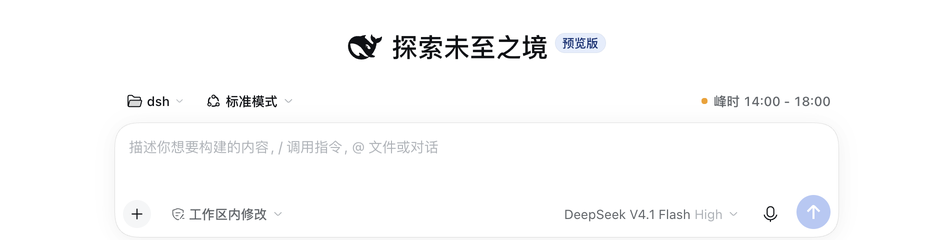
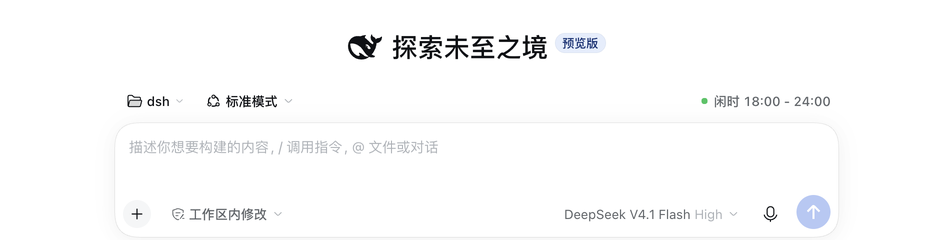
An existing session — the badge is the last reading in the statistics row under the composer, immediately right of the context meter, and keeps that row's 22px height.


Click for prices — the popover lists the FLASH and PRO price of the running window, with the note that off-peak rates are half the peak rates.
Schedule and prices (official, not invented)
The schedule is quoted from DeepSeek's official pricing page:
Off-peak rates are half of the peak rates. Beijing time, Monday to Friday (excluding Chinese statutory holidays) 09:00 - 12:00 and 14:00 - 18:00 are peak hours; all other times, including weekends and Chinese statutory holidays all day, are off-peak.
- Official pricing page: https://api-docs.deepseek.com/zh-cn/quick_start/pricing/
- 2026 holidays: State Council notice 国办发明电〔2025〕7 号 https://www.gov.cn/zhengce/zhengceku/202511/content_7047091.htm
- 2027 holidays: State Council notice 国办发明电〔2026〕10 号 https://www.gov.cn/zhengce/zhengceku/202611/content_7085102.htm
Prices in CNY per million tokens, matching the official page on 2026-11-16:
| FLASH peak | FLASH off-peak | PRO peak | PRO off-peak | |
|---|---|---|---|---|
| Input (cache hit) | 0.04 | 0.02 | 0.30 | 0.15 |
| Input (cache miss) | 2.00 | 1.00 | 9.00 | 4.50 |
| Output | 8.00 | 4.00 | 27.00 | 13.50 |
Background: time-of-day pricing started on 2026-08-17, weekends became off-peak all day on 2026-08-23, and the FLASH series switched to the prices above at 12:00 Beijing time on 2026-09-10. When DeepSeek changes prices, update the plugin (see below).
Install
In DSH open Plugins → Add plugin and enter the npm package name:
dsh-plugin-deepseek-peak-hours
Or point it at this repository's directory for local development. The plugin is active for the whole profile and survives a restart. Refresh the page after installing.
Design and performance
- One timer, no polling: it wakes at the next window boundary only — 00:00, 09:00, 12:00, 14:00 and 18:00 Beijing time, at most five times a day. Coming back to a background tab, or waking a laptop, recomputes from the current clock.
- No network calls: the schedule, the holiday calendar, and the price table all ship in the bundle.
- No dependencies: it uses only the browser module table's
react/react-dom, and never imports@deepseek-ai/dsh-client-ui-primitivesor other DSH Client packages that change without notice. - Row-native geometry: 22px tall in the composer statistics row, exactly like the context meter and the stat pills; 28px with secondary ink in the New Session row, matching the workspace, preset and worktree chips beside it.
- Native styling: every color, radius, shadow and font size comes from
--dsw-*/--dsh-*theme tokens, so light and dark themes both match; the popover copies the built-in statistics dialog (12px padding,--dsw-radius-lg,elevation-prominent, z-index 1100, Escape and outside-click dismissal). - Beijing time only: the billing rule is defined in Beijing time, so the badge always computes in
Asia/Shanghairegardless of the machine's zone (the test suite also passes underTZ=America/New_York). - Clean teardown: styles render as a React element and disappear on unmount; the timer and listeners are released in effect cleanups.
Known limitations
- No badge on a session-less cold start: on a home with no session at all DSH opens no slot under the composer, and no plugin seat exists there. The badge appears as soon as a session is selected or created — the same visibility the built-in context meter has.
- Holiday data covers 2026–2027: a later year falls back to the plain weekday rule (weekends still correct). Append the new State Council ranges to
HOLIDAY_RANGESinclient.jsand publish a release when the notice appears. - Prices are a static snapshot: update
PRICESinclient.jswhen DeepSeek changes its price list; the plugin does not scrape the web.
Development
npm test        # schedule, holidays, boundaries, slots and dictionary wiring
npm run test:tz # the same suite under a non-Beijing machine zone
Files:
client.js            # everything: schedule + badge + price popover (no build step)
index.js             # Host half; registers nothing
cordis.patch.yml     # inserts the deepseek-peak-hours row
locale/{zh,en}.json  # Plugin Manager title and description
icon.svg             # 36×36 plugin icon (clock plus the peak wedge)
assets/icon-180.png  # 180×180 storefront tile
test/                # node --test suites
The schedule lives between /* #region schedule */ markers, and the tests evaluate that block straight out of client.js, so there is exactly one implementation.
License

Related plugins
DeepSeek-Balance-Whale-Widget
meteornox/deepseek-balance-whale-widget
dsh-context
bowenliang123/dsh-context
dsh-cost-meter
han-1413141/dsh-cost-meter
dsh-damage-pulse
wssfk12138/dsh-damage-pulse