meow-starmap
hirschno/meow-starmap
Star map of the meow-memory store: each memory a glowing star, project memories gathered around a galaxy core, edges from project membership and shared keywords, fading into galaxies when zoomed out. Read-only.
Install
dsh plugin --profile web add github:hirschno/meow-starmapREADME
meow-memory-starmap
Star-map panel for the meow-memory store inside DeepSeek Harness: every memory entry is a glowing star, project memories gather around a galaxy core, edges follow project membership and shared keywords, and meteor trails run along the links.
Read-only. It opens the SQLite store with node:sqlite in read-only mode and never writes to it.
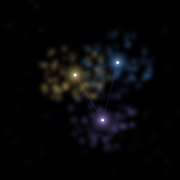
What you see
| Element | Meaning |
|---|---|
| Star | one memory entry |
| Colour | memory level (soul / user / project / fact / lesson / topic / rules) |
| Size | importance |
| Halo | status |
| Galaxy core | a project, with its memories orbiting it |
| Edge | project membership, or two entries sharing keywords |
| Meteor | a pulse travelling along an edge; denser on the selected node |
Zooming out fades individual memories into their galaxies (level of detail), so a 1000-entry store stays readable. Names are hidden until you hover or select a node, and the toolbar has a "show all names" checkbox.
Requirements
- DeepSeek Harness with the Web GUI (
0.2.2-rc.1is what this release is tested against). - meow-memory installed in the same workspace — it owns the database this panel reads.
- Node.js 22.5 or newer (
node:sqlite).
Install
dsh plugin add meow-memory-starmap          # from npm
dsh plugin add github:HirschNo/meow-starmap # or straight from this repository
Restart DeepSeek Harness, then open 记忆星图 in the left sidebar.
Where the data comes from
The panel reads <workspace>/.dsh-meow/memory.db, the store meow-memory maintains for the current workspace. Resolution order:
DSH_MEOW_DB— full path to amemory.dbDSH_MEOW_WORKSPACE/DSH_WORKSPACE— workspace root- the host process's current directory, walking up four levels
If none of them contains a database, the panel says so and lists the paths it tried.
Levels
soul · user · project · fact · lesson · topic · rules — each level is one table in the store, and each gets its own colour in the map.
Limitations
- Read-only: you cannot edit importance or status from the panel.
- No time axis: the map shows the current state, not how memories evolved.
- Keywords drive the second edge type, so entries without keywords only connect through their project.
License
MIT