dsh-usage-peak
hseons/dsh-usage-peak
DeepSeek Harness 用量峰谷仪表盘:峰/谷时段(含节假日与调休)、按请求开始时刻计价、自定义价目表、今日花费与 tokens、项目下钻/模型统计、可配置预算预警、余额可撑天数、CSV 导出、7/14/30 天窗口、缓存命中、谷时更省,侧栏常驻胶囊 + 设置页详情。
Install
dsh plugin --profile web add github:hseons/dsh-usage-peakREADME
用量峰谷仪表盘(DSH Usage Dashboard)
给 DeepSeek Harness 用的用量/花费仪表盘:一眼看清现在是不是峰时、今天花了多少钱、烧了多少 tokens、钱花在哪个项目,以及余额还能撑几天。支持按请求开始时刻判断峰谷,并可在面板里改价目表。
全部在本地读取 DSH 自己的会话日志,不联网、不上报。
效果
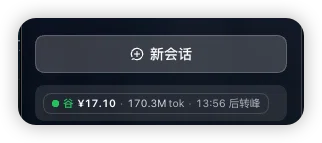
侧栏常驻一行:峰/谷、今日花费、tokens、距离下次切价的时间,一眼看完。
功能
- 侧栏常驻胶囊:
● 峰 ¥14.70 · 12.8M tok · 2:43 后转谷,点一下打开完整面板。侧栏折叠时收成一个小圆点。默认可撑天数不足 7 天时胶囊转琥珀色,不足 3 天转红色;可在面板调整阈值。 - 峰谷状态:当前时段、距离下次切换的倒计时、当前时段单价(缓存命中 / 全价输入 / 输出)。
- 今日概况:花费、请求数、tokens、缓存命中率、峰时花费占比、谷时更省(把这些峰时用量挪到谷时能省下的钱)、余额、余额可撑天数(余额 ÷ 近 7 天日均花费)。
- 今日 24 小时分布:每小时花费柱状,峰时与谷时用不同颜色,当前小时高亮;悬停或聚焦柱子可看该小时的花费、请求、tokens 与缓存命中率,键盘
←→/Home/End浏览、Esc关闭。 - 窄侧栏自适应:侧栏变窄或窗口变小时,图表自动换行、24 根柱子收窄、每日趋势的日期标签按宽度变稀疏;价目表按模型分组、单价输入自动换行,过宽的表格可横向滚动,胶囊的 tokens 段优先省略而不挤掉倒计时。
- 花费构成:缓存命中 / 全价输入 / 输出 三段占比,直接看出钱花在哪。
- 近 7 / 14 / 30 天趋势:右上角切换窗口,按天堆叠柱状,缺数据的日期补零,列数恒定;可对照峰时占比判断"贵在哪天"。
- 按项目与下钻:按会话头里的工作目录(
cwd)聚合,倒序列出每个项目的请求数、tokens、花费与占比条。点击项目可只看该项目的概况、24 小时、趋势和模型明细,通过顶部「全部项目」恢复。 - 可配置预警:在面板中设置余额预警天数(默认 7)、紧张天数(默认 3)和可选每日预算。每日花费超过预算时预警,达到预算 120% 时紧张;多个告警取最高级别。配置保存在当前浏览器,侧栏与面板同步。
- 全局钱包口径:余额、余额可撑天数和每日预算始终按所有项目计算,不会因为筛选一个低花费项目而误判余额充足。
- 按模型:Flash / Pro 各自的请求数、tokens、花费。
- 导出 CSV:每日数据与项目数据都能导出(UTF-8 BOM,Excel 直接打开不乱码;单元格做了公式注入防护)。
- 价目表:当前时段那一行高亮,方便解释账单;下方可编辑 Flash / Pro 的缓存命中、输入、输出单价(谷 / 峰),保存后所有金额与 CSV 立即按新价目重算,只存在当前浏览器,可一键恢复默认。
- 按请求开始时刻计价:会话日志里一条回复可能跨过切价点,峰谷按第一个流式 chunk 的时间判断,而不是回复完成时间。
- 节假日与调休:按国务院办公厅公布的安排判断——法定节假日全天谷时,调休上班的周末按工作日峰谷计算;当前覆盖 2026–2027 年,缺失年份会在面板给出提示并回落到周一至周五规则。
- 页脚:GitHub 仓库链接(可顺手点个 Star)、当前版本号与日历覆盖年份。
设置页里的入口是「用量仪表盘」,侧栏胶囊就是同一份数据的浓缩版。
价格模型
单位为元 / 百万 tokens,[谷时, 峰时]。下表是默认价目;面板里的「自定义价目表」可以改成实际合同价,保存在当前浏览器。
| 模型 | 缓存命中 | 全价输入 | 输出 |
|---|---|---|---|
| DeepSeek Flash | 0.02 / 0.04 | 1 / 2 | 4 / 8 |
| DeepSeek Pro | 0.15 / 0.30 | 4.5 / 9 | 13.5 / 27 |
峰时 = 工作日 09:00–12:00、14:00–18:00(北京时间);其余时间、周末与法定节假日为谷时。默认价目峰时单价是谷时的 2 倍;调休上班日(包括周末)按工作日的峰谷窗口计算。
节假日数据在 holidays.js,来源为国务院办公厅 2026 年、2027 年 放假安排通知,并与 holiday-cn 交叉核对。新一年安排公布后,补一组日期并把年份加进 CALENDAR_YEARS 即可。
数据来源
~/.dsh/sessions/<项目 slug>/<会话 id>/session.v4.jsonl.zstd:每条assistant/message的usage(输入、缓存读取、输出)与模型,按该条回复第一个流式 chunk 的时间(请求开始)判断峰谷;项目归属取会话头里的绝对cwd,没有会话头时才回落到目录 slug。~/.dsh/.dshw-usage.json:鲸鱼记账本的余额与当日花费,用作交叉校验。
日志是多帧 zstd,Node 自带的 zlib.zstdDecompressSync 只解第一帧,所以插件内部按 zstd magic 切帧、逐帧解压再拼接(不需要 zstd 命令行)。
- 数据接口支持
?days=7|14|30选择统计窗口(默认 14,白名单之外的取值回落到 14);快照按窗口与项目分别缓存 15 秒,面板上的「刷新」按钮会带?fresh=1强制重算。 /data和/export.csv均接受可选project参数(项目的精确 key,真实会话通常是绝对cwd;必须 URL 编码)。不传或空字符串表示全部项目,未知 key 返回空项目数据而不是退回全量。项目列表来自全局窗口,方便切换。/data与/export.csv还接受可选pricing参数(flash:hitV,hitP,missV,missP,outV,outP|pro:...,由面板自动附带);非法参数回退默认价目并在warnings里给出pricing-invalid。
导出接口为 /plugin/dsh-usage-peak/export.csv?days=7|14|30&scope=days|projects&project=...,带 Content-Disposition: attachment 与 UTF-8 BOM。页面的每日和项目 CSV 都跟随当前筛选与价目。
默认价目峰时单价恰为谷时 2 倍,所以「谷时更省」等于峰时花费的一半;自定义价目下按「峰时花费 − 同样用量按谷价计算的金额」逐项重算。它衡量的是这些峰时用量如果改在谷时发生能省多少,而不是已经省下的钱。
安装
dsh plugin add dsh-usage-peak
也可以在 DSH 插件市场搜索 dsh-usage-peak 安装。
装好后:
- 侧栏图标列表最上方出现用量胶囊;
- 设置 → 用量仪表盘 打开完整面板。
兼容性
- DeepSeek Harness 0.2.1-rc.3(见
package.json的dsh.compatibility.dshReleases)。 - Node.js >= 22.15(需要
zlib.zstdDecompressSync)。 - 纯 JS,无构建步骤:
client.js直接用window.__ModuleLoader__注册,require('react')由宿主提供。
已知限制
- 依赖 DSH 会话日志的内部格式(
session.v4.jsonl.zstd与assistant/message.data.usage)。DSH 改格式时需要跟进;读不到数据时面板会显示为空态而不是报错。 - 每日预算基于本机会话日志估算的北京时间「今日」总花费,不代表平台实时账单;预警配置与自定义价目只存当前浏览器,不跨设备同步。宿主功能升级后需重启 DSH,客户端重新加载后使用新界面。
- 只统计本机会话日志覆盖到的历史,鲸鱼记账本从 2026-11-02 才开始记账。
- 项目归属依赖会话头中的
cwd;极少数没有会话头的旧日志会回落到 workspace slug,slug 会转义部分字节,显示名可能不如真实路径精确。
许可
MIT
English
A usage and cost dashboard for DeepSeek Harness. It reads the local session logs (session.v4.jsonl.zstd) and the whale ledger, then shows:
- a persistent sidebar pill with peak/valley state, today's spend, tokens and the countdown to the next price switch; the pill turns amber when the balance runway is under 7 days and red under 3 days;
- request-start billing: peak/valley is decided by the first stream chunk of a reply, not by its completion time;
- an editable Flash/Pro price list (cache hit, input, output, valley/peak). Saved prices apply to every figure and CSV immediately, live only in this browser, and can be reset to the defaults;
- China public holidays and makeup workdays: holidays are valley all day, makeup weekend workdays follow the weekday windows (2026–2027 calendars shipped; missing years fall back to Mon-Fri with a visible warning);
- a footer with the GitHub repository link, the running version and the covered calendar years;
- a details page (Settings → Usage dashboard) with KPIs (including balance runway), an hourly breakdown, cost composition, a 7/14/30-day trend switch, spend by project, a per-model table, CSV export and the price list;
- hover or keyboard focus on the hourly/daily charts for that bucket's spend, requests, tokens and cache-hit rate (arrows/Home/End to browse, Esc to close), with a clamped tooltip that fits narrow panels;
- narrow sidebars and small windows: charts wrap, the 24 hourly bars compress, day labels thin out, the custom price form stacks its fields and wide tables scroll horizontally;
- a custom price parameter (
pricing=) on/dataand/export.csv; malformed values fall back to the defaults with apricing-invalidwarning; - project drilldown: select a project to filter KPIs, hourly/daily charts, models and both CSV exports; clear the filter to return to all projects;
- configurable browser-local runway thresholds (warning 7 days / critical 3 days by default) and an optional daily budget (warning above 100%, critical at 120%); settings sync between the sidebar and dashboard;
- balance runway and daily-budget alerts always use global spend, even while a project is selected;
- a "valley saving" KPI: with the default prices (peak = 2x valley) it is half of the peak spend; with custom prices it is recomputed per bucket as peak cost minus the same usage at valley prices.
Default pricing ([valley, peak], CNY per million tokens): Flash cache-hit 0.02/0.04, miss 1/2, output 4/8; Pro cache-hit 0.15/0.30, miss 4.5/9, output 13.5/27. They can be edited in the panel; custom prices stay in this browser. Peak hours are 09:00–12:00 and 14:00–18:00 Beijing time on weekdays; everything else is valley.
Everything stays local — no network calls, no telemetry. Multi-frame zstd logs are decoded frame by frame with Node's built-in zlib, so no zstd binary is required.
Related plugins
DeepSeek-Balance-Whale-Widget
meteornox/deepseek-balance-whale-widget
dsh-context
bowenliang123/dsh-context
dsh-cost-meter
han-1413141/dsh-cost-meter
dsh-damage-pulse
wssfk12138/dsh-damage-pulse