refyard
huakunshen/refyard
The Refyard Git workbench as a DeepSeek Harness panel: history, changes, diffs, commits, branches and stashes for the repository the current session is working in.
Install
dsh plugin --profile web add github:huakunshen/refyardREADME
Refyard
A local-first Git workbench: the whole history of your repository in a beautiful graph, without giving a hosted service your repository.





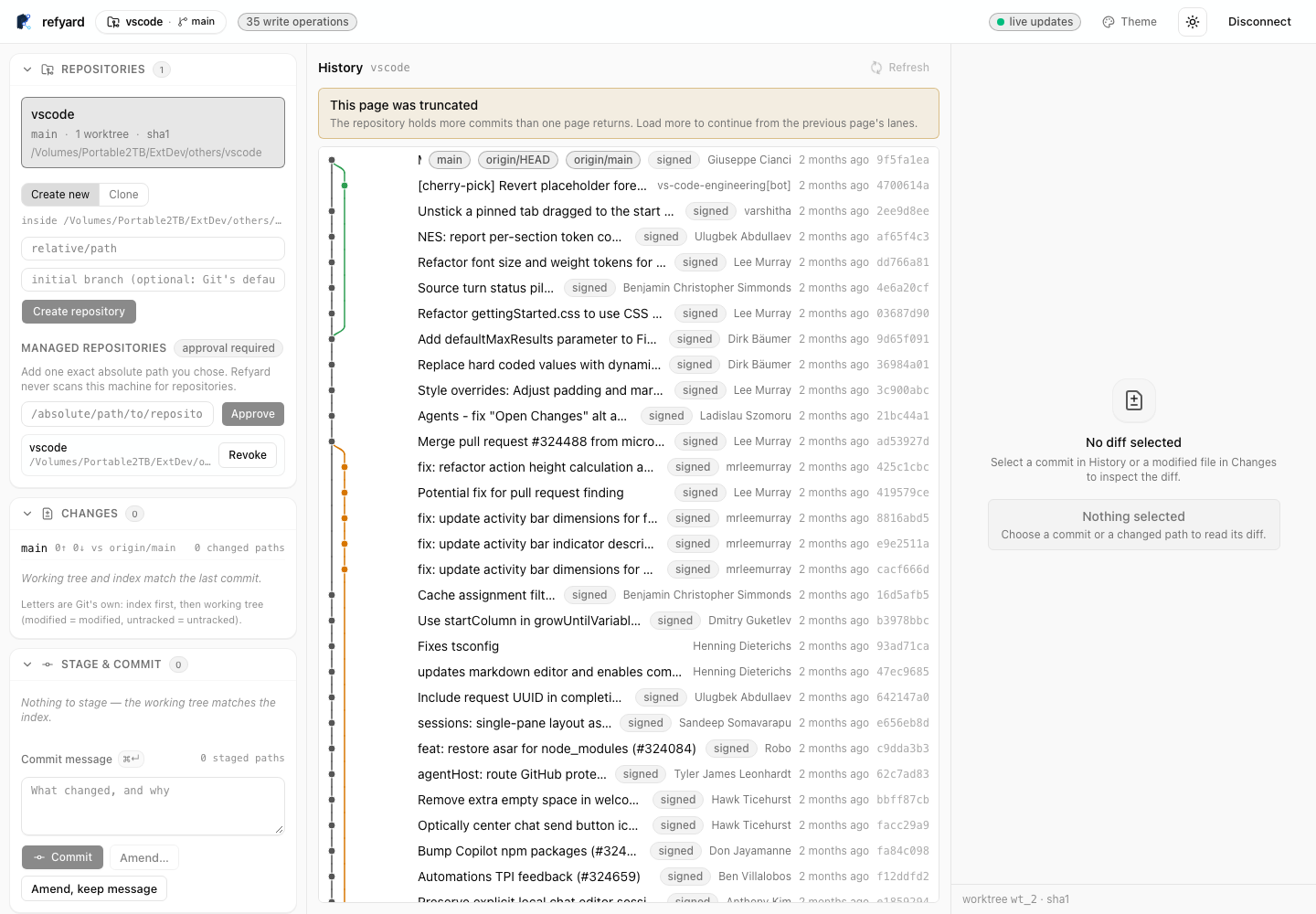
A real local session reading a large open-source repository: the signed, braided history with its parallel branch lanes, the working copy, and the panel rail — nothing mocked.
Refyard drives your machine's own git and never asks for a hosted copy of your code. Git
runs as you — with your hooks, filters, credential helpers, and SSH configuration — and the UI
receives a closed JSON contract plus authenticated SSE updates. One repository ships two
runtimes with the same UI and the same safety rules:
- Native desktop app and CLI (Rust/Tauri 2) — the headline form. A native macOS, Windows,
and Linux application whose Git engine is Rust (
crates/); the UI is compiled in and talks to the host over Tauri IPC, with no JavaScript runtime bundled (pnpm native:verifyfails the build if one ever shows up). It opens local repositories and remote repositories over SSH, with hosts chosen from the machine's own~/.ssh/config— nothing is installed on the remote. - Node CLI (
refyard open|serve|doctor) — serves an authenticated loopback HTTP API and the static SvelteKit workbench from one local origin; the same UI is also deployable as a static PWA to Cloudflare (below).
Both runtimes speak one closed contract, rendered by one Svelte component library
(packages/git-ui) — which is also what the VS Code extension embeds.
What the workbench does
- History — commit graph with colored lanes, signed-commit badges, branch/remote/tag ref decorations, and commit search with filters.
- Working copy — stage and unstage files, commit, amend the last commit, with per-file diffs.
- Panels — Branches, Remotes, Stashes, Tags, Worktrees (add and lock linked worktrees), and Submodules.
- Themes and settings — dark, light, and system theme, plus accent and appearance options, in a Settings dialog.
- Live updates over SSE: the graph, status, and panels track the repository as it changes.
Get it
Installers are published on GitHub Releases by the tag-triggered desktop pipeline:
| Platform | Artifacts |
|---|---|
| macOS (Apple Silicon) | Refyard_<version>_aarch64.dmg |
| macOS (Intel) | Refyard_<version>_x64.dmg |
| Linux x64 and arm64 | .deb and .AppImage |
| Windows x64 | NSIS installer (.exe) |
Every artifact is minisign-signed, and each release carries a latest.json for the updater
(see Updates).
macOS without Apple code signing. The binaries are ad-hoc signed only — there is no Apple Developer ID behind them yet — so Gatekeeper blocks the first launch of a copy downloaded from a browser. Clear the quarantine flag once, then open normally:
xattr -cr /Applications/Refyard.app(or right-click the app and choose Open once, or approve it under System Settings → Privacy & Security). Installing through Homebrew is not affected — Homebrew does not quarantine casks.
Homebrew (macOS). The cask is versioned off the release DMG URLs and has a livecheck watching new releases:
brew install --cask HuakunShen/tap/refyard
The cask's source of truth lives in
packaging/homebrew/Casks/refyard.rb.
Build from source
Development uses Node 26.x and pnpm 11:
pnpm install
pnpm check
pnpm test
pnpm build
Native desktop app and CLI (macOS arm64 is what the test suites cover):
pnpm desktop:build                        # Refyard.app under apps/desktop/src-tauri/target/release/bundle/macos
cargo build --release -p refyard-native   # native CLI at target/release/refyard-native
The native CLI mirrors the Node commands:
refyard-native doctor [--json]                 # what this machine can do; exit 2 when unusable
refyard-native open <path>...                  # the service plus the built workbench
refyard-native serve <path>... --json --no-open # API-only; readiness JSON on stdout, pairing URL on stderr
--port (default 9595; an explicitly requested busy port is refused), --ticket-ttl, --json,
and --no-open behave as in the Node CLI. --machine is the native pairing mode for
supervisors — readiness JSON on stdout, a single-use pairing URL on stderr — and is what the
VS Code extension drives.
Node CLI, from a checkout:
pnpm build:release    # bundles the CLI plus local SPA and stages packages/npm-dist
pnpm pack:smoke       # packs it, installs it into a temporary HOME, and uses it
After the npm release, the installed form is:
npx refyard /absolute/path/to/repository
# or, after a global install:
refyard open /absolute/path/to/repository
VS Code extension
apps/refyard-vscode (publisher HuakunShen) brings the same workbench
into VS Code for the repository you have open. It reuses the @refyard/git-ui Svelte components
inside a webview to show the working-copy status, the history graph, and diffs — read-only for
now; staging and commits land later.
The extension spawns the local refyard-native CLI in machine-pairing mode (--machine):
readiness JSON on stdout, a single-use pairing URL on stderr, and the ticket bound to the empty
origin so no browser can spend it. The webview never sees a token. Configuration is
refyard.cliPath (default refyard-native on PATH); commands are Refyard: Open Workbench
(refyard.openWorkbench), Refyard: Refresh (refyard.refresh), and Refyard: Shutdown
Service (refyard.shutdown). Build it as a .vsix:
pnpm --dir apps/refyard-vscode package # compiles host + webview, then emits refyard-0.1.0.vsix
Updates
The desktop app checks
https://github.com/HuakunShen/refyard/releases/latest/download/latest.json — only when you
ask it to. Settings → Updates has a manual Check for updates (it shows the available
version; Install and restart applies it), and an automatic check at startup that is
opt-in and defaults to off. Nothing is downloaded on its own.
Update packages are verified against the project's minisign public key, which ships inside the
app, so an unsigned feed is refused. Homebrew and the in-app updater can each update the app;
use brew upgrade refyard to update through Homebrew.
The Node runtime and its loopback security model
refyard open <path> starts the complete local workbench for explicitly chosen repositories
and prints a single-use pairing URL in the terminal. refyard serve --repo <path> --no-open --json is the API-only form for supervisors, integrations, and separately hosted UI;
refyard doctor reports what the machine can do.
- Loopback only. Default port 9595; if that is busy another free port is taken and named, an
explicitly requested busy
--portis refused, and--port 0asks the OS for one. - Every HTTP call is authenticated — reads included. The terminal prints a single-use bootstrap
ticket; the browser exchanges it for an in-memory bearer that is never placed in
localStorage. - Exact
Origin/Hostchecks, no CORS wildcard, JSON 404 for unknown/apipaths, no fallthrough to the SPA. Live updates arrive over authenticated SSE. - Multiple repositories require repeated, explicit
--repoarguments — Refyard never scans a parent directory. - The browser sends Git intentions; only trusted core turns intentions into Git arguments. No
raw
runGit(args, cwd), shell,cwd, orenvcrosses the HTTP or browser boundary.
Deploy the UI to your own Cloudflare account
The button creates a Worker deployment in your Cloudflare account from this public repository. It deploys the static PWA only; it does not move a repository or install the Node API. The same flow is available from a checkout:
pnpm deploy
The Worker is an asset-only remote UI host: it has no Git binding, repository path, shell,
credential store, bearer token, or API proxy, and it never receives Git contents. The initial
PUBLIC_API_ORIGINS value is empty by design, so the browser cannot call an arbitrary backend
until the owner configures one. If you connect the UI to a remote machine, expose that
machine's loopback API through your own HTTPS tunnel, configure that exact origin in the
Worker, and start the CLI with matching --allow-origin, --ui-origin, and --api-origin
values plus the environment-only REFYARD_HOSTED_PASSWORD. There is no central Refyard relay.
Release and trust
ci.yml is the test workflow. publish.yml is the only npm publisher and runs on v* tags
after the package build and smoke tests, using npm Trusted Publishing through GitHub OIDC with
environment: publish — no NPM_TOKEN or NODE_AUTH_TOKEN is needed. release.yml is the
only desktop publisher and runs on app-v* tags: the test contract gates first, then a
five-runner matrix (macOS Apple Silicon and Intel, Ubuntu x64 and arm64, Windows x64) builds,
signs, and publishes the artifacts and the updater's latest.json automatically. The two
release lines can never be confused.
The package and repository are licensed under the GNU Affero General Public License v3.0 only (AGPL-3.0-only). If you run a modified Refyard service for users over a network, AGPLv3's corresponding-source requirements apply to that deployment.
Safety boundary
- Repository roots are approved explicitly and kept separate.
- Destructive actions require confirmation, a backup where possible, and a verified precondition.
- A killed process records its in-flight operation as
unknown; the repository's next write stays blocked until a person confirms the state in the app. - Unknown Git outcomes are reported as unknown and are never retried automatically.
- The browser sends Git intentions; only trusted core creates Git arguments.
- The complete operation set is the one reported by
GET /api/v1/capabilities— anything unimplemented is simply absent, never faked.
Repository map
| Path | Responsibility |
|---|---|
apps/web | SvelteKit shell, static adapter, PWA, asset-only Worker |
apps/cli | CLI grammar, doctor, open/serve lifecycle |
apps/desktop | Tauri desktop shell over the same service; no JS runtime in the bundle |
apps/refyard-vscode | VS Code extension: the same UI in a webview, driven by refyard-native |
crates/refyard-core | Host-free Git planners, parsers, safety rules (Rust) |
crates/refyard-host | Service, journal, queue, local and SSH providers (Rust) |
crates/refyard-http | Native loopback HTTP entry with the same closed contract (Rust) |
crates/refyard-cli | Native CLI: doctor, serve, open (Rust) |
packages/git-contract | Public Zod schemas and JSON Schema |
packages/git-core | Host-free bytes, parsers, planners, workflows (TypeScript) |
packages/host-node | Processes, filesystem, registries, coordinator, HTTP host |
packages/git-client | Browser/Node HTTP and SSE client |
packages/git-ui | Reusable Svelte 5 components |
packages/npm-dist | Self-contained CLI + local-workbench publication staging |
tests | Contract, core, integration, security, browser, compatibility, packaging |
docs | Product decisions, plans, goals, evidence, release instructions |
More detail lives in docs/installation.md,
docs/releasing.md, and
docs/evidence/release-matrix.md.
Related plugins
dsh-web (dsh-git-graph)
zhu1090093659/dsh-web
dsh-web-ui (dsh-git-graph)
zhu1090093659/dsh-web-ui
codex-guard (dsh)
akimiya-z/codex-guard
dsh-file-review
left0ver/dsh-file-review