dsh-power-type
huangzhilin-hzl/dsh-power-type
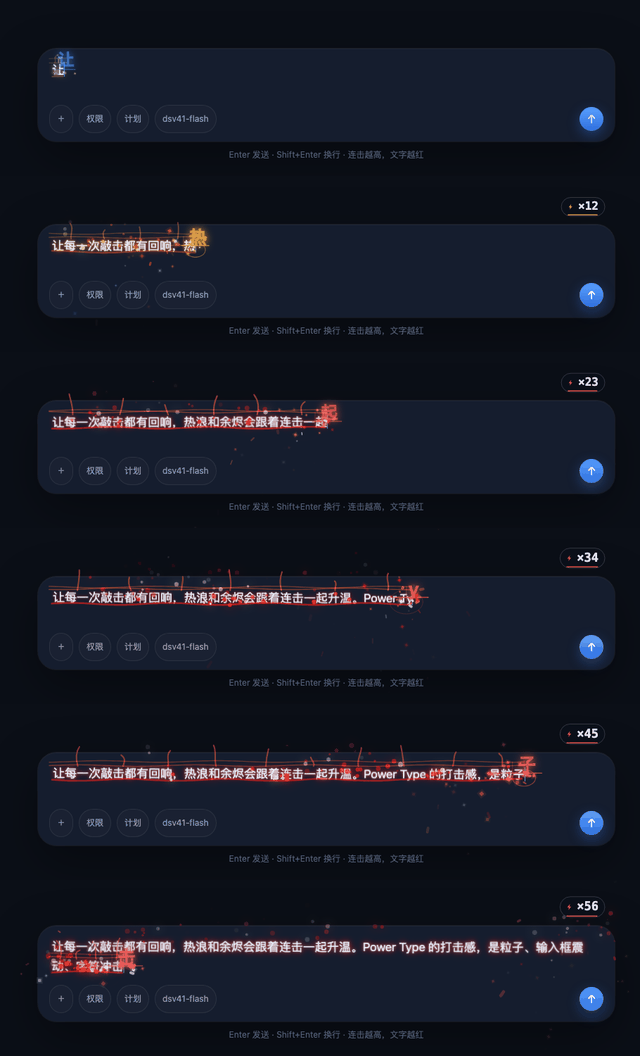
Power Mode typing effects for the DSH web composer: caret particles and glowing character echoes, a heat ramp from amber to red with rising embers as the combo grows, a combo counter over visible glyphs, and a synthesized key tick with a heavier Enter impact.
Install
dsh plugin --profile web add github:huangzhilin-hzl/dsh-power-typeREADME
dsh-power-type
English | 中文


Power Mode typing effects for the DeepSeek Harness (DSH) Web composer: sparks, shockwaves, combo, heat and embers.
Features
- Caret particles, glowing character echoes and editor shake.
- The current text line heats up with the streak: amber → orange → red, with heat shimmer and rising embers.
- Heat wraps the text only: no composer border and no settlement card.
- Combo counts visible glyphs: English adds per key, while a multi-character IME commit fills in the matching streak and tick density.
- A quiet synthesized tick per keystroke; a heavier impact on Enter, with independent mute and volume.
- Chinese and other IME composition support, plus light/dark theme adaptation.
Installation
Requires DSH Web >=0.2.1-rc.2 <0.3.0.
dsh plugin --profile web add dsh-power-type
To install the current commit instead of the published release, use the repository:
dsh plugin --profile web add github:huangzhilin-hzl/dsh-power-type
If running DSH from source, execute this from the DSH repository root:
pnpm dsh plugin --profile web add github:huangzhilin-hzl/dsh-power-type
Restart DSH Web and refresh the page after installation. No plugin build is required.
For local development, install from a local checkout instead:
dsh plugin --profile web add /absolute/path/to/dsh-power-type
Local installation uses a directory link, so keep that directory in place.
Usage
Start typing in the composer. Effects are enabled by default. Toggle the plugin under Plugins → Installed plugins → Power Type.
Adjust intensity and sound in the browser console:
window.__dshPowerType.setIntensity(1.5)      // Default: 1; range: 0.2–2.5
window.__dshPowerType.setSoundEnabled(false) // Mute key/Enter cues
window.__dshPowerType.setVolume(0.5)         // 0–1, default 0.9
Settings are saved locally in the browser.
Uninstall
dsh plugin --profile web remove dsh-power-type
For a DSH source checkout, use pnpm dsh instead of dsh.
Development
Install dependencies in a DSH checkout, then run these commands from this plugin directory:
export DSH_CHECKOUT=/absolute/path/to/deepseek-harness
node --test test/engine.test.mjs
node --test test/browser.test.mjs
node --test test/dsh.test.mjs
Browser tests require Chrome/Chromium. DSH integration also requires pnpm and a built Web frontend at apps/web/dist in the DSH checkout. Use CHROME_PATH and DSH_TEST_PNPM to specify executable paths when needed.
Set DSH_PLUGIN_SPEC=github:huangzhilin-hzl/dsh-power-type to run the DSH integration test against the remote package.
Open demo/index.html for a standalone visual demo, or demo/index.html?heat=1 for a continuous heat demo. Add &theme=light for the light theme.