dsh-theme-neon
ishawnwang/dsh-theme-neon
Three neon palettes for DeepSeek Harness — cyan, pink and yellow — picked from a Theme colors row of three swatches under Appearance in Settings → General, each palette carrying its own light and dark token set; the built-in Appearance switch still owns dark and light.
Install
dsh plugin --profile web add github:ishawnwang/dsh-theme-neonREADME
Neon DSH Themes
English · 简体中文
Three neon palettes for DeepSeek Harness (DSH) — cyan, pink and yellow — in one row in settings.
This is a small DeepSeek Harness (DSH) plugin:
it adds a Theme colors row under Appearance in Settings → General, with three swatches you click to switch.
No theme panel, import/export, or wallpapers.
Colors only: neutral scale + accent + semantic colors + borders + syntax highlighting.
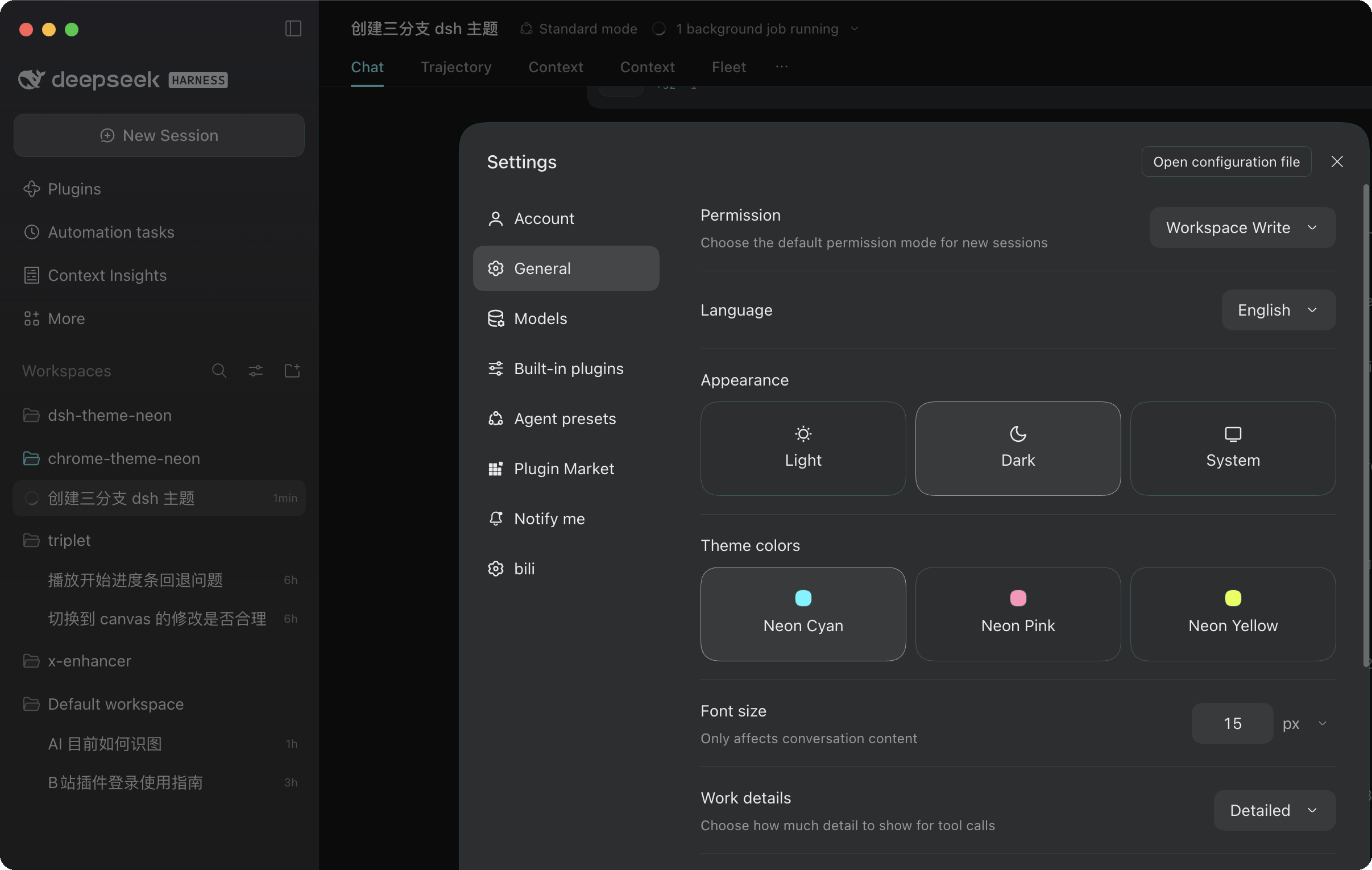
The three palettes
| ID | Name | Accent (dark) | Accent (light) | Notes |
|---|---|---|---|---|
neon-cyan | Neon Cyan | #54F5FF | #007A87 | Arctic neon cyan on a cool gunmetal base |
neon-pink | Neon Pink | #FF94B8 | #B03A64 | Electric neon pink |
neon-yellow | Neon Yellow | #E6FF40 | #6E7C00 | Acid neon yellow |
Shared base: in dark appearance the neutral scale runs from #F2F5F7 down to #0A0B0D (a near-black cool base, not pure black), and borders carry a hint of the palette color (alpha 7).
Light appearance has its own near-white base and coexists with DSH's built-in Appearance switch — Appearance chooses dark / light / follow-system, Theme colors only picks which of the three palettes is active.
How it works
themes/*.jsonis the single source of truth: each palette stores only seeds (neutral endpoints, accent/green/amber/red, border, shiki).scripts/build-client.mjsexpands the seeds into CSS variables with the same algorithm as the DSH presets and inlines them intolib/client.js.- Surface tokens get a 5–14% wash of the accent (
SURFACE_TINTS: sidebar, selected rows, input, bubble, settings card, hover); text and ramps stay neutral. - The client plugin registers a row in the
settings.general.itemslot (order10.5, right after Appearance). Selecting a palette addsdata-neon-palette="<id>"to<html>, and the static stylesheet switches between light and dark based ondata-ds-dark-theme. - The selection is stored under
dsh-neon-paletteinlocalStorageand survives a refresh; with no selection, everything returns to the DSH defaults.
Install / develop
git clone git@github.com:iShawnWang/dsh-theme-neon.git
cd dsh-theme-neon
npm run build        # generate lib/client.js from themes/*.json
npm run check        # verify lib/client.js is in sync with themes/*.json
Mount the repo as a file: dependency in your DSH profile:
# ~/.dsh/profiles/desktop/package.json
#   dependencies: { "dsh-theme-neon": "file:/path/to/dsh-theme-neon" }
#   dsh.profile.bundles: [ ..., "dsh-theme-neon" ]
pnpm install --dir ~/.dsh/profiles/desktop
Or let DSH install the plugin directly from GitHub:
dsh plugin add github:iShawnWang/dsh-theme-neon
Refresh the DSH window (restart if needed). Open Settings → General and you will find Theme colors below Appearance:
the Neon Cyan / Neon Pink / Neon Yellow swatches — click one to switch; Appearance still controls dark / light.
To change colors, edit themes/*.json and run npm run build; the plugin picks it up when DSH reloads it.
Layout
themes/                  seed JSON for the three palettes
scripts/build-client.mjs seeds → CSS variables → lib/client.js
lib/index.js             host half (empty; keeps the profile bundle structure valid)
lib/client.template.js   client plugin source (with placeholders)
lib/client.js            generated, committed, loaded by DSH directly
cordis.patch.yml         profile patch that adds the plugin to the bundle list
assets/icon-180.png      market card icon
assets/screenshots/      settings screenshots (three dark + one light)
screenshots.json         market screenshot manifest, paths relative to repo root
The original Chrome theme (the Chrome Web Store release) lives in iShawnWang/chrome-theme-neon.
License
MIT © 2026 Shawn Wang
Related plugins
dsh-wallpaper-engine
elysia395/dsh-wallpaper-engine
dsh-deep-whale (maid-atelier)
small-tailqwq/dsh-deep-whale
dsh-deep-whale
small-tailqwq/dsh-deep-whale
dsh-claude-style
nwflower/dsh-claude-style