dsh-login
islibaodong/dsh-login
Multi-user login gateway for the DSH web UI: the first visit creates the admin account, admins add and manage users in the GUI settings panel, ordinary users see only their own conversations, and unauthenticated visitors are redirected to /login.
Install
dsh plugin --profile web add github:islibaodong/dsh-loginREADME
dsh-login
English | 简体中文
Adds a login page, user accounts, and per-user conversation isolation to the DeepSeek Harness Web GUI: every visit requires sign-in, ordinary users cannot see each other's conversations, and an admin manages all accounts from inside the GUI.
| Login page | User management (设置 → 用户管理) |
|---|---|
 | 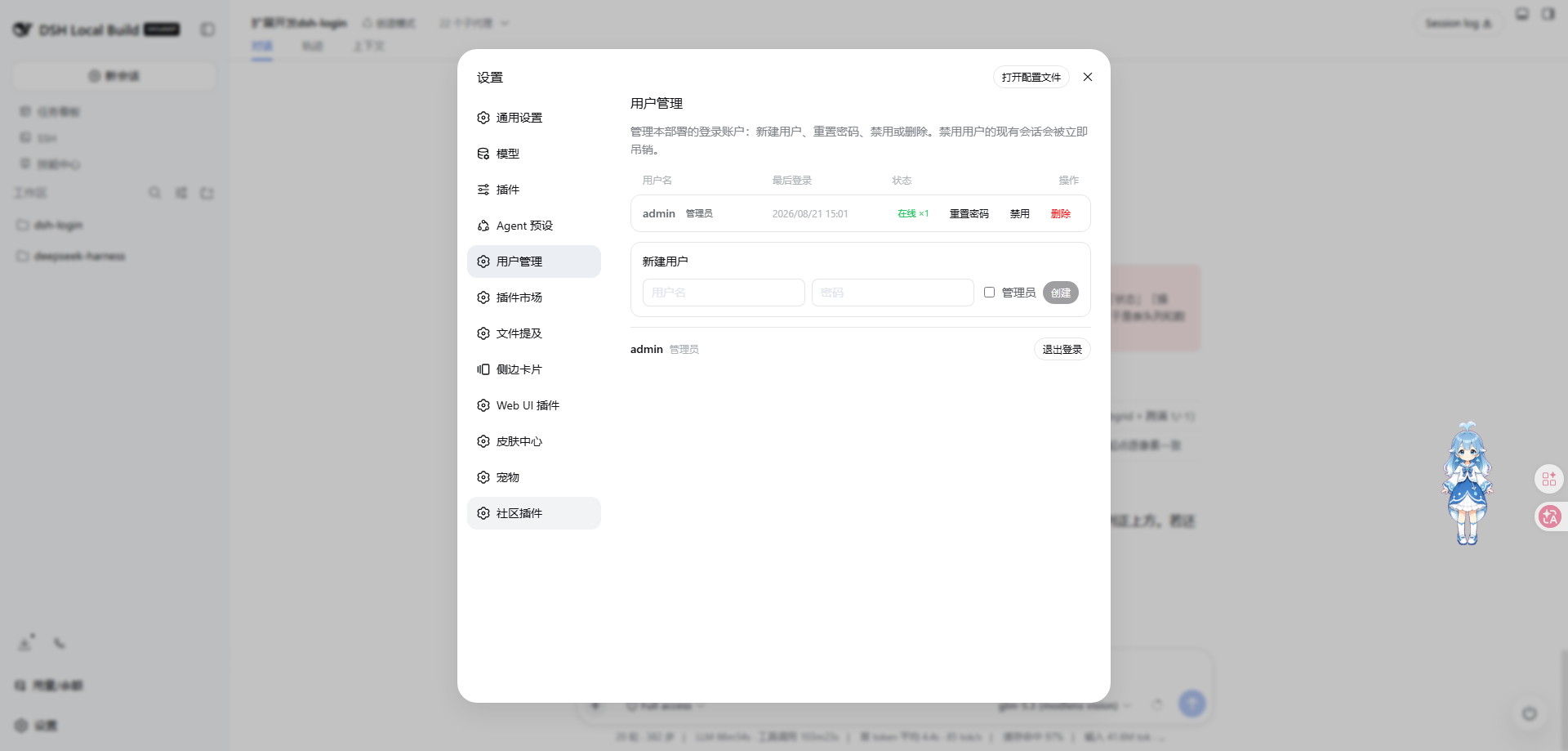 |
The problem it solves
The DSH Web GUI ships with no login — it assumes a single user on localhost. The moment you bind it to 0.0.0.0 (phone access, LAN sharing, a small team), anyone on that network can open your GUI: read every conversation, burn your configured model API keys, even change host settings.
dsh-login turns that exposure into a multi-user deployment:
- 🔐 Login wall — pages, static assets, SPA routes, the API, and WebSockets all require a valid session; unauthenticated visitors are redirected to
/login - 👥 Multiple accounts — the first visit creates the administrator account; further users are added by an admin right inside the GUI, no CLI needed
- 🙈 Conversation isolation — ordinary users see and act on their own conversations only (including their subagents/forks); the bridge wall denies non-whitelisted methods and narrows
session.list/session.search/workspace.listresponses to owned sessions, and the composed REMOTE-layer guard scopes dispatches by ownership; other users' sessions, messages, and workspaces are invisible; credentials, host settings, and other admin domains are forbidden wholesale - 🛠 User management — 设置 → 用户管理: last-login time, online session count, reset password, disable, remove; disabling/removing/password-changes immediately revoke that user's live sessions
- 👑 Admin exception — the admin is not isolated: all sessions visible, full configuration access
- 🚪 Logout — every user gets a logout entry in their settings panel
- 🌐 Remote access friendly — reach the GUI through frp/隧道/tunnels or a LAN IP without hand-editing
trustedHosts: the/apihost-trust fence uses a live set (LAN literals +trustedHosts+ auto-learned hosts), and any successful login learns its Host into a persisted whitelist you can manage in 设置 → 用户管理
Current status — released (option A)
Released:
@islibaodong/dsh-login@0.3.10(git tagv0.3.10; published on npm —latest= 0.3.10). Verified against DSH 0.2.2-alpha.3 (devDep line; full suite 21 files / 269 tests green). 0.3.10 tracks DSH 0.2.2-alpha.3 (2026-11-03, first release since 0.2.2-alpha.2): dependency retarget onto the alpha.3 tuple line + the wire surface re-pinned 199 → 204 —schedule.update/schedule.deletefolded upstream into a singleschedule.editandschedule.create/run/view/deliveryLimitsadded (all user methods), plus the forge review surfaceforgePanel.changeRequestChecks/submitReview(session-scoped, user). No multi-user change upstream (see the 2026-11-04 watch anddocs/adapt-dsh-0.2.2-alpha.3.md).2026-11-04 scheduled watch — DSH 0.2.2-alpha.3 released; adapted and released as 0.3.10.
dsh-v0.2.2-alpha.3(tag commit05b1cae8db, the vendor release commit; tagged 2026-11-03 14:19:06 +0800) is 111 commits pastce7073d512; npmalphamoved to 0.2.2-alpha.3 (published 2026-11-03T07:48:26Z) whilelatest/nextstay 0.2.1-rc.5. Adapter surface:packages/apisees only the session-controller projection rework (~130 src lines —SessionProjectionUpdateframe payload reshaped to per-event{sessionId, seq, changes[]};@Remotemethod names unchanged), everything else in the adapter-surface directories is package.json bumps; the wire registry drift 199 → 204 matches what the 11-02 watch pre-recorded on the dev tree. Verified from a built alpha.3 worktree (E:\code\deepseek-harness-wt-022a3@05b1cae8db:pnpm install+pnpm run typecheck, 5 gates pass, 36 typert files): dump = 204 methods; re-classified +7/−2 (buckets 124/79/1 — seedocs/adapt-dsh-0.2.2-alpha.3.md§5). Full suite green (21 files / 269 tests),dist/client.jsbyte-identical rebuild. Multi-user re-verified at the alpha.3 tag: the recurringmulti.?user|multiuser|role.?based|\brbac\bgrep still yields its single hit (packages/api/remote-access/README.md) — no native accounts; the__DSH_BOOT__lever is intact (packages/client/modules/src/index.ts:635) souiRoleGateis unaffected; dsh-login remains the account layer.2026-10-30 scheduled watch — DSH 0.2.1-rc.5 released; verified compatible, no adaptation needed (0.3.9 stays current).
dsh-v0.2.1-rc.5(tag commitb830ec950f, merge PR #7572; release commit31cfe2aafe) was tagged 2026-10-29 21:01 +0800 and published to npm 2026-10-29T14:15Z — after the 10-29 noon watch. npmlatestwas promoted from rc.2 to rc.5 (the first stable-channel move since 10-17);alphastays 0.2.2-alpha.2. rc.4 → rc.5 is 4 commits whose only functional change is PR #7484 (ui-chat thinking-block rendering); every adapter-surface directory (host/webserver,client/connection,host-frontend-static,client/modules,api,boot,apps/web,web-app,ui-slots, plugin-manager/market, vendor) sees package.json bumps only. Verified directly against the rc.5 tag:authorizeIndex(req, res, secure = false)present (packages/client/connection/src/browser-auth.ts:263; the core's rpc-host already passeswebServer.protocol === 'https:'),get protocol()present (packages/host/webserver/src/index.ts:341), the__DSH_BOOT__lever intact (packages/client/modules/src/index.ts:592), and all 146 rc-line wire methods keep their exact buckets inside the current 199-method classification (92/53/1 ⊂ 119/79/1, identical per method). The peers'>=0.2.1-alpha.1 <0.3.0-0branch already admits rc.5, and devDeps stay pinned to^0.2.2-alpha.2(the newer-generation line — same treatment rc.4 received on 10-28).2026-11-02 scheduled watch — no new DSH release; 0.3.9 stays current.
git fetch --tagsbrings no new objects; the newest tags remaindsh-v0.2.1-rc.5(2026-10-29 21:01 +0800) anddsh-v0.2.2-alpha.2; local HEAD == origin/master (ce7073d512, 2026-10-30, PR #7552); npm dist-tags unchanged (next= 0.2.1-rc.5,alpha= 0.2.2-alpha.2; registrytime.modified2026-10-29T13:50:52Z). Multi-user re-verified at the rc.5 tag: the recurringmulti.?user|multiuser|role.?based|\brbac\bgrep still yields its single hit (packages/api/remote-access/README.md) — no native accounts; dsh-login remains the account layer. Dev-tree observations recorded for the next re-pin (unreleased, no action taken): the wire surface has drifted 199 → 204 (forgePanel.changeRequestChecks/submitReviewandschedule.create/deliveryLimits/edit/run/viewadded;schedule.update/deletefolded intoschedule.edit) — left unclassified, so denied by default on dev trees; and remote-access grew client-side effect controllers (whenAccess/whenAllowed, per-PeersnapshotFor) — future substrate for non-owner-principal gating, no released impact. Test suite re-run green (21 files / 269 tests).2026-11-03 scheduled watch — no new DSH release; 0.3.9 stays current. All three detection channels unchanged from the 11-02 watch:
git fetch --tagsbrings no new objects (newest tags stilldsh-v0.2.1-rc.5, 2026-10-29 21:01 +0800, anddsh-v0.2.2-alpha.2); local HEAD == origin/master (ce7073d512) — nothing new landed upstream, so the dev-tree wire drift (199 → 204) and remote-access observations recorded on 11-02 remain the latest; npm dist-tags unchanged (next= 0.2.1-rc.5,alpha= 0.2.2-alpha.2;@deepseek-ai/dshtime.modified2026-10-29T16:01:42Z,dsh-web-frontend14:13:50Z,dsh-host-webserver13:50:52Z — no registry activity since the 10-29 rc.5 publish window). Multi-user re-verified at the rc.5 tag: the recurringmulti.?user|multiuser|role.?based|\brbac\bgrep still yields its single hit (packages/api/remote-access/README.md) — no native accounts; dsh-login remains the account layer; role-based whole-UI control stays delivered in-plugin (uiRoleGate). Test suite re-run green (21 files / 269 tests).New in 0.3.8: tracking DSH 0.2.2-alpha.2 (wire surface 146 → 199 methods) — two upstream releases since the 0.3.7 watch:
dsh-v0.2.1-rc.4(→504a01a957, 2026-10-26, package bumps + tooltip/acp-stdout/mcp-diagnostic fixes — zero adapter-surface impact) anddsh-v0.2.2-alpha.2(→f3803c9697, release merge PR #7437, 2026-10-28, 2161 commits). The alpha.2 line rewrote the static-hosting seam: PR #6901 (commit73931626be, alpha.2-only) turned@deepseek-ai/dsh-host-frontend-staticinto a WebResource cordis plugin and removed itsserveStaticexport — dsh-login now ships its own embedded fallback (src/serve-static.ts, node:http; same auth shape, vendored copy still covers rc.3/rc.4). The 199-method wire registry (dumped from the real alpha.2 builds) adds 53 methods: the per-session forge panel (forgePanel.*, 18, user), session state/observation (session.events/observeEvent/observeProjections/observeState/state/wait, 6, user),toolResults.watch(user),actionCards.act+pluginRecommendations.describe(user), CUA consent (cuaAccess.*, 9, admin), plugin detail/update (pluginManager.listVersions/readBundleDetail/updateBundle,pluginMarket.readEntryDetail, admin),schedule.deleteInactive(admin) and Liveshare share management (liveshareShares.*, 12, admin — upstream declares the whole surface owner-only operator territory). Buckets: 119 user / 79 admin-only / 1 host-internal. devDeps retargeted to^0.2.2-alpha.2(vendor line cordis~4.0.6-alpha.1, schemastery~3.18.6-alpha.1, include~1.0.11-alpha.1, loader~1.0.7-alpha.1); peers add the>=0.2.2-alpha.2 <0.3.0-0branch (the old>=0.2.1-alpha.1branch cannot match a new prerelease tuple) and the vendor alpha tilts. 0.3.7: tracking DSH 0.2.1-rc.3** — one upstream release since the 0.3.6 watch (tagdsh-v0.2.1-rc.3→1f81c047fc, 2026-10-23, 6 commits) and the entire adapter surface is source-unchanged: rc.3 is a client-UI-only release (navigation entry customization, nav pin/menu icon fixes, analytics events, the llm/modelslisting re-home), the 146-method wire registry is byte-identical to rc.2's, and the boot-graph lever is untouched — so 0.3.7 is a devDependency retarget (^0.2.1-rc.3) plus theWIRE_SURFACE_DSH_VERSIONpin, with no code logic change. New in 0.3.6 — issue #4: the ordinary-user method allow-list had drifted off the wire surface. 0.3.5'sUSER_ALLOWEDwas written against a pre-0.2 spelling set, so on DSH 0.2.1-rc.2 every entry was a dead name and ordinary users were deniedsession.modelCatalog(model dialog),directoryPicker.*(add workspace) andllm.listProviders/llm.discoverModels(settings→models provider catalog) withnot permitted for this user. 0.3.6 re-derives the allow-list from the real 146-method registry (src/api-filter.ts: 92 user / 53 admin-only / 1 host-internal, exhaustive), addsscripts/dump-wire-surface.mjs+tests/wire-surface.spec.tsso an upstream rename fails the suite instead of silently locking users out, logs an unknown-method denial once to the host log, and alignscapabilities/remote-guardwith the same names. Option A: upstream reworked the/apitransport — dsh-login no longer takes it over (theconnectionrow is re-enabled) and answers 401 on the shared/apibridge without a session (apiBridgeAuth, default on). New in 0.3.5: tracking DSH 0.2.1-rc.2 — three upstream releases landed since alpha.4 (alpha.5 → rc.1 → rc.2; 49 commits) and the entire adapter surface is source-unchanged: every dsh-login integration point (host/webserver,client/connection,settings,host/frontend-static,client/modulesboot graph,client/runtime/ui-slots, the/apicontrollers,web-app,app-boot) changed only inpackage.json, and the/apicontrollers have zero src diff — so the wire method registry (andUSER_ALLOWED/ADMIN_ONLY_*) needed no edits. The harness also re-released its vendored packages at stable versions (PR #6388: cordis 4.0.5, schemastery 3.18.5, include 1.0.10, loader 1.0.6, …), so 0.3.5 pins those instead of the alphas; the new rc.2 packages (web-deepseek-api,ui-deepseek-model-label-1017,ui-settings-web-search) are agent-side/UI-only and add no wire surface. 0.3.4: tracking DSH 0.2.1-alpha.4 — upstream added the plugin market (packages/boot/plugin-market, typert namespacepluginMarket: browse configured market indexes and install their bundles), which dsh-login gates admin-only across all three layers (wire guard,/api/pluginMarket/*two-segment deny with quiet read probes, capability advertisement) —setIndexesreconfigures the instance-wide index list, so it is never user-reachable; the client boot graph now carries areleasestamp that dsh-login'suiRoleGatepreserves byte-identical through filtering. 0.3.3: tracking DSH 0.2.1-alpha.3 — upstream shipped its first native RBAC substrate (packages/api/remote-access: per-Peer policies for non-owner connections — dsh-login users remain owner principals, so dsh-login's own walls keep enforcing; still no native user accounts), the terminal became a bidirectionalterminal.attachstream (the removedterminal.follow/terminal.write/terminal.resizemethods dropped from the allow-list), and the newharness-dev-contextweb-app row injectswebApp, which dsh-login now provides itself alongside its web-runtime takeover. 0.3.2: tracking DSH 0.2.1-alpha.2 — upstream added TLS (HTTPS) to the webserver, moved the connection trust authorities to the newwebStartupservice, and retired thewebRuntimeservice upstream (dsh-login'stakeOverWebRuntimere-provide is now compat-only) — thedsh web:URL line andDSH_WEB_URLnow spell the actual bind address, matching upstream. 0.3.1: the bridge wall enforces theUSER_ALLOWEDmethod allow-list for ordinary users, narrows theirsession.list/session.search/workspace.listresponses to owned sessions, keeps the ownership sidecar warm (session/workspace/forkrecording + per-user default-workspace provisioning), and ships a deployment glue (composeDshLoginGuard+docs/compose-guard.md) for composing the REMOTE-layer isolation guard over the nativetypertGateway— the two-browser sign-off of that composition remains a deployment-side acceptance step. 0.3.0 added per-role whole-UI gating (uiRoleGate, default on) — ordinary users never mount the admin-only client bundles (the boot-graph lever documented below). SeeCurrent status →anddocs/verify-option-A.md.Adaptation history (all versions below are published on npm):
0.3.10→ DSH 0.2.2-alpha.3 (devDep retarget onto the alpha.3 tuple line with the re-issued vendor alphas; peers unchanged — the existing>=0.2.2-alpha.2 <0.3.0-0branch admits alpha.3 via the same-prerelease-tuple rule; the wire surface re-pinned 199 → 204 —schedule.update/schedule.deletefolded upstream into a singleschedule.edit,schedule.create/run/view/deliveryLimits+forgePanel.changeRequestChecks/submitReviewadmitted as user methods, buckets 124/79/1; verified from a built alpha.3 worktree — 5 typecheck gates pass, dump = 204; 269 tests);0.3.8→ DSH 0.2.2-alpha.2 (devDep retarget onto the alpha.2 tuple line with the re-published vendor alphas; peers gained the>=0.2.2-alpha.2 <0.3.0-0branch + vendor alpha tilts; the wire surface grew 146 → 199 —forgePanel.*18 +session.events/observeEvent/observeProjections/observeState/state/wait6 +toolResults.watch+actionCards.act+pluginRecommendations.describeadmitted as user methods,cuaAccess.*9 +pluginManager.listVersions/readBundleDetail/updateBundle+pluginMarket.readEntryDetail+schedule.deleteInactive+liveshareShares.*12 gated admin-only;src/serve-static.tsreplaces the@deepseek-ai/dsh-host-frontend-staticserveStaticimport that PR #6901 removed upstream — the gateway keeps its own authenticated static fallback; buckets now 119/79/1; multi-user re-verified — still no native accounts, the sole grep hit remains the remote-access README);0.3.9→ issue-#10 fix (server-side virtual exchange viacreateCaptureResponse/mintCoreCookieinsrc/gateway.ts— the launch token never reaches the wire; theisAuthenticatedprobe now uses the listener's secure decision; 269 tests);0.2.1→ DSH 0.1.6-alpha.1 (sidebar terminal, unarchive sessions);0.2.2→ 0.1.6-alpha.2 (theapiBridgeAuthwall on the shared/apibridge, the document-previewworkspaceFiles/officeToPdfuser surface, the nativepluginManagernamespace admin-only);0.2.3→ 0.1.7-alpha.2 (settings seam re-home, the newaccountnamespace admin-only, thejobcontroller user surface, session pinning);0.2.4→ the DSH #4587 settings-error fix;0.2.5→ DSH 0.2.0-rc.2 (peer retarget onto the 0.2.0 tuple line — the surface verified source-compatible, no code change);0.2.6→ the issue #3 fix (a fresh device's first page load after login hit the core BrowserAuth's plain-text 401 — the gateway now bounces once through the?token=exchange so the core mints its browser cookie);0.2.7→ DSH 0.2.1-alpha.1 (peer retarget onto the 0.2.1 tuple line + the retired@deepseek-ai/dsh-invariantsreferences removed — no source change);0.3.0→ the per-role whole-UI gate (uiRoleGate) implemented on the boot-graph lever (still tracking DSH 0.2.1-alpha.1);0.3.1→ the shared-/apibridge wall gains per-user enforcement (theUSER_ALLOWEDmethod gate, owned-onlysession.list/session.search/workspace.listnarrowing, ownership recording including admin record-only, default-workspace provisioning wiring) plus thecomposeDshLoginGuarddeployment glue (no upstream change — still 0.2.1-alpha.1);0.3.2→ DSH 0.2.1-alpha.2 (devDep retarget — the peer tuple already admitted alpha.2 — plus thedsh web:URL line/DSH_WEB_URLnow spelling the actual bind address; upstream retired itswebRuntimeservice, so dsh-login's takeover is compat-only, and upstream added TLS);0.3.3→ DSH 0.2.1-alpha.3 (devDep retarget onto the re-published vendor alphas — peers unchanged;webAppprovided so the newharness-dev-contextrow injects; allow-list updated for the alpha.3 wire surface:terminal.attachreplaces follow/write/resize,remoteAccess.followadmitted; upstream's first RBAC substrate evaluated);0.3.4→ DSH 0.2.1-alpha.4 (devDep retarget — the peer tuples already admitted alpha.4; the newpluginMarketnamespace — the plugin market's instance-wide index configuration — gated admin-only across all three layers; theuiRoleGateboot-graph filter regression-tested to preserve the newreleasegraph field);0.3.5→ DSH 0.2.1-rc.2 (devDep retarget onto the rc.2 tuple line plus the stable vendor re-release — peers unchanged, the alpha-peer ranges admit stable; the whole adapter surface verified source-unchanged,/apicontrollers zero diff — no code change; the newweb-deepseek-api/ui-deepseek-model-label-1017/ui-settings-web-searchpackages add no wire surface; multi-user/RBAC re-verified, still none native);0.3.7→ DSH 0.2.1-rc.3 (devDep retarget — the peers already admitted rc.3; rc.3 is a client-UI-only release (6 commits: navigation entry customization, nav pin/menu icon fixes, analytics events, the llm/modelslisting re-home), the 146-method wire registry is byte-identical to rc.2's and the boot-graph lever is untouched — no source change). 0.1.7-rc.1 / rc.2 were verified compatible without a release — details indocs/adapt-dsh-0.1.7-rc.1.md/docs/adapt-dsh-0.1.7-rc.2.md/docs/adapt-dsh-0.2.0-rc.2.md. Upstream still has no native multi-user accounts and no per-role UI gating, but 0.2.1-alpha.3 shipped the first native RBAC substrate for non-owner connections (packages/api/remote-access+ multi-principal Peers; re-evaluated 2026-10-15 — see below).
@islibaodong/dsh-login@0.3.8 is released (git tag v0.3.8; published on npm — latest = 0.3.8). 0.3.8 tracks DSH 0.2.2-alpha.2 (2026-10-28): the wire surface grew 146 → 199 methods, the static-hosting seam moved upstream (PR #6901 removed the @deepseek-ai/dsh-host-frontend-static serveStatic export, so dsh-login now serves its own authenticated fallback from src/serve-static.ts — same trust shape: dist-root-confined paths, authorizeIndex() + renderIndex() on the index), and the method walls were re-derived from the real alpha.2 registry (119 user / 79 admin-only / 1 host-internal of 199, exhaustive and test-enforced). New user surface: the per-session forge panel (forgePanel.* — git worktree/change-request operations scoped to the session's own checkout, first arg sessionId the gateway resolves and the remote guard ownership-checks), session state/observation (session.events/observeEvent/observeProjections/observeState/state/wait), toolResults.watch (the session's own tool-result stream), actionCards.act, pluginRecommendations.describe. New admin-only surface: CUA consent (cuaAccess.applicationIcons/applications/enablePersistentPtc/openSettings/ptcConfiguration/requestPermission/retryApproval/revoke/systemStatus), plugin detail/update (pluginManager.listVersions/readBundleDetail/updateBundle, pluginMarket.readEntryDetail), schedule.deleteInactive, and the whole liveshareShares namespace (upstream declares it the owner-only share-management surface — publishing sessions to external viewers, host relay, owner identity, audit trail — operator territory in a multi-user deployment). 0.3.6 was the issue-#4 fix: the ordinary-user method allow-list is re-derived from the actual DSH 0.2.1-rc.2 wire surface (92 user / 53 admin / 1 host-internal of 146 methods, exhaustive and test-enforced), so model selection, add-workspace and settings→models work again for non-admins. The option-A adaptation for DSH ≥ 0.1.5-alpha.1 is complete and tracks upstream through 0.2.2-alpha.2 (verified 2026-10-28): dsh-login no longer takes over /api — the native connection + api-remotes/api-gateway stack owns the transport — and composes the login wall (fallback seat), the apiBridgeAuth wall on the shared /api bridge, and capability discovery on top of it. 0.3.0 ships the per-role whole-UI gate: with uiRoleGate: true (default) the gateway filters the window.__DSH_BOOT__ graph for ordinary users so admin-only client bundles never mount (src/ui-gate.ts; deny-list = ADMIN_ONLY_UI_PLUGINS; admins and uiRoleGate:false see the full graph; fail-open on any unexpected shape). The bridge wall adds (0.3.1) the per-user method gate (USER_ALLOWED), owned-only response narrowing for session.list/session.search/workspace.list, ownership recording (including admin-created resources, record-only), and per-user default-workspace provisioning. 0.3.2 mirrored upstream's bind-address URL line (upstream's webRuntime retirement made the takeover compat-only). 0.3.3 retargeted the devDeps to 0.2.1-alpha.3 and provided webApp for the new harness-dev-context row. 0.3.4 retargets the devDeps to 0.2.1-alpha.4 (peers already admitted it) and keeps the walls current with the new wire surface: alpha.4's plugin market (packages/boot/plugin-market, typert namespace pluginMarket — listIndexes/setIndexes/search over the instance-wide market index list) is gated admin-only across all three layers (src/remote-guard.ts ADMIN_ONLY_NAMESPACES, src/capabilities.ts two-segment deny + admin advertisement + quiet read probes for listIndexes/search, setIndexes staying a loud 403), and the boot graph's new release stamp (WebBootRelease {version, commit?} — alpha.4's client reload gating) is preserved byte-identical through the uiRoleGate filter with a regression test. 0.3.5 retargets the devDeps to 0.2.1-rc.2 (peers already admitted it, and the stable vendor re-release) — the adapter surface came out source-unchanged (every integration point changed only in package.json; the /api controllers have zero src diff), so the walls needed no edits; the rc.2 additions (web-deepseek-api, ui-deepseek-model-label-1017, ui-settings-web-search) add no wire surface. The full suite is 21 files / 267 tests green against the published 0.2.2-alpha.2 builds, including the real-composition tests on booted servers. Deliberately NOT yet boot-verified (needs a real dsh web boot to confirm): the per-user isolation guard composed over the native typertGateway via the shipped deployment glue (docs/compose-guard.md) and the two-browser isolation sign-off (see docs/verify-option-A.md §B). See docs/adapt-dsh-0.2.2-alpha.2.md for this release's full surface analysis and docs/adapt-dsh-0.1.5.md for the original status matrix.
Delivered and working
- Login wall + multi-account user management (设置 → 用户管理).
- Capability discovery (
GET /api/auth/capabilities, session-authenticated) and quiet read-denials (204for a no-permission read probe,403for writes; toggle viaquietDenials), so ordinary-user browsers stop getting "forbidden" walls and retry storms. - dsh-login's own settings contribution is already per-user: admins see 设置 → 用户管理, ordinary users see 账户 (identity + logout); ordinary users never call the admin API.
- Per-user isolation guard ships as a composition primitive (option A). Under DSH ≥ 0.1.5 the native
connection/api-gatewayowns/api, so dsh-login's isolation is a REMOTE-layer guard —wrapRemoteGateway+createRemoteIsolation, exported from this package's host bundle and unit/integration-tested (including ownership scoping and admin passthrough). The wrapper forwards every non-dispatch gateway member unchanged (e.g. DSH 0.2.0-rc.2's requiredhasLiveClient()), so composing it stays interface-complete.connectionownership + per-user default workspace are re-established on the native stack. The guard must be composed over the nativetypertGatewayrow at boot (a deployment decision, not a runtime hot-swap — re-providingtypertGatewaywould be a duplicate-service error); dsh-login ships ready-made glue for that composition — the ownership sidecar is published as thedshLoginOwnershipservice andcomposeDshLoginGuard(ctx, gateway)wraps a native gateway in one call (seedocs/compose-guard.mdfor a complete row module and acceptance checklist). The two-browser behavior sign-off remains a deployment-side step. Seedocs/verify-option-A.md§B. - Tracks upstream 0.1.5-alpha.1 → 0.2.2-alpha.3 (0.2.2-alpha.3 adapted and released as 0.3.10 on 2026-11-04; 0.2.1-rc.5 verified 2026-10-30 — zero surface change). Each upstream release's user-facing wire surface joins the ordinary allow-list as it lands (sidebar
terminal.*,workspace.unarchiveSession/pinSession/unpinSession, the read-onlyworkspaceFiles/officeToPdfdocument preview, thejobcontroller; 0.2.0 added no new wire methods or namespaces; 0.2.1 added theclaudeCodeModsnamespace — agent-mod band UI above the prompt — which rides the default deny, no user surface yet; 0.2.1-alpha.2 added none; 0.2.1-alpha.3 replaced the terminal trio with theterminal.attachstream and admittedremoteAccess.follow— the native remote-access snapshot stream that answers with only the caller's own grants; 0.2.1-alpha.4 added thepluginMarketnamespace — admin-only wholesale, see below; 0.2.1-rc.2 added no wire methods or namespaces at all — the entire adapter surface is source-unchanged and the new rc.2 bundles (web-deepseek-api,ui-deepseek-model-label-1017,ui-settings-web-search) are agent-side or UI-only; 0.2.1-rc.3 added no wire methods or namespaces either — its changes are client-UI-only (navigation entry customization, nav pins/menu icons, analytics events, the llm/modelslisting re-home); 0.2.2-alpha.2 added 53 (the forge panel, session state/observation,toolResults.watch, CUA consent, plugin detail/update,actionCards.act,pluginRecommendations.describe,schedule.deleteInactiveand Liveshare share management — classified above); 0.2.2-alpha.3 re-pinned the schedule CRUD split and the forge review surface (+7/−2:schedule.create/edit/run/view/deliveryLimits+forgePanel.changeRequestChecks/submitReviewin, the retiredschedule.update/deleteout)), while new admin-only namespaces (pluginManager+pluginRegistryProbe, theaccountDeepSeek-Platform controller — the one process-wide upstream grant, including 0.1.7-rc.2'swatchExpiryexpiry stream, and 0.2.1-alpha.4'spluginMarket, plus 0.2.2-alpha.2'sliveshareSharesnamespace and itscuaAccess/pluginManagerdetail-update additions) are denied wholesale. Since DSH 0.1.7-rc.1 the host runs a boot-time plugin-compatibility admission against peer ranges — dsh-login's ranges admit the current runtime (0.2.7 added the 0.2.1 branch), and the check is fail-open (stderr report only), so after any DSH upgrade verify the login page actually appears. 0.3.0 additionally shipsuiRoleGate— the per-role whole-UI boot-graph filter (see below).
Per-role control of the whole UI — SHIPPED in 0.3.0 (uiRoleGate)
- dsh-login 0.3.0 implements the whole-UI gate in-plugin (no upstream change needed). The gateway renders the index itself, and the client module roster travels in that HTML as
window.__DSH_BOOT__; the page then activates exactly that roster (ClientEntries.reconcile()creates one entry per manifest row and removes any bundle absent from it). For an ordinary (non-admin) session withuiRoleGate: true(the default), the gateway rewrites the boot graph before serving the index: entries in theADMIN_ONLY_UI_PLUGINSdeny-list are dropped, their batches patched or removed, and the shell never mounts them. Presentation-only — the/apiallow-list (apiBridgeAuth+USER_ALLOWED) remains the security boundary. Admins get the unfiltered graph; any unexpected shape fails open (original HTML served). Seedocs/adapt-dsh-0.2.1-alpha.1.md§6. - What the gate does NOT do: per-package granularity only — hiding one slot/section inside an allowed bundle (e.g. DSH's settings panel, whose
SettingsRoot→useSectionslist carries no identity dimension) stays out of scope. DSH's WebServer route priority is exact-beats-prefix with no pre-routing hook, so a plugin that self-registers exact routes (e.g.@linxin666/dsh-petserving/api/pet/pets) cannot be intercepted per user bydsh-logineither. - Upstream still ships no per-identity UI gate: the client boot/activation layer and ui-slots carry no
role/permission/isAdminconcept (re-verified 2026-11-04 at 0.2.2-alpha.3 — the release's only api-side change is the session-controller projection rework, client activation untouched; the__DSH_BOOT__lever is intact atpackages/client/modules/src/index.ts:635; previously 2026-11-03 — no new release, no upstream change since; the unreleased dev tree's remote-accesswhenAccess/whenAllowedeffect controllers are connection-axis (non-owner Peer authorization), not a UI-roster permission axis; before that 2026-11-02, 2026-10-30 at 0.2.1-rc.5, 2026-10-28 at 0.2.2-alpha.2, 2026-10-24 at 0.2.1-rc.3;isAdmin/isAllowedgreps return zero hits underpackages/client— and note that ~238 files still match a rawrolegrep because of DOMrole="…"accessibility attributes, not account roles). 0.2.1-alpha.3's remote-access RBAC gates non-owner Peer connections server-side (per-resourcedecide()+ snapshot injection), not the client UI roster — an entirely different axis from this boot-graph gate; 0.2.1-alpha.4 changed nothing here (itsreleasegraph field is release-identity plumbing for client reload gating, not a permission axis, and dsh-login's gate preserves it); 0.2.1-rc.2 re-verified unchanged; 0.2.1-rc.3 likewise (its UI changes are content-level customization, not a permission axis); 0.2.2-alpha.2 re-verified 2026-10-28 — its new client packages (forge panel UI, liveshare viewer, CUA consent UI) mount through the same boot graph with no permission axis, and the gate's deny-list is unchanged.
Upstream multi-user / RBAC evaluation (first at 0.2.1-alpha.3, 2026-10-15; re-verified 0.2.1-alpha.4, 2026-10-16, 0.2.1-rc.2, 2026-10-18, 0.2.1-rc.3, 2026-10-24, 0.2.2-alpha.2, 2026-10-28, 0.2.1-rc.5, 2026-10-30, the 2026-11-02/2026-11-03 watches — no new release, re-checked at rc.5 + the dev tree, and 0.2.2-alpha.3, 2026-11-04)
- No native user accounts — no user store, no login, no identity UI (the recurring
multi.?user|multiuser|role.?based|\brbac\bgrep produced its first hit ever:packages/api/remote-access/README.md; the same single hit at 0.2.1-rc.2, 2026-10-18, 0.2.1-rc.3, 2026-10-24, 0.2.2-alpha.2, 2026-10-28, 0.2.1-rc.5, 2026-10-30, 2026-11-02, 2026-11-03 (watches; no new release), and 0.2.2-alpha.3, 2026-11-04 — the surface still has no account store). dsh-login remains the account/authn layer. - What 0.2.1-alpha.3 actually added: a native authorize-only RBAC engine for non-owner Peers (
packages/api/remote-access:Principal/PrincipalMap— owner is the only kind today, merge-extensible — plusregisterPolicy/decideper resource, an owner baseline injected as the__DSH_REMOTE_ACCESS__global, and the always-allowedremoteAccess.followsnapshot stream) and the multi-principal connection machinery behind it (createPeer/admitConnection, v2 API cookies{version:2, id: PeerId}, theGET /connecttoken exchange, socket-ownership 409). This is the substrate a future native per-resource/whole-UI permission system would build on — nothing consumes it for dsh-login's use case yet. - Why it does not change dsh-login's security model: dsh-login users reach the native stack as owner principals (the browser cookie mints
browserPeer {kind:'owner'}), and remote-access never gates owners — dsh-login's login wall,USER_ALLOWEDbridge wall, remote guard, anduiRoleGateremain the actual multi-user boundary. Known substrate caveats dsh-login's own scrubbing already covers: undeclared resources are UNCHECKED, api-sessionaddedentries leakparentSessionId, the ready frame exposes full host/home. At 0.2.2-alpha.2 the substrate itself grew (role bindings overforgePanel/liveshareShares/sessionresource kinds, per-Peer access snapshots) but still only gates non-owner Peers — dsh-login users stay owner principals, so the assessment is unchanged (re-evaluated 2026-10-28, seedocs/adapt-dsh-0.2.2-alpha.2.md§6). - Future option (documented, not integrated): if dsh-login ever mints non-owner principals, it could register remote-access policies per dsh-login role to get native per-resource enforcement for free.
Still wanted from upstream: per-identity slot/section filtering (for sub-package granularity inside an allowed bundle) and a host-side per-user plugin activation gate. Neither exists at 0.2.2-alpha.3 (re-verified 2026-11-04: the release's changes are projection internals + schedule/forge wire methods — the remote-access substrate remains per-resource connection policy, not UI activation; previously 0.2.2-alpha.2: 0.2.1-alpha.4 added the admin-only plugin market and the release boot-graph stamp — release-identity plumbing, not a permission axis; rc.2/rc.3 added nothing here; 0.2.2-alpha.2's new UI packages ride the same activation layer — its forgePanel/liveshareShares/session RBAC additions are again connection-axis only); the 0.3.0 boot-graph gate covers whole packages only.
Quick start
No environment variables, no config edits — three steps:
# 1. Install (web is the profile that boots the Web GUI)
dsh plugin --profile web add github:islibaodong/dsh-login
- Initialize: restart
dsh weband open the GUI — the first visit shows a one-time "create administrator account" page; pick a username and password - Add users: sign in as admin → 设置 → 用户管理 → 新建用户
Uninstall:
dsh plugin --profile web remove @islibaodong/dsh-login
Why
--profile web? DSH installs plugins per profile directory ($DSH_HOME/profiles/<name>);webis the profile that boots the Web GUI. Use your profile's name if you run a custom one.
FAQ
- Do I have to log in again after restarting DSH? No — login sessions are persisted to
<dataDir>/sessions.json(0o600), so an existing cookie keeps working across a process restart (the cookie otherwise lasts 7 days by default). Only an actual log-out, password change, user removal, or TTL expiry invalidates it. - What can an ordinary user do? Use the chat normally: create/open/continue their own sessions, run subagents, manage their own workspace content. Everything else (other people's sessions, credentials, plugins/presets/host settings, model-key management) is refused.
- Upgrading from the old single-password version? The old single password no longer logs anyone in; the first visit after upgrading bootstraps a fresh administrator account (details in the migration note below).
Technical details
For contributors, security reviewers, and troubleshooting. You don't need any of this to use the plugin.
What installation does
dsh plugin add reads this package's declared cordis.patch.yml (a bundle patch) and automatically:
- mounts the
dsh-loginplugin row (config defaults are sensible;distIndexresolves the frontend dist automatically) - disables the
web-runtimerow (where dsh-web-app mounts the frontend-static fallback); dsh-login takes over the fallback seat and re-provides thewebRuntimeservice (LAN trust for the/apifence + theDSH_WEB_URLvariable) - keeps the shipped
connectionrow enabled (option A, DSH ≥ 0.1.5): dsh-client-connection owns the/apicarrier and browser-session auth; dsh-login composes its login wall (fallback seat) + per-user isolation primitive on top. It ships its own browser bundledist/client.jsfor the settings panel only.
Manual installation (alternative)
If you prefer managing the patch file yourself, add these rows to your profile's cordis.patch.yml:
- insert:
    - id: dsh-login
      name: '@islibaodong/dsh-login'
      config:
        password: DSH_LOGIN_PASSWORD   # credential ref name; namespaces the user store (<name>_USERS)
        distIndex: ''                  # empty resolves the frontend dist automatically
        dataDir: ''                    # empty resolves to <DSH_HOME>/.dsh-login (ownership index)
        sessionTtl: 604800             # 7 days (default)
        autoTrustHosts: true          # learn the Host of any successful login into the /api whitelist
        enabled: true                 # set false to disable without uninstalling
        defaultWorkspace: true        # auto-provision a per-user default workspace on first /api access (on by default; toggleable live in 设置-用户管理)
        workspaceRoot: ''             # default-workspace sandbox root; empty => <DSH_HOME>/workspaces
        apiBridgeAuth: true           # require the dsh_session cookie on the shared /api bridge (DSH >= 0.1.6-alpha.2, on by default)

# IMPORTANT: dsh-login takes over the fallback seat, so the web-runtime row
# (which mounts frontend-static) must be disabled. dsh-login re-provides the
# webRuntime service, so the rest of the composition is unaffected.
- id: web-runtime
  disabled: true
The shipped
connectionrow (dsh-client-connection) stays enabled in option A — it owns/apiand the browser-session auth. Do not disable it. dsh-login ships a ready-made deployment glue for per-user isolation (seedocs/compose-guard.md): fork yourtypertGatewayrow and wrap the native gateway withcomposeDshLoginGuardat boot — dsh-login publishes its ownership sidecar as thedshLoginOwnershipservice for exactly that composition.
Note: new rows must live under
- insert:— a bare top-level row is treated as an override of an existing row and is a silent no-op for new ids; and the disable key isdisabled(notdisable).
First-time setup flow
- First visit (no users yet) ->
/loginshows a "Create administrator account" page (username + password) - User picks credentials ->
POST /api/auth/setupcreates the forced-admin account (scrypt-hashed, stored under the${password}_USERScredential ref, defaultDSH_LOGIN_PASSWORD_USERS) and logs it in - Subsequent visits ->
/loginshows the normal username/password login form - User management -> admins open 设置 → 用户管理 in the GUI to list (last login/online status), create, disable/enable, remove users and reset passwords (
/api/auth/admin/*JSON routes; removing the last admin is refused) - Security ->
/api/auth/setupreturns 403 once any user exists, preventing hijacking
Migration note: the legacy single-password credential (default ref
DSH_LOGIN_PASSWORD) no longer logs anyone in. It stays configured but is unused for authentication — thepasswordconfig key now only namespaces the user store credential ref (${password}_USERS). Upgrading an existing single-password deployment therefore requires the first visit to bootstrap a fresh administrator account.
How it works
Request -> WebServer
  ├─ /login (exact)            -> dsh-login: setup page (if no users) OR login page
  ├─ /api/auth/setup (exact)  -> dsh-login: POST create admin on first use (403 if users exist)
  ├─ /api/auth/login (exact)  -> dsh-login: POST verify {username,password}, set cookie
  ├─ /api/auth/logout (exact) -> dsh-login: POST revoke session, clear cookie
  ├─ /logout (exact)          -> dsh-login: GET same revocation, redirect to /login
  ├─ /api/auth/me (exact)     -> dsh-login: GET current session identity
  ├─ /api/auth/admin/* (exact) -> dsh-login: admin JSON API (users, password, disable, remove)
  ├─ /api/...                 -> native connection + api-remotes/api-gateway (option A):
  │                             browser-session auth, typert REMOTE dispatch, WS streams
  └─ fallback                 -> dsh-login: auth gateway + static files
                                ├─ no valid cookie -> 302 /login
                                └─ valid cookie   -> serveStatic + connection.authorizeIndex
- Cookie:
dsh_session, HttpOnly, SameSite=Strict, Path=/ - Session: 32-byte random token (256-bit) with TTL expiry; sessions carry the username and admin flag and are persisted across restarts (/sessions.json, 0o600), so an in-flight SPA keeps working after a process reload instead of turning every /api call into a 401
- Password storage: scrypt hashes (per-user salt) in the DSH credentials system under
${password}_USERS
Multi-user permission model
- Ordinary users are conversation-only. In option A the native
connection/api-gatewayowns/apiand is agent-keyed. Two layers now enforce the boundary:- Method allow-list on the bridge wall (
apiBridgeAuth, always on with the wall): a non-admin POST whose wire endpoint (/api/<endpoint>, dotted likesession.create) is not on theUSER_ALLOWEDallow-list is denied — withquietDenials(default) as a wire-correct forbidden envelope, otherwise a plain 403.GET/SSE/WS pass through to the upstream fence (the wire is POST-only). - REMOTE-layer isolation guard (
wrapRemoteGateway, exported from this package), composed overtypertGatewayvia the deployment glue (docs/compose-guard.md): restricts ordinary users to their own sessions plus lineage children (subagents/forks — ownership followsparentSessionId), scoped by the ownership sidecar the wall keeps warm.
- Response narrowing on the bridge wall:
session.list/session.search/workspace.listresponses of an ordinary user are filtered down to their owned sessions (workspaces keep only ownedsessionIdsand drop out when none remain) — defense-in-depth on top of the guard, so other users' sessions are invisible even in list projections. Everything else is off limits: - physical allow-list: the user-facing wire surface (
USER_ALLOWED, 92 of the 146 methods DSH 0.2.1-rc.3 actually exposes) —session.*(19: prompt/page/modelCatalog/selectModel/fork/attachment/…),workspace.*(10 of 11),goals.*,subagents.*,terminal.*(8),job.*,workspaceFiles.*/officeToPdf.*(the read-only document preview),llm.listProviders/llm.listConfigurableProviders/llm.discoverModels(the model picker + settings→models),skills.list,commands.*,directoryPicker.*(adding a workspace directory),schedule.*,speech.*,userQuestions.*,messageFeedback.*,sessionFeedback.record,fileUploads.upload,fileReferences.list,permissionPresets.catalog,productAnalytics.*,cotTranslation.*,sessionReferenceResolver.candidatesand theremoteAccess.followgrant stream; any other wire method is refused (enforced by the bridge wall's method gate for ordinary users; the REMOTE-layer guard denies the same set at the dispatch layer once composed). The list is exhaustive against the wire surface:tests/wire-surface.spec.tsfails if upstream renames or adds a method without a bucket (seedocs/adapt-dsh-0.2.1-rc.2-issue-4.md) - admin-only domains (
ADMIN_ONLY_METHODS, 53):credentials.*,settings.*,agentPresets.*(preset system prompts + plugin composition), the native plugin manager (pluginManager.*,pluginMarket.*,pluginRegistryProbe.*,pluginInventory.*),dynamicCordisRunner.*(runs arbitrary host-side code),claudeCodeMods.*, and the wholeaccount.*namespace (the single process-wide upstream DeepSeek Platform grant — sign-in/out, profile/wallet projections, rc.2'swatchExpiryexpiry stream) are forbidden wholesale - host-internal:
workspace.initializeDefault(first-use plumbing; denied to users and never advertised) - an unknown method (not on this build's wire surface) is logged once to the host log with the target version, so an upstream rename shows up as a diagnostic instead of a silent user-facing denial — refresh
src/api-filter.tsfrom the checkout withnode scripts/dump-wire-surface.mjs - workspace-scoped mutations are ownership-guarded by
workspaceId: a non-admin may onlyrename/delete/insertBeforea workspace that holds at least one of their own sessions, andcreateis confined to their own sandbox (workspaceRoot/<username>) — so they cannot touch other users' workspaces or register a workspace pointing at an arbitrary host directory - the physical
session.exportchannel (target in the query string, outside the envelope) is ownership-guarded at the carrier - event streams (mux/host WebSocket frames): per-user frame filtering rides the composed REMOTE-layer guard (see its docs for the stream surface it covers); the upgrade itself stays fenced by the upstream Host/Origin + browser-auth fence
- Method allow-list on the bridge wall (
- Default user workspace (
defaultWorkspace, on by default): non-admin users get a per-user isolated default workspace on first/apiaccess —mkdirtheir sandbox (workspaceRoot/<username>, default<DSH_HOME>/workspaces/<username>) → register it in the durable workspace registry → attach one session (sessions.create({ workspaceId }), the grouping shape) and record its ownership, so the workspace is immediately visible in the user'ssession.list/workspace.followand ready to use. This means a non-admin never starts out workspace-less on a public/FRP deployment; since 0.3.6 the native picker (directoryPicker.*) also works for them, withworkspace.createstill confined to their sandbox. Admins can toggle it live from the 设置 → 用户管理 panel's 默认用户工作空间 switch (persisted to<dataDir>/settings.json, effective immediately, no restart); turning it off does not remove existing workspaces. Provisioning is idempotent (once per user per process) and best-effort (failures never fail the triggering request). - Remote access compat (
remoteWebUiCompat, on by default): accommodates@linxin666/dsh-remote-web-uiunchanged. That popular plugin's/remotedevice-pairing gate 401s non-loopback (public FRP) desktop traffic — the model dialog, history, composer — independently of dsh-login's /api auth. When this flag is on, dsh-login writes remote-web-ui'senabled:true(which is what actually mounts its host routes; without it the server answers nothing and the client fail-closes onto a dead/remote405 wall) andrequirePairingForLan:false(a live, settings-backed flag re-read per request), so non-loopback traffic rides dsh-login's/apichannel gated by thedsh_sessioncookie instead. It also writespublicBaseUrlfrom theremoteWebUiPublicBaseUrlconfig when that is set — required for a public FRP/tunnel host so remote-web-ui's Host-header-based/api/pair/*fence trusts the ordinary-user origin (otherwise the browser there gets 403 on/api/pair/statusand the client still fail-closes onto/remote). No-op when remote-web-ui is not installed; admins toggle it live from the 设置 → 用户管理 panel's 远程访问兼容 switch (persisted, effective immediately). Note: withremoteWebUiCompatdefaulting to on, the pairing barrier is off for every dsh-login + remote-web-ui deployment — intended, since dsh-login's own /api auth still sits in front. - Capability discovery + quiet denials (
quietDenials, on by default): stops the browser-splashing "forbidden" walls that installed UI plugins (task-board, plugin-manager, agentPreset, doctor, …) trigger on an ordinary-user session when they probe/api/*they cannot use. Three layers: (1)GET /api/auth/capabilitiesreturns the authenticated identity's method/domain/UI-plugin surface (ordinary = theUSER_ALLOWEDallow-list + core plugins; admin = everything), and dsh-login injects a static non-admin baseline intowindow.__DSH_SESSION__at index-render time so clients that read it render no unauthorized feature instead of probing; (2) on the/apibridge wall, a denied non-admin POST is answered with a wire-correctserver-responseenvelope carrying{ ok: false, code: 'forbidden' }(HTTP 200) — the wall consumes the request body to echo the caller'srpcId, so the browser surfaces an ordinary denied-RPC error instead of a transport-failure splash; (3) withquietDenialsoff, denied POSTs fall back to a plain 403. Authorization is never loosened — only the shape of the denial is quieter. Admins can flipquietDenialsoff to restore plain 403 everywhere. /apibridge auth wall (apiBridgeAuth, on by default; DSH ≥ 0.1.6-alpha.2): on the upstreamconnection/requesthook dsh-login answers 401 for any bridged/apirequest without a livedsh_session— so logout/expiry/revocation actually cut/apiaccess even though the browser keeps the connection row's process-wide browser-auth cookie. Beyond authentication, the wall is the per-user enforcement seam: the method allow-list gate (above) and the response narrowing forsession.list/session.search/workspace.listride the same hook, and admittedsession.create/session.fork/workspace.createresponses are observed to keep the ownership sidecar warm (admin-created resources are recorded too, record-only, so the composed REMOTE-layer guard can attribute admin sessions). Plugin-exact routes (/api/auth/*, remote-web-ui's/api/pair/*pairing) never touch the bridge and keep working pre-login; the stream-mux WebSocket upgrade stays fenced by the upstream Host/Origin + browser-auth fence (no per-request hook exists there). Turn it off only if you serve the bridge to clients that cannot carry thedsh_sessioncookie — e.g. remote-web-ui's/remotepaired-device channel re-issues requests server-side without it (pairing is by design a full-control credential outside dsh-login's user model). On DSH < 0.1.6-alpha.2 the hook does not exist and this is a harmless no-op.- Admin sees and does everything: unfiltered API access, all sessions/workspaces visible, and the 设置 → 用户管理 settings section.
- Logout: the settings panel's 用户管理/账户 section carries a logout entry for every user (POST
/api/auth/logout→/login);GET /logoutworks as a plain link. - Admin user management (设置 → 用户管理): ships inside the GUI settings panel via the browser bundle — no separate page. Inside it, the Allowed Hosts / Trusted Hosts card lists the
/apiwhitelist (learned + manually added) with add/remove — removing takes effect immediately. A 默认用户工作空间 switch toggles the per-user default-workspace provisioning live (persisted, no restart), and a 远程访问兼容 switch toggles the remote-web-uirequirePairingForLanbypass. The user list reports each account's last-login time (stamped on every successful login;neverbefore its first login after the feature shipped), online session count, and disabled flag; per-row actions reset passwords, disable/enable, and remove users (single non-wrapping line, right-aligned). Ordinary users get an 账户 section (identity + logout). The panel styles itself entirely through the framework's--dsw-alias-*theme tokens, so it follows the app skin (light/dark) automatically.
Data locations
| Data | Location |
|---|---|
| User accounts (scrypt hashes) | DSH credentials system, ref ${password}_USERS (default DSH_LOGIN_PASSWORD_USERS) |
| Session→user ownership sidecar | <DSH_HOME>/.dsh-login/ownership.json (configurable via dataDir; DSH_HOME env or ~/.dsh) |
| Auto-learned / admin Host whitelist | <DSH_HOME>/.dsh-login/trusted-hosts.json (configurable via dataDir) |
| Default-user-workspace toggle | <DSH_HOME>/.dsh-login/settings.json (configurable via dataDir) |
| Remote-web-ui compat toggle | <DSH_HOME>/.dsh-login/settings-remote-web-ui.json (configurable via dataDir) |
| Login sessions | <DSH_HOME>/.dsh-login/sessions.json (0o600; persisted across restarts, TTL drops stale) |
/api integration (option A, DSH ≥ 0.1.5-alpha.1)
For DSH ≥ 0.1.5-alpha.1 dsh-login no longer takes over the /api carrier: cordis.patch.yml
leaves the shipped connection row enabled, so dsh-client-connection + api-remotes /
api-gateway own the /api transport and the live Remote streams. dsh-login composes its
per-user layer on top of that native stack (see docs/adapt-dsh-0.1.5.md
and the verification checklist docs/verify-option-A.md):
fallback login wall + static serving through the native serveStatic, plus
connection.authorizeIndex on index responses so the browser receives its upstream /api
cookie. The old src/connection.ts carrier takeover and its dist/client.js re-stamp were
removed with the dsh-host-apiproxy-based per-user ApiProxy. The per-user conversation /
workspace isolation is re-homed as a REMOTE-layer guard — wrapRemoteGateway +
createRemoteIsolation, exported from this package's host bundle and unit/integration-tested —
which a deployment composes over the native typertGateway at boot using the shipped glue
(dsh-login publishes its ownership sidecar as the dshLoginOwnership service;
composeDshLoginGuard / docs/compose-guard.md). The two-browser
behavioral sign-off of that composition is the remaining, boot-bound step (see
docs/verify-option-A.md §B).
Host trust is evaluated live per request. The /api fence uses a deduped effective set —
LAN literals from the web runtime + trustedHosts + the persisted whitelist (src/hosts.ts).
A successful login/setup auto-learns the request Host (gated by autoTrustHosts, default
true), so a public host reached through frp/隧道/tunnels is trusted after one login; learned
hosts bind immediately and removals apply without a restart.
Security notes
Protected by the gateway
| Asset | Protection |
|---|---|
Page navigation (/) | 302 redirect to /login if unauthenticated |
Static assets (/assets/*.js, .css, etc.) | Same gateway check |
SPA routes (/conversations, /settings, etc.) | Same gateway check |
The process launch token never reaches remote clients (issue #10). The
core mints one random launch token per process; dsh web prints the
/?token=… URL in the local console only, and that token is what mints
the browser cookie and what GET /connect exchanges for an owner-principal
API credential. Earlier releases bootstrapped a fresh device by bouncing the
browser to /?token=<launchToken>, which exposed the token to the remote
client (Location header → browser history, proxy access logs) — dsh-login
0.3.9 instead runs the same exchange server-side and serves the index
directly with the minted cookie, so the token never appears on the wire. A
remote user can therefore never reach owner credentials through dsh-login;
the token remains a local-console-only secret, exactly as upstream delivers
it.
Protected by the bridge wall
| Asset | Protection |
|---|---|
API requests (/api/*) | isTrustedApiRequest host trust and a valid dsh_session cookie (401 without one); non-allowed POST methods denied for ordinary users (wire-correct forbidden envelope with quietDenials, else 403); session.list/session.search/workspace.list responses narrowed to owned sessions |
WebSocket (/api/events.mux, /api/events.host) | Host-trust + browser-auth checks on upgrade (upstream fence — no per-request hook exists there); per-user frame filtering is provided by the composed REMOTE-layer guard, not the upgrade fence |
Recommendations for public exposure
- With
autoTrustHostson (default), any successful login learns its Host into the whitelist (/api/auth/admin/hosts, manageable in 设置 → 用户管理), so an frp/tunnel host is trusted after one login — notrustedHostsediting needed. Keep it on unless you want only loopback + an explicittrustedHostsset to be accepted. - Use a reverse proxy (nginx/caddy) with TLS termination in front of DSH.
- The gateway cookie is
SameSite=Strict, protecting against CSRF on the login/logout endpoints.
Troubleshooting: a non-admin user "cannot add a workspace" over a public tunnel?
Diagnosis quick reference: this is almost never the host whitelist (autoTrustHosts already learns the public host and login succeeds). On ≤ 0.3.5 the blocker was the method gate: the frontend's add-workspace flow calls the directory picker, and 0.3.5's USER_ALLOWED carried the pre-0.2 spellings (host.pickDirectory, …), so non-admins were denied with not permitted for this user / HTTP 403. 0.3.6 fixes exactly this (issue #4): the real picker is directoryPicker.pick/list/createDirectory and it is admitted to ordinary users.
- The picker is safe to admit because the privilege boundary sits one call later:
workspace.createis confined to the caller's sandbox (workspaceRoot/<username>), so a non-admin cannot register a workspace outside it. Ordinary users can already run shell as the host user throughterminal.*, so browsing hosts files adds no new capability class. defaultWorkspace(on by default) still gives every non-admin a ready-made isolated sandbox on first/apiaccess, so they never need the picker — but they can now use the native flow too.- If
/apistill answersnot permitted for this useron 0.3.7+, the method is off this build's wire surface: check the host log for the one-per-methoddsh-login: /api/<method> was denied …line (it names the DSH version the allow-list targets) and re-sync withnode scripts/dump-wire-surface.mjs.
Architecture note: fallback vs prefix /
The gateway uses registerFallback() (not register({ kind: 'prefix', path: '/' })) because the DSH WebServer's prefix matching checks pathname.startsWith(prefix + '/'). For prefix /, this becomes //, which no normal path starts with -- a prefix / route only matches the exact path /. The fallback handler catches everything no named route claims, which is the correct catch-all behavior for the authentication gateway.
The WebServer has a single fallback seat. dsh-web-app's web-runtime row mounts frontend-static over it unconditionally, so the web-runtime row must be disabled when using dsh-login; dsh-login re-provides the webRuntime service that row owned (LAN trust, DSH_WEB_URL), leaving the rest of the composition intact.
Running tests
# Canonical full suite (269 tests, green under option A against DSH 0.1.5-alpha.1 through 0.2.2-alpha.2; requires the DSH checkout for package
# resolution — set DSH_HARNESS_CHECKOUT or run beside the default path)
npx vitest run
The .spec.ts files are the canonical vitest definitions, including the pure/multi-user-adjacent suites (users, ownership, hosts, admin-api, session, gateway, capabilities, remote-web-ui-compat, client-bundle, settings-panel, plugin-entry, bridge-list-filter, …). The connection / api-filter / multiuser-e2e specs were removed in the option-A adaptation (they tested the deleted dsh-host-apiproxy /api takeover); the REMOTE-layer isolation guard is covered by tests/remote-guard.spec.ts (ownership scoping, admin passthrough, array/nested id-arg ownership) and the bridge wall (401 + method gate + quiet denials + record/filter tee + provisioning trigger) by tests/api-bridge-auth.spec.ts. tests/runner.mjs and tests/integration-runner.mjs are sandbox-compatible harnesses for the original single-password core only; they were not extended for the multi-user feature. The live two-browser isolation sign-off (§B of docs/verify-option-A.md) still requires a booted deployment.
Project structure
src/
├── index.ts          # Cordis plugin entry: registers auth routes, fallback login gateway, webRuntime
├── config.ts         # schemastery config schema (password, distIndex, dataDir, sessionTtl, ...)
├── users.ts          # UserStore: user records, scrypt hashing, credentials-backed persistence
├── session.ts        # SessionStore: sessions (user + admin flag) with TTL expiry, persisted across restarts
├── ownership.ts      # OwnershipIndex: sessionId → username sidecar (debounced JSON file)
├── hosts.ts          # TrustedHosts: trusted-host whitelist (live set + debounced JSON persistence)
├── api-filter.ts     # pure predicates (AuthUser/USER_ALLOWED/isUserAllowed) for the per-user admission seam
├── bridge-list-filter.ts  # wire-response observation: owned-session closure + session/workspace.list narrowing (used by the bridge wall)
├── host-session-access.ts  # lazy host-side session surface (sessionController first, typertGateway fallback) for provisioning/list-probe
├── provision.ts      # DefaultWorkspaceProvisioner: per-user sandbox + registry workspace + seeded attached session
├── glue.ts           # deployment-side composition glue (dshLoginOwnership service + composeDshLoginGuard), see docs/compose-guard.md
├── settings-panel.client.js  # settings-panel browser half (plain JS): 用户管理/账户 section, theme-token styled
├── workspace-setting.ts  # 默认用户工作空间 runtime toggle (extends BooleanSetting)
├── boolean-setting.ts  # live + persisted {enabled} runtime flag shared by admin switches
├── remote-web-ui-compat.ts  # writes remote-web-ui's enabled+requirePairingForLan+publicBaseUrl (settings-backed, live) to mount its routes & bypass pairing / trust the public host
├── capabilities.ts  # capability discovery (deriveCapabilities) + read-probe classifier (isReadProbe/QUIET_DENY_METHODS)
├── admin-api.ts      # /api/auth/me + /api/auth/capabilities + /api/auth/admin/* JSON routes (settings-panel backend)
├── auth.ts           # Cookie management + constant-time compare helpers
├── gateway.ts        # Auth gateway fallback (login wall + serveStatic + upstream connection.authorizeIndex)
├── login-api.ts      # POST /api/auth/login + logout + setup
├── login-page.ts     # Login and setup page HTML
├── http-json.ts      # readBody/sendJson helpers + resolveDshHome
├── remote-guard.ts   # REMOTE-layer per-user isolation guard (wrapRemoteGateway + createRemoteIsolation), exported from the host bundle
└── web-runtime.ts    # webRuntime takeover: LAN trust + DSH_WEB_URL
tests/ (option-A suite: 19 files / 247 tests green)
└── *.spec.ts         # vitest test definitions
License
MIT
Related plugins
dsh-purge
hunyisage/dsh-purge
dsh-infinite-gen-4
minglink/dsh-infinite-gen-4
dsh-purge
mmparko/dsh-purge
cc-safety-net
kenryu42/cc-safety-net