dsh-agent-processes
janpauldahlke/dsh-agent-processes
DeepSeek Harness plugin: host-owned process & port lifecycle for local agents. start/stop/list/logs/wait-ready, tracked port reclaim, Processes rightbar + dock chip.
Install
dsh plugin --profile web add github:janpauldahlke/dsh-agent-processesREADME
dsh-agent-processes
Host-owned process & port lifecycle for local coding agents in the DeepSeek Harness web UI.
Long-lived local processes started through raw bash become zombies: the agent
forgets the PID, the port stays held, the next start hits EADDRINUSE, and the
agent rewrites code around a bug that was really a port. This plugin gives the
agent first-class hands — start / stop / list / logs / wait-ready with a
persistent vault — plus a Processes rightbar and composer dock chip for the
human.
Related plugins (same dual-face dsh.bundle shape for the web rightbar / dock):
| Plugin | Repo |
|---|---|
| Long-horizon task status | dsh-local-long-horizon |
| NVIDIA GPU util / VRAM / power | dsh-gpu-monitor-nvml |
| Local LLM endpoint / slot health | dsh-slot-health |
This package: dsh-agent-processes.
Verified against DeepSeek Harness 0.1.7-rc.2 (dsh web).
Requirements
- DeepSeek Harness web profile (
dsh web). - Node.js ≥ 20 to build.
Screenshots
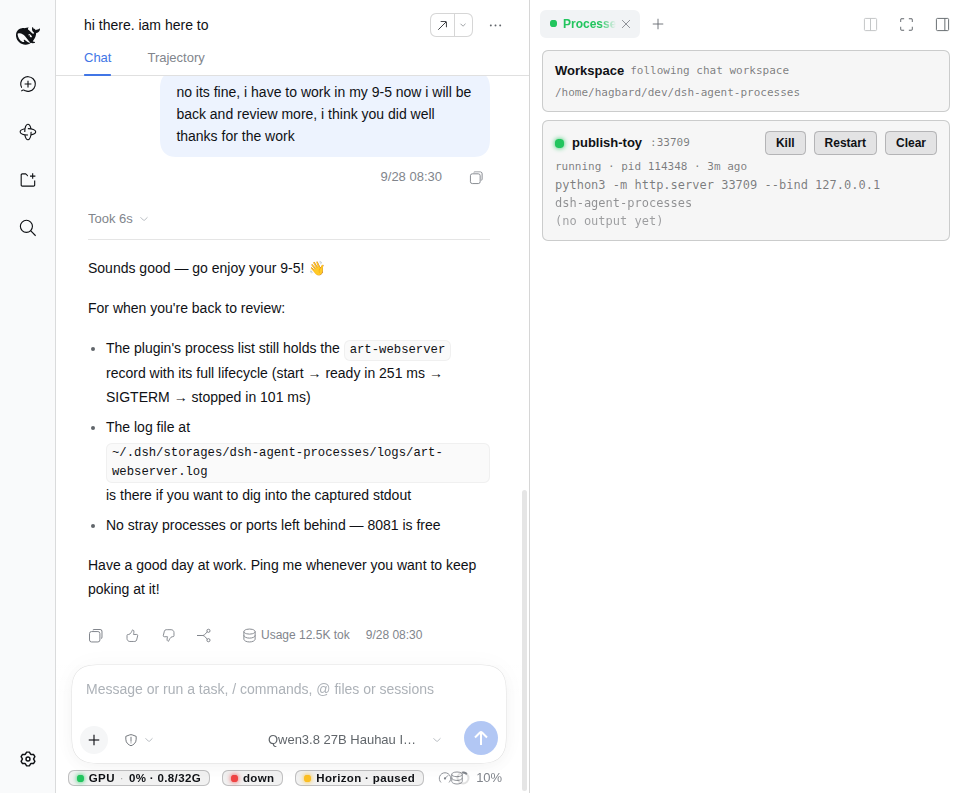
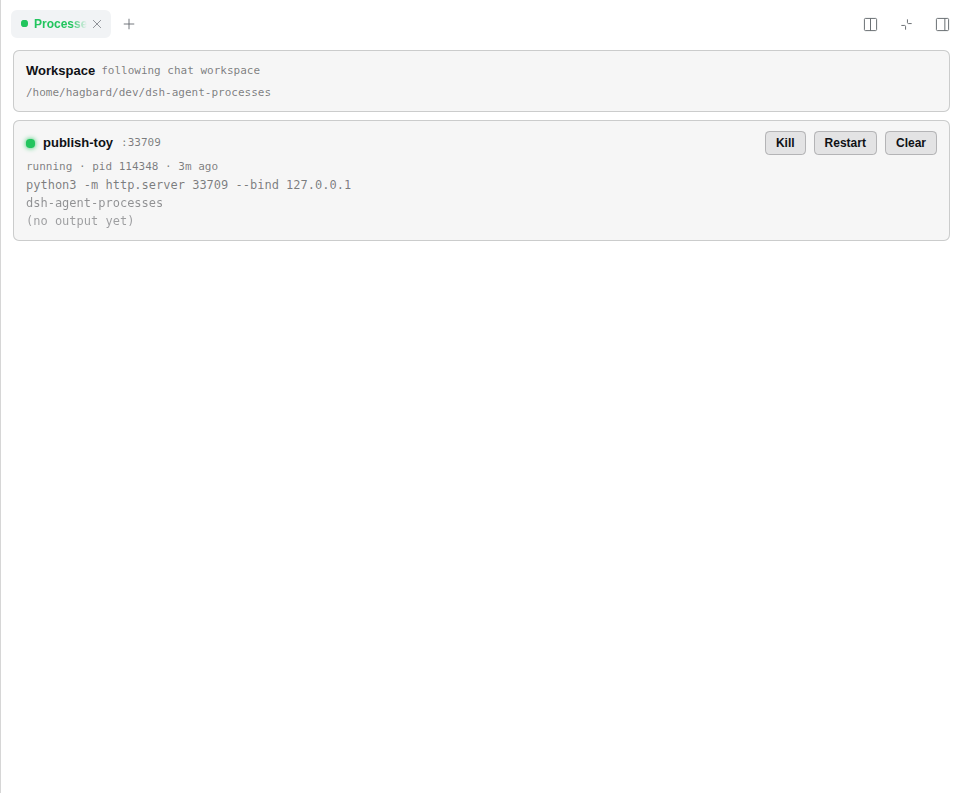
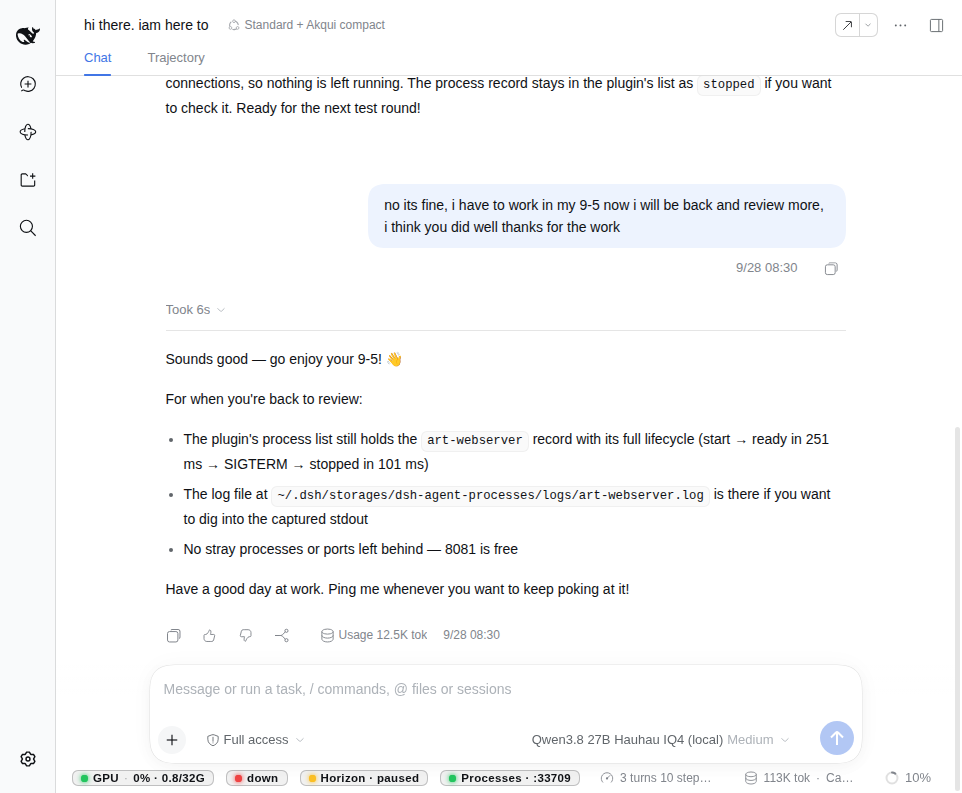
Light theme, matching the DSH default.
| Pane + chat (mid-run) | Processes pane (fullscreen) |
|---|---|
 |  |
| Dock chip (rightbar closed, chat metrics active) |
|---|
 |
What you see
- Processes rightbar — follows the open chat workspace. Per-record card: status dot (green running / amber starting / red crashed / grey stopped), id + port, pid + age, command, cwd basename, log preview, and Kill / Restart / Clear.
- Dock chip — on the chat metrics strip when the rightbar is closed and
something is running for the followed workspace (
Processes · :3000,Processes · 3 running, …). Click opens the pane. - Tracked reclaim — starting with a
portstops any tracked holder of that port first; foreign (untracked) holders are refused, never killed.
Install
From npm (recommended)
dsh plugin --profile web add dsh-agent-processes
# restart dsh web (or rely on live patch reload), then hard-refresh the browser
From GitHub
dsh plugin --profile web add github:janpauldahlke/dsh-agent-processes
From a git checkout (developers)
git clone https://github.com/janpauldahlke/dsh-agent-processes.git
cd dsh-agent-processes
npm install && npm run build
dsh plugin --profile web add "$(pwd)"
Restart (or boot) dsh web so the host + client faces load:
env -u DSH_WEB_URL -u DSH_SHELL -u DSH_SESSION_ID dsh web --no-open
Uninstall:
dsh plugin --profile web remove dsh-agent-processes
# restart the web instance that had the plugin
No harness file: dependencies — the host registers tools on the live
ctx.tools service provided by dsh. Rebuild lib/ after edits; client changes
hot-load, host changes need a web-shell restart.
Agent tools
| Tool | Purpose |
|---|---|
process_start | Spawn + track; optional port wait / reclaim |
process_stop | SIGTERM → 3s grace → SIGKILL (process group) |
process_list | All tracked records (liveness re-checked) |
process_logs | Tail a record's captured log |
process_wait_ready | Poll until 127.0.0.1:port accepts (or timeout) |
process_ping | Plugin liveness probe |
process_start with port:
- Reclaim — stop every tracked, live holder of that port; report ids in
reclaimed[]. - Foreign check — if the port still accepts connections, refuse with a typed error (no kill).
- Readiness — TCP connect to
127.0.0.1:P(default timeout 15s). Timeout is a success-shaped result witherror: 'port-timeout'; the process is left running.
Records store lossless argv so UI / route restart re-runs the same command
under the same id.
Surfaces
| Surface | Path / name |
|---|---|
| Vault | ~/.dsh/storages/dsh-agent-processes/processes.json |
| Logs | ~/.dsh/storages/dsh-agent-processes/logs/<id>.log |
| HTTP | GET / POST /api/dsh-agent-processes |
| UI | Rightbar Processes + composer dock chip |
GET  /api/dsh-agent-processes
→ { ok, package, version, storageRoot, count, processes: […] }

POST /api/dsh-agent-processes  { "action": "stop" | "restart" | "remove", "id": "…" }
The pane polls every 2s (refcounted — stops when the last viewer unmounts).
Recommended AGENTS.md snippet
## Long-lived processes — use dsh-agent-processes

For anything that stays up (dev servers, watchers, long `node` servers):

- Start with `process_start` (include `port` if it listens). It reclaims tracked
  holders of that port, refuses foreign ones, and waits for TCP readiness —
  do **not** start long-lived processes with raw `bash` or backgrounded `&`.
- Before assuming a port is free, check `process_list`; after starting, use
  `process_wait_ready` instead of `sleep`.
- Stop with `process_stop`. Read `process_logs` when something looks wrong.
- On crash or port failure: read `process_logs`, fix, `process_start` again,
  verify with `process_wait_ready`.
- Never kill untracked PIDs; if a foreign process holds the port, free it
  manually or start on another port.
Architecture
Dual-face package (same bar as the other web rightbar / dock plugins):
- Host (
lib/index.js, ESM) — vault, tools, HTTP route. - Client (
lib/client.js, CJS ModuleLoader factory) — rightbar + dock chip. - Glue —
cordis.patch.yml+dsh.bundle/dsh.clientinpackage.json.
dsh-agent-processes/
├── package.json
├── build.mjs
├── cordis.patch.yml
├── media/                 # README screenshots
├── scripts/               # shippable lifecycle smoke
├── test/                  # node --test (vault + service)
├── src/host/              # vault, service, tools, route
├── src/client/            # pane + dock chip
├── src/shared/            # shared types
└── lib/                   # built artifacts (required at runtime)
Develop / test
npm test          # node --test (vault + service; real child processes)
npm run smoke     # shippable lifecycle smoke (start → ready → reclaim → foreign refuse)
Limitations
- Tracked-only kill scope — never signals a PID it does not track; foreign port holders are refused, not killed.
- Crash detection is by liveness probe (sampler + on-request recheck), not by signal watching.
- No log rotation — logs are append-only.
- No per-session isolation — vault is per web profile; UI scoping is by cwd.
- Stretch (not in v0): read-only top-N system process card.
Contributing
See CONTRIBUTING.md for setup, layout, and PR expectations.
License
MIT — see LICENSE.
Related plugins
archify (deepseek-harness)
tt-a1i/archify
WeKnora (dsh-weknora)
tencent/weknora
weknora
tencent/weknora
BrowserSkill (dsh-plugin-browserskill)
tencent/browserskill