dsh-baton
jialaoliu/dsh-baton
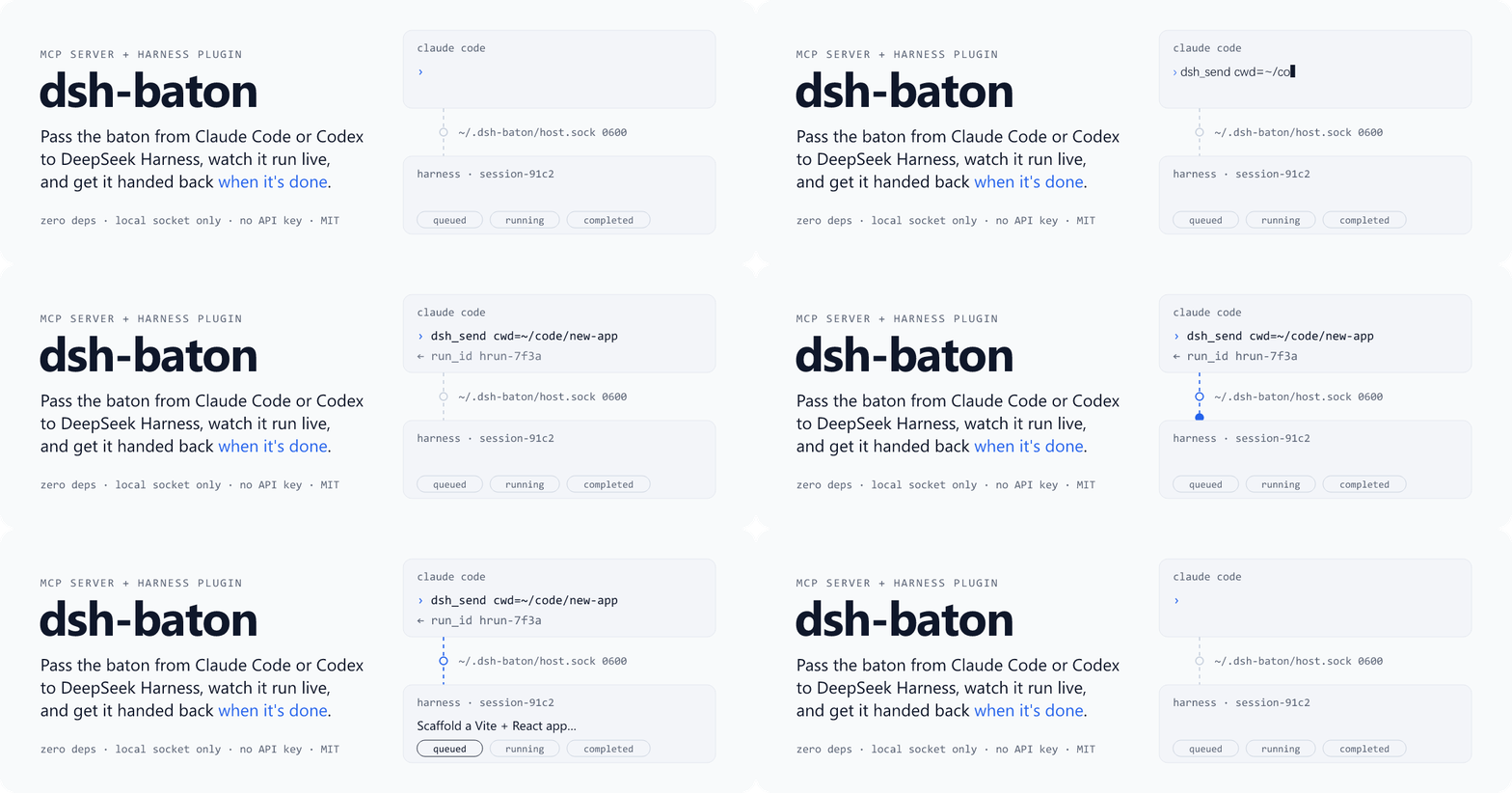
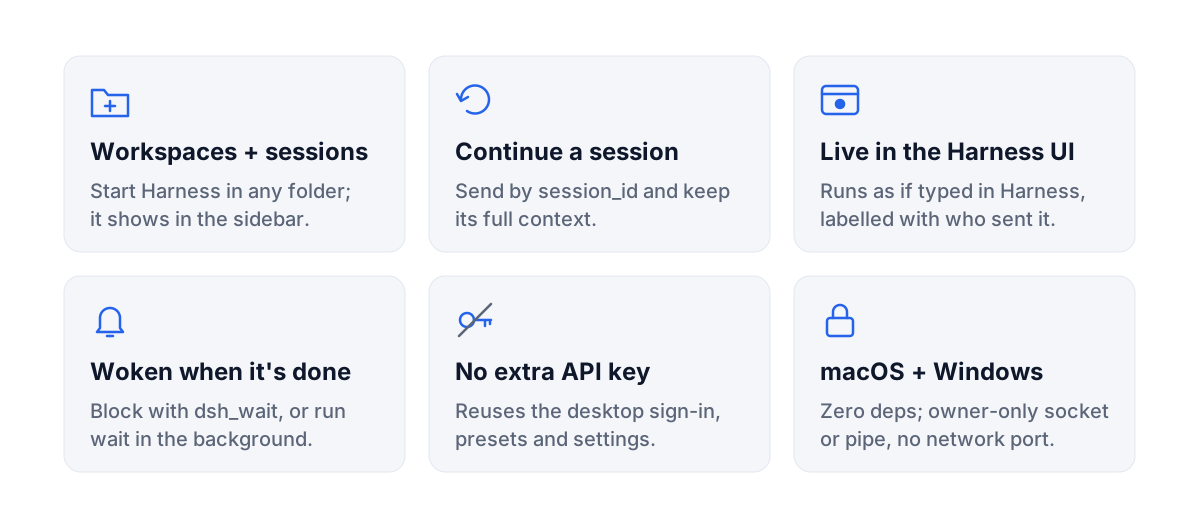
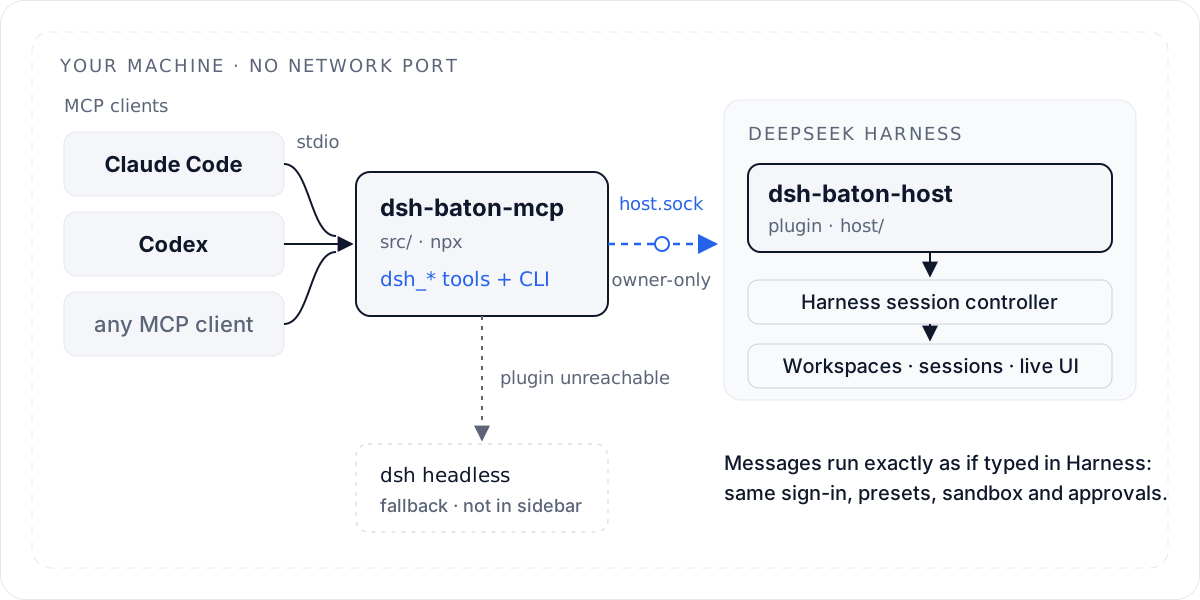
DeepSeek Harness plugin for dsh-baton: adding it is the whole install. Switched on, it registers the dsh-baton MCP server for Claude Code and Codex, then takes the baton over a local, owner-only control socket, runs it in a specific session through the ho
Install
dsh plugin --profile web add github:jialaoliu/dsh-batonREADME
English | 中文
macOS · Windows (guide) · no Node.js needed · zero dependencies · MIT
Claude Code and Codex each hand a task to DeepSeek Harness, and its subagents build this rainy-night street in 1 h 41 min (40 s, sound on):
https://github.com/user-attachments/assets/72e2fdff-275e-48bc-8e5a-39ffb025a0a8
See it run
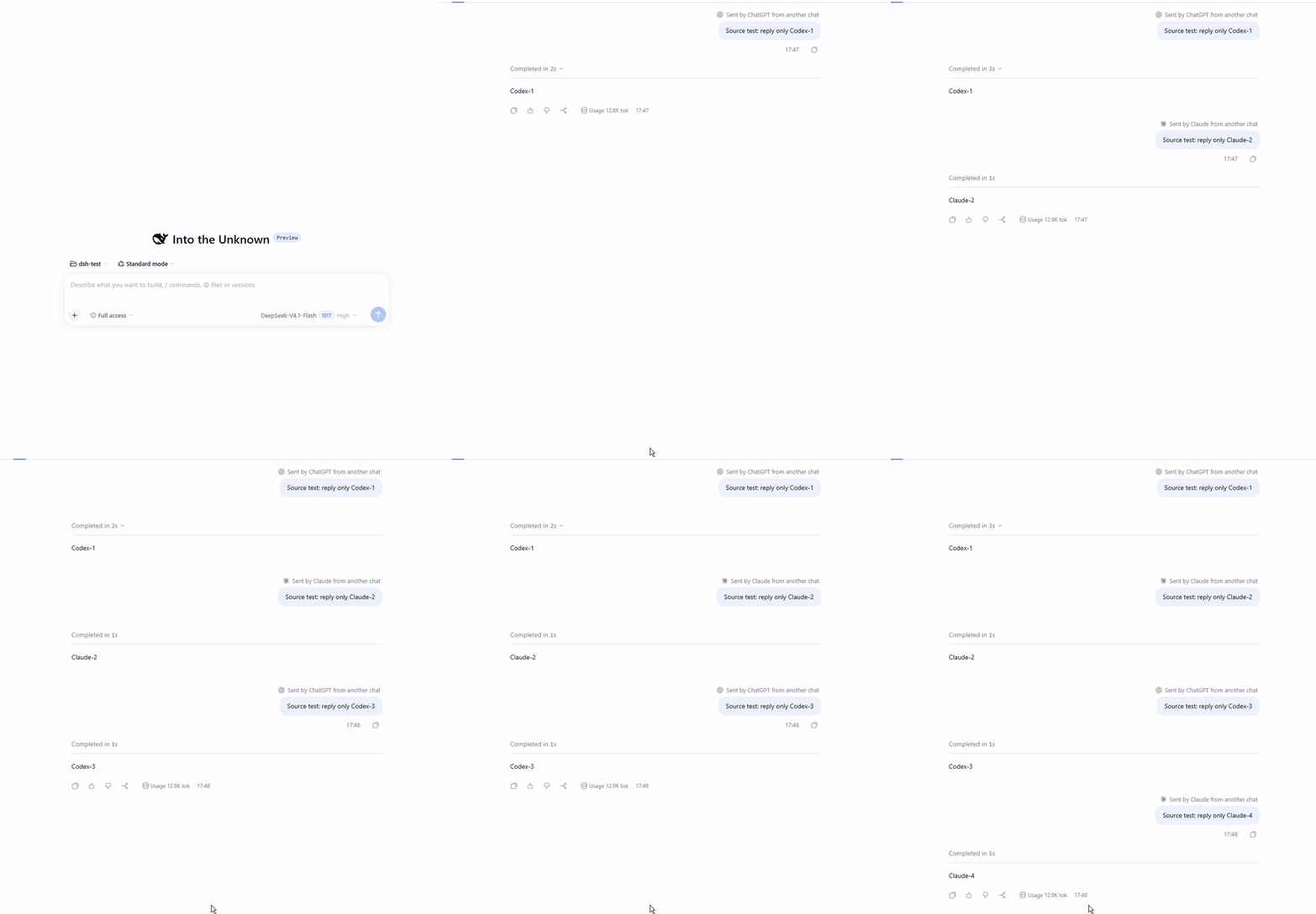
One Codex chat starts a task, queues a follow-up, steers the running turn, and waits for all three:
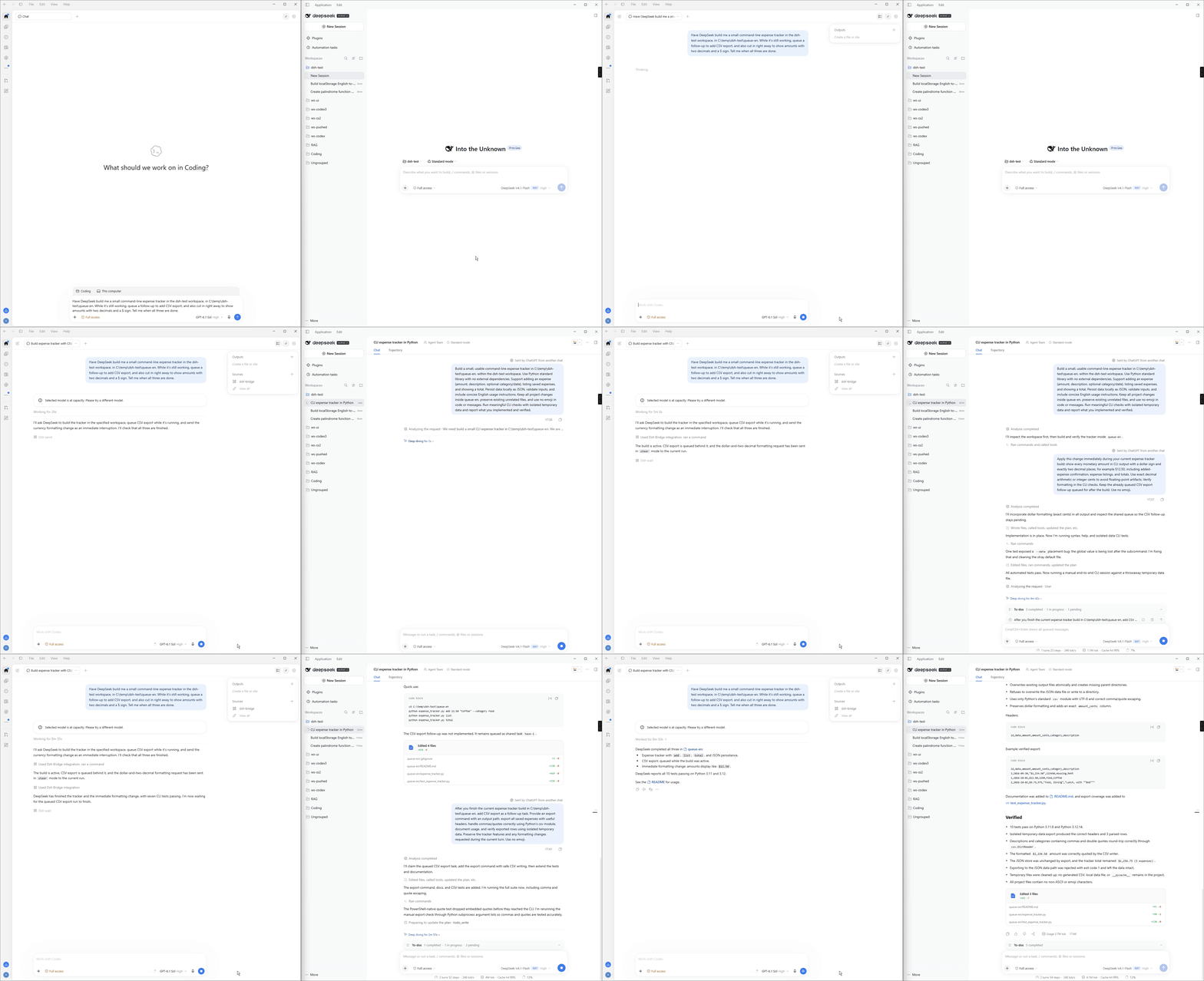
Codex and Claude take turns in the same Harness session, and every message is labelled with who sent it:
Quick start
Requires DeepSeek Harness ≥ 0.2.1-rc.2 (signed in) and Claude Code or Codex. Nothing else: no Node.js, no terminal. The steps are the same on macOS and Windows.
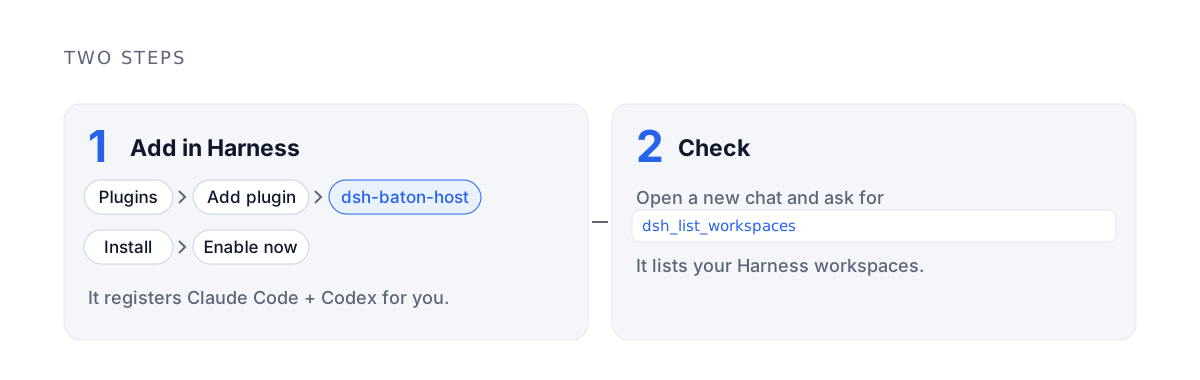
1. Add the plugin in Harness: Plugins (插件) → Add plugin (添加插件) → type dsh-baton-host → Install (安装) → Enable now (立即启用).
Switched on, the plugin registers dsh-baton for Claude Code and Codex, for every folder, and Harness says so.
2. Check: in a new Claude Code or Codex conversation, ask it to call dsh_list_workspaces. It lists your Harness workspaces.
That is all. If Harness says it could not register, run npx -y dsh-baton-mcp setup in a terminal (this needs Node.js ≥ 22.15); it does the same registration. Updating, removing and Windows details are further down.
How it works
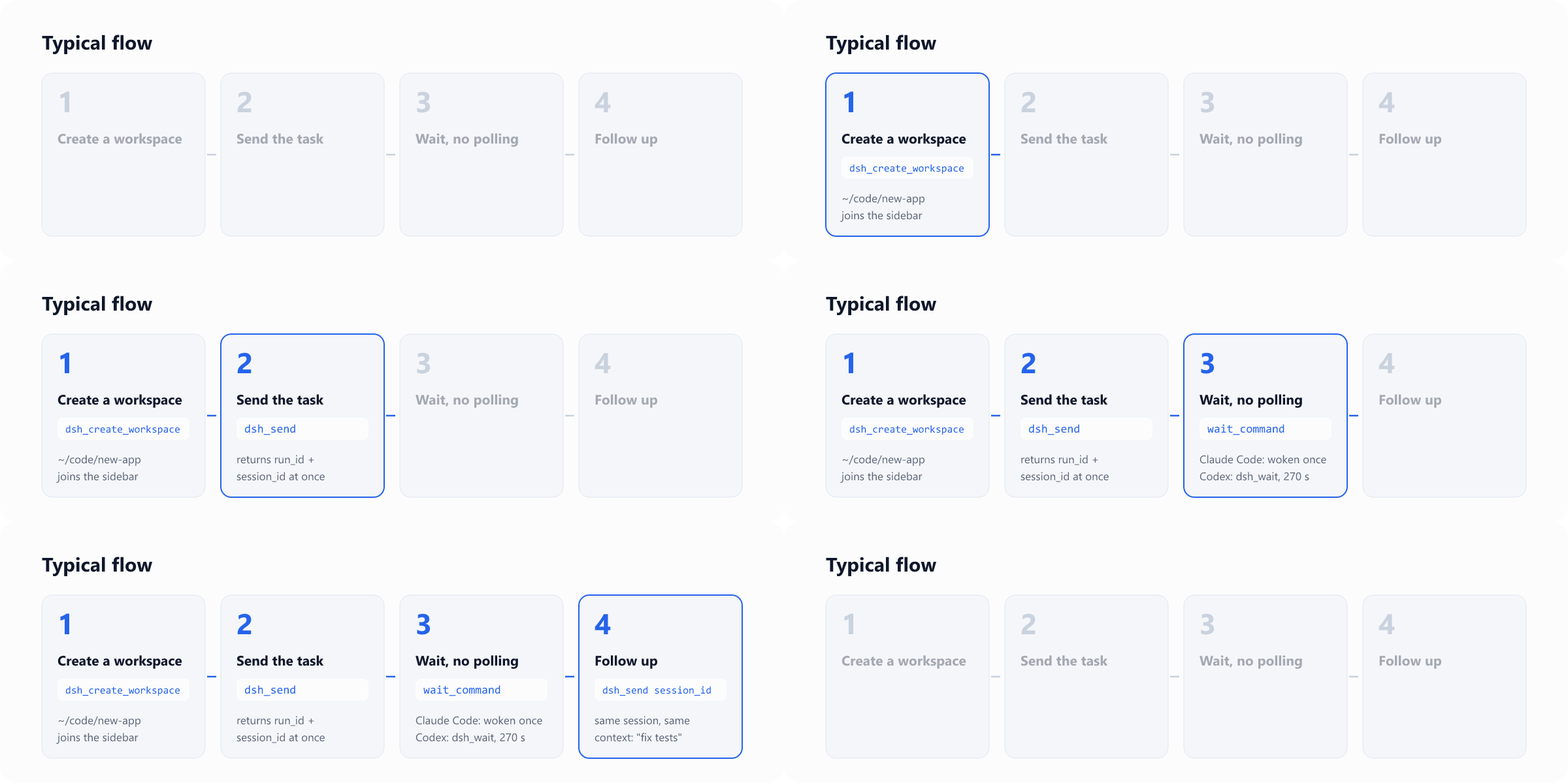
How each client waits (nothing to configure):
- Claude Code waits for a run in the background (the
wait_commandthatdsh_sendreturns) and is woken once, when the run ends. - Codex waits inside
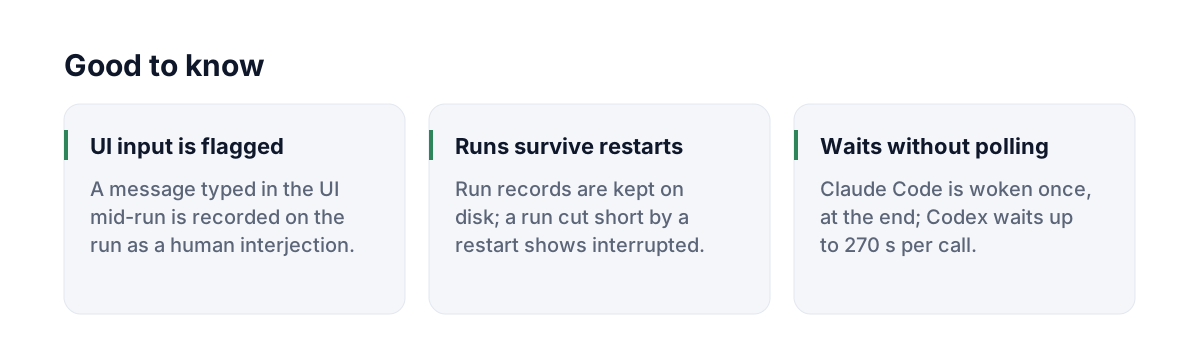
dsh_wait, up to 270 s per call, just under its 300 s tool timeout. An unfinished wait returns only the state, so Codex calls again without summarising. Codex gets nowait_command: its terminal cannot wake it, so it would poll. - Codex asks you to approve MCP tool calls: approve the
dsh-batontools. For unattendedcodex execruns, add--approve-for-me.
Tools
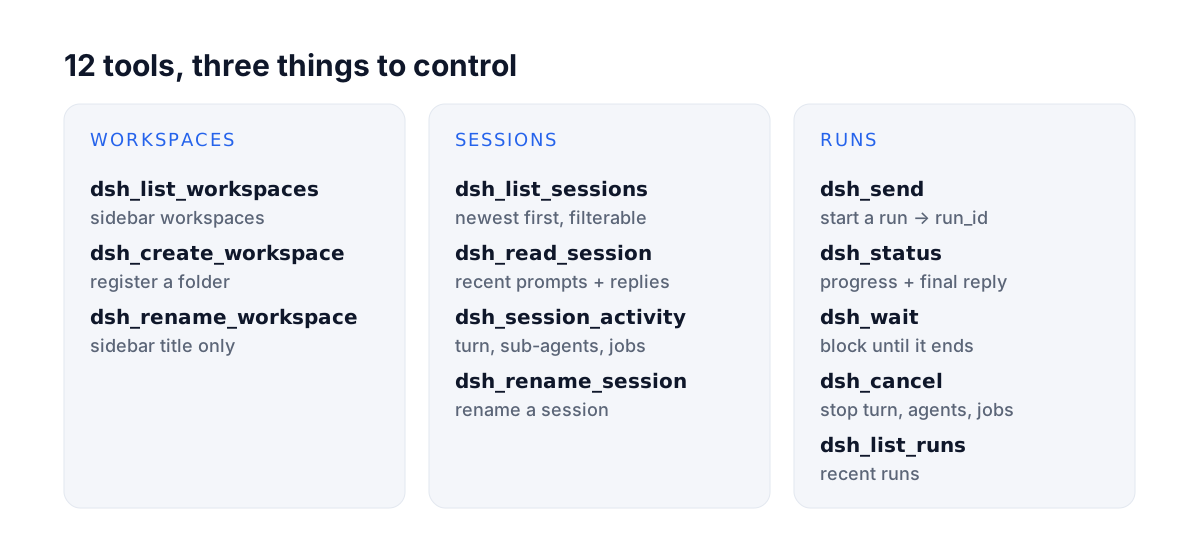
Full tool reference
| Tool | What it does |
|---|---|
dsh_list_workspaces | Workspaces in the Harness sidebar |
dsh_create_workspace | Register a folder as a workspace (creates the folder if missing); returns the existing one if already registered |
dsh_list_sessions | Sessions newest first, with title, folder and running state; filter by folder or text. Archived sessions are left out |
dsh_read_session | Recent prompts and replies of one session (with tool names); archived: true for an archived session |
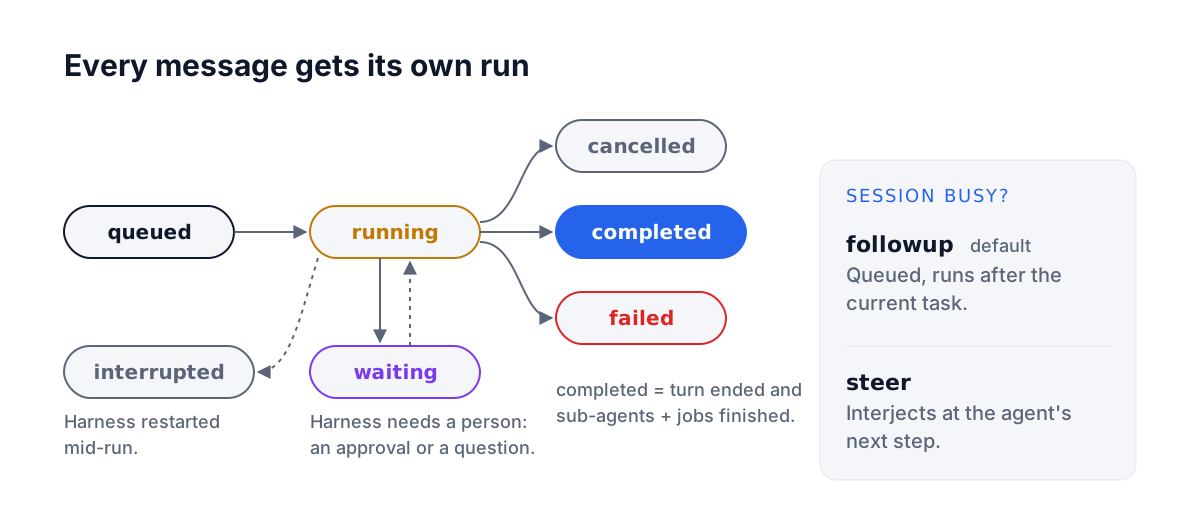
dsh_send | Send a message: session_id continues that session; cwd or workspace_id starts a new one (a cwd that is not a workspace yet is registered first). Returns a run_id at once. In Harness the message is marked "Sent by Claude / ChatGPT from another chat". An archived session is refused: unarchive it in Harness, or start a new session. To a busy session, mode followup queues the message after the current turn and steer adds it to the running turn; left out, it does what Harness's own setting says (Settings → sending while busy: queue or steer), and followup when that cannot be read. mode_source says which applied |
dsh_status | Run progress: state, recent text and tool calls, final reply; waiting_on when the turn is over but sub-agents or jobs still run; human_interjections when someone typed in the Harness UI mid-run; state interrupted for a run cut short by a Harness restart |
dsh_wait | Wait for the run to end (or until it stops to ask a person, see dsh_answer): up to 270 s per call for Codex, 50 s for other clients. Still going: returns timed_out with just the state; call it again. Clients that can wait in the background use dsh_send's wait_command instead. dsh_status is a one-off look, not a way to wait |
dsh_answer | Answer the questions a run stopped to ask (Harness's ask_user_question): per question, an option number or label, free text, or skip; one at a time or all at once. dsh_wait and wait_command return as soon as a run asks, with the questions (needs_input, question; the option Harness's model would pick is in harness_suggested, apart from the labels). The assistant answers by its own judgment only when you told it to decide, and then passes reason and tells you what it chose and why; otherwise it brings you the questions, starting with its own recommendation and reason. You can also answer in the Harness window: whoever answers first wins |
dsh_session_activity | What a session is doing now: running turn, sub-agents (any depth), background jobs; archived: true for an archived session |
dsh_update_queued | Change a message still waiting in the queue of a busy session, by its run_id: edit its text, remove it, or steer it into the running turn now. Once it has reached the conversation it can no longer be changed |
dsh_cancel | Stop everything a session is doing, by run_id or session_id: turn, sub-agents, jobs. Harness also drops the messages waiting in its queue; their runs end as cancelled |
dsh_rename_session | Rename a session |
dsh_rename_workspace | Rename a workspace (sidebar title only; the folder is not moved) |
dsh_list_runs | Recent runs, optionally of one session |
dsh_call | Backup entry: calls any dsh_* tool by name, for a conversation whose tool list predates an update; an unknown name lists the tools |
CLI
dsh-baton workspaces
dsh-baton new-workspace ~/code/new-app --title "New App"
dsh-baton sessions --cwd ~/code/new-app
dsh-baton send --cwd ~/code/new-app "Scaffold the project"
dsh-baton send --session session-xxxx "Next: add tests"
dsh-baton send --session session-xxxx --mode steer "Interjection: don't change the API"
dsh-baton wait hrun-xxxx              # blocks, prints the final reply; exit 0 on success
dsh-baton status hrun-xxxx
dsh-baton activity session-xxxx       # running turn, sub-agents, background jobs
dsh-baton cancel --session session-xxxx
dsh-baton rename session-xxxx "New title"
dsh-baton rename-workspace ~/code/new-app "New name"
Configuration
| Variable | Default | Meaning |
|---|---|---|
DSH_BATON_BACKEND | auto | auto, host or headless |
DSH_BATON_HOME | ~/.dsh-baton | Socket and headless run records |
DSH_BATON_SOCKET | $DSH_BATON_HOME/host.sock | Plugin socket path (must match on both sides); on Windows mapped to a per-user named pipe |
DSH_BATON_WAIT_S | 270 for Codex, else 50 | How long one dsh_wait call waits; set it only if you raised the client's tool timeout, and keep it below that |
DSH_BIN | the dsh inside the macOS app, else PATH | Harness CLI for headless mode |
DSH_HOME | ~/.dsh | Harness data folder (headless session reads) |
DSH_BATON_ACCOUNT | 1 | 0 uses the API-key route in headless mode |
DSH_BATON_PATCHES | empty | Extra headless --patch overlays, :-separated |
Headless fallback details
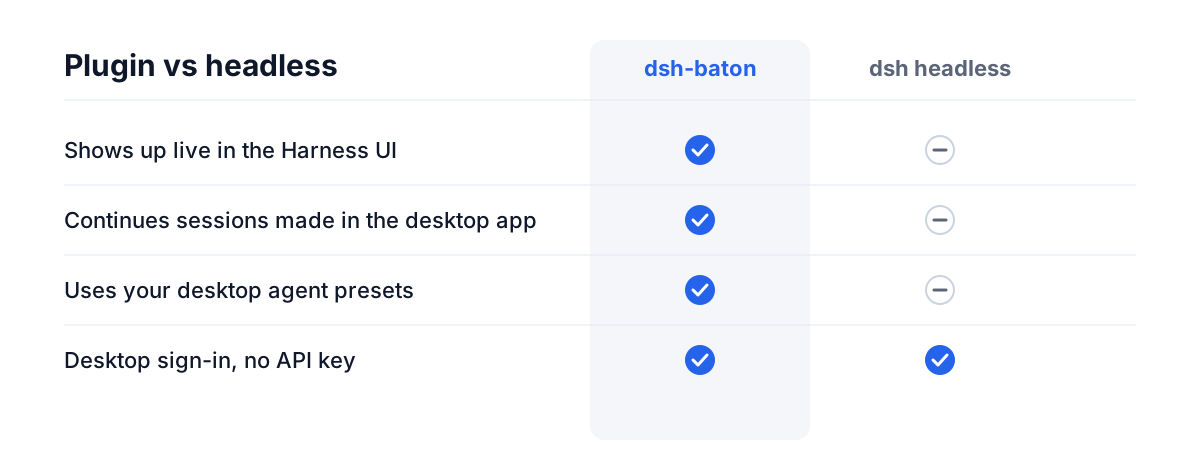
When the plugin is unreachable, the MCP server falls back to Harness's dsh headless command. It can only continue sessions it created itself (headless does not load agent presets such as standard), and new sessions do not appear in the desktop sidebar. By default patches/account.patch.yml reuses the desktop app's DeepSeek account sign-in, so no API key is needed.
Install details
What the plugin does when switched on. It copies the MCP server to ~/.dsh-baton/app, a folder that stays put, and writes the MCP entry into ~/.claude.json and ~/.codex/config.toml directly, keeping a *.bak-dsh-baton backup of each. It starts the server with your own Node.js ≥ 22.15 when it finds one on PATH; without one, with Harness's own runtime (the Harness app in Node mode, ELECTRON_RUN_AS_NODE=1), so nothing else has to be installed. Either way it works with only the desktop apps installed, when claude / codex are not on your PATH. It runs again on each Harness start: an entry that is already right, or a working one that starts another copy of dsh-baton, is left alone. In Harness, the source switches to the npm registry ("Official npm registry", 「npm 官方源」) by itself once you type the package name, and no restart is needed. To turn the registration off, set DSH_BATON_AUTO_REGISTER=0 for Harness.
Updates need no restart. When a newer version lands in ~/.dsh-baton/app (a plugin update, setup, or a copy by hand), conversations already open in Claude Code and Codex use it from their next dsh_* call: the server checks the folder before each call, starts the new version, and says once in that call's result that it was updated. A dsh_wait that is already running finishes on the old version first. If the new version cannot start, the old one keeps working and the result says why. A tool added in the new version shows up in Claude Code at once (the server tells the client its tool list changed); Codex keeps the tool list a conversation started with, so it does not show a new tool until the next conversation; from 0.5.9 on it can still use one at once through dsh_call, which the update note points to, and the tools it already has run the new code right away. This works from the version after 0.5.8 on; a server started from 0.5.8 or earlier needs one last restart (or /mcp reconnect) to pick it up.
npx -y dsh-baton-mcp setup does the same registration from a terminal: for a plugin that could not register, or when you come from an MCP directory. With the plugin already registered it changes nothing, then points you to the plugin if it is missing.
Updating. Harness has an update button only for its official plugins, so: Plugins → dsh-baton-host → Uninstall, then Add plugin → dsh-baton-host. For a while after a release, Harness installs the previous version instead (pnpm's minimumReleaseAge holds back versions published very recently, and the install dialog says so); to get the new one at once, type the version: dsh-baton-host@0.5.0. Switched on again, the plugin brings the MCP server to the same version; new conversations use it. If the two are ever out of step, the first tool call that notices it says so.
Removing. Harness → Plugins → dsh-baton-host → Uninstall, then npx -y dsh-baton-mcp setup --remove. The plugin cannot tell an uninstall from Harness quitting, so it leaves the MCP entries to that command, which also deletes ~/.dsh-baton/app; run records stay in ~/.dsh-baton until you delete it.
Upgrading from dsh-bridge. In Harness, uninstall dsh-bridge-host, then add dsh-baton-host; switched on, it replaces the old dsh-bridge MCP entries. DSH_BRIDGE_* variables and an existing ~/.dsh-bridge folder keep working for now. Tools get a new prefix (mcp__dsh-baton__…), so update any permission allowlists. A plugin added before 0.4 by pasting ~/.dsh-baton/app/host still works but does not update with npm: uninstall it and add dsh-baton-host by name.
From source (to follow main or change the code): git clone https://github.com/JialaoLiu/dsh-baton.git, then in Harness add the plugin from the clone's host folder (Add plugin → paste the path). Switched on, it registers the clone itself, so changes run before they are published. Update with git pull. node dsh-baton/src/cli.mjs setup registers the clone from a terminal.
Windows. Same steps; WINDOWS.md covers what differs (a named pipe instead of a socket file) and fixes for a Plugins page that cannot install or uninstall.
Manual registration and the Claude desktop app
The plugin and setup write the same entries these commands would (with the absolute path of node, since desktop apps start MCP servers without your shell's PATH):
claude mcp add dsh-baton -s user -- "$(command -v node)" "$PWD/dsh-baton/src/server.mjs"
codex mcp add dsh-baton -- "$(command -v node)" "$PWD/dsh-baton/src/server.mjs"
-s user matters: without it, Claude Code registers the server for the current project folder only.
Claude desktop app (optional): for the chat app's connectors (separate from Claude Code), add this to ~/Library/Application Support/Claude/claude_desktop_config.json and restart the app. It shows as a "Local dev" connector.
{ "mcpServers": { "dsh-baton": { "command": "/absolute/path/to/node", "args": ["/absolute/path/to/dsh-baton/src/server.mjs"] } } }
Security and limits
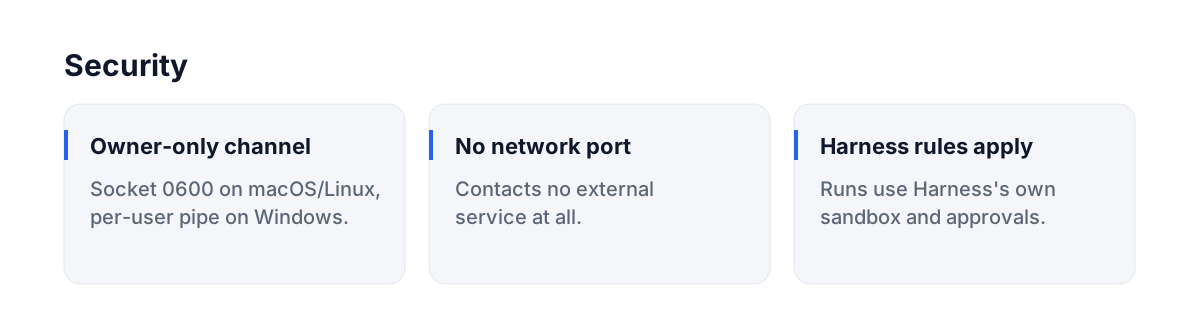
Any process running as your OS user can drive Harness through the socket, the same as running dsh directly. dsh-baton relies on Harness 0.2.1-series internal service APIs, so a major Harness update may need a follow-up release.
License
MIT
Related plugins
reactive-resume
amruthpillai/reactive-resume
cloudbase-ai-toolkit
tencentcloudbase/cloudbase-ai-toolkit
deja-vu
vshulcz/deja-vu
sandbase-harness
sandbaseai/sandbase-harness