dsh-connectors
joblessjoe/dsh-connectors
Claude-style connectors: add any MCP server (Streamable HTTP with SSE fallback, or a local stdio command) from a Connectors page in the sidebar, sign in once with OAuth 2.1 + PKCE, discovery and dynamic client registration (callback returns to whatever dsh address you use, so it works on headless servers), or a bearer token; tokens live in the dsh credential store and refresh on their own, dropped connections reconnect with backoff, single tools can be switched off, and mcpServers blocks from Claude Desktop, Cursor or VS Code can be pasted in. Tools appear as mcp__<id>__<tool>.
Install
dsh plugin --profile web add github:joblessjoe/dsh-connectorsREADME
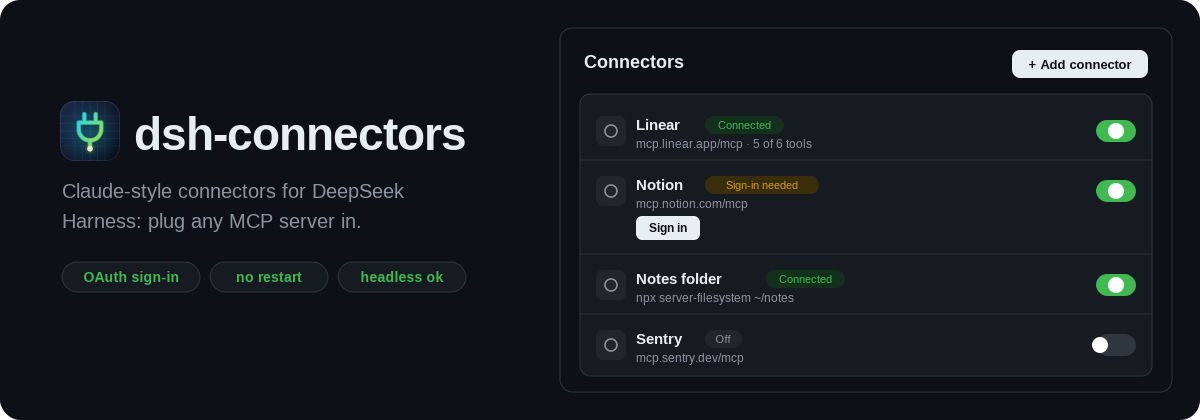





A DeepSeek Harness (dsh) plugin that brings Claude-style connectors to your agents: add any MCP server from a page in the sidebar, sign in once, and its tools show up in every chat. Hosted servers with an OAuth login, servers that want a token, and local programs all work the same way. No YAML, no restart per server.
npx @deepseek-ai/dsh plugin --profile web add dsh-connectors
Reload the browser tab. Connectors appears in the sidebar, right below Projects. Full details under Install.


Add a connector: paste the URL, pick how it signs in. A new OAuth connector opens its sign-in page right away.
What it does
- Any MCP server. Remote (Streamable HTTP, with automatic fallback to the older SSE transport) or a local command over stdio (
npx,uvx,docker, anything). - Real sign-in. OAuth 2.1 with PKCE, server discovery (RFC 9728 / RFC 8414) and dynamic client registration, done by the official MCP SDK. Works with hosted connectors like Linear, Notion, Sentry or your own FastMCP server behind GitHub login.
- Sign-in finishes by itself, anywhere. The provider sends you back to the dsh address you're using, so it works on a headless server too. No setup. See Signing in.
- Stays signed in. Tokens live in dsh's own credential store, survive restarts and refresh on their own.
- Heals itself. Dropped connections reconnect with backoff. A tool call during a hiccup waits a few seconds for the server instead of failing.
- You decide what agents see. Turn a whole connector off, or switch single tools off (say,
delete_issue). - Import. Paste an
mcpServersblock from Claude Desktop, Cursor, VS Code or a server's README. Tokens in anAuthorizationheader move to the credential store. - Fits in. Built from dsh's own buttons, switches, tags and dialogs, so it follows your theme in light and dark mode.
Tools appear as mcp__<id>__<tool>, the same names dsh's built-in MCP client uses.
Where it shows up
- Sidebar → Connectors, just below Projects. It is a normal dsh panel, so the shell's More menu can hide or show it.
- Settings → Connectors: the same page, for people who look there first.
Nothing in dsh is patched. Both entries are registered by the plugin through dsh's slot system.
Signing in
- Click Sign in on a connector. The provider's login page opens in a new tab.
- Log in and accept. The provider sends you back to dsh at
<your dsh address>/plugins/dsh-connectors/callback, the tab closes, and the connector turns Connected. That's it, on any device, whether dsh runs on your laptop or a server.
No setup and no fixed address: the plugin uses whatever address your browser opened dsh at (http://localhost:3080, https://dsh.example.com, a LAN IP). If you open dsh at a new address, the next sign-in registers it by itself.
How dsh-connectors identifies itself, best first:
- Your own OAuth client, if you enter a client id under Advanced (for servers that require pre-registration).
- Self-registration (DCR) for your dsh address: the no-paste flow above. Most servers today.
- The published identity (Client ID Metadata Document, the method newer MCP servers prefer):
https://joblessjoe.github.io/dsh-connectors/client-metadata.json. It can only name fixed return addresses, so it returns to127.0.0.1: automatic when dsh runs on your computer, the paste box when it runs on a server.
Fallback: a few providers only accept localhost return addresses. For those, click Try the paste method: the tab then ends on an error page at http://127.0.0.1:47391/callback?code=…; copy that address into the box and click Finish.
Install
Into your dsh web profile (web below is the profile name; use the one that backs your web GUI). From a source checkout, use pnpm dsh instead of npx @deepseek-ai/dsh:
npx @deepseek-ai/dsh plugin --profile web add dsh-connectors
This installs the package and adds it to dsh.profile.bundles. If Connectors doesn't show up after a browser reload, restart dsh once. After that, adding, editing and removing connectors never needs a restart.
Requires dsh 0.2.2-rc.1 or newer and Node 20+.
Configuration
Everything is done on the Connectors page. Two optional settings for the plugin entry in cordis.patch.yml:
| Key | Default | What it does |
|---|---|---|
file | $DSH_HOME/connectors.json | Where the connector list (no secrets) is saved |
callbackPort | 47391 | Port of the paste-method fallback listener |
Security
- Secrets never touch the connector list. Tokens, client secrets and OAuth grants go to dsh's credential store (
dsh-connectors/<id>records). The list file is written with mode600anyway. - Secrets never reach the browser. The page only learns whether a token is saved.
- The sign-in return route (
/plugins/dsh-connectors/callback) has to accept a cross-site redirect from the provider, so it sits outside dsh's/apifence. It only completes a sign-in that dsh itself started: a one-time randomstateplus the PKCE verifier, unused sign-ins expire after 15 minutes. If your dsh sits behind a login proxy, your browser's proxy session covers it. - The fallback listener only runs while a paste-method sign-in waits, binds to
127.0.0.1and stops afterwards. - The management route sits behind dsh's own login and trust checks, like every other
/apiroute. - Local commands run as your user, like any MCP server you'd add by hand. Only add commands you trust.
Building from source
git clone https://github.com/JoblessJoe/dsh-connectors.git
cd dsh-connectors
npm install
npm test        # builds lib/, then runs end-to-end tests against a real MCP server (stdio + HTTP)
node scripts/build.mjs alone emits lib/index.js (host) and lib/client.js (web).
Credits
Ideas from two earlier dsh MCP plugins: the settings-page approach of dsh-mcp-oauth-client and the credential-store and output-cap ideas of dsh-mcp-oauth. Both MIT.
License
MIT
中文简介 · DeepSeek Harness (dsh) 插件:像 Claude 一样的「连接器」。在侧边栏的 Connectors 页面添加任意 MCP 服务器(远程 OAuth 登录、令牌或本地命令),工具立即出现在所有对话中,无需 YAML、无需重启。支持 OAuth 2.1 + PKCE、令牌自动刷新、断线自动重连、按工具开关、从 Claude Desktop 配置导入;dsh 运行在服务器上时同样可以登录。
安装:npx @deepseek-ai/dsh plugin --profile web add dsh-connectors
Related plugins
archify (deepseek-harness)
tt-a1i/archify
WeKnora (dsh-weknora)
tencent/weknora
next-ai-draw-io (dsh-plugin)
dayuanjiang/next-ai-draw-io
weknora
tencent/weknora