dsh-pet-connector
keyszuns/dsh-pet-connector
Connects local dsh-pet to Big Fat Fish World (install dsh-pet first) with pairing, presence, bilingual panel, unique names, and friend co-op. Its HTTP routes have no DSH access check, so a web page open in your browser could call them.
Install
dsh plugin --profile web add github:keyszuns/dsh-pet-connectorREADME
dsh-pet-connector · 大肥鱼世界连接器
English | 中文
把本机 dsh-pet 接入「大肥鱼世界」的 DSH 插件。
不想摸鱼还可修仙! 除了摸鱼、逛街和日常养成,现在还能进入文字修仙秘境,选择地区、冲击境界、修习本命功法。
前置条件:先安装并启用
dsh-pet。 本插件只通过 dsh-pet 自带的本地 HTTP 扩展面工作,不修改 dsh-pet,也不读取本地文件或会话。
功能
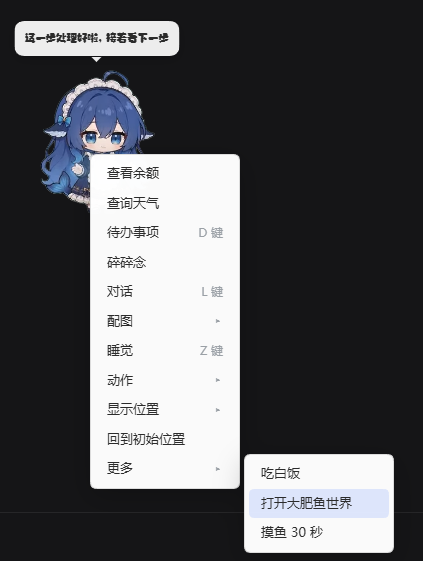
- 设备配对:右键宠物 →「打开大肥鱼世界」→ 生成配对码 → 浏览器加入 → 自动上线
- 换电脑恢复:大肥鱼ID + 恢复码
- 手动选择城市、生日五行、世界在线
- 三 Tab 面板:我的鱼 / 世界 / 背包
- 好友、排行、世界频道、私信、组队
- 班次、修仙秘境、装备、商店、签到、任务、运势、鱼潮
- 修仙独立境界/头衔、地区解锁、手动突破、本命功法、修仙榜
- 面板内「关于 / About」页支持中英文介绍
- 支持 dsh-market 更新 API:手动检查/更新,可选每 24 小时自动更新
安装
在 DSH 插件页安装 dsh-pet 后,任选一种安装本连接器:
# 从 GitHub 安装
dsh plugin --profile web add github:keyszuns/dsh-pet-connector
桌面版可在 插件 → 添加插件 → 安装第三方插件 输入:
github:keyszuns/dsh-pet-connector
或下载 GitHub Release 的 .tgz,在同一个对话框里输入本地绝对路径。
安装后启用 dsh-pet-connector,打开任意会话,右键桌面宠物选择「打开大肥鱼世界」。
入口位置:右键宠物 → 更多 → 打开大肥鱼世界。
服务器地址默认:
https://fish.virtuallife.cloud
配置
cordis.patch.yml 的 config:
| 键 | 默认值 | 说明 |
|---|---|---|
platformUrl | https://fish.virtuallife.cloud | 大肥鱼世界服务地址 |
petId | main | 本机 dsh-pet 实例 id |
petName | 大肥鱼 | 首次配对时的显示名,加入页可改 |
隐私
- 不请求定位,不接收经纬度,不调用地图服务
- 不读取用户文件、DSH 会话、模型密钥、剪贴板或进程
- 只读写
~/.dsh/dsh-pet-connector/state.json - 只访问配置里的
platformUrl和本机 dsh-pet 接口
更新
面板「关于」页提供:
- 检查更新 / Check
- 立即更新 / Update
- 24h 自动更新 / Auto: ON/OFF
更新通过 dsh-market 的公共更新 API v1 完成;未安装 dsh-market 时按钮会提示不可用。
从本地 .tgz/目录安装的副本没有市场来源,不能通过这个按钮自动更新;要实现手动/24h 自动更新,请通过 GitHub 或 dsh-market 安装。
English
A DSH plugin that connects your local dsh-pet to Big Fat Fish World.
Don't feel like working? Go cultivate immortality! Besides fishing, strolling and daily life, you can now enter a text cultivation realm, choose regions, break through realms, and learn a primary technique.
Prerequisite: install and enable
dsh-petfirst. This plugin only talks to dsh-pet's local HTTP extension surface. It does not modify dsh-pet or read local files or sessions.
Features
- Device pairing: right-click pet → Open Big Fat Fish World → join in browser
- Account recovery with Big Fish ID + recovery code
- Manual city choice, birthday five-elements, world presence
- Three-tab panel: My Fish / World / Bag
- Friends, leaderboards, world chat, direct messages, co-op
- Shifts, cultivation realm, gear, shop, check-in, quests, fortune, tide
- Independent cultivation realm/title, region unlocks, manual breakthroughs, primary technique, cultivation leaderboard
- Bilingual About page inside the panel
- dsh-market update API: manual check/update and optional 24h auto-update
Install
Install dsh-pet first, then:
dsh plugin --profile web add github:keyszuns/dsh-pet-connector
Or in Desktop: Plugins → Add plugin → Install third-party plugin, enter:
github:keyszuns/dsh-pet-connector
You can also install a Release .tgz by entering its absolute local path.
Enable dsh-pet-connector, open a session, right-click the pet, and choose Open Big Fat Fish World.
Entry: right-click pet → More → Open Big Fat Fish World.
Default server:
https://fish.virtuallife.cloud
Privacy
- No geolocation, no coordinates, no map service
- No access to local files, DSH sessions, API keys, clipboard, or processes
- Only reads/writes
~/.dsh/dsh-pet-connector/state.json - Only contacts the configured
platformUrland local dsh-pet
Updates
The About panel offers Check, Update, and a 24h auto-update toggle. Updates use the public dsh-market update API v1; without dsh-market the controls report that updates are unavailable.
A local .tgz/directory install has no market source and cannot auto-update through this button. Install from GitHub or dsh-market to enable manual and 24h updates.
License
MIT
Related plugins
dsh-web-ui (dsh-pet)
zhu1090093659/dsh-web-ui
dsh-pet (dsh-pet)
pc2005-cloud/dsh-pet
dsh-tavern (dsh-tavern)
flizzywine/dsh-tavern
dsh-tavern (dsh-profile-bridge)
flizzywine/dsh-tavern