dsh-device-mesh
kfxhjz/dsh-device-mesh
DSH device mesh: pair your DSH devices and control them remotely over LAN/Tailscale or a paseo-relay public channel
Install
dsh plugin --profile web add github:kfxhjz/dsh-device-meshREADME
DSH Device Mesh



简体中文 | English
Pair multiple DeepSeek Harness (DSH) machines into one device mesh. After a one-time pairing, any paired device can open another device's full DSH Web UI — conversations, approvals, terminal, files and settings — as if you were sitting in front of it.
Status: developer preview (
v0.1.9), targeting DSH0.2.2-rc.2. Design and security model: docs/DESIGN.md. Wire protocol: docs/PROTOCOL.md.
What it is
DSH Device Mesh is a third-party DSH plugin (a host half plus a Web client half) that connects separate DSH installations:
- The daemon is the device being controlled. It exposes a pairing ticket and accepts encrypted mesh sessions.
- The controller is the device you are sitting at. It pairs with a daemon, lists that device's workspaces, and opens its DSH Web UI through a local reverse proxy called a portal.
Roles are per connection, not per machine: every install ships both halves, so each device can control others and be controlled. The protocol does not depend on the operating system.
Screenshots
The sidebar host switcher lists this host plus paired remotes; selecting a remote mirrors its workspaces and sessions (marked Remote) while the local tree stays intact, and any row opens the full remote UI through the portal.
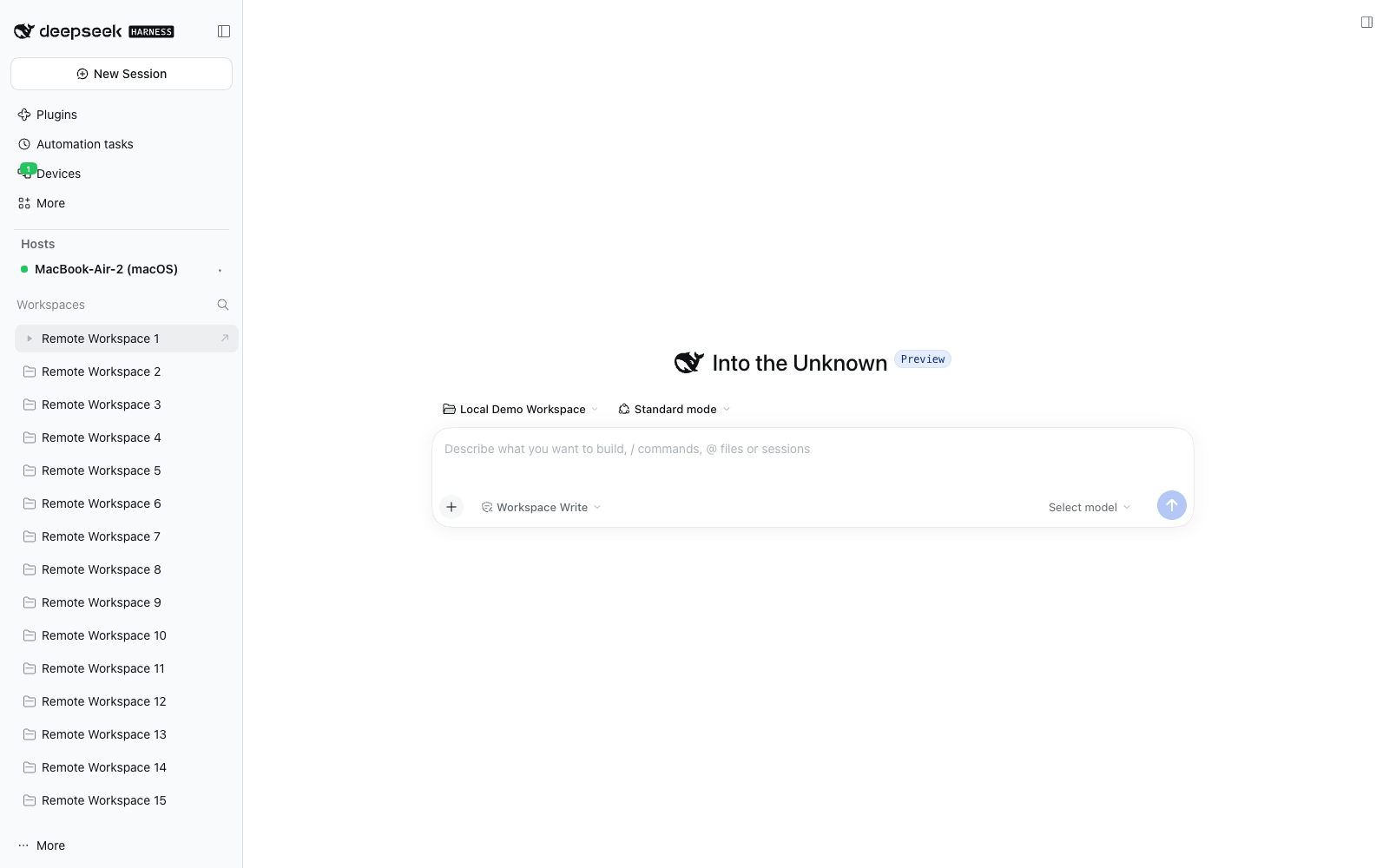
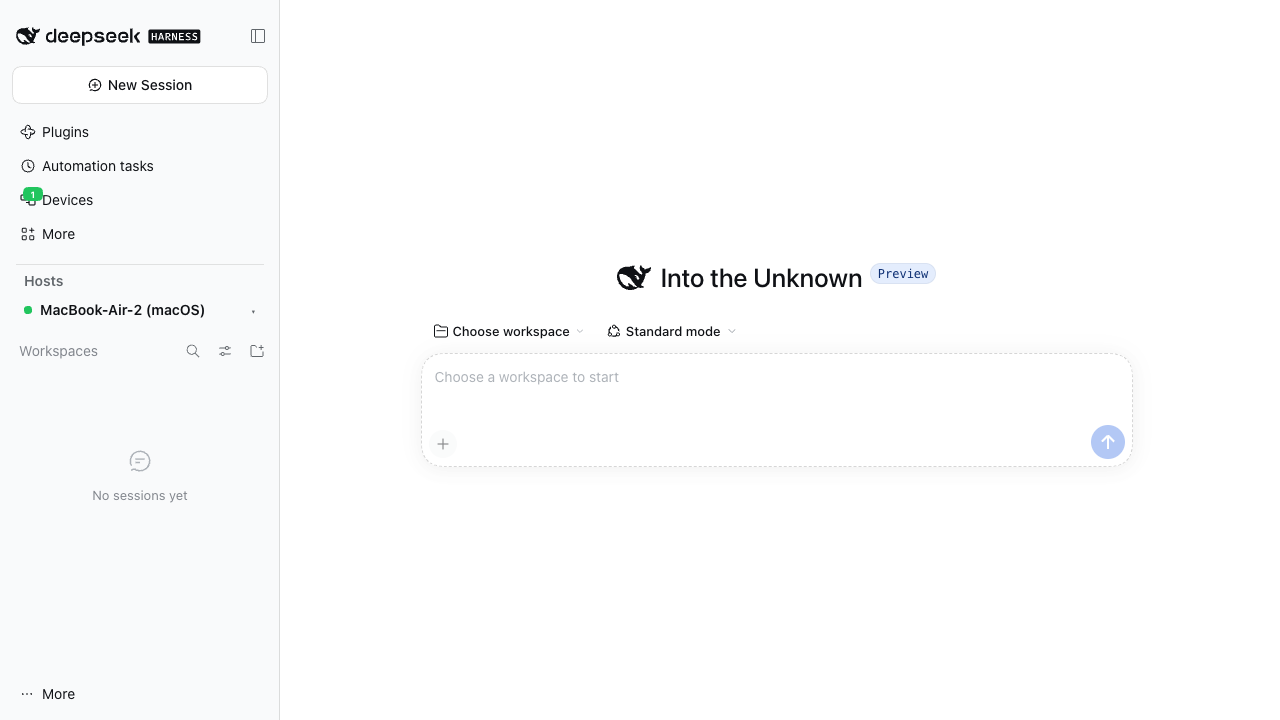
Both screenshots come from the isolated two-instance E2E run, not from a real device profile.
Features
- Symmetric by design — one package, both roles. The same build runs on a Linux desktop, a Linux server and a macOS desktop.
- Two transports, one session protocol — direct WebSocket on the LAN or a Tailscale network, or a self-hosted paseo-relay over the public internet. The relay only forwards opaque ciphertext.
- QR / link pairing — the daemon shows a one-time QR code and a
dsh-mesh://pair?d=…link. The controller scans it or pastes it. - Explicit local approval — the daemon shows the controller's name, platform
and a 6-digit SAS fingerprint (
123-456) and waits for a human decision. - End-to-end encryption —
Noise_NK_25519_ChaChaPoly_SHA256, pinned device keys, one-time pairing tokens and per-device authorization. - Revocation and audit — revoke any paired device at any time; pairing, connection, revocation and portal-open events are written to an audit log without message contents or secrets.
- Local and remote are clearly separated — a host switcher above
Workspaces shows the current host; selecting a paired host replaces the
workspace region with a remote mirror (host name, status, workspaces and
sessions), and selecting this host restores the native local tree. The
mirror has its own View options (group by workspace or one list, order by
recent activity or title, hide/show/only archived), a New session (
+) action on each remote workspace row, and per-session Archive / Unarchive actions, while the Devices panel remains the management surface for pairing and devices. - Compressed remote history — large
/api/remote.muxWebSocket messages (session history snapshots, streamed output) are gzipped end to end across the Mesh when both ends support it, so opening a large Session is not limited by transferring multi-megabyte JSON verbatim.
Platform matrix
| Device | Form factor | Role | Direct | Relay | Verification |
|---|---|---|---|---|---|
| A | Linux desktop DSH | daemon + controller | ✅ | ✅ | Host + controller flow verified via dsh web; desktop UI pending |
| B | Linux server, dsh web --no-open | daemon + controller | ✅ | ✅ | Verified end to end via dsh web |
| C | macOS desktop DSH | daemon + controller | ✅ | ✅ | Verified via dsh web; Electron window/right-sidebar UI pending |
| D | Future official mobile DSH (Android / iOS / HarmonyOS) | controller (daemon later) | planned | planned | Not implemented |
Typical usage (a prime denotes a second device of the same class; any authorized pairing works, including two devices of the same class):
- A controls B (Linux desktop ↔ Linux server).
- B controls B′ (server ↔ second server).
- C controls A, B and C′ (macOS desktop ↔ everything).
- A future D scans a pairing code and controls A, B and C.
The D row is intentionally conservative: the wire protocol and the client half are platform-neutral, but no mobile build exists yet and camera / background-lifecycle work has not been done. Android, iOS and HarmonyOS are expected to load the same Web client half through the official DSH mobile shell or a WebView host.
Browser requirement for the controller: the portal's cookie authentication
needs browser Fetch Metadata (Sec-Fetch-Site). Supported: Chromium 88+,
Firefox 90+, Safari 16.4+ and the Electron shell. Older browsers can still pair
and manage devices, but cannot open the remote UI; use a supported controller
browser instead.
How it works
Device A (daemon)                              Device B (controller)
┌─────────────────────────────────┐            ┌─────────────────────────────────┐
│ DSH host process                │            │ DSH host process                │
│                                 │            │                                 │
│  ┌───────────────────────────┐  │            │  ┌───────────────────────────┐  │
│  │ client plugin (Web UI)    │  │            │  │ browser: remote DSH UI    │  │
│  │  Devices / QR / workspaces│  │            │  │ (loopback portal URL)     │  │
│  └─────────────┬─────────────┘  │            │  └─────────────┬─────────────┘  │
│                │ same-origin    │            │                │ HTTP / WS      │
│  ┌─────────────▼─────────────┐  │            │  ┌─────────────▼─────────────┐  │
│  │ host plugin               │  │            │  │ host plugin               │  │
│  │  broker / direct / relay  │  │            │  │  controller / portal      │  │
│  └─────────────┬─────────────┘  │            │  └─────────────▲─────────────┘  │
└────────────────┼────────────────┘            └────────────────┼────────────────┘
                 │                                              │
                 └──────────── Noise NK (E2EE) ─────────────────┘
                        direct (LAN / Tailscale) or paseo-relay
- Identity. On first start each device generates an Ed25519 signing key and
an X25519 Diffie-Hellman key under
$DSH_HOME/device-mesh/identity.json(mode0600). Public keys travel in pairing links; private keys never leave the device. - Pairing. The daemon creates a short-lived, signed ticket containing its public keys, reachable endpoints, a relay route only while this device serves relay, and a one-time token. The controller verifies the signature, pins the keys and connects. It proves possession of the token inside the encrypted channel; the daemon asks its local user, who compares the SAS with the controller.
- Transport. Both sides then run the same Noise session over either a
direct WebSocket (default port
45871) or paseo-relay v2 (a control socket plus one data socket per controller). The relay cannot read or modify frames without detection. - Remote control. The controller starts a loopback portal. A browser tab loads the daemon's own DSH Web UI through the portal, and every HTTP request and WebSocket frame is proxied through the Noise session. The daemon's DSH browser cookie stays in the daemon's memory and never crosses the mesh.
Requirements
- DSH
>=0.2.2-rc.1 <0.3.0(declared inpackage.json→engines.dsh); CI and the release gate are pinned to0.2.2-rc.2. Incompatible DSH versions are rejected instead of silently degrading. - Node.js
>=24.9.0to build the plugin and to run server installs. The desktop app ships its own runtime. - npm (the build uses only the dependencies in
package.json). - pnpm for
dsh plugin add/remove: the DSH CLI forwards those commands to pnpm, so the desktop app's bundled CLI still needs a working pnpm onPATH. CI installs pnpm 11 and the pnpm major should track the DSH baseline. - macOS or Linux for the tested matrix. Windows is not part of the tested matrix.
- Optional: a publicly reachable paseo-relay
v0.1.2instance for internet-wide pairing. LAN and Tailscale do not need it.
Install
The plugin is a standard DSH third-party bundle: a host plugin plus a Web client plugin. Install the prebuilt package from npm without building anything:
dsh plugin --profile <profile> add dsh-device-mesh
The same command also accepts the .tgz from the
latest release
(add ./dsh-device-mesh-<version>.tgz), which is the fallback while a specific
version is not on npm. The steps below build from source for contributors.
Which profile?
--profile is required: it selects which DSH runtime composition receives the
plugin. A profile is a named, ordered stack of plugin-bundle patch layers under
$DSH_HOME/profiles/<name>/, with its own package.json (bundle list and
dependencies) and cordis.patch.yml. A bundle installed into one profile is not
visible to another, so install into the profile you actually boot:
| You start | Install into |
|---|---|
| DSH Desktop | desktop |
dsh web | web |
dsh headless | headless |
dsh tui | tui |
dsh --profile <name> (custom) | <name> |
# Desktop app
dsh plugin --profile desktop add dsh-device-mesh

# Headless server running `dsh web`
dsh plugin --profile web add dsh-device-mesh

# A custom profile created from the shipped web template
dsh --from-default-profile web --profile edge --dump-config
dsh plugin --profile edge add dsh-device-mesh
Inspect a profile without booting it:
dsh plugin --profile desktop list --depth 0   # installed packages
dsh --profile desktop --dump-config           # composed patch layers
$DSH_HOME defaults to ~/.dsh; profile directories live under
$DSH_HOME/profiles/. dsh plugin without --profile fails, so always name the
profile you boot. The desktop app uses desktop; the CLI dsh web uses web.
1. Build from source
git clone <repo-url> dsh-device-mesh
cd dsh-device-mesh
npm install
npm run build        # produces lib/host/index.js and client.js
npm test             # optional: unit and transport suites
npm run build must finish before installing: DSH loads lib/host/index.js
and serves client.js from the package root.
2. macOS desktop (device C)
Use the dsh CLI bundled with the desktop app and install the checkout into the
reserved desktop profile:
"/Applications/DeepSeek Harness.app/Contents/Resources/runtime/cli/bin/dsh" \
  plugin --profile desktop add "$PWD"
If your app is installed elsewhere, substitute the equivalent bundled CLI path. Quit and reopen DSH Desktop. The sidebar should now show a Devices entry (with an online-device count); a host switcher sits in the sidebar directly above Workspaces, showing the current host name and, on click, paired remotes plus Add host, while the panel follows the selected host. Add host (direct connection, remote SSH marked as planned, or paste a pairing link); you can also confirm the plugin under Settings → Plugins.
3. Linux desktop (device A)
Use the dsh CLI shipped with your desktop build (on PATH, or under the app's
resources directory):
dsh plugin --profile desktop add "$PWD"
Restart the desktop app after the command succeeds.
4. Linux server, dsh web --no-open (device B)
dsh plugin --profile web add "$PWD"
dsh web --no-open
dsh web --no-open prints a tokenized loopback URL (http://127.0.0.1:<port>/?token=…).
Open it from a browser on the same machine, or keep the server headless and use
another device as the controller.
For access from other browsers, follow the DSH public-deployment guide: --host
must be a concrete local address (DSH rejects wildcard binds), and a
browser-visible authority must be declared with --trusted-host. Terminate TLS
at DSH or at a reverse proxy. Do not expose a plain http:// DSH Web port to an
untrusted network.
5. Install from a .tgz
If you prefer a single artifact, pack the built directory and install that:
npm pack
dsh plugin --profile desktop add ./dsh-device-mesh-<version>.tgz
The same add command accepts a local directory, a .tgz, an npm package name
or a link: spec. Relative paths are resolved from the directory where you run
the command.
6. Mobile (device D, future)
There is no mobile app yet. The controller half is a Web client bundle, so once an official DSH mobile shell or WebView host exists on Android, iOS or HarmonyOS it can load the same UI. The protocol is platform-neutral; camera permission, QR scanning and background keep-alive must be adapted separately.
Upgrading
Rebuild, reinstall into the same profile and restart DSH:
npm run build
dsh plugin --profile <profile> add "$PWD"
Device identity and pairings live in $DSH_HOME/device-mesh/ and are preserved.
An incompatible protocol version is rejected and requires re-pairing.
Pairing and usage
The UI labels below are the English defaults; the plugin ships English and Chinese dictionaries and follows the DSH language setting.
Pair a controller with a daemon
- On the daemon: open Devices → This device → Create pairing link. The
panel shows a QR code and a
dsh-mesh://pair?d=…link. It is valid for 10 minutes and is removed the first time a controller presents it (before approval). If the request is denied or the prompt is lost, create a new link. - On the controller: open Devices → Add remote device, then Scan
(Chromium's
BarcodeDetector) or Paste manually. - On the daemon: a Pairing request appears with the controller's name,
platform and a 6-digit security code, for example
123-456. Compare it with the controller and click Allow. - On the controller: the device moves to Paired devices and its status becomes Online.
The security code is derived from the Noise handshake hash and both public keys. If the two screens show different codes, deny the request. The controller waits up to 5.5 minutes for approval; if its session closes first, the daemon denies the pending request automatically.
Open the remote control
- Devices → Paired devices → Open remote control opens the daemon's complete
DSH Web UI. On the Web profile it renders in an iframe over the local center
column (
http://127.0.0.1:<random port>/), so the local sidebar stays usable and no remote credential reaches the browser. The same center-column surface is used in the Desktop shell: the portal cookie isSameSite=None; Secure, and the response is a bootstrap page that lets the cross-sitedsh-app:iframe acquire it. The remote shell's own sidebars are collapsed and its Session is selected from?dm-session=, so it reads like the local conversation column. Right-sidebar Browser tab and the system browser remain fallbacks. - The host switcher above Workspaces mirrors the selected daemon's workspaces and sessions (marked with a Remote badge); opening a row starts the same portal. A listing is capped at 200 sessions across at most 100 workspaces so it fits one encrypted message, and says so when it was trimmed.
- GUI assets are content-addressed and cached under
$DSH_HOME/device-mesh/portal-cache; reopening the same remote build skips the multi-megabyte plugin download. - The portal is owner-level control of the peer. Anyone who can reach that browser tab can operate the remote DSH. Close the tab when you are done; an idle portal closes after 30 minutes by default.
Direct or relay
- Direct is used first when the pairing ticket contains a reachable LAN or
Tailscale address. The plugin listener defaults to TCP
45871; allow it through the host firewall when direct connections are wanted. - Relay is used when direct is disabled or unreachable. Both devices configure the same relay, the daemon connects outbound, and no inbound port is needed on the daemon.
- The pairing ticket records both routes when available; the controller picks one automatically. Disable Direct listener under Devices → This device on a public host to force relay-only operation.
Public relay setup
A relay is optional. It is the recommended path when devices are not on the same LAN or Tailscale network and you do not want to expose inbound ports.
Run the published relay image:
docker run -d --name paseo-relay --restart unless-stopped --stop-timeout 30 \
  --read-only --cap-drop ALL --security-opt no-new-privileges \
  -p 127.0.0.1:4000:4000 \
  -e PASEO_RELAY_MAX_CONNECTIONS=4000 -e PASEO_RELAY_MAX_SESSIONS=4000 \
  ghcr.io/kfxhjz/paseo-relay:v0.1.2
Then put TLS in front of it (Caddy or Nginx) and expose a wss:// endpoint such
as wss://relay.example.com/ws. Keep the relay itself bound to loopback on the
host. Do not run a public relay over plain ws://.
On each device:
- Open Devices → This device → Public relay.
- Enter the relay URL or a bare IP/domain (optionally with a port); the plugin
normalizes it to
wss://<host>/wsand accepts a pastedhttp(s)://orws(s)://URL (an explicitwss:///https://turns the TLS switch on, an explicitws:///http://turns it off). If you only control other devices, leave Allow relay control of this device off: the endpoint is still used for outbound sessions, but starting a second relay server slot on the same public relay can make both sides reconnect in a loop. Enable it only when another device must reach this machine.
If the relay itself serves plain ws://
(for example a bare paseo-relay without a TLS proxy), turn Use TLS (wss)
off. That opt-in is for trusted/testing networks only; a public relay must
terminate TLS in front of it.
3. Click Save and enable; the panel shows Connected when the outbound
relay socket is up.
4. On a public host, also disable Direct listener so the pairing ticket is
relay-only.
5. If that ticket advertises a plaintext ws:// relay on a non-loopback host,
the controller shows a second confirmation listing the affected relay URLs
and only dials after you accept. Prefer wss:// anywhere beyond a trusted
test network.
Operational notes:
- The relay routes by a random
serverIdthat is part of the pairing ticket. Treat it as a secret and rotate it if a ticket leaks. - Multi-node relays must hash consistently on the
serverIdquery parameter, otherwise the two ends of a session land on different nodes. - Expose
/healthand/readyfor probes, not/metrics. - Keep access logs free of query strings (
serverId) and payloads. - See the paseo-relay documentation for Compose/Caddy examples, drain behavior and capacity planning.
Security summary
- End-to-end encryption. Every transport runs
Noise_NK_25519_ChaChaPoly_SHA256with prologuedsh-mesh/1. The relay sees routing metadata (serverId, connection ids), frame sizes and timing, but not plaintext. - Pinned identities. The daemon's Ed25519/X25519 public keys are distributed out of band in the pairing link and pinned by the controller. A changed key means a changed device: re-pair and verify the warning.
- Portal isolation. The portal binds loopback, requires the exact
Host, checks same-origin browser requests (cookie-authenticated requests must carrySec-Fetch-Site:same-originornone) and the portalOriginon WebSocket upgrades, and strips the one-time capability token from forwarded requests. - Least privilege and revocation.
viewgrants are reserved and rejected by the current release; portal access requires an unrestrictedcontrolgrant; revocation/expiry closes live sessions and portals (within the 30-second grant sweep). - The pairing code is control. A pairing link is a one-time bearer credential valid for 10 minutes; its token is consumed on first presentation, before approval. Anyone who scans it can request control; the daemon still requires local approval and SAS comparison. Treat the QR code and link like a password, and never post a screenshot of them.
- Loopback portal. The controller-side portal binds to
127.0.0.1on a random port and requires a 32-byte capability token exchanged for anHttpOnly; SameSite=None; Securecookie. Loopback cookies are host-scoped, not port-scoped: another local web server you visit can read the cookie server-side, so treat local processes as partially trusted and close unused portal tabs. Never port-forward or reverse-proxy the portal. Cookie-authenticated portal requests require browser Fetch Metadata (Sec-Fetch-Site); browsers that do not send it cannot open the remote UI (Chromium/Electron on the supported matrix does). - Revocation and audit. Each paired device can be revoked from the Devices panel; revocation disconnects the session and blocks future handshakes. Pairing, connection, revocation and portal-open events are audited without message contents, tokens or cookies.
- Trusted host code. A DSH host plugin runs as trusted Node.js code inside the DSH process. Installing this plugin is equivalent to running its code; only install builds you trust.
- Not independently audited. No third-party security audit has been performed yet; the release reflects an internal review with regression tests on pairing, Noise, portal authentication and revocation. Deploy it on devices you control, follow the hardening checklist, and report suspected issues privately.
Read SECURITY.md for the threat model, key handling and the deployment hardening checklist. The architecture rationale is in docs/DESIGN.md §5.
Development
npm install
npm run build          # host + client
npm run build:host     # host bundle only
npm run build:client   # client bundle only (UI work)
npm run watch          # rebuild on change
npm run typecheck      # tsc --noEmit
npm test               # core + transport + host + client suites
npm run test:coverage  # the same suites with source coverage thresholds
npm run test:e2e       # two real `dsh web` instances (see below)
End-to-end tests need a DSH CLI:
- Set
DSH_CLIto thedshexecutable. Without it the harness tries the macOS packaged CLI, thendshonPATH. - The relay E2E case needs a local paseo-relay binary. Set
PASEO_RELAY_BIN, or build one into.build/; if the binary is missing the case is skipped. Build hint: runCARGO_TARGET_DIR=<path-to-this-repo>/.build/paseo-relay-target cargo build --releasein a paseo-relay checkout. DSH_MESH_FORCE_BUILD=1forces a rebuild before the tests run.- E2E uses isolated
DSH_HOMEdirectories under.test/e2e/; your real$DSH_HOMEis never touched.
Directory layout:
src/shared/   wire types, transport and session interfaces (no Node dependencies)
src/host/     host plugin: Noise/channel/session, transports, store, pairing,
              workspaces, portals, DSH wiring
src/client/   Web client plugin: host switcher, sidebar workspace mirror, Devices panel, pairing QR
scripts/      build and development scripts
docs/         design, protocol, development guide and ADRs
test/         unit, transport and end-to-end suites
When changing UI or packaging, follow the plugin bundle contract described in
CONTRIBUTING.md and docs/development.md:
the client bundle must be wrapped in
window.__ModuleLoader__.load({ id, factory }), and React and the other DSH
baseline modules must stay external.
Known limitations and roadmap
- The MVP remote control is a portal. It reverse-proxies the peer's complete
DSH Web UI over the mesh. Remote workspaces are mirrored in the sidebar under
Devices panel, but a native workspace-row badge needs an upstream
ui-workspaceslot (see docs/DESIGN.md §8.3); DSH core is not modified in this MVP. - Native RPC control is Phase 2. Driving remote sessions directly from the local UI (list sessions, send prompts, answer approvals, attach a terminal) is designed but not implemented. See docs/development.md and ADR 0001.
- Desktop manual check. The center-column iframe path is covered by the browser E2E suite; a final visual pass in the packaged Electron window is still recommended after install. Real-phone camera scanning has not been tested; there is no mobile (Android / iOS / HarmonyOS) build yet.
- No file, clipboard or screen streaming. No multi-hop/cascading, and no native Paseo protocol interop — only paseo-relay's routing is reused.
- Version coupling. DSH slot and service contracts can change between
versions. The plugin is tested against
0.2.2-rc.2and fails closed on an incompatible protocol version. - Windows is not in the tested matrix.
Docs
| Document | Contents |
|---|---|
| README.zh.md | Chinese README (same structure as this file) |
| docs/DESIGN.md · 中文 | Architecture, security model, platform matrix, limitations |
| docs/PROTOCOL.md · 中文 | Wire protocol v1 |
| docs/development.md · 中文 | Maintainer guide: packaging, local loop, DSH integration, UI slots, testing, releases |
| docs/adr/0001-remote-control-in-dsh.md · 中文 | Architecture decision: host-side mesh plus loopback portal |
| docs/README.md · 中文 | Documentation index |
| CONTRIBUTING.md · 中文 | Development setup, packaging contract, PR rules |
| SECURITY.md · 中文 | Vulnerability reporting and deployment hardening |
| MAINTAINERS.md | Maintainers, review/release duties and the security triage route |
| CODE_OF_CONDUCT.md · 中文 | Community behaviour expectations |
| CHANGELOG.md · 中文 | Release history |
| RELEASE.md · 中文 | Release gate: automated checks, manual matrix, known limitations |
License
MIT. paseo-relay is a separate project and follows its own license.
Related plugins
dsh-purge
kingcharleslzy-ai/dsh-purge
dsh-web (dsh-ssh)
zhu1090093659/dsh-web
dsh-web (dsh-remote-web-ui)
zhu1090093659/dsh-web
dsh-web-ui (dsh-ssh)
zhu1090093659/dsh-web-ui