dsh-pet-statuslight
kongchengavg/dsh-pet-statuslight
DeepSeek Harness status-light plugin: character expressions follow the model state, chat-bubble notifications, and a Windows always-on-top mini-window. 状态灯插件:角色表情跟随模型状态 + 聊天框气泡 + 系统级置顶小窗。
Install
dsh plugin --profile web add github:kongchengavg/dsh-pet-statuslightREADME
dsh-pet-StatusLight
A talking desktop pet for DeepSeek Harness.






A character portrait that reflects your model's live state — thinking, error, completed, idle — with character-specific chat bubbles when a task finishes, fails, or asks you a question. Click through to the exact session in one step. Even with the browser minimized, the system-level always-on-top mini-window keeps you company.
Preview
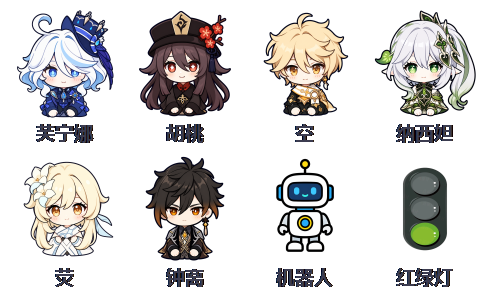
Nine characters, switch anytime via right-click
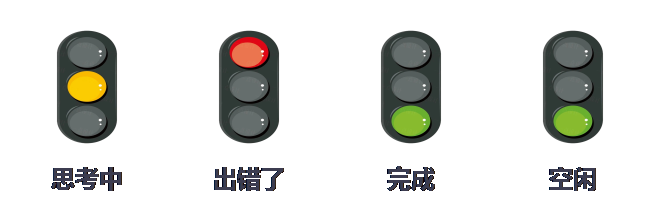
Status light: thinking / error / completed / idle expressions switch automatically

Character-specific chat bubbles on completion, error, and questions
Contact
Feel free to open an issue for bugs, suggestions, or questions.
Highlights & Features
- 🐾 9 desktop-pet characters: Furina, Hu Tao, Aether, Nahida, Kazuha, Lumine, Zhongli, Traffic Light, Robot; switch anytime via right-click, and your choice is remembered.
- 🎭 Live expressions: four states — thinking, error, completed, idle — each with its own set of expressions; errors take priority and auto-recover.
- 💬 Character chat bubbles: pop up when a task completes, errors, or asks you a question; tap View Details to jump straight to the session.
- 🪟 Always-on-top mini-window (Windows): a transparent window independent of the browser — visible even when the browser is minimized; draggable, right-click to switch characters, auto-respawns on failure.
Install, Uninstall & Update
Install
Method 1: Hand it to your AI (copy and send the text below to your AI)
"Install this plugin by following INSTALL.md at https://github.com/kongchengavg/dsh-pet-StatusLight/"
Method 2: Manual install
Published to npm; install with one command:
dsh plugin --profile web add dsh-pet-statuslight          # one-line npm install
# or via GitHub source:
dsh plugin --profile web add git+https://github.com/kongchengavg/dsh-pet-StatusLight.git
Restart dsh web and the plugin loads automatically.
Note: pnpm withholds versions published less than 24 hours ago; if you do not get the latest version, pin the version explicitly (e.g.
dsh-pet-statuslight@1.0.33).
Uninstall
dsh plugin --profile web remove dsh-pet-statuslight
Restart dsh web and the plugin is removed.
Update
dsh plugin --profile web add dsh-pet-statuslight@<latest>   # npm source (pin version to bypass 24h hold)
# or re-pull the latest from GitHub:
dsh plugin --profile web add git+https://github.com/kongchengavg/dsh-pet-StatusLight.git
Re-adding completes the update; restart dsh web to apply.
Usage
- Right-click the light or the mini-window: switch character / open the main UI / close the mini-window.
- Left-drag the mini-window: move it (position auto-saved).
- Chat bubble: tap View Details to jump to the session; tap × to dismiss instantly; auto-dismisses after 60 seconds.
- Character and position settings are stored in
.statuslight.jsonin the workspace and can be edited manually.
Disclaimer
This project is provided as-is, without warranty or endorsement for any particular purpose (including commercial use). Character image assets belong to their original authors and are provided for personal/learning use only — verify their licenses yourself. This is a community open-source project and is not affiliated with DeepSeek, miHoYo, or any official entity.
License
Code is licensed under MIT (see LICENSE); character image assets belong to their original authors.