dsh-workpet
lastorder/dsh-workpet
Work pet capability for DeepSeek Harness: a floating pet whose actions mirror what the current Session is doing, with swappable appearances contributed by other plugins.
Install
dsh plugin --profile web add github:lastorder/dsh-workpetREADME
dsh-workpet
English | 中文
A floating work pet for DeepSeek Harness whose actions show what the current Session is doing: it thinks, types, runs off to use tools, waves when it needs you, celebrates when a turn finishes, and dozes off when nothing happens.
The pet is a capability with a defined interface, not a single drawing. dsh-workpet owns the interface and the behavior; appearances are separate npm packages that register into it. The default appearance is a cream-and-ginger kitten in a soft, hand-painted picture-book style. Other bundles can add more: every enabled appearance is a pet of its own on screen, so you choose your pets by switching their plugins on or off.
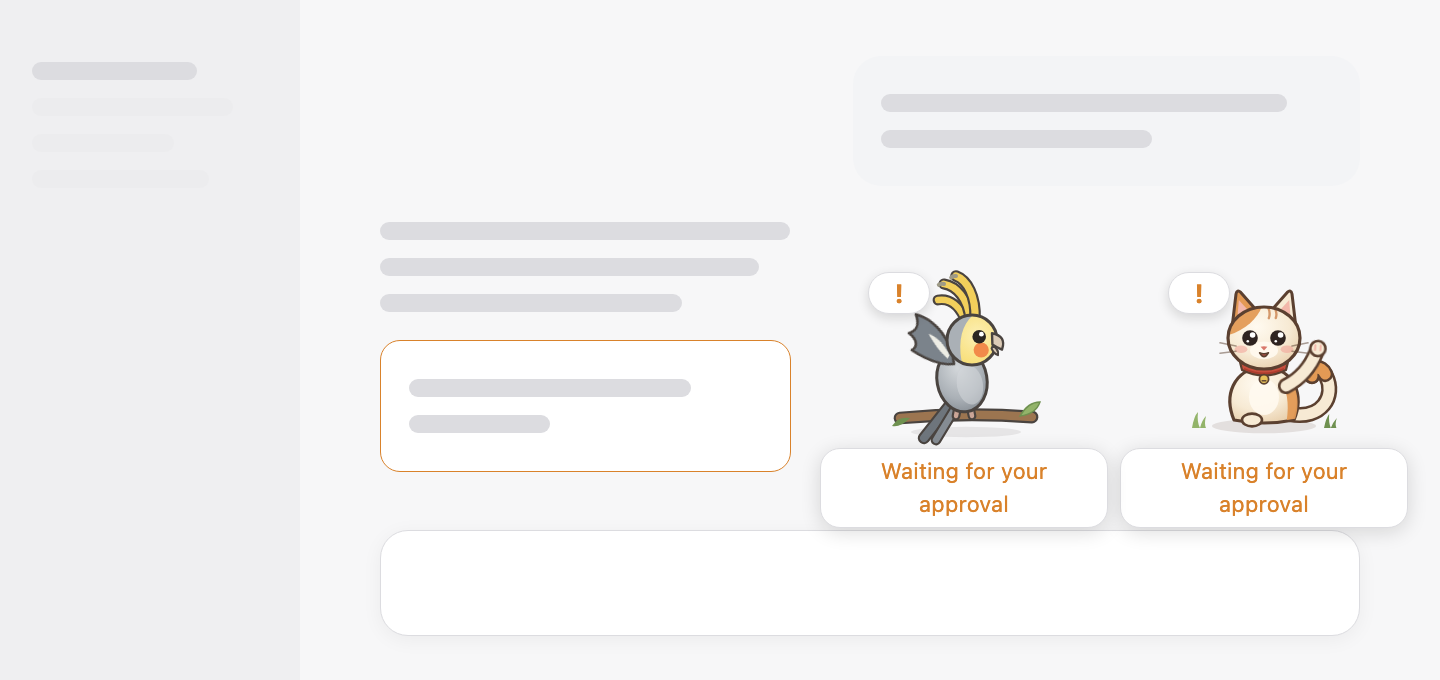
Table of Contents
Packages
| Package | Role | Where |
|---|---|---|
dsh-workpet | Service Definition (ctx.workpet) + Consumer (floating pets, appearance cards, action preview); bundle | this repository |
dsh-workpet-cat | Service Provider: the default kitten; installed with dsh-workpet | this repository |
dsh-workpet-parrot | Service Provider: a cockatiel, written as plain JavaScript with no build step; the template for new pets | separate repository |
See docs/architecture.md for the roles, the interface, and the activity rules.
Install
Installing the dsh-workpet bundle installs the default kitten with it: dsh-workpet-cat is a dependency of dsh-workpet, and the bundle inserts its row. Other appearances, such as dsh-workpet-parrot, are separate bundles.
From npm, in a Harness session, ask the agent to run plugin_manager install_bundle:
install_bundle  dsh-workpet          # the pet and the default kitten
install_bundle  dsh-workpet-parrot   # optional cockatiel
From source, build first, then install the directories:
pnpm install
pnpm run build
install_bundle  /absolute/path/to/dsh-workpet/packages/workpet/workpet   # the pet and the default kitten
install_bundle  /absolute/path/to/dsh-workpet-parrot                     # optional cockatiel
For a CLI-managed profile (not the Desktop app's desktop profile, which only the app may change), use dsh plugin --profile <profile> add dsh-workpet (or add link:/absolute/path/to/dsh-workpet/packages/workpet/workpet), and the same for dsh-workpet-parrot.
Then refresh the Harness window. On DeepSeek Harness 0.2.0 and earlier, restart the app once after the first install: those versions read a bundle's dependencies only at start-up, so the kitten row reports "failed to import" until the restart. Later versions pick it up immediately.
Using it
The pets on screen
Once installed, the pets stand in the bottom-right corner of the Harness window, above the composer, and act out what the session in the main view is doing.
- Drag a pet anywhere. Each pet remembers its own position, also after a refresh.
- Click a pet (or focus it and press Enter) to pet it: it purrs, and hearts float up. Only the pet you clicked reacts.
- Hover a pet to see what the session is doing in a small bubble. While the session waits for you, and right after a turn finishes or fails, the bubble stays visible under every pet without hovering.
- Every pet shows the same session, so with the kitten and the cockatiel enabled, both start typing when the model writes and both wave when an approval is pending.
Choosing your pets
There is no appearance setting: every enabled appearance plugin is a pet on screen. You choose your pets in the Plugin Manager.
- Add a pet: install an appearance bundle, such as
dsh-workpet-parrot. It appears next to the others right away, with nothing to select. - Remove a pet: switch its plugin off. The cockatiel is its own bundle in the plugin list; the default kitten is the
dsh-workpet-catrow on the Work Pet bundle page, below the pet section. Switch it back on and the pet returns to where you left it. - New pets line up to the left of the existing ones; drag them wherever you like.
The Work Pet page
Plugins → Work Pet shows every pet that is on screen and lets you preview everything they can do, without waiting for a real session to fall asleep or fail.
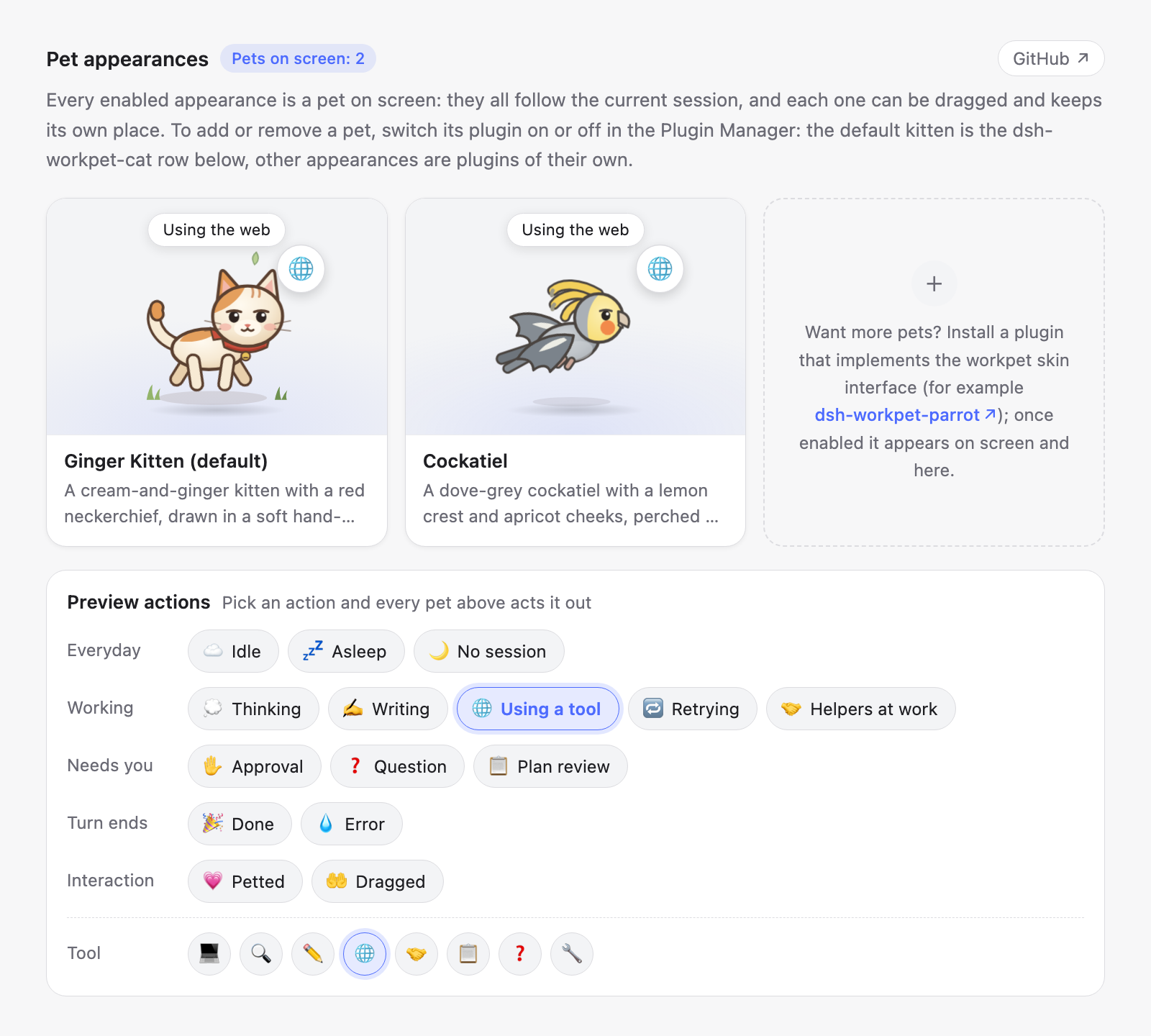
- Appearance cards: one card per enabled appearance, with its name, its description, and a small stage where the pet acts out the chosen action with its status bubble. The last card explains how to get more pets and links to dsh-workpet-parrot; with no pet enabled it tells you how to bring the kitten back. The GitHub button next to the title opens this repository, with this guide, in your browser.
- Preview actions: every action is a button, grouped into Everyday, Working, Needs you, Turn ends, and Interaction. Press one and it is highlighted, and every pet above switches to that action at once, so you can compare them side by side.
- Tool: when Using a tool is selected, a row of tool families (terminal, search, editor, web, subagent, plan, question, other) appears; each one changes the badge the pets wear.
What the pets do
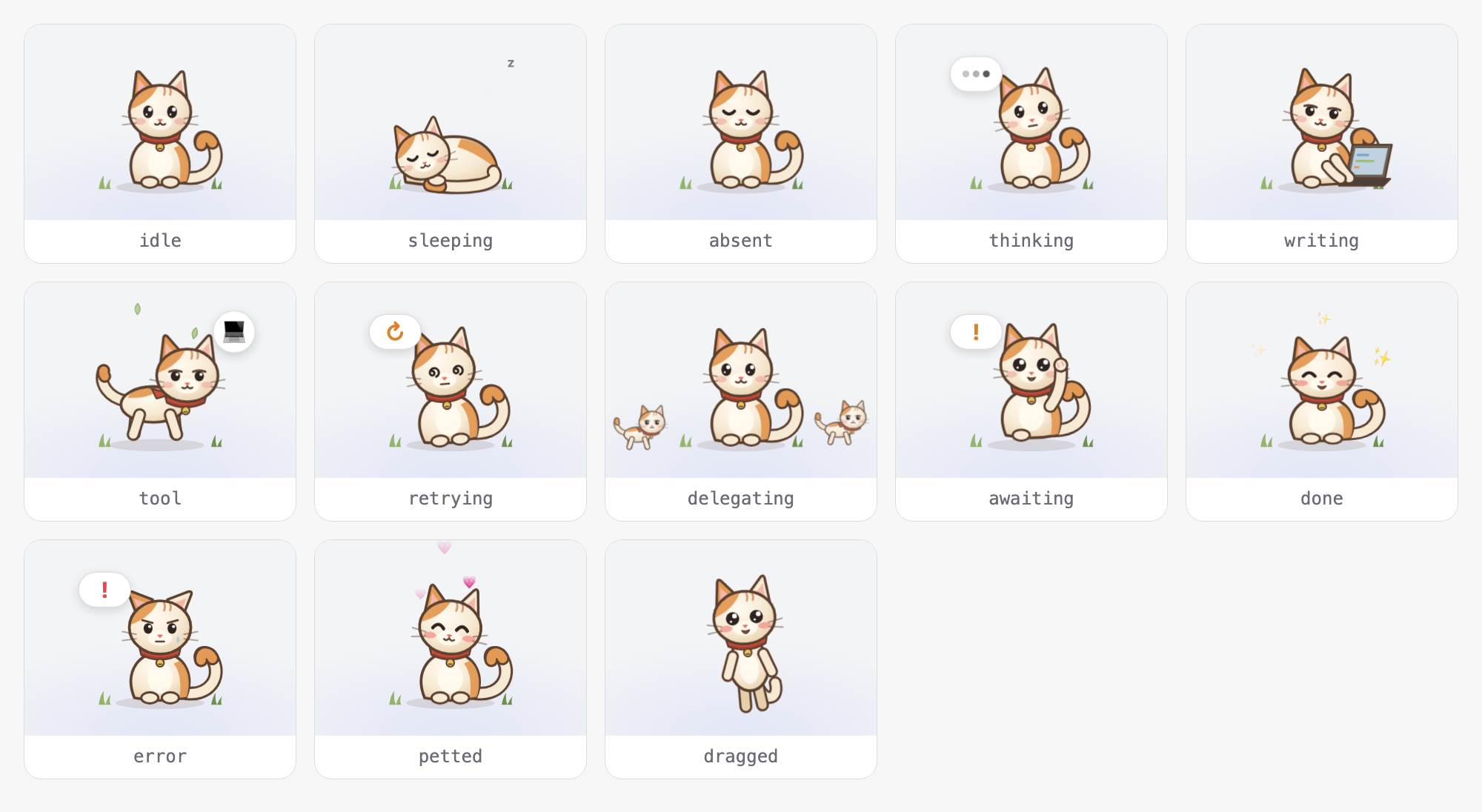
| Session state | Activity | Kitten |
|---|---|---|
| No session open | absent | Sits with eyes closed |
| Idle | idle | Sits, blinks, sways its tail |
| Idle for a while | sleeping | Curls up asleep |
| Model thinking | thinking | Tilts its head and looks up |
| Model writing | writing | Types on a little laptop |
| Tool running | tool | Runs through drifting leaves, with a tool badge |
| Retrying a request | retrying | Dizzy spiral eyes |
| Waiting for approval / an answer / a plan review | awaiting | Waves a paw |
| Subagents running | delegating | Watches its helper kittens |
| Turn finished | done | Jumps for joy |
| Turn failed | error | Droopy ears and a tear |
| Petted | petted | Purrs with eyes closed |
| Being dragged | dragged | Dangles and kicks |
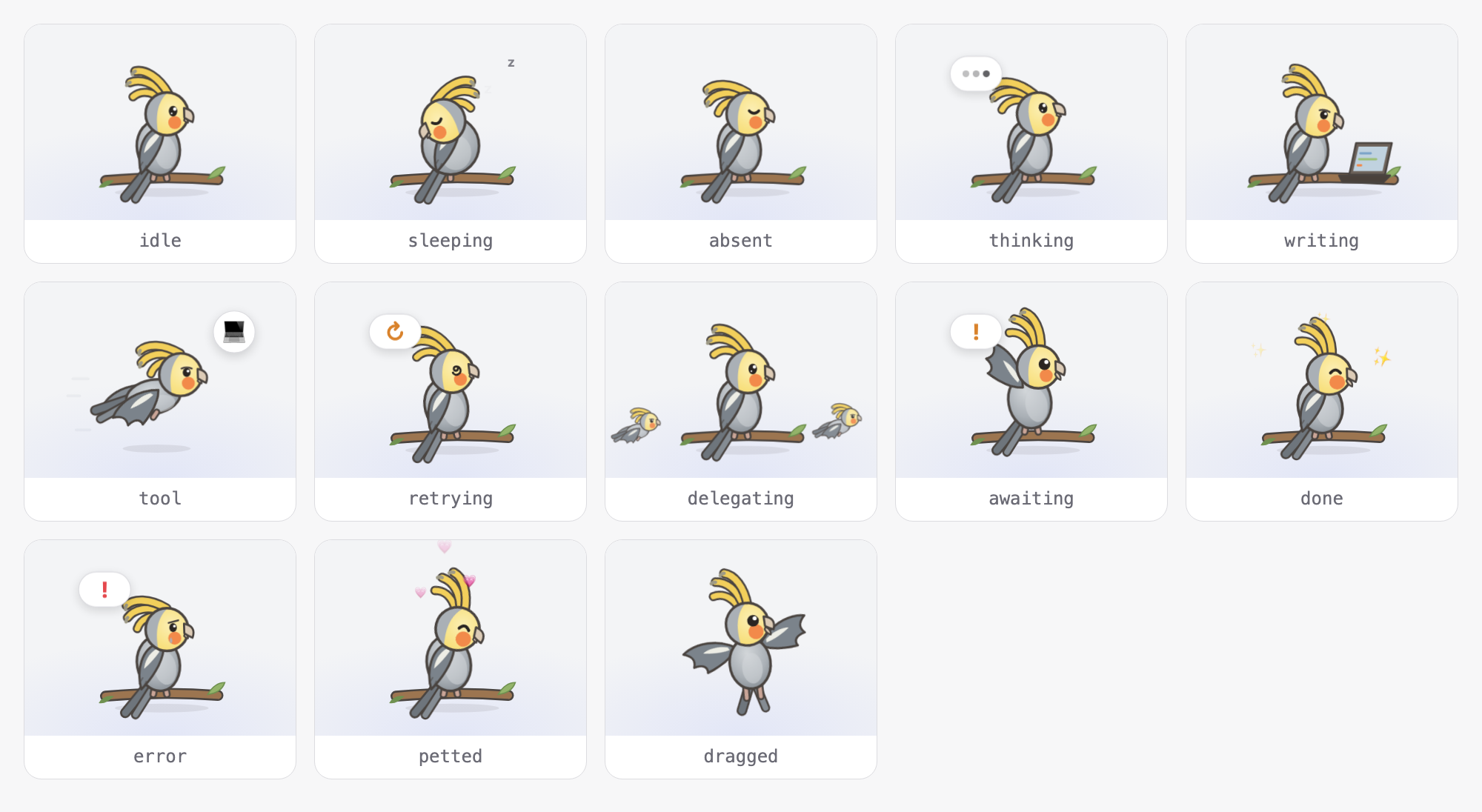
The cockatiel from dsh-workpet-parrot has its own pose for every activity:
Create your own pet
Start from dsh-workpet-parrot. It is a complete appearance in one plain-JavaScript file with no build step and no TypeScript, so almost everything you edit is the drawing itself:
- Copy the repository and rename the package, the Loader row in
cordis.patch.yml, theidinwindow.__ModuleLoader__.load, the skinid, and thewpp-CSS prefix. - Replace the artwork in
client.js: a palette, body parts, and one pose per activity, as SVG markup in a 100 × 80 box. Its README lists every activity, the building blocks, and the animation rules. - Install it as its own bundle next to
dsh-workpetwithinstall_bundle, and it appears on screen next to the kitten. Open Plugins → Work Pet and press the action buttons to check every pose.
The interface the pet implements (WorkpetSkin, WorkpetScene, ctx.workpet) is described in docs/architecture.md. A compiled TypeScript appearance follows dsh-workpet-cat instead.
Development
pnpm run build       # every package: lib/index.js, lib/client.js (and lib/types for dsh-workpet)
pnpm run typecheck
pnpm run test        # pure scene/registry tests + smoke tests over the built bundles
pnpm run verify      # all three
Layout follows the DeepSeek Harness monorepo: packages live at packages/<group>/<package>/, and each package keeps a Host half (src/index.ts) and a Client half (src/client/). See AGENTS.md for conventions and the npm release procedure.
The screenshots in this README are rendered from the built bundles: after changing the UI or a drawing, run pnpm run build, then node scripts/screenshots.mjs --parrot ../dsh-workpet-parrot (needs Google Chrome and a dsh-workpet-parrot checkout); it rewrites docs/images/.
Documentation
- Architecture: capability roles, the interface, data flow, activity precedence, writing a new appearance.
- Package group map.
Related plugins
dsh-web (dsh-task-board)
zhu1090093659/dsh-web
dsh-web (dsh-web-all)
zhu1090093659/dsh-web
dsh-web-ui (dsh-task-board)
zhu1090093659/dsh-web-ui
dsh-web-ui (dsh-web-ui-all)
zhu1090093659/dsh-web-ui