dsh-workpet-parrot
lastorder/dsh-workpet-parrot
A cockatiel appearance for the dsh-workpet capability in DeepSeek Harness.
Install
dsh plugin --profile web add github:lastorder/dsh-workpet-parrotREADME
dsh-workpet-parrot
English | 中文
A cockatiel appearance for the DeepSeek Harness Work Pet (dsh-workpet). Install it in the same profile as the dsh-workpet bundle and the cockatiel appears on screen next to the other pets, with no setting. Switch the bundle off in the Plugin Manager to take it away again.
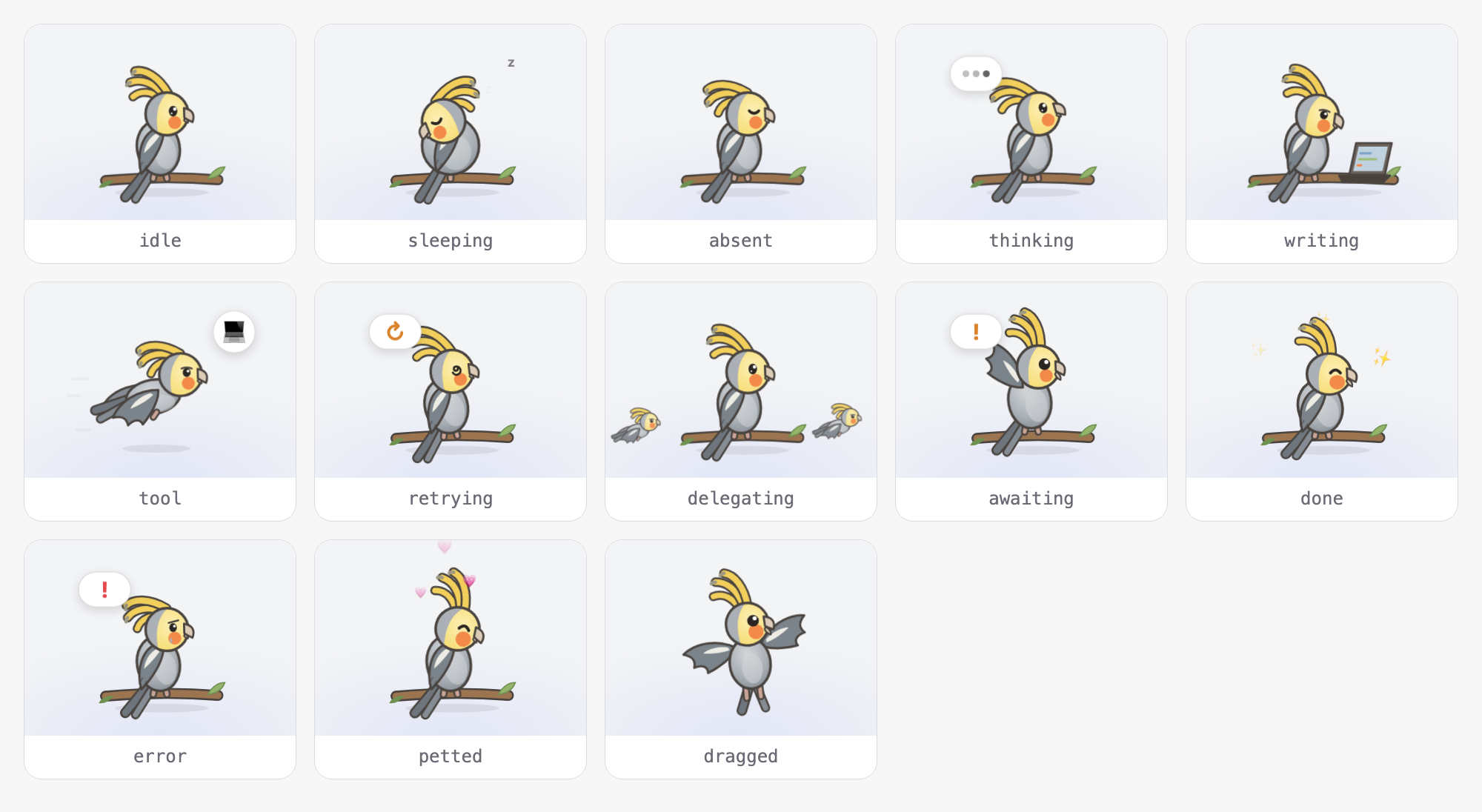
This package has no build step and no TypeScript: DeepSeek Harness loads client.js exactly as written. Almost all of that file is drawing, so developing this package is mostly drawing.
Files
| File | Purpose |
|---|---|
client.js | Everything the browser runs: the artwork, its CSS animations, and a short registration block |
index.js | Empty Host half; the Loader row needs a module to load |
cordis.patch.yml | Inserts the dsh-workpet-parrot row when the bundle is installed |
package.json | Bundle manifest; dsh.client.inject: ["dsh-workpet"] makes the Work Pet load first |
locale/*.json, icon.svg | Name, description, and icon shown in the Plugin Manager |
test/smoke.test.mjs | Optional check that every activity draws without errors |
AGENTS.md, .github/ | Maintenance and release notes, CI, and the npm release pipeline |
How the drawing works
The Work Pet decides what the pet is doing; this package only decides what that looks like.
- For every render the Work Pet hands the Figure a
scene.scene.activityis one of the 13 values in the table below;scene.toolandscene.awaitingcarry details, andscene.helperscounts running subagents. draw(scene, id, compact)inclient.jspicks a pose and returns plain SVG markup for a 100 × 80 box (viewBox="0 0 100 80"). The bird stands on the branch with its feet at about y = 68.ParrotFigurewraps that markup in an<svg>. Whencompactis true, the bird is a small helper companion: skip scenery such as the shadow and wind lines.
The Work Pet draws the rest itself, so do not draw any of these: the status bubble, the tool badge (💻 🔍 …), helper companions, and effects such as hearts, sparkles, z, !, and ?.
scene.activity | When | Cockatiel pose (draw) |
|---|---|---|
absent | No session is open | perched: eyes closed, crest down |
idle | Session idle | perched: blinking |
sleeping | Idle for more than 70 s | sleeping: fluffed into a ball, head tucked back |
thinking | Model running, nothing written yet | perched: head tilted, eyes up, crest bobbing |
writing | Model streaming text | typing: pecking at a laptop |
tool | A tool call is running | flying: wings beating |
retrying | Waiting to retry a failed request | perched: spiral eyes, wobbling |
awaiting | Waiting for your approval or answer | perched: waving a wing, crest up |
delegating | Idle while subagents still run | perched: looking around |
done | Just finished | perched: happy eyes, hopping |
error | Just failed | perched: sad eyes, a tear, shaking |
petted | You clicked it | perched: eyes closed, cheeks glowing |
dragged | You are dragging it | dangling: both wings flapping |
Building blocks in client.js
P— the palette. Change a colour here and it changes everywhere.head(id, cx, cy, face)— the head, radius 12.5, facing right.facecontrolseyes(open,up,look,focus,happy,closed,wide,spiral,sad),crest(up,mid,down),tiltin degrees,beakOpen,blush(softorstrong),tear, andcrestMotion(an animation class for the crest).body,tail,feet,foldedWing(x, y),openWing(color),perch(x1, x2, y), andtube(d, color, width)(a line with an ink outline, used for legs, tail feathers, and crest feathers).- Poses:
perched,flying,typing,sleeping,dangling.
Animation rules
- Animate with CSS classes prefixed
wpp-, all defined in theCSSstring: add the class in the markup (class="wpp-flap") and its@keyframesinCSS. - In SVG, a CSS rotation pivots on
transform-originin viewBox units:style="transform-origin:46px 60px". Without it, the pivot is the local(0, 0). The wings rely on this: each wing is drawn hinged at(0, 0)inside atranslate(...)group, so a plainrotate()flaps it from the shoulder. - Never put an animation class on an element that also has a
transform="..."attribute, because the CSS transform replaces the attribute. Nest a<g>instead. - Gradient ids must include
${id}(for exampleurl(#body-${id})), because helper companions put several birds on the page at once. - The
@media (prefers-reduced-motion: reduce)rule at the end ofCSSstops all motion for users who ask for that. Keep it.
Development
Prerequisite: the dsh-workpet bundle is installed in your profile. It provides ctx.workpet and brings the default kitten with it; without it this plugin stays inactive.
-
Install the bundle once. In a DeepSeek Harness session, ask the agent to run
plugin_managerinstall_bundlewith this directory's absolute path as the target (the Desktop app'sdesktopprofile can only be changed this way):install_bundle /absolute/path/to/dsh-workpet-parrotOnce the package is on npm, the target can also be the package name
dsh-workpet-parrot. A CLI-managed profile can instead run:dsh plugin --profile <profile> add link:/absolute/path/to/dsh-workpet-parrotA
link:install points at this folder, so later edits need no reinstall. -
Edit
client.js, usually a pose or a part of the head. -
Check it:
pnpm run check # syntax check, no dependencies needed pnpm install && pnpm test # optional: draws all 13 activities with React's server renderer -
Look at it: refresh the Harness window, open Plugins → Work Pet, and press the action buttons under the appearance cards: the cockatiel's card acts out each activity on demand, so you do not have to wait for a real session to fall asleep or fail. If the page still shows the old drawing after a refresh, restart DeepSeek Harness so it reloads the file.
Adding a new pose
-
Write a function that returns markup for the 100 × 80 box, reusing
head,body,tube, and the other parts:const bathing = (id) => ` ${perch()} <g class="wpp-splash" style="transform-origin:50px 68px"> ${body(id)} ${foldedWing(47, 38)} ${head(id, 54, 30, { eyes: 'happy', crest: 'up' })} </g>` -
Add
.wpp-splash{animation:…}and its@keyframestoCSS. -
Return it from the matching
caseindraw.
Using this repository as a template for a new pet
- Copy this repository and rename:
nameinpackage.json, the rowid/nameincordis.patch.yml, theidpassed towindow.__ModuleLoader__.loadat the top ofclient.js(it must equal the package name), the skinidin the registration, and thewpp-CSS prefix (so the two pets do not collide). - Redraw part 1 (ARTWORK) and part 2 (ANIMATION) of
client.js; in part 3 (PLUG-IN) change only names and text. - Update
locale/*.json,icon.svg, and bothREADME.mdandREADME.zh.md.
Publishing to npm
AGENTS.md describes the release procedure: the one-time Trusted Publisher setup, tagging, and approving on npm. In short: bump version in package.json → pnpm run verify → commit Release vX.Y.Z: … → push the vX.Y.Z tag → GitHub Actions stages the package on npm → approve it on npmjs.com.
The interface, for reference
Registration happens in the last block of client.js and rarely needs changes. The plugin waits for the capability with inject: ['workpet', 'locale'] and registers inside ctx.effect, so switching the bundle off removes the cockatiel again:
ctx.effect(() => ctx.workpet.register({
  id: 'cockatiel',          // stable id; the bird's screen position is saved under it
  order: 10,                // arrangement: on screen and on the page (the default kitten is 0)
  title: () => t('title'),  // localized name
  description: () => t('description'),
  Figure: ParrotFigure,     // React component: ({ scene, compact }) => <svg>
}))
The full contract (WorkpetScene, WorkpetSkin, WorkpetService) is packages/workpet/workpet/src/client/contract.ts in the dsh-workpet repository, published as dsh-workpet/contract.
Related plugins
dsh-wallpaper-engine
elysia395/dsh-wallpaper-engine
dsh-deep-whale (maid-atelier)
small-tailqwq/dsh-deep-whale
dsh-deep-whale
small-tailqwq/dsh-deep-whale
open-sea-skin
d-dev0101/open-sea-skin