dsh-think-any-lang
lco117/dsh-think-any-lang
DeepSeek Harness (DSH) plugin: a "Thinking Language" selector under Settings → General that tells the model which language to reason in (chain of thought) via a system-prompt section. Zero extra calls, zero latency, 12 languages.
Install
dsh plugin --profile web add github:lco117/dsh-think-any-langREADME
dsh-think-any-lang











A DeepSeek Harness plugin that adds a Thinking Language dropdown under Settings → General, letting you choose which language the model uses for its reasoning / chain of thought (中文, English, 日本語, 한국어, Deutsch, …). The final reply stays in the user's language.
Screenshots · Features · How it works · Installation · Usage · Development · Publishing · Star History
Screenshots
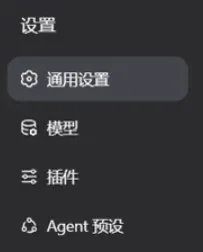 Selector in General settings Pick it right from the settings page |
 The selector box Click to expand and pick a language |
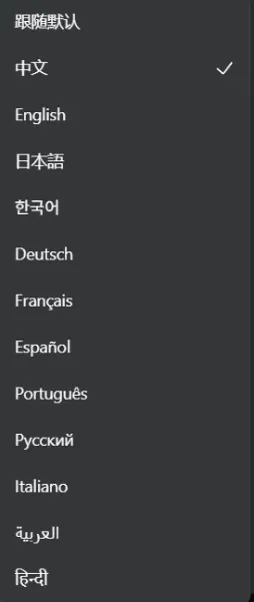 All languages in one dropdown off plus 12 languages in one list |
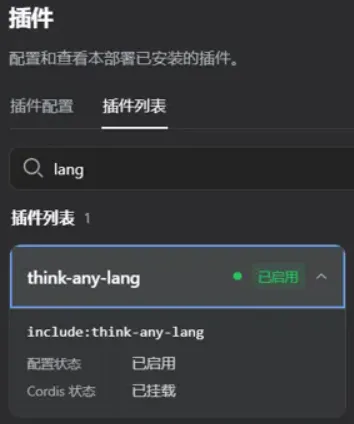 In the plugin list Listed under plugin management after install |
Features
- Settings → General → Thinking Language: a dropdown to pick the language the model thinks in.
- Zero latency, zero extra calls: implemented as a system-prompt instruction (
systemPrompt.section) — no extra model calls or response delay like "translate the reasoning" approaches. - Instructions written in the target language: each instruction is written in its own language (e.g. the English instruction is written in English), which improves model adherence.
- Persisted: the choice is stored in the user settings document (settings service) and survives restarts.
- Plain JS, no build step: both the host and browser halves are hand-written JavaScript; install straight from GitHub with zero friction.
Supported languages: off (follow default, no instruction), Simplified Chinese, English, 日本語, 한국어, Deutsch, Français, Español, Português, Русский, Italiano, العربية, हिन्दी.
How it works
| Half | Responsibility |
|---|---|
index.js (host half) | Registers the think-any-lang settings namespace (language field, enum, default zh); watches for changes and mounts systemPrompt.section (named think-any-lang) when non-off, unmounts on off; also registers a private loopback RPC channel /think-any-lang (get/set) that the browser half uses to read/write the namespace |
client.js (browser half) | Registers a settings.general.item row via the window.__ModuleLoader__.load contract; renders the dropdown and reads/writes the setting through the host half's /think-any-lang RPC channel |
Why a private RPC channel instead of the settings RPC surface?
dsh-host-apiproxyonly exposes an explicit allowlist of settings namespaces to configuration clients (WEB_SETTINGS_NAMESPACES/PRODUCT_SETTINGS_NAMESPACES); a third-party namespace answerssettings-not-exposed, so the selection would never persist. The browser half therefore talks to a private channel registered in-process (ctx.connection.rpc.handle), and in-processctx.settingsaccess is not filtered by that allowlist — persistence and thesystemPromptlinkage stay unchanged.
The language table is maintained in two places —
index.js(instruction texts) andclient.js(display labels): the browser factory'srequireonly resolves platform modules and cannot read local modules, so each half keeps its own language view. Keep both files in sync when adding a language.
Installation
Requirements: dsh CLI installed with an initialized profile (dsh plugin --profile <name> add auto-initializes).
From GitHub (recommended)
dsh plugin --profile web add github:lco117/dsh-think-any-lang
The package is pure JS with no
preparebuild script, so no pnpm ≥10allowBuildsapproval is needed — install straight from GitHub. Pinning to a commit is recommended as in the official docs:github:lco117/dsh-think-any-lang#<commit-sha>.
From a local directory (development)
dsh plugin --profile web add ./dsh-think-any-lang
Verify
dsh --profile web --dump-config # should show a "# == dsh-think-any-lang" layer
Usage
- Start
dsh web. - Open Settings → General.
- Pick a language in the Thinking Language dropdown (default: Chinese).
- Subsequent model calls receive the thinking-language instruction in the system prompt; DeepSeek reasoning models typically output
reasoning_contentin the chosen language.
Development
dsh-think-any-lang/
├── package.json       # declares dsh.bundle and dsh.client
├── cordis.patch.yml   # plugin row: mounts both halves of this package
├── index.js           # host half: settings namespace + systemPrompt.section
├── client.js          # browser half: settings row UI (hand-written factory bundle)
├── README.md          # 中文说明
├── README.en-US.md    # English docs
└── screenshots/       # README screenshots (webp)
Tech Stack
| Category | Tech |
|---|---|
| Plugin platform | DeepSeek Harness (DSH) |
| Plugin framework | Cordis |
| Language | JavaScript (ESM) |
| Schema | @deepseek-ai/schemastery |
| Build | None (plain JS, install straight from GitHub) |
License
MIT © 2026 lco117
⭐ Star History
If this project helps you, give it a ⭐ to help more people discover dsh-think-any-lang.
Related plugins
archify (deepseek-harness)
tt-a1i/archify
weknora
tencent/weknora
BrowserSkill (dsh-plugin-browserskill)
tencent/browserskill
dsh-infinite-gen-3
minglink/dsh-infinite-gen-3