dsh-sidebar-sections
leescenic/dsh-sidebar-sections
Collapsible section headers for the DSH sidebar: fold the functions list, the workspace list and the footer status area behind labelled header rows; sections are identified by position so cards the host or other plugins append to the footer join the status section automatically, and the account row stays pinned to the bottom (client-only DOM enhancement, no host patch).
Install
dsh plugin --profile web add github:leescenic/dsh-sidebar-sectionsREADME
dsh-sidebar-sections
Collapsible section headers for the DeepSeek Harness sidebar.
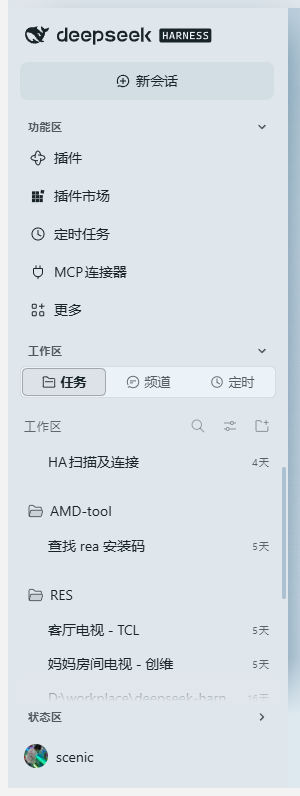 All sections open |
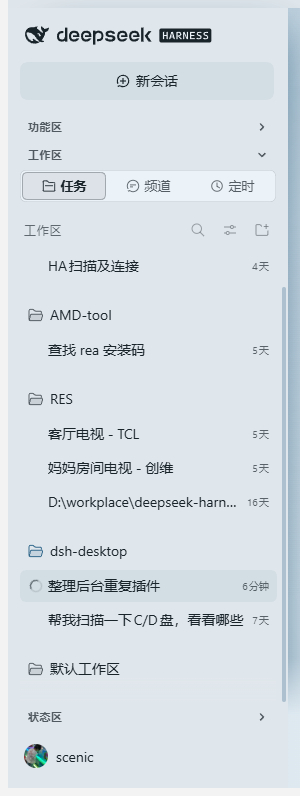 Workspace only |
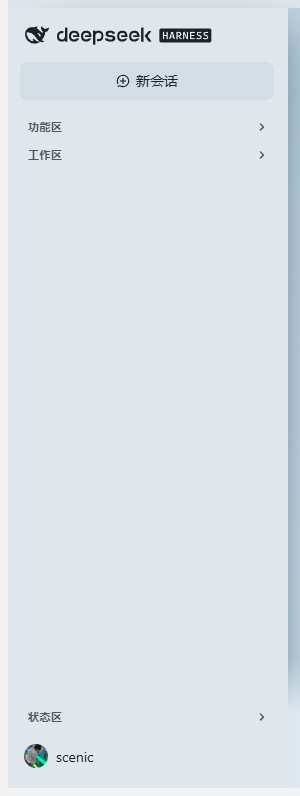 All folded — account row pinned to the bottom |
简体中文
DSH 侧栏里的东西一多,整列就变得又长又挤。这个插件给侧栏加上三根可折叠的标题条,哪些区块常驻、哪些区块收起,由你自己定。
三段分别控制
| 折叠条 | 管的是 | 内容 |
|---|---|---|
| 功能区 | nav._panelList,以及「新会话」按钮到工作区之间的东西 | 插件、插件市场、定时任务、MCP 连接器、更多 |
| 工作区 | 工作区区域 div._regionArea | 任务 / 频道 / 定时 三个 tab,以及工作区与会话列表 |
| 状态区 | div._footArea 里除设置区以外的一切 | Remote 卡片、OpenCode GO 用量卡片,以及以后任何东西 |
三段互相独立。想只留工作区?把另外两根收起来就行 —— 这也正是默认状态。
新加的东西会自动归位
不按 class 名单点名,而是按位置判定:
- 外壳里排在「新会话」之后、工作区之前的 → 功能区;
- 外壳里排在工作区之后的(
.panelList之外的全部兄弟节点)→ 状态区; _footArea里的每个子元素 → 状态区,唯一的例外是设置区本身,以及任何包含设置区的容器(这样账号那排不会被一起藏掉)。
所以宿主以后往侧栏底部加个入口、或者别的插件(例如用量卡片)自己 insertBefore 塞一张卡,都会被当次重扫描收进状态区,不需要给本插件升级。
账号与设置永远钉在最底部
底部那一排(呼叫按钮、账号头像 scenic)不跟着状态区一起折叠,位置也不随任何折叠状态浮动,始终贴在侧栏最下面。
装上就能用
dsh plugin --profile web add "https://github.com/LeeScenic/dsh-sidebar-sections/releases/latest/download/dsh-sidebar-sections-1.0.4.tgz"
桌面版把 web 换成 desktop:
dsh plugin --profile desktop add "https://github.com/LeeScenic/dsh-sidebar-sections/releases/latest/download/dsh-sidebar-sections-1.0.4.tgz"
也可以直接从仓库装:dsh plugin --profile desktop add "github:LeeScenic/dsh-sidebar-sections#v1.0.4"。
装完要完全退出再打开 DSH —— 客户端 bundle 是启动时加载的。
几个细节
- 纯客户端增强:不注册槽位,不动宿主 React 树,只往页面里插 DOM 和一段
<style>,卸载后不留残渣。 - 不写死样式哈希:靠
[class*="_regionArea"]这类后缀匹配加一条(^|\s)[A-Za-z0-9_-]*_<suffix>(\s|$)精确校验来定位锚点,宿主升级换了 CSS Modules 哈希也照样能用。 - 按位置归位:给要折叠的元素打
data-dsh-sc-part="panels|foot",每次重扫描都按当前 DOM 重新判定,所以新插进来的卡片当次就被收进状态区。 - 折叠状态扛得住重渲染:折叠是
<html>上的data-dsh-sc-<key>属性加一条!important规则,React 重绘不会把藏起来的区块弄回来。 - 标题条会自己补回:
MutationObserver(rAF 去抖)加 1500 ms 兜底定时器,被重绘冲掉就重新插;同一分区只留一条,旧的错位标题条会被清掉。 - 窄栏自动隐藏:侧栏收成图标条(
clientWidth < 96)时标题条自动隐藏,不硬挤成一条竖线。 - 出错不影响侧栏:整段逻辑包在 try/catch 里,出问题只
console.warn。
状态记忆
存在 localStorage["dsh-sidebar-sections:v3"],形如 {"panels":true,"region":false,"foot":true}(true = 折叠)。
已知限制:DSH 桌面版每次启动换一个端口,等于换了 origin,上一次的状态读不回来,于是回到默认值。默认值本来就是「只留工作区」,所以实际影响很小。
兼容性
DSH 0.2.1-rc.3 — 0.2.1-rc.5,web 与 desktop 都行。除了侧栏那几个 CSS Modules 类名(按后缀匹配),不向宿主索要任何东西。
文件
| 文件 | 作用 |
|---|---|
lib/client.js | 浏览器半边 —— 全部行为 |
lib/index.js | host 半边 —— 空的 apply(),只为让入口出现在 Loader 图里 |
cordis.patch.yml | bundle patch,insert 一行(纯新增,带重复挂载守卫) |
dsh.plugin.json | 插件清单 |
docs/screenshots/ | 上面那三张截图 |
MIT License.
English
What it does
The sidebar is cut into three labelled rows — Panels, Workspace and Status — and each one folds with a single click.
| Section | Host element | What it holds |
|---|---|---|
| Panels | nav._panelList, plus everything between the new-session button and the workspace area | Plugins / Plugin Market / Scheduled tasks / MCP connectors / More |
| Workspace | div._regionArea | the Tasks / Channels / Scheduled tabs and the session + workspace list |
| Status | everything inside div._footArea except the settings row | Remote entry, OpenCode GO usage, and whatever comes next |
The three are independent. The default is Workspace only: open the app and the workspace list is the only thing expanded.
Nothing is named in a fixed class list — sections are decided by position:
- at shell level, everything after the new-session button and before the workspace area → Panels;
- at shell level, everything after the workspace area (the panel list aside) → Status;
- every child of
_footArea→ Status, with one exception: the settings row itself, and any container that contains it (so the account row is never hidden).
So a footer entry the host adds later, or a card another plugin insertBefores into the footer, is
folded into Status on the next rescan — no update of this plugin required.
The settings row (div._settingsArea: the call button and your account avatar) is never folded and
is pinned to the very bottom of the sidebar, so it does not move when sections open or close.
Install
dsh plugin --profile web add "https://github.com/LeeScenic/dsh-sidebar-sections/releases/latest/download/dsh-sidebar-sections-1.0.4.tgz"
Desktop profile: dsh plugin --profile desktop add "https://github.com/LeeScenic/dsh-sidebar-sections/releases/latest/download/dsh-sidebar-sections-1.0.4.tgz",
or straight from the repo: dsh plugin --profile desktop add "github:LeeScenic/dsh-sidebar-sections#v1.0.4".
Fully quit and reopen DSH after installing — client bundles are loaded at start-up.
How it works
Client-only plugin (dsh.client.platform = "web"). It registers no slot and does not touch the React
tree:
- Sections are located by CSS Modules class suffix (
[class*="_regionArea"]plus an exact(^|\s)[A-Za-z0-9_-]*_<suffix>(\s|$)test), never by the build hash — a host upgrade that changes the hash keeps working. - Fold candidates get
data-dsh-sc-part="panels|foot"and are re-classified from the live DOM on every rescan, so a node inserted later is folded the same tick it appears. - Folding is a
data-dsh-sc-<key>attribute on<html>plus one!importantCSS rule, so a React re-render cannot restore a hidden section. - The header rows can themselves be dropped by a re-render, so a
MutationObserver(rAF-debounced) plus a 1500 ms safety timer puts them back; a section keeps exactly one header row, stale ones are removed. - In the collapsed rail (
clientWidth < 96) the header rows hide themselves instead of squeezing into a vertical stack, and the icon strip is never folded. - Everything is wrapped in try/catch: a failure only
console.warns and never breaks the sidebar.
State
Stored in localStorage["dsh-sidebar-sections:v3"], e.g. {"panels":true,"region":false,"foot":true}
(true = folded).
Known limitation: the DSH desktop app picks a new port on every start, so the origin changes and the previous state cannot be read back — the defaults apply again. The defaults are "workspace only", so the practical effect is small.
Compatibility
DSH 0.2.1-rc.3 — 0.2.1-rc.5, web and desktop. Requires nothing from the host beyond the sidebar's
CSS Modules class names, which are matched by suffix.
Files
| File | Purpose |
|---|---|
lib/client.js | browser half — all of the behaviour |
lib/index.js | host half — empty apply(), only so the entry shows up in the Loader graph |
cordis.patch.yml | bundle patch, inserts the plugin row (pure addition, with a double-mount guard) |
dsh.plugin.json | plugin manifest |
docs/screenshots/ | the three screenshots above |
License
MIT
Related plugins
dsh-web (dsh-task-board)
zhu1090093659/dsh-web
dsh-web (dsh-web-all)
zhu1090093659/dsh-web
dsh-TUI
ccch1mneyyy/dsh-tui
dsh-web-ui (dsh-task-board)
zhu1090093659/dsh-web-ui