dsh-ledger-kitty
lexvolkov/dsh-ledger-kitty
White kitten accountant on the window sill: shows the tokens and money for each answer and for the whole session, the money the prompt cache saved, the context size against the model window, the next peak/off-peak price change and the live DeepSeek balance; it purrs when stroked, reacts while the agent works and synthesizes all of its sounds.
Install
dsh plugin --profile web add github:lexvolkov/dsh-ledger-kittyREADME
dsh-ledger-kitty

A white kitten accountant on the window sill. It is drawn as one inline SVG, so every part can be animated separately and nothing is rasterized at a fixed size; on top of that it keeps the numbers: cost of the last answer, cost of the whole open session and the remaining balance, in one chosen currency.
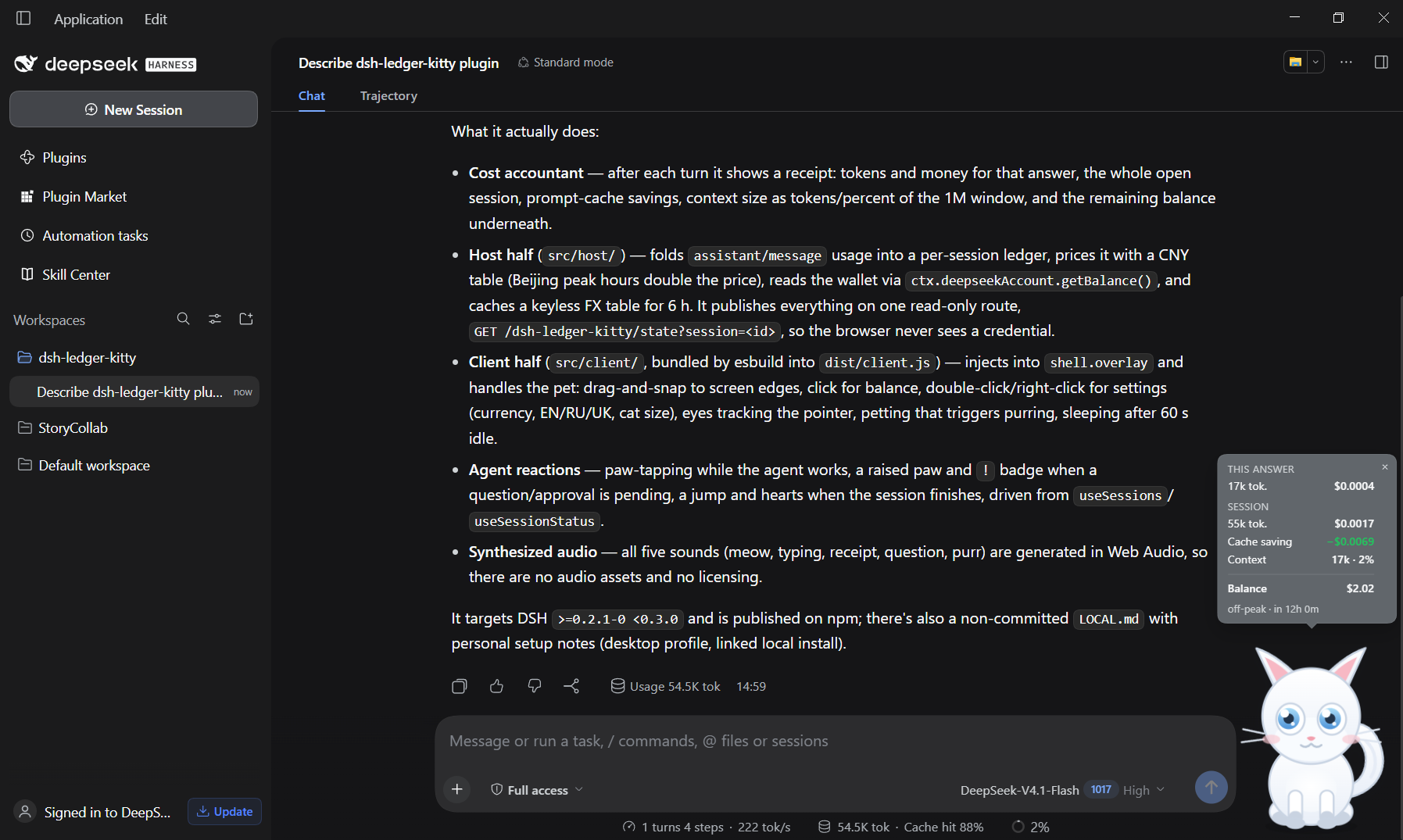
What it does today
- Stands on the floor — the default spot is the bottom edge of the window and the idle motion is breathing, not vertical floating: the cat never levitates.
- Idle life — breathing, a swaying tail, random ear twitches, and blinking every 2–6 seconds.
- Big eyes follow you — the pupils track the mouse pointer across the window.
- Drag & snap — drag it anywhere; it springs on drop and snaps to the nearest screen edge, including the floor. The position is remembered per browser.
- Click = balance — a silent hop, then the balance card (no chatter).
- Double click = settings — currency, language (English / Русский /
Українська / 中文), and the cat's size (0.5× / 1× / 1.25× / 1.5×). Settings are
remembered per browser. The double click is detected from two pointer-ups
within 400 ms, because pointer capture makes the browser's own
dblclickunreliable on this element. - Own language — the four dictionaries live in
STRINGS; the picker is independent of the app locale, which only seeds the initial value. - Right click = menu — Balance / Settings, so both panels stay reachable even if a double click is awkward on a touchpad.
- Sleeps when you are away — after 60 seconds without input it closes its eyes
and shows
z z; any pointer movement wakes it. prefers-reduced-motionturns the looping animations off.
Accountant card
The Host half folds every assistant/message event into a per-session ledger and
publishes it on one read-only route, GET /dsh-ledger-kitty/state?session=<id>:
{ "ok": true,
  "balance": { "CNY": 41.2, "USD": null }, "balanceReason": "ok",
  "rates": { "USD": 0.14 }, "ratesReason": "ok",
  "session": { "tokens": 1204000, "cost": 0.82, "saved": 0.25,
               "last": { "tokens": 12480, "cost": 0.013, "context": 400000 } },
  "peak": false, "nextChangeAt": 1792770000000, "contextWindow": 1000000 }
- After every turn the cat shows a receipt: tokens and money for this answer,
then the same for the whole open session, the money the prompt cache saved
(
cacheReadTokens × (miss − hit)), the context size as tokens and percent of the 1M window, and the remaining balance underneath. - Says what is missing — no account, a signed-out session, a temporary
failure, no network or an unreachable Host each get their own line under the
balance instead of a bare dash: “Аккаунт DeepSeek не подключён”, “Войдите в
аккаунт DeepSeek”, “Не удалось получить баланс”, “Нет сети — курсы
недоступны”, “Host не отвечает”. A failed balance read is retried on the next
poll and is never cached; a missing exchange rate renders as “—” and never as
$0.00. - Peak countdown — the receipt ends with
непик · через 1 ч 15 мин: the Host returns the next Beijing price boundary (nextChangeAt), so the cat tells you when the cheap tariff starts. - Clicking the cat shows just the balance, without a speech bubble.
- The session ledger is seeded from the session's existing events when the Host first sees it, so the “session” number covers the whole conversation rather than only the turns since the app started.
- Cost comes from the durable usage (
inputTokens,cacheReadTokens,outputTokens) times the CNY price table; weekday peak hours in Beijing (09:00–12:00, 14:00–18:00) double the price. - One display currency. Settings (double click, or right click → Settings) offer every currency in the live table, popular ones first; costs and balance are converted into the chosen unit, so a USD wallet and CNY pricing never mix.
- Live rates, no typing. The Host fetches
https://open.er-api.com/v6/latest/CNY(keyless), caches it for six hours and includes the whole table in the state payload. There is no manual rate field: if the request fails the previous table is kept, and a unit without a quote shows “—”. - Balance comes from
ctx.deepseekAccount.getBalance()— the DSH account login, no API key needed. Without a signed-in account the card shows “—”. - The card is measured against the viewport, so it never runs off-screen at the window edge: it slides back and its tail keeps pointing at the cat. It has its own close button, and it also fades out on its own after a few seconds.
- Edges stick across resize. A cat within the snap zone of the right or bottom edge keeps that gap when the window changes size; a cat parked away from the edges stays exactly where it is.
- The route is served by the Host, so the browser never sees a credential.
Agent reactions
The cat watches the agent through the standard Slot hooks useSessions and
useSessionStatus (root-scope hooks provided by ui-session); it reads only the
main-view session, so a background subagent does not make it celebrate.
- Working — while the agent runs, the cat taps its front paws alternately, bobs faster, flicks its tail and looks down at its paws; it also refuses to fall asleep for the duration of the turn.
- Waiting for you — when a question or an approval request is pending, one paw
goes up, the ears perk, a
!badge appears and the bubble says “Нужен твой ответ”. - Finished — when every running session stops, the cat jumps once, throws hearts and says “Готово!”.
- Petted — stroking the head with the cursor (no click needed) closes the eyes, wags the tail and releases hearts; the cat purrs only while the hand moves and for 0.8 s after it stops. One stroke cycle needs ~140 px of cursor travel, so a single pass over the head does not trigger it.
- Idle — with nothing running it returns to breathing, blinking and sleeping.
Sound
All five effects are synthesized in Web Audio (src/client/audio.js): no audio files, no licensing, nothing to download.
| Sound | When | How it is made |
|---|---|---|
meow | click on the cat | sawtooth with a pitch envelope through a band-pass formant |
typing | agent working | low sine thump (88→58 Hz), a dark noise body (~1.2 kHz low-pass) and a small band-passed click (~2.4–3.1 kHz); spacing is random: 150–400 ms, quick doubles, occasional 0.65–1.5 s pauses |
receipt | the receipt appears | two sine notes, 880 → 1320 Hz |
question | a question or approval is pending | two triangle blips, 660 → 990 Hz |
purr | the head is stroked | filtered noise amplitude-modulated at 26 Hz, looping until the stroke ends |
Settings open with a Звуки button that leads to its own sub-menu: a
checkbox per sound, a ▶ preview button beside each one, a master volume
slider and the autoplay hint. A preview plays even when that sound's checkbox
is off, so a switch can be auditioned before it is enabled (typing previews
three ticks, the purr runs for 1.3 s). Browsers only allow audio after a user
gesture, so the AudioContext is created and resumed on the first pointer-down
or key press anywhere in the app; until then the cat is silent and the panel
says so.
The state is a pure function of two snapshots (readAgentState), so the pet adds
no polling and no Host traffic.
Both Standard hooks are selector hooks (useSessions(selector) /
useSessionStatus(selector)), implemented with useSyncExternalStoreWithSelector,
which calls selector(snapshot) unconditionally. Calling either one without a
selector throws selector is not a function during render, and the slot renderer
then removes the whole entry — the cat disappears without a visible error. The
plugin therefore passes an identity selector (selectSnapshot) and runs the
watcher in a child behind an error boundary, so a future hook change can only
cost the reactions, never the cat.
Why SVG and not a PNG sequence
The cat is a rig, not a picture: head, ears, tail, body and four legs are separate groups. Movement is CSS transforms on those groups, so:
- the typing tap is two phase-shifted leg rotations plus a small body bob;
- the jump is squash-and-stretch on one wrapper, already implemented;
- blinking swaps two eye layers, already implemented;
- no frame assets, no fixed resolution, and the whole character is about 10 KB.
A PNG (or sprite-sheet) sequence only wins when the art needs painted texture
(fur, watercolor, pixel art). Then 8–12 frames per action are stored and played
with steps(). The behavior layer would stay the same; only the art layer would
be swapped.
Next: walking
Every leg already sits in its own group (.dpp-leg-fl, .dpp-leg-fr,
.dpp-leg-bl, .dpp-leg-br), so the next step is:
- a walk keyframe per leg pair (front-left with back-right, and the opposite);
- a patrol that moves the cat along the bottom or right edge and flips it on a direction change;
- sitting / grooming states between walks.
Agent reactions, the receipt and the sounds are already in place.
Project layout
The loader accepts exactly one browser artifact per package, so the sources are
ES modules under src/ and esbuild bundles them into dist/client.js.
index.js                  Host entry: re-exports src/host
src/host/
  index.js                apply(ctx): subscriptions + route
  pricing.js              prices, peak hours, token total
  ledger.js               usage fold, per-session ledger, log seeding
  balance.js              account wallet reader (30 s cache, failure reasons)
  rates.js                keyless FX table (6 h cache, stale fallback)
  route.js                GET /dsh-ledger-kitty/state
src/client/
  index.js                createPlugin(require): locale + slot registration
  runtime.js              lazy React surface (initRuntime)
  constants.js            sizes, storage keys, symbols
  store.js                localStorage + legacy key migration
  format.js               tokens, money, currency conversion
  geometry.js             clamp / default position / edge snap
  agent.js                readAgentState + AgentWatcher
  styles.js               all CSS
  i18n/{en,ru,uk}.js      dictionaries, i18n/index.js assembles them
  ui/cat.js               the SVG character
  ui/pet.js               container: state, effects, handlers
  ui/pet-view.js          render tree
  ui/card.js              balance / receipt card
  ui/settings.js          settings panel
  ui/boundaries.js        error boundaries (built lazily)
dist/client.js            build output, served to the page
assets/                   cat art, storefront icon, screenshot
screenshots.json          storefront gallery (1-8 paths)
npm install        # once, installs esbuild
npm run build      # src/ -> dist/client.js
npm run watch      # rebuild on save
client-hmr watches dist/client.js, so after a build the running page swaps the
plugin by itself; a Host change still needs an app restart.
Customize
| Want to change | Where |
|---|---|
| The cat | src/client/ui/cat.js — one SVG, viewBox 0 0 120 140 |
| Fur / eye colors | the gradients dpp-fur, dpp-iris, dpp-belly in cat.js |
| Speech lines | src/client/i18n/{en,ru,uk}.js (line.1 … line.6) |
| Card / menu wording | the same dictionaries |
| Sizes | SIZES in src/client/constants.js |
| Sleep delay | SLEEP_AFTER_MS in constants.js |
| Edge snap distance | SNAP_ZONE in constants.js |
| Motion | src/client/styles.js: dpp-idle, dpp-hop, dpp-breathe, dpp-sway, dpp-twitch-* |
| Prices / peak hours | src/host/pricing.js |
| Route path | src/host/route.js (and fetchState in src/client/format.js) |
How it plugs in
package.jsondeclaresdsh.bundle.patch(Host row) anddsh.client(browser half:platform: "web",immediately: true), withexports["./client"]pointing at the builtdist/client.js.- The bundle registers a lazy factory with
window.__ModuleLoader__.load, thenctx.slots.inject('shell.overlay', () => ctx.slots.register(...)). - React is never imported at bundle load:
createPlugin(require)hands it toinitRuntime()before the first render. - Text goes through the Client
localeservice and the pet's own language picker.
Install
Requires DSH >=0.2.1-0 <0.3.0, declared as engines.dsh.
dsh plugin --profile web add dsh-ledger-kitty
Listed in the DSH plugin catalog since 2026-10-24, category Usage & Billing: catalog page · npm. The storefront gallery is driven by screenshots.json.
For local development the profile can link this directory instead; after
npm run build the page reloads the plugin, while a Host-side change needs an
app restart.
Publish a new version
- Bump
versioninpackage.json. npx -y npm@12 stage publish --access public, then approve the staged version on https://www.npmjs.com/package/dsh-ledger-kitty (2FA).- Nothing else: the market catalog reads the version and downloads from npm
through the
repositoryfield, so no catalog PR is needed for an update.
License
MIT for the code; the artwork is original SVG drawn by this plugin.
Related plugins
DeepSeek-Balance-Whale-Widget
meteornox/deepseek-balance-whale-widget
dsh-context
bowenliang123/dsh-context
dsh-cost-meter
han-1413141/dsh-cost-meter
dsh-damage-pulse
wssfk12138/dsh-damage-pulse